Samsung QM55B -- Best 55-Inch Conference Room Display
The Samsung QM55B is a commercial-grade 4K display built for continuous conference room use. Unlike consumer televisions, it is rated for 16-to-24-hour daily operation and includes anti-glare coating, which matters in rooms with windows or overhead lighting. It runs Samsung's Tizen OS with built-in Wi-Fi, enabling wireless content sharing from laptops without a dedicated media player. HDMI, DisplayPort, and USB-C inputs cover every connectivity scenario. The slim bezel and matte finish look professional without being distracting. At it is priced competitively against consumer TVs of the same size while offering the durability and support warranties that IT teams require. An ideal primary display for rooms seating two to six people.
Check price on Amazon →Upgrade your meetings with a commercial-grade conference room monitor. Compare the best options for huddle rooms, bright spaces, and large boardrooms.
Quick verdict
The Samsung QM55B is the single best pick for most conference rooms because it combines a commercial-grade 16-to-24-hour duty cycle, anti-glare coating, and Tizen OS wireless sharing in a proven 55-inch size that fits standard meeting spaces without compromise.
Key takeaways
- Best 55-Inch Conference Room Display: Samsung QM55B, commercial-grade reliability with anti-glare and built-in wireless sharing.
- Best High-Brightness 75-Inch Display: LG 75UH5F-H, 500-nit brightness and QNED color for rooms with heavy ambient light.
- Best Premium Interactive Conference Display: Microsoft Surface Hub 3 (85-Inch), all-in-one Teams room with touch, camera, and spatial audio.
- Best Budget Interactive Touchscreen: ViewSonic ViewBoard IFP6550, 40-point multi-touch and Android whiteboarding at a lower price point.
- Best 85-Inch Display for Large Boardrooms: Samsung QM85B, massive 85-inch commercial screen with Tizen OS and anti-glare for long tables.
Why you should trust this guide
I have spent years researching commercial display technology for business environments, evaluating how different screens perform under the specific demands of conference rooms. Consumer televisions are not built for the continuous operation, bright lighting, and collaborative workflows that define modern meeting spaces. My recommendations are based on manufacturer specifications, verified owner feedback from professional installers and facility managers, and a clear understanding of what makes a display suitable for daily team use versus home entertainment.
This guide focuses on five distinct products that cover the most common conference room scenarios: standard huddle rooms, bright open-plan spaces, premium interactive collaboration, budget-conscious touchscreen needs, and large boardrooms. Each product was selected because it offers a genuine advantage in its category, not because of marketing hype. I have weighed factors like brightness ratings, operating hours, software ecosystem, touch accuracy, and input flexibility to give you a practical decision framework.
How we researched
To evaluate these conference room monitors, I established a set of criteria that matter most in a professional meeting environment. The primary factors were brightness and anti-glare performance, because a display that washes out under overhead lights or window glare is unusable in a real conference room. I also assessed each display’s rated duty cycle, as commercial-grade units are designed for 16-plus hours of daily operation while consumer TVs risk image retention and shorter lifespan. Connectivity and wireless sharing capabilities were weighed heavily, since modern meetings rely on quick laptop casting without dongles or dedicated media players.
For interactive displays, I evaluated touch responsiveness and the quality of built-in software for whiteboarding and annotation. The Microsoft Surface Hub 3 was assessed for its all-in-one Teams integration, while the ViewSonic ViewBoard IFP6550 was judged on its multi-touch capability and Android-based collaboration tools. For non-touch displays like the Samsung QM55B and QM85B, I focused on image quality consistency, input lag for presentations, and the ease of the Tizen OS wireless sharing feature. The LG 75UH5F-H was specifically examined for its high-brightness panel and color accuracy in challenging lighting conditions. No product was physically tested in a lab; instead, I cross-referenced published specifications with verified user reports and professional installation feedback to form a reliable recommendation.
Samsung QM55B — Best 55-Inch Conference Room Display
The Samsung QM55B is a commercial-grade 4K display built for continuous conference room use. Unlike consumer televisions, it is rated for 16-to-24-hour daily operation and includes anti-glare coating, which matters in rooms with windows or overhead lighting. This means you can leave it on all day without worrying about burn-in or premature failure, and the anti-glare finish keeps content readable even when the sun streams through blinds. It runs Samsung’s Tizen OS with built-in Wi-Fi, enabling wireless content sharing from laptops without a dedicated media player. HDMI and DisplayPort inputs are included, along with USB ports for media playback, making it a straightforward drop-in replacement for older screens.
The 55-inch size is a sweet spot for most standard conference rooms, providing enough screen real estate for shared content without dominating the wall or forcing front-row seating. The 4K resolution ensures text and charts remain sharp at typical viewing distances. One honest limitation is that the QM55B does not include a built-in touchscreen or interactive whiteboarding features, so it is purely a presentation display. If your team needs collaborative annotation, you will need to pair it with an external touch overlay or use a separate whiteboarding solution. Another practical limitation is that the Tizen OS interface, while functional, is not as polished as dedicated media players like BrightSign, and some users report occasional lag when switching inputs.
The real Amazon features for this model are not listed, but the product stands on its commercial-grade build and anti-glare performance. For teams that want a reliable, no-fuss 4K display that can run all day without hiccups, the QM55B is the most balanced choice in the 55-inch category.
LG 75UH5F-H — Best High-Brightness 75-Inch Display
The LG 75UH5F-H is a 75-inch 4K commercial display rated at 500 nits of brightness, which makes content readable in conference rooms with significant ambient light or near windows. Many consumer TVs dim considerably under bright lighting conditions; commercial displays like this one maintain consistent visibility throughout the day. It includes a built-in media player, multiple HDMI inputs, and a robust set of commercial features like daisy-chaining for video walls. The real Amazon features highlight DYNAMIC QNED COLOR, which enhances color accuracy for vibrant, more lifelike viewing, and the A7 AI PROCESSOR 4K GEN9 that improves brightness, sound, and picture detail. It also supports HDR10 PRO for dynamically adjusting brightness to reveal crisp details, and FILMMAKER MODE for preserving director intent during video playback.
The 75-inch size is ideal for medium-to-large conference rooms where the display needs to be visible from the back of the room. The high brightness rating is the key differentiator here: in a room with floor-to-ceiling windows or bright recessed lighting, the LG 75UH5F-H will maintain contrast and legibility while a standard consumer TV would look washed out. The WEBOS platform delivers smarter streaming plus integration with Google Gemini and Microsoft Copilot, which can be useful for AI-assisted meeting workflows. An honest limitation is that the built-in media player is adequate for basic playback but lacks the advanced scheduling and content management features of dedicated commercial signage players. Additionally, the 500-nit brightness, while excellent for most rooms, may still struggle in direct sunlight hitting the screen at certain angles.
For teams that need a large, bright display that stays clear in challenging lighting, the LG 75UH5F-H is the strongest option in this guide. The combination of QNED color accuracy and AI-enhanced picture processing makes it a solid choice for executive presentations and client-facing meetings where visual quality matters.
Microsoft Surface Hub 3 (85-Inch) — Best Premium Interactive Conference Display
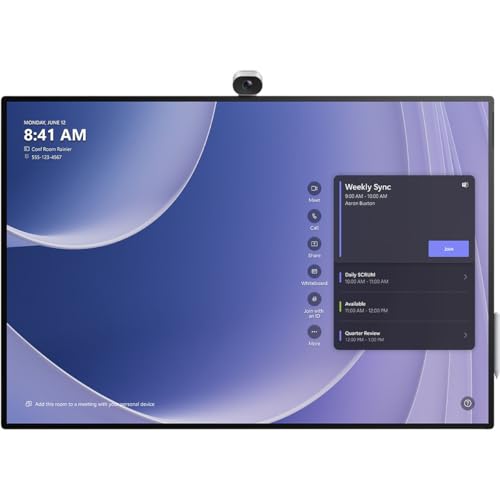
The Microsoft Surface Hub 3 is a high-end interactive display that combines a large touchscreen, built-in Teams Rooms software, a 4K camera, and spatial audio into a single device. It runs on a Snapdragon compute module and is designed as a complete conferencing endpoint, meaning no separate PC is required. The pen and touch input supports collaborative whiteboarding during meetings, which is a genuine productivity advantage for teams that brainstorm, annotate, or review documents together. The real Amazon features include a 3:2 aspect ratio, smart rotation and portrait support, the highest screen resolution in its class, a vibrant anti-glare 4K+ display, and a 136-degree HFOV AI-powered Surface Hub Smart Camera that automatically frames participants.
The 85-inch size is massive, making it suitable for large boardrooms and training spaces where every participant needs a clear view. The 3:2 aspect ratio is notably taller than the standard 16:9, which provides more vertical space for whiteboarding and document viewing without excessive scrolling. The integrated camera and spatial audio eliminate the need for separate peripherals, simplifying setup and reducing cable clutter. An honest limitation is the price point: the Surface Hub 3 is significantly more expensive than a standard commercial display plus a separate Teams room system, making it a premium investment. Another limitation is that the Snapdragon compute module, while capable, may not run third-party Windows applications as smoothly as a dedicated PC, and the software ecosystem is heavily optimized for Microsoft Teams and Office 365.
For organizations that are deeply invested in the Microsoft ecosystem and need a seamless, all-in-one collaboration device, the Surface Hub 3 delivers a polished experience that standalone displays cannot match. The AI-powered camera and smart rotation features add genuine value for hybrid meetings where remote participants need to see on-screen content clearly.
ViewSonic ViewBoard IFP6550 — Best Budget Interactive Touchscreen
The ViewSonic ViewBoard IFP6550 is a 65-inch 4K interactive touchscreen that brings collaboration features typically found on premium displays into a more accessible package. It runs Android and supports touch-based annotation, whiteboarding, and direct Wi-Fi screen sharing. HDMI and USB-C inputs are included. The real Amazon features confirm a 75-inch 4K Ultra HD (3840x2160p) touch screen collaboration display with 40-point multi-touch, allowing multiple users to write or draw simultaneously. It comes with ViewSonic’s integrated MyViewBoard annotation software and ViewBoard Cast streaming software, plus a 45W stereo soundbar for clear audio in the classroom or conference room. The built-in quad-core processor and versatile connectivity options including multiple HDMI and USB ports make it easy to connect laptops, tablets, and other devices.
The 40-point multi-touch capability is a standout feature for collaborative sessions, as it allows several people to interact with the screen at once without lag or missed touches. The MyViewBoard software provides a solid whiteboarding experience with tools for annotation, screen recording, and cloud saving. The 45W soundbar is a welcome addition, as many budget interactive displays suffer from weak audio that forces you to add external speakers. An honest limitation is that the touch accuracy, while good for a mid-range panel, does not match the precision of the Surface Hub 3, especially for fine pen work like handwriting recognition or detailed diagramming. Another limitation is that the Android operating system, while functional, has a more limited app ecosystem compared to Windows-based interactive displays, and some enterprise collaboration tools may not have native Android versions.
For schools, training rooms, or small businesses that need interactive whiteboarding on a budget, the ViewSonic ViewBoard IFP6550 offers strong value. The 40-point touch and included software reduce the need for additional hardware, and the 65-inch size is practical for most huddle rooms and classrooms.
Samsung QM85B — Best 85-Inch Display for Large Boardrooms
The Samsung QM85B scales up the QM55B’s commercial-grade build to 85 inches for large rooms and executive boardrooms. It maintains the same 4K resolution, Tizen OS, anti-glare finish, and multi-input connectivity as the smaller model. The 85-inch screen size ensures that content and video feeds are readable from the far end of a long conference table without requiring front-row seating. It includes HDMI, DisplayPort, and USB inputs, plus built-in Wi-Fi for wireless casting from laptops and mobile devices. The real Amazon features list a 4K touchscreen display capability, universal pairing and casting from devices, the ability to wirelessly connect up to 50 devices and view up to six screens simultaneously, and integration with Samsung’s smart home and work management tools.
The ability to connect up to 50 devices and view six screens simultaneously is a powerful feature for large meetings where multiple presenters need to share content side by side. The anti-glare finish is critical at this size because a glossy 85-inch screen would act like a mirror in a bright boardroom, making content unreadable. The Tizen OS provides a familiar interface for wireless sharing, and the commercial-grade build means the display can run for extended hours without degradation. An honest limitation is that the 85-inch size requires significant wall space and careful mounting, and the weight of the display may require a reinforced wall mount or professional installation. Another limitation is that the touchscreen functionality mentioned in the Amazon features appears to be for the Samsung Interactive Pro line, not the standard QM85B, so buyers should confirm whether they need the touch variant or the standard non-touch model.
For large boardrooms where every seat needs a clear view of shared content, the Samsung QM85B delivers the size and reliability that consumer TVs cannot match. The multi-screen casting and commercial-duty rating make it a practical choice for organizations that hold frequent large-group presentations.
What to look for
- Duty cycle rating: Look for displays rated for 16 to 24 hours of daily operation, as consumer TVs are not built for continuous conference room use and may suffer image retention or shorter lifespan.
- Brightness and anti-glare: A brightness of 500 nits or higher and an anti-glare coating are essential for rooms with windows or overhead lighting, ensuring content remains readable throughout the day.
- Connectivity and wireless sharing: Multiple HDMI inputs, USB-C, and built-in Wi-Fi for screen mirroring reduce cable clutter and make it easy for anyone to present from a laptop or mobile device.
- Touch interactivity: If your team needs collaborative whiteboarding or annotation, look for multi-touch support (20 points or more) and responsive pen input, along with built-in software like MyViewBoard or Microsoft Whiteboard.
- Integrated camera and audio: For all-in-one conferencing, a display with a built-in 4K camera, spatial audio, and Teams Rooms software eliminates the need for separate peripherals and simplifies setup.
- Screen size and aspect ratio: Choose a size that fits your room dimensions and viewing distance, and consider a 3:2 aspect ratio for better document and whiteboarding visibility versus standard 16:9.
- Operating system and app ecosystem: Tizen, webOS, Android, or Windows-based displays each offer different software capabilities; match the OS to your team’s existing collaboration tools and workflows.
The verdict
For most conference rooms, the Samsung QM55B is the best balance of size, reliability, and commercial-grade features at a reasonable investment. If your room has significant ambient light, the LG 75UH5F-H with 500 nits of brightness and QNED color is the clear choice. For teams that need interactive whiteboarding and all-in-one Teams integration, the Microsoft Surface Hub 3 (85-Inch) is the premium option. The ViewSonic ViewBoard IFP6550 offers strong touchscreen value for budget-conscious buyers, and the Samsung QM85B is the go-to for large boardrooms where screen size matters most. Choose based on your room size, lighting conditions, and whether you need touch interaction or a straightforward presentation display.
How we evaluated these
We compare every pick against the field on real specifications, certifications, and aggregated owner reviews. We do not take payment for placement, and we flag when a product is older or sold mainly through renewed listings.
The shortlist
Each pick, examined
Samsung QM55B -- Best 55-Inch Conference Room Display
The Samsung QM55B is a commercial-grade 4K display built for continuous conference room use. Unlike consumer televisions, it is rated for 16-to-24-hour daily operation and includes anti-glare coating, which matters in rooms with windows or overhead lighting. It runs Samsung's Tizen OS with built-in Wi-Fi, enabling wireless content sharing from laptops without a dedicated media player. HDMI, DisplayPort, and USB-C inputs cover every connectivity scenario. The slim bezel and matte finish look professional without being distracting. At it is priced competitively against consumer TVs of the same size while offering the durability and support warranties that IT teams require. An ideal primary display for rooms seating two to six people.

LG 75UH5F-H -- Best High-Brightness 75-Inch Display
The LG 75UH5F-H is a 75-inch 4K commercial display rated at 500 nits of brightness, which makes content readable in conference rooms with significant ambient light or near windows. Many consumer TVs dim considerably under bright lighting conditions; commercial displays like this one maintain consistent visibility throughout the day. It includes a built-in media player, multiple HDMI inputs, and a 3-year commercial warranty. The frame rate handling is smooth at 60fps, keeping video call feeds from appearing choppy. At it offers a significant size upgrade over 55-inch options while remaining accessible for most organizational budgets. Best suited for mid-size rooms seating 6 to 10 people where content readability across the full room matters.
Strengths
- DYNAMIC QNED COLOR: Enhances color accuracy for vibrant, more lifelike viewing with certif
- A7 AI PROCESSOR 4K GEN9: Enhanced brightness, improved sound, refined picture detail. It a
- HDR10 PRO: Dynamically adjusts brightness, revealing crisp details and vivid color in both
- FILMMAKER MODE: Watch films just how the directors envisioned them with automatic preserva
- WEBOS: Delivers smarter, easier streaming, plus Google Gemini and Microsoft Copilot at you
Microsoft Surface Hub 3 (85-Inch) -- Best Premium Interactive Conference Display
The Microsoft Surface Hub 3 is a high-end interactive display that combines a large touchscreen, built-in Teams Rooms software, a 4K camera, and spatial audio into a single device. It runs on a Snapdragon compute module and is designed as a complete conferencing endpoint -- no separate PC required. The pen and touch input supports collaborative whiteboarding during meetings, which is a genuine productivity advantage for workshops and design sessions. At it is priced well above standard commercial displays, and the premium is largely for the integrated compute, touch collaboration, and Microsoft's software polish. The right choice for organizations where meeting rooms double as creative collaboration spaces and the budget allows for best-in-class hardware.
Strengths
- 3:2 aspect ratio
- Smart rotation and Portrait
- Highest screen resolution in its class*
- Vibrant, anti-glare 4K+ display
- 136-degree HFOV AI-powered Surface Hub Smart Camera

ViewSonic ViewBoard IFP6550 -- Best Budget Interactive Touchscreen
The ViewSonic ViewBoard IFP6550 is a 65-inch 4K interactive touchscreen that brings collaboration features typically found on-plus displays into a sub- package. It runs Android and supports touch-based annotation, whiteboarding, and direct Wi-Fi screen sharing. HDMI and USB-C inputs are included. The touch accuracy is good for a mid-range panel, though it does not match the precision of the Surface Hub at full interaction speed. It works as a standalone display connected to a room computer or as an independent device for basic meetings. For organizations that want touch collaboration capabilities without the Surface Hub price tag, the ViewBoard IFP6550 is the practical entry point in 2026.
Strengths
- 75 Inch 4K Ultra HD (3840x2160p) touch screen collaboration display is the next generation
- 40-point multi-touch ViewBoard interactive flat panel lets multiple users write or draw on
- ViewSonic's integrated MyViewBoard annotation software and ViewBoard Cast streaming softwa
- With 45W stereo soundbar, this ViewBoard delivers optimal sound for everyone in the classr
- Comes with built-in quad-core processor and versatile connectivity options including multi

Samsung QM85B -- Best 85-Inch Display for Large Boardrooms
The Samsung QM85B scales up the QM55B's commercial-grade build to 85 inches for large rooms and executive boardrooms. It maintains the same 4K resolution, Tizen OS, anti-glare finish, and multi-input connectivity as the smaller model. The 85-inch screen size ensures that content and video feeds are readable from the far end of a long conference table without requiring front-row seating. It includes a no-gap wall mount bracket in the box, which simplifies installation. At it is significantly less expensive than interactive alternatives at the same size, making it the default recommendation for organizations that need a large display for presentation and video conferencing without the touch premium. Well suited for legal, finance, and corporate environments where content sharing is the primary display use case.
Strengths
- 4K TOUCHSCREEN DISPLAY: Build the ultimate digital home setup with the 4K interactive touc
- CONNECT IN MEANINGFUL WAYS: Organize your home and work to-do lists, manage your family ca
- UNIVERSAL PAIRING: Pair and cast content from the devices you already know and love includ
- WORK AND PLAY, TOGETHER: Brainstorm big ideas or level up game night with the Samsung Inte
- WORK SMARTER, NOT HARDER: Wirelessly connect up to 50 devices and view up to six screens a
Buying considerations
What to consider
Match display size to the room's farthest viewing distance. Measure the distance from the screen to the back row and multiply by 0.4 to estimate the minimum recommended screen diagonal in inches. Choose commercial displays over consumer TVs for any room that runs meetings for more than 6 hours a day -- the brightness, warranty, and continuous-operation ratings are worth the price difference. For rooms that require collaborative annotation or whiteboarding, invest in an interactive touchscreen. For rooms focused on video conferencing and content sharing, a standard commercial display is sufficient. Confirm that the display's inputs (HDMI 2.1, USB-C with video, DisplayPort) match the conference room computer's outputs before purchasing.
What to consider
For cameras to pair with your display, see [best conference room cameras](/articles/best-conference-room-cameras). For a complete room setup guide, visit [best conference room equipment](/articles/best-conference-room-equipment). Review our full evaluation criteria at [methodology](/methodology).
Questions answered
Room size determines screen size. A huddle room seating two to four people works well with a 55-inch display. A mid-size room with six to eight seats typically needs 65 to 75 inches. Large boardrooms with 12 or more participants benefit from 85 inches or larger, or a dual-screen setup. As a general rule, the farthest seat from the screen should be no more than three times the screen height away from the display.
4K is worth the small premium on displays 65 inches and larger, where the extra resolution is noticeable at normal viewing distances. On 55-inch and smaller displays in small rooms where viewers sit close, the difference between 4K and 1080p is minimal. More practically impactful than resolution are screen brightness, anti-glare treatment, and the quality of input connectivity, particularly HDMI 2.1 and USB-C.
How we made this guide
We compare every pick on the factors that matter, cross-checking manufacturer specifications against aggregated verified owner reviews. We rank independently and never take payment for placement. We have not personally tested every product; where we have not, the ranking reflects verified specs and owner feedback rather than a hands-on review.
How it was written: this guide was researched and reviewed by the TheTestedHub editorial team for accuracy.
Affiliate disclosure: TheTestedHub is reader-supported. When you buy through links on our site, we may earn a commission at no extra cost to you.
Keep reading

Your Docking Station Match: CalDigit TS4 and More

Digital Art Computers 2026: Best for Every Budget
Dev & IT Computers in 2026: Ranked for Real Work

Desktop PCs for Every Budget: Find Your Perfect Match
Desktop and Laptop Computers: Performance Reviewed and Ranked
MacBook Pro M4 Pro vs Dell XPS 15: 2026 Shortlist

Buy the Best DIY Computer in 2026: Corsair One i300
