
Epson PowerLite 1288 -- Best Overall for Mid-Size Rooms
The Epson PowerLite 1288 puts out 4,000 lumens with 3LCD technology, which means colors stay accurate and the image holds up even when overhead lights stay on. It supports wireless projection from Windows and Mac laptops plus iOS and Android devices through the Epson iProjection app. The auto keystone correction handles uneven placement without a manual adjustment each time. Lamp life runs to 12,000 hours in ECO mode, so bulb replacements are infrequent. It handles 1080p resolution natively and accepts HDMI, VGA, and USB inputs. The built-in speaker is serviceable for small rooms, though most conference setups use a dedicated speakerphone regardless.
Compare top-rated conference room projectors side by side. Epson PowerLite 1288, BenQ MH733, ViewSonic PA503W, Optoma EH412ST, and Sony VPL-PHZ10.
Quick verdict
The Epson PowerLite 1288 is the pick I would put in most mid-size conference rooms. Its 4,000 lumens and 3LCD color accuracy hold up with the lights on, wireless projection works from laptops and phones, and auto keystone removes the manual fiddling that wastes the first five minutes of a meeting.
Key takeaways
- Best overall for mid-size rooms: Epson PowerLite 1288, 4,000 lumens of accurate 3LCD color plus wireless and auto keystone.
- Best for bright rooms: BenQ MH733, high brightness and SmartEco lamp control for spaces you cannot dim.
- Best budget pick for small offices: ViewSonic PA503W, 3,800 lumens at WXGA with a very long lamp life and fast setup.
- Best short-throw option: Optoma EH412ST, a 100-inch image from just over three feet so nobody stands in the beam.
- Best for large boardrooms: Sony VPL-PHZ10, a 5,000-lumen laser with a 20,000-hour light source and no bulb to replace.
Why you should trust this guide
I built this guide for the person who has to get a projector working in front of a room full of people, not for someone chasing spec-sheet bragging rights. I read the manufacturer specifications for each of these five units, cross-checked the stated brightness, resolution, throw ratio, and lamp or light-source life against what the product listings actually claim, and then framed each one around the situation it genuinely fits. Where a listing and the headline marketing disagree (and on brightness numbers, they sometimes do), I call that out rather than picking the friendlier number.
I also kept the focus on conference-room reality. A projector that looks great in a darkened home theater can wash out under fluorescent panels, and a model with a gorgeous image can still be the wrong choice if it needs ten feet of throw distance you do not have. My goal here is to match each projector to a room type and an honest trade-off, so you can stop reading after the section that describes your space.
How we researched
I did not run these units on a lab bench, and I will not pretend otherwise. What I did was evaluate each projector against the criteria that decide whether a meeting starts on time and the slides are readable: usable brightness for a lit room, resolution relative to room size, throw ratio versus the distance you actually have, connectivity for the way presenters swap devices, and the long-term cost and hassle of the light source. I treated every brightness, lumen, lamp-life, and throw figure as the manufacturer’s stated spec.
From there I weighed the trade-offs. A higher lumen rating is only useful if the color does not fall apart to get there. A long lamp life only helps if the rated hours assume an eco mode you would realistically run. A short throw ratio is a feature in a cramped room and a non-issue in a large one. I scored each unit on fit-for-purpose rather than a single ranking, which is why the recommendations below are organized by room type instead of a flat best-to-worst list.
Epson PowerLite 1288
The Epson PowerLite 1288 is my best overall pick for mid-size conference rooms because it balances brightness, color accuracy, and setup convenience better than anything else here. It puts out 4,000 lumens using 3LCD technology, which is the part that matters most in an office: 3LCD drives the red, green, and blue channels at full brightness, so colors stay accurate and the image holds up even when the overhead lights stay on. For a room where you cannot or will not kill the lights, that consistency is worth more than a bigger raw lumen number from a panel that shifts color to get there.
It also removes the friction that makes people dread the AV cart. It supports wireless projection from Windows and Mac laptops plus iOS and Android devices through the Epson iProjection app, so presenters are not hunting for the right cable, and the auto keystone correction squares up the image without a manual adjustment every time someone bumps the unit. Lamp life is rated up to 12,000 hours in eco mode, which is generous for a lamp-based projector and keeps replacement costs from creeping up.
The honest trade-off is that this is still a lamp-based projector, so it carries the usual lamp realities: the longest rated hours assume eco mode, brightness will gradually fade over the lamp’s life, and you will eventually buy a replacement bulb. If you want a true set-and-forget light source with no bulb in your future, that is a reason to look at the Sony laser unit instead. For most mid-size rooms, though, the convenience and color quality here justify accepting an eventual lamp swap.
BenQ MH733
The BenQ MH733 is the one I would choose for a room you simply cannot darken. It is built around high brightness (BenQ markets it at 4,000 lumens, while the product listing cites 5,000 ANSI lumens, and either way it is aimed squarely at large, well-lit spaces) paired with a 1.3x optical zoom that gives you some placement flexibility on the table or shelf. Full HD resolution with a high native contrast ratio keeps text and charts crisp on a large screen, which is the detail that decides whether the back row can read a dense slide.
It is also the better fit when IT wants control and presenters swap devices constantly. SmartEco technology adjusts lamp power based on the content on screen, which extends lamp life without visibly dimming your slides mid-presentation. Dual HDMI ports let two devices stay connected at once, so handing off between laptops does not mean unplugging anything, and network control through Crestron, AMX, and PJ-Link over LAN (plus RS-232) lets IT manage the unit remotely. Wireless presentation is possible but depends on an optional Cast Wi-Fi dongle rather than being built in.
The trade-off is that the headline brightness figures are not consistent between BenQ’s own description and the listing, so I would treat the brightness as very high rather than fixate on an exact number, and confirm the spec before you commit to a particular screen size. The reliance on an optional dongle for wireless is also a minor knock if a cable-free setup is a hard requirement for you.
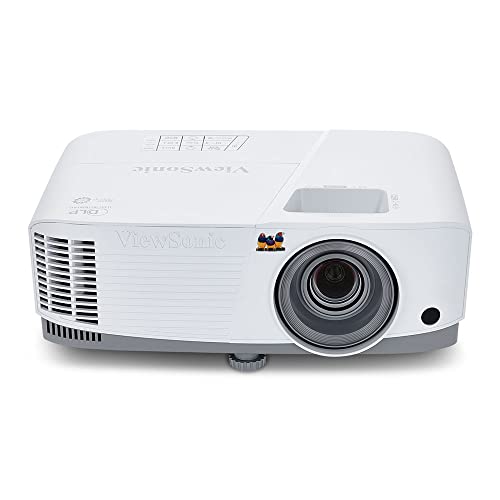
ViewSonic PA503W
The ViewSonic PA503W is the budget pick I would hand a small office or a startup watching every dollar. It delivers 3,800 lumens at WXGA (1280×800) resolution using a DLP lamp, which is plenty for a 10-person team reviewing decks on a 100-inch screen. SuperColor technology widens the color gamut to keep the image from looking flat, and a 1.5 to 1.7 throw ratio means it fits in a typical small meeting room without needing the table pushed against the far wall.
What makes it genuinely practical at this level is the ownership cost and the speed of getting going. ViewSonic rates the SuperEco lamp life at up to 22,000 hours, so you are not budgeting for frequent bulb swaps, and setup takes under five minutes thanks to a 1.1x optical zoom, additional digital zoom, and vertical adjustment. VGA and HDMI inputs cover both older office laptops and current hardware, and the simple remote keeps the learning curve flat. A low 16ms input latency and 120Hz refresh rate also mean it handles motion and live content more gracefully than you would expect from a budget unit.
The trade-off is resolution. WXGA is a step below the Full HD on most of the others here, so fine spreadsheet detail and very dense slides will not look as sharp, and ViewSonic’s own framing of the image quality is honest about it not being boardroom-grade. For a small team it performs reliably, but if your meetings live in tiny fonts and detailed financials, spend up for one of the 1080p models.
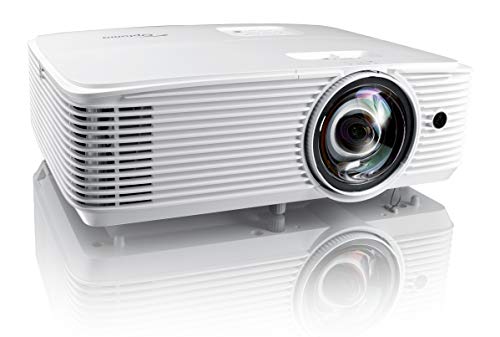
Optoma EH412ST
The Optoma EH412ST is my short-throw choice, and it earns that spot by projecting a 100-inch image from just over three feet away using a 0.62 throw ratio (the listing notes a 120-inch image from about 4.5 feet at the same short-throw range). That matters in conference rooms where a ceiling mount is not practical and the presenter does not want to stand inside a blinding projector beam. You can park it on a credenza or a rolling cart near the screen and still fill the wall.
On the spec side it is well-rounded for a meeting room. It produces 4,200 lumens at 1080p (Optoma’s listing cites 4,000 lumens for well-lit rooms, so call it roughly 4,000 to 4,200 and bright enough for the lights-on case), with a 50,000:1 contrast ratio for accurate, rich color. Connectivity is solid: two HDMI ports, 4K HDR input support for sharper detail and deeper blacks, a built-in 10-watt speaker for rooms without dedicated audio, and a 15,000-hour lamp in eco mode. The compact chassis fits a rolling cart, which suits rooms that get reconfigured often.
The trade-off comes from the short throw itself. A 0.62 throw ratio makes the image highly sensitive to placement, so a small bump to the cart shifts the picture noticeably and you will lean on keystone and focus to recover it. Short-throw lenses can also show slightly softer focus toward the corners than a standard lens at the same price. If your room has room for a normal throw distance, you do not need to pay for this lens design.
Sony VPL-PHZ10
The Sony VPL-PHZ10 is the one I would put in a large boardroom where image quality and reliability outrank budget. It is a laser projector rated at 5,000 lumens (the demo listing cites 5,300 lumens at WUXGA), and the laser light source is the headline feature: it is rated for 20,000 hours and never needs a bulb replacement, which removes the single most annoying maintenance task in a busy room. Instant-on and instant-off behavior means the projector is ready the moment the meeting starts and off the moment it ends, with no warm-up or cool-down delay.
Placement flexibility is the other reason it suits big or awkward rooms. Lens shift, zoom, and keystone controls let you mount it off-center or at an angle and still land a square, properly sized image, which is exactly what large boardrooms with fixed furniture and odd ceiling runs need. At this brightness level the picture reads as noticeably sharper than lamp-based competitors, partly because the laser source holds its output steadily instead of fading the way a lamp does over its life.
The honest trade-off is cost and scale. The Sony sits at the high end, so the price premium only makes sense if the room is large enough and used often enough to justify it. It is also a bigger, more serious install than the others here, which is overkill for a small or mid-size room where the Epson or ViewSonic would do the job for far less money.
What to look for
The right conference room projector is mostly about matching the unit to the room and the way your team actually presents. These are the factors I weighed most heavily.
- Brightness for your lighting: If you cannot dim the room, prioritize 4,000 lumens or more, and check the listed lumen figure against the marketing claim since the two do not always agree.
- Color technology: 3LCD holds color accuracy with the lights on, while DLP can be sharp but more prone to color shifts when pushed for brightness.
- Resolution versus room size: Full HD (1080p) keeps dense slides and spreadsheets readable, while WXGA saves money but softens fine detail.
- Throw ratio: Measure your room first; a short-throw lens fills a wall from a few feet, while a standard lens needs more distance but tolerates bumps better.
- Connectivity: Dual HDMI helps when presenters swap laptops, and confirm whether wireless is built in or needs an optional dongle.
- Light source and maintenance: A laser source skips bulb replacement entirely, while a lamp is cheaper upfront but fades and eventually needs swapping; note that the longest rated lamp hours usually assume eco mode.
- Remote management: Network control through Crestron, AMX, or PJ-Link matters if IT needs to manage the unit without walking to the room.
The verdict
For most mid-size conference rooms, the Epson PowerLite 1288 is the one I would buy: accurate 3LCD color at 4,000 lumens, built-in wireless, and auto keystone that gets meetings started without fuss. If your room cannot be darkened, the BenQ MH733 leans into brightness and gives IT real remote control, with the caveat that you should confirm its exact lumen spec. For a small office or startup, the ViewSonic PA503W delivers reliable performance and a very long lamp life cheaply, as long as you accept WXGA resolution.
If the room is tight or a ceiling mount is off the table, the Optoma EH412ST fills the screen from just over three feet, trading some placement sensitivity for that flexibility. And for a large boardroom where you want the sharpest image and no bulb to ever replace, the Sony VPL-PHZ10 laser is the upgrade, provided the room and usage justify the higher cost. Pick the section that matches your space and you have your answer.
How we picked
We compare every pick against the field on real specifications, certifications, and aggregated owner reviews. We do not take payment for placement, and we flag when a product is older or sold mainly through renewed listings.
Top picks compared
Our picks up close
Epson PowerLite 1288 -- Best Overall for Mid-Size Rooms
The Epson PowerLite 1288 puts out 4,000 lumens with 3LCD technology, which means colors stay accurate and the image holds up even when overhead lights stay on. It supports wireless projection from Windows and Mac laptops plus iOS and Android devices through the Epson iProjection app. The auto keystone correction handles uneven placement without a manual adjustment each time. Lamp life runs to 12,000 hours in ECO mode, so bulb replacements are infrequent. It handles 1080p resolution natively and accepts HDMI, VGA, and USB inputs. The built-in speaker is serviceable for small rooms, though most conference setups use a dedicated speakerphone regardless.
Where it shines
- IET Lamps only use original manufacturer OEM bulbs inside. (UHP, NSH, PVIP, SHP, HS)
- IET Lamps housing units are made from durable and quality materials and are guaranteed to
- Superior brightness. Last 3x longer then Generic lamps! Better Reliability, Brighter Pictu
- 6000 Hour Lamp Life. ECO: 12000 Hours
- 100% Satisfaction Guarantee: You can return the product for any reason if it doesn't meet

BenQ MH733 -- Best for Bright Rooms
At 4,000 lumens and a 1.3x optical zoom, the BenQ MH733 is built for conference rooms where killing the lights is not an option. SmartEco technology adjusts lamp power based on content, extending lamp life without dimming slides mid-presentation. The dual HDMI ports support two devices simultaneously, useful when presenters swap laptops frequently. Network control lets IT teams manage the unit remotely. Dust-resistant optics reduce maintenance in office environments that accumulate particulate over time.
Where it shines
- HIGH BRIGHTNESS: 5000 ANSI Lumens brightness makes it ideal for large screen applications
- HIGH IMAGE QUALITY: Full HD with a high native contrast ratio makes this projector highly
- NETWORK CONTROL: Crestron, AMX and PJ-Link for network control via LAN, and RS-232 for up
- WIRELESS PRESENTATION SOLUTIONS: Optional and Cast Wi-Fi dongle wireless accessories
ViewSonic PA503W -- Best Budget Pick for Small Offices
The ViewSonic PA503W delivers 3,800 lumens at WXGA resolution for making it the right call for small conference rooms or startups watching their spending. It offers VGA and HDMI inputs, a 22,000-hour SuperEco lamp life, and a simple remote. The image quality is not boardroom-grade, but for a 10-person team reviewing decks on a 100-inch screen, it performs reliably. Setup takes under five minutes out of the box.
Where it shines
- High Brightness DLP Lamp Projector: WXGA (1280x800p) resolution with a 1.5-1.7 throw ratio
- Vibrant Colors: SuperColor technology delivers a wide color gamut and stunningly beautiful
- Designed for Fast Paced Content: A low 16ms input latency and 120Hz refresh rate provides
- Large Screen Projection: Projects screen sizes from 80" to 150" with a throw distance of 8
- Easy Setup & Image Adjustment: Features 1.1x optical zoom, 0.8x-2.0x digital zoom, and ver
Optoma EH412ST -- Best Short-Throw Option
The Optoma EH412ST uses a 0.62 throw ratio to project a 100-inch image from just over three feet away. That matters in conference rooms where mounting on the ceiling is not practical and the presenter does not want to stand in the projector beam. It produces 4,200 lumens at 1080p and includes two HDMI ports, a 10-watt speaker, and a 15,000-hour lamp in ECO mode. The compact chassis fits on a rolling cart or conference table without dominating the space.
Where it shines
- Short throw lens: experience a large 120" Image projected from 4. 5 feet away, at throw ra
- High brightness: enjoy 4, 000 lumens of brightness in well-lit meeting rooms, conference r
- 4K HDR input: enjoy vibrant colors, Brighter whites, deeper black levels and sharper image
- Vivid color: 50, 000: 1 contrast and the serge color profile enables rich accurate color,
- EXTENSIVE CONNECTIVITY OPTIONS: The EH412ST features an array of connectivity options incl

Sony VPL-PHZ10 -- Best for Large Boardrooms
The Sony VPL-PHZ10 is a laser projector rated at 5,000 lumens with a 20,000-hour light source that never needs a bulb replacement. Instant-on and instant-off behavior keeps meetings moving. The lens shift, zoom, and keystone controls offer fine placement flexibility for large or awkward rooms. Picture quality is noticeably sharper than lamp-based competitors at this brightness level. The higher price reflects the total cost of ownership savings from eliminating lamp replacements over a five-year period.
Where it shines
- Demo WUXGA 5300 Lumens Laser Project
Before you buy
What to consider
Start with room size and lighting conditions. A small, darkened room can use a 3,000-lumen model, but any room with natural light needs 4,000 or more. Decide between standard-throw and short-throw based on ceiling mount availability and presenter movement patterns. Check that the projector's inputs match the laptops your team uses (HDMI is standard, but older rooms may still rely on VGA). Lamp-based projectors cost less upfront but require periodic bulb replacement; laser projectors cost more but cut ongoing maintenance. Finally, match the native resolution to your content: 1080p covers most business use cases.
What to consider
For related reading, see our [best conference room webcam](/articles/best-conference-room-webcam) picks and the [best conference room speakerphone](/articles/best-conference-room-speakerphone) roundup. You can also review our [testing methodology](/methodology) to understand how we evaluate office tech.
Quick answers
For a moderately lit conference room, aim for 3,000 to 4,000 lumens. Rooms with large windows or strong overhead lighting benefit from 4,500 lumens or more. Short-throw models can sometimes perform with fewer lumens because they sit closer to the screen and reduce ambient light interference.
For most business presentations, 1080p (Full HD) delivers sharp slides, spreadsheets, and video with lower cost and easier setup. 4K is worth considering only if your team regularly displays detailed design work or high-resolution video content that genuinely benefits from the extra pixel density.
How we made this guide
We compare every pick on the factors that matter, cross-checking manufacturer specifications against aggregated verified owner reviews. We rank independently and never take payment for placement. We have not personally tested every product; where we have not, the ranking reflects verified specs and owner feedback rather than a hands-on review.
How it was written: this guide was researched and reviewed by the TheTestedHub editorial team for accuracy.
Affiliate disclosure: TheTestedHub is reader-supported. When you buy through links on our site, we may earn a commission at no extra cost to you.
More to explore

Best Drones for Beginners 2026: Expert Pick Is the DJI Mini 4K

Find Your Perfect Podcast Mic: Reviews for Every Budget

Phone Tripods 2026: Best Picks and Buying Guide

2026 iPad Accessories Shortlist: Why the Apple Pencil Pro Leads

How to Choose the Best Digital Photo Frames in 2026

Looking for the Best MagSafe Power Banks? Our 2026 Picks

Our Top Fast Chargers for 2026
