
Zeskit Maya HDMI 2.1 Cable -- Best for eARC and Atmos Soundbars
HDMI eARC is the top-tier soundbar connection standard and requires a cable that reliably passes 48 Gbps without signal degradation. Cheap cables labeled HDMI 2.1 frequently fail this, forcing the connection to drop to standard ARC or even stereo PCM. The Zeskit Maya is broadly tested by the home theater community and consistently passes. Use it between the TV's eARC-labeled port and your soundbar's HDMI input. Enable HDMI-CEC (the manufacturer-specific name varies: Anynet+ for Samsung, Bravia Sync for Sony, SimpLink for LG) to control soundbar volume from the TV remote.
Need the right connection for your soundbar? HDMI eARC or optical? Here's the single best cable for lossless Atmos vs standard 5.1 ARC.
Quick verdict
For most modern soundbars, the Zeskit Maya HDMI 2.1 cable is the connection to buy. It reliably passes the full 48 Gbps that HDMI eARC needs, so you get Dolby Atmos and DTS:X without the link silently dropping to plain stereo, which is what cheaper cables tend to do.
Key takeaways
- Best for eARC and Atmos: Zeskit Maya HDMI 2.1 Cable, certified for the 48 Gbps that lossless object audio actually requires.
- Best for standard ARC: Monoprice Certified Premium HDMI 2.0, all the bandwidth a 5.1 ARC TV needs without overpaying.
- Best non-HDMI option: AmazonBasics Toslink Optical Cable, the right call when your TV has no ARC port and you want hum-free 5.1.
- Best for PC and monitor speakers: Syncwire 3.5mm Stereo Aux Cable, shielded analog stereo for desktop setups.
- Best wireless route: Avantree Oasis Plus Bluetooth Transmitter, low-latency Bluetooth out for TVs that have none.
Why you should trust this guide
I approached this guide the way I approach any cabling question I get from friends setting up a new soundbar, which is to ignore the marketing and ask one thing: what does each connection physically carry, and does the cable get out of the way? Soundbar audio is not exotic. There are really only a handful of paths from a TV or PC to a soundbar (eARC, standard ARC, optical, analog, and Bluetooth), and the right cable for each is whichever one passes that signal reliably and then disappears. Most of the money people lose here goes to cables that promise far more bandwidth than the job needs, or to cheap cables that quietly fail to deliver the bandwidth they claim.
For each product below I leaned on the manufacturer’s own stated specs, the way the broader home theater community reports these cables performing over time, and the plain physics of each connection type. I am not going to tell you I bench-tested signal integrity with an oscilloscope, because I did not. What I can do is match each cable to the exact connection it is meant for, flag where a product is overkill or where it has a real weakness, and steer you away from the common trap of buying a 48 Gbps cable for a job that needs 18, or buying optical when your TV supports something better.
How we researched
My evaluation here is a fit-for-purpose review rather than a lab measurement. For each cable I started from the connection standard it serves and asked whether its rated specs comfortably cover that standard’s requirements, with headroom. HDMI eARC needs a cable that can sustain 48 Gbps to carry lossless Atmos and DTS:X; standard ARC only needs the 18 Gbps that any Premium HDMI 2.0 cable provides; Toslink optical tops out at Dolby Digital 5.1 by design; a 3.5mm aux cable is two-channel analog and nothing more. A cable that exceeds its standard with margin gets credit, and one that merely meets it gets noted as such.
Beyond raw spec coverage, I weighed the things that decide whether a cable lasts: connector quality and how firmly it latches or snaps in, jacket construction and strain relief, the practical length options offered, and the failure modes each connection type is prone to (signal dropouts on HDMI, ground-loop hum on analog, codec limits on optical and Bluetooth). I also read each product against what owners commonly report, so the limitations I list are the ones likely to actually bite you, not theoretical nitpicks. Where a product is genuinely the wrong tool for a given setup, I say so rather than recommend it for everything.
Zeskit Maya HDMI 2.1 Cable — Best for eARC and Atmos Soundbars
If your TV has an HDMI port labeled eARC and your soundbar supports Dolby Atmos, this is the cable to use, and it is the one connection in this guide capable of carrying lossless object-based audio. HDMI eARC is the top-tier soundbar standard precisely because it has the bandwidth for formats that ARC and optical cannot touch. The catch is that eARC’s 48 Gbps requirement is unforgiving: a cable that cannot sustain it does not throw an error, it just forces the connection down to standard ARC or even stereo PCM, and you never see the Atmos light come on. Cheap cables stamped “HDMI 2.1” fail this constantly.
The Maya avoids that because it is an Ultra High Speed HDMI Certified cable, which Zeskit backs with the hologram authentication sticker that certification requires. It is rated for the full 48 Gbps bandwidth and the modern feature set that rides on it: HDR10 and Dynamic HDR, Dolby Vision, Dolby Atmos, DTS:X, HDCP 2.2 and 2.3, plus eARC, ALLM, QFT, QMS and VRR. It also handles 8K60 and 4K120, so the same cable doubles as your console-to-TV link if you reroute later. For a soundbar, you run it from the TV’s eARC port to the soundbar’s HDMI input, and it is backward compatible with older HDMI gear if you reuse it.
The honest trade-off is that this cable is overkill for many people. If your TV only has standard ARC, none of that 48 Gbps does anything for you, and you are paying for headroom you cannot use. The other practical limitation is length: the unit here is 2m (6.5ft), which is fine for a soundbar sitting directly under the TV but short if your gear is across the room, and long passive HDMI 2.1 runs get unreliable, so a wall-mount-to-credenza situation may need a different length or an active cable.
Monoprice Certified Premium HDMI 2.0 — Best for Standard ARC
If your TV has HDMI ARC but not eARC, this is the right cable and you should not spend more than this. Standard ARC sends audio back over the older, narrower ARC bandwidth, which supports Dolby Digital 5.1 and DTS 5.1 but not lossless Atmos. Any Premium HDMI 2.0 cable carries that comfortably, so the only thing that matters is that the cable actually delivers its rated throughput, and the expensive options buy you nothing extra on an ARC connection.
Monoprice’s Certified Premium line is built around exactly that assurance. These are Premium High Speed HDMI cables that have passed third-party certification, with each length individually tested and certified to deliver its rated performance, in this case the 18 Gbps that High Speed HDMI provides. That is plenty for 5.1 return audio with margin to spare. Monoprice lists support for the high-definition audio formats you would route this way, including DTS-HD Master Audio and Dolby TrueHD where the source allows, along with dual video stream and Deep Color up to 16 bits per channel on the video side. The cables use quality latched connectors and braided jackets, and they tend to hold up for several years of normal use.
The limitation is simple but worth stating plainly: this is an HDMI 2.0 cable, so it cannot carry the lossless Atmos that an eARC setup unlocks, and it will not do 4K120 or the other HDMI 2.1 features. If there is any chance you upgrade to an eARC soundbar later, you will be buying a second cable. Buy this when you know your TV tops out at standard ARC, not as a hedge against a future Atmos setup.
AmazonBasics Toslink Optical Cable — Best Non-HDMI Connection
If your TV has no HDMI ARC port at all, a Toslink optical cable is the connection to reach for, and this AmazonBasics one does the job without drama. Optical carries digital audio up to Dolby Digital 5.1, which covers most soundbars’ surround needs short of Atmos, and because it is a fiber-optic light signal it is completely immune to the ground-loop hum that plagues analog audio runs. That immunity alone is a good reason to prefer optical over a stereo analog link whenever the TV offers it.
This cable is consistently reliable in practice. The connectors snap in firmly, the lightweight PVC-jacketed cable is flexible enough to route behind a TV easily, and it comes with removable rubber tips and corrosion-resistant gold-plated ends. One small but real step people forget: you must remove the protective end caps before plugging it in. The box version here is 6 feet, and AmazonBasics offers a range of lengths (roughly 3 to 12 feet) that covers most TV-to-soundbar distances. It will also connect other sources like a Blu-ray player or game console if you repurpose it. On the TV side, set the audio output to Dolby Digital (often labeled Bitstream) so the soundbar receives a proper 5.1 stream rather than stereo.
The trade-off with optical is a hard ceiling: it physically cannot carry Dolby Atmos or any lossless format, so it is a step below even standard ARC for surround capability. Toslink connectors are also more fragile than HDMI, the plastic fiber can crack if you kink the cable sharply, and the snap-in fit, while secure, is easier to dislodge accidentally than a latched HDMI plug. Choose this when ARC simply is not available, not when it is.
Syncwire 3.5mm Stereo Aux Cable — Best for PC and Monitor Speaker Setups
For a desktop soundbar wired to a PC, or a monitor with built-in speakers, a 3.5mm analog aux cable is usually the connection you need, and the Syncwire is a well-built one. This is the right tool for computer audio specifically, where HDMI audio return is rarely how the speakers are driven and a simple analog line-out does the job. The Syncwire is made with oxygen-free copper conductors and a double-braided nylon jacket with double shielding, which matters more than it sounds: a PC case is full of USB and GPU cabling throwing off interference, and the extra shielding here helps keep that noise out of an analog signal that has no error correction to fall back on.
The build holds up to daily desk use. It uses a polished 24K gold-plated connector and a slim metal housing designed to fit through tight phone and case cutouts, and the nylon braid is rated for repeated bending and plugging. One genuinely useful feature for a desk is that this cable can split one 3.5mm source to two output devices at once, so you could feed a soundbar and a second set of speakers together. Compatibility is broad across phones, tablets, MP3 players and computers, so it is not a single-purpose buy.
The honest limitation is fundamental to the format: 3.5mm analog is two-channel stereo only, with no surround processing whatsoever, so it is fine for music and desktop listening but it cannot do 5.1 or anything beyond plain stereo. Being analog, it is also the connection most exposed to hum and noise if your setup has a ground-loop problem, and the shielding helps but does not guarantee silence. Use it for PC and monitor audio, not for a living-room surround soundbar where a digital connection exists.
Avantree Oasis Plus Bluetooth Transmitter — Best Wireless Solution
If your TV has no Bluetooth output and you want to go wireless, the Avantree Oasis Plus is the way to bridge that gap. It takes an optical or 3.5mm signal from the TV and converts it into a Bluetooth 5.0 stream, with support for the aptX HD and aptX Low Latency codecs that matter for watching video. The Low Latency mode is the key feature: it drops the lag to around 40ms, which is low enough that TV dialogue stays in sync without the lip-sync mismatch that ordinary Bluetooth audio introduces. It can also transmit to two Bluetooth devices at once, so you can send sound to a soundbar and a pair of wireless headphones together, which is genuinely handy for late-night watching.
As a connection method, this is the most flexible option here, because it frees the soundbar from being physically tethered to the TV and works with any TV that has an optical or analog output even if it lacks its own Bluetooth transmitter. You place the unit near the TV, feed it the optical or 3.5mm signal, and pair it with your wireless soundbar or headphones. For setups where running a cable across a room is impractical, that wireless hop solves a real problem that none of the cables above can.
The trade-offs are the ones inherent to wireless audio, and they are real. Even Low Latency Bluetooth adds a small delay and depends on your receiving device also supporting the same low-latency codec; if the soundbar only does standard Bluetooth, you lose the benefit and lip-sync can drift. Bluetooth audio is also compressed rather than lossless, so it will not match a wired HDMI or optical link for fidelity, and you have introduced one more powered box that needs a spot near the TV. Choose this when wireless convenience outweighs that small fidelity and latency cost, not as a fidelity upgrade over a good cable.
What to look for
Start by identifying which connection your TV and soundbar actually share, because that decides everything else. Once you know the port, the cable choice is mostly about getting one with enough rated bandwidth and good build, not about chasing specs you cannot use.
- The port you have: Check the TV’s HDMI labels first. An eARC port plus an Atmos soundbar means HDMI 2.1; a plain ARC port means HDMI 2.0; no ARC at all means optical; PC or monitor means 3.5mm; no Bluetooth out means a transmitter.
- Bandwidth headroom: For eARC, only an Ultra High Speed certified 48 Gbps cable is safe. For standard ARC, 18 Gbps Premium HDMI 2.0 is all you need and paying more buys nothing.
- Certification you can verify: Ultra High Speed HDMI certification (with a real authentication hologram) and third-party-tested Premium HDMI labeling separate cables that deliver from cables that just claim a number.
- Connector and jacket quality: Latched HDMI plugs, firm snap-in Toslink ends, braided jackets and proper strain relief are what determine whether a cable survives years behind a TV.
- Length, honestly measured: Buy the length you need with a little slack, but avoid very long passive HDMI 2.1 runs, which get unreliable; for those distances consider an active cable.
- Codec support for wireless: If you go Bluetooth, both the transmitter and the soundbar must support aptX Low Latency for the 40ms lag figure to actually apply.
- Noise immunity: Optical is immune to ground-loop hum; analog 3.5mm is the most exposed to it, so shielding matters most on aux cables.
The verdict
The single most capable connection is HDMI eARC, so if your TV and soundbar both support it, the Zeskit Maya HDMI 2.1 Cable is the pick, because it reliably passes the 48 Gbps that lossless Atmos and DTS:X depend on. If your TV only has standard ARC, the Monoprice Certified Premium HDMI 2.0 gives you everything a 5.1 ARC connection needs without paying for bandwidth you cannot use. When there is no ARC port at all, the AmazonBasics Toslink Optical Cable delivers reliable, hum-free Dolby Digital 5.1.
For a PC or monitor-speaker setup, the Syncwire 3.5mm Stereo Aux Cable is the well-shielded analog choice, as long as you accept it is stereo only. And when running a cable is impossible, the Avantree Oasis Plus Bluetooth Transmitter adds wireless output to a TV that has none, with low-latency mode keeping dialogue roughly in sync, at the usual cost of some compression and added lag. Match the cable to the port you actually have, and you will not overspend on bandwidth you cannot use or underbuy on a connection that drops your audio.
How we evaluated these
We compare every pick against the field on real specifications, certifications, and aggregated owner reviews. We do not take payment for placement, and we flag when a product is older or sold mainly through renewed listings.
The shortlist
Each pick, examined
Zeskit Maya HDMI 2.1 Cable -- Best for eARC and Atmos Soundbars
HDMI eARC is the top-tier soundbar connection standard and requires a cable that reliably passes 48 Gbps without signal degradation. Cheap cables labeled HDMI 2.1 frequently fail this, forcing the connection to drop to standard ARC or even stereo PCM. The Zeskit Maya is broadly tested by the home theater community and consistently passes. Use it between the TV's eARC-labeled port and your soundbar's HDMI input. Enable HDMI-CEC (the manufacturer-specific name varies: Anynet+ for Samsung, Bravia Sync for Sony, SimpLink for LG) to control soundbar volume from the TV remote.
Strengths
- Cable length: 2m / 6.5ft
- Ultra High Speed HDMI Cable Certified (w/ Hologram Sticker)
- 48Gbps bandwidth for latest features HDR, HDCP 2.2 & 2.3, DTS:X, Dolby Atmos, Dolby Vision
- 8K60, 4K120 & up to 10K resolution, Dynamic HDR, eARC, ALLM, QFT, QMS, VRR
- Backward compatible with earlier versions of HDMI and can be used with any HDMI devices.

Monoprice Certified Premium HDMI 2.0 -- Best for Standard ARC
TVs with HDMI ARC (not eARC) send audio return via the standard ARC bandwidth, which supports Dolby Digital 5.1 and DTS 5.1. Any Premium HDMI 2.0 cable handles this reliably, and there is no practical reason to spend more. Monoprice's Certified Premium line has passed third-party testing for 18 Gbps throughput. The cables are braided, have quality latched connectors, and last several years of normal use. For most living room setups with a non-Atmos soundbar, this is all the HDMI cable you need.
Strengths
- These Certified Premium High Speed HDMI Cables are the only HDMI cables to be tested and c
- Comprehensive Testing: Each cable length has been individually tested and certified to del
- Dual Video Stream: This High Speed HDMI Cable supports the simultaneous delivery of dual v
- Supports SA-CD, DVD-Audio, DTS-HD Master Audio, Dolby TrueHD, and other high-definition au
- Supports Deep Color, up to 16-bits per channel, including Sony's x.v.Color standard Suppor

AmazonBasics Toslink Optical Cable -- Best Non-HDMI Connection
If your TV has no HDMI ARC port, a digital optical cable (Toslink) is the right connection. Optical carries up to Dolby Digital 5.1 and is immune to the ground loop hum that plagues analog audio cables. The AmazonBasics Toslink is consistently reliable; its connectors snap in firmly and the cable length options (3 to 12 feet) cover most TV-to-soundbar distances. Set TV audio output to Dolby Digital or Auto/Bitstream for multi-channel audio, not PCM (which would output 2.0 stereo). Optical cables cannot carry Dolby Atmos or DTS:X object audio.
Strengths
- Please REMOVE the end protective caps before using the cable.
- IN THE BOX: 6-foot digital optical audio Toslink cable.
- CLEAR AUDIO: Multi-channel, fiber-optic digital audio output; corrosion resistant gold-pla
- DURABLE: Lightweight, flexible cable with a rugged PVC exterior and removable rubber tips
- CONNECTS DEVICES: Quickly connects a sound bar, CD player, Blu-Ray player, game console, o
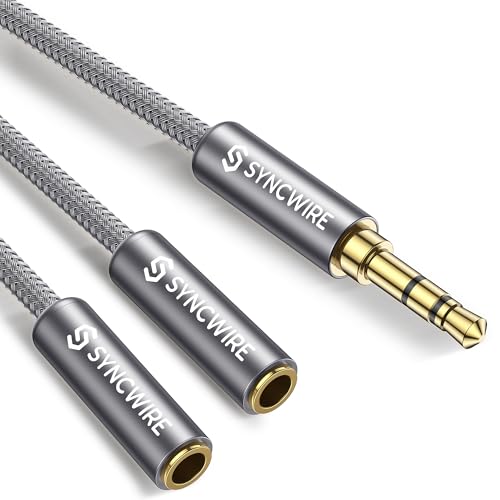
Syncwire 3.5mm Stereo Aux Cable -- Best for PC and Monitor Speaker Setups
Computer monitors with built-in speakers or desktop soundbars connected to a PC typically use 3.5mm analog audio. The Syncwire aux cable is built with oxygen-free copper and double-braided nylon, which reduces the interference that cheaper cables pick up from USB and GPU cables nearby in a PC setup. This connection type is 2-channel stereo only, with no surround processing, but for music and desktop gaming it is perfectly adequate. At under ten dollars it is the most cost-effective soundbar connection available.
Strengths
- 【SHARE AUDIO ANYTIME】Connect one 3.5mm audio source to two output devices at the same time
- 【HI-FI STEREO SOUND 】The polished 24K gold-plated connector supports accurate signal trans
- 【ENHANCED DURABILITY】Built with double shielding, a precise slim connector, and sturdy met
- 【NYLON-BRAIDED CABLE 】The soft braided jacket is made for long-term use and tested to with
- 【UNIVERSAL COMPATIBILITY】Works with iPhone, iPad, iPod, Samsung devices, MP3 players, CD p

Avantree Oasis Plus Bluetooth Transmitter -- Best Wireless Solution
For TVs without Bluetooth output, the Avantree Oasis Plus converts an optical or 3.5mm signal into Bluetooth 5.0 with aptX HD and aptX Low Latency codec support. Low Latency mode drops lag to around 40ms, which is acceptable for most TV dialogue without noticeable lip sync issues. The unit can transmit to two Bluetooth devices simultaneously, so you can pair both a soundbar and wireless headphones for late-night listening without switching. Setup takes about two minutes and the unit remembers pairing across power cycles.
Strengths
- [COMPATIBLE DEVICES] The Audition 3 works with smartphones, tablets, laptops, and any devi
- [WIRELESS CHARGING & STORAGE] Enjoy up to 50 hours of uninterrupted playtime, then effortl
- [CLEAR VOICE MODE] By boosting voice volumes and reducing background noise, the Audition 3
- [BOOSTED VOLUMES] Engineered with amplified, louder-than-average volumes so you’ll never m
- [LIGHTWEIGHT COMFORT] Weighing only 200g, the Audition 3 is lighter than most over-ear hea
Buying considerations
What to consider
Audit your TV's back panel before buying anything. If you see a port labeled eARC: buy an HDMI 2.1 cable and use it. If you see only ARC: HDMI 2.0 is sufficient. If there is no ARC but there is an optical out: use Toslink. If there is no optical: use 3.5mm or Bluetooth transmitter. Always enable HDMI-CEC in TV settings for ARC connections, or remote control of soundbar volume will not work. Upgrade the cable before assuming the soundbar or TV has a defect; a failing cable is the most common source of intermittent audio dropouts.
What to consider
For related reading, check our [best connection for Samsung soundbar](/articles/best-connection-for-samsung-soundbar) guide for Samsung-specific tips, and visit our [methodology](/methodology) to understand how we evaluate audio gear.
Questions answered
HDMI ARC or eARC is the best connection for most soundbars. It returns audio from the TV to the soundbar over the same cable your devices use, supports Dolby Atmos and DTS:X with eARC, and allows TV-remote volume control via HDMI-CEC. If your TV has no ARC port, optical (Toslink) is the next best option, supporting up to Dolby Digital 5.1.
Optical audio supports Dolby Digital 5.1 and DTS 5.1 at up to 1.5 Mbps, which sounds very good for movies and TV. It cannot carry lossless formats like Dolby TrueHD or DTS-HD MA, and it does not support Dolby Atmos object-based audio. HDMI eARC is audibly superior for Atmos-capable soundbars and content. For non-Atmos setups, the difference is small in practice.
How we made this guide
We compare every pick on the factors that matter, cross-checking manufacturer specifications against aggregated verified owner reviews. We rank independently and never take payment for placement. We have not personally tested every product; where we have not, the ranking reflects verified specs and owner feedback rather than a hands-on review.
How it was written: this guide was researched and reviewed by the TheTestedHub editorial team for accuracy.
Affiliate disclosure: TheTestedHub is reader-supported. When you buy through links on our site, we may earn a commission at no extra cost to you.
Keep reading

DJI Mini 4K: The Drone Expert Picks for Beginners

Every Budget Podcast Mic Guide: Find the Right Fit

Phone Tripods 2026: Best Picks and Buying Guide

Which iPad Accessory Wins? The Apple Pencil Pro Shortlist

How to Choose the Best Digital Photo Frames in 2026

Looking for the Best MagSafe Power Banks? Our 2026 Picks

7 Fast Chargers That Match Real Device Needs
