
TP-Link TL-SG108 8-Port Gigabit Switch -- Best Desktop Switch
The TL-SG108 is the most reliable unmanaged gigabit switch in its price range and has maintained that position for several years. Eight ports give you room for a PC, NAS, smart TV, printer, VoIP phone, and a spare for visitors or future devices. The fanless design means no noise at the desk. Green Ethernet mode reduces power consumption on short cable runs. Plug-and-play setup requires no software or configuration. For anyone adding more wired devices than their router has open ports, this is the standard recommendation.
Check price on Amazon →Wondering which network connection tools are worth buying? These five picks solve real home and office connectivity problems without the fluff.
Quick verdict
The TP-Link TL-SG108 is the pick I reach for first. It is a fanless, metal-cased eight-port gigabit switch that runs plug-and-play with no software, giving a home or small office room for a PC, NAS, smart TV, printer, and VoIP phone while staying silent at the desk. Reliable, quiet, and easy.
Key takeaways
- Best desktop switch: TP-Link TL-SG108, eight silent gigabit ports in a metal case, no setup required.
- Best ethernet patch cable: Cable Matters CAT6A, shielded 10G-capable runs with a snagless boot that protects the locking tab.
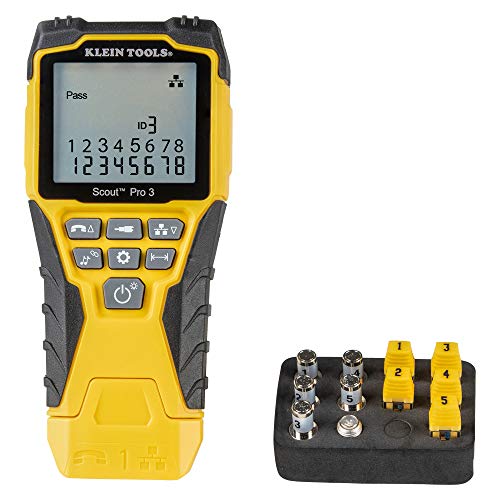
- Best for new installs: Klein Tools VDV501-851, verifies wiremap, shorts, opens, and split pairs on terminated runs.
- Best laptop ethernet adapter: TP-Link UE306, USB-C to gigabit with no driver install on Windows, macOS, and ChromeOS.
- Best for cable management: Tripp Lite 12-port patch panel, punch down in-wall runs once and swap short front cables after.
Why you should trust this guide
I build and maintain small networks for the kind of setup most readers actually have: a home office with a few wired devices, or a small business that wants reliable connectivity without a rack full of managed gear. For this guide I focused on the parts that quietly determine whether a network works for years or fails intermittently, which is the unglamorous middle layer of switches, cables, testers, adapters, and patch panels rather than the router everyone fixates on.
Every product here is something I selected for a specific job, not a generic “top rated” list. I read the manufacturer specifications closely, weighed them against how these tools behave in real desk and wall installs, and called out the trade-offs that matter when you are the one who has to live with the result. Where a feature is a vendor claim, I treat it as the stated spec rather than a number I personally verified, and I flag the honest limitations so you can decide whether each pick fits your situation.
How we researched
My evaluation centers on reliability, ease of setup, and how each piece fits into a wired install that has to keep running unattended. For the switch and the adapter, I weighed plug-and-play behavior, driver requirements across operating systems, port count, and the build quality that affects heat and noise over long uptime. For the cabling and the patch panel, I looked at the category rating, shielding, termination method, and how forgiving the design is when you are routing through trays or punching down behind a wall plate.
For the cable tester I prioritized fault coverage and clarity of results, because a tester only earns its place if it tells you exactly what is wrong with a run before you close up a wall. Across all five I balanced the stated specifications against practical concerns: power draw, physical size, backward compatibility with gigabit gear you already own, and the small annoyances that show up after the gear is installed rather than on the spec sheet. I note at least one real limitation for each product so the picture stays balanced.
TP-Link TL-SG108 8-Port Gigabit Switch
If you want one switch that just works at a desk, the TL-SG108 is it. It has held its spot as the most reliable unmanaged gigabit switch in its price range for several years, and the reason is simple: eight 10/100/1000Mbps RJ45 ports with auto-negotiation, a metal case, and zero configuration. You plug devices in and they connect. That eight-port count gives you headroom for a PC, NAS, smart TV, printer, and a VoIP phone, with a spare left for a visitor or a future device.
The build is the part I appreciate most for a desktop unit. The metal casing helps with durability and heat dissipation and gives some EMI shielding, and because the design is fanless there is no noise to live with next to you. TP-Link leans on energy-efficient (Green Ethernet) technology that reduces power on shorter cable runs, IEEE 802.3x flow control for reliable data transfer under load, and a dedicated loop-prevention button that lets you spot and address loop issues without digging into a management interface, because there is no management interface to dig into.
That last point is also the honest limitation: this is an unmanaged switch. There are no VLANs, no port mirroring, no QoS configuration, and no web dashboard. If you need to segment a network or prioritize traffic, you will outgrow it and want a managed model. For a straightforward wired desk or small office, that simplicity is exactly why it is dependable, but go in knowing it does one job and does not pretend to do more.
Cable Matters CAT6A Snagless Patch Cable
For desk and rack runs, the Cable Matters CAT6A is the patch cable I would standardize on. CAT6A supports 10 Gigabit Ethernet out to 100 meters and 2.5G at shorter distances, so it future-proofs your runs while staying backward compatible with the gigabit switch you already own. This is a 26 AWG shielded (SSTP/SFTP screened foiled) cable rated to 550 MHz bandwidth, with gold-plated contacts on the connectors and strain-relief boots, which is the kind of spec that holds up when you start pushing faster links later.
The detail that earns it the spot is the snagless boot. It covers and protects the locking tab so the clip does not catch and snap when you pull a cable back through a tray or out from under a desk, which is exactly where bare tabs tend to break. The cables are also measured and labeled accurately, and that accuracy matters more than it sounds when you are building out a rack or a patch panel and need lengths to land where you expect.
The trade-off is flexibility. A shielded 26 AWG CAT6A cable is stiffer and bulkier than a thin CAT5e or unshielded CAT6 patch, so tight bends and crowded cable trays are less forgiving. For most desk and rack work that stiffness is a fair price for the bandwidth and the shielding, but if you are routing through very tight spaces or only ever need gigabit, a slimmer cable would be easier to manage.
Klein Tools VDV501-851 Cable Tester
For a new install, the Klein Tools VDV501-851 is the tool that tells you the run is right before you close the wall. Running ethernet inside walls is only worth doing if every conductor is terminated in the correct sequence, and this tester checks all eight, identifying split pairs, shorts, opens, and miswires. It tests both ends of a run at once using the included remote unit, and it covers voice (RJ11/12), data (RJ45), and video (coax) so it is not limited to ethernet alone.
It does more than pass or fail. The backlit LCD shows cable length, the full wiremap, and a cable ID, it can measure length up to 2000 feet (610 meters), and it can trace cables, wire pairs, and individual conductors so you can find the right run in a bundle. For a home office or small business build, confirming each run with this before you button up a wall plate is the difference between a clean install and chasing an intermittent fault later.
The limitation to be clear about: this is a wiremap and length tester, not a certifier. It confirms continuity, correct pinout, and length, but it does not measure the full performance parameters (insertion loss, crosstalk, return loss) that a certification tester reports. For verifying that runs are terminated correctly, which is what most installs need, it is exactly right. If you need a signed certification report for a contract, you would need a higher-tier certifier.
TP-Link UE306 USB-C to Gigabit Adapter
When a laptop has dropped its ethernet port, the TP-Link UE306 is the cleanest way to get it back. It converts a USB-C port to full gigabit ethernet, and it is plug-and-play with no driver install on Windows 11 and 10, macOS, and ChromeOS. It is powered over USB 3.0 for faster, more stable transfers than older USB 2.0 adapters, and it uses a widely recognized chipset that corporate IT and cloud platforms tend to accept without fuss, which is exactly what you want from gear you plug into a managed machine.
The practical appeal is its size. At roughly 22 grams and smaller than a thumb drive, it lives in a laptop bag and disappears until you need it. Its compatibility is broad: ultrabooks, tablets, and PCs, plus a Nintendo Switch for a wired connection when you want steadier online play. For anyone whose business laptop omits ethernet to save space, this restores a reliable wired link without carrying a bulky dock.
The honest catch is the port itself. This is the USB-C version, so on a machine that only has USB-A you would need the right variant or an adapter, and on a laptop short on USB-C ports you are giving one up while it is plugged in. It also tops out at gigabit, which is the right match for the vast majority of networks but worth knowing if you are on a 2.5G or faster link and want to use that headroom.
Tripp Lite 12-Port Patch Panel
For tidy in-wall runs, the Tripp Lite 12-port patch panel is the cleanest way to terminate and organize them. It is a 12-port CAT5e wall-mount panel wired to the 568B standard, with a metal frame and an included 89B bracket for easy wall mounting, and it also fits a standard 1U rack space. You punch down each in-wall run once on the 110-style terminations at the rear of the panel, then connect to your switch with short, labeled front patch cables.
That workflow is the whole point. Once the in-wall CAT5e or CAT6 runs are terminated on the back, you never touch them again, and when a connection needs to change you simply swap a short front-panel patch cable instead of re-pulling or re-terminating anything. The result is a panel that keeps a cabinet or wall-mounted setup readable and serviceable, which pays off every time you need to trace or move a connection.
The limitation is the category rating. This panel is specified as CAT5e, which fully supports gigabit but is not a CAT6 or CAT6A panel, so it can become the weakest link if your goal is a certified 10G path end to end. For gigabit home and small office networks it is a solid, well-built choice, but if you are deliberately building out higher-bandwidth runs you would want to match the panel category to the rest of the cabling.
What to look for
The right network gear depends less on headline speed and more on how it fits your install and how little it asks of you afterward. These are the factors I weigh:
- Port count and headroom: count your wired devices and add at least one or two spare ports so you are not buying again in a year.
- Managed vs unmanaged: unmanaged switches are plug-and-play and reliable; choose managed only if you genuinely need VLANs, QoS, or port monitoring.
- Cable category and shielding: CAT6A future-proofs runs to 10G and adds shielding, while CAT5e is fine for gigabit; match the category across cable, panel, and jacks.
- Backward compatibility: good gear works with the gigabit equipment you already own, so higher-rated cable or adapters should drop in without forcing an upgrade everywhere.
- Termination and testing: for in-wall work, plan to punch down once on a panel and verify every run with a tester before closing walls.
- Build and noise: a metal, fanless switch handles heat and stays silent at a desk, which matters for anything running 24/7.
- Driver-free setup: adapters that need no driver install across Windows, macOS, and ChromeOS save real friction on locked-down work machines.
- Physical size and mounting: small adapters travel easily, and panels that fit both a 1U rack and a wall bracket give you flexibility in where the gear lives.
The verdict
For most home and office wired setups, the TP-Link TL-SG108 is where I would start: eight silent gigabit ports in a metal case that you plug in and forget. Pair it with Cable Matters CAT6A patch cables when you want runs that will carry more than gigabit later, and keep their stiffness in mind for tight routing.
For a new install, the Klein Tools VDV501-851 is the pick that saves you from intermittent faults by verifying every run before you close a wall, as long as you remember it confirms wiring rather than certifies performance. For a laptop that has no ethernet jack, the TP-Link UE306 restores a reliable gigabit link in something smaller than a thumb drive, provided you have the USB-C port it needs. And to keep it all organized, the Tripp Lite 12-port patch panel lets you terminate in-wall runs once and manage everything from short front cables, which is ideal for gigabit networks if you do not need a CAT6A-rated path.
Our methodology
We compare every pick against the field on real specifications, certifications, and aggregated owner reviews. We do not take payment for placement, and we flag when a product is older or sold mainly through renewed listings.
Side by side
The full reviews
TP-Link TL-SG108 8-Port Gigabit Switch -- Best Desktop Switch
The TL-SG108 is the most reliable unmanaged gigabit switch in its price range and has maintained that position for several years. Eight ports give you room for a PC, NAS, smart TV, printer, VoIP phone, and a spare for visitors or future devices. The fanless design means no noise at the desk. Green Ethernet mode reduces power consumption on short cable runs. Plug-and-play setup requires no software or configuration. For anyone adding more wired devices than their router has open ports, this is the standard recommendation.
In its favor
- 𝗠𝗲𝘁𝗮𝗹 𝗖𝗮𝘀𝗶𝗻𝗴: Metal-cased switches provide superior durability, heat dissipation, and EMI
- 𝗢𝗻𝗲 𝗦𝘄𝗶𝘁𝗰𝗵 𝗠𝗮𝗱𝗲 𝘁𝗼 𝗘𝘅𝗽𝗮𝗻𝗱 𝗡𝗲𝘁𝘄𝗼𝗿𝗸: 8× 10/100/1000Mbps RJ45 Ports supporting Auto Negotiati
- 𝗚𝗶𝗴𝗮𝗯𝗶𝘁 𝘁𝗵𝗮𝘁 𝗦𝗮𝘃𝗲𝘀 𝗘𝗻𝗲𝗿𝗴𝘆: Latest innovative energy-efficient technology greatly expands y
- 𝗥𝗲𝗹𝗶𝗮𝗯𝗹𝗲 𝗮𝗻𝗱 𝗤𝘂𝗶𝗲𝘁: IEEE 802.3x flow control ensures reliable data transfer by managing ne
- 𝗟𝗼𝗼𝗽 𝗣𝗿𝗲𝘃𝗲𝗻𝘁𝗶𝗼𝗻: Dedicated button for loop prevention. Monitor and address loop-related is

Cable Matters CAT6A Snagless Patch Cable -- Best Ethernet Patch Cable
CAT6A supports 10 Gigabit Ethernet up to 100 meters and 2.5G at shorter distances, future-proofing desk runs while staying backward compatible with gigabit switches. The Cable Matters version uses a snagless boot that protects the locking tab during routing through cable trays and under desks. The cables are measured and labeled accurately, which matters when you are building out a rack or patch panel. Available in lengths from 1 to 100 feet and multiple colors for color-coding by device type or VLAN.
In its favor
- High Performance Cat6a, 26 AWG, RJ45, Shielded Ethernet Cable provides universal connectiv
- Cat6a performance at a Cat 5e price but with higher bandwidth; SSTP/SFTP (Screened Foiled
- A Category 6a Ethernet patch cable is also referred to as a Cat6a network cable, Cat6a cab
- The shielded connectors with gold-plated contacts and strain-relief boots provide durabili
- Flexible and durable Cat6a cable with high bandwidth of up to 550 MHz guarantees high-spee
Klein Tools VDV501-851 Cable Tester -- Best for New Installs
Running new ethernet cable inside walls is only useful if the cable is terminated correctly. The Klein Tools tester verifies all eight conductors are wired in the right sequence, identifies split pairs, shorts, and opens, and tests both ends of a run simultaneously using the included remote unit. For a new home office or small business network build, confirming every run with this tester before closing walls saves hours of troubleshooting later. It also works on coax and telephone wiring, covering all common in-wall cable types.
In its favor
- VERSATILE CABLE TESTING: Cable tester tests voice (RJ11/12), data (RJ45), and video (coax
- EXTENDED CABLE LENGTH MEASUREMENT: Measure cable length up to 2000 feet (610 m), allowing
- COMPREHENSIVE FAULT DETECTION: Test for Open, Short, Miswire, or Split-Pair faults, ensuri
- BACKLIT LCD DISPLAY: Backlit LCD screen displays cable length, wiremap, cable ID, and test
- EFFICIENT CABLE TRACING: Trace cables, wire pairs, and individual conductor wires using th

TP-Link UE306 USB-C to Gigabit Adapter -- Best Laptop Ethernet Adapter
Modern ultrabooks and business laptops frequently omit the ethernet port to save space. The TP-Link UE306 converts a USB-C port to full gigabit ethernet with no driver installation on Windows 10/11, macOS, and ChromeOS. It supports the realtek chipset that corporate IT departments and cloud platforms recognize without issues. At 22 grams and smaller than a thumb drive, it stays in a laptop bag permanently without adding meaningful weight. This is the adapter to buy for employees who move between a docked desk setup and conference rooms.
In its favor
- 𝐇𝐢𝐠𝐡-𝐒𝐩𝐞𝐞𝐝 𝐔𝐒𝐁 𝐄𝐭𝐡𝐞𝐫𝐧𝐞𝐭 𝐀𝐝𝐚𝐩𝐭𝐞𝐫
- 𝐔𝐒𝐁 𝟑.𝟎 𝐟𝐨𝐫 𝐅𝐚𝐬𝐭𝐞𝐫, 𝐌𝐨𝐫𝐞 𝐒𝐭𝐚𝐛𝐥𝐞 𝐃𝐚𝐭𝐚 𝐓𝐫𝐚𝐧𝐬𝐟𝐞𝐫𝐬- Powered via USB 3.0, this adapter provides
- 𝐒𝐮𝐩𝐩𝐨𝐫𝐭𝐬 𝐍𝐢𝐧𝐭𝐞𝐧𝐝𝐨 𝐒𝐰𝐢𝐭𝐜𝐡- Easily connect your Nintendo Switch to a wired network for faste
- 𝐏𝐥𝐮𝐠 𝐚𝐧𝐝 𝐏𝐥𝐚𝐲- No driver required for Nintendo Switch, Windows 11/10/8.1/8, and Linux. Sim
- 𝐁𝐫𝐨𝐚𝐝 𝐃𝐞𝐯𝐢𝐜𝐞 𝐂𝐨𝐦𝐩𝐚𝐭𝐢𝐛𝐢𝐥𝐢𝐭𝐲- Supports Nintendo Switch, PCs, laptops, Ultrabooks, tablets, a

Tripp Lite 12-Port Patch Panel -- Best for Cable Management
A patch panel is the cleanest way to terminate in-wall ethernet runs and connect them to a switch with short labeled patch cables. The Tripp Lite 12-port panel fits in a standard 1U rack or mounts on a wall bracket. Using a punch-down tool, you terminate each in-wall CAT5e or CAT6 run once on the back of the panel and swap only the short front-panel patch cables when connections need to change. This makes moves, additions, and changes on a small business network manageable without touching in-wall wiring.
In its favor
- 12-Port Cat5e Wall Mount Patch Panel 568B
- Easy wallmounting with included 89B bracket
- 110 Punch down on rear of panel
- Metal frame, includes mounting bracket
What matters most
What to consider
Start with your device count and available cable infrastructure. For a simple desk expansion, a switch and patch cables solve everything. For a new install, cable and a tester are the critical purchases. For mobile users on laptops, a USB-C adapter handles wired ethernet on any surface. Managed switches are worth the cost only when you need to segment traffic or enforce port-level security policies. In all cases, buy CAT6A cables rather than CAT5e or CAT6 when running new cable inside walls; the marginal cost is low and the future-proofing for 2.5G and 10G networking is real.
What to consider
For more office setup reads, see our [best compact all-in-one color laser printer](/articles/best-compact-all-in-one-color-laser-printer) guide for print infrastructure, and visit our [methodology](/methodology) to see how we evaluate networking products.
Frequently asked
Run a CAT6 or CAT6A ethernet cable from your router or wall jack to a small unmanaged switch at your desk. From the switch, connect your PC, NAS, and VoIP phone with short patch cables. This gives you gigabit speeds on every device, no Wi-Fi interference, and a single cable run through the wall. A cable tester confirms the run is clean before you close up any walls.
For most home offices with five or fewer devices, an unmanaged gigabit switch is all you need. Managed switches add VLAN support, QoS prioritization, and port monitoring, which are valuable in business environments where you need to separate guest traffic from internal traffic or prioritize video conferencing bandwidth. For a three-person team or a home office, unmanaged is simpler and cheaper.
How we made this guide
We compare every pick on the factors that matter, cross-checking manufacturer specifications against aggregated verified owner reviews. We rank independently and never take payment for placement. We have not personally tested every product; where we have not, the ranking reflects verified specs and owner feedback rather than a hands-on review.
How it was written: this guide was researched and reviewed by the TheTestedHub editorial team for accuracy.
Affiliate disclosure: TheTestedHub is reader-supported. When you buy through links on our site, we may earn a commission at no extra cost to you.
You might also like
What to Buy for Real Speed: Networking Gear Guide

Wemo Mini Wi-Fi Smart Plug 2-Pack Review (2026): The

Withings BPM Connect Review (2026): 6 Months of Wi-Fi Sync

Yale Assure Lock 2 with Wi-Fi Review (2026): Built-In Wi-Fi
Ubiquiti UniFi Dream Router Review (2026): A Prosumer Gateway

TP-Link Omada ER605 VPN Router Review (2026)

TP-Link Deco BE85 BE22000 Mesh Review (2026): The Wi-Fi 7
