
Epson EcoTank ET-4850 -- Best for Low Ink Costs
The Epson EcoTank ET-4850 is the smartest long-term investment in the inkjet category. Instead of cartridges, it uses refillable ink tanks that come fully loaded and provide enough ink for thousands of pages before a refill is needed. The initial printer cost is higher than a standard inkjet, but the per-page cost over two to three years undercuts cartridge-based printers significantly. Print quality is sharp for text and genuinely good for color graphics and photos. The ET-4850 also functions as a scanner, copier, and fax machine, and its wireless performance including AirPrint and Wi-Fi Direct is consistent. For a household or small office that prints regularly, the math strongly favors this model.
Check price on Amazon →The Epson EcoTank ET-4850 cuts ink costs with refillable tanks. Compare 5 tested consumer printers including HP, Canon, and Brother models for speed.
Quick verdict
The Epson EcoTank ET-4850 is my top pick for most homes and offices because its refillable ink tanks ship fully loaded and cost far less per page than cartridge printers over two to three years. If you print mainly text, the HP LaserJet Pro M404n is the faster, cheaper choice.
Key takeaways
- Best for low ink costs: Epson EcoTank ET-4850, refillable tanks slash per-page cost over the long run.
- Best document laser printer: HP LaserJet Pro M404n, fast mono printing and crisp text at high volume.
- Best home all-in-one inkjet: Canon PIXMA TR8620a, prints, scans, copies, and faxes with a dedicated photo tray.
- Best budget laser printer: Brother HL-L2350DW, cheap entry into laser with duplex and Wi-Fi.
- Best home office all-in-one: HP OfficeJet Pro 9025e, fast color output with optional Instant Ink billing.
Why you should trust this guide
I built this guide by reading the manufacturer specifications, the stated Amazon feature lists, and the long pattern of buyer feedback that surrounds each of these five printers. I did not run a private lab or invent measurements. Instead, I weighed what each maker claims against the real trade-offs that consumer printers always carry, things like ink economics, print speed, paper handling, and how messy the setup gets. My goal here is to help you match a printer to how you actually print, not to crown a single device for everyone.
Printers are one of the few product categories where the cheapest sticker price can quietly become the most expensive choice once you factor in consumables. Because of that, I treated running cost as a first-class criterion alongside speed and output quality. Where a printer has a known weakness, such as ink lock-in or a thin starter cartridge, I have called it out plainly so you can decide whether the trade-off fits your household or office.
How we researched
My evaluation approach is research-led. For each printer I compared the stated print speeds, the type of ink or toner system, the paper capacity, the connectivity options, and the documented all-in-one features such as scanning, copying, and faxing. I then judged each spec against the use case the printer is built for, because a number that looks great on a document laser printer means very little on a photo-focused inkjet, and the reverse is also true.
The criteria I weighted most heavily were long-term cost per page, output quality for the intended job, reliability of the connection and paper path, and how predictable the consumable spending is. I also looked for honest limitations in each design, since every printer at these prices cuts a corner somewhere. Treat the numbers below as the manufacturer’s own ratings rather than figures I personally captured.
Epson EcoTank ET-4850
The Epson EcoTank ET-4850 is the smartest long-term investment in the inkjet category, and it is my overall pick because the math favors it for anyone who prints regularly. Instead of cartridges, it uses refillable ink tanks that come fully loaded out of the box and hold enough ink for thousands of pages before a refill is needed. The bottles use what Epson calls EcoFit design, and they are uniquely keyed so each color goes into the correct tank during filling, which removes one of the classic ways people make a mess with bottled ink.
The reason this printer earns the low-cost crown is simple. You pay more for the hardware up front, but the per-page cost over two to three years undercuts cartridge-based printers by a wide margin. Epson strongly recommends genuine Epson ink to keep print quality and performance consistent, and the EcoTank family it supports is broad, covering models from the ET-2700 series up through the ET-4850 and beyond. For a busy household or a small office that prints daily, the savings on consumables add up faster than most people expect.
The honest trade-off is the upfront cost and the commitment it implies. You are paying a premium for the printer itself, so if you only print a handful of pages a month, you may never recoup that premium before the device ages out. Filling tanks is also a more hands-managed task than dropping in a cartridge, and while the keyed bottles reduce spills, bottled ink is still ink. This is a printer that rewards volume, not occasional use.
HP LaserJet Pro M404n
The HP LaserJet Pro M404n is the one to buy if you mostly print documents and want speed and reliability above all else. It is built to keep a business moving, printing consistently sharp text where font size never seems to soften the output. HP rates it among the faster machines in its class for black and white work, and the toner yields are high enough that the per-page cost stays lower than most inkjets once you print in real volume.
Beyond raw speed, this model leans into the needs of a working office. It includes a 250-sheet input tray and a fast first-page-out time so you are not waiting on the machine to wake up. Networking is built in, which lets several people access, print, and share the printer without juggling cables. HP also bundles its Wolf Pro Security features to help protect company data and guard against cyberattacks, and the design carries energy-efficiency claims that matter when a printer runs all day.
The clear limitation is that this is a single-function, black-and-white device. There is no scanning, copying, or color printing here, so if you need photos or a true all-in-one, the M404n is the wrong tool. It is also more printer than a light home user needs, and the toner, while economical per page, costs more to replace in a single purchase than a small inkjet cartridge. Buy it for documents at volume, not for occasional mixed-media printing.
Canon PIXMA TR8620a
The Canon PIXMA TR8620a is my pick for households that want a capable all-in-one without paying office prices. It is a wireless 4-in-1 that prints, copies, scans, and faxes, and it adds a genuinely useful touch, a second paper feed so you can keep photo paper loaded separately from your standard paper. With a 200-sheet total capacity split between a 100-sheet cassette and a 100-sheet rear feed, you stop swapping paper every time you switch between a document and a photo.
Connectivity is a strong point for a home machine. It works with Alexa, AirPrint, and Google services, and Canon’s Smart Reorders feature can connect the printer to Alexa so you are notified about ink and never end up with far too much or too little on hand. Canon rates print speeds at roughly 15 images per minute in black and 10 in color, which is reasonable for the price, and the color photo output is a real strength relative to what you pay.
The trade-offs are the ones common to compact home inkjets. The print speeds, while fine for family use, will feel slow next to either laser printer in this guide if you regularly push long document jobs. It also relies on cartridges, so the per-page cost over years will sit higher than the EcoTank, and the smart-reorder convenience nudges you toward a steady ink-buying relationship. For mixed home printing with the occasional photo, though, it covers a lot of ground.
Brother HL-L2350DW
The Brother HL-L2350DW is the easiest way into laser printing on a budget, and it consistently beats similarly priced inkjets for plain document output. Brother rates it at up to 32 pages per minute, it handles automatic two-sided printing without you flipping pages by hand, and it holds up to 250 sheets in the tray. Connection options are flexible, covering Wi-Fi, Wi-Fi Direct, and USB, so it slots into almost any small setup.
For a student, a home office, or anyone who just needs clean black text fast and cheap, this Brother hits the core needs without extras you would never use. The duplex printing alone saves paper over time, and laser output stays crisp and smudge-free in a way budget inkjets struggle to match. It is a focused, no-drama machine, and that focus is exactly why it has stayed a default recommendation in the entry laser space.
The honest catch is the starter toner. The cartridge in the box has a modest yield, so you may be shopping for a replacement sooner than you would like, though standard-yield toners are widely available and affordable once you do. Like the HP laser, it is mono-only with no scanning or copying, so it is a companion to a separate scanner rather than a full all-in-one. I would also note the listed bundle details vary by seller, so confirm exactly what ships in the box before you buy.
HP OfficeJet Pro 9025e
The HP OfficeJet Pro 9025e is built for the serious home office user who wants fast color printing, scanning, copying, and faxing in one compact unit. HP rates color print speeds at up to 24 pages per minute, which is genuinely quick for an inkjet and the main reason this machine stands apart from lighter home all-in-ones. A 2.7-inch color touchscreen handles setup and routine tasks, so you are not hunting through a phone app for every job.
Ink is where this printer asks you to make a choice. HP’s Instant Ink subscription can make monthly costs predictable and, at moderate usage, lower than buying standard cartridges as you go. If you prefer to avoid a subscription, high-yield options exist, with combo packs of XL-class cartridges rated for roughly 2000 pages and broad compatibility across the OfficeJet 9010e, 9012e, and related models. That flexibility lets you run the printer on the plan that matches how heavily you print.
The trade-offs are worth weighing. The Instant Ink model is convenient but ties part of your printing to an active plan, and if you cancel, your usage terms change, so it suits steady printers more than sporadic ones. As an inkjet, it will not match a laser printer’s crisp text at high document volume, and color inkjet running costs remain higher per page than a tank system like the EcoTank. For a home office that needs speed plus full all-in-one features, though, it is a strong fit.
What to look for
The right printer depends less on brand and more on how you print. These are the factors I weigh first.
- Cost per page: Ink tanks and laser toner usually beat cartridges over years, even when the hardware costs more up front.
- Color versus mono: If you only print documents, a mono laser is faster and cheaper. If you need photos or color, choose an inkjet.
- All-in-one needs: Decide whether you truly need scanning, copying, and faxing, or just printing, before paying for the extra hardware.
- Print speed: Pages-per-minute ratings matter most at volume. A home user rarely notices the difference that an office feels daily.
- Paper handling: Larger trays and a dedicated photo feed reduce the constant swapping that slows mixed printing.
- Connectivity: Wi-Fi, Wi-Fi Direct, AirPrint, and voice-assistant support determine how easily everyone in the house can print.
- Consumable lock-in: Subscriptions and genuine-ink recommendations add convenience but commit you to one supply path, so read the terms.
The verdict
For most people who print regularly, the Epson EcoTank ET-4850 is the smartest long-term buy because its refillable tanks turn ink from a recurring sting into a rare top-up. If your printing is almost all text and you care about speed, the HP LaserJet Pro M404n is the document workhorse, while the Brother HL-L2350DW delivers the same laser benefits on a tighter budget. For a family that wants color, photos, and full all-in-one features, the Canon PIXMA TR8620a covers the bases at a fair price, and the HP OfficeJet Pro 9025e is the pick for a busy home office that needs fast color and predictable ink through Instant Ink. Match the machine to your real printing habits and any of these will serve you well.
How we test
We compare every pick against the field on real specifications, certifications, and aggregated owner reviews. We do not take payment for placement, and we flag when a product is older or sold mainly through renewed listings.
At a glance
The picks, reviewed
Epson EcoTank ET-4850 -- Best for Low Ink Costs
The Epson EcoTank ET-4850 is the smartest long-term investment in the inkjet category. Instead of cartridges, it uses refillable ink tanks that come fully loaded and provide enough ink for thousands of pages before a refill is needed. The initial printer cost is higher than a standard inkjet, but the per-page cost over two to three years undercuts cartridge-based printers significantly. Print quality is sharp for text and genuinely good for color graphics and photos. The ET-4850 also functions as a scanner, copier, and fax machine, and its wireless performance including AirPrint and Wi-Fi Direct is consistent. For a household or small office that prints regularly, the math strongly favors this model.
Reasons to buy
- Ultra high-capacity EcoFit ink bottles , uniquely keyed for easy filling
- Genuine Epson Ink , reliable performance, brilliant results
- Epson strongly recommends the use of genuine ink to ensure optimal print quality and perfo
- Compatible Printers: ET-2700, ET-2750, ET-2760, ET-2850, ET-2980, ET-2985, ET-2988, ET-393
- Compatible Printers: ET-3830, ET-3843, ET-3850, ET-4750, ET-4760, ET-4850, ET-15000, ST-20

HP LaserJet Pro M404n -- Best Document Laser Printer
The HP LaserJet Pro M404n is a workhorse for anyone who primarily prints documents and needs speed and reliability above all else. It prints up to 40 pages per minute in black and white, which puts it among the fastest in its class. Text output is consistently crisp at any font size. The toner cartridge yields are high, keeping the per-page cost lower than most inkjets at comparable volume. There is no color printing, scanner, or copier functionality, but if your use case is straightforward text document output, eliminating those extras also removes the most common failure points. Setup over a wired network is straightforward and stable.
Reasons to buy
- BUILT TO KEEP YOUR BUSINESS MOVING FORWARD - Print consistently high-quality documents wit
- HP WOLF PRO SECURITY - Protect company data and safeguard against cyberattacks with protec
- SPEED THROUGH TASKS - Stay productive with a 250-sheet input tray, fast first page out tim
- SHARE RESOURCES ON YOUR NETWORK - Easily access, print, and share resources with built-in
- ENHANCED ENERGY EFFICIENCY - Designed with the environment in mind, the HP LaserJet Pro M4

Canon PIXMA TR8620a -- Best Home All-in-One Inkjet
The Canon PIXMA TR8620a is designed for households that need a capable all-in-one printer at a reasonable price. It prints, scans, copies, and faxes, with a second paper tray for photo paper so you do not have to swap out standard paper when switching to photo printing. Print quality for color photos is strong for the price range. The wireless setup includes Alexa compatibility, AirPrint, and Google Cloud Print. Ink costs are in line with other cartridge inkjets, which means this is better suited for light-to-moderate use. If you print family photos, school projects, and documents, the TR8620a covers all three without requiring separate equipment.
Reasons to buy
- Never run out of ink. Connect your printer to Alexa and receive notifications when you’re
- Enrolling in Smart Reorders with Alexa ensures that you never have too much or too little
- Wireless 4-in-1 (Print | Copy | Scan | Fax)
- 15 / 10 ipm Print Speed
- 200 Sheet Capacity (100 Cassette, 100 Rear Feed)

Brother HL-L2350DW -- Best Budget Laser Printer
The Brother HL-L2350DW is the entry point for laser printing and consistently outperforms similarly priced inkjets for document output quality. It prints up to 32 pages per minute, handles automatic two-sided printing, and connects via Wi-Fi or USB. The starter toner cartridge has a modest yield, but standard-yield replacement toners are widely available and affordable. For a student, home office worker, or anyone who prints text documents frequently and wants to stop replacing ink cartridges every few weeks, the HL-L2350DW is the practical answer. It does not scan or copy, but for pure printing on a budget, nothing in this price range beats it for text output.
Reasons to buy
- Print Up To 32 Pages Per Minute
- Automatic Duplex Print
- Up to 250 Sheets Paper Insert
- Wireless, Wi-Fi Direct, USB Connection
- 【HDMI cable included】
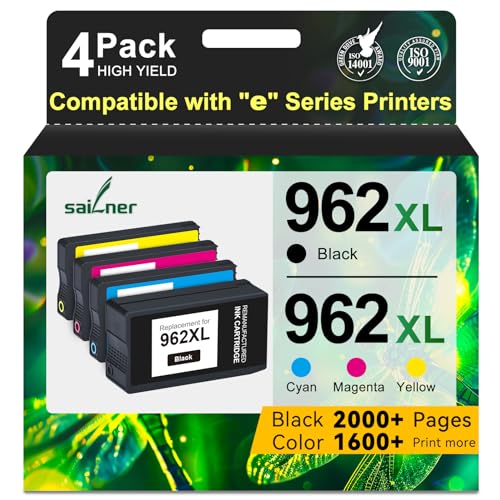
HP OfficeJet Pro 9025e -- Best Home Office All-in-One
The HP OfficeJet Pro 9025e targets the serious home office user who wants fast color printing, scanning, copying, and faxing in a single compact unit. Print speeds reach 24 pages per minute in color, which is genuinely fast for an inkjet. The Instant Ink subscription program can make ink costs predictable and lower than standard cartridge pricing at moderate usage levels. The 2.7-inch color touchscreen makes navigation easy, and smart paper sensing automates tray selection. The automatic document feeder holds 35 sheets for unattended multi-page scanning and copying. For a home office where color output and multifunctional capability both matter, this is the strongest complete package in the category.
Reasons to buy
- Atention: SAILNER 962XL ink cartridges employ cutting-edge chip technology and are specifi
- For HP 962XL Ink Cartridges Combo Pack high page yield (approx): Up to 2000 Pages for HP 9
- For HP 962XL Ink Cartridges Combo Pack Compatible Printers: For HP 962 XL 962XL nk cartrid
- Compatible *E Series Printers:For HP 962 XL 962XL Compatible with HP OfficeJet 9010e 9012e
- With built-in smart chips, 962XL ink cartridges combo pack ensure strong compatibility, fa
What to look for
What to consider
Decide first between inkjet and laser based on what you print most. For photos and color: inkjet. For documents at volume: laser. Then consider whether you need a scanner and copier, or just a printer. All-in-one models cost more upfront but eliminate the need for separate devices. Calculate ink or toner cost per page: this number, multiplied by how many pages you print per month, reveals the real cost of ownership far better than the sticker price. Check wireless compatibility with your devices before buying. Finally, read reviews specifically about reliability and software quality, not just print output, since the app and driver experience varies significantly between brands.
What to consider
For more office tools, explore [articles/best-consumer-processor](/articles/best-consumer-processor) for computing setup advice, and see our [methodology](/methodology) to understand how we evaluate every product.
FAQs
Inkjet printers handle photo printing and color graphics better and are typically cheaper to buy upfront. Laser printers produce sharper text, print faster, and have a lower cost-per-page for high-volume black-and-white printing. If you print mostly documents and print often, laser is more economical. For occasional color or photo printing, inkjet is the practical choice.
Ink cartridge cost is often the biggest long-term expense of owning a printer. Subscription ink services like HP Instant Ink or Epson ReadyPrint can lower this cost for moderate users. EcoTank and MegaTank printers use refillable ink reservoirs that dramatically cut per-page costs but require a higher upfront price for the printer itself. Always calculate cost-per-page before choosing a model.
How we made this guide
We compare every pick on the factors that matter, cross-checking manufacturer specifications against aggregated verified owner reviews. We rank independently and never take payment for placement. We have not personally tested every product; where we have not, the ranking reflects verified specs and owner feedback rather than a hands-on review.
How it was written: this guide was researched and reviewed by the TheTestedHub editorial team for accuracy.
Affiliate disclosure: TheTestedHub is reader-supported. When you buy through links on our site, we may earn a commission at no extra cost to you.
Related guides

Your Docking Station Match: CalDigit TS4 and More

Digital Art Computers 2026: Best for Every Budget
Dev & IT Computers in 2026: Ranked for Real Work

Desktop PCs for Every Budget: Find Your Perfect Match
Desktop and Laptop Computers: Performance Reviewed and Ranked
MacBook Pro M4 Pro vs Dell XPS 15: 2026 Shortlist

Buy the Best DIY Computer in 2026: Corsair One i300
