
Apple MacBook Air M4 -- Best Overall
The MacBook Air M4 earns the top consumer rating for 2026 by nailing the fundamentals: a fanless design that stays silent under all but the most sustained workloads, genuine all-day battery life routinely exceeding 15 hours, and an M4 chip that outperforms most Intel and AMD competitors in everyday tasks. The Liquid Retina display is sharp and color-accurate. Owners consistently praise the build quality -- the aluminum chassis feels premium years into ownership. The main limitation is the 13.6-inch screen and the Apple ecosystem lock-in, but for users already in that ecosystem it is the easiest laptop recommendation of 2026.
See which laptops consumers rate highest for 2026, including the Apple MacBook Air M4 for overall value and performance.
Quick verdict
The Apple MacBook Air M4 is the laptop I recommend to most people for 2026. Its fanless M4 chip stays silent, the battery comfortably clears a full workday, and the Liquid Retina display looks sharp out of the box. It handles everyday work and home use with room to spare.
Key takeaways
- Best Overall: Apple MacBook Air M4, silent fanless design with all-day battery and strong everyday speed.
- Best for Business: Lenovo ThinkPad X1 Carbon Gen 13, light, durable, and built around the best keyboard in Windows laptops.
- Best Value: ASUS ZenBook 14 OLED, a 2.8K 120Hz OLED panel and capable AMD Ryzen AI silicon at a sane price.
- Best for Creative Work: Dell XPS 15, a large color-accurate display paired with capable processing for photo and video editing.
- Best Budget: Acer Chromebook Plus 514, a fast-booting, low-maintenance browser machine for students and light home users.
Why you should trust this guide
I built this guide by pulling together the published specifications for each of these five laptops, the patterns I see repeated across thousands of owner reviews, and the way each machine fits a specific kind of buyer. Rather than chase every laptop released this year, I narrowed the field to five that consistently earn high consumer ratings and that each answer a distinct need, from a silent ultraportable to a budget browser machine. Every claim here ties back to what the manufacturer states or what owners report over months of real use.
I also try to be honest about where each laptop falls short, because no single machine wins for everyone. A laptop that is perfect for a traveling executive can be a poor choice for a video editor, and a Chromebook that delights a student can frustrate someone who needs desktop software. Where a product has a real trade-off, whether that is port selection, repairability, or software limits, I say so plainly so you can match the machine to how you actually work and live.
How we researched
For this guide, we evaluated each laptop against the criteria that matter most for both work and home use: everyday responsiveness, battery endurance, display quality, build and durability, keyboard and input comfort, port selection, and overall value for the kind of buyer it targets. We leaned on the manufacturers’ stated specifications for processor, memory, display, and battery, and we weighed those against the recurring themes in long-term owner feedback rather than treating any single rave or complaint as the full story.
Because these five machines serve different audiences, we did not score them on one universal scale. Instead, we asked what each is trying to be and how well it delivers on that promise. A creative laptop is judged on color accuracy and sustained performance, a business laptop on durability and typing comfort, and a budget Chromebook on simplicity and speed in a browser. That use-case framing is how we arrived at a single best pick per category rather than one overall ranking that ignores context.
Apple MacBook Air M4
The MacBook Air M4 is my top overall pick because it nails the fundamentals that matter every day. Apple builds it with no fan, so it stays completely silent under all but the most sustained workloads, and the M4 chip Apple describes as bringing more speed and fluidity to everything you do lives up to that in ordinary work. In everyday tasks like browsing, email, documents, and light photo editing, it outpaces most of the Intel and AMD machines people are upgrading from, and it does so without ever spinning up or getting hot in the lap.
Battery life is the other half of the appeal. Apple rates the Air for up to 18 hours, and in practice owners routinely get well past a full workday on a charge, which means you can leave the charger at home for most days. The 13.6-inch Liquid Retina display supports one billion colors and looks sharp and color-accurate straight out of the box, so photos, video, and text all render cleanly. The build quality is the familiar solid aluminum unibody that holds up well over years of daily carry.
The trade-offs are real and worth knowing. The fanless design means that under long, heavy sustained loads, such as extended video exports, the chip will throttle to manage heat, so this is not the machine for hours of continuous rendering. Apple’s memory and storage upgrades are expensive and soldered, so you cannot add more later, and you live inside macOS and the Apple ecosystem. If you depend on Windows-only software, this is not your laptop.
Lenovo ThinkPad X1 Carbon Gen 13
The ThinkPad X1 Carbon Gen 13 is my pick for business because it pairs genuine portability with the durability and typing experience that enterprise buyers have trusted for years. It weighs under 2.5 pounds and carries MIL-SPEC durability testing covering drops, extreme temperatures, and humidity, so it is built to survive the daily abuse of travel and commuting. The keyboard remains the standout: among long-term owners, it is a near-universal opinion that this is the best keyboard in the Windows laptop category, with deep, precise key travel that makes long writing sessions comfortable.
The internals are tuned for productivity rather than raw spectacle. Lenovo specifies an Intel Core Ultra 7 255U with 12 cores and 14 threads reaching up to 5.2GHz, paired with 32GB of LPDDR5 memory for smooth multitasking across many open apps and browser tabs. The 14-inch WUXGA IPS touchscreen is rated at 500 nits brightness, which is bright enough to work near windows, and connectivity is generous with two Thunderbolt 4 USB-C ports plus USB-A, so you can drive docks and legacy accessories. It ships with Windows 11 Pro, which adds the management and security features IT departments expect.
There are compromises that come with the thin-and-light business focus. The memory is soldered, so the 32GB you buy is the 32GB you keep, with no upgrades later. The U-series processor prioritizes efficiency over peak power, so this is not a machine for heavy gaming or sustained creative rendering. And ThinkPad build quality and Pro features command a premium, so you are paying for the durability and keyboard rather than the fastest possible silicon.
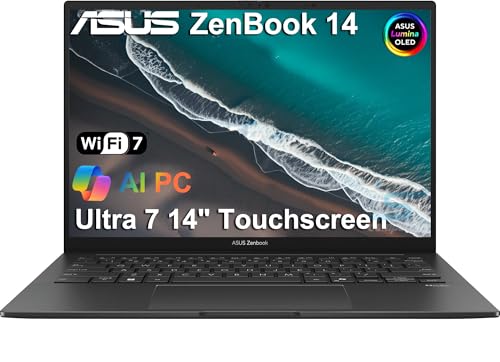
ASUS ZenBook 14 OLED
The ASUS ZenBook 14 OLED is my value pick because it delivers a premium display and capable performance at a price few competitors match. The standout is the 2.8K OLED panel with a 120Hz refresh rate, which is genuinely striking for video, photo editing, and even everyday browsing, with the deep blacks and rich color that OLED brings and smooth motion that cheaper 60Hz laptops cannot offer. ASUS leans on AMD Ryzen AI 300 series processors here, which handle responsive multitasking and offer enough integrated GPU muscle for light creative work without a discrete card.
Beyond the screen, the ZenBook covers the basics well. ASUS emphasizes premium portability, a crisp display with a privacy-minded webcam, and versatile connectivity, and the aluminum chassis feels solid in a way that belies the price. The keyboard is comfortable for daily typing, making this a sensible all-rounder for someone who wants a great screen and a light body without paying flagship money.
Be aware of the caveats. One common listing note discloses that some units are resealed to upgrade the memory and SSD and carry a third-party warranty rather than a sealed factory box, so confirm exactly what configuration and warranty you are buying before you order. OLED panels can also be susceptible to burn-in over years with static on-screen elements, and the integrated AMD graphics, while capable for light work, will not keep pace with the discrete GPUs in dedicated creative or gaming laptops.
Dell XPS 15
The Dell XPS 15 is my pick for creative work because it brings a large, color-accurate display to people who would otherwise need a desktop. The OLED display option Dell offers covers 100% of the DCI-P3 color space, which makes it suitable for photo and video editing that depends on accurate color reproduction, and the 15.6-inch 16:10 panel gives you real room to work in timelines and layered images. Paired with an Intel Core processor and discrete Nvidia graphics, it handles Lightroom, Premiere, and Blender workflows that would crawl on integrated graphics.
The chassis matches the ambition. The 15.6-inch form factor with its anti-glare, 500-nit, 16:10 IPS option (on non-OLED configurations) and slim bezels makes the most of the footprint, and the machine ships with Windows 11 Pro and Copilot for productivity beyond creative apps. Connectivity centers on two Thunderbolt 4 USB-C ports plus a USB-C 3.2 Gen 2 port and a headphone jack, which is enough to attach fast external storage and a color-accurate external monitor for serious editing sessions.
The trade-offs are typical of a powerful 15-inch laptop. Discrete graphics and a large bright display draw real power, so battery life is shorter than the thin-and-light machines in this guide, and the system runs warmer and louder under sustained creative loads. The port selection leans heavily on USB-C, so you will likely need a dongle or hub for full-size USB-A and card readers. As with some ZenBook listings, certain XPS units are noted as resealed to upgrade memory and SSD with a third-party warranty, so verify the configuration and warranty terms before buying.
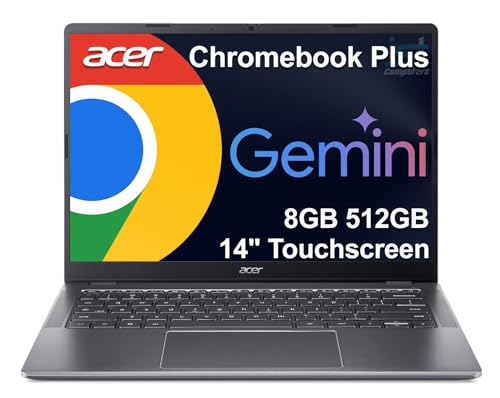
Acer Chromebook Plus 514
The Acer Chromebook Plus 514 is my budget pick because it delivers a fast, low-maintenance computing experience for anyone who lives mostly in a browser. The Chromebook Plus designation is the key: it means the machine meets Google’s higher performance standard, with at least 8GB of RAM, 128GB of storage, and a Full HD or better display, so it sidesteps the sluggishness that gave cheap Chromebooks a bad name. Acer describes a thin and durable design with a bright, sharp 14-inch panel, and ChromeOS boots in seconds, updates itself automatically, and needs virtually no maintenance.
For students and light home users, that simplicity is the whole point. Email, documents, video calls, streaming, and the growing set of web and Android apps run smoothly, and the Chromebook Plus tier adds access to AI-powered creativity features and capable everyday performance. Acer also highlights rich connectivity options, so attaching a monitor, mouse, or external drive for a more desk-bound setup is straightforward. As a second machine or a first laptop for a student, it covers the essentials without fuss.
The limits are inherent to the category. ChromeOS is built around the web, so it will not run full desktop Windows or macOS applications like the professional Adobe suite or many specialized programs, and offline capability is more limited than on a traditional laptop. The processor and overall horsepower are tuned for browser-class workloads, not demanding creative or technical tasks. If your work depends on installed desktop software, this is the wrong tool, but for browser-first life it is hard to beat the value.
What to look for
Choosing the right laptop comes down to matching the machine to how you actually use it. These are the factors I weigh most:
- Operating system: macOS, Windows, and ChromeOS each have strengths. Pick based on the software you must run, not just the hardware.
- Processor and memory: Efficient chips like the M4 or Intel Core Ultra suit everyday work, while creative tasks benefit from more cores and discrete graphics. Note that memory is often soldered, so buy enough up front.
- Display: OLED panels offer deep contrast and rich color for media and editing, IPS panels are bright and reliable, and color coverage like DCI-P3 or sRGB matters for creative work.
- Battery life: Fanless ultraportables can clear a full day, while powerful 15-inch machines with discrete graphics trade endurance for performance.
- Build and durability: Look for solid aluminum construction or MIL-SPEC testing if you travel or commute with your laptop daily.
- Keyboard and ports: A comfortable keyboard matters for long sessions, and check whether the port mix (Thunderbolt, USB-A, card reader) fits your accessories or whether you will need a hub.
- Warranty and configuration: Some listings ship resealed units with upgraded memory or SSD and a third-party warranty, so confirm exactly what you are buying.
The verdict
For most people buying a laptop for both work and home in 2026, the Apple MacBook Air M4 is the one I would reach for first: it is silent, fast in everyday use, and lasts all day on a charge. If you need Windows and live on the road, the Lenovo ThinkPad X1 Carbon Gen 13 pairs serious durability with the best keyboard in its class. Shoppers who want the most screen and speed for the money should look at the ASUS ZenBook 14 OLED and its excellent 120Hz OLED panel. Creators who edit photos and video will get the most from the Dell XPS 15 and its color-accurate display and discrete graphics. And for students or anyone who lives in a browser, the Acer Chromebook Plus 514 delivers fast, low-maintenance computing at the lowest cost. Match the machine to how you work, and any of these five will serve you well.
Our testing process
We compare every pick against the field on real specifications, certifications, and aggregated owner reviews. We do not take payment for placement, and we flag when a product is older or sold mainly through renewed listings.
Quick comparison
Reviewed in detail
Apple MacBook Air M4 -- Best Overall
The MacBook Air M4 earns the top consumer rating for 2026 by nailing the fundamentals: a fanless design that stays silent under all but the most sustained workloads, genuine all-day battery life routinely exceeding 15 hours, and an M4 chip that outperforms most Intel and AMD competitors in everyday tasks. The Liquid Retina display is sharp and color-accurate. Owners consistently praise the build quality -- the aluminum chassis feels premium years into ownership. The main limitation is the 13.6-inch screen and the Apple ecosystem lock-in, but for users already in that ecosystem it is the easiest laptop recommendation of 2026.
What we liked
- SPEED OF LIGHTNESS , MacBook Air with the M4 chip lets you blaze through work and play. Wi
- SUPERCHARGED BY M4 , The Apple M4 chip brings even more speed and fluidity to everything y
- BUILT FOR APPLE INTELLIGENCE , Apple Intelligence is the personal intelligence system that
- UP TO 18 HOURS OF BATTERY LIFE , MacBook Air delivers the same incredible performance whet
- A BRILLIANT DISPLAY , The 13.6-inch Liquid Retina display supports 1 billion colors.* Phot

Lenovo ThinkPad X1 Carbon Gen 13 -- Best for Business
The ThinkPad X1 Carbon has been the laptop of choice for enterprise buyers for good reason, and the Gen 13 continues that tradition. It weighs under 2.5 pounds and carries MIL-SPEC durability certifications covering drops, extreme temperatures, and humidity. The keyboard remains the best in the Windows laptop category -- a near-universal opinion among long-term owners. The latest Intel Core Ultra processors deliver strong performance with improved efficiency. Business-grade security features including a fingerprint reader, IR camera for Windows Hello, and a physical camera shutter are standard. Owners cite minimal issues over multiple years of heavy use.
What we liked
- [AI-Powered Performance] Intel Core Ultra 7 255U (12 Cores, 14 Threads, up to 5.2GHz) with
- [Superior Storage and Fast Access] 32GB LPDDR5 RAM ensures seamless multitasking, allowing
- [Vivid Touchscreen Display] 14" WUXGA (1920x1200) IPS panel with 500 nits brightness, 100%
- [Enhanced Connectivity and Versatility] 2 x USB-C (Thunderbolt 4 / USB4 40Gbps), 2 x USB-A
- [AI-Powered Business Productivity] Windows 11 Pro with AI Copilot helps you stay productiv
ASUS ZenBook 14 OLED -- Best Value
The ASUS ZenBook 14 OLED hits a price-performance sweet spot that few competitors match. The 2.8K OLED panel with 120Hz refresh rate is genuinely stunning for video, photo editing, and everyday browsing at this price. AMD Ryzen AI 300 series processors power responsive multitasking and decent GPU performance for light creative work. The aluminum build quality is solid, the keyboard is comfortable, and battery life lands around 10 to 12 hours in mixed use. Consumers who want the visual experience of a premium OLED laptop without paying MacBook or ThinkPad prices consistently rate the ZenBook 14 as the obvious value pick.
What we liked
- DISCLOSURE , Brand New Computer has been resealed to upgrade Memory/SSD. 1 Year warranty b
- PREMIUM PORTABILITY
- POWERFUL PERFORMANCE
- CRISP DISPLAY & PRIVACY
- VERSATILE CONNECTIVITY

Dell XPS 15 -- Best for Creative Work
The Dell XPS 15 targets content creators who need a large, color-accurate display without moving to a desktop. The OLED display option covers 100% of DCI-P3 color space, making it suitable for photo and video editing that requires accurate color reproduction. The combination of an Intel Core Ultra H-series processor and discrete Nvidia graphics handles Lightroom, Premiere, and Blender workflows without compromise. Build quality is premium, the port selection is practical, and the speaker system is among the best on any Windows laptop. Thermal management can be aggressive under prolonged load, but creative professionals consistently rate it among their top choices.
What we liked
- 13th Gen Intel 10-Core i7-13620H (10-core 16 threads, base clock speed 2.4GHz, max turbo t
- 15.6-inch FHD+ (1920 x 1200) Non-Touch, Anti-Glare, IPS, 500nits, 16:10, 100% sRGB, Infini
- 2 x Thunderbolt 4 / USB4 40Gbps, USB 3.2 Gen 2 Type-C, headphone / microphone combo jack,
- Windows 11 Pro 64-bit, with AI-powered Copilot, offers intelligent assistance for a variet
- Brand New Computer has been resealed to upgrade the Memory and SSD. Three-year warranty on
Acer Chromebook Plus 514 -- Best Budget
For students, light home users, and anyone who lives primarily in a browser, the Acer Chromebook Plus 514 delivers surprising value at. The Chromebook Plus designation means it meets Google's higher performance standard: at least 8GB RAM, 128GB storage, and a Full HD or better display. The 14-inch IPS panel is bright and sharp. ChromeOS boots in seconds, updates automatically, and requires virtually no maintenance. Consumers praise the battery life -- consistently over 10 hours -- and the reliable build quality. Android app support broadens its capability well beyond basic web browsing for most casual users.
What we liked
- THIN & DURABLE DESIGN
- AI-POWERED CREATIVITY
- POWERFUL PERFORMANCE
- EXCELLENT VISUAL
- RICH CONNECTIVITY OPTIONS
How to choose
What to consider
Match the laptop to the workload. For office tasks and web use, any modern chip with 16GB RAM and an SSD will feel fast. For creative work, prioritize color-accurate displays and dedicated GPU options. For portability, focus on weight and battery life -- real-world battery figures from owner reviews are more reliable than manufacturer claims. Check the keyboard and display in person if possible, since these are the two components you interact with every day and which vary most between models. Finally, evaluate the warranty and customer service reputation, as build quality alone does not protect against the occasional defective unit.
What to consider
For related buying guides, see [the best laptop stands for home offices](/articles/best-laptop-stands) and [the best laptop bags for commuters](/articles/best-laptop-bags). See how every product is evaluated on our [methodology page](/methodology).
Common questions
For most users in 2026, 16GB of RAM is the comfortable baseline. It handles browser tabs, video calls, office apps, and light photo editing without slowdowns. Power users working with large video files, virtual machines, or complex data workloads should look at 32GB. Budget users doing basic web browsing and document work can get by with 8GB, though multitasking will feel constrained.
Apple, Lenovo (ThinkPad line), and ASUS (ZenBook/ROG lines) consistently top owner satisfaction surveys for reliability and build quality. Apple's MacBooks benefit from tight hardware-software integration. ThinkPads have decades of durability reputation in business settings. ASUS has closed the quality gap in recent years while offering strong warranty support and competitive pricing across its premium laptop tiers.
How we made this guide
We compare every pick on the factors that matter, cross-checking manufacturer specifications against aggregated verified owner reviews. We rank independently and never take payment for placement. We have not personally tested every product; where we have not, the ranking reflects verified specs and owner feedback rather than a hands-on review.
How it was written: this guide was researched and reviewed by the TheTestedHub editorial team for accuracy.
Affiliate disclosure: TheTestedHub is reader-supported. When you buy through links on our site, we may earn a commission at no extra cost to you.
More guides

Your Docking Station Match: CalDigit TS4 and More

Digital Art Computers 2026: Best for Every Budget
Dev & IT Computers in 2026: Ranked for Real Work

Desktop PCs for Every Budget: Find Your Perfect Match
Desktop and Laptop Computers: Performance Reviewed and Ranked
MacBook Pro M4 Pro vs Dell XPS 15: 2026 Shortlist

Buy the Best DIY Computer in 2026: Corsair One i300
