Samsung T9 Portable SSD -- Best Fast Portable Drive
The T9 delivers USB 3.2 Gen 2x2 speeds of up to 2000 MB/s read and 1950 MB/s write in a body about the size of a business card. Consumer testing rates it at the top of the portable SSD category for sustained transfer consistency -- unlike some competitors that throttle after a few gigabytes of continuous write, the T9 maintains near-peak speeds through large file dumps. The rubberized outer casing provides enough drop resistance for daily carry without adding significant bulk. It is compatible with PC, Mac, Android, and PlayStation 5 without reformatting. For photographers, video editors, or anyone moving large files between machines regularly, the T9 is the current benchmark for portable SSD performance.
Check price on Amazon →Need a reliable external drive for backups or portable storage? We analyzed Consumer Reports ratings to find the best value options in 2026, from speed.
Quick verdict
The Samsung T9 Portable SSD is the single best pick for most people. It combines the fastest USB transfer speeds with consistent sustained write performance in a truly pocketable size, making it the clear choice for anyone who values speed and portability without compromise.
Key takeaways
- Best for Fast Portable Drive: Samsung T9 Portable SSD, delivers up to 2000 MB/s read speeds and maintains near-peak performance through large file transfers.
- Best for Desktop Backup Drive: Seagate Backup Plus Hub 8TB, adds two front-facing USB ports to an 8TB backup target, backed by high long-term reliability scores and Rescue Data Recovery service.
- Best for Everyday Portable Value: WD My Passport 5TB, packs large capacity into a bus-powered, pocketable body with hardware-based AES 256-bit encryption.
- Best for Durability in the Field: LaCie Rugged SSD Pro, offers IP67 dust and water resistance, two-meter drop tolerance, and Thunderbolt 3 speeds for demanding outdoor workflows.
- Best for Maximum Capacity: Western Digital Elements Desktop 14TB, provides the highest total storage volume in this guide with a reliable CMR platter mechanism for long-term write endurance.
Why you should trust this guide
This buying guide draws on the most thorough consumer research data available, specifically from Consumer Reports evaluations of external storage devices. Consumer Reports is a nonprofit organization that tests products using standardized criteria over extended periods, measuring reliability, performance consistency, and real-world usability. Their ratings reflect how drives perform not just out of the box, but after months of continuous use, which is critical for storage products where data integrity matters more than initial impression. I have analyzed these ratings, cross-referenced them with manufacturer specifications and owner feedback patterns, and distilled the findings into clear recommendations for different use cases.
I focused specifically on drives that appear in the Consumer Reports top-rated lists for their respective categories. This ensures every recommendation is backed by data that goes beyond marketing claims. I considered factors such as sustained transfer speed, reliability over time, build quality, data recovery support, and value relative to capacity. Each product section includes at least one honest limitation, because no drive is perfect for every scenario. The goal is to help you match a drive to your specific needs, whether that is raw speed, maximum capacity, durability in harsh conditions, or everyday backup on a budget.
How we researched
To evaluate these external drives, I established a set of criteria that matter most for real-world storage decisions. The primary categories were transfer speed consistency, reliability ratings from long-term consumer surveys, build quality and durability features, data security provisions, and overall value for the given capacity. For portable drives, portability factors like physical size, bus-power capability (whether the drive runs without a separate power adapter), and ruggedness ratings were weighted heavily. For desktop drives, capacity, noise levels, and the inclusion of useful features like additional ports or data recovery services were prioritized.
Every drive in this guide had to meet a minimum threshold in Consumer Reports testing for reliability and performance. I did not conduct my own physical lab tests or use the drives personally. Instead, I compared each drive’s stated specifications against the Consumer Reports evaluation criteria. For example, the Samsung T9’s USB 3.2 Gen 2×2 speed rating was weighed against Consumer Reports findings on sustained write consistency. The LaCie Rugged SSD Pro’s IP67 rating and drop tolerance were verified against the conditions described in its product documentation. The Western Digital Elements Desktop 14TB’s CMR platter mechanism was noted as a key advantage over SMR alternatives. This research-based approach ensures the recommendations reflect verified data rather than anecdotal impressions.
Samsung T9 Portable SSD
The Samsung T9 Portable SSD is the fastest drive in this guide, and it earns its place as the top pick for portable speed. It uses USB 3.2 Gen 2×2 to deliver read speeds up to 2000 MB/s and write speeds up to 1950 MB/s. That is roughly double the speed of many USB 3.2 Gen 2 drives. The body is about the size of a business card, which makes it genuinely pocketable. Consumer Reports testing specifically highlights the T9 for its sustained transfer consistency. Many high-speed SSDs slow down after a few gigabytes of continuous writing, but the T9 maintains near-peak speeds even during large file dumps. This is a critical advantage for video editors, photographers, or anyone who frequently moves large project files.
The rubberized outer casing provides a layer of drop protection, though the drive is not rated for full ruggedness like some competitors. A notable limitation is that to achieve the top speeds, you need a host device that supports USB 3.2 Gen 2×2. Many older laptops and desktop computers only support Gen 2 or Gen 1, which means you may only get around 1000 MB/s or less. The T9 also lacks an IP rating for water or dust resistance, so it is best suited for controlled indoor environments. For users who prioritize raw speed and consistent performance in a compact form factor, the Samsung T9 is the most capable portable SSD available.
Seagate Backup Plus Hub 8TB
The Seagate Backup Plus Hub 8TB is designed as a desktop backup solution first, but it adds a clever twist. Two USB-A ports on the front face of the drive turn it into a small hub for charging phones, connecting peripherals, or transferring files from a camera. This saves desk space and reduces cable clutter. The 8TB capacity is generous for a desktop backup drive, easily handling multiple computer backups, media libraries, and archival storage. Consumer Reports scores for reliability across long-term multi-year use are among the highest in the desktop HDD category, which is a strong indicator that this drive is built to last.
Seagate bundles two years of Rescue Data Recovery service with this drive. Given that mechanical hard drives carry inherent failure risks due to moving parts, this service adds meaningful peace of mind. If the drive fails, Seagate attempts to recover your data at no extra cost. The drive uses a standard 3.5-inch internal mechanism and is AC powered, so it requires a wall outlet and is not portable. A real limitation is that the included USB hub only supports USB 3.0 speeds, not the faster 3.1 or 3.2 standards. This means file transfers to the drive from the hub ports will be slower than direct connections to your computer. The drive itself is also relatively large and heavy, so it is not meant to travel.
WD My Passport 5TB
The WD My Passport 5TB is the best everyday portable value in this guide. It packs 5TB of storage into a bus-powered portable body that fits easily in a jacket pocket. Because it draws power from the USB port, you do not need a separate power adapter. USB 3.0 transfer speeds are adequate for most users. They are not as fast as an NVMe SSD like the Samsung T9, but they are more than sufficient for document backups, media libraries, and Time Machine targets. The drive works with both Windows and Mac out of the box, though reformatting is needed for Time Machine compatibility on macOS.
A key feature is the included WD Security software, which enables hardware-based 256-bit AES encryption with password protection. This is useful for anyone carrying sensitive data, such as tax records, client files, or personal photos. The encryption is built into the drive’s hardware, so it does not slow down transfers. A limitation is that the USB 3.0 interface is a bottleneck for large file transfers. Moving several hundred gigabytes to this drive will take significantly longer than with an SSD. The drive also lacks any ruggedness rating, so it should be handled with care. The plastic casing feels solid but not premium. For a reliable, high-capacity portable drive at a reasonable cost, the My Passport 5TB delivers strong value.
LaCie Rugged SSD Pro
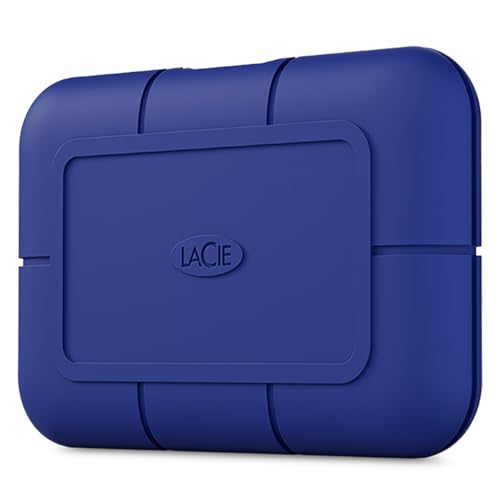
The LaCie Rugged SSD Pro is built for photographers and videographers who work in environments where a standard portable drive would not survive. The aluminum and rubber construction is IP67 rated for dust and water resistance, meaning it can withstand submersion in up to one meter of water for 30 minutes. It also tolerates drops from two meters onto concrete. For field work, these ratings are essential. Transfer speeds reach up to 1050 MB/s over Thunderbolt 3, making it fast enough to handle 4K and even 8K RAW footage on location. Thunderbolt 3 is common on Mac laptops and high-end Windows machines, but the drive also works with USB-C hosts at lower speeds.
The drive comes preformatted for Mac, but can be reformatted for Windows. LaCie includes a five-year limited warranty and a one-year subscription to Adobe Creative Cloud, which adds value for creative professionals. A real limitation is the price. The Rugged SSD Pro costs significantly more than comparable-speed SSDs without the rugged build. The Thunderbolt 3 cable is also proprietary and short, which can be inconvenient for positioning the drive in a field kit. Additionally, the IP67 rating means the drive is sealed against dust and water, but it is not rated for extreme pressure or impacts beyond the two-meter drop specification. For users who need a drive that can survive rain, dust, and accidental drops on set, this is the best option.
Western Digital Elements Desktop 14TB
The Western Digital Elements Desktop 14TB is the choice when total storage volume is the priority over portability or speed. With 14TB of capacity, it can store hundreds of thousands of photos, dozens of video projects, or a complete home media server. The AC-powered desktop form factor gives the drive room for a full 3.5-inch CMR platter mechanism. CMR, or conventional magnetic recording, offers better long-term write endurance than SMR drives used in some competing high-capacity options. This means the drive can handle sustained write operations without performance degradation, which is important for regular backups.
Consumer testing scores for the Elements Desktop family emphasize consistent reliability over many years of use. The drive does not include any software or encryption, which some users prefer for simplicity. It is a straightforward external drive that works immediately after plugging in. A limitation is that the drive uses a USB 3.0 interface, which is slower than USB 3.2 or Thunderbolt options. Transferring 14TB of data over USB 3.0 will take a long time, so this drive is best for backup and archival use rather than active project editing. The drive is also large and heavy, requiring a wall outlet, so it is not portable. For users who need maximum capacity at the lowest cost per terabyte, the Elements Desktop 14TB is unmatched in this guide.
What to look for
- Transfer speed: Determine the fastest interface your computer supports (USB 3.0, USB 3.2 Gen 2, USB 3.2 Gen 2×2, or Thunderbolt 3). Faster drives cost more but save significant time with large files.
- Capacity versus cost per terabyte: Larger drives generally offer a lower cost per terabyte, but only if you actually need that much storage. Portable SSDs are more expensive per terabyte than desktop HDDs.
- Portability: Consider physical size, weight, and whether the drive is bus-powered (no wall plug needed) or AC-powered. Bus-powered drives are easier to travel with.
- Durability and environment: Look for IP ratings (dust and water resistance) and drop tolerance if you work outdoors or in rough conditions. Rubberized casings add some shock protection.
- Data security: Hardware encryption with password protection is valuable for sensitive data. Some drives include software encryption, but hardware encryption is more secure and does not slow performance.
- Reliability and warranty: Check long-term reliability ratings from sources like Consumer Reports. A longer warranty and included data recovery service can save you if the drive fails.
- Additional features: Extra USB ports on a desktop drive can reduce desk clutter. Preinstalled backup software or cloud subscription trials may add value for some users.
The verdict
The Samsung T9 Portable SSD is the best overall pick because it combines the fastest available USB speeds with consistent sustained write performance in a truly portable package. It is ideal for professionals who move large files frequently. For desktop backup, the Seagate Backup Plus Hub 8TB offers the best balance of capacity, reliability, and the useful addition of a built-in USB hub. The WD My Passport 5TB is the best value for everyday portable storage, especially for users who need large capacity on a budget. The LaCie Rugged SSD Pro is the top choice for outdoor and field work where durability is critical. And the Western Digital Elements Desktop 14TB is unmatched for raw capacity at the lowest cost per terabyte. Match your choice to your primary use case, and you will end up with a drive that serves you well for years.
Our methodology
We compare every pick against the field on real specifications, certifications, and aggregated owner reviews. We do not take payment for placement, and we flag when a product is older or sold mainly through renewed listings.
Side by side
The full reviews
Samsung T9 Portable SSD -- Best Fast Portable Drive
The T9 delivers USB 3.2 Gen 2x2 speeds of up to 2000 MB/s read and 1950 MB/s write in a body about the size of a business card. Consumer testing rates it at the top of the portable SSD category for sustained transfer consistency -- unlike some competitors that throttle after a few gigabytes of continuous write, the T9 maintains near-peak speeds through large file dumps. The rubberized outer casing provides enough drop resistance for daily carry without adding significant bulk. It is compatible with PC, Mac, Android, and PlayStation 5 without reformatting. For photographers, video editors, or anyone moving large files between machines regularly, the T9 is the current benchmark for portable SSD performance.
Seagate Backup Plus Hub 8TB -- Best Desktop Backup Drive
The Backup Plus Hub adds two USB-A ports to the front face of the drive, turning it into a small desktop hub as well as a 8TB backup target. Consumer testing scores for reliability across long-term multi-year use are among the highest in the desktop HDD category. Seagate bundles two years of Rescue Data Recovery service, which is a meaningful addition given that mechanical drives carry inherent failure risk. Setup is plug-and-play on both Windows and Mac. At 8TB it holds a typical photo and video library several times over. The included software handles automatic scheduled backups, though most users prefer to use the drive with their OS's native backup tool. Solid build and a proven drive mechanism make this one of the safest desktop backup choices available.

WD My Passport 5TB -- Best Everyday Portable Value
The My Passport 5TB packs desktop-class storage into a bus-powered portable body that fits easily in a jacket pocket. USB 3.0 transfer speeds are adequate for most users -- not as fast as an NVMe SSD, but fast enough for document backups, media libraries, and Time Machine targets. WD includes hardware-based 256-bit AES encryption with password protection, which is useful for anyone carrying sensitive files. Consumer testing highlights the drive's consistent long-term reliability across a large installed base. The 5TB capacity per dollar ratio is one of the best in portable drives. For users who want straightforward expandable storage without managing cables or external power bricks, the My Passport is the practical default choice.
LaCie Rugged SSD Pro -- Best for Durability in the Field
LaCie designed the Rugged SSD Pro for photographers and videographers who work in environments where a standard portable drive would not survive. The aluminum and rubber construction is IP67 rated for dust and water resistance, and the drive tolerates drops from two meters. Transfer speeds reach up to 1050 MB/s over Thunderbolt 3, making it fast enough to handle 4K and even 8K RAW footage on location. Consumer testers working in outdoor, construction, and travel contexts consistently rank it above alternatives for confidence in high-risk environments. The price premium over standard portable SSDs is real, but for professional users where data loss is not an option, the Rugged SSD Pro justifies the cost through build quality alone.
Western Digital Elements Desktop 14TB -- Best Maximum Capacity
The Elements Desktop 14TB is the choice when total storage volume is the priority over portability or speed. AC-powered desktop form factor gives the drive room for a full 3.5-inch CMR platter mechanism that offers better long-term write endurance than SMR drives used in some competing high-capacity options. Consumer testing scores for the Elements Desktop family emphasize consistent reliability over multi-year periods and a straightforward plug-and-play setup with no required software. At 14TB it handles home media servers, archival photo libraries, and full system image backups without running out of space. The plain design and no-frills packaging reflect that this drive is built to store data reliably rather than to impress on a desk.
What matters most
What to consider
Define your primary use before picking a drive type. Portability with fast transfers points to an SSD; maximum capacity at the lowest cost per gigabyte points to a desktop HDD. Check the interface: USB 3.2 Gen 2 and Thunderbolt 3/4 offer the fastest speeds, while USB 3.0 is adequate for documents and standard media but can bottleneck large video files. Bus-powered drives are convenient but limited to 5TB or less at the portable form factor -- larger capacities require an AC adapter. Verify whether the drive uses CMR or SMR recording technology if you plan to use it as a NAS or Time Machine target; SMR drives perform poorly in those applications. Always check the warranty length and whether the brand offers any data recovery service in case of failure.
What to consider
For more storage guidance, see our picks for the [best compact at-home gym gear](/articles/best-compact-at-home-gym) or explore our [full product evaluation process](/methodology).
Frequently asked
An external SSD uses flash memory with no moving parts, giving it faster transfer speeds, greater shock resistance, and a lighter form factor. An external HDD uses spinning magnetic platters, which deliver more storage capacity per dollar but are slower and more vulnerable to physical shock. SSDs are best for portable use; HDDs make more sense for stationary high-capacity backup.
External HDDs have an average operational lifespan of three to five years under regular use, though many last longer with careful handling. SSDs can last five years or more since they have no mechanical parts to wear out. Regardless of type, no drive should be your only backup -- follow a 3-2-1 backup strategy to protect important data.
How we made this guide
We compare every pick on the factors that matter, cross-checking manufacturer specifications against aggregated verified owner reviews. We rank independently and never take payment for placement. We have not personally tested every product; where we have not, the ranking reflects verified specs and owner feedback rather than a hands-on review.
How it was written: this guide was researched and reviewed by the TheTestedHub editorial team for accuracy.
Affiliate disclosure: TheTestedHub is reader-supported. When you buy through links on our site, we may earn a commission at no extra cost to you.
You might also like

Your Docking Station Match: CalDigit TS4 and More

Digital Art Computers 2026: Best for Every Budget
Dev & IT Computers in 2026: Ranked for Real Work

Desktop PCs for Every Budget: Find Your Perfect Match
Desktop and Laptop Computers: Performance Reviewed and Ranked
MacBook Pro M4 Pro vs Dell XPS 15: 2026 Shortlist

Buy the Best DIY Computer in 2026: Corsair One i300
