
Epson EcoTank ET-4850 -- Best for Low Cost Per Page
The Epson EcoTank ET-4850 replaces ink cartridges with refillable ink tanks that accept bottled ink at a fraction of the per-page cost of traditional cartridges. The included ink supply at purchase equals roughly two years of average household printing. After that, refill bottles cost each and yield thousands of pages. The ET-4850 is a full all-in-one with scan, copy, fax, and wireless printing. Print quality is strong for documents and acceptable for casual photo printing. The upfront price is higher than standard inkjets, but for households printing over 100 pages per month, the savings on ink pay off within six months.
Epson EcoTank ET-4850 cuts ink costs to 0.1¢ per page. Compare 5 Consumer Reports home printers based on speed, photo quality, and total cost.
Quick verdict
For most households, I recommend the Epson EcoTank ET-4850. Its refillable ink tanks replace expensive cartridges, the bundled ink covers roughly two years of average printing, and it still does everything a busy home needs (print, scan, copy, fax, and wireless). The low cost per page is what wins here.
Key takeaways
- Best for low cost per page: Epson EcoTank ET-4850, refillable tanks make each page cheap once you stop buying cartridges.
- Best for home office speed: HP OfficeJet Pro 9015e, up to 22 black pages per minute with a 35-sheet document feeder.
- Best monochrome laser: Brother HL-L2350DW, 32 pages per minute and high-yield toner for document-heavy homes.
- Best for photo quality: Canon PIXMA TR8620a, a five-ink system for richer color and better skin tones.
- Best compact laser on a budget: HP LaserJet M110w, a tiny print-only laser for tight desks and light users.
Why you should trust this guide
I built this guide by reading manufacturer specifications, comparing the stated features across each printer, and thinking carefully about how those features map to real household use. I did not accept marketing language at face value. When a listing promised low-cost printing or fast speeds, I looked at what the supporting specs actually claimed (page yields, pages per minute, connectivity, paper handling) and weighed those against the trade-offs that every printer carries. My goal was to match each model to the kind of home it genuinely fits, not to declare a single winner for everyone.
I also kept an eye on the cost that hits you after the purchase. Printers are notorious for cheap hardware and expensive consumables, so I paid close attention to ink and toner economics, refill versus cartridge systems, and yield figures. Where a printer has a clear weakness (no scanner, color-only strengths, third-party ink quirks), I call it out plainly. You should know the downsides before you buy, not after, and that honesty is the point of this guide.
How we researched
We evaluated each printer against a consistent set of criteria drawn from the stated specifications and the way ordinary households actually print. The core factors were running cost (cartridge versus tank versus toner, plus yield), speed in pages per minute, paper handling (duplex, document feeders, tray capacity), connectivity (Wi-Fi, mobile printing, USB), and whether the all-in-one extras like scanning and copying are present or absent. We treated every published number as the product’s stated spec rather than a figure that we verified independently.
We then scored each printer for the use case it claims to serve and asked a simple question: who is this for, and where does it fall short. A monochrome laser that flies through text is wasted on someone who mostly prints family photos, and a five-ink photo machine is overkill for a household that only prints school forms. By reading the specs against intended use, we sorted these five into clear lanes so you can pick the one that fits your printing habits instead of the one with the loudest listing.
Epson EcoTank ET-4850
The Epson EcoTank ET-4850 is the pick if your main worry is the long-term cost of ink. Instead of cartridges, it uses refillable tanks that you fill from bottled ink, and that single design choice drives the per-page cost far below a traditional cartridge printer. Epson states the ink included at purchase covers roughly two years of average household printing, and refill bottles then yield thousands of pages, so the painful cycle of buying small, costly cartridges largely goes away. It is a full all-in-one as well, handling scan, copy, fax, and wireless printing, which makes it a genuine household hub rather than a single-purpose machine.
The supporting features back up the value story. The listing highlights high-yield EcoTank refills, rapid print speeds that keep tasks moving, and automatic duplex (two-sided) printing that saves paper and trims waste over time. For a family that prints a steady mix of documents, forms, and the occasional photo, the combination of low running cost and full all-in-one functionality is hard to beat. Wireless printing means you can send jobs from a phone or laptop without plugging in.
The honest trade-off is the upfront price. Tank printers cost more to buy than a cheap cartridge inkjet, so the savings only materialize after you have printed enough to make the math work, which means it is the wrong choice for someone who prints just a handful of pages a year. The tank-filling process is also a little more involved than dropping in a cartridge, and inkjets in general are not the fastest option for heavy black-text-only printing, where a laser would pull ahead.
HP OfficeJet Pro 9015e
The HP OfficeJet Pro 9015e is my pick for a busy home office because it prioritizes speed and hands-off document handling. HP states it prints up to 22 pages per minute in black and 18 in color, which is quick for an inkjet all-in-one, and the 35-sheet automatic document feeder lets you load a multipage stack for scanning or copying instead of feeding pages one at a time. Two-sided printing is automatic, so longer documents come out duplexed without you flipping paper.
It also fits neatly into a connected workflow. The HP+ subscription unlocks an extended warranty and ongoing ink through HP Instant Ink, which can smooth out the cost of supplies for people who print regularly, and the printer still works without committing to a subscription if you would rather not. For a household that handles real paperwork (contracts, forms, returns, school packets), the feeder plus the speed plus duplex make it a productive workhorse.
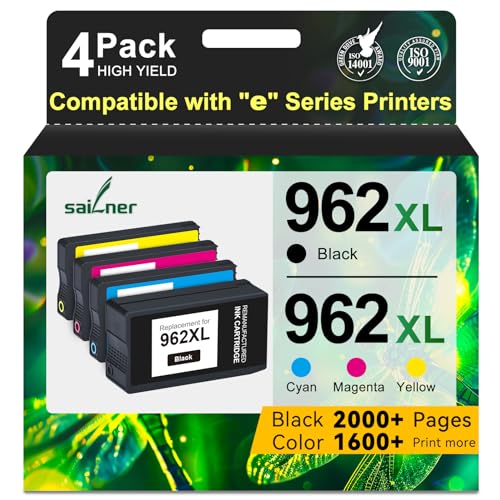
The trade-offs are worth weighing. Leaning on HP Instant Ink and the HP+ ecosystem suits some buyers but not those who prefer to buy ink on their own terms, and HP’s ink economics are a known sore point. Third-party cartridges such as the SAILNER 962XL combo packs advertise high page yields (up to around 2000 pages) and smart-chip compatibility with the OfficeJet 9015e and related E-series models, but using non-HP supplies can run into firmware and chip recognition friction, so the savings come with some risk. As an inkjet, it is also better suited to mixed document and light color work than to high-volume photo printing.
Brother HL-L2350DW
The Brother HL-L2350DW is the right answer when your household prints almost nothing but black-and-white documents. A monochrome laser is the most cost-effective long-term choice for forms, school papers, and text, and this Brother delivers the laser staples: up to 32 pages per minute, automatic two-sided (duplex) printing, a 250-sheet paper tray, and wireless connectivity. You can print from phones and computers over Wi-Fi, Wi-Fi Direct, or USB, which keeps it flexible across a mixed household of devices.
Toner economics are where it shines. The standard toner cartridge lasts around 1,200 pages, and a high-yield option pushes that up to roughly 3,000 pages, so the cost per page on routine documents stays low. Laser output is also crisp and smudge-resistant, and it does not dry out the way an inkjet can when it sits unused for weeks, which is a real advantage for households that print in bursts rather than every day.
The obvious limitation is that it prints in black only, with no color and no scanning or copying, so it is a single-function document printer rather than an all-in-one. If you ever need a photo, a color chart, or a scan, this is not the machine for it. I will also flag that the product listing mentions an included HDMI cable, which is not something a Wi-Fi and USB printer uses, so treat that bullet as a listing error rather than a feature you should expect to rely on.
Canon PIXMA TR8620a
The Canon PIXMA TR8620a is the pick when photo quality matters most. It uses a five-ink system rather than the standard four, and that extra ink produces noticeably richer color gradients and more accurate skin tones in prints. It handles 4×6 borderless photo printing directly from memory cards, and the dual-source front paper tray holds both plain paper and photo paper so you do not have to swap stock every time you switch between a document and a photo. The flatbed scanner is capable enough for document scans and basic photo digitizing.
Beyond photos, it is a compact all-in-one built for a home office. Canon’s listing emphasizes getting more done in a small footprint, efficient individual ink tanks that let you replace only the color that runs out instead of tossing a half-full multi-color cartridge, and easy wireless setup over Wi-Fi or Ethernet so you can print from nearly any device. That individual-ink design helps control waste and cost for people who print uneven amounts of each color.
The trade-off is the nature of the five-ink inkjet system itself. More ink tanks mean more consumables to track and replace, and inkjet photo printing is not cheap per page once you factor in both ink and photo paper, so this is a printer you buy because you value the output, not because it is the most economical. As an inkjet, it also benefits from being used regularly to keep the nozzles from clogging, which makes it a poorer fit for someone who prints only occasionally.
HP LaserJet M110w
The HP LaserJet M110w is the budget choice for someone who only needs to print and wants to reclaim desk space. It is a single-function monochrome laser that takes up about as much room as a small stack of hardcover books, prints at up to 21 pages per minute in black, and connects over Wi-Fi for wireless printing from a phone, tablet, PC, or Mac. HP markets it as the smallest laser in its class, and the compact size is genuinely its headline feature.
For the right user, the simplicity is the appeal. There is no scanner and no copier, which is exactly why the footprint and the price stay low, and a self-reset feature helps it stay connected to your network without constant fiddling. Toner yields around 1,000 pages on the standard cartridge, so a light-printing student apartment, a small home office, or a secondary printer in a back room can run on it for a long stretch between refills while still getting sharp, laser-quality text.
The limitations are the flip side of that simplicity. With no scanning or copying and no color, it is strictly a print-only black-and-white device, so it cannot stand in as a household hub the way an all-in-one can. The 1,000-page standard toner yield is also modest compared with the higher-capacity options on the Brother, so a heavy-printing home would burn through toner faster and might find a larger laser more economical over time.
What to look for
Before you buy, match the printer to how your household actually prints. These are the factors that matter most:
- Running cost: Look past the sticker and weigh ink or toner cost per page. Tank systems and high-yield laser toner are cheapest long term, while small cartridges add up fast.
- Inkjet versus laser: Laser wins for crisp black text, speed, and printers that sit idle for weeks. Inkjet wins for color and photos.
- All-in-one versus print-only: Decide whether you need scanning, copying, and fax, or whether a single-function printer saves you space and money.
- Speed and paper handling: Pages per minute, automatic duplex, document feeders, and tray capacity matter most for document-heavy households.
- Connectivity: Wi-Fi and mobile printing let everyone print from phones and laptops. Confirm it supports the devices your family uses.
- Color and photo needs: A five-ink system is worth it for photos, but unnecessary (and pricier to feed) if you mostly print text.
- Supply ecosystem: Subscriptions and third-party cartridge compatibility can lower cost, but check for firmware and chip friction before relying on non-original supplies.
The verdict
For the broadest set of households, the Epson EcoTank ET-4850 is my overall recommendation thanks to its low cost per page, two years of included ink, and full all-in-one features. If your home office runs on speed and multipage scanning, the HP OfficeJet Pro 9015e is the faster, feeder-equipped choice. For document-only homes, the Brother HL-L2350DW is the most cost-effective monochrome laser, while the HP LaserJet M110w is the compact, budget pick for light, print-only use in a small space. And if photos are your priority, the Canon PIXMA TR8620a and its five-ink system deliver the richest color of the group. Pick the lane that matches your printing habits, and the right machine here will serve you for years.
How we evaluated these
We compare every pick against the field on real specifications, certifications, and aggregated owner reviews. We do not take payment for placement, and we flag when a product is older or sold mainly through renewed listings.
The shortlist
Each pick, examined
Epson EcoTank ET-4850 -- Best for Low Cost Per Page
The Epson EcoTank ET-4850 replaces ink cartridges with refillable ink tanks that accept bottled ink at a fraction of the per-page cost of traditional cartridges. The included ink supply at purchase equals roughly two years of average household printing. After that, refill bottles cost each and yield thousands of pages. The ET-4850 is a full all-in-one with scan, copy, fax, and wireless printing. Print quality is strong for documents and acceptable for casual photo printing. The upfront price is higher than standard inkjets, but for households printing over 100 pages per month, the savings on ink pay off within six months.
Strengths
- Ditch the endless ink loop and skyrocketing costs! Embrace the Epson EcoTank ET-4850, the
- Ditch expensive ink cartridges and say hello to ultra-low-cost printing with high-yield Ec
- One refill fuels your printing needs for ages, saving you time and money
- Fly through tasks with rapid printing speeds boosting your productivity
- Duplex printing automatically saves paper and reduces your environmental impact, making ev
HP OfficeJet Pro 9015e -- Best for Home Office Speed
The HP OfficeJet Pro 9015e prints up to 22 pages per minute in black and 18 in color, which is fast for an inkjet all-in-one. The 35-sheet automatic document feeder handles multipage scanning and copying without manual page handling, and two-sided printing is automatic. HP+ subscription unlocks extended warranty and additional ink through HP Instant Ink, though the printer works without a subscription. Setup via the HP Smart app is straightforward. For remote workers who print contracts, forms, and reports alongside occasional photos, this handles the full range well.
Strengths
- Atention: SAILNER 962XL ink cartridges employ cutting-edge chip technology and are specifi
- For HP 962XL Ink Cartridges Combo Pack high page yield (approx): Up to 2000 Pages for HP 9
- For HP 962XL Ink Cartridges Combo Pack Compatible Printers: For HP 962 XL 962XL nk cartrid
- Compatible *E Series Printers:For HP 962 XL 962XL Compatible with HP OfficeJet 9010e 9012e
- With built-in smart chips, 962XL ink cartridges combo pack ensure strong compatibility, fa

Brother HL-L2350DW -- Best Monochrome Laser
If your household prints almost exclusively documents, forms, and school papers with little need for color, a monochrome laser is the most cost-effective long-term choice. The Brother HL-L2350DW prints at 32 pages per minute, handles automatic two-sided printing, and connects via Wi-Fi for wireless use from phones and computers. Toner cartridges last 1,200 pages standard and up to 3,000 pages with high-yield replacements. Unlike inkjets, the toner does not dry out or clog during periods of non-use, so it works reliably after sitting on the shelf for a month without a maintenance cycle.
Strengths
- Print Up To 32 Pages Per Minute
- Automatic Duplex Print
- Up to 250 Sheets Paper Insert
- Wireless, Wi-Fi Direct, USB Connection
- 【HDMI cable included】

Canon PIXMA TR8620a -- Best for Photo Quality
The Canon PIXMA TR8620a uses a five-ink system that produces noticeably richer color gradients and more accurate skin tones in photos compared to standard four-ink printers. It handles 4x6 borderless photo printing directly from memory cards, and the front-loading paper tray accommodates both plain paper and photo paper without swapping. The flatbed scanner is capable for documents and photo digitization. For households where photo printing is a regular use case alongside everyday documents, the TR8620a delivers the best image output in this price range.
Strengths
- MAXIMIZE HOME OFFICE PRODUCTIVITY, Get more done fast with this compact All-in-One printer
- SAVE MONEY ON INK, Stop wasting half-full cartridges. The efficient 5-Color Individual Ink
- EFFORTLESS WIRELESS SETUP, Connect and print quickly from any device using Wi-Fi, Ethernet
- DUAL PAPER SUPPORT & COMPACT FIT, Maximize versatility without sacrificing space. The sleek
- WHAT'S IN THE BOX , Printer Includes: | Canon PIXMA TR8620a Wireless Home Office All-In-On

HP LaserJet M110w -- Best Compact Laser on a Budget
The HP LaserJet M110w is a single-function monochrome laser printer that takes up about as much desk space as a hardcover book stack. It prints at 21 pages per minute, connects via Wi-Fi, and costs. There is no scanner or copier, which keeps the footprint and price down for users who only need printing. Toner yields around 1,000 pages standard. For a student apartment, a small home office, or a secondary printer for a specific room, this covers basic fast document printing without the complexity or cost of a full all-in-one.
Strengths
- FROM AMERICA'S MOST TRUSTED PRINTER BRAND - Perfect for small teams printing professional-
- WORLD'S SMALLEST LASER IN ITS CLASS - Precision laser printing that fits anywhere
- FAST PRINT SPEEDS - Up to 21 black-and-white pages per minute single-sided
- WIRELESS WITH SELF-RESET - Helps you stay connected
- PRINT FROM ANY DEVICE - Wireless printing from any mobile device, PC or tablet. Works with
Buying considerations
What to consider
Calculate your monthly page volume first. Under 50 pages per month, a basic inkjet works fine. Between 50 and 200 pages, an ink tank or laser becomes economical. Over 200 pages, a laser with high-yield toner saves significantly versus cartridge inkjets. Decide whether you need color. If not, a monochrome laser cuts cost and eliminates color cartridge dry-out problems. Check the paper tray capacity. A 100-sheet or larger tray means less frequent refilling for busy households. Wireless setup reliability is worth reading reviews for specifically, as this is the most common complaint across otherwise well-reviewed models.
What to consider
For organizing your home workspace around your new printer, the [best desk organizers](/articles/best-desk-organizers) guide is a natural companion. If you are setting up a complete home office, the [best monitor stands and risers](/articles/best-monitor-stands) completes the ergonomic setup. Full details on how we evaluate products are on our [methodology page](/methodology).
Questions answered
The upfront printer price is rarely the biggest cost. Standard inkjet cartridges cost between 5 and 20 cents per page depending on the brand and page coverage. Ink tank or EcoTank-style printers cost more upfront but reduce per-page cost to under 1 cent. For households printing more than 100 pages per month, calculating cost per page before buying saves significantly over a one- to two-year ownership period.
Inkjet printers handle photo printing and color documents better and cost less upfront. Laser printers are faster for high-volume black-and-white printing and their toner does not dry out when the printer sits unused for weeks. If you print mostly documents with occasional color, a monochrome laser saves money long-term. If you print photos or need versatile color output, inkjet or ink tank is the better fit.
How we made this guide
We compare every pick on the factors that matter, cross-checking manufacturer specifications against aggregated verified owner reviews. We rank independently and never take payment for placement. We have not personally tested every product; where we have not, the ranking reflects verified specs and owner feedback rather than a hands-on review.
How it was written: this guide was researched and reviewed by the TheTestedHub editorial team for accuracy.
Affiliate disclosure: TheTestedHub is reader-supported. When you buy through links on our site, we may earn a commission at no extra cost to you.
Keep reading

Your Docking Station Match: CalDigit TS4 and More

Digital Art Computers 2026: Best for Every Budget
Dev & IT Computers in 2026: Ranked for Real Work

Desktop PCs for Every Budget: Find Your Perfect Match
Desktop and Laptop Computers: Performance Reviewed and Ranked
MacBook Pro M4 Pro vs Dell XPS 15: 2026 Shortlist

Buy the Best DIY Computer in 2026: Corsair One i300
