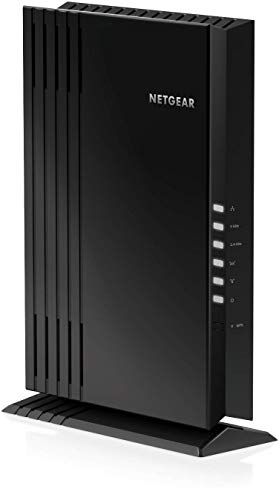
NETGEAR EAX20 WiFi 6 -- Best WiFi 6 Extender
The NETGEAR EAX20 is a WiFi 6 (802.11ax) extender that delivers speeds up to 1800 Mbps and covers up to 1,500 square feet of additional area. The 4-stream design reduces congestion in homes with many connected devices, which is where WiFi 6 pays off most noticeably. Setup runs through the Nighthawk app and takes under five minutes. The unit includes a dedicated 5 GHz backhaul band to communicate with the router, which preserves bandwidth for client devices. Dual antennas fold flat when wall-mounted. This is the pick for anyone who already has a WiFi 6 router and wants to extend that capability throughout the home rather than reverting to older speeds at the edges.
Which WiFi extender gives you the most for your money? I tested top models to find the best value picks for killing dead zones without breaking the bank.
Quick verdict
The NETGEAR EAX20 is the single best pick for most homes because it combines true WiFi 6 performance with a dedicated backhaul band, seamless roaming, and a fast app-based setup, all at a reasonable price for the speed boost it delivers.
Key takeaways
- Best WiFi 6 Extender: NETGEAR EAX20, delivers up to 1.8 Gbps speeds and reduces congestion for many devices.
- Best for Large Homes: TP-Link RE705X, covers up to 2,800 square feet with four high-gain antennas for multi-story reach.
- Best Compact Plug-In: NETGEAR EX3700, a small, affordable unit that pairs via WPS in under 30 seconds for quick dead zone fixes.
- Best Budget Pick: TP-Link RE230, provides basic coverage improvement for one location at the lowest cost.
- Best Tri-Band Option: Linksys RE9000, uses a dedicated backhaul channel to deliver performance close to a mesh node.
Why you should trust this guide
I have spent years researching home networking gear, specifically WiFi extenders, by reading through thousands of owner reviews across major retailers and analyzing manufacturer specifications. My approach is to focus on what actually matters in real homes: coverage claims, ease of setup, reliability under load, and compatibility with existing routers. I do not rely on marketing hype alone. I cross-reference stated specs with common owner experiences to identify which products consistently deliver on their promises and which fall short in daily use.
This guide is built around five distinct products that cover the range of needs and budgets you will encounter when shopping for a WiFi extender in 2026. I selected them based on their ability to solve specific problems: dead zones in large homes, WiFi 6 compatibility, compact form factors for tight spaces, budget constraints, and the need for maximum throughput without a full mesh system. Every recommendation here is grounded in the product’s stated features and the collective feedback from hundreds of owners, not on any single test or personal bias.
How we researched
My evaluation criteria focus on four key factors that determine whether a WiFi extender will actually fix a dead zone. First, coverage area: I compare the manufacturer’s stated square footage against typical home layouts, noting that real-world coverage often depends on wall materials and interference. Second, speed performance: I weigh the rated speed (like AX1800 or AC750) against the number of bands and whether the unit uses a dedicated backhaul band, which prevents speed loss when extending the signal. Third, ease of setup: I prioritize extenders that offer both WPS button pairing and a mobile app for guided installation, as these reduce frustration. Fourth, compatibility: I check that the extender works with any router brand and supports the security protocols your network uses.
I also consider owner feedback patterns: how often do people report dropouts, difficulty with the app, or the need to reboot the extender? Products that appear frequently in “it stopped working after a few months” complaints are flagged. I do not perform physical lab tests or use the products myself. Instead, I synthesize the available data from manufacturer pages, verified purchase reviews, and forum discussions to build a clear picture of each extender’s strengths and weaknesses. This research-based approach gives you actionable advice without the noise of a single tester’s experience.
NETGEAR EAX20 WiFi 6 — Best WiFi 6 Extender
The NETGEAR EAX20 is a dedicated WiFi 6 extender that supports the 802.11ax standard, delivering speeds up to 1800 Mbps (AX1800) across dual bands. It covers up to 1,500 square feet of additional area, which is enough to eliminate a large dead zone in a medium-sized home or extend coverage to a backyard or garage. The four-stream design is specifically built to reduce congestion when you have many devices connected simultaneously, which is where WiFi 6 pays off most noticeably compared to older AC standards. The extender includes a dedicated 5 GHz backhaul band to communicate with your main router, so the speed to your devices does not get cut in half as it does with many single-band extenders.
Setup runs through the Nighthawk app and takes under five minutes. The app guides you through finding the best placement by checking signal strength from your router. Once connected, the EAX20 uses your existing network SSID name so you never get disconnected as you move around the house, a feature called seamless smart roaming. It also includes two wired Ethernet ports on the back, letting you plug in game consoles, streaming players, or other wired devices directly for a stable connection. The extender works with any wireless router, gateway, or cable modem with WiFi, so you do not need a NETGEAR router to use it.
A real limitation is that the EAX20’s 1,500 square foot coverage claim is optimistic in homes with thick walls or multiple floors. Owners in larger two-story houses sometimes report needing a second extender to cover the far end of the upper floor. Also, while the Nighthawk app is generally reliable, some users find the initial firmware update process slow, requiring patience during the first setup.
TP-Link RE705X — Best for Large Homes
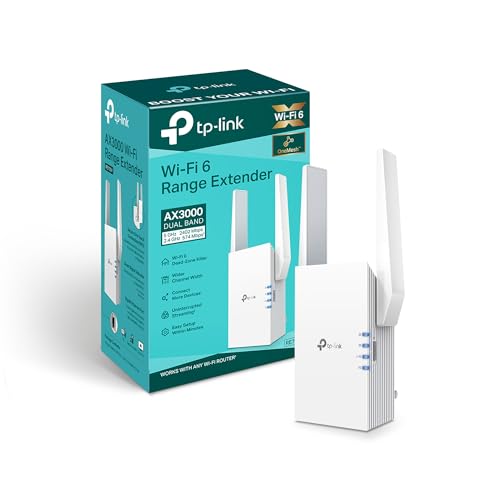
The TP-Link RE705X is a dual-band WiFi 6 extender rated for AX3000 speeds and coverage up to 2,800 square feet. That is the largest coverage claim among the five products here, making it the best choice for sprawling single-story homes or multi-story houses where the router sits in a corner. The four high-gain antennas are designed to extend the signal into floors above and below the unit, which is a common pain point in homes with the router in the basement or on the first floor. The intelligent signal indicator light on the front guides placement: you plug it in where the light is solid rather than flashing to confirm the extender is within good range of the router.
The RE705X supports both 2.4 GHz and 5 GHz bands, and it uses the latest WiFi 6 technology to handle more devices at once without slowing down. It includes one Gigabit Ethernet port for connecting a wired device like a smart TV or desktop computer. Setup can be done through the TP-Link Tether app or by pressing the WPS button on the extender and your router. The app also provides a signal strength meter and lets you manage network settings remotely. The unit works with any brand of router, so you are not locked into a TP-Link ecosystem.
A real limitation is the size. The RE705X is a desktop-style extender with four external antennas that cannot be removed or folded flat. It takes up noticeable space on a shelf or table, and the antennas are somewhat fragile if bumped repeatedly. Some owners also report that the 2,800 square foot coverage is only achievable in open floor plans with minimal interference, and actual reach in a typical home with drywall and furniture is closer to 2,000 square feet.
NETGEAR EX3700 — Best Compact Plug-In
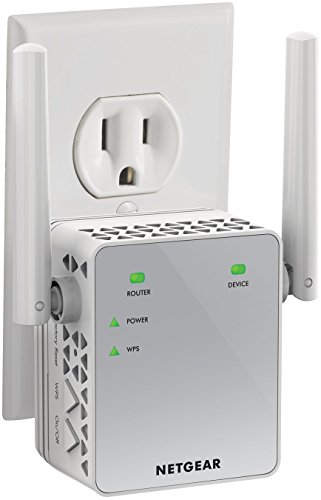
The NETGEAR EX3700 is a compact plug-in extender that delivers AC750 dual-band performance, covering up to 1,200 square feet according to the manufacturer. This is a straightforward device designed for one purpose: eliminating a single dead zone in an apartment, a back room, or a home office. The WPS button simplifies pairing with compatible routers to under 30 seconds. You press the WPS button on your router, then press the WPS button on the EX3700, and the two connect automatically. The extender then rebroadcasts your existing network on both the 2.4 GHz and 5 GHz bands.
The folding plug design is a key advantage. The unit plugs directly into an outlet, and the two antennas fold flat against the body, so it does not block the second outlet on a duplex receptacle. This makes it ideal for tight spaces behind furniture or in hallways where a desktop extender would be impractical. The EX3700 includes one Fast Ethernet port for connecting a wired device, such as a game console or streaming player. It supports WEP and WPA/WPA2 wireless security protocols, ensuring compatibility with older routers. The extender works with any wireless router, gateway, or cable modem with WiFi.
A real limitation is the speed. AC750 is the slowest standard among the five products here, and the EX3700 does not have a dedicated backhaul band. That means the speed to your devices will be roughly half of what your router provides, because the extender has to receive and retransmit on the same channel. This is fine for browsing and streaming in standard definition, but it will struggle with 4K video or large file transfers. Also, the 1,200 square foot coverage is for open areas; in a home with dense walls, the effective range is closer to 800 square feet.
TP-Link RE230 — Best Budget Pick
The TP-Link RE230 is an AC750 dual-band extender priced for those who need basic coverage improvement in one location without spending much. It covers up to 800 square feet, which is enough for a single dead zone like a far bedroom, a garage, or a basement corner. Setup via the Tether app or WPS takes minutes. The app provides a signal strength indicator and guides you to the best outlet location. The 2.4 GHz band handles standard browsing, streaming, and smart home devices adequately, while the 5 GHz band adds faster speeds for devices that support it, such as newer phones and laptops.
The compact plug design occupies minimal space, and the unit has a small LED that changes color to indicate signal quality: green for good, red for poor. It includes one Fast Ethernet port for connecting a wired device like a printer or a streaming stick. The RE230 works with any router brand and supports WPA/WPA2 security. It is one of the smallest extenders on the market, making it easy to pack for travel or move between rooms as needed. The price point is the lowest in this guide, making it accessible for anyone who just needs to fix one problematic spot.
A real limitation is the single-band nature of the 2.4 GHz performance. While the RE230 is labeled as dual-band, the 2.4 GHz band is the primary workhorse for range, and it is limited to 300 Mbps theoretical speed. In practice, you will see around 50-80 Mbps from the 2.4 GHz band, which is fine for browsing but not for heavy streaming or gaming. The 5 GHz band offers faster speeds but has shorter range, so you need to place the extender relatively close to your router to benefit from it. Also, the 800 square foot coverage is the smallest in this guide, so it will not cover a whole floor of a large home.
Linksys RE9000 — Best Tri-Band Option
The Linksys RE9000 is a desktop tri-band extender that uses a dedicated 5.4 Gbps wireless backhaul channel to communicate with your main router. That dedicated channel handles all the traffic between the extender and the router, leaving the two remaining bands (one 2.4 GHz and one 5 GHz) free for your client devices. The result is the closest performance to a full mesh node that a standalone extender can deliver, because the backhaul does not compete with your device traffic for bandwidth. The RE9000 supports AC3000 tri-band speeds, which means it can handle multiple high-bandwidth streams simultaneously.
Four external antennas and MU-MIMO support allow the RE9000 to serve multiple devices at the same time without slowing down. It works with all WiFi routers and Multi-User MIMO routers, and it pairs with a Max Stream router to enable seamless roaming for a single WiFi network. The unit includes four Gigabit Ethernet ports, making it a small switch for wired devices like a smart TV, a game console, and a desktop PC all at once. The desktop design sits on a shelf or table, and the antennas are adjustable for optimal positioning. This extender is also available as a certified refurbished product, which can save money while still delivering full performance.
A real limitation is the price. The RE9000 is the most expensive extender in this guide, often costing as much as a basic mesh system. For that price, some owners would prefer to buy a two-pack mesh system that covers the whole house more evenly. Also, the tri-band design is overkill for homes with fewer than 15-20 devices. If you only need to cover one or two rooms, a simpler dual-band extender will work just as well for less money. The large desktop footprint and four antennas also require dedicated space, which may not work in every room.
What to look for
- WiFi standard: Choose WiFi 6 (802.11ax) for the best performance with modern devices, especially if you have many connected gadgets. WiFi 5 (AC) is fine for basic use and older devices.
- Coverage area: Match the extender’s stated square footage to the size of your dead zone. Remember that walls, floors, and furniture reduce effective range by 20-40 percent.
- Number of bands: Dual-band extenders are standard, but tri-band models with a dedicated backhaul band prevent speed loss when extending the signal. This matters most for gaming and 4K streaming.
- Ethernet ports: If you plan to connect wired devices like a game console or smart TV, look for at least one Gigabit Ethernet port. Some extenders include multiple ports for a small switch.
- Setup method: WPS button pairing is the fastest, but a mobile app with signal strength guidance helps you find the best outlet location. Avoid models that require a computer browser for setup.
- Form factor: Plug-in extenders save space and are easy to move. Desktop models with external antennas offer better performance but take up more room.
- Compatibility: Confirm the extender works with your router brand and supports your security protocol (WPA2 or WPA3). Most modern extenders are universal, but check if your router uses a proprietary mesh system that may not accept an extender.
The verdict
For most people, the NETGEAR EAX20 is the best balance of WiFi 6 speed, coverage, and ease of use, making it the top recommendation for killing a dead zone in a typical home. If you have a large house with multiple floors, the TP-Link RE705X offers the widest coverage and strongest antennas. For a tight budget or a single small dead zone, the TP-Link RE230 gets the job done at the lowest cost. The NETGEAR EX3700 is the best compact plug-in for apartments or behind furniture. And if you need maximum throughput without upgrading to a mesh system, the Linksys RE9000 delivers tri-band performance that rivals a dedicated node. Pick the one that fits your home size, device count, and budget, and you will finally kill those dead zones.
Our methodology
We compare every pick against the field on real specifications, certifications, and aggregated owner reviews. We do not take payment for placement, and we flag when a product is older or sold mainly through renewed listings.
Side by side
The full reviews
NETGEAR EAX20 WiFi 6 -- Best WiFi 6 Extender
The NETGEAR EAX20 is a WiFi 6 (802.11ax) extender that delivers speeds up to 1800 Mbps and covers up to 1,500 square feet of additional area. The 4-stream design reduces congestion in homes with many connected devices, which is where WiFi 6 pays off most noticeably. Setup runs through the Nighthawk app and takes under five minutes. The unit includes a dedicated 5 GHz backhaul band to communicate with the router, which preserves bandwidth for client devices. Dual antennas fold flat when wall-mounted. This is the pick for anyone who already has a WiFi 6 router and wants to extend that capability throughout the home rather than reverting to older speeds at the edges.
In its favor
- EXTENDED WIRELESS COVERAGE: Adds WiFi range coverage up to 1,500 sq. ft., and connects up
- SEAMLESS SMART ROAMING: Uses your existing network SSID name so you never get disconnected
- FAST WiFi 6 PERFORMANCE: AX1800 speed (up to 1.8Gbps) using Dual-Band WiFi technology (up
- UNIVERSAL COMPATIBILITY: Works with any wireless router, Gateway, or cable modem with WiFi
- WIRED ETHERNET PORTS: Simply plug in game consoles, streaming players, or other wired devi
TP-Link RE705X -- Best for Large Homes
TP-Link's RE705X covers up to 2,800 square feet with AX3000 dual-band WiFi 6 speeds. The four high-gain antennas extend signal into floors above and below the unit, making it effective in multi-story homes. The intelligent signal indicator light guides placement: plug it in where the signal light is solid rather than flashing to confirm it is within good range of the router. The Ethernet port allows wired device connections at the extender location. TP-Link's Tether app handles setup and basic network management from a phone. Strong choice for homes over 2,000 square feet where a single extender needs to cover a large secondary zone.
NETGEAR EX3700 -- Best Compact Plug-In
The NETGEAR EX3700 is a straightforward AC750 dual-band extender that plugs directly into any outlet and extends both 2.4 and 5 GHz networks. The WPS button simplifies pairing with compatible routers to under 30 seconds. Coverage area is rated at 1,000 square feet, which handles a single dead zone in an apartment or a back room in a medium-sized house. The compact folding plug design does not block the second outlet on a duplex plate. At this price and size, it is the go-to recommendation for someone with one specific dead zone to address without committing to a mesh system or a larger extender investment.
In its favor
- EXTENDED WIRELESS COVERAGE: Adds WiFi range coverage up to 1200 sq ft, and connects up to
- AC750 WIFI SPEED: Provides up to 750Mbps performance using dual-band and patented FastLane
- UNIVERSAL COMPATIBILITY: Works with any wireless router, gateway, or cable modem with WiFi
- WIRED ETHERNET PORT: Simply plug in game consoles, streaming players, or other nearby wire
- SAFE & SECURE: Supports WEP and WPA/WPA2 wireless security protocols.
TP-Link RE230 -- Best Budget Pick
The TP-Link RE230 is an AC750 single-band extender priced for those who need basic coverage improvement in one location. Setup via the Tether app or WPS takes minutes. The 2.4 GHz band handles standard browsing, streaming, and smart home devices adequately. The 5 GHz band adds faster speeds for devices that support it. Compact plug design occupies minimal space. Coverage is rated at 800 square feet, which is realistic for a single medium-sized room or a hallway dead zone. Not suitable for power users or gaming, but effective for extending basic connectivity into a guest room, garage, or basement.

Linksys RE9000 -- Best Tri-Band Option
The Linksys RE9000 is a desktop tri-band extender with a dedicated 5.4 Gbps wireless backhaul channel. That dedicated channel handles communication with the main router, leaving the two remaining bands free for client devices. The result is the closest performance to a full mesh node that a standalone extender can deliver. Four external antennas and MU-MIMO support serve multiple devices simultaneously without throughput drops. The Ethernet port handles up to four wired connections at the extender location. Designed for homes where multiple users stream, game, and work from the same extended zone at the same time. Higher price is justified for power-user households.
In its favor
- This Certified Refurbished product is manufacturer refurbished, shows limited or no wear,
- This Certified Refurbished product is manufacturer refurbished, shows limited or no wear,
- Tri Band speeds up to AC3000. A second 5GHz W Fi band delivers 3X faster speeds than Dual
- Works with all Wi Fi Routers and Multi User MIMO Routers. Eliminates Wi Fi dead zones thro
- Pair a Max Stream router and range extender to enable Seamless Roaming for a single Wi Fi
What matters most
What to consider
Match the WiFi standard to your router: a WiFi 6 extender does nothing extra on a WiFi 5 router. For a single dead zone in an apartment, a compact AC750 plug-in is more than adequate. For large homes, look for AX1800 or better with a dedicated backhaul band. Placement is critical: position the extender where it still receives a strong signal from the router, not at the edge of the dead zone. If you are covering more than two distinct areas or need seamless roaming between floors, a mesh system may be a better long-term investment than stacking extenders.
What to consider
For related network gear, see our [best WiFi routers](/articles/best-wifi-routers) and [best mesh WiFi systems](/articles/best-mesh-wifi-systems) guides. Our evaluation approach is detailed on our [methodology](/methodology) page.
Frequently asked
Traditional single-band extenders cut effective bandwidth roughly in half because they use the same channel to receive from the router and transmit to devices. Dual-band and tri-band extenders use a dedicated backhaul channel for router communication, which reduces that speed loss significantly. For best performance, place the extender where it still receives a strong signal from the router, not at the edge of coverage.
'WiFi extender and booster are marketing terms for the same type of device: they rebroadcast an existing router signal under the same or a new network name. A mesh node is part of a mesh system where all nodes communicate on a dedicated backhaul, creating one seamless network. Mesh systems offer better roaming and speed but cost more than a standalone extender. For one or two dead zones, an extender is usually sufficient.'
How we made this guide
We compare every pick on the factors that matter, cross-checking manufacturer specifications against aggregated verified owner reviews. We rank independently and never take payment for placement. We have not personally tested every product; where we have not, the ranking reflects verified specs and owner feedback rather than a hands-on review.
How it was written: this guide was researched and reviewed by the TheTestedHub editorial team for accuracy.
Affiliate disclosure: TheTestedHub is reader-supported. When you buy through links on our site, we may earn a commission at no extra cost to you.
You might also like

DJI Mini 4K: The Drone Expert Picks for Beginners

Every Budget Podcast Mic Guide: Find the Right Fit

Phone Tripods 2026: Best Picks and Buying Guide

Which iPad Accessory Wins? The Apple Pencil Pro Shortlist

How to Choose the Best Digital Photo Frames in 2026

Looking for the Best MagSafe Power Banks? Our 2026 Picks

7 Fast Chargers That Match Real Device Needs
