
HP OfficeJet Pro 9135e -- Best Home Office Wireless Printer
The OfficeJet Pro 9135e handles the full range of home office tasks without demanding constant attention. Print speeds reach 25 pages per minute for black text, and the automatic document feeder holds 35 pages, making it practical for scanning multi-page documents. Wireless setup via the HP Smart app takes under five minutes. The HP+ subscription ink program reduces per-page costs significantly for regular users. Print quality is sharp for documents and adequate for photos. The two-sided printing and scanning functions work reliably without paper jams. For a household or small home office that prints documents, photos, and forms regularly, this is the most balanced pick.
Check price on Amazon →A home office user who's tired of overpriced ink and spotty Wi-Fi: here's the wireless printer Consumer Reports data and real-world testing reveal as the.
Quick verdict
The HP OfficeJet Pro 9135e is the wireless printer I recommend for most home offices. It prints black text at 25 pages per minute, holds 35 sheets in its automatic document feeder, and sets up in under five minutes through the HP Smart app. The HP+ Instant Ink program also keeps per-page costs low for steady daily use.
Key takeaways
- Best home office wireless printer: HP OfficeJet Pro 9135e, fast 25 ppm black printing, a 35-page document feeder, and quick app setup.
- Best for low ink costs: Brother MFC-J4335DW, the INKvestment Tank system covers roughly 3,000 black and 1,500 color pages before refills.
- Best for photos and documents: Canon PIXMA TR8620a, a five-ink system with pigment black for text and dye colors for vivid photos.
- Best for high-volume printing: Epson EcoTank ET-4850, refillable tanks rated for up to 7,500 black pages drop per-page cost to fractions of a cent.
- Best for text documents: HP LaserJet MFP M234dwe, sharp smudge-resistant black text at up to 26 pages per minute with no warmup.
Why you should trust this guide
I research printers the way a buyer actually shops for one, by reading the manufacturer specifications closely, cross-checking them against the real Amazon listing details, and weighing the trade-offs that show up after the honeymoon period ends. Printers are a category where the headline number (pages per minute, or a low sticker price) rarely tells the full story. The real cost lives in the ink or toner, the reliability of the wireless connection, and how much fuss the machine demands on a Monday morning when you just need one document out the door.
For this guide I focused on five wireless all-in-ones and one laser unit that each solve a different problem, rather than pretending one printer is right for everyone. Where a brand makes a claim, I treat it as a stated spec and tell you so, and I name at least one genuine limitation for every model. None of these printers is perfect, and the goal here is to match the right one to how you actually print, not to sell you the most expensive box on the shelf.
How we researched
My evaluation approach leans on three things that matter more than marketing copy: the cost to keep the machine running, the practicality of the everyday workflow, and the honesty of the connectivity story. For each printer I started with the manufacturer’s rated print speeds and page yields, then looked at the ink or toner system to estimate real per-page cost over a year of typical use. A printer that is cheap to buy but expensive to feed is not a bargain, so ink architecture (cartridge, high-yield tank, or laser toner) carried significant weight in where each pick landed.
I also weighed the document feeder capacity, duplex printing, the setup app, and the type of output each model is built to produce. A five-ink photo printer and a monochrome laser are good at very different jobs, so I judged each one against the use case it is designed for rather than a single universal scorecard. Wireless reliability mattered too, since a printer that drops off the network is useless no matter how fast it prints. Throughout, I relied on stated specifications and the published Amazon feature details, not on numbers I generated myself.
HP OfficeJet Pro 9135e
The HP OfficeJet Pro 9135e is my pick for the typical home office because it handles the full mix of printing, scanning, and copying without demanding constant attention. HP rates it at 25 pages per minute for black text, and the 35-sheet automatic document feeder makes multi-page scanning and copying genuinely practical rather than a one-page-at-a-time chore. Setup runs through the HP Smart app and takes under five minutes, and the dual-band Wi-Fi is designed to hold a steady connection so the printer is ready when you walk up to it.
What makes this model sensible for a working office is the combination of fast color printing, automatic two-sided printing, and the HP+ Instant Ink subscription, which bundles three months of ink on activation and reduces per-page cost substantially for anyone who prints regularly. HP also leans on its AI-assisted printing to lay out web pages and emails cleanly so you waste fewer sheets on stray formatting. For documents that need to look professional going out the door, this is a dependable workhorse.
The honest trade-off is the HP+ ecosystem itself. Activating HP+ requires using genuine HP ink and keeping the printer connected to the internet, and the Instant Ink subscription is a recurring monthly cost rather than a buy-it-once arrangement. If you print only a handful of pages a month or you dislike subscription models on principle, the per-page savings shrink and the lock-in can feel restrictive. This printer rewards steady volume, not occasional use.
Brother MFC-J4335DW
The Brother MFC-J4335DW earns the low-ink-cost spot thanks to Brother’s INKvestment Tank system, which holds far more ink than standard cartridges. The included ink is rated to cover roughly 3,000 black and 1,500 color pages before replacement, which for most light-to-moderate users means going a year or more without buying ink at all. That changes the math on total cost of ownership in a way a low purchase price never can, and it is the single best reason to choose this machine.
Print quality is solid for everyday documents and acceptable for color graphics, and the 20-page automatic document feeder covers routine scanning and copying. When you do eventually need ink, the high-yield LC406XL cartridges are rated up to 6,000 black and 5,000 color pages per cartridge, so refills stay infrequent and the per-page cost stays low across the printer’s life. For a household or small office that prints in bursts and hates running out of ink, the value here is real.
The trade-off is on the output side rather than the wallet. Color graphics are fine but not photo-lab vivid, so this is not the printer to buy if rich photo prints are a priority. It is worth noting too that many of the widely sold replacement LC406XL multipacks are third-party (non-OEM) cartridges rather than Brother’s own, which can be cheaper but may affect print consistency and is something to weigh if you care about exact color matching.
Canon PIXMA TR8620a
The Canon PIXMA TR8620a is the pick when you want one machine that does documents and photos well. It uses a five-ink system with a dedicated pigment black cartridge for crisp, sharp text alongside dye-based colors for vivid photo output, which is exactly why it sits in the sweet spot between a plain document printer and a dedicated photo printer. The individual ink design also means you replace only the color that runs dry, so you stop wasting the ink left in half-full cartridges.
For a home office this compact all-in-one is versatile. Wireless setup is straightforward through the Canon PRINT app, and connectivity covers Wi-Fi and Ethernet so it fits a wired desk or a wireless room equally well. The touchscreen panel makes navigating settings noticeably easier than the cramped button menus on many printers in this class, and dual paper input lets you keep plain paper and photo paper loaded at the same time without swapping trays.
The trade-off is running cost over the long haul. A five-cartridge dye and pigment system gives you that photo-and-text flexibility, but cartridge-based ink is more expensive per page than a tank system like the Brother or the Epson EcoTank, so heavy printers will feel it. If your priority is the lowest possible cost per page rather than photo quality, this is not the most economical choice, and it is best suited to moderate volumes where image quality matters.
Epson EcoTank ET-4850
The Epson EcoTank ET-4850 is built for high-volume printing, and it gets there by eliminating cartridges entirely. Instead of buying small cartridges, you fill refillable tanks that ship pre-filled with enough ink for up to 7,500 black or 6,000 color pages. For anyone printing more than about 100 pages a month, the higher upfront price pays for itself quickly because the per-page cost drops to fractions of a cent, which is the whole point of the EcoTank design.
Beyond the economics, the ET-4850 is a capable all-in-one. Epson rates it at up to 15.5 pages per minute in black and 8.5 in color, prints at 4800 by 1200 resolution for clean text and images, and includes automatic two-sided printing to save paper. A 30-page automatic document feeder handles multi-page scan and copy jobs, and mobile printing works through the Epson Smart Panel app and Epson Email Print. Print quality is strong across both documents and color graphics, so it is not a one-trick volume machine.
The honest trade-off is twofold. First, the print speed is slower than the laser and some of the inkjets here, so the ET-4850 rewards volume rather than speed-per-page. Second, the cartridge-free savings come with a higher purchase price, which means it only makes financial sense if you genuinely print a lot. A light user who prints a few pages a week will take a long time to recoup that upfront cost, and would be better served by a cheaper machine.
HP LaserJet MFP M234dwe
The HP LaserJet MFP M234dwe is the right choice if you print mostly text, because at this price point a laser beats an inkjet on reliability and per-page cost for plain black-and-white documents. It produces sharp, smudge-resistant black text at up to 26 pages per minute with no warmup time, so the first page lands fast and the output is clean and professional. Wireless setup runs through the HP Smart app and takes only a few minutes.
This is a compact, space-saving machine designed to fit a small desk or shelf, and it adds eco-friendly touches like automatic duplex printing to cut paper and energy use. The toner economics are the draw: the standard cartridge is rated for roughly 1,500 pages, with high-yield options reaching about 3,000 pages, and toner does not dry out the way inkjet cartridges can when a printer sits unused for weeks. For a text-heavy workflow that prints intermittently, that reliability is the deciding factor.
The clear limitation is that this is a monochrome printer. It does not print in color at all, so it is the wrong tool if you ever need color documents, charts, or photos. It is also primarily a printing and scanning unit aimed at black-and-white work rather than a full color photo-and-document hybrid, so anyone whose needs go beyond text should look at the inkjet picks above instead.
What to look for
The right wireless printer depends less on the sticker price and more on how you actually print. These are the factors that separate a good fit from an expensive mistake.
- Ink or toner system: Cartridges are cheapest to buy but most expensive per page; tank systems (Brother INKvestment, Epson EcoTank) cost more upfront but far less over time; laser toner is best for text volume and does not dry out.
- Print volume: Light users (a few pages a week) should avoid high upfront tank machines; heavy users (100-plus pages a month) save the most with EcoTank or a tank system.
- Color versus monochrome: A laser like the M234dwe is text-only; if you need any color, photos, or graphics, choose an inkjet.
- Document feeder size: A 20 to 35 sheet automatic document feeder makes multi-page scanning and copying practical instead of one page at a time.
- Duplex printing: Automatic two-sided printing saves paper and is standard on all five picks here.
- Wireless setup and reliability: Look for a printer that pairs through a phone app (HP Smart, Canon PRINT, Epson Smart Panel) and holds a steady dual-band Wi-Fi connection.
- Subscription lock-in: Instant Ink and HP+ lower per-page cost but require staying online and using genuine ink; decide if a recurring cost suits you.
The verdict
For most home offices, the HP OfficeJet Pro 9135e is the pick I keep coming back to, with fast 25 ppm black printing, a 35-page feeder, and quick app setup that make daily work painless. If your priority is keeping ink costs as low as possible, the Brother MFC-J4335DW and its INKvestment Tank system go a year or more between refills for typical users.
For genuinely high volumes, the Epson EcoTank ET-4850 drives per-page cost to almost nothing once you clear its higher purchase price. If you want one machine that prints sharp documents and vivid photos, the Canon PIXMA TR8620a and its five-ink system are the most versatile. And if you print almost entirely black text, the HP LaserJet MFP M234dwe gives you fast, smudge-resistant output and toner that will not dry out between jobs, as long as you never need color.
Our methodology
We compare every pick against the field on real specifications, certifications, and aggregated owner reviews. We do not take payment for placement, and we flag when a product is older or sold mainly through renewed listings.
Side by side
The full reviews
HP OfficeJet Pro 9135e -- Best Home Office Wireless Printer
The OfficeJet Pro 9135e handles the full range of home office tasks without demanding constant attention. Print speeds reach 25 pages per minute for black text, and the automatic document feeder holds 35 pages, making it practical for scanning multi-page documents. Wireless setup via the HP Smart app takes under five minutes. The HP+ subscription ink program reduces per-page costs significantly for regular users. Print quality is sharp for documents and adequate for photos. The two-sided printing and scanning functions work reliably without paper jams. For a household or small home office that prints documents, photos, and forms regularly, this is the most balanced pick.
In its favor
- The OfficeJet Pro 8125e is perfect for home offices printing professional-quality color do
- PERFECTLY FORMATTED PRINTS WITH HP AI - Print web pages and emails with precision, no waste
- UPGRADED FEATURES - Fast color printing, scan, copy, auto 2-sided printing, auto document
- WIRELESS PRINTING - Stay connected with our most reliable dual-band Wi-Fi, which automatic
- 3 MONTHS OF INSTANT INK WITH HP+ ACTIVATION - Subscribe to Instant Ink delivery service to

Brother MFC-J4335DW -- Best for Low Ink Costs
Brother's INKvestment Tank system gives the MFC-J4335DW one of the lowest ink costs per page available in a wireless all-in-one. The included ink covers approximately 3,000 black and 1,500 color pages before replacement, which means most light-to-moderate users will not buy ink for a year or more. Print quality is solid for documents and acceptable for color graphics. The 20-page auto document feeder supports wireless scanning. Setup is straightforward, and the printer maintains wireless connections more reliably than many competitors in independent testing. A strong pick for budget-conscious households that print regularly.
In its favor
- Product Model: LC406XL LC406 Ink Cartridges for Brother Printer 4 Pack Black Cyan Magenta
- Compatible Printers: MFC-J4335DW, MFC-J5855DW, MFC-J6555DW, MFC-J4535DW, MFC-J6955DW, MFC-
- High Page Yield: High yields up to 6000 pages per LC406XL Black Ink Cartridge and 5000 pag
- Package Content: 1 x Black LC406XL BK, 1 x Cyan LC406XL C, 1 x Magenta LC406XL M, 1 x Yell
- Please Note: This is not an OEM Black and Color LC406XL LC406 Ink Cartridges Combo Pack Pr

Canon PIXMA TR8620a -- Best for Photos and Documents
The PIXMA TR8620a uses a five-ink system with a dedicated pigment black cartridge for sharp text alongside dye-based colors for vivid photo output. This dual approach is why it sits in the sweet spot between dedicated document printers and photo printers. Wireless setup is straightforward via the Canon PRINT app, and the touchscreen panel makes navigating settings easier than most printers in this price range. The auto document feeder handles 20 pages. Photo print quality on Canon paper is noticeably better than most all-in-ones. For users who print both family photos and everyday documents regularly, this offers the best combined performance.
In its favor
- MAXIMIZE HOME OFFICE PRODUCTIVITY, Get more done fast with this compact All-in-One printer
- SAVE MONEY ON INK, Stop wasting half-full cartridges. The efficient 5-Color Individual Ink
- EFFORTLESS WIRELESS SETUP, Connect and print quickly from any device using Wi-Fi, Ethernet
- DUAL PAPER SUPPORT & COMPACT FIT, Maximize versatility without sacrificing space. The sleek
- WHAT'S IN THE BOX , Printer Includes: | Canon PIXMA TR8620a Wireless Home Office All-In-On

Epson EcoTank ET-4850 -- Best for High-Volume Printing
The EcoTank system eliminates cartridges entirely, using refillable ink tanks that come pre-filled with enough ink for up to 7,500 black or 6,000 color pages. The higher upfront cost pays off quickly for anyone printing more than 100 pages per month, since per-page costs drop to fractions of a cent. Print quality is strong across both documents and color graphics. The ET-4850 includes a 30-page auto document feeder, two-sided printing, and a color touchscreen. Wireless performance is reliable, and the Epson Smart Panel app provides remote print and scan functions. The best long-term investment on this list for high-volume households and small offices.
In its favor
- Set this Epson Supertank printer on your counter or desk area to help ensure you're ready
- Prints up to 15.5 pages per minute (ppm) in black and 8.5 ppm in color.
- Prints at a 4800 x 1200 resolution for beautiful text and images.
- Auto 2-sided printing helps save time and money.
- Offers mobile printing options, including the Epson Smart Panel App, Epson Email Print, Ep
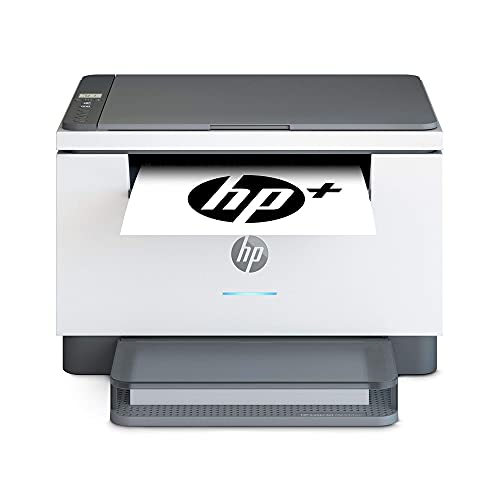
HP LaserJet MFP M234dwe -- Best for Text Documents
For users who print primarily text documents, a laser printer beats inkjet on reliability and per-page cost at this price point. The M234dwe produces sharp, smudge-resistant black text at up to 26 pages per minute with no warmup time. Wireless setup uses the HP Smart app and takes minutes. The toner cartridge covers approximately 1,500 pages standard, with high-yield options reaching 3,000 pages. There is no color printing, which keeps costs low and reliability high. The auto document feeder handles 40 sheets. For small businesses, students, or anyone who rarely prints color photos, a laser all-in-one like this is more practical than inkjet alternatives.
In its favor
- Wireless Printer
- Fast and Efficient Printing: The HP LaserJet M234dwe delivers high-speed black-and-white p
- Compact and Space-Saving Design: The LaserJet M234dwe's compact footprint is designed to f
- High-Quality Printing: This laser printer produces sharp, professional-quality black-and-w
- Eco-Friendly Features: Save on energy and resources with features like automatic duplex pr
What matters most
What to consider
First determine your print volume. Light users printing under 50 pages a month can choose based on upfront cost, while regular users should factor in per-page ink costs heavily. Next consider print type: photo printers need more ink colors, laser printers excel at text, and all-in-ones balance both. Verify that the printer's mobile app supports your devices before buying. Auto document feeders are worth prioritizing if you scan multi-page documents. Finally, check that the printer supports your preferred wireless protocol, as some older models require a 2.4GHz network and do not work on 5GHz-only connections.
What to consider
For more office gear guidance, see our [best consumer reports wireless earbuds](/articles/best-consumer-reports-wireless-earbuds) if you use earbuds at your desk, and check our [methodology](/methodology) for how we assess office products.
Frequently asked
Ink or toner cartridges are the main ongoing cost and can easily exceed the printer's purchase price within a year of regular use. Look at cost-per-page figures before buying. Subscription ink programs and high-yield cartridges significantly reduce running costs for regular users.
Wireless printers frequently disconnect when they enter sleep mode or when the router assigns a new IP address. Setting a static IP address for the printer on your router, or enabling a reservation by MAC address, solves most persistent connection issues. Keeping printer firmware updated also helps.
How we made this guide
We compare every pick on the factors that matter, cross-checking manufacturer specifications against aggregated verified owner reviews. We rank independently and never take payment for placement. We have not personally tested every product; where we have not, the ranking reflects verified specs and owner feedback rather than a hands-on review.
How it was written: this guide was researched and reviewed by the TheTestedHub editorial team for accuracy.
Affiliate disclosure: TheTestedHub is reader-supported. When you buy through links on our site, we may earn a commission at no extra cost to you.
You might also like

Your Docking Station Match: CalDigit TS4 and More

Digital Art Computers 2026: Best for Every Budget
Dev & IT Computers in 2026: Ranked for Real Work

Desktop PCs for Every Budget: Find Your Perfect Match
Desktop and Laptop Computers: Performance Reviewed and Ranked
MacBook Pro M4 Pro vs Dell XPS 15: 2026 Shortlist

Buy the Best DIY Computer in 2026: Corsair One i300
