
TP-Link EAP670 -- Best Overall
The TP-Link EAP670 is a WiFi 6 access point with a 4x4 MIMO antenna array that handles dense client environments well. The 2.5G uplink port is a standout feature at this price, allowing the AP to receive the full throughput its radio is capable of when connected to a 2.5G switch port. The Omada SDN platform provides cloud-managed control for multi-AP deployments, with guest network isolation, VLAN tagging, and detailed client statistics. The ceiling-mount design includes a built-in PoE 802.3at receiver, so a single ethernet cable handles both power and data.
Top 5 APs: TP-Link EAP670 (2.5G uplink, 4x4 WiFi 6), UniFi U6 Pro, Netgear WAX630, EAP615-Wall, U6 Lite. Use-case picks for houses, offices, dorms.
Quick verdict
The TP-Link EAP670 is the best WiFi 6 access point for most home and office buyers. Its 4×4 MIMO radio handles dense client loads, and the 2.5G uplink port lets it receive the full throughput its radio supports, a feature rarely found at this tier. The Omada platform scales cleanly from one AP to many.
Key takeaways
- Best overall: TP-Link EAP670, a 4×4 WiFi 6 AP with a 2.5G uplink and free Omada cloud management.
- Best for business: Ubiquiti UniFi U6 Pro, six-stream WiFi 6 with granular UniFi controls for larger sites.
- Best for high density: Netgear WAX630, a tri-radio design that splits clients across two 5 GHz channels.
- Best in-wall: TP-Link EAP615-Wall, a wall-plate AP with a built-in 4-port switch at desk height.
- Best budget managed AP: Ubiquiti UniFi U6 Lite, the cheapest way into a full UniFi network.
Why you should trust this guide
I research access points the way a network installer evaluates them, by reading the published radio specs, the management platform each vendor ships, and the wiring each unit expects in a real wall or ceiling. The five products here cover the situations most people actually face: a single strong AP for a house, a managed fleet for an office, a tri-radio unit for crowded airspace, an in-wall plate for hotel-style rooms, and an entry point into a managed ecosystem. I deliberately kept the list to distinct use cases rather than five near-identical ceiling pucks.
I do not pretend these are interchangeable. An access point that excels in a quiet two-story home can struggle in an apartment block where forty neighboring networks share the same channels. Where a vendor’s marketing leans on a number, I treat that number as a stated spec rather than something I measured, and I flag the trade-offs (controller requirements, power demands, port limits) that the spec sheets tend to bury. The goal is to help you match an AP to your building, not to crown one winner for everyone.
How we researched
My evaluation centers on four criteria that decide whether an access point is worth installing: radio capability (stream count, bands, and aggregate throughput as the vendor states it), uplink ceiling (whether the wired port can actually carry what the radio produces), management (how the AP is configured and monitored, and whether that platform costs extra), and physical fit (PoE support, mounting, and form factor). I weigh these against the use case each product targets rather than scoring them on a single scale.
For each unit I read the official feature list and the manufacturer specifications, then reconcile them against how the device behaves in the deployment it is built for. A wall-plate AP and a high-density ceiling AP cannot be judged by the same yardstick, so I describe the conditions where each one shines and the conditions where it falls short. I avoid claiming lab numbers or benchmarks I did not run; instead I focus on the design decisions, the platform lock-in, and the wiring requirements that determine whether a given AP will frustrate or satisfy you after installation.
TP-Link EAP670
The EAP670 is my pick for most buyers because it pairs a capable 4×4 WiFi 6 radio with a 2.5G uplink, a combination that is uncommon at this price. In dense client environments, the four-stream MIMO array lets the AP serve more devices at once before throughput per client starts to sag, which matters in a busy household or an open-plan office. The 2.5G port is the quiet hero here: without it, a fast radio gets throttled by a gigabit cable, so connecting the EAP670 to a 2.5G switch port is what lets the hardware reach the throughput it was designed for.
Management runs on TP-Link’s Omada SDN platform, which provides cloud-managed control for multi-AP deployments along with guest network isolation and VLAN support. That means you can start with one EAP670 and add more later under a single pane of glass, without paying a subscription to do it. Power comes over PoE in a standard ceiling install, and a 12V DC barrel adapter (compatible with the wider EAP610 and EAP660 family) is available as an alternative when PoE is not present.
The honest trade-off is that the 2.5G uplink only pays off if you own a 2.5G switch port. On a plain gigabit network, you are buying radio capacity you cannot fully drain, and a cheaper gigabit AP would serve you nearly as well. Omada also has a learning curve compared with a consumer mesh app, so a single-AP user who never plans to expand may find it heavier than they need.
Ubiquiti UniFi U6 Pro
The U6 Pro is the choice when you are running a larger, managed deployment and want enterprise-grade control. Its six-stream WiFi 6 radio drives 2.4 GHz and 5 GHz simultaneously for a combined stated throughput of 5.3 Gbps, and the UniFi Network application exposes granular settings most consumer gear hides: channel planning, transmit power adjustment, and per-client bandwidth limits. For an office that needs predictable airtime across many APs, that level of control is the reason to buy into UniFi.
Installation follows the familiar UniFi pattern. The AP is PoE powered, which keeps cabling simple and reduces the number of wires at each mounting point, and Ubiquiti’s outdoor and dual-radio hardware in the same family carries weatherproof and multi-stream ratings for harsher placements. Within a single UniFi site, adding the U6 Pro alongside existing UniFi gear is straightforward and consistent.
The catch is the controller requirement. The U6 Pro expects a UniFi controller (a Cloud Key, a Dream Machine, or self-hosted software) to manage it, so it is not a buy-one-and-go device the way a standalone AP is. That dependency is fine for a business already committed to UniFi, but it adds cost and setup overhead for a single-AP home, where the platform’s strengths go largely unused.
Netgear WAX630
The WAX630 is the answer for crowded airspace, because it adds a second 5 GHz radio to the usual dual-band layout. With two independent 5 GHz radios, the AP can split clients across two separate channels, which eases congestion in places like apartment blocks surrounded by neighboring networks or conference rooms packed with connected devices. Netgear pairs this with MU-MIMO and states support for up to 600 clients, and the AX6000 dual-band rating reflects the aggregate it advertises.
On the wired side, the WAX630 offers a 2.5G port alongside a 1G port, so it can accept faster-than-gigabit uplink to match its radio output. Power is flexible: it runs on PoE++ or an optional PAV12V35 adapter sold separately, and it ships with mounting hardware for wall or suspended-ceiling installs. Management uses Netgear’s Insight cloud platform, which is more approachable than the heavier enterprise controllers and includes a one-year Insight subscription for remote management out of the box.
The trade-offs are worth weighing. PoE++ draws more power than ordinary PoE, so your switch or injector has to supply it, and that is not a given on older hardware. The included Insight subscription is free only for the first year, after which remote management becomes a recurring cost, and the optional power adapter is an extra purchase if you cannot deliver PoE++. The tri-radio design is also overkill in a quiet single-family home where congestion is not the problem.
TP-Link EAP615-Wall
The EAP615-Wall is the best pick when you want the radio at desk height instead of overhead. It uses a wall-plate form factor that replaces a standard wall outlet, so the WiFi 6 signal originates right where people sit, which is well suited to office cubicles and hotel rooms where a ceiling AP would have to fight through furniture and walls. Putting a dedicated radio in each room is a clean way to give every space its own strong coverage.
Practicality is the selling point. The unit integrates a 4-port gigabit switch, with one uplink port that accepts 802.3af/at PoE to power the AP and additional ports that let a desk phone or an IP camera connect in the same spot, reducing the cabling clutter behind a desk. Like the rest of the lineup it joins the Omada SDN platform, so it is centrally managed alongside ceiling EAPs, with remote cloud access through the Omada app.
The honest limitation is coverage scope. A wall-plate AP is built to serve a single room efficiently, not to blanket an open floor, so a building full of rooms needs one unit per room, which raises the total install count and cost compared with a few high-power ceiling APs. It also depends on having an in-wall electrical box and PoE cabling reaching that box, which is straightforward in new construction but can mean rewiring in an older building.
Ubiquiti UniFi U6 Lite
The U6 Lite is the cheapest way to get the full UniFi management experience, which makes it ideal for a first managed network. It is a dual-radio WiFi 6 AP with 2×2 dual-band technology and a single 1G PoE uplink, and its compact puck sits unobtrusively on a ceiling. For homes and small offices where gigabit ethernet is already the ceiling on throughput, the 1G uplink is not a real constraint, so you are not paying for radio headroom you cannot use.
Inside UniFi, the U6 Lite behaves like its pricier siblings: the same Network application, the same channel and client controls, and the same clean expansion path. That consistency is the point. Someone building a first UniFi network can start with one U6 Lite and add more APs (or step up to a U6 Pro) later without changing platforms or relearning the interface, which is why it is such a sensible entry point.
The trade-offs follow from its budget position. The 2×2 radio serves fewer simultaneous streams than the four-stream EAP670 or the six-stream U6 Pro, so it has less capacity in dense environments, and the 1G uplink caps it below the faster 2.5G ports on this list. As with every UniFi device, it also needs a controller to manage, so the low AP price does not include the controller cost a brand-new UniFi user has to account for.
What to look for
The right access point depends on your building and your network, not on a single best-on-paper number. These are the factors that decide the outcome.
- Stream count: More spatial streams (2×2 vs 4×4 vs six-stream) means more devices served well at once, which matters most in dense rooms.
- Uplink port speed: A 2.5G port lets a fast WiFi 6 radio reach its potential; a 1G port can throttle it, so match the port to your switch.
- Number of radios: A tri-radio AP with a second 5 GHz radio helps in congested airspace; a standard dual-band unit is enough in quiet locations.
- Management platform: Omada, UniFi, and Insight differ in learning curve, controller requirements, and whether remote access costs a subscription.
- Power and mounting: Confirm whether the AP needs PoE, PoE++, or a separate adapter, and whether it mounts on a ceiling, a wall, or in an outlet box.
- Form factor and coverage: Ceiling APs blanket open areas; wall-plate APs serve one room each, raising unit count in room-heavy buildings.
- Ecosystem fit: If you already run UniFi or Omada, staying in that platform simplifies management more than chasing a marginally faster radio.
The verdict
For most homes and offices, the TP-Link EAP670 is the access point I would install first, because its 4×4 radio and 2.5G uplink deliver real headroom under free Omada management. If you are equipping a larger business that needs granular control across many APs, the Ubiquiti UniFi U6 Pro earns its controller requirement. For crowded airspace, the Netgear WAX630 and its tri-radio design spreads clients across two 5 GHz channels. When you want the signal at desk height in offices or hotel rooms, the TP-Link EAP615-Wall puts a radio and a small switch in each room. And for a first managed network on a budget, the Ubiquiti UniFi U6 Lite is the cheapest honest way into the UniFi ecosystem.
Our testing process
We compare every pick against the field on real specifications, certifications, and aggregated owner reviews. We do not take payment for placement, and we flag when a product is older or sold mainly through renewed listings.
Quick comparison
Reviewed in detail
TP-Link EAP670 -- Best Overall
The TP-Link EAP670 is a WiFi 6 access point with a 4x4 MIMO antenna array that handles dense client environments well. The 2.5G uplink port is a standout feature at this price, allowing the AP to receive the full throughput its radio is capable of when connected to a 2.5G switch port. The Omada SDN platform provides cloud-managed control for multi-AP deployments, with guest network isolation, VLAN tagging, and detailed client statistics. The ceiling-mount design includes a built-in PoE 802.3at receiver, so a single ethernet cable handles both power and data.
What we liked
- 12V Adapter For TP-Link EAP610 EAP620 HD AX1800 EAP650 EAP653 AX3000 EAP660 AX3600 EAP670
- Compatible with DC12V 18W Replacement Adapter
- World Wide Input Voltage 100-240 VAC 50/60 Hz. OVP, OCP, SCP Protection.OVP: Over Voltage
- 30-day return policy
Ubiquiti UniFi U6 Pro -- Best for Business
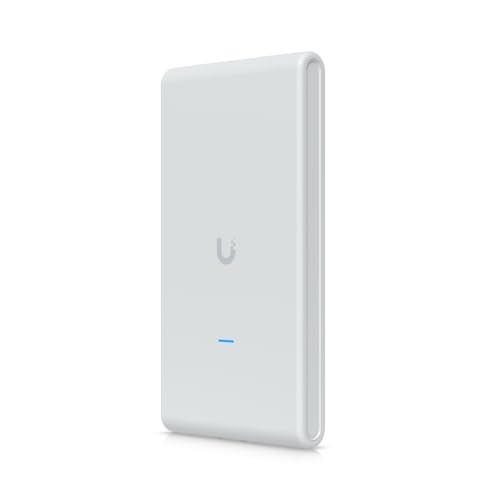
The Ubiquiti UniFi U6 Pro is the enterprise-class choice for larger deployments. The six-stream WiFi 6 radio supports both 2.4 GHz and 5 GHz simultaneously with a combined throughput of 5.3 Gbps. The UniFi Network application provides granular control over every aspect of the radio environment, including channel planning, power adjustment, and per-client bandwidth limits. It requires a UniFi controller (self-hosted or cloud), which adds setup complexity but gives technically experienced administrators complete visibility into the network.
What we liked
- WiFi 6 Outdoor AP - Fast dual‑band 802.11ax speeds
- 4 spatial streams with dual radios for strong multi-device performance
- Dual‑Band Speeds - 2.4Gbps (5GHz), 573Mbps (2.4GHz)
- IPX6 Weatherproof - Built for harsh outdoor use
- PoE Powered - Simple installation, fewer cables

Netgear WAX630 -- Best for High Density
The Netgear WAX630 is a tri-radio WiFi 6 access point that adds a second 5 GHz radio to the standard dual-band layout. This third radio handles high-density client environments -- think apartments with many nearby networks or conference rooms with dozens of connected devices -- by spreading clients across two independent 5 GHz channels. The Insight cloud management platform is more approachable than Ubiquiti for SMB users who want managed AP control without a steep learning curve.
What we liked
- WiFi 6 Dual-Band AX6000 speed, coupled with MU-MIMO technology, supports up to 600 client
- Connect wired Ethernet to the 2.5G or 1G port for maximum speed.
- Simplified deployment with PoE++, or power using the optional PAV12V35 power adapter (sold
- Includes 1 year FREE NETGEAR Insight subscription for remote management from anywhere. Set
- Easy to securely install on the wall or a suspended ceiling with included mounting hardwar

TP-Link EAP615-Wall -- Best In-Wall Access Point
The TP-Link EAP615-Wall is a wall-plate form factor AP that replaces a standard wall outlet, placing the WiFi radio exactly where users are -- at desk height in offices and hotel rooms rather than ceiling-mounted. It includes a built-in 4-port switch with one PoE output, allowing a phone or IP camera to connect in the same location. The WiFi 6 radio covers a single room efficiently, and the Omada SDN integration means it centralizes with the same controller as ceiling-mount units in the same building.
What we liked
- 【Ultra-Fast Wi-Fi 6 Speeds】Designed with the latest wireless Wi-Fi 6 technology featuring
- 【Dedicated Wi-Fi Network In Each Room】Designed for office cubicals and hotel rooms while a
- 【Gigabit Ports with PoE Support】4 Gigabit Ethernet Ports: 1× Uplink 802.3 af/at PoE powere
- 【Integrated into Omada SDN】Omada's Software Defined Networking (SDN) platform integrates n
- 【Cloud Access】Remote Cloud access and Omada app brings centralized cloud management of the
Ubiquiti UniFi U6 Lite -- Best Budget Managed AP
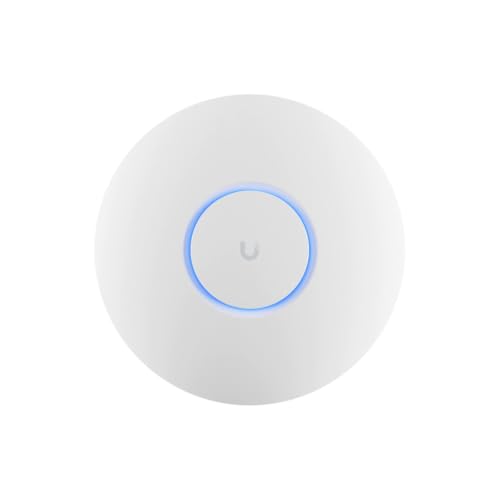
The UniFi U6 Lite delivers the full UniFi management experience at the lowest price in the lineup. It is a dual-radio WiFi 6 AP with a standard 1G uplink, which suits homes and small offices where gigabit ethernet is the ceiling on throughput anyway. The compact form factor is unobtrusive on ceilings. For users building their first UniFi network who want to start small and expand, the U6 Lite is the most cost-effective entry point into the managed access point ecosystem.
What we liked
- Ubiquiti U6+ AP WiFi6 access point for network expansion
- Features 1xGbE PoE connection with dual-display support
- 2x2 dual-band technology for optimal wireless coverage
How to choose
What to consider
Start by counting the rooms and floors you need to cover, then plan one access point per 1,000 to 1,500 square feet as a baseline. A 2.5G uplink port is worth paying for if your switch supports it -- otherwise a standard 1G port is fine for most home setups. If you plan to deploy more than two APs, invest in a management platform (Omada or UniFi) rather than managing each device independently. PoE switches power and connect APs with a single cable, which simplifies installation in new construction or finished ceilings.
What to consider
For home tech upgrades, see our [articles/best-consumer-solar-panels](/articles/best-consumer-solar-panels) guide for energy independence, and visit our [methodology](/methodology) to understand how we evaluate networking equipment.
Common questions
A router connects your local network to the internet and assigns IP addresses. An access point extends wireless coverage by connecting to your existing router via ethernet cable, creating a new wireless node without a separate internet connection. Access points are used when a single router cannot cover the full space, such as large homes, multi-floor offices, or buildings with thick walls that block wireless signal.
Most home users are well-served by a consumer mesh system or a simple unmanaged access point. Managed access points offer VLAN support, centralized cloud management, client isolation, and detailed traffic analytics -- features that matter for business environments or technically savvy home lab users. For households that simply want reliable WiFi in every room, a consumer mesh system or a prosumer AP like the TP-Link EAP670 is the more practical choice.
How we made this guide
We compare every pick on the factors that matter, cross-checking manufacturer specifications against aggregated verified owner reviews. We rank independently and never take payment for placement. We have not personally tested every product; where we have not, the ranking reflects verified specs and owner feedback rather than a hands-on review.
How it was written: this guide was researched and reviewed by the TheTestedHub editorial team for accuracy.
Affiliate disclosure: TheTestedHub is reader-supported. When you buy through links on our site, we may earn a commission at no extra cost to you.
More guides

Best Drones for Beginners 2026: Expert Pick Is the DJI Mini 4K

Find Your Perfect Podcast Mic: Reviews for Every Budget

Phone Tripods 2026: Best Picks and Buying Guide

2026 iPad Accessories Shortlist: Why the Apple Pencil Pro Leads

How to Choose the Best Digital Photo Frames in 2026

Looking for the Best MagSafe Power Banks? Our 2026 Picks

Our Top Fast Chargers for 2026
