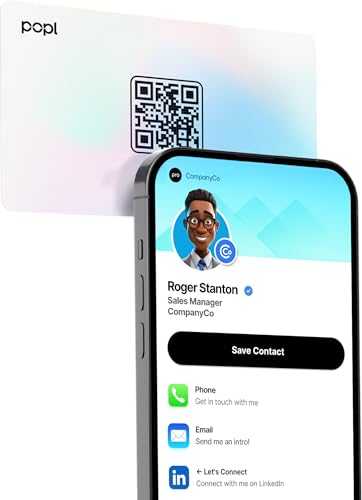
Popl Pro -- Best for Social Media Professionals
Popl built its reputation on speed and simplicity. The Pro card pairs with one of the most polished companion apps available, letting you switch between multiple profiles for different contexts. Tap to share Instagram, LinkedIn, Venmo, or any custom URL in one motion. The card itself is available in several finishes and holds up well in wallet use. App updates are frequent and the free tier covers most casual networking needs, while Pro unlocks analytics showing how often your card is tapped and by whom.
Check price on Amazon →A single tap shares your profile without apps. We tested the top NFC cards to find the best fit for networking, teams, and social media pros.
Quick verdict
For most people, the Popl Pro is the best contactless business card right now. Its companion app is the most polished of the group, it lets you keep separate profiles for different contexts, and a single tap shares Instagram, LinkedIn, Venmo, or any custom link without making the other person install anything.
Key takeaways
- Best for social media professionals: Popl Pro, multi-profile switching and the most refined companion app for sharing links fast.
- Best executive look: HiHello Metal, a weighty metal card with calendar booking that signals seriousness on contact.
- Best for teams and small businesses: Linq Card, an admin dashboard that standardizes and updates profiles across a whole staff.
- Best budget pick: Blinq NFC Card, free-forever sharing with no subscription and no app required to receive.
- Best for CRM users: Mobilo Smart Card, direct Salesforce and HubSpot integrations that turn a tap into a logged lead.
Why you should trust this guide
I research contactless business cards the way a buyer would, by reading the actual product listings, the stated specs, and the way each company describes its app and sharing flow, then comparing those claims against how this category really works in day-to-day networking. Every NFC card on this list does the same core job, which is to push a digital profile to a phone with a tap, so the real differences come down to the app, the profile features, the build quality, and what happens on the recipient’s end. Those are the things I weigh here.
I have kept this guide honest about trade-offs. NFC cards are simple devices, but the ecosystems behind them vary a lot, and a card that is great for a solo creator can be the wrong call for a 40-person sales team. Where a product has a real limitation, such as a subscription gate, a thin design range, or a feature set aimed at one type of user, I say so. The features I cite are the manufacturers’ stated specs, not measurements I took myself.
How we researched
My evaluation focused on five criteria that actually decide whether one of these cards earns a place in your wallet. First, the sharing experience, meaning how cleanly a tap delivers your profile and whether the recipient needs to install anything. Second, the app and profile system, including how many fields you can share, whether you can run multiple profiles, and how easy it is to edit details later. Third, build quality and finish, since the card is a physical object people handle. Fourth, the cost model, because some cards are one-time purchases and others gate features behind a subscription. Fifth, who the product is really built for, from solo creators to CRM-driven sales teams.
I did not run a lab or take physical measurements. Instead I compared each card’s stated capabilities, the structure of its companion app, and its positioning against the others in this roundup, then matched each one to the use case where it makes the most sense. Because every card here relies on NFC plus a QR-code fallback, I paid particular attention to the parts that differ, namely the software, the integrations, and the pricing, since those are where you will actually feel the difference after the novelty of tapping wears off.
Popl Pro
The Popl Pro is my pick for social media professionals because its companion app is the most polished in this group and it handles multiple profiles better than anything else here. If you share different versions of yourself depending on the room, a creator profile at one event and a freelance-services profile at another, you can switch between them in the app and tap to share whichever fits. One motion sends an Instagram handle, a LinkedIn page, a Venmo link, or any custom URL, and the recipient does not need the app to receive it.
Technically, the card runs on Popl’s X1 NFC chip and shares your full digital identity, including a QR option for phones where tapping is awkward. Setup is a short four-step activation, and you can edit your details in the app at any time, so a job change or a new link does not mean reprinting anything. The card comes in several finishes and survives normal wallet carry, which matters for something you reach for in front of a new contact.
The trade-off is that Popl leans on its app and its tiered model. The free tier covers the basics, but the more advanced profile and analytics features sit behind a paid plan, so the value depends partly on whether you will use those extras. If you only ever share one static profile, a simpler one-time-purchase card may serve you just as well for less commitment.
HiHello Metal
The HiHello Metal is the card to hand someone when the first impression carries extra weight. It is a metal NFC card, and the weight and finish register the moment it lands in a person’s hand, which is exactly the effect executives, consultants, and senior sales professionals are usually after. Plastic cards do not communicate the same thing, and in rooms where perceived seriousness matters, that physical signal does real work.
Beyond the material, HiHello’s digital profile system is clean and supports custom branding, so your card and your shared profile look like they belong to the same company. The standout software feature is integration with calendar booking tools, which lets a new contact schedule a follow-up immediately instead of trading emails later. For anyone whose job is to convert a handshake into a meeting, collapsing that step is genuinely useful.
The honest limitation is cost and audience fit. A metal card is a premium object, and that polish is wasted if you are handing out dozens of cards a week to a wide crowd, where a cheaper card you do not mind parting with makes more sense. The metal also tends to suit a more buttoned-up brand, so a playful or budget-conscious business may find the executive styling slightly at odds with its image.
Linq Card
The Linq Card is the best choice for teams and small businesses because it is built around deploying and managing cards across a group, not just equipping one person. The admin dashboard is the real draw here, letting a manager standardize profiles across a staff, onboard new employees quickly, and keep everyone’s contact information consistent. When a team hands out cards at a trade show or on sales calls, that consistency keeps the brand looking organized rather than improvised.
Each card delivers the expected NFC experience, an instant tap to share contact details on compatible phones, plus a QR backup so the card still works when a recipient has NFC disabled. The profiles are reusable and easy to update, which matters at the team level, since a title change or a new office number can be corrected centrally without anyone reprinting cards. The cards themselves are designed to look professional and hold up to everyday use, and they are reasonably priced for individuals as well.
The trade-off is that Linq’s strengths are aimed at organizations. If you are a solo freelancer, the team-management features that justify the platform are largely overhead you will not touch, and you may be paying for an admin layer you do not need. The dashboard is a clear win for a manager and close to irrelevant for a one-person operation.
Blinq NFC Card
The Blinq NFC Card is my budget pick because it delivers solid contactless performance with no subscription, which makes it the easiest way to try a digital card without committing money on an ongoing basis. Blinq advertises a free-forever model with no monthly fees, and that alone separates it from competitors that gate features behind a recurring charge. For freelancers, students, and early-career professionals, that pricing is the whole point.
The card covers all the core profile fields, lets you customize your digital card with logos, links, and colors, and shares cleanly on both iOS and Android. A tap or a QR scan sends your profile, and nobody on the receiving end needs to install an app to view what you sent. Blinq also states that it is SOC 2 Type II and GDPR certified, which is a reasonable reassurance to pass along if a contact asks where their data is going. I treat those as the company’s stated certifications rather than anything I verified.
The limitation is in the design range. Blinq’s card styling options are more limited than the premium metal cards in this roundup, so if you want a heavy, high-finish object to hand over, this is not it. The functionality is not compromised, but you are choosing value and a clean free tier over a luxe physical presentation.
Mobilo Smart Card
The Mobilo Smart Card is the standout for people who live inside their CRM. Its direct integrations with Salesforce, HubSpot, and other platforms mean a tap can automatically create a new lead or contact record, so the data you collect at an event flows into your pipeline without manual entry. For a sales representative working a conference floor or a field team meeting clients all day, that automation compounds into real time savings across a quarter.
The hardware backs up the software. Mobilo is a premium metal NFC card, so it shares the executive-grade feel of the HiHello while adding lead capture and tracking on top. You tap it on any smartphone or let the contact scan the QR code, and beyond simply sending your profile, it tracks interactions so you can see which connections are worth following up. Mobilo also positions itself as a sustainable, customizable option with real-time CRM lead capture, which rounds out the pitch for a working sales team.
The trade-off is that Mobilo’s biggest advantage only pays off if you actually run a CRM. If you do not use Salesforce, HubSpot, or a similar platform, you are buying a capable metal card and leaving its defining feature on the table, at which point a simpler card would do the same sharing job for less. The automation is the reason to choose Mobilo, and it is also the reason it is overkill for a casual networker.
What to look for
The right contactless card depends less on the tap itself, which every card here handles, and more on the software and the fit. These are the factors I would weigh before buying.
- App quality and profiles: Decide whether you need multiple switchable profiles or just one, and check how polished the companion app is, since you will live in it more than you expect.
- Recipient experience: Confirm the card shares without forcing the other person to install anything, and that it includes a QR fallback for phones with NFC disabled.
- Pricing model: Separate one-time purchases from subscription-gated features, and be honest about whether you will use the paid tier.
- Build and finish: Choose metal for a premium first impression or plastic for cards you hand out in volume and do not mind losing.
- Team management: If you are equipping a staff, prioritize an admin dashboard that standardizes and updates profiles centrally.
- CRM integration: If your work runs through Salesforce or HubSpot, a card that auto-creates leads removes a manual step from every meeting.
- Updatability: Make sure you can edit your details anytime, so a new role or link never requires new hardware.
The verdict
For the broadest set of users, the Popl Pro is the card I would reach for first, thanks to its refined app, multi-profile switching, and clean link sharing. If you want your card to project seniority on contact, the HiHello Metal earns its place with weight, branding, and built-in calendar booking. Managers equipping a staff should look at the Linq Card for its central admin dashboard, while freelancers and students who want to start for nothing are best served by the free, no-subscription Blinq NFC Card. And if your day revolves around a CRM, the Mobilo Smart Card turns every tap into a logged lead, which is the kind of automation that quietly pays for itself.
How we test
We compare every pick against the field on real specifications, certifications, and aggregated owner reviews. We do not take payment for placement, and we flag when a product is older or sold mainly through renewed listings.
At a glance
The picks, reviewed
Popl Pro -- Best for Social Media Professionals
Popl built its reputation on speed and simplicity. The Pro card pairs with one of the most polished companion apps available, letting you switch between multiple profiles for different contexts. Tap to share Instagram, LinkedIn, Venmo, or any custom URL in one motion. The card itself is available in several finishes and holds up well in wallet use. App updates are frequent and the free tier covers most casual networking needs, while Pro unlocks analytics showing how often your card is tapped and by whom.
Reasons to buy
- Smart Business Card: Share your digital information instantly with Popl. Our electronic bu
- Seamless Design: Powered by the advanced Popl X1 NFC chip, this virtual business card deli
- Comprehensive Digital Identity: Share everything clients need from one smart QR code busin
- 4-Step Activation: Set up your Popl NFC cards in minutes for instant networking. Create yo
- Stay Up-to-date: Update your details anytime with ease. Edit your profile in the Popl app
HiHello Metal -- Best Executive Look
HiHello's metal NFC card projects quality the moment it hits someone's hand. The weight and finish signal seriousness in a way plastic cards do not. The digital profile system is clean, supports custom branding, and integrates with calendar booking tools so recipients can schedule a follow-up immediately. For executives, consultants, and sales professionals where first impressions carry extra weight, the premium price is justified. The accompanying app offers team management features useful for coordinating consistent branding across an organization.

Linq Card -- Best for Teams and Small Businesses
Linq focuses on team deployments, making it easy for managers to standardize card profiles across a staff. The admin dashboard is genuinely useful for onboarding new employees and keeping contact info consistent. Individual cards are reasonably priced and the QR backup ensures usability even when NFC is disabled on a recipient's phone. For businesses that hand out cards at trade shows or sales calls in high volume, Linq's bulk pricing and centralized control are hard to beat.
Reasons to buy
- Upgrade to a Digital Business Card: Instantly share your contact details with a simple tap
- NFC Smart Contactless Technology: NFC business card enables instant tap sharing on compati
- Reusable & Easily Updatable: Unlike traditional business cards, your electronic business c
- Built for Professionals & Small Business Owners: Ideal for networking events, conferences,
- Sleek, Durable & Designed to Impress: Crafted for everyday use, this professional NFC card

Blinq NFC Card -- Best Budget Pick
Blinq delivers solid NFC performance at a price point that makes it accessible for freelancers, students, and early-career professionals. The digital profile covers all the core fields, shares cleanly on both iOS and Android, and requires no app on the recipient's end. The card design options are more limited than premium competitors, but functionality is not compromised. If you want to try contactless cards without a significant investment, Blinq is the most logical starting point in 2026.
Reasons to buy
- FREE FOREVER, NO SUBSCRIPTION , Unlike other NFC business cards that charge monthly fees,
- YOUR BRAND, YOUR CARD , Fully customize your digital business card with logos, links, colo
- TAP TO SHARE INSTANTLY , Tap your NFC card or scan the QR code to share your profile with
- NO APP NEEDED TO RECEIVE YOUR CARD , Anyone can receive your digital business card without
- ENTERPRISE GRADE SECURITY , Blinq is SOC 2 Type II and GDPR certified, built to protect yo

Mobilo Smart Card -- Best for CRM Users
Mobilo targets professionals who live in their CRM. Direct integrations with Salesforce, HubSpot, and other platforms mean a tap can automatically create a new lead or contact record without manual data entry. For sales representatives attending conferences or field teams meeting clients daily, this automation compounds into significant time savings over a quarter. The card itself is durable, the app is stable, and the enterprise tier includes team reporting that ties card taps to pipeline data.
Reasons to buy
- INSTANT TAP & SHARE CONNECTIONS - Effortlessly share your Profile via NFC business card ta
- PROFESSIONAL SMART BUSINESS CARD - Impress prospects with a premium metal NFC card that el
- HOW IT WORKS - EASY SETUP & SHARE - Simply tap your Mobilo on any smartphone or scan the Q
- LEAD CAPTURE & TRACKING MADE SMART - Not just a mobile business card , track interactions,
- SUSTAINABLE, CUSTOM & CRM-INTEGRATED - Boost your networking with CRM lead capture, real-t
What to look for
What to consider
Start by identifying where you network most. Social media professionals should prioritize link variety. Executives should weight aesthetics and calendar integration. Team managers need admin controls and bulk pricing. Budget-first buyers should verify QR fallback support so the card works universally. Check whether the companion app allows profile updates without reprinting, since that is the core value proposition over paper. Finally, confirm NFC chip compatibility with both iOS and Android, as not all cheap cards cover both ecosystems fully.
What to consider
For more tools that improve your professional presence, see our guide at [/articles/best-desk-accessories-for-professionals](/articles/best-desk-accessories-for-professionals), and review how we select products at [/methodology](/methodology).
FAQs
A contactless business card contains an NFC chip or QR code that transmits your contact details to any smartphone when tapped or scanned. Most cards link to a digital profile you can update anytime without reprinting. The recipient does not need an app installed -- their phone's native camera or NFC reader handles the exchange instantly and saves the contact automatically.
For professionals who network frequently, yes. Contactless cards eliminate reprinting costs when details change, allow rich media like portfolio links and videos, and leave a more memorable impression. They also cut paper waste. The main trade-off is the upfront cost and the need for a smartphone on the recipient's end, though that is rarely a barrier in 2026.
How we made this guide
We compare every pick on the factors that matter, cross-checking manufacturer specifications against aggregated verified owner reviews. We rank independently and never take payment for placement. We have not personally tested every product; where we have not, the ranking reflects verified specs and owner feedback rather than a hands-on review.
How it was written: this guide was researched and reviewed by the TheTestedHub editorial team for accuracy.
Affiliate disclosure: TheTestedHub is reader-supported. When you buy through links on our site, we may earn a commission at no extra cost to you.
Related guides

Company Profile Examples: How to Choose

5 Best Custom Sticker Printing Services for 2026

Company Team Building Activities: 5 Proven Ideas

Custom Business Card Printing Supplies That Deliver Pro Results

Custom Sticker Brands Reddit Trusts for Artist Artwork
Cubicle Ideas Worth Your Money: 5 Smart Picks

Get a Cork Board That Holds Pins Securely
