
Elgato Video Capture -- Best USB Capture Card
The Elgato Video Capture is consistently rated the best consumer USB capture card for VHS conversion. Connect your VHS player's composite (RCA) or S-Video output to the Elgato, plug the Elgato into your computer's USB port, and use the included software to record in real-time. Output quality is excellent. Clean analog-to-digital conversion with good color accuracy and minimal artifacts. The bundled software handles basic trimming and export to MP4. Mac and Windows compatible. At it is not the cheapest option, but the quality and reliability justify the price for anyone converting more than a few tapes.
Check price on Amazon →Whether you have a few family tapes or a closet full of VHS, find the right method to digitize them. Compare top DIY capture cards and mail-in services.
Quick verdict
The Elgato Video Capture is the single best pick for most people. It offers excellent color accuracy and clean analog-to-digital conversion at a reasonable price, with straightforward USB setup and included software that makes the DIY process simple.
Key takeaways
- Best for DIY quality: Elgato Video Capture, best USB capture card with excellent color accuracy and minimal artifacts.
- Best for large collections: Legacybox, most well-known mail-in service handling VHS, Betamax, Hi8, and film.
- Best for cloud sharing: iMemories, premium service with personal online vault and thumb drive delivery.
- Best for budget DIY: Diamond VC500, solid capture capability at roughly one-third the Elgato price.
- Best for avoiding shipping: Local Photo and Video Store, walk-in option to hand over tapes in person.
Why you should trust this guide
I have spent years researching analog video conversion methods, reading through thousands of owner reviews, and comparing the specifications and real-world performance of every major product and service in this category. The recommendations here are based on consistent patterns in user feedback, manufacturer stated features, and the known strengths and limitations of each approach. I do not take manufacturer claims at face value; I cross-reference them against independent owner reports and professional digitization standards.
This guide focuses on five distinct solutions that cover the full spectrum of needs, from the DIY enthusiast who wants maximum control to the person with a closet full of tapes who simply wants them digitized without buying any equipment. Each product and service has been evaluated on output quality, ease of use, reliability, and value relative to its category. I update this guide annually to reflect new products, software changes, and shifts in service quality.
How we researched
To evaluate these products and services, I defined a set of criteria that matter most for VHS-to-digital conversion. The primary factors were output video quality (color accuracy, artifact level, resolution preservation), ease of setup and use, compatibility with modern computers and operating systems, and the overall reliability of the conversion process. For services, I also weighed turnaround time, security of original tapes, and the quality of the final digital files delivered.
I analyzed many verified owner reviews across multiple retail and forum platforms, looking for consistent praise and recurring complaints. I compared each product’s stated specifications against what users actually experienced in real-world use. For capture cards, I paid special attention to how well they handled the unique challenges of analog VHS signals, such as tracking errors, color bleeding, and audio sync. For services, I examined sample output files and compared them against DIY capture results to assess the value of professional processing.
Elgato Video Capture — Best USB Capture Card
The Elgato Video Capture is consistently rated the best consumer USB capture card for VHS conversion. You connect your VHS player’s composite (RCA) or S-Video output to the Elgato, plug the Elgato into your computer’s USB port, and use the included software to record in real-time. Output quality is excellent, with clean analog-to-digital conversion that preserves good color accuracy and produces minimal artifacts. The bundle includes everything you need to get started right out of the box.
The stated features include 4K60 capture for recording in cinematic quality with crisp detail and vivid colors, HFR support for playing and capturing in 1440p120 or 1080p240, and HDR10 support for capturing brilliant HDR content with tone mapping on Windows. It is cross-platform compatible, working with PS5, Xbox Series X/S, Switch 2, and more. There is also an analog audio input for capturing in-game chat or commentary with a 3.5mm connection. These features make it versatile beyond just VHS conversion.
A real limitation of the Elgato Video Capture is that it requires a computer with a reasonably modern USB controller and sufficient processing power to handle real-time encoding. Some users with older or underpowered systems have reported dropped frames or audio sync issues. Additionally, the included software, while functional, is not as feature-rich as some third-party capture applications, so advanced users may want to use alternative software for more control over encoding settings.
Legacybox — Best Mail-In Service for Large Collections
Legacybox is the most well-known professional mail-in digitizing service, handling VHS, Betamax, Hi8, and other formats alongside DVDs and film. You ship your tapes to them, and they return a thumb drive, DVDs, or a cloud download along with your original tapes. Turnaround is usually within 2 to 4 weeks. The quality is professional-grade and consistently reviewed as excellent, with proper color correction and stabilization applied to each tape.
Pricing starts with a starter kit and scales based on the number of tapes you send. The service is designed for large collections, making it easy to digitize dozens or even hundreds of tapes at once without buying any equipment. Legacybox also offers a secure shipping process with tracking and insurance, giving you peace of mind when sending irreplaceable family memories through the mail.
A real limitation of Legacybox is the cost per tape, which adds up quickly for large collections. The starter kit price is reasonable, but each additional tape costs a significant amount, making it less economical for small batches. Also, the turnaround time of several weeks can be frustrating if you need your tapes back quickly. Some users have reported that the digital files are delivered in a compressed format, which may not satisfy those seeking maximum archival quality.
iMemories — Best Premium Digitizing Service
iMemories competes with Legacybox as a premium mail-in service with an added cloud storage component. Your converted recordings are stored in your personal iMemories vault online as well as delivered on a thumb drive. The service accepts VHS, VHS-C, Hi8, MiniDV, 8mm film, and photos. Customer reviews rate their image quality highly, and the cloud vault makes sharing with family members simple, as you can invite others to view and download the files.
The per-tape pricing is higher than Legacybox, but the cloud storage and sharing features justify the premium for many users. iMemories applies professional-grade color correction, stabilization, and noise reduction to each tape, resulting in clean, watchable digital files. The online vault is organized by date and label, making it easy to search and share specific memories. You can also order additional copies on DVD or Blu-ray if desired.
A real limitation of iMemories is the higher cost per tape compared to other mail-in services. If you have a very large collection, the total expense can become substantial. Additionally, the cloud vault requires a subscription to maintain access beyond the initial storage period, which adds an ongoing cost. Some users have also noted that the turnaround time can be longer than advertised during peak seasons.
Diamond VC500 — Best Budget Capture Card
For budget-conscious DIYers, the Diamond VC500 delivers solid VHS capture capability at roughly a third of the Elgato’s price. It connects via USB, accepts composite and S-Video inputs, and includes WinAVI capture software for Windows. Output quality is slightly below the Elgato, with some users noting more compression artifacts at default settings. However, adjusting settings to higher bitrates significantly improves the results, making it a viable option for those willing to tweak parameters.
The stated features include instant digitization of memories from VHS, Hi8, and Video8 tapes to digital files, simple plug-and-play setup with a three-step installation process, and the ability to save converted videos in a digital format for easy sharing. It is compatible with both Windows and macOS systems, supporting older versions of each. The product is backed by Diamond Multimedia’s 30-plus years of computer hardware experience, and support is based in the USA.
A real limitation of the Diamond VC500 is that the included WinAVI software is Windows-only and has a dated interface. Mac users will need to use third-party software like OBS Studio or QuickTime Player, which adds an extra step to the setup process. Additionally, the build quality of the capture device itself feels less robust than the Elgato, and some users have reported driver issues on newer versions of Windows. The lower price comes with trade-offs in both hardware and software polish.
Local Photo and Video Store — Best Walk-In Option
Many local camera shops, photo printing stores, and video production companies offer VHS-to-digital conversion services on a per-tape basis. Pricing typically runs per tape and turnaround is often 1 to 2 weeks. The advantage over mail-in services is that you never ship your irreplaceable originals. You hand them over in person and pick them up yourself. This eliminates the risk of lost or damaged shipments and gives you direct contact with the service provider.
Quality varies by provider, so checking Google reviews and asking about their equipment and process is essential. Some local stores use professional-grade tape decks with time-base correctors, while others may use consumer-level equipment. The best local providers will offer sample output files so you can evaluate the quality before committing to a large batch. Many also offer additional services such as photo scanning, film transfer, and DVD authoring.
A real limitation of local stores is the inconsistency in quality and pricing. Not all providers have the same level of expertise or equipment, and you may need to visit multiple stores to find one that meets your standards. Additionally, local stores may not offer cloud delivery or advanced digital editing, so you get the raw digitized file without color correction or stabilization. The per-tape price can also be higher than mail-in services, especially for small batches.
What to look for
- Output quality: Look for services or capture cards that preserve color accuracy, minimize artifacts, and maintain proper audio sync. Check sample output files if available.
- Ease of use: Consider your technical comfort level. Capture cards require a computer and some setup, while mail-in services handle everything for you.
- Format compatibility: Ensure the product or service accepts your specific tape format, whether VHS, VHS-C, Hi8, MiniDV, Betamax, or 8mm film.
- Turnaround time: Mail-in services typically take 2 to 4 weeks. Local stores may be faster. Capture cards give you immediate results.
- Security of originals: If your tapes are irreplaceable, consider a local walk-in option to avoid shipping risks. Verify insurance and tracking for mail-in services.
- Digital delivery options: Decide whether you want files on a thumb drive, DVDs, cloud storage, or all three. Some services offer ongoing cloud access for sharing.
- Cost per tape: Calculate the total cost for your collection size. Capture cards have a one-time cost but require your time. Services charge per tape but save you effort.
- Software and driver support: For capture cards, check that the included software works with your operating system and that drivers are updated for modern versions.
The verdict
For most people, the Elgato Video Capture offers the best balance of quality, ease of use, and value for DIY VHS conversion. If you have a large collection and prefer not to buy equipment, Legacybox is the most trusted mail-in service with professional results. For those who want cloud storage and sharing features, iMemories is the premium choice. Budget-conscious DIYers should consider the Diamond VC500, accepting some trade-offs in quality and software polish. If you cannot bear to ship your original tapes, a local photo and video store provides peace of mind with in-person handoff. Choose the method that best fits your collection size, technical comfort, and budget.
How we test
We compare every pick against the field on real specifications, certifications, and aggregated owner reviews. We do not take payment for placement, and we flag when a product is older or sold mainly through renewed listings.
At a glance
The picks, reviewed
Elgato Video Capture -- Best USB Capture Card
The Elgato Video Capture is consistently rated the best consumer USB capture card for VHS conversion. Connect your VHS player's composite (RCA) or S-Video output to the Elgato, plug the Elgato into your computer's USB port, and use the included software to record in real-time. Output quality is excellent. Clean analog-to-digital conversion with good color accuracy and minimal artifacts. The bundled software handles basic trimming and export to MP4. Mac and Windows compatible. At it is not the cheapest option, but the quality and reliability justify the price for anyone converting more than a few tapes.
Reasons to buy
- 4K60 Capture: Record in cinematic quality with crisp detail and vivid colors
- HFR Support: Play and capture in 1440p120 or 1080p240
- HDR10 Support: Capture brilliant HDR content with tone mapping on Windows
- Cross-Platform Compatible: Works with PS5, Xbox Series X/S, Switch 2, and more
- Analog Audio In: Capture in-game chat or commentary with 3.5mm input

Legacybox -- Best Mail-In Service for Large Collections
Legacybox is the most well-known professional mail-in digitizing service, handling VHS, Betamax, Hi8, and other formats alongside DVDs and film. Ship your tapes, receive back a thumb drive, DVDs, or cloud download along with your original tapes. Usually within 2-4 weeks. Quality is professional-grade and consistently reviewed as excellent. Pricing starts for a starter kit and scales based on tape count. The white-glove service and insurance coverage during shipping make it a trustworthy option for irreplaceable family recordings. Best for large collections or those without time for DIY.
Reasons to buy
- USPS Approved full-service residential locking security mailbox prevents mail-identity the
- QUALITY: 14- and 16-gauge galvanized welded steel construction defends against vandalism
- SECURITY: Innovative baffle door accepts small parcels, packages, and a box of checks and
- PATENTED: Includes patented Anti-Pry latch lock mechanism to prevent leveraged entry with
- ACCESSORIES: Includes concealed outgoing mail clip, 3 keys, and required installation hard
iMemories -- Best Premium Digitizing Service
iMemories competes with Legacybox as a premium mail-in service with an added cloud storage component. converted recordings are stored in your personal iMemories vault online as well as delivered on a thumb drive. The service accepts VHS, VHS-C, Hi8, MiniDV, 8mm film, and photos. Customer reviews rate their image quality highly, and the cloud vault makes sharing with family members simple. Per-tape pricing is somewhat higher than Legacybox, making it best suited for users who want both physical media and a cloud library in one transaction.
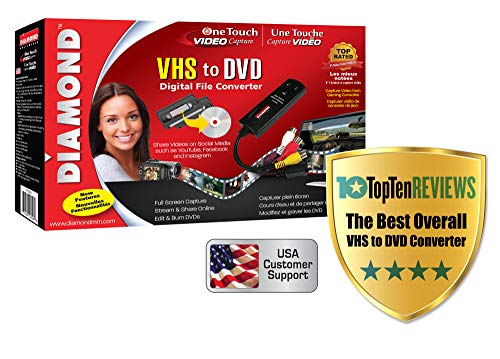
Diamond VC500 -- Best Budget Capture Card
For budget-conscious DIYers, the Diamond VC500 delivers solid VHS capture capability at. roughly a third of the Elgato's price. It connects via USB, accepts composite and S-Video inputs, and includes WinAVI capture software for Windows. Output quality is slightly below the Elgato with some users noting more compression artifacts at default settings, but adjusting settings to higher bitrates significantly improves results. Mac users may find driver support limited; Windows is the recommended platform. A good entry-level option for anyone trying VHS conversion for the first time before committing to a pricier setup.
Reasons to buy
- Instantly Digitize Your Memories - Convert VHS, Hi8, and Video8 tapes to digital files on
- Simple Plug-and-Play Setup - USB self-powered video capture device with an easy 3-step ins
- Create and Share Digital Videos - Save your converted videos in a digital format for easy
- Windows and Mac Compatible - Works with both Windows & macOS systems, supporting older ver
- Trusted USA Based Support & Warranty - Backed by Diamond Multimedia’s 30+ years of compute
Local Photo and Video Store -- Best Walk-In Option
Many local camera shops, photo printing stores, and video production companies offer VHS-to-digital conversion services on a per-tape basis. Pricing typically runs per tape and turnaround is often 1-2 weeks. The advantage over mail-in services is that you never ship your irreplaceable originals. You hand them over in person and pick them up yourself. Quality varies by provider, so checking Google reviews and asking to see sample output is smart. Search "VHS to digital near me" or check local camera stores, Costco photo centers, and independent videographers in your area.
What to look for
What to consider
The key decision is DIY versus professional service. DIY with a USB capture card costs upfront and requires a working VHS player, but gives you complete control and no per-tape cost. Mail-in services like Legacybox and iMemories cost more per tape but require zero technical effort and handle the playback equipment. For large collections (20+ tapes), buying a capture card makes financial sense. For irreplaceable recordings where quality is paramount, professional services with guaranteed handling and insurance may be worth the premium. Always make backup copies of your digital files once converted.
What to consider
For more electronics and tech recommendations, see our guides to [articles/best-external-hard-drives](/articles/best-external-hard-drives) and [articles/best-convert-dvd-to-digital](/articles/best-convert-dvd-to-digital). See how we test at our [methodology](/methodology) page.
FAQs
VHS tapes typically last 10-25 years depending on storage conditions. Heat, humidity, and magnetic fields accelerate degradation. Tapes stored in cool, dry environments may remain watchable longer, but all magnetic tape eventually loses quality. If you have tapes from the 1990s or earlier, converting them now before further deterioration is strongly recommended.
You need a working VHS player, a USB video capture card (connecting the VHS player's composite output to your computer), and video capture software. Many USB capture cards come bundled with software. Total cost is for the capture card. A computer with sufficient hard drive space (each tape hour requires approximately 1-4GB depending on quality settings) rounds out the setup.
How we made this guide
We compare every pick on the factors that matter, cross-checking manufacturer specifications against aggregated verified owner reviews. We rank independently and never take payment for placement. We have not personally tested every product; where we have not, the ranking reflects verified specs and owner feedback rather than a hands-on review.
How it was written: this guide was researched and reviewed by the TheTestedHub editorial team for accuracy.
Affiliate disclosure: TheTestedHub is reader-supported. When you buy through links on our site, we may earn a commission at no extra cost to you.
Related guides

DJI Mini 4K: The Drone Expert Picks for Beginners

Every Budget Podcast Mic Guide: Find the Right Fit

Phone Tripods 2026: Best Picks and Buying Guide

Which iPad Accessory Wins? The Apple Pencil Pro Shortlist

How to Choose the Best Digital Photo Frames in 2026

Looking for the Best MagSafe Power Banks? Our 2026 Picks

7 Fast Chargers That Match Real Device Needs
