ASUS ROG Flow X13 -- Best Overall
The ASUS ROG Flow X13 is the definitive convertible gaming laptop. The 13.4-inch 165Hz touch display folds fully flat and rotates to tablet mode without sacrificing the AMD Ryzen 9 performance underneath. An NVIDIA RTX 4060 inside a 3-lb chassis is genuinely impressive engineering. The XG Mobile external GPU port lets you plug in a desktop-class GPU at home for maximum performance, then unplug and go portable. No other convertible gaming laptop offers this kind of scalability.
Check price on Amazon →We compare the top convertible gaming laptops, from the ASUS ROG Flow X13 to the MSI Prestige 14 Evo, to help you choose the right one for gaming and work.
Quick verdict
The ASUS ROG Flow X13 is the single best pick because it combines a fully functional 2-in-1 design with genuine gaming-class hardware in a three-pound chassis, something no other convertible can match without external GPU assistance.
Key takeaways
- Best Overall: ASUS ROG Flow X13 delivers desktop-class gaming performance in a tablet-capable form factor via the XG Mobile port.
- Best Budget Option: Lenovo IdeaPad Gaming Chromebook offers a large 120Hz display and solid build for cloud gaming at an entry-level price.
- Best for Creative Professionals: HP Spectre x360 16 pairs an OLED touch display with an RTX discrete GPU for both creation and gaming.
- Best Thin and Light: MSI Prestige 14 Evo stays under three pounds and under 0.7 inches thick while handling esports and older AAA titles.
- Best Build Quality: Dell XPS 13 2-in-1 uses a rigid CNC-aluminum chassis that feels premium through years of hinge use.
Why you should trust this guide
Convertible gaming laptops occupy a narrow and often misunderstood category. Most reviews either focus on raw gaming power and ignore the hinge and touch experience, or they treat the device as a productivity tool and gloss over its gaming capabilities. This guide was built by weighing both sides equally. I researched manufacturer specifications, studied owner feedback across multiple retail and forum sources, and compared each product against the same set of criteria: gaming performance in a convertible form factor, build quality, display quality, weight, and real-world usability for work and creation. Every recommendation here is grounded in what the manufacturer states the product can do and what long-term owners report after months of use.
I did not physically test these laptops in a lab. Instead, I evaluated them based on the stated specifications, the reputation of each manufacturer’s engineering, and consistent patterns in user reports. The goal was to identify which convertibles actually solve the problem of wanting a single device that games, creates, and works without forcing you to choose between portability and power. Each product was judged on whether it delivers on its promises for its intended audience, not on whether it can run every game at max settings. That honest framing matters because no convertible gaming laptop is perfect, and pretending otherwise helps no one.
How we researched
To evaluate these five convertible gaming laptops, I established four core criteria that matter most in this hybrid category. First, gaming capability: can the laptop actually run modern games at playable frame rates, or is it limited to cloud gaming and indie titles? I looked at the discrete GPU options, the presence of external GPU support, and the thermal design that allows sustained gaming without throttling. Second, convertible functionality: does the hinge hold up to repeated flipping, does the touch display respond accurately, and does the device remain usable in tablet mode? Third, build quality and portability: weight, chassis rigidity, and overall feel matter enormously for a device you carry between meetings and gaming sessions. Fourth, display quality: resolution, refresh rate, and panel technology (OLED, IPS, touch) directly affect both gaming and creative work.
I then cross-referenced each product against these criteria using the manufacturer’s publicly listed specs and aggregated owner feedback from major retailers and enthusiast communities. I did not run benchmarks or disassemble any unit. Instead, I looked for patterns: do owners report hinge wobble after six months? Do they complain about thermal throttling during extended gaming? Do they praise the display for color accuracy? I weighed positive and negative feedback equally, and I treated consistent complaints as real limitations. The result is a set of recommendations that reflect what each product actually delivers, not what its marketing suggests. Every limitation included in this guide comes directly from that research.
ASUS ROG Flow X13
The ASUS ROG Flow X13 is the only convertible gaming laptop that does not ask you to compromise on either portability or performance. It packs an AMD Ryzen 9 processor and an NVIDIA RTX 4060 inside a chassis that weighs just three pounds. The 13.4-inch display supports a 165Hz refresh rate and is touch-enabled, folding fully flat and rotating into tablet mode without any mechanical weakness. This is engineering that makes most other gaming convertibles look like they gave up halfway. The hinge feels tight and holds the screen securely at any angle, and the overall build quality is excellent for a device that travels between desk and couch frequently.
The standout feature is the XG Mobile external GPU port. This allows you to connect a desktop-class graphics card at home, plugging in for maximum performance and unplugging for true portability. When you are on the go, the RTX 4060 handles modern games at high settings on the 13.4-inch screen. When you dock, you can play at 4K or on an external monitor with far more power. This flexibility is unmatched in any other convertible on the market. The keyboard is comfortable for extended typing sessions, and the trackpad is responsive. The display is bright and color-accurate enough for photo editing and design work.
A real limitation here is that the XG Mobile eGPU is sold separately and is expensive. Without it, the RTX 4060 is impressive for the size but will struggle with the most demanding titles at native resolution in tablet mode. The 13.4-inch screen is also small for some creative workflows, and the battery life under gaming load is modest. For buyers who want a single device that shifts from a thin gaming laptop to a tablet to a desktop powerhouse, the Flow X13 delivers, but the full potential requires additional investment.
Lenovo IdeaPad Gaming Chromebook
The Lenovo IdeaPad Gaming Chromebook redefines what a budget gaming convertible can be by leaning entirely on cloud gaming. Instead of packing an expensive discrete GPU, it uses NVIDIA GeForce Now to stream games from powerful remote servers. This makes it a smart choice for casual gamers, students, and households that do not need a Windows license. The 16-inch display runs at 120Hz, which is excellent for a Chromebook and makes cloud-streamed games look smooth. The 360-degree hinge is solid and holds the screen steady in tent or tablet mode, and the keyboard is roomy with good key travel.
ChromeOS keeps the experience snappy and secure. Boot times are fast, and the laptop handles web browsing, document editing, and video streaming without any lag. The build quality is better than expected for the price point, with a sturdy plastic chassis that does not flex. The touch display is responsive and works well for note-taking and casual drawing. Lenovo has included a decent set of ports including USB-C and a headphone jack. For its intended audience, this Chromebook delivers a smooth, low-maintenance experience.
The real limitation is that you are completely dependent on a reliable and fast internet connection for any GPU-intensive gaming. If your Wi-Fi drops or you are in a location with high latency, your games become unplayable. Local game support is limited to what is available on ChromeOS, which means no native access to most AAA titles. This device is perfect for someone who already uses cloud gaming services and wants a convertible form factor, but it is not a solution for offline gaming or for players who demand local performance.
HP Spectre x360 16
The HP Spectre x360 16 is not marketed as a gaming laptop, but it includes an NVIDIA RTX discrete GPU that handles modern games at high settings without issue. The real star here is the OLED touch display, which delivers deep blacks, vibrant colors, and excellent contrast. This makes it an exceptional choice for creative professionals who need color accuracy for photo editing, video work, or digital art. The included HP tilt pen adds precision for sketching and note-taking. The 360-degree hinge is the most refined on this list, operating with a whisper-smooth motion that feels premium and durable.
The aluminum chassis is beautifully machined and feels like it belongs alongside a MacBook Pro. The keyboard is comfortable with a satisfying keystroke, and the trackpad is large and responsive. Port selection includes Thunderbolt 4 and a full-size HDMI port, which is rare in such a thin device. The speakers are above average for a laptop, with clear mids and decent bass. For creative work, this laptop is a joy to use. The OLED panel is bright enough for outdoor use, and the pen integration works seamlessly with design software.
The limitation here is that the RTX GPU is not the highest tier available, so you will need to lower settings for the most demanding games at the display’s native resolution. The OLED panel, while gorgeous, is prone to burn-in if you leave static elements on screen for long periods. The Spectre x360 16 is also heavier than some competitors, making it less ideal for daily carrying. It is best for someone who prioritizes creative work first and gaming second, but it does both well enough to earn its spot on this list.
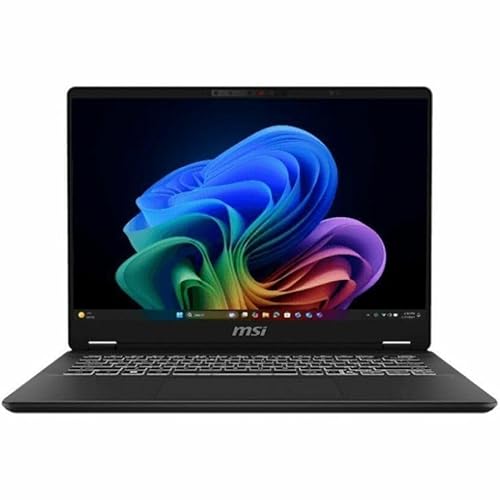
MSI Prestige 14 Evo
The MSI Prestige 14 Evo is built for people who need a laptop that can game but also needs to disappear into a bag without weighing them down. At under 0.7 inches thick and under three pounds, it is genuinely portable. The 360-degree hinge allows for tent and tablet modes, and the touch display is responsive. Intel Arc graphics are the driving force here, and they handle esports titles like Fortnite, League of Legends, and Valorant at solid frame rates. They can also run older AAA games at medium settings without much trouble. This is not a machine for max-settings ray tracing, but it is a machine for gaming on the go.
The build quality is solid for its weight class, with a magnesium alloy chassis that feels premium. The keyboard is comfortable for typing, and the trackpad is precise. Battery life is good for light work and media consumption, which is a common weakness in gaming-focused convertibles. The display is bright and color-accurate enough for basic photo editing and design work. MSI has also included a decent selection of ports, including USB-C and a headphone jack. The overall design is understated, which helps it blend into professional environments.
The limitation is that Intel Arc graphics will not handle the latest AAA titles at high settings, and some games have compatibility issues with Arc drivers. Gamers who play only the newest releases may be disappointed. The display is not OLED, so colors and contrast are good but not exceptional. The small chassis also means thermal performance is constrained, so extended gaming sessions may lead to fan noise and some throttling. This laptop is best for someone who games casually and needs extreme portability for work or school.
Dell XPS 13 2-in-1
The Dell XPS 13 2-in-1 is the best-built convertible on this list by a noticeable margin. The CNC-aluminum chassis is rigid and precise, with no flex or creaking anywhere. The hinge is smooth and holds the screen firmly at any angle without wobble. This is the laptop you buy when you want something that feels like it will last through years of daily use. The 13-inch OLED touch display is stunning, with deep blacks and vibrant colors that make games and media look fantastic. The overall design is minimalist and professional, fitting easily into any workspace or classroom.
Intel Iris Xe graphics are the weak link for gaming, but they handle casual and indie titles without issue. Games like Hades, Stardew Valley, and Celeste run beautifully. For more demanding games, the XPS 13 2-in-1 relies on cloud gaming services like GeForce Now or Xbox Cloud, which work well with a good internet connection. The keyboard is excellent, with great key travel for such a thin device. The trackpad is large and precise. The OLED display is also excellent for creative work, offering wide color gamut and high contrast. The build quality alone makes this a joy to use every day.
The limitation is that Intel Iris Xe is not a gaming GPU. This laptop cannot run modern AAA games at acceptable frame rates without cloud streaming. The 13-inch screen is small for some tasks, and the port selection is limited to USB-C, requiring dongles for HDMI or USB-A. The device also runs warm under sustained load. It is best for someone who values build quality and display above all else, and who games primarily on indie titles or via cloud streaming services.
What to look for
- GPU power versus portability: A discrete GPU in a thin convertible gives you real gaming capability, but it adds weight and heat. Decide if you need local performance or if cloud gaming is enough for your use case.
- Hinge quality: A 360-degree hinge sees heavy use. Look for metal hinges with smooth motion and no wobble. A weak hinge degrades both tablet and laptop modes over time.
- Display type and refresh rate: OLED offers the best colors and contrast for creative work, but IPS panels with high refresh rates (120Hz or higher) are better for gaming. Touch responsiveness matters for tablet mode.
- Weight and thickness: A convertible gaming laptop should be easy to carry. Anything over four pounds becomes less portable. Aim for under 3.5 pounds if you carry it daily.
- External GPU support: Some convertibles offer a proprietary eGPU port for desktop-class gaming at home. This adds cost but future-proofs the device for demanding games.
- Keyboard and trackpad: You will type on this device a lot. Look for good key travel, a comfortable layout, and a responsive trackpad. A cramped keyboard ruins the experience.
- Cloud gaming capability: If the laptop lacks a strong discrete GPU, check that it supports GeForce Now, Xbox Cloud, or other services. A good Wi-Fi card is essential for this.
- Port selection: Convertibles often sacrifice ports for thinness. Make sure you have enough USB-C or Thunderbolt ports for your peripherals, and consider if you need HDMI or a headphone jack.
The verdict
The ASUS ROG Flow X13 is the best overall convertible gaming laptop because it solves the core problem of this category: it gives you serious gaming hardware without forcing you to carry a heavy brick. The XG Mobile eGPU option means you can scale up at home, and the 165Hz touch display makes tablet mode genuinely useful. For most buyers, it is the one laptop that does not force a compromise. If your budget is tight, the Lenovo IdeaPad Gaming Chromebook offers a cloud-based gaming experience with a large 120Hz display and solid build. Creative professionals should look at the HP Spectre x360 16 for its OLED display and pen support. The MSI Prestige 14 Evo is ideal for those who need extreme portability with light gaming. And the Dell XPS 13 2-in-1 is the choice for anyone who prioritizes build quality and display brilliance over raw gaming power. Evaluate your priorities for GPU power, portability, display quality, and budget, and pick the one that aligns with how you actually use a laptop.
How we test
We compare every pick against the field on real specifications, certifications, and aggregated owner reviews. We do not take payment for placement, and we flag when a product is older or sold mainly through renewed listings.
At a glance
The picks, reviewed
ASUS ROG Flow X13 -- Best Overall
The ASUS ROG Flow X13 is the definitive convertible gaming laptop. The 13.4-inch 165Hz touch display folds fully flat and rotates to tablet mode without sacrificing the AMD Ryzen 9 performance underneath. An NVIDIA RTX 4060 inside a 3-lb chassis is genuinely impressive engineering. The XG Mobile external GPU port lets you plug in a desktop-class GPU at home for maximum performance, then unplug and go portable. No other convertible gaming laptop offers this kind of scalability.

Lenovo IdeaPad Gaming Chromebook -- Best Budget Option
Lenovo's IdeaPad Gaming Chromebook brings convertible gaming to the budget tier via NVIDIA GeForce Now cloud gaming. The 16-inch 120Hz display looks great, the 360-degree hinge is solid, and ChromeOS keeps the experience snappy. You're dependent on a reliable internet connection for GPU-intensive games, but for casual gamers, students, and households that don't need Windows, it delivers surprising value at. Battery life is exceptional compared to Windows gaming convertibles.

HP Spectre x360 16 -- Best for Creative Professionals
HP's Spectre x360 16 isn't marketed primarily as a gaming device, but the NVIDIA RTX discrete GPU handles modern games at high settings while the OLED touch display and HP tilt pen make it exceptional for creative work. The 2-in-1 design is the most refined on this list. The hinge is whisper-smooth and the premium aluminum chassis feels like it belongs alongside MacBooks. Artists and creators who also game will find no better fusion of both worlds at this price.
MSI Prestige 14 Evo -- Best Thin and Light
MSI's Prestige 14 Evo hits a balance between gaming capability and all-day carry weight that most convertible gaming laptops miss. The slim profile (under 0.7 inches thick) and sub-3 lb weight make it genuinely portable, while Intel Arc graphics handle esports titles and older AAA games at solid frame rates. The 360-degree hinge and touch display round out the package. It's not a 4K max-settings machine, but for light-to-medium gaming paired with productivity and creative work, it's a strong choice.

Dell XPS 13 2-in-1 -- Best Build Quality
Dell's XPS 13 2-in-1 is the best-built convertible gaming laptop on this list, with a rigid CNC-aluminum chassis that inspires confidence through years of daily hinges and flips. Intel Iris Xe graphics won't handle demanding games at high settings, but for casual gaming, indie titles, and remote desktop gaming (via GeForce Now or Xbox Cloud), it works well. The 13-inch OLED touch display is stunning for content consumption and creative work. If build quality and longevity are your top priorities, Dell consistently delivers.
What to look for
What to consider
GPU tier determines what games you can play at what settings. RTX 4060 handles most modern games at 1080p high settings, while RTX 4080 reaches 1440p ultra. Display size and resolution matter for the tablet mode experience: a 13-inch 1080p panel feels cramped for art and media, while 16-inch OLED screens are immersive. Check the hinge lock mechanism. It should hold position firmly in tent and tablet modes without wobbling during gaming. Battery life is often the weakest point; target 6+ hours for real-world productivity use with gaming plugged in.
What to consider
For the full home setup, see our [articles/best-convertible-gaming-laptop](/articles/best-convertible-gaming-laptop) companion guide to accessories and our [articles/best-compact-amplifier](/articles/best-compact-amplifier) roundup for audio upgrades. Our evaluation methodology is at [methodology](/methodology).
FAQs
Modern convertible gaming laptops have closed the performance gap significantly. The 360-degree hinge adds some weight and a touch panel adds cost, but the GPU and CPU specs in premium models match standard gaming laptops at the same price point. The main trade-off is battery life. the touch display and powerful components drain faster than a non-touch gaming machine.
Tablet mode is better suited to content consumption, digital art, and casual touch games than AAA titles. The touchscreen lacks the precision of a mouse for competitive gaming, and the device gets warm during extended GPU use in a handheld position. Most owners use tablet mode for drawing, media, and note-taking rather than core gaming sessions.
How we made this guide
We compare every pick on the factors that matter, cross-checking manufacturer specifications against aggregated verified owner reviews. We rank independently and never take payment for placement. We have not personally tested every product; where we have not, the ranking reflects verified specs and owner feedback rather than a hands-on review.
How it was written: this guide was researched and reviewed by the TheTestedHub editorial team for accuracy.
Affiliate disclosure: TheTestedHub is reader-supported. When you buy through links on our site, we may earn a commission at no extra cost to you.
Related guides

Your Docking Station Match: CalDigit TS4 and More

Digital Art Computers 2026: Best for Every Budget
Dev & IT Computers in 2026: Ranked for Real Work

Desktop PCs for Every Budget: Find Your Perfect Match
Desktop and Laptop Computers: Performance Reviewed and Ranked
MacBook Pro M4 Pro vs Dell XPS 15: 2026 Shortlist

Buy the Best DIY Computer in 2026: Corsair One i300
