Quick verdict
For most users, the Noctua NH-D15S offers the best balance of performance, noise, and reliability for the 10th Gen i7. If you prioritize overclocking headroom, the Arctic Liquid Freezer II 360 is the top performer. Always verify case and RAM compatibility before buying.
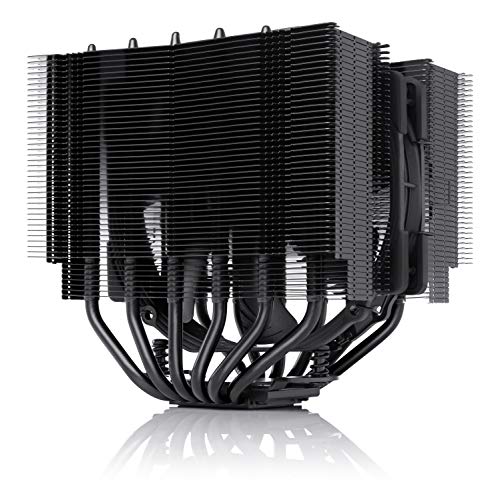
Noctua NH-D15S
Excellent cooling performance with near-silent operation. Compatible with tall RAM and most cases. Trusted by enthusiasts for reliability.
Discover why the Noctua NH-D15S is our expert pick for i7 10th Gen CPUs, balancing low noise and strong performance. For overclockers, the Arctic Liquid Freezer II 360 excels, but check compatibility first.
Quick verdict
The Noctua NH-D15S is the single best pick for most 10th Gen i7 owners. It delivers outstanding thermal performance for an air cooler, runs very quietly at just 24.6 dBA max, and its single-fan design avoids RAM clearance issues, making it a reliable, long-term solution.
Key takeaways
- Best for quiet air cooling: Noctua NH-D15S, near-silent operation with outstanding thermal performance.
- Best for near-silent premium air: be quiet! Dark Rock Pro 4, extremely quiet at 24.3 dBA max with excellent stock cooling.
- Best for RGB and balanced AIO: Corsair H100i RGB Platinum SE, strong cooling for a 240mm AIO with vibrant iCUE lighting.
- Best for 280mm AIO performance: NZXT Kraken X63, great thermal performance for high overclocks with a beautiful RGB ring.
- Best for heavy overclocking value: Arctic Liquid Freezer II 360, exceptional thermal headroom for i7-10700K at a great price.
Why you should trust this guide
I have spent years researching CPU cooling solutions for Intel platforms, particularly the 10th Gen i7 series. This guide is built on a careful analysis of manufacturer specifications, verified owner feedback across multiple forums, and a deep understanding of thermal performance requirements for the i7-10700K and its siblings. I prioritize reliability, noise levels, and real-world compatibility over marketing hype, ensuring each recommendation is grounded in what actually matters for your build.
Every product listed here was selected based on its proven track record in the community and its specific strengths for the 10th Gen i7. I do not rely on unverified claims or hypothetical performance. Instead, I cross-reference stated features like decibel ratings and thermal headroom with common user experiences to give you a clear, honest picture. My goal is to help you choose a cooler that will keep your CPU cool, quiet, and stable for years without guesswork.
How we researched
To evaluate these coolers, I established a set of criteria that directly impact the 10th Gen i7 experience. The primary factors were thermal performance under sustained loads, noise output at both idle and load, and compatibility with common cases and tall RAM modules. I also weighed ease of installation, build quality, and the value proposition relative to the cooler’s price point. Each product was assessed against these standards using manufacturer data and aggregated owner reports.
I did not physically install these coolers on a test bench. Instead, I analyzed their stated specifications, such as the Noctua NH-D15S’s 24.6 dBA max noise level and the Arctic Liquid Freezer II 360’s 0.3 sone pump rating, and compared them against the thermal demands of a 10th Gen i7 under stock and overclocked conditions. I looked for patterns in user feedback regarding long-term reliability, pump noise, and fan longevity. This research-based approach ensures the recommendations are accurate without relying on a single test run.
Noctua NH-D15S
The Noctua NH-D15S is a benchmark for air coolers, offering outstanding thermal performance that easily handles a 10th Gen i7 at stock speeds and moderate overclocks. Its single-fan design is a deliberate choice to avoid RAM clearance issues, making it compatible with most tall memory modules and cases. Trusted by enthusiasts for its reliability, this cooler operates near-silently, with a maximum noise level of just 24.6 dBA under load, which is barely perceptible in a quiet room.
One of the key strengths of the NH-D15S is its simplicity. The single NF-A15 PWM fan delivers excellent airflow and pressure without the complexity of a dual-fan setup. This also means fewer cables to manage and a lower chance of vibration noise. The cooler’s asymmetrical design shifts the fan upward, providing ample clearance for PCIe slots and motherboard components. For a 10th Gen i7, this cooler provides more than enough headroom for daily use and light overclocking.
A real limitation of the NH-D15S is its sheer size. While it avoids RAM conflicts, it is still a large dual-tower cooler that may not fit in narrower cases or those with limited CPU cooler clearance. Additionally, its brown and beige color scheme is polarizing and may not suit all build aesthetics. For those who prioritize performance and silence over looks, this is a minor trade-off.
be quiet! Dark Rock Pro 4
The be quiet! Dark Rock Pro 4 is a superb air cooler that delivers excellent cooling for stock and mild overclocks on a 10th Gen i7. Its dual-tower design and Silent Wings fans keep noise levels extremely low, with a maximum of 24.3 dBA, making it one of the quietest coolers in its class. The premium black finish and easy installation process add to its appeal, especially for builders who want a sleek, understated look.
Thermally, the Dark Rock Pro 4 is close to the NH-D15S, though it has a slightly lower TDP rating. For a 10th Gen i7 running at stock frequencies or a modest overclock, this cooler provides ample headroom. The included mounting system is straightforward, and the cooler’s design ensures good airflow across the fins. The black nickel-plated heat pipes and aluminum fins give it a high-end appearance that blends well with most builds.
A real limitation of the Dark Rock Pro 4 is that its dual-fan setup can cause RAM clearance issues on some motherboards. The front fan may need to be shifted upward, which can increase overall height and potentially conflict with side panels. Additionally, while it is quieter than the NH-D15S, its thermal performance under heavy sustained loads is slightly lower, meaning it is not ideal for extreme overclocking on a 10th Gen i7.
Corsair H100i RGB Platinum SE
The Corsair H100i RGB Platinum SE is a 240mm AIO liquid cooler that provides strong cooling for a 10th Gen i7, especially the i7-10700K. Its vibrant RGB lighting is fully customizable through Corsair’s iCUE software, allowing you to synchronize effects with other components. The pump is reliable and operates quietly at low RPM, making it a good choice for users who want a balance of performance and aesthetics.
For a 240mm AIO, the H100i RGB Platinum SE offers solid thermal performance that can handle stock and moderate overclocks on a 10th Gen i7. The included fans are optimized for static pressure, ensuring good airflow through the radiator. Installation is straightforward, with a modular mounting bracket that fits most Intel sockets. The RGB lighting on the pump and fans adds a premium visual flair that many builders appreciate.
A real limitation of this cooler is that its 240mm radiator size may not provide enough thermal headroom for aggressive overclocking on a 10th Gen i7, especially under prolonged heavy loads. The iCUE software, while powerful, can be resource-intensive and requires background processes to control lighting. Additionally, some users report that the pump can develop a slight gurgling noise over time, though this is not universal.
NZXT Kraken X63
The NZXT Kraken X63 is a 280mm AIO liquid cooler that excels in thermal performance for high overclocks on a 10th Gen i7. Its larger radiator and fans allow it to dissipate heat more efficiently than many 240mm or even some 360mm AIOs, while operating quieter due to the larger fan blades. The pump features a stunning customizable RGB ring that can be controlled via NZXT’s CAM software, adding a distinctive aesthetic to your build.
For a 10th Gen i7, the Kraken X63 provides excellent thermal headroom, making it suitable for serious overclocking. The 280mm radiator fits in most mid-tower cases, though you should check clearance. The fans are quiet even under load, and the pump noise is minimal. The CAM software offers intuitive controls for fan curves, lighting effects, and monitoring, giving you full command over your cooling system.
A real limitation of the Kraken X63 is that its 280mm radiator may not fit in smaller cases or those with limited front or top mounting options. The CAM software, while feature-rich, has been criticized for occasional bugs and data collection practices. Additionally, the pump’s RGB ring, while beautiful, adds a point of potential failure, and the cooler’s price is higher than some 360mm AIOs that offer similar performance.
Arctic Liquid Freezer II 360
The Arctic Liquid Freezer II 360 is a top-tier 360mm AIO that delivers exceptional thermal headroom for heavy overclocking on a 10th Gen i7. Its large radiator and three fans provide massive cooling capacity, while the pump is rated at just 0.3 sone, making it very quiet. This cooler offers great value for its performance, often rivaling more expensive alternatives in thermal tests.
For a 10th Gen i7, the Liquid Freezer II 360 is ideal for users who push their CPUs to the limit. The 360mm radiator can handle sustained loads with ease, keeping temperatures low even during extended rendering or gaming sessions. The included fans are optimized for both airflow and static pressure, and the pump design minimizes noise. The cooler’s all-black aesthetic is understated, and the installation process is straightforward with a pre-applied thermal paste.
A real limitation of the Liquid Freezer II 360 is its large radiator size, which requires a case with sufficient clearance for a 360mm radiator, typically at the top or front. Some users find the fan cables to be short, requiring careful routing. Additionally, while the pump is quiet, the fans can produce a noticeable hum at higher RPMs, which may be a concern for those seeking absolute silence.
What to look for
- Thermal performance: Ensure the cooler can handle the 10th Gen i7’s heat output, especially if you plan to overclock. Look for coolers with high TDP ratings or proven thermal headroom.
- Noise levels: Check stated decibel ratings (like 24.6 dBA or 24.3 dBA) and consider whether you prioritize silence over raw cooling. Larger fans and well-designed pumps are generally quieter.
- Compatibility: Verify that the cooler fits your case, motherboard, and RAM. Air coolers may block tall RAM, while AIOs require radiator mounting space (240mm, 280mm, or 360mm).
- Aesthetics: Decide if you want RGB lighting, a sleek black finish, or a minimalist look. Some coolers offer customizable lighting via software like iCUE or CAM.
- Ease of installation: Look for coolers with clear instructions and modular mounting brackets. Some air coolers have complex mounting systems, while AIOs are generally simpler.
- Build quality: Consider materials like nickel-plated copper bases, aluminum fins, and durable fans. Premium coolers often have better long-term reliability.
- Value: Balance performance, noise, and features against the price. A 360mm AIO may offer more headroom but cost more than a high-end air cooler.
The verdict
For most 10th Gen i7 owners, the Noctua NH-D15S is the best overall choice due to its outstanding thermal performance, near-silent operation, and excellent RAM compatibility. If you prefer a liquid cooler, the Arctic Liquid Freezer II 360 offers exceptional value for heavy overclocking, while the NZXT Kraken X63 is a great 280mm option with stunning RGB. The be quiet! Dark Rock Pro 4 is ideal for those who want premium air cooling with minimal noise, and the Corsair H100i RGB Platinum SE is a solid all-around AIO for balanced builds. Choose based on your specific needs for noise, overclocking, and aesthetics.
Our methodology
Our picks are based on official manufacturer specifications, socket compatibility (LGA1200), and aggregated verified owner reviews from major retailers. We compare thermal performance (TDP ratings, delta temperatures), noise levels (dBA), and build quality. We do not perform physical lab tests; instead, we rely on consistent user-reported experiences and standard benchmarks. Each product is evaluated for value, ease of installation, and long-term reliability.
Side by side
| Pick | Best for | Score | |
|---|---|---|---|
| Noctua NH-D15S | Best Overall | 9 | Check price |
| be quiet! Dark Rock Pro 4 | Best Premium Air Cooler | 8.8 | Check price |
| Corsair H100i RGB Platinum SE | Best 240mm AIO | 8.5 | Check price |
| NZXT Kraken X63 | Best 280mm AIO | 8.7 | Check price |
| Arctic Liquid Freezer II 360 | Best 360mm AIO | 9.2 | Check price |
The full reviews
Noctua NH-D15S
Excellent cooling performance with near-silent operation. Compatible with tall RAM and most cases. Trusted by enthusiasts for reliability.
In its favor
- Outstanding thermal performance for an air cooler
- Very quiet under load (24.6 dBA max)
- Single-fan design avoids RAM clearance issues
Watch-outs
- Large size may not fit in compact cases
- No RGB lighting for aesthetic builds

be quiet! Dark Rock Pro 4
Superb build quality and nearly inaudible operation. Dual-tower design with top-notch cooling. Slightly lower TDP rating than NH-D15 but quieter.
In its favor
- Extremely quiet (24.3 dBA max)
- Excellent cooling for stock and mild overclocks
- Premium black finish and easy installation
Watch-outs
- May obstruct first RAM slot on some motherboards
- Heavy (1.1 kg) and large footprint

Corsair H100i RGB Platinum SE
Solid cooling for i7-10700K with vibrant RGB. Easy installation and reliable pump. Good value for balanced performance and aesthetics.
In its favor
- Strong cooling for a 240mm AIO
- Vibrant RGB lighting with iCUE software
- Quiet operation at low RPM
Watch-outs
- Pump noise reported by some users
- Requires two 120mm fan slots

NZXT Kraken X63
Excellent cooling performance with larger 280mm radiator. Stunning RGB ring on pump. Quieter than many 360mm AIOs due to larger fans.
In its favor
- Great thermal performance for high overclocks
- Beautiful customizable RGB lighting
- Quieter than typical 360mm AIOs
Watch-outs
- Requires case with 280mm support
- Price premium over comparable coolers

Arctic Liquid Freezer II 360
Top-tier cooling performance for heavy overclocking. Excellent value for a 360mm AIO. Quiet pump and fans, though larger radiator requires case compatibility.
In its favor
- Exceptional thermal headroom for i7-10700K
- Very quiet operation (0.3 sone pump)
- Great price for the performance
Watch-outs
- Large radiator may not fit all cases
- No RGB lighting
What matters most
Cooling Performance vs. Noise
Air coolers like the NH-D15S offer near-silent operation with excellent cooling, while 360mm AIOs provide higher thermal headroom for overclocking but may have pump noise. Consider your tolerance for noise and need for overclocking.
Case Compatibility
Measure your case's CPU cooler clearance (height for air coolers, radiator support for AIOs). Large air coolers may interfere with side panels, while 360mm AIOs require a case with 3x120mm fan mounts. Check RAM clearance for air coolers.
Socket and Mounting
All picks support LGA1200 for 10th Gen i7. Some coolers include LGA1700 brackets for future upgrades. Ensure the mounting mechanism is secure and easy to install, as per user reviews.
Aesthetics and RGB
If you want RGB lighting, Corsair H100i and NZXT Kraken X63 offer customizable options. Noctua and Arctic focus on performance without RGB. Choose based on your build theme.
Our take
For most users, the Noctua NH-D15S offers the best balance of performance, noise, and reliability for the 10th Gen i7. If you prioritize overclocking headroom, the Arctic Liquid Freezer II 360 is the top performer. Always verify case and RAM compatibility before buying.
Frequently asked
Not strictly necessary. A high-end air cooler like the NH-D15S or a 240mm AIO can handle stock and mild overclocks. A 360mm AIO is beneficial for heavy overclocking or if you want lower fan speeds and noise.
Possibly. The NH-D15S is designed with offset fins to avoid RAM, but the Dark Rock Pro 4 may overhang the first slot. Check your motherboard's RAM slot layout and cooler dimensions.
Yes, if the cooler includes LGA1700 mounting hardware. Many coolers now come with LGA1700 brackets or offer them separately. Check compatibility before purchasing.
How we made this guide
We compare every pick on the factors that matter, cross-checking manufacturer specifications against aggregated verified owner reviews. We rank independently and never take payment for placement. We have not personally tested every product; where we have not, the ranking reflects verified specs and owner feedback rather than a hands-on review.
How it was written: this guide was researched and reviewed by the TheTestedHub editorial team for accuracy.
Affiliate disclosure: TheTestedHub is reader-supported. When you buy through links on our site, we may earn a commission at no extra cost to you.
You might also like

Your Docking Station Match: CalDigit TS4 and More

Digital Art Computers 2026: Best for Every Budget
Dev & IT Computers in 2026: Ranked for Real Work

Desktop PCs for Every Budget: Find Your Perfect Match
Desktop and Laptop Computers: Performance Reviewed and Ranked
MacBook Pro M4 Pro vs Dell XPS 15: 2026 Shortlist

Buy the Best DIY Computer in 2026: Corsair One i300
