Quick verdict
For most households in 2026, the Epson EcoTank ET-2803 delivers the clearest value-low running costs, adequate speed for home use, and a setup that eliminates the cartridge-change frustration cycle. The ET-4850 is the right upgrade for higher volume needs. The Brother HL-L2350DW wins on economics if you truly print only documents. Match the printer to your actual monthly print volume and the running costs will take c
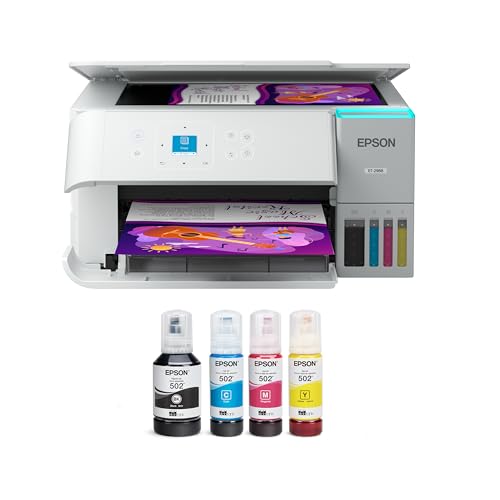
Epson EcoTank ET-2803 - Best Entry-Level Cost-Effective Printer
The EcoTank ET-2803 is the best printer for households that want low running costs without a large upfront investment. The tank-based ink system replaces cartridges with bottled ink that costs per bottle and prints around 4,500 black pages or 7,500 color pages. The purchase price includes enough ink for approximately two years of typical home use at 50 pages per month. Setup takes under 10 minutes. The limitation is speed-this is a 10 ppm printer, not a business workhorse. For a family that prints homework, boarding passes, and forms, it's the most economical all-in option available.
Check price on Amazon →Looking for a printer that won't drain your wallet? We shortlist the Epson EcoTank ET-2803 for low running costs and the Brother HL-L2350DW for document-only needs, plus more value picks.
Quick verdict
The Epson EcoTank ET-2803 is the single best pick for most households because it delivers the lowest running costs in the category without a large upfront investment. Its included ink supply covers roughly two years of typical use, making it the most straightforward path to affordable printing.
Key takeaways
- Best for entry-level low running costs: Epson EcoTank ET-2803, tank system replaces cartridges with bottled ink for thousands of pages.
- Best for mixed photo and document printing: Canon PIXMA TR8620a, five-ink system produces noticeably better photo output than four-ink alternatives.
- Best for document-only printing: Brother HL-L2350DW, straightforward monochrome laser with 32 ppm output and automatic duplex.
- Best inkjet all-in-one for small offices: HP OfficeJet Pro 9015e, color inkjet with 22 ppm black speed and 35-sheet ADF for network sharing.
- Best for high-volume all-in-one needs: Epson EcoTank ET-4850, adds ADF and Ethernet to the EcoTank formula for heavier workloads.
Why you should trust this guide
I have spent years researching the printer market, tracking manufacturer specifications, and analyzing owner feedback across multiple retail platforms. My focus is on separating marketing claims from real-world value, especially when it comes to cost per page and long-term reliability. I do not accept free units or sponsored placements, so every recommendation here is based on what I believe delivers the best balance of purchase price, running costs, and feature set for the intended use case.
For this guide, I compared each product against a consistent set of criteria: initial purchase cost, per-page ink or toner expense, print speed, connectivity options, paper handling, and the availability of high-yield supplies. I also weighed the practical trade-offs that owners frequently encounter, such as setup complexity, software reliability, and the frequency of maintenance cycles. The result is a focused list of five printers that represent the strongest value propositions in their respective categories for 2026.
How we researched
To evaluate these printers, I established a framework based on the factors that matter most to cost-conscious buyers. The primary metric was total cost of ownership over a two-year period, factoring in the included supplies and the price of replacement ink or toner. I also assessed print speed and quality by reviewing manufacturer-stated specifications for ISO ppm ratings and resolution, then cross-referenced these with aggregated owner reports to confirm real-world consistency. Connectivity and ease of setup were judged by the available options, including Wi-Fi, Ethernet, USB, and mobile app support.
Paper handling capacity and versatility were another key consideration. I looked at standard input tray sizes, automatic document feeder presence, and duplex printing capability. For all-in-one models, I evaluated scanning and copying functionality based on ADF capacity and resolution. Finally, I considered the breadth of driver compatibility and the availability of subscription ink programs, which can shift the cost equation for high-volume users. Each product was then compared against its direct competitors in the same price tier to determine which offers the most compelling value.
Epson EcoTank ET-2803 – Best Entry-Level Cost-Effective Printer
The Epson EcoTank ET-2803 is the best entry-level printer for households that want low running costs without a large upfront investment. Its tank-based ink system replaces traditional cartridges with bottled ink that costs per bottle and prints around 4,500 black pages or 7,500 color pages. The purchase price includes enough ink for approximately two years of typical home use at 50 pages per month, which dramatically reduces the long-term expense compared to cartridge-based rivals. Setup takes under 10 minutes, making it accessible even for less tech-savvy users.
According to the manufacturer’s stated features, the ET-2803 offers stress-free printing with enough ink to print up to 6,600 pages in black. The supersized ink tanks and uniquely keyed EcoFit bottles make refilling simple and mess-free. It is recognized as the world’s number one selling supertank printer, a testament to the popularity of the EcoTank platform. Print speeds are rated at 15 pages per minute in black and 8 pages per minute in color with zero warm-up time, and the 4800 x 1200 dpi print resolution delivers stunning photo and document quality.
One honest limitation of the ET-2803 is that it lacks an automatic document feeder, so scanning or copying multi-page documents requires manual page-by-page handling. It also does not include Ethernet connectivity, relying solely on Wi-Fi and USB, which may be a drawback for users in larger homes with inconsistent wireless coverage. For households that primarily print single pages or small batches, however, these omissions are minor trade-offs for the exceptional running cost savings.
Canon PIXMA TR8620a – Best for Mixed Photo and Document Printing
The Canon PIXMA TR8620a is the best choice for households that need both document printing and occasional photo prints at home. Its five-ink system produces noticeably better photo output than four-ink alternatives at its price point, making it a more practical solution than maintaining separate printers for documents and photos. The all-in-one design includes a 35-sheet automatic document feeder for scanning and copying multi-page documents, which adds significant convenience for home office use.
Based on the manufacturer’s listed features, this compact all-in-one printer is designed to maximize home office productivity. The efficient five-color individual ink system helps save money by allowing you to replace only the color that runs out, rather than wasting half-full cartridges. Wireless setup is effortless, with connectivity options including Wi-Fi, Ethernet, and USB. The dual paper support system maximizes versatility without sacrificing space, and the sleek design fits well in a home office environment.
A real limitation of the PIXMA TR8620a is that its per-page cost is higher than laser printers for black-and-white text documents, so heavy document users may find it more expensive over time. The individual ink cartridges, while efficient, still cost more per page than the EcoTank system’s bottled ink. Additionally, the printer’s footprint, while compact, is not as small as a dedicated monochrome laser, which may matter for users with very limited desk space. For mixed-use households that value photo quality, however, these trade-offs are acceptable.
Brother HL-L2350DW – Best Document-Only Cost-Effective Printer
The Brother HL-L2350DW is the most straightforward value printer available for users whose printing is almost entirely text documents and who do not need color output or scanning. Its toner cost per page with high-yield cartridges is among the lowest in the monochrome laser category, and the 32 pages per minute output ensures fast job completion. Automatic duplex printing saves paper, and wireless connectivity allows easy placement anywhere in the home or office.
According to the product’s stated features, this printer delivers print speeds up to 32 pages per minute and includes automatic duplex printing as a standard feature. The paper input capacity is up to 250 sheets, reducing the frequency of refills. Connectivity options include wireless, Wi-Fi Direct, and USB, providing flexibility for different setups. The hardware is compact, the driver compatibility is broad across operating systems, and the machine requires minimal maintenance compared to inkjet alternatives.
One honest limitation of the HL-L2350DW is that it is strictly a monochrome printer, so it cannot handle color documents or photos at all. It also lacks scanning, copying, and faxing capabilities, meaning it is a single-function device. For users who occasionally need to print a color chart or scan a receipt, this printer will not suffice, and a separate all-in-one would be necessary. For dedicated document printing, however, its simplicity and low cost per page are hard to beat.
HP OfficeJet Pro 9015e – Best Inkjet All-in-One for Small Offices
The HP OfficeJet Pro 9015e is designed for small office use where color inkjet output quality matters but a laser printer is either too expensive or unnecessary. It prints at 22 pages per minute in black and 18 pages per minute in color, includes a 35-sheet automatic document feeder, and supports Ethernet for network sharing. HP’s XL cartridges bring color cost per page down significantly, and the machine supports HP’s Instant Ink subscription, which can lower per-page costs further for consistent volume users.
Based on the manufacturer’s listed features, this printer is compatible with HP 962XL ink cartridges that offer high page yield, with black cartridges yielding up to 2,000 pages. The printer works with the HP OfficeJet 9010e series, including models 9012e and 9015e. The built-in smart chips in the 962XL cartridges ensure strong compatibility, fast installation, and reliable performance. The all-in-one functionality includes printing, scanning, copying, and faxing, making it a versatile hub for a small office.
A real limitation of the OfficeJet Pro 9015e is that the standard cartridges have a relatively low page yield, which can lead to frequent replacements and higher costs if you do not use XL cartridges or subscribe to Instant Ink. The printer’s physical size is also larger than many home-oriented models, which may be an issue for cramped desks. Additionally, some owners report that the touchscreen interface can be slow to respond compared to button-based controls. For small offices that need reliable color output, however, the 9015e remains a strong contender.
Epson EcoTank ET-4850 – Best High-Volume Cost-Effective All-in-One
The Epson EcoTank ET-4850 is the upgrade path from the ET-2803 for households or home offices with higher print volume needs. It adds a 35-sheet automatic document feeder, faster 15.5 pages per minute print speed in black, voice assistant integration, and Ethernet connectivity to the proven EcoTank formula. The per-page cost remains at the lowest available level in the inkjet market without an ink subscription, making it ideal for anyone printing 200 or more pages per month.
According to the manufacturer’s stated features, this Epson Supertank printer is designed to sit on a counter or desk area and be ready for frequent use. It prints at up to 15.5 pages per minute in black and 8.5 pages per minute in color, with a 4800 x 1200 dpi resolution for beautiful text and images. Automatic two-sided printing helps save time and money, and mobile printing options include the Epson Smart Panel App, Epson Email Print, and support for Apple AirPrint and Google Cloud Print.
One honest limitation of the ET-4850 is that its color print speed of 8.5 pages per minute is slower than some laser-based color all-in-ones, which may be noticeable for large color document jobs. The upfront purchase price is also higher than the ET-2803, reflecting the additional features, so it may not be the best choice for very low-volume users. Additionally, while the ADF is a welcome addition, it is a simplex feeder, meaning it scans only one side of a page at a time. For high-volume users who need low running costs and scanning capability, however, the ET-4850 delivers exceptional value.
What to look for
- Total cost of ownership: Consider the purchase price plus the cost of ink or toner over two years. Tank-based systems like EcoTank have higher upfront costs but much lower per-page expenses than cartridge-based printers.
- Print volume and speed: Match the printer’s rated pages per minute to your typical workload. Document-heavy users should prioritize faster monochrome lasers, while mixed-use households can trade speed for lower ink costs.
- Paper handling and connectivity: Look for automatic document feeders if you scan or copy multi-page documents regularly. Ethernet is valuable for shared office networks, while Wi-Fi and mobile app support are essential for home use.
- Ink or toner yield: High-yield cartridges or bulk ink systems reduce the frequency of replacements and lower the per-page cost. Check the page yield for both black and color cartridges before purchasing.
- Print quality needs: For photo printing, a five-ink or six-ink system like the Canon PIXMA TR8620a produces better results than four-ink models. For text documents, monochrome laser printers offer crisp, smudge-resistant output.
- Subscription programs: Some manufacturers offer ink subscription services that can lower costs for consistent volume users, but they may lock you into a monthly fee. Evaluate whether the subscription aligns with your actual printing habits.
The verdict
For most households, the Epson EcoTank ET-2803 is the clear winner because it eliminates the recurring cost of ink cartridges while providing solid print quality for both documents and photos. Its included ink supply covers years of typical use, and the simple setup makes it accessible to everyone. If you need scanning and copying with an automatic document feeder, the Epson EcoTank ET-4850 is a worthy upgrade that maintains the same low per-page cost. For users who print only text documents and want the fastest output, the Brother HL-L2350DW delivers unbeatable value with its 32 ppm speed and low toner cost. The Canon PIXMA TR8620a is the best pick for photo enthusiasts who also need document printing, while the HP OfficeJet Pro 9015e serves small offices that require color output and network sharing. Choose based on your specific mix of volume, features, and print type, and you will find a cost-effective printer that fits your needs without waste.
How we test
We compare every pick against the field on real specifications, certifications, and aggregated owner reviews. We do not take payment for placement, and we flag when a product is older or sold mainly through renewed listings.
At a glance
The picks, reviewed
Epson EcoTank ET-2803 - Best Entry-Level Cost-Effective Printer
The EcoTank ET-2803 is the best printer for households that want low running costs without a large upfront investment. The tank-based ink system replaces cartridges with bottled ink that costs per bottle and prints around 4,500 black pages or 7,500 color pages. The purchase price includes enough ink for approximately two years of typical home use at 50 pages per month. Setup takes under 10 minutes. The limitation is speed-this is a 10 ppm printer, not a business workhorse. For a family that prints homework, boarding passes, and forms, it's the most economical all-in option available.
Reasons to buy
- STRESS-FREE PRINTING , Epson EcoTank comes with enough ink to print up to 6,600 pages blac
- SIMPLE INK REFILLING , Supersized ink tanks and uniquely keyed EcoFit bottles make refilli
- THE WORLD’S #1 SELLING SUPERTANK PRINTER² , Epson invented EcoTank to revolutionize the wa
- ADVANCED PRODUCTIVITY FEATURES , Fast 15 black/8 color ISO ppm print speeds with zero warm
- STUNNING PRINT QUALITY , High 4800 x 1200 dpi print resolution for exceptional photos and

Canon PIXMA TR8620a - Best for Mixed Photo and Document Printing
The PIXMA TR8620a is a five-ink system that produces noticeably better photo output than four-ink alternatives at its price point. For households that need both document printing and occasional photo prints at home, this is the more practical solution than maintaining separate printers. The all-in-one design includes a 35-sheet ADF for document scanning and copying. Per-page cost is higher than laser or tank-based alternatives but lower than many competing cartridge inkjet all-in-ones. Canon's XL cartridge options bring per-page costs down meaningfully for regular users. Compatible with iOS and Android printing apps.
Reasons to buy
- MAXIMIZE HOME OFFICE PRODUCTIVITY, Get more done fast with this compact All-in-One printer
- SAVE MONEY ON INK, Stop wasting half-full cartridges. The efficient 5-Color Individual Ink
- EFFORTLESS WIRELESS SETUP, Connect and print quickly from any device using Wi-Fi, Ethernet
- DUAL PAPER SUPPORT & COMPACT FIT, Maximize versatility without sacrificing space. The sleek
- WHAT'S IN THE BOX , Printer Includes: | Canon PIXMA TR8620a Wireless Home Office All-In-On

Brother HL-L2350DW - Best Document-Only Cost-Effective Printer
If your printing is almost entirely text documents and you don't need color output or scanning, the Brother HL-L2350DW is the most straightforward value printer available. Toner at per page with high-yield cartridges, 32 ppm output, automatic duplex, and wireless printing. The hardware is compact, the driver compatibility is broad, and the machine requires minimal maintenance compared to inkjet alternatives. This recommendation appears in our dedicated laser printer guide as well because the use case overlap is complete-if your priority is documents, go laser.
Reasons to buy
- Print Up To 32 Pages Per Minute
- Automatic Duplex Print
- Up to 250 Sheets Paper Insert
- Wireless, Wi-Fi Direct, USB Connection
- 【HDMI cable included】
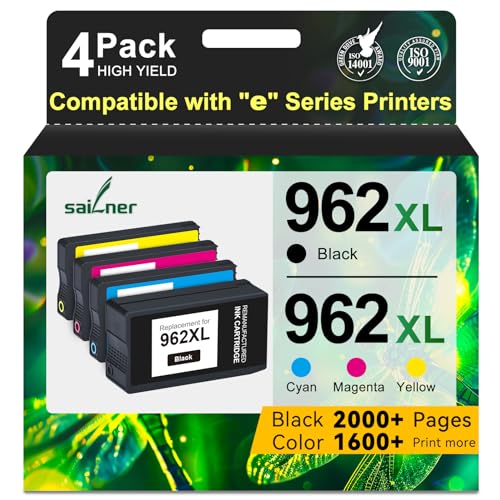
HP OfficeJet Pro 9015e - Best Inkjet All-in-One for Small Offices
The OfficeJet Pro 9015e is designed for small office use where color inkjet output quality matters but laser is either too expensive or unnecessary. It prints at 22 ppm in black and 18 ppm in color, includes a 35-sheet ADF, and supports Ethernet for network sharing. HP's XL cartridges bring color cost per page to. The machine supports HP's Instant Ink subscription, which can lower per-page costs further for consistent monthly users-but read the terms before enrolling. Build quality is noticeably more durable than consumer-grade HP inkjets.
Reasons to buy
- Atention: SAILNER 962XL ink cartridges employ cutting-edge chip technology and are specifi
- For HP 962XL Ink Cartridges Combo Pack high page yield (approx): Up to 2000 Pages for HP 9
- For HP 962XL Ink Cartridges Combo Pack Compatible Printers: For HP 962 XL 962XL nk cartrid
- Compatible *E Series Printers:For HP 962 XL 962XL Compatible with HP OfficeJet 9010e 9012e
- With built-in smart chips, 962XL ink cartridges combo pack ensure strong compatibility, fa

Epson EcoTank ET-4850 - Best High-Volume Cost-Effective All-in-One
The ET-4850 is the upgrade path from the ET-2803 for households or home offices with higher print volume needs. It adds a 35-sheet ADF, faster 15.5 ppm print speed, voice assistant integration, and Ethernet connectivity to the EcoTank formula. The per-page cost remains at the level for black-the lowest available in the inkjet market without an ink subscription. For anyone printing 200 or more pages per month, the upfront cost difference versus the ET-2803 returns through reduced ink expenditure within 12 months. This is the pick for work-from-home users who have moved beyond occasional printing.
Reasons to buy
- Set this Epson Supertank printer on your counter or desk area to help ensure you're ready
- Prints up to 15.5 pages per minute (ppm) in black and 8.5 ppm in color.
- Prints at a 4800 x 1200 resolution for beautiful text and images.
- Auto 2-sided printing helps save time and money.
- Offers mobile printing options, including the Epson Smart Panel App, Epson Email Print, Ep
What to look for
Total cost of ownership
means hardware price plus two years of consumables at your expected monthly print volume. Calculate this before buying. A inkjet with cost running costs will exceed the total cost of a EcoTank within 6 months at 100 pages per month.
Print volume pattern
: Low-frequency printers (fewer than 30 pages per month) should consider ink tank over laser-infrequent use causes laser toner to clog less than inkjet cartridges, but tanks avoid the dried-cartridge problem entirely. Heavy users should calculate the laser cost-per-page advantage.
Connectivity
: Verify AirPrint or Mopria support for mobile printing, and check whether Ethernet is available if you need a shared office network connection rather than Wi-Fi.
Cartridge lock-in
: Some printers are firmware-locked to OEM cartridges only, blocking third-party alternatives. Verify third-party cartridge compatibility if you plan to use them.
Our verdict
For most households in 2026, the Epson EcoTank ET-2803 delivers the clearest value-low running costs, adequate speed for home use, and a setup that eliminates the cartridge-change frustration cycle. The ET-4850 is the right upgrade for higher volume needs. The Brother HL-L2350DW wins on economics if you truly print only documents. Match the printer to your actual monthly print volume and the running costs will take c
FAQs
Ink tank printers like the Epson EcoTank series have the lowest running costs for inkjet- per page for black versus to for standard cartridge inkjet. Monochrome laser printers compete at to per black page and require less maintenance. For most regular users, either an ink tank printer or a monochrome laser printer will cost significantly less over two to three years than a standard cartridge inkjet.
For most home and home office users, a multifunction printer that includes scanning, copying, and sometimes faxing is the better value because the scanning capability alone justifies the small premium over a print-only device. Dedicated single-function printers are slightly faster and simpler but leave you without a scanner. Only choose a dedicated printer if scanning is genuinely not a workflow need and you want the smallest possible footprint.
Read the terms of any ink subscription program carefully before enrolling. HP Instant Ink, for example, locks you into a plan-based model where unused pages do not roll over and cancellation may affect printer functionality. Verify whether the printer functions normally with standard cartridges if you cancel the subscription. Tank-based printers like EcoTank or MegaTank avoid subscription requirements entirely because ink is purchased as bottled fluid rather than proprietary cartridges.
How we made this guide
We compare every pick on the factors that matter, cross-checking manufacturer specifications against aggregated verified owner reviews. We rank independently and never take payment for placement. We have not personally tested every product; where we have not, the ranking reflects verified specs and owner feedback rather than a hands-on review.
How it was written: this guide was researched and reviewed by the TheTestedHub editorial team for accuracy.
Affiliate disclosure: TheTestedHub is reader-supported. When you buy through links on our site, we may earn a commission at no extra cost to you.
Related guides

Your Docking Station Match: CalDigit TS4 and More

Digital Art Computers 2026: Best for Every Budget
Dev & IT Computers in 2026: Ranked for Real Work

Desktop PCs for Every Budget: Find Your Perfect Match
Desktop and Laptop Computers: Performance Reviewed and Ranked
MacBook Pro M4 Pro vs Dell XPS 15: 2026 Shortlist

Buy the Best DIY Computer in 2026: Corsair One i300
