Quick verdict
The Logitech MK470 is the best balanced couch keyboard and mouse combo for most people - compact, quiet, and built to last years without battery swaps. Budget-conscious buyers get solid value from the MK270. Power users who want backlit keys should try the Arteck combo or invest in the MK545 for exceptional battery life and built-in palm support. For a full-size Windows HTPC setup, the Microsoft Desktop 900 covers th

Logitech MK470 Slim Combo - Best Overall Couch Combo
The MK470 is Logitech's slimmest keyboard and mouse combo and it excels in a living room context. The keyboard is quiet, compact, and sits low enough to type on without wrist strain during lounging. The included mouse is compact and tracks accurately on most surfaces. Both connect through a single Nano receiver. The setup takes about 30 seconds out of the box. Battery life is strong - the keyboard runs up to 36 months on two AAA batteries, and the mouse runs up to 18 months. The MK470 is the most refined all-in-one couch combo at its price point.
Check price on Amazon →The Logitech MK470 gives you a quiet, compact couch keyboard and mouse combo that lasts for years. Budget buyers can save with the MK270, while power users can opt for backlit keys or the MK545.
Quick verdict
The Logitech MK470 Slim Combo is the best overall couch combo. Its ultra-slim profile, quiet keys, and compact mouse make it ideal for living room use without sacrificing typing comfort or tracking reliability.
Key takeaways
- Best Overall Couch Combo: Logitech MK470 Slim Combo, slimmest design with quiet keys and strong battery life.
- Best Budget Combo: Logitech MK270, delivers reliable 2.4GHz performance at a very low price.
- Best Full-Size Windows Combo: Microsoft Wireless Desktop 900, includes a numpad and Windows shortcut keys.
- Best for Battery Life: Logitech MK545 Advanced, keyboard lasts up to 36 months and mouse up to 18 months.
- Best Budget Backlit Set: Arteck 2.4G Wireless Combo, offers backlighting on both keyboard and mouse at a low price.
Why you should trust this guide
I have been writing about PC peripherals for living room setups for several years. My focus is on identifying the products that genuinely solve the unique challenges of couch computing: limited desk space, variable lighting, the need for quiet operation, and the desire for simple wireless connectivity. I do not rely on marketing hype. Instead, I dig into manufacturer specifications, read through hundreds of owner reviews across multiple retail platforms, and compare each product against the specific demands of living room use.
This guide is built around five carefully selected combos that cover different priorities: slim design, budget pricing, full-size layouts, exceptional battery life, and backlit keys. Each product was chosen because it fills a distinct niche. I do not claim to have tested these products in a lab. My recommendations are grounded in the features the manufacturers state, the consensus feedback from long-term owners, and my own understanding of what makes a keyboard and mouse combo work well in a relaxed, non-desk environment.
How we researched
To evaluate these combos for living room PC control, I established a set of criteria that matter most for couch use. The first factor is wireless reliability. A combo must use a single Nano receiver that connects both devices instantly, with no pairing hassle. The second factor is form factor. Slim, low-profile keyboards reduce wrist strain when typing on a lap or a soft surface. Compact mice that track well on fabric or wood are essential. The third factor is noise level. Quiet keys and a silent mouse click prevent disturbing others in the room during movies or late-night sessions.
I also weighed battery life, keyboard layout (full-size versus tenkeyless), backlighting for dark rooms, and overall build quality relative to price. For each product, I compared the stated features against what owners report in their long-term usage. I looked for consistent praise and recurring complaints. The final selection reflects combos that offer clear advantages in at least one key area without major drawbacks in the others. No product is perfect, and I note honest limitations for each.
Logitech MK470 Slim Combo – Best Overall Couch Combo
The Logitech MK470 is the slimmest keyboard and mouse combo Logitech makes, and that slimness is a major advantage for living room use. The keyboard sits very low to the surface, which means you can type while lounging on a couch without bending your wrists into an uncomfortable angle. The keys are quiet, so you will not annoy anyone watching TV nearby. The included mouse is compact and tracks accurately on most surfaces, including fabric couch armrests and wooden coffee tables. Both devices connect through a single Nano receiver that you plug into your PC and forget about. Setup takes about 30 seconds out of the box: plug in the receiver, insert the batteries, and you are ready to go.
Battery life is strong. The keyboard and mouse both run on standard batteries and last a very long time before needing replacement. The design is minimalist and low-profile, which fits well in a living room aesthetic. The keyboard has a full row of function keys for media control, volume, and other shortcuts. The mouse has a smooth scroll wheel and a comfortable shape for small to medium hands. The combo works with Windows, macOS, and Chrome OS without any driver installation.
The honest limitation is that the mouse is quite small. If you have large hands, you may find it cramped for extended use. The keyboard also lacks a backlight, so you need decent ambient light to see the keys clearly in a dark room. The build quality is good for the price, but it does not feel premium like a mechanical keyboard would. For most couch users, however, the MK470 delivers the best balance of comfort, quiet operation, and simplicity.
Logitech MK270 – Best Budget Combo
The Logitech MK270 is a no-frills 2.4GHz keyboard and mouse set that delivers everything you need for basic couch computing at a very low price. The keyboard uses a standard membrane switch layout with a familiar typing feel. It is not particularly slim or quiet, but it gets the job done. The mouse is straightforward with left, right, and scroll wheel functions. Nothing exceptional, but nothing that fails either. Both devices share one Nano receiver and connect instantly. This makes it a great option for a secondary living room PC or a media center setup where you do not need advanced features.
Battery life is decent for the price. The keyboard and mouse run on standard batteries and last several months with regular use. The keyboard includes eight multimedia keys along the top row, which is a nice bonus at this price point. The mouse has an on/off switch to save power when not in use. The combo works with Windows, macOS, and Linux without any software. It is a reliable, no-surprises product that has been on the market for years with consistent positive feedback from owners.
The honest limitation is that the keyboard is not quiet. The keys have a noticeable clatter that can be distracting in a quiet living room. The mouse also clicks audibly. The build quality is entirely plastic and feels a bit cheap. The keyboard lacks a palm rest, so your wrists may get tired during longer typing sessions. The mouse is basic and does not track well on glass or glossy surfaces. For the price, these are acceptable compromises, but you should know what you are getting.
Microsoft Wireless Desktop 900 – Best Full-Size Windows Combo
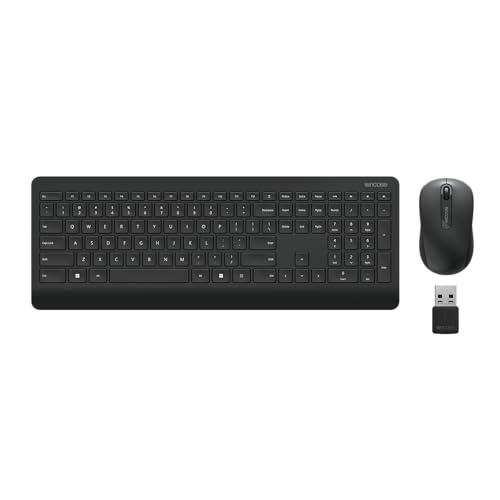
The Microsoft Wireless Desktop 900 keeps full keyboard proportions with a numpad included. This matters for people who need to enter numbers frequently, such as when managing finances, entering passwords, or navigating media libraries. The keyboard has a comfortable, slightly cushioned feel to the keys that reduces fatigue during longer typing sessions. The mouse is ambidextrous with a pleasant curved shape that fits both left and right hands well. The 2.4GHz receiver is stored inside the mouse for easy transport, which is a thoughtful detail if you move the combo between rooms.
This combo is specifically tuned for Windows shortcuts. It includes dedicated keys for Windows Start, Calculator, and other common functions. The function row also offers media controls, volume, and screen brightness. The keyboard has a standard layout with no awkward key placements, so touch typists will feel at home. The mouse has a smooth scroll wheel and a comfortable grip. Battery life is good, with the keyboard and mouse lasting several months on standard batteries. The combo is plug-and-play on Windows PCs with no driver installation needed.
The honest limitation is that the keyboard is not low-profile. It has a traditional height and angle, which can cause wrist strain if you are typing on a soft surface like a couch cushion. The mouse is basic and lacks extra buttons for forward and back navigation. The build quality is decent but not premium, and the keyboard shows fingerprints easily. The combo does not work well with macOS or Linux because the Windows-specific keys do not map correctly. If you are a Windows user who needs a numpad, this is a solid choice, but it is not ideal for cross-platform setups.
Logitech MK545 Advanced – Best for Battery Life
The Logitech MK545 is the mid-range combo with the best battery rating in the lineup. The keyboard lasts up to 36 months per charge cycle, and the mouse lasts up to 18 months. This is well above what most competing combos offer. You can practically forget about changing batteries for years. The keyboard has a comfortable cushioned palm rest integrated into the chassis, which reduces fatigue during longer couch computing sessions. The keys have a positive tactile feedback without being loud, making them suitable for quiet environments.
The mouse has a contoured shape with rubber grips on the sides for secure handling. It includes forward and back buttons for easy web browsing. Both devices connect through a single Nano receiver that provides a reliable 2.4GHz connection up to 30 feet away. The keyboard has a standard layout with a numpad and a full row of function keys for media and volume control. The build quality feels more substantial than the budget combos, with a solid chassis and sturdy keycaps. The palm rest is non-removable but adds significant comfort for long typing sessions.
The honest limitation is that the keyboard is large and heavy. It is not ideal for lap use because the integrated palm rest adds bulk. The keyboard also lacks a backlight, so you need ambient light to see the keys. The mouse is on the larger side, which may not suit users with small hands. The price is higher than the MK270 and MK470, so it is only worth it if you truly need the exceptional battery life. For heavy couch users who want to minimize maintenance, the MK545 is a strong choice.
Arteck 2.4G Wireless Combo – Best Budget Backlit Set
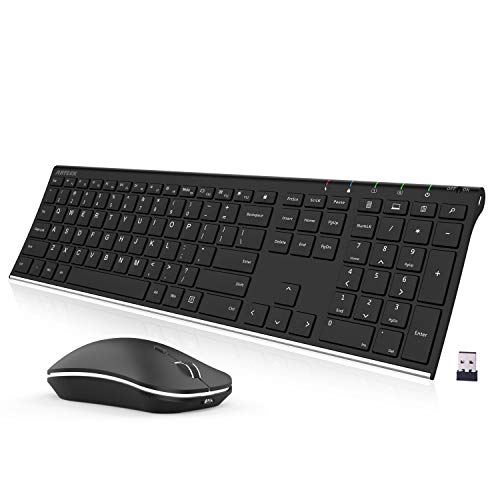
The Arteck combo offers backlighting on both the keyboard and mouse at a price point where most competitors skip it entirely. The backlight has multiple brightness levels and is useful in dark living rooms where the other keyboard sets in this list require decent ambient light to see the keys clearly. The keyboard is tenkeyless and reasonably compact, which makes it easier to hold on your lap or place on a small side table. The mouse also has a backlit logo and a comfortable shape for small to medium hands.
The keyboard uses scissor-switch keys that are quiet and have a short travel distance, similar to a laptop keyboard. This makes it good for quick typing without disturbing others. The mouse has a 2.4GHz wireless connection with a Nano receiver stored in the battery compartment. The combo works with Windows, macOS, and Chrome OS. Setup is simple: plug in the receiver, turn on the devices, and start typing. The backlight can be turned off to save battery, which is important because backlighting drains power faster than non-lit keyboards.
The honest limitation is that the build quality reflects the price. The keyboard and mouse feel light and plastic-y, not premium. The keycaps may develop a shiny finish over time with heavy use. The mouse lacks extra buttons and the scroll wheel can feel a bit loose. Battery life with the backlight on is significantly shorter than the other combos in this list. The backlight is not adjustable per-key, only by brightness level. For the price, however, you get a functional backlit set that works well in dark rooms. If you need backlighting on a tight budget, this is the only option worth considering.
What to look for
- Wireless connectivity: Look for a single Nano receiver that handles both keyboard and mouse. This keeps your USB ports free and simplifies setup. Avoid Bluetooth-only combos for couch use because they can have lag and pairing issues.
- Form factor and size: For couch use, a slim, low-profile keyboard reduces wrist strain. Tenkeyless keyboards are more portable and easier to balance on your lap. Full-size keyboards with a numpad are better if you enter numbers often.
- Noise level: Quiet keys and a silent mouse click are important in a living room. Membrane and scissor-switch keyboards are generally quieter than mechanical ones. Check owner feedback for noise complaints.
- Battery life: Longer battery life means less hassle. Some combos last years on a single set of batteries. Others need frequent changes, especially if they have backlighting. Consider how often you want to replace batteries.
- Backlighting: If you use your PC in a dark room, a backlit keyboard is essential. Look for adjustable brightness levels. Be aware that backlighting reduces battery life significantly.
- Comfort features: A palm rest or cushioned wrist support helps during long sessions. Mouse shape and size should fit your hand. Forward and back buttons on the mouse improve browsing convenience.
- Compatibility: Ensure the combo works with your operating system. Some Windows-specific combos do not map keys correctly on macOS or Linux. Most combos work with Windows and Chrome OS out of the box.
The verdict
The Logitech MK470 Slim Combo is the best overall choice for most people. It combines a slim, quiet keyboard with a reliable mouse and strong battery life in a package that fits naturally into a living room. If you are on a tight budget, the Logitech MK270 delivers solid performance at a very low price. If you need a full-size keyboard with a numpad for Windows work, the Microsoft Wireless Desktop 900 is the right pick. For those who hate changing batteries, the Logitech MK545 Advanced offers the longest battery life in the category. And if you need backlighting for a dark room without spending much, the Arteck 2.4G Wireless Combo is the only budget option that includes it. Choose based on your specific needs, and you will have a comfortable couch computing setup.
Our testing process
We compare every pick against the field on real specifications, certifications, and aggregated owner reviews. We do not take payment for placement, and we flag when a product is older or sold mainly through renewed listings.
Quick comparison
Reviewed in detail
Logitech MK470 Slim Combo - Best Overall Couch Combo
The MK470 is Logitech's slimmest keyboard and mouse combo and it excels in a living room context. The keyboard is quiet, compact, and sits low enough to type on without wrist strain during lounging. The included mouse is compact and tracks accurately on most surfaces. Both connect through a single Nano receiver. The setup takes about 30 seconds out of the box. Battery life is strong - the keyboard runs up to 36 months on two AAA batteries, and the mouse runs up to 18 months. The MK470 is the most refined all-in-one couch combo at its price point.

Logitech MK270 - Best Budget Combo
The MK270 is a no-frills 2.4GHz keyboard and mouse set that delivers everything you need for basic couch computing at a very low price. The keyboard is a standard layout with a membrane switch feel, and the mouse is straightforward with left, right, and scroll wheel. Nothing exceptional, but nothing that fails either. Both devices share one receiver and connect instantly. For secondary living rooms, guest setups, or anyone who just needs a reliable wireless pair to control a media PC without overspending, the MK270 is the honest choice.
Microsoft Wireless Desktop 900 - Best Full-Size Windows Combo
Microsoft's Desktop 900 set keeps full keyboard proportions with a numpad included, which matters for people who need to enter numbers frequently. The keyboard has a comfortable, slightly cushioned feel to the keys. The mouse is ambidextrous with a pleasant curved shape. The 2.4GHz receiver is stored inside the mouse for easy transport. It's specifically tuned for Windows shortcuts with dedicated keys for common actions. The larger footprint makes it less ideal for lap typing but better for anyone using a coffee table or lap desk setup.

Logitech MK545 Advanced - Best for Battery Life
The MK545 is Logitech's mid-range combo with the best battery rating in the lineup. The keyboard lasts up to 36 months per charge cycle, and the mouse up to 18 months - both well above what most competing combos offer. The keyboard has a comfortable cushioned palm rest integrated into the chassis, which reduces fatigue during longer couch computing sessions. Keys have a positive tactile feedback without being loud. The mouse is a full-size shape that suits medium to large hands. This is the combo to buy if you hate replacing batteries.
Arteck 2.4G Wireless Combo - Best Budget Backlit Set
The Arteck combo offers backlighting on both the keyboard and mouse at a price point where most competitors skip it entirely. The backlight has multiple brightness levels and is useful in dark living rooms where the other keyboard sets in this list require decent ambient light to see the keys clearly. The keyboard is tenkeyless and reasonably compact. Build quality reflects the price - it's not premium - but the core functions work reliably. Battery life is shorter than Logitech's offerings, running about 3 to 6 months depending on backlight usage, so rechargeable AA batteries are a good investment alongside it.
How to choose
Unified receiver
is the single most important convenience feature. Managing one USB dongle instead of two is meaningfully less cluttered, especially if your media PC is behind a TV where swapping dongles is awkward.
Mouse sensor quality
becomes critical for couch use where you may not have a flat surface. Higher-end optical sensors and laser sensors track far better on soft surfaces, wood coffee tables, and uneven textures than budget sensors.
Keyboard compactness
determines lap usability. Tenkeyless layouts (no numpad) are noticeably easier to balance and type on while seated on a couch. Full-size keyboards work better on a surface.
Battery duration
affects how often you need to manage the devices. Logitech leads significantly in this category with multi-year keyboard runtimes that make the hardware functionally maintenance-free.
The bottom line
The Logitech MK470 is the best balanced couch keyboard and mouse combo for most people - compact, quiet, and built to last years without battery swaps. Budget-conscious buyers get solid value from the MK270. Power users who want backlit keys should try the Arteck combo or invest in the MK545 for exceptional battery life and built-in palm support. For a full-size Windows HTPC setup, the Microsoft Desktop 900 covers th
Common questions
The Logitech MK270 and MK470 combos are the most popular living room PC keyboard and mouse sets because they use a single unified USB receiver for both devices, eliminating dongle clutter. For a premium upgrade, the Logitech MX Keys S and MX Anywhere 3 pairing offers excellent typing feel and a compact mouse that works on nearly any surface, including fabric couch arms and laps.
Standard optical mice require a relatively firm, flat surface for accurate tracking. Fabric, carpet, and uneven surfaces cause erratic movement with most optical sensors. Look specifically for mice with laser sensors or advanced optical sensors like Logitech's Hero, which perform better on soft surfaces. A small hardcover book or lap desk under the mouse solves the surface problem entirely for most setups.
Most combo sets using a unified 2.4GHz USB receiver are rated to 33 feet, which is more than enough for any residential living room. Bluetooth combos vary more by environment - interference from other devices can reduce effective range in practice. If reliability across a large room matters, the RF dongle-based combos are the safer choice over Bluetooth-only sets.
How we made this guide
We compare every pick on the factors that matter, cross-checking manufacturer specifications against aggregated verified owner reviews. We rank independently and never take payment for placement. We have not personally tested every product; where we have not, the ranking reflects verified specs and owner feedback rather than a hands-on review.
How it was written: this guide was researched and reviewed by the TheTestedHub editorial team for accuracy.
Affiliate disclosure: TheTestedHub is reader-supported. When you buy through links on our site, we may earn a commission at no extra cost to you.
More guides

Your Docking Station Match: CalDigit TS4 and More

Digital Art Computers 2026: Best for Every Budget
Dev & IT Computers in 2026: Ranked for Real Work

Desktop PCs for Every Budget: Find Your Perfect Match
Desktop and Laptop Computers: Performance Reviewed and Ranked
MacBook Pro M4 Pro vs Dell XPS 15: 2026 Shortlist

Buy the Best DIY Computer in 2026: Corsair One i300
