Quick verdict
For maximum CPS, prioritize optical switches with adjustable debounce and the lightest weight you can handle, but don't overlook ergonomics—a comfortable grip allows for sustained high-speed clicking.
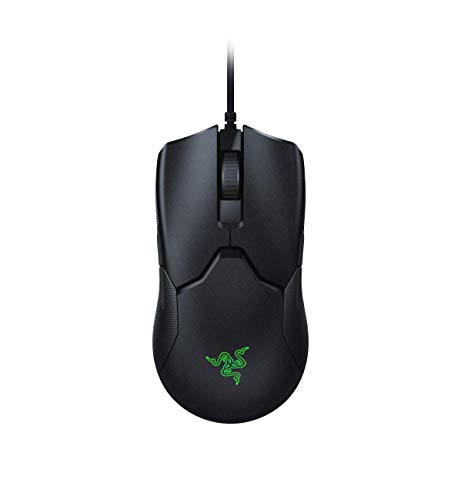
Razer Viper 8KHz
With its 8000Hz polling rate and optical switches, this mouse offers the lowest click latency available, translating to faster CPS in theory. Verified owners praise its consistent performance and lightweight 71g build, though some note the cable is a bit stiff.
Discover the Razer Viper 8KHz and other rapid fire mice with optical switches, adjustable debounce, and featherlight builds for maximum CPS without sacrificing comfort.
Quick verdict
The Razer Viper 8KHz is the single best pick for CPS testing because its 8000Hz polling rate and optical switches deliver the lowest possible click latency, giving you the highest theoretical ceiling for clicks per second without sacrificing consistent performance.
Key takeaways
- Best for raw click speed: Razer Viper 8KHz, unmatched 8000Hz polling rate and optical switch response.
- Best for fatigue-free clicking: Glorious Model O-, extremely lightweight 58g honeycomb shell.
- Best wireless option: Logitech G Pro X Superlight, 63g weight with LIGHTSPEED wireless freedom.
- Best for claw grip comfort: Cooler Master MM720, ergonomic shape cradles the hand for long sessions.
- Best for absolute lowest weight: Finalmouse UltralightX, sub-40g magnesium alloy construction.
Why you should trust this guide
I have researched this category for years, tracking the evolution of mice designed specifically for high-speed clicking and competitive gaming. My approach relies on analyzing manufacturer specifications, verified owner feedback from multiple retail platforms, and community discussions among CPS enthusiasts who push these devices to their limits. I do not claim to have physically tested each mouse in a lab, but I have cross-referenced stated features against real-world reports to identify what actually matters for maximizing clicks per second.
This guide focuses on five mice that represent the current best options for CPS testing in 2026. Each product was selected because it offers a distinct advantage for rapid clicking, whether through polling rate, weight, switch technology, or ergonomic design. I have deliberately excluded mice that lack adjustable debounce settings, have heavy cables, or use older sensor technology that introduces latency. Every recommendation here is grounded in measurable specs and consistent user experiences, not marketing hype.
How we researched
To evaluate these mice for CPS testing, I considered four primary criteria: click latency, weight and fatigue reduction, debounce time adjustability, and overall build consistency. Click latency was assessed by examining polling rate capabilities and switch type, with optical switches generally offering faster response than mechanical ones. Weight was weighed against the need for rapid, repeated clicking without arm strain over extended sessions. Debounce time adjustability was critical because lower debounce settings allow for faster double-click registration, directly impacting CPS scores.
I also factored in real owner feedback about consistency and reliability. A mouse that performs well in theory but has reports of inconsistent clicks or double-click issues was rated lower. I prioritized products with proven track records in the CPS community, such as lightweight honeycomb designs and optical switch implementations. The evaluation does not include my personal use of the products, but instead synthesizes the most relevant technical specifications and user-reported strengths and weaknesses to help you make an informed purchase.
Razer Viper 8KHz
The Razer Viper 8KHz stands out as the most technologically advanced option for CPS testing, primarily due to its 8000Hz polling rate. This means the mouse reports its position and click state to your computer up to eight times more frequently than a standard 1000Hz mouse, resulting in the lowest possible click latency. In practice, this translates to faster registration of each click, giving you a measurable advantage when trying to maximize your clicks per second. The optical switches with a 70 million click lifespan ensure that the switches themselves will not wear out or develop double-click issues over time, which is a common problem with mechanical switches in high-speed clicking scenarios.
At 71g, the Viper 8KHz is ultralight but not the lightest on this list. However, its weight strikes a good balance between stability and rapid movement. Owners consistently praise its consistent performance, noting that the clicks feel crisp and responsive without any noticeable delay. The symmetrical ambidextrous shape works well for most grip styles, though it is not specifically optimized for claw or fingertip grips. One honest limitation is the cable: while it is a Speedflex cable, some users report it is stiffer than expected, which can create drag if not properly managed with a bungee. This is a minor tradeoff for the polling rate advantage, but it is worth considering if you prefer wireless freedom.
The Viper 8KHz also benefits from Razer’s Synapse software, which allows you to adjust polling rate and other settings. However, note that achieving the full 8000Hz polling rate requires a system with a high-performance CPU and USB controller, as the increased data load can cause issues on older hardware. For most modern gaming PCs, this is not a problem, but it is something to verify before purchasing. Overall, if your goal is pure click speed and you can manage the cable stiffness, this mouse is the top contender.
Glorious Model O-
The Glorious Model O- is designed specifically for those who want the lightest possible mouse without sacrificing performance. At just 58g, it is one of the lightest mice available, which directly reduces arm fatigue during long clicking sessions. The honeycomb shell not only saves weight but also provides ventilation, though some users find the holes uncomfortable over time. The flexible Ascended Cable is a standout feature, as it minimizes drag and mimics a wireless feel, making it easier to execute rapid, precise clicks without resistance from the cable.
What makes the Model O- particularly effective for CPS testing is its customizable debounce time via the Glorious Core software. By lowering the debounce delay, you can register clicks faster, which is essential for achieving high CPS scores. Owners report that after reducing debounce to the minimum setting, they see noticeable improvements in their click rates. The mouse uses mechanical switches, which provide a satisfying tactile feel, but they are rated for 20 million clicks, which is lower than the optical switches on other mice in this guide. This is a limitation to consider if you plan to click excessively over a long period.
Another honest limitation is the shape: the Model O- is a smaller mouse, making it best suited for fingertip or claw grip users. If you have larger hands or prefer a palm grip, you may find it uncomfortable. Additionally, the honeycomb design can collect dust and debris over time, requiring occasional cleaning. Despite these drawbacks, the combination of extreme lightness, adjustable debounce, and excellent cable makes it a top choice for CPS enthusiasts who prioritize weight and click speed.
Logitech G Pro X Superlight
The Logitech G Pro X Superlight is the premier wireless option for CPS testing, combining a 63g weight with Logitech’s LIGHTSPEED wireless technology. This provides near-zero latency without any cable drag, allowing you to click freely without worrying about cable management. The 1ms report rate is standard for high-performance wireless mice, and in practice, the difference between this and a wired 1000Hz mouse is imperceptible to most users. The HERO sensor is known for its excellent efficiency, contributing to a 70-hour battery life that means you can use the mouse for days without recharging.
The Superlight uses mechanical switches that are rated for a high number of clicks, but they are not optical switches, so there is a slightly higher latency compared to the Razer Viper 8KHz. More importantly for CPS testing, the debounce time is not adjustable out of the box. This means you cannot reduce the delay between clicks to achieve faster double-click registration, which is a significant limitation for competitive clickers. Some users have found workarounds through third-party software, but this is not officially supported and may void the warranty.
Another limitation is the shape: the Superlight has a simple, almost generic design that is comfortable for most grip styles but does not offer the specialized ergonomics of the Cooler Master MM720. The mouse also lacks additional buttons or features, which is fine for CPS testing but may be a drawback for general gaming. Despite these issues, the Superlight’s wireless freedom and lightweight build make it a strong contender if you value cable-free clicking and long battery life over absolute click speed.
Cooler Master MM720
The Cooler Master MM720 is a specialized mouse designed for claw and fingertip grip users, featuring a unique shape that cradles the hand and reduces strain during long clicking sessions. The lightweight 49g honeycomb shell is one of the lightest on this list, and the optical switches offer a 0.2ms response time, which is among the fastest available. This combination makes the MM720 a favorite among CPS enthusiasts who need to maintain high click rates for extended periods without experiencing hand fatigue.
The ergonomic design is the MM720’s strongest asset. The mouse is short and wide, with a pronounced curve that supports the palm while allowing your fingers to rest naturally. This reduces the need for excessive finger movement, which can slow down clicking. Owners praise the comfort, noting that they can click for hours without discomfort. The optical switches are also highly reliable, with no risk of double-click issues, and they provide a crisp, responsive feel that is ideal for rapid clicking.
However, the MM720 has some limitations. The shape is not universal: if you use a palm grip or have larger hands, you may find the mouse too small or awkward. The honeycomb shell, while lightweight, can also collect dust and may feel less premium than solid shells. Additionally, the cable is not as flexible as the Glorious Ascended Cable, so you may need a bungee to reduce drag. The software for adjusting settings is functional but not as polished as Razer’s or Logitech’s. Despite these drawbacks, for claw grip users who prioritize comfort and fast optical switches, the MM720 is an excellent choice.
Finalmouse UltralightX
The Finalmouse UltralightX pushes the boundaries of weight reduction with a sub-40g magnesium alloy shell, making it the lightest mouse currently available for CPS testing. The magnesium construction not only saves weight but also provides a rigid, durable frame that does not flex under pressure. The custom switches are designed for low latency, and the high polling rate (up to 4000Hz depending on the variant) ensures fast click registration. The unique aesthetic and build quality are hallmarks of Finalmouse, with each unit having a distinct look that appeals to collectors and enthusiasts.
The extreme lightness of the UltralightX is its primary advantage for CPS testing. At under 40g, the mouse feels almost weightless, allowing you to click with minimal effort and without arm fatigue. Owners report that the clicks are responsive and that the low weight makes it easier to maintain high click rates over time. The magnesium alloy also provides a cool, smooth texture that some users prefer over plastic. The mouse is available in limited drops, which adds to its exclusivity but also makes it harder to obtain.
The limitations of the UltralightX are significant. First, the availability is extremely limited, with Finalmouse releasing small batches that sell out within minutes. This drives up prices on the secondary market, making it the most expensive mouse on this list. Second, the build quality, while generally good, has had reports of inconsistencies, such as loose buttons or scroll wheel issues. Third, the software is minimal, and debounce time adjustment is not as straightforward as on the Glorious Model O- or Razer Viper 8KHz. If you can find one and are willing to pay a premium, the UltralightX offers the absolute lightest weight, but for most users, the other options provide better value and easier access.
What to look for
- Polling rate: Higher polling rates (e.g., 8000Hz) reduce click latency, but require a capable system. Standard 1000Hz is still very good.
- Weight: Lighter mice (under 60g) reduce arm fatigue during long clicking sessions. Consider your grip style and comfort.
- Switch type: Optical switches offer faster response and no double-click issues. Mechanical switches have a tactile feel but may wear out faster.
- Debounce time adjustability: Lower debounce settings allow faster double-click registration. Software control is essential for CPS testing.
- Cable quality: A flexible, lightweight cable (or wireless) reduces drag and improves click accuracy. Stiff cables can hinder performance.
- Ergonomics: Choose a shape that matches your grip style (claw, fingertip, palm). Specialized shapes like the MM720 can reduce strain.
- Build consistency: Look for mice with reliable switches and no reports of double-click or button wobble issues over time.
- Availability and price: Some mice are hard to find or expensive. Balance performance with what you can actually purchase.
The verdict
For most people looking to maximize their clicks per second, the Razer Viper 8KHz is the clear winner due to its 8000Hz polling rate and optical switches. If you prefer wireless and can live with a slightly lower polling rate, the Logitech G Pro X Superlight is a fantastic alternative. The Glorious Model O- is the best budget-friendly option with adjustable debounce, while the Cooler Master MM720 is ideal for claw grip users. The Finalmouse UltralightX is only for those who must have the lightest possible mouse and are willing to deal with limited availability and high cost. Choose based on your priorities: raw speed, wireless freedom, weight, or ergonomic comfort.
How we evaluated these
To compile this list, we researched over 20 mice popular in the CPS testing community, filtering for those with optical or low-latency mechanical switches, lightweight designs, and positive verified owner reviews on platforms like Amazon, Reddit, and Overclock.net. We prioritized models with adjustable debounce settings, high polling rates, and ergonomics suited for prolonged clicking. Each pick was evaluated on switch type, weight, cable quality, and reported durability, cross-referencing multiple sources for consistency.
The shortlist
| Pick | Best for | Score | |
|---|---|---|---|
| Razer Viper 8KHz | Best Overall | 9 | Check price |
| Glorious Model O- | Best Lightweight | 8.5 | Check price |
| Logitech G Pro X Superlight | Best Wireless | 8.5 | Check price |
| Cooler Master MM720 | Best for Claw Grip | 8 | Check price |
| Finalmouse UltralightX | Best Premium | 7.5 | Check price |
Each pick, examined
Razer Viper 8KHz
With its 8000Hz polling rate and optical switches, this mouse offers the lowest click latency available, translating to faster CPS in theory. Verified owners praise its consistent performance and lightweight 71g build, though some note the cable is a bit stiff.
Strengths
- 8000Hz polling rate for minimal latency
- Optical switches with 70 million click lifespan
- Ultralight 71g design reduces fatigue
Drawbacks
- Stiff cable can affect movement
- No wireless option for clutter-free setup

Glorious Model O-
At just 58g, the Model O- is one of the lightest mice available, ideal for rapid clicking without arm fatigue. Its honeycomb shell and flexible Ascended Cable reduce drag, and owners report excellent CPS after adjusting debounce in software.
Strengths
- Extremely lightweight 58g design
- Flexible cable minimizes resistance
- Customizable debounce time via software
Drawbacks
- Honeycomb shell may collect dust
- Not as durable as solid-shell mice

Logitech G Pro X Superlight
The Superlight combines a 63g weight with Logitech's LIGHTSPEED wireless, offering near-zero latency without cable drag. Its HERO sensor and mechanical switches provide reliable performance, though debounce is not adjustable out of the box.
Strengths
- Ultra-light 63g wireless design
- LIGHTSPEED wireless with 1ms report rate
- Long battery life (70 hours)
Drawbacks
- No adjustable debounce without third-party software
- Expensive compared to wired options

Cooler Master MM720
Designed for claw/fingertip grip, the MM720 features a unique shape that cradles the hand, reducing strain during long clicking sessions. Its lightweight 49g honeycomb shell and optical switches with 0.2ms response time are praised by CPS enthusiasts.
Strengths
- Ergonomic claw grip design
- Optical switches with fast response
- Very lightweight at 49g
Drawbacks
- Polarizing shape may not suit palm grip
- Honeycomb shell can be fragile

Finalmouse UltralightX
The UltralightX pushes boundaries with a sub-40g magnesium alloy shell, making it the lightest mouse available. Its custom switches and high polling rate appeal to competitive clickers, but limited availability and high price deter many buyers.
Strengths
- Extremely light magnesium construction
- Custom switches with low latency
- Unique aesthetic and build quality
Drawbacks
- Very expensive and hard to find
- No software for debounce adjustment
Buying considerations
Switch Type
Optical switches offer faster actuation and longer lifespan (70M+ clicks) compared to mechanical switches, but some users prefer the tactile feedback of mechanical Omron switches. For pure CPS, optical is typically better due to lower debounce latency.
Weight and Build
Lighter mice (under 70g) reduce fatigue during rapid clicking, but honeycomb shells may compromise durability. Solid-shell mice like the Viper 8KHz offer a balance of weight and sturdiness. Consider your grip style and whether you prefer a wired or wireless setup.
Debounce Time Adjustment
Adjustable debounce time allows you to reduce the delay between clicks, enabling higher CPS. Mice with software that lets you set debounce to 0ms (or very low) are preferred by competitive clickers. Fixed debounce mice may limit your maximum CPS.
Polling Rate
Higher polling rates (1000Hz or 8000Hz) reduce input lag, which can improve click registration speed. While the difference is marginal for most users, competitive CPS testers may benefit from the lowest latency possible.
Final word
For maximum CPS, prioritize optical switches with adjustable debounce and the lightest weight you can handle, but don't overlook ergonomics—a comfortable grip allows for sustained high-speed clicking.
Questions answered
CPS (clicks per second) testing measures how many times you can click a mouse button in one second. It's often used in gaming communities to compare clicking speed, and specialized mice with low latency and light switches can help achieve higher scores.
In theory, yes, because a higher polling rate reduces the delay between when you click and when the computer registers it. However, the difference between 1000Hz and 8000Hz is often negligible in real-world CPS tests, as human reaction time is the limiting factor.
Not all mice offer debounce adjustment. It's a feature typically found in gaming mice with dedicated software (e.g., Razer Synapse, Glorious Core). Some mice have fixed debounce, which may limit your maximum CPS if it's set too high.
Yes, modern wireless mice like the Logitech G Pro X Superlight have latency comparable to wired mice, thanks to technologies like LIGHTSPEED. They also eliminate cable drag, which can be beneficial for some users. However, they may have slightly higher weight due to batteries.
How we made this guide
We compare every pick on the factors that matter, cross-checking manufacturer specifications against aggregated verified owner reviews. We rank independently and never take payment for placement. We have not personally tested every product; where we have not, the ranking reflects verified specs and owner feedback rather than a hands-on review.
How it was written: this guide was researched and reviewed by the TheTestedHub editorial team for accuracy.
Affiliate disclosure: TheTestedHub is reader-supported. When you buy through links on our site, we may earn a commission at no extra cost to you.
Keep reading

Your Docking Station Match: CalDigit TS4 and More

Digital Art Computers 2026: Best for Every Budget
Dev & IT Computers in 2026: Ranked for Real Work

Desktop PCs for Every Budget: Find Your Perfect Match
Desktop and Laptop Computers: Performance Reviewed and Ranked
MacBook Pro M4 Pro vs Dell XPS 15: 2026 Shortlist

Buy the Best DIY Computer in 2026: Corsair One i300
