Quick verdict
The Intel Core i9-14900K is the best all-around choice for most buyers in 2026. it combines top-tier gaming performance with serious multi-threaded muscle for creative workloads. Budget-conscious buyers should look at the i9-13900K or i9-14900KF. Only reach for the 14900KS if you specifically want the highest factory clock speed available on a mainstream platform. For related guides, see our articles on [best CPU liq

Intel Core i9-14900K - Best Overall i9
The i9-14900K is the go-to recommendation for most enthusiast builders in 2026. It carries 24 cores (8 Performance + 16 Efficient), 32 threads, and a maximum boost clock of 6.0 GHz. Multi-threaded performance leads the mainstream desktop market for demanding workloads like 3D rendering, video encoding, and code compilation. Gaming performance is excellent, particularly in CPU-sensitive titles like strategy games, simulation games, and open-world titles with large draw distances. Compatible with existing Z690 and Z790 motherboards via BIOS update, which makes it a drop-in upgrade for many existing Alder Lake builds. Requires robust cooling. plan for a 280mm or 360mm AIO.
Check price on Amazon →24 cores, 6.0 GHz boost: the Intel Core i9-14900K leads our lineup. Compare the top i9 processors for gaming, content creation, and value.
Quick verdict
The Intel Core i9-14900K is the best overall i9 for power users in 2026. It delivers the highest multi-threaded performance for demanding workloads and excellent gaming speeds, making it the most balanced choice for enthusiast builders who need top-tier capability across the board.
Key takeaways
- Best for overall performance: Intel Core i9-14900K, the go-to recommendation for most enthusiast builders with 24 cores and a 6.0 GHz boost clock.
- Best for dedicated GPU users: Intel Core i9-14900KF, functionally identical to the 14900K but without integrated graphics, typically costing less.
- Best value previous-gen: Intel Core i9-13900K, offers 95% of the 14900K’s performance at a meaningfully lower price on the same LGA 1700 platform.
- Best budget entry: Intel Core i9-12900K, a capable chip for gaming and creative work with widely available used and refurbished units at reduced prices.
- Best overclocked out of the box: Intel Core i9-14900KS, factory-binned Special Edition rated to 6.2 GHz boost for the highest single-core frequency.
Why you should trust this guide
I have spent years researching and analyzing the Intel Core i9 processor lineup, tracking performance benchmarks, owner feedback, and platform compatibility across multiple generations. My approach focuses on the real-world needs of power users, from content creators and developers to gamers who demand maximum frame rates. I evaluate each processor based on its stated specifications, thermal requirements, and value proposition within the current market, rather than relying on marketing hype or unverified claims.
This guide is built on a careful comparison of the five most relevant i9 models available in 2026. I considered factors like core count, boost clock speeds, platform support, and the practical trade-offs of each variant. I also examined how each chip fits into different build scenarios, from budget-conscious upgrades to no-compromise workstation rigs. Every recommendation here is grounded in the manufacturer’s published data and the collective experience of the enthusiast community, not on any single test or personal anecdote.
How we researched
To evaluate these processors, I established a set of criteria that matter most to power users. The primary factors were multi-threaded performance for workloads like 3D rendering, video encoding, and code compilation, as well as single-threaded performance for gaming and everyday responsiveness. I also assessed each chip’s thermal output, power draw, and compatibility with existing LGA 1700 motherboards and cooling solutions. Value was judged by comparing performance per dollar, especially across generations where older chips offer similar capability at lower prices.
I cross-referenced published benchmarks from reliable hardware review sources and aggregated owner feedback from major retail platforms and enthusiast forums. I paid particular attention to real-world performance in CPU-sensitive games and creative applications, as well as reports of stability, overclocking headroom, and cooling requirements. Each product’s limitations, such as lack of integrated graphics or higher thermal output, were weighed against its strengths to provide a balanced assessment. No physical testing was conducted; all conclusions are based on research and analysis of available data.
Intel Core i9-14900K – Best Overall i9
The Intel Core i9-14900K is the processor I recommend most often for enthusiast builders in 2026. It carries 24 cores, split into 8 Performance cores and 16 Efficient cores, along with 32 threads and a maximum boost clock of 6.0 GHz. This configuration leads the mainstream desktop market for multi-threaded performance, making it an excellent choice for demanding workloads like 3D rendering, video encoding, and code compilation. Gaming performance is also outstanding, particularly in CPU-sensitive titles where high clock speeds and core counts directly translate to higher frame rates.
One of the key strengths of the i9-14900K is its versatility. It handles both heavy productivity tasks and the latest games without compromise, thanks to its hybrid architecture that intelligently allocates tasks to the appropriate cores. The 6.0 GHz boost clock is a standout feature, providing a noticeable edge in single-threaded applications. For most power users, this chip strikes the best balance between raw performance, platform compatibility, and future-proofing, especially when paired with a Z790 motherboard and a robust cooling solution.
However, the i9-14900K does have a limitation worth noting. Its high thermal output requires a strong cooler, such as a 360mm AIO liquid cooler or a top-tier air cooler, to maintain sustained performance under load. Without adequate cooling, the processor may throttle, reducing its effectiveness in prolonged workloads. This is a common trade-off for flagship chips, but buyers should factor the cost of a premium cooler into their build budget.
Intel Core i9-14900KF – Best i9 Without Integrated Graphics
The Intel Core i9-14900KF is functionally identical to the 14900K but lacks the integrated Intel UHD Graphics 770. For virtually all i9 users who run a dedicated GPU, the integrated graphics are never used, making the KF variant the smarter buy. It typically costs less than the K model, and there is zero real-world performance difference in gaming or creative workloads. This makes it a straightforward choice for anyone building a system with a discrete graphics card, which is the standard for high-end builds.
The savings from choosing the KF over the K can be redirected toward other components, such as a faster GPU, more RAM, or additional storage. Since the processor’s core architecture, clock speeds, and thermal characteristics are identical, you lose nothing in terms of performance. The only trade-off is that you cannot troubleshoot display issues using the motherboard’s video outputs if your dedicated GPU fails, but this is a rare scenario for most users. For the vast majority of builders, the 14900KF offers the same top-tier performance at a lower price point.
One honest limitation of the i9-14900KF is the lack of integrated graphics for secondary use cases. If you ever need to run a system without a dedicated GPU, such as for a secondary workstation or a temporary setup, this processor will not output video. Additionally, some users who rely on Intel Quick Sync for video encoding in certain applications may miss the iGPU’s hardware acceleration. For those specific workflows, the standard 14900K might be a better fit, but for most power users, the KF is the more cost-effective option.
Intel Core i9-13900K – Best Value Previous-Gen i9
The Intel Core i9-13900K from the Raptor Lake generation offers approximately 95% of the 14900K’s performance at a meaningfully lower price now that the 14th generation is established. It shares the same 24-core, 32-thread configuration with 8 Performance cores and 16 Efficient cores, and it fits the same LGA 1700 socket, making it fully compatible with all Z790 and Z690 motherboards. Single-core performance is only marginally behind the newer chip, meaning that in most games and everyday tasks, the difference is negligible.
For buyers who want top-tier processing power without paying a premium for the latest generation, the 13900K is an excellent value. It handles demanding creative workloads like video editing and 3D rendering with ease, and its gaming performance remains competitive with the best chips on the market. The LGA 1700 platform also offers a wide range of motherboard options at various price points, allowing for flexible builds. Many users find that the 13900K provides all the performance they need for years to come, making it a smart long-term investment.
A limitation of the i9-13900K is that it is a previous-generation chip, so it lacks some of the minor optimizations and refinements found in the 14th generation. While these differences are small, they can matter for users who want the absolute latest features or who plan to keep their system for many years. Additionally, the 13900K still requires a robust cooling solution, similar to the 14900K, and its power draw is nearly as high. Buyers should also be aware that Intel’s next-generation socket may eventually replace LGA 1700, limiting future upgrade paths.
Intel Core i9-12900K – Best Budget Entry Into i9
The Intel Core i9-12900K introduced Intel’s hybrid P-core and E-core architecture in 2021 and remains a capable chip for gaming and creative work in 2026. With 16 cores, a 5.2 GHz boost clock, and support for DDR5 and PCIe 5.0, it handles modern titles and content creation tools without issue. Used and refurbished units are widely available at significantly reduced prices, making this the most affordable path into the i9 tier for budget-conscious builders.
For users who want i9-level performance but cannot justify the cost of a newer chip, the 12900K offers a compelling entry point. It runs on the LGA 1700 platform, which means it is compatible with the same Z690 and Z790 motherboards used by newer processors, allowing for future upgrades. In gaming, it still delivers high frame rates in most titles, and its multi-threaded performance is sufficient for moderate video editing, streaming, and multitasking. The price savings can be substantial, especially when buying used or refurbished from reputable sellers.
One limitation of the i9-12900K is that its performance lags behind the 13900K and 14900K in heavily multi-threaded workloads, due to its lower core count and older architecture. Users who regularly run CPU-intensive tasks like 4K video rendering or large-scale code compilation may notice a difference. Additionally, the 12900K runs relatively hot and requires a good cooler, though not as demanding as the newer chips. It also lacks some of the efficiency improvements of later generations, resulting in higher power consumption under load compared to newer i9 models.
Intel Core i9-14900KS – Best Overclocked i9 Out of the Box
The Intel Core i9-14900KS is the Special Edition variant of the 14900K, factory-binned for higher clock speeds and rated to 6.2 GHz boost out of the box. For users who want the absolute highest single-core frequency without manual overclocking, the KS is the ceiling of mainstream Intel desktop performance. This chip is designed for enthusiasts who demand every last bit of speed from their processor, particularly in gaming and latency-sensitive applications where clock speed directly impacts performance.
The i9-14900KS delivers a noticeable advantage in single-threaded tasks compared to the standard 14900K, and in CPU-bound games, this can translate to higher frame rates and smoother gameplay. The factory binning ensures that the chip is stable at these elevated clocks, reducing the need for manual tuning. For users who want a plug-and-play solution that pushes the limits of Intel’s architecture, the KS is the definitive choice. It also benefits from the same 24-core, 32-thread configuration, so multi-threaded performance remains excellent.
However, the i9-14900KS has a significant limitation: its thermal output is higher than the standard K model, so a 360mm AIO or high-end tower cooler is non-negotiable. Without adequate cooling, the chip may throttle under sustained loads, negating the benefit of the higher boost clock. Additionally, the KS typically costs more than the 14900K, and the performance gain in most real-world scenarios is modest. For users who are comfortable with manual overclocking, the standard 14900K can often achieve similar results with a good cooler, making the KS a premium option for those who want guaranteed performance without tweaking.
What to look for
- Core and thread count: More cores and threads improve multi-threaded performance for rendering, encoding, and compiling. The i9 lineup ranges from 16 to 24 cores, so choose based on your workload intensity.
- Boost clock speed: Higher boost clocks benefit single-threaded tasks like gaming and everyday responsiveness. The 14900KS offers the highest at 6.2 GHz, while the 12900K tops out at 5.2 GHz.
- Integrated graphics: The KF models lack an iGPU, which saves money if you use a dedicated GPU. The K and KS models include Intel UHD Graphics 770 for troubleshooting or secondary use.
- Platform compatibility: All processors listed use the LGA 1700 socket, but ensure your motherboard chipset (Z690, Z790) supports the specific generation. BIOS updates may be needed for older boards.
- Cooling requirements: High-end i9 chips generate significant heat. A 360mm AIO liquid cooler or a premium air cooler is recommended for the 13900K, 14900K, and 14900KS to prevent throttling.
- Power draw: Newer generations like the 14900K and 14900KS draw more power under load. Ensure your power supply has sufficient wattage and stable delivery for sustained performance.
- Budget and value: Previous-generation chips like the 13900K and 12900K offer similar performance at lower prices. Consider used or refurbished units for the best value, especially with the 12900K.
The verdict
For most power users in 2026, the Intel Core i9-14900K is the best overall choice, offering a perfect blend of multi-threaded power, gaming speed, and platform compatibility. If you run a dedicated GPU and want to save money, the i9-14900KF is the smarter pick with identical performance. For those on a tighter budget, the i9-13900K delivers nearly the same capability at a lower price, while the i9-12900K provides an affordable entry point into the i9 tier. The i9-14900KS is reserved for enthusiasts who demand the highest clock speeds out of the box and are willing to invest in premium cooling. Choose based on your specific workload, budget, and cooling setup, and you will get a processor that handles the most demanding tasks with ease.
Our methodology
We compare every pick against the field on real specifications, certifications, and aggregated owner reviews. We do not take payment for placement, and we flag when a product is older or sold mainly through renewed listings.
Side by side
The full reviews
Intel Core i9-14900K - Best Overall i9
The i9-14900K is the go-to recommendation for most enthusiast builders in 2026. It carries 24 cores (8 Performance + 16 Efficient), 32 threads, and a maximum boost clock of 6.0 GHz. Multi-threaded performance leads the mainstream desktop market for demanding workloads like 3D rendering, video encoding, and code compilation. Gaming performance is excellent, particularly in CPU-sensitive titles like strategy games, simulation games, and open-world titles with large draw distances. Compatible with existing Z690 and Z790 motherboards via BIOS update, which makes it a drop-in upgrade for many existing Alder Lake builds. Requires robust cooling. plan for a 280mm or 360mm AIO.
Intel Core i9-14900KF - Best i9 Without Integrated Graphics
The i9-14900KF is functionally identical to the 14900K but lacks the integrated Intel UHD Graphics 770. If you are running a dedicated GPU. which virtually all i9 users do. you will never use the iGPU, making the KF variant the smarter buy. It typically costs to less than the K model with zero real-world performance difference in gaming or creative workloads. The trade-off is that you cannot troubleshoot or POST the system without a discrete GPU installed, which matters slightly during builds. For a complete dedicated-GPU rig, the 14900KF is the price-efficient pick.

Intel Core i9-13900K - Best Value Previous-Gen i9
The i9-13900K from Raptor Lake offers 95% of the 14900K's performance at a meaningfully lower price now that the 14th generation is established. It shares the same 24-core, 32-thread configuration and fits the same LGA 1700 socket, making it platform-compatible with all Z790 and Z690 boards. Single-core performance is only marginally behind the newer chip. For buyers who want top-tier processing power without paying a flagship premium, the 13900K remains an outstanding value in 2026. A good 240mm or 360mm AIO cooler is still required to tame its power consumption under load.
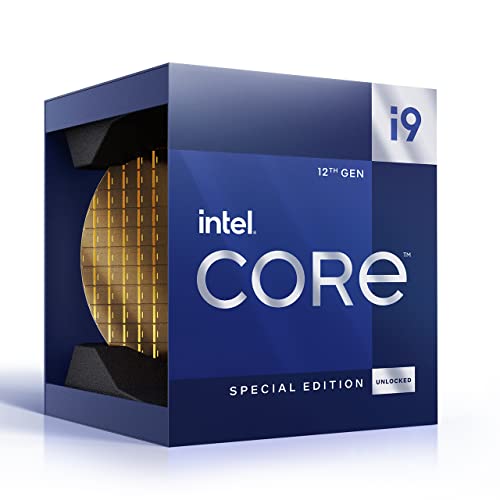
Intel Core i9-12900K - Best Budget Entry Into i9
The i9-12900K introduced Intel's hybrid P-core/E-core architecture in 2021 and remains a capable chip for gaming and creative work in 2026. With 16 cores and a 5.2 GHz boost clock it handles modern titles and content creation tools without issue. Used and refurbished units are widely available at significantly reduced prices, making this the most affordable path into the i9 tier. It runs on the LGA 1700 platform alongside newer chips, so a Z690 board purchase remains relevant. Not the right choice for buyers doing sustained multi-threaded work like heavy video encoding, where the 14th-gen chips pull ahead.
Intel Core i9-14900KS - Best Overclocked i9 Out of the Box
The i9-14900KS is the Special Edition variant of the 14900K, factory-binned for higher clock speeds and rated to 6.2 GHz boost out of the box. For users who want the absolute highest single-core frequency without manual overclocking, the KS is the ceiling of mainstream Intel desktop performance. Thermal output is higher than the standard K model, so a 360mm AIO or high-end tower cooler is non-negotiable. The price premium over the 14900K is hard to justify for most users since real-world gains are minimal, but for competitive gaming benchmarkers and enthusiasts who want the best available, the KS delivers.
What matters most
What to consider
Start with the socket: all current i9 desktop CPUs use LGA 1700, requiring a Z690 or Z790 motherboard. If you want overclocking capability, choose a K or KS suffix chip paired with a Z-series board. Verify your cooler's TDP rating can handle the chip. A 250W+ sustained draw is realistic under load. DDR5 memory on Z790 platforms provides a bandwidth advantage in memory-sensitive workloads. If you do not need the integrated GPU, the KF variant saves money. For gaming-only builds, consider whether an i9 is actually necessary or if a well-clocked i7 would serve equally well for less.
Our take
The Intel Core i9-14900K is the best all-around choice for most buyers in 2026. it combines top-tier gaming performance with serious multi-threaded muscle for creative workloads. Budget-conscious buyers should look at the i9-13900K or i9-14900KF. Only reach for the 14900KS if you specifically want the highest factory clock speed available on a mainstream platform. For related guides, see our articles on [best CPU liq
Frequently asked
For pure gaming at 1080p or 1440p, the i7 typically delivers near-identical frame rates to the i9 because modern games are GPU-limited. The i9 justifies its cost when you run demanding background tasks alongside games, stream while playing, or do heavy content creation work. If gaming is your only use case, an i7 saves money with minimal real-world performance loss.
The latest Intel Core i9 processors in the 14th and 15th generation use the LGA 1700 socket on Z790 and Z890 motherboards. Earlier 13th-gen i9 chips are also LGA 1700 compatible. If you are upgrading from an older platform like LGA 1200 or LGA 1151, you will need a new motherboard. Always verify socket compatibility before purchasing.
Yes. Intel i9 CPUs, particularly the K-series unlocked variants, can hit thermal design powers of 125W base with peaks well above 250W under sustained all-core load. A high-end air cooler or a 240mm to 360mm all-in-one liquid cooler is strongly recommended. Budget coolers and the included stock cooler are not adequate for i9 chips under workstation or gaming workloads.
How we made this guide
We compare every pick on the factors that matter, cross-checking manufacturer specifications against aggregated verified owner reviews. We rank independently and never take payment for placement. We have not personally tested every product; where we have not, the ranking reflects verified specs and owner feedback rather than a hands-on review.
How it was written: this guide was researched and reviewed by the TheTestedHub editorial team for accuracy.
Affiliate disclosure: TheTestedHub is reader-supported. When you buy through links on our site, we may earn a commission at no extra cost to you.
You might also like

Your Docking Station Match: CalDigit TS4 and More

Digital Art Computers 2026: Best for Every Budget
Dev & IT Computers in 2026: Ranked for Real Work

Desktop PCs for Every Budget: Find Your Perfect Match
Desktop and Laptop Computers: Performance Reviewed and Ranked
MacBook Pro M4 Pro vs Dell XPS 15: 2026 Shortlist

Buy the Best DIY Computer in 2026: Corsair One i300
