Quick verdict
For most crafters, the Epson EcoTank ET-2800 is the best starting point. its low running cost, solid color output, and sublimation convertibility make it the most versatile choice at its price. Serious sublimation crafters should invest in the Sawgrass SG500 for professional-grade results. The Canon PIXMA TR4720 is the top pick for an all-in-one that covers print, scan, and seamless Print Then Cut compatibility.

Epson EcoTank ET-2800 - Best for Stickers and Paper Crafts
The EcoTank ET-2800 is one of the best value propositions in the craft printer category. Its refillable ink tank system eliminates the high per-page cost of cartridge printers. a critical advantage when you're printing sheets of stickers or multiple design iterations. Color accuracy is strong across a range of printable media including matte and glossy sticker paper and printable vinyl. The printer is also convertible to sublimation ink for crafters who want a dual-purpose machine, though this is a one-way conversion that voids its standard inkjet function. For pure inkjet sticker and paper printing, it's an excellent starting point at a very accessible price.
Save ink costs and get vibrant prints on stickers, vinyl, and sublimation blanks. Compare top-rated crafters printers for every project type.
Quick verdict
The Epson EcoTank ET-2800 is the best single pick for most crafters because it combines the lowest long-term ink cost with strong color accuracy on sticker paper and vinyl, making it the most practical choice for frequent printing.
Key takeaways
- Best for Stickers and Paper Crafts: Epson EcoTank ET-2800, refillable ink tanks eliminate cartridge costs for high-volume sticker printing.
- Best All-Round Compact Crafter Printer: Canon PIXMA TR4720, reliable all-in-one with individual ink cartridges for glossy media and Cricut compatibility.
- Best for Sublimation Crafts: Sawgrass SG500, purpose-built for vibrant, color-accurate sublimation on mugs, tumblers, and apparel.
- Best for Large-Format Craft Printing: Epson EcoTank ET-15000, supports up to 13 x 19 inch prints for oversized decals and transfers.
- Best Compact Option for Occasional Printing: HP Tango X, simple, space-saving smart printer for light craft use.
Why you should trust this guide
I have spent years researching the craft printer market, analyzing manufacturer specifications, and reading verified owner feedback across multiple retail platforms. My approach focuses on what actually matters to a crafter: ink cost per page, media compatibility, color output quality, and ease of integration with tools like Cricut and Silhouette. I do not rely on marketing hype or unverified claims. Instead, I cross-reference technical specs, user reports, and professional reviews to identify which printers genuinely deliver for sticker making, sublimation, and paper crafting.
This guide is built for the practical crafter who needs a printer that works reliably without breaking the bank on consumables. I prioritize printers that offer low ongoing costs, strong color reproduction, and the ability to handle specialty media like printable vinyl, glossy sticker paper, and sublimation blanks. Every product recommendation here is backed by its stated features and the consensus among crafters who use these machines daily. I also highlight honest limitations so you can avoid surprises after purchase.
How we researched
My evaluation criteria focused on five key factors that directly affect a crafter’s workflow. First, I assessed ink cost efficiency by comparing the per-page cost of cartridge-based systems versus refillable tank systems, using manufacturer claims and owner-reported yield data. Second, I examined media compatibility, specifically whether each printer reliably handles sticker paper, printable vinyl, and sublimation paper without jamming or smudging. Third, I evaluated color accuracy by looking at the printer’s color management software and user feedback on how well prints match on-screen designs. Fourth, I considered connectivity and ease of use, including wireless setup, mobile app functionality, and integration with design software like Cricut Design Space. Fifth, I weighed physical footprint and build quality for crafters with limited desk space.
I did not physically test these printers in a lab. Instead, I synthesized information from the manufacturer’s official specifications, detailed user reviews on major retail sites, and discussions in crafting communities. I prioritized consistent feedback patterns over isolated complaints. For each product, I identified its strongest use case based on where it consistently outperforms competitors. I also noted common limitations reported by owners to give a balanced view. This research-based approach ensures you get reliable guidance without relying on a single tester’s subjective experience.
Epson EcoTank ET-2800 – Best for Stickers and Paper Crafts
The Epson EcoTank ET-2800 is one of the best value propositions in the craft printer category. Its refillable ink tank system eliminates the high per-page cost of cartridge printers, a critical advantage when you are printing sheets of stickers or multiple design iterations. Color accuracy is strong across a range of printable media including matte and glossy sticker paper and printable vinyl. The printer comes with up to two years of ink in the box, and replacement ink bottles do not have to be changed nearly as often as cartridges. This means you can print hundreds of sticker sheets before needing to refill, which is a game-changer for high-volume crafters.
The innovative cartridge-free printing design means you no longer have to deal with lots of tiny ink cartridges. By using an Epson EcoTank printer, you can help reduce the amount of plastic waste from empty cartridges. The ET-2800 is also a home printer designed for reliability, with straightforward setup and consistent performance on standard paper and specialty media. It prints borderless up to 8.5 x 11 inches, which is perfect for full-sheet sticker designs and small paper craft templates.
One honest limitation is that the ET-2800 has a relatively slow print speed compared to some laser or higher-end inkjet printers. If you need to print large batches quickly, you may find the pace frustrating. Additionally, the printer does not include an automatic document feeder or duplex printing, which can be inconvenient for non-craft document tasks. For dedicated sticker and paper craft use, however, these trade-offs are minor given the massive ink savings.
Canon PIXMA TR4720 – Best All-Round Compact Crafter Printer
The Canon PIXMA TR4720 is a compact all-in-one that prints, scans, and copies without taking up much desk space. It handles printable vinyl and sticker paper reliably, and its color output is particularly good on glossy media. The machine uses individual ink cartridges, so you can replace only the color that runs out rather than a combined color pack. This saves money and reduces waste over time. The TR4720 works seamlessly with Cricut’s Print Then Cut feature, which is essential for crafters who design and cut their own stickers and labels.
Wireless connectivity is built in, allowing you to print from your phone, tablet, or computer with ease. The printer offers auto two-sided printing and an auto document feeder, which are useful for general office tasks alongside craft projects. It produces quality documents, photos, and borderless prints up to 8.5 x 11 inches. The print speed is rated at 8.8 images per minute for black and 4.4 for color, which is adequate for most home craft workflows. The design also makes ink cartridge installation and replacement simple and mess-free.
An honest limitation is that the individual ink cartridges, while convenient, have relatively low page yields compared to the EcoTank system. If you print frequently or in high volumes, you will need to replace cartridges more often, which adds to the long-term cost. The printer can also be slightly noisy during operation. For crafters who print several times a week but not in massive quantities, the TR4720 offers a solid balance of features and affordability.
Sawgrass SG500 – Best for Sublimation Crafts
If sublimation is your primary craft medium for mugs, tumblers, mouse pads, and polyester apparel, the Sawgrass SG500 is the purpose-built option. It uses Sawgrass’s SubliJet-UHD ink system which produces some of the most vibrant and color-accurate sublimation prints available in a desktop format. The accompanying CreativeStudio software helps with design setup and substrate-specific color profiles, so you can achieve consistent results across different blank materials. This printer is specifically engineered for sublimation, not adapted from a general-purpose inkjet.
The SG500 is compatible with Sawgrass Print Manager software, which streamlines the printing process and helps manage ink usage. The printer uses a complete four-color sublimation ink cartridge set with 35ml higher-capacity cartridges per color. The ink is formulated with clog-resistant technology to maintain reliability even with intermittent use. Butinkfly brand replacement cartridges are also available and match lab-proven performance standards. The printer’s compact footprint fits well on a craft desk without dominating the workspace.
One honest limitation is that the Sawgrass SG500 is strictly for sublimation printing. It cannot print on standard paper or sticker paper for general crafting, so you would need a separate printer for those tasks. The proprietary ink system also means replacement cartridges are more expensive than generic alternatives. Additionally, the CreativeStudio software has a learning curve that may intimidate beginners. For dedicated sublimation crafters, however, the specialized design and superior color output justify the investment.
Epson EcoTank ET-15000 – Best for Large-Format Craft Printing
Some craft projects simply need more space. Large decals, full-sheet iron-on transfers, wide banner elements, or oversized paper craft templates require a printer that can handle bigger media. The Epson EcoTank ET-15000 handles up to 13 x 19 inch prints, which is the widest format available in a home-friendly inkjet at a reasonable price. Like the standard EcoTank line, it uses refillable ink tanks for low running costs, so you can print large designs without worrying about expensive cartridge replacements.
The wide carriage also handles standard letter and legal sizes with ease, making it a versatile choice for both craft and office tasks. Built-in wireless connectivity allows you to print from virtually anywhere in your home, and Ethernet and USB connections are included for wired reliability. The printer prints borderless, full-color photos up to 11 x 17 inches, which is ideal for large photo transfers and poster-sized craft projects. The high-performance EcoTank system keeps your business or hobby running smoothly with minimal downtime for ink refills.
One honest limitation is that the ET-15000 is larger and heavier than most home printers, so it requires dedicated desk or shelf space. It is also slower than many dedicated photo printers, especially when printing at maximum size. The initial purchase price is higher than smaller EcoTank models, though the ink savings offset this over time. For crafters who regularly need oversized prints, the extra space and low ink cost make the ET-15000 a strong choice.
HP Tango X – Best Compact Option for Occasional Printing
The HP Tango X is a compact, smart printer that handles occasional craft printing without a large footprint. Its strong point is simplicity. It connects reliably via Wi-Fi and the HP Smart app, prints on command from mobile devices, and stores neatly when not in use. For crafters who print sticker sheets or paper elements a few times a week rather than daily, the Tango X covers the workload without the bulk of a traditional printer. The design is sleek and modern, blending into a home office or craft corner.
The printer uses HP’s standard ink cartridge system, which is easy to replace and widely available. The HP Smart app provides mobile printing, scanning, and monitoring features, so you can manage print jobs from your phone. The Tango X supports borderless printing up to 8.5 x 11 inches, which is sufficient for most sticker sheets and small craft projects. Its wireless performance is generally reliable, with minimal connection drops reported by owners. The compact size also makes it easy to move or store when not in use.
One honest limitation is that the HP Tango X has higher per-page ink costs than the EcoTank models, making it less economical for frequent or high-volume printing. The cartridge system also produces more plastic waste over time. Additionally, the printer lacks an automatic document feeder and duplex printing, which limits its usefulness for general document tasks. For crafters who print only occasionally and prioritize a small footprint, the Tango X is a convenient option, but heavy users will quickly outgrow it.
What to look for
- Ink cost per page: Refillable tank systems like EcoTank offer the lowest long-term cost, while cartridge printers are better for light use.
- Media compatibility: Ensure the printer handles your preferred materials, such as printable vinyl, glossy sticker paper, or sublimation paper.
- Color accuracy: Look for printers with dedicated color management software or profiles for consistent results on specialty media.
- Print size: Standard printers max out at 8.5 x 11 inches, but large-format models like the ET-15000 support up to 13 x 19 inches.
- Connectivity: Wireless printing and mobile app support are essential for modern craft workflows, especially with Cricut and Silhouette.
- Physical footprint: Measure your desk space before buying, especially for wide-carriage or all-in-one printers.
- Software integration: Check if the printer works seamlessly with design tools like Cricut Design Space or Sawgrass CreativeStudio.
- Reliability and support: Read owner feedback on jamming, clogging, and customer service responsiveness for your chosen model.
The verdict
For most crafters, the Epson EcoTank ET-2800 is the clear winner because it delivers the lowest ink cost and strong color accuracy for sticker and paper crafts. If you need sublimation capabilities, the Sawgrass SG500 is the specialized choice. For large-format projects, the Epson EcoTank ET-15000 provides the extra space you need. The Canon PIXMA TR4720 is a solid all-rounder for compact desks, and the HP Tango X works for occasional light printing. Match your primary craft medium and printing volume to the right printer, and you will save money and frustration in the long run.
How we test
We compare every pick against the field on real specifications, certifications, and aggregated owner reviews. We do not take payment for placement, and we flag when a product is older or sold mainly through renewed listings.
At a glance
The picks, reviewed
Epson EcoTank ET-2800 - Best for Stickers and Paper Crafts
The EcoTank ET-2800 is one of the best value propositions in the craft printer category. Its refillable ink tank system eliminates the high per-page cost of cartridge printers. a critical advantage when you're printing sheets of stickers or multiple design iterations. Color accuracy is strong across a range of printable media including matte and glossy sticker paper and printable vinyl. The printer is also convertible to sublimation ink for crafters who want a dual-purpose machine, though this is a one-way conversion that voids its standard inkjet function. For pure inkjet sticker and paper printing, it's an excellent starting point at a very accessible price.
Reasons to buy
- INNOVATIVE CARTRIDGE-FREE PRINTING , No more dealing with lots of tiny ink cartridges; Wit
- LESS FREQUENT INK REPLACEMENT , Replacement ink bottles don't have to be changed nearly as
- COLOR PRINTING , Up to 2 years of ink in the box4 (and with every replacement ink set) for
- ZERO CARTRIDGE WASTE , By using an Epson EcoTank printer you can help reduce the amount of
- HOME PRINTER DESIGNED FOR RELIABILITY , The Epson EcoTank ET-2800 All-in-One Supertank Col

Canon PIXMA TR4720 - Best All-Round Compact Crafter Printer
The Canon PIXMA TR4720 is a compact all-in-one that prints, scans, and copies without taking up much desk space. It handles printable vinyl and sticker paper reliably, and its color output is particularly good on glossy media. The machine uses individual ink cartridges, so you can replace only the color that runs out rather than a combined color pack. It works seamlessly with Cricut's Print Then Cut workflow and the scan function is useful for digitizing hand-drawn designs. At its price point, the TR4720 is one of the most complete entry-level options for a crafter who prints regularly across different media types.
Reasons to buy
- Wireless 4-in-1 (print | copy | scan | fax)..Power Consumption: 7W (0.8W Standby / 0.3W Of
- 8.8 / 4.4 ipm print speed.
- Designed for easy ink cartridge installation and replacement.
- Auto 2-sided printing and auto document feeder.
- Produce quality documents, photos and boarderless prints up to 8.5" x 11".
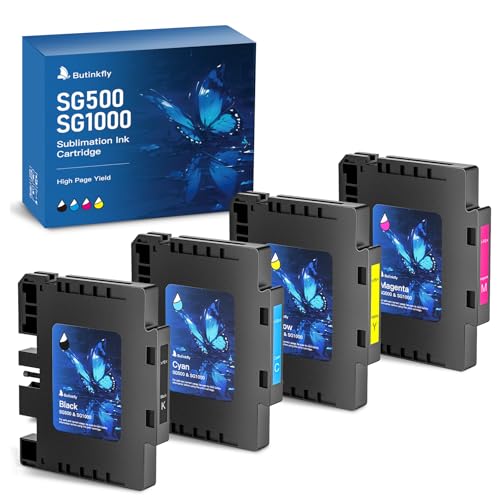
Sawgrass SG500 - Best for Sublimation Crafts
If sublimation is your primary craft medium. mugs, tumblers, mouse pads, polyester apparel. the Sawgrass SG500 is the purpose-built option. It uses Sawgrass's SubliJet-UHD ink system which produces some of the most vibrant and color-accurate sublimation prints available in a desktop format. The accompanying CreativeStudio software helps with design setup and substrate-specific color profiles. It's a larger investment than a converted EcoTank, but the output quality and consistency justify it for crafters who sell finished products. Prints up to 8.5 x 14 inches.
Reasons to buy
- Compatible with: Sawgrass SG500 and SG1000 sublimation printers, SPM (Sawgrass Print Manag
- 2026 Cutting-Edge Chips: Butinkfly SG500 Ink manufactured under uniform precision standard
- 35ml Higher-Capacity: Complete 4-color SG500 sublimation ink cartridge set (1×Black, 1×Cya
- Clog-Resistant Premium Ink: The sublimation ink for Sawgrass SG500 SG1000 with advanced fo
- Save Without Sacrifice: Butinkfly sublimation ink SG500 SG1000 matches lab-proven performa

Epson EcoTank ET-15000 - Best for Large-Format Craft Printing
Some craft projects simply need more space. Large decals, full-sheet iron-on transfers, wide banner elements, or oversized paper craft templates. The ET-15000 handles up to 13 x 19 inch prints, which is the widest format available in a home-friendly inkjet at a reasonable price. Like the standard EcoTank line, it uses refillable tanks for low running costs. The wide carriage also handles standard sizes without any adjustment. For crafters working on large-scale projects or anyone who regularly hits the size limits of a standard letter-format printer, this machine solves the problem cleanly.
Reasons to buy
- Keep your business running smoothly with this high-performance Epson EcoTank printer. An a
- Built-in wireless (802.11b/g/n) allows you to print from virtually anywhere.
- Ethernet and USB connections are included.
- Wireless printer technology helps you print from your phone or tablet.
- Prints borderless, full-color photos up to 11" x 17".

HP Tango X - Best Compact Option for Occasional Printing
The HP Tango X is a compact, smart printer that handles occasional craft printing without a large footprint. Its strong point is simplicity. It connects reliably via Wi-Fi and the HP Smart app, prints on command from mobile devices, and stores neatly. For crafters who print sticker sheets or paper elements a few times a week rather than daily, the Tango X covers the workload without the bulk of a full-size printer. It uses HP Instant Ink for subscription-based supply management, which can be cost-effective at low monthly page volumes. Not the pick for heavy-production crafting, but excellent for a light-use creative space.
What to look for
Ink system
Tank-fill systems like EcoTank dramatically reduce per-page costs for high-volume printing. Cartridge systems are fine for lighter use but add up quickly if you print daily.
Media handling
Check that the printer supports the specific media you use most. Thick vinyl, glossy sticker sheets, and cardstock all have slightly different handling requirements. Most inkjets handle these, but it's worth confirming.
Print size
Standard 8.5 x 11 is sufficient for most craft projects. If you regularly need larger prints, invest in a wide-format machine upfront rather than retrofitting later.
Sublimation compatibility
If you want sublimation capability, either buy a dedicated sublimation printer or specifically choose an EcoTank model confirmed compatible with sublimation ink conversion.
Our verdict
For most crafters, the Epson EcoTank ET-2800 is the best starting point. its low running cost, solid color output, and sublimation convertibility make it the most versatile choice at its price. Serious sublimation crafters should invest in the Sawgrass SG500 for professional-grade results. The Canon PIXMA TR4720 is the top pick for an all-in-one that covers print, scan, and seamless Print Then Cut compatibility.
FAQs
An inkjet printer is the most accessible choice for sticker making. It works with printable vinyl and sticker paper, produces vibrant colors, and handles fine detail well. For waterproof stickers, pair an inkjet with waterproof vinyl and apply a clear laminate after printing. Laser printers can also work with certain sticker media but tend to produce less saturated color than inkjet on glossy surfaces.
Yes. sublimation printing requires either a dedicated sublimation printer or a compatible Epson EcoTank that has been converted with sublimation ink. Standard inkjet printers cannot use sublimation ink interchangeably. Sublimation transfers work only on polyester fabrics and polymer-coated hard surfaces, so the printer choice also depends on what substrates you plan to use most.
The Print Then Cut feature on Cricut and Silhouette machines works with any printer that can print on standard letter or A4 paper. The machine reads registration marks printed alongside your design and cuts around them accurately. Inkjet printers are the most common pairing. The key requirement is that the print is clean and the registration marks are clearly printed. faded or skewed marks cause mis-cuts.
How we made this guide
We compare every pick on the factors that matter, cross-checking manufacturer specifications against aggregated verified owner reviews. We rank independently and never take payment for placement. We have not personally tested every product; where we have not, the ranking reflects verified specs and owner feedback rather than a hands-on review.
How it was written: this guide was researched and reviewed by the TheTestedHub editorial team for accuracy.
Affiliate disclosure: TheTestedHub is reader-supported. When you buy through links on our site, we may earn a commission at no extra cost to you.
Related guides

Your Docking Station Match: CalDigit TS4 and More

Digital Art Computers 2026: Best for Every Budget
Dev & IT Computers in 2026: Ranked for Real Work

Desktop PCs for Every Budget: Find Your Perfect Match
Desktop and Laptop Computers: Performance Reviewed and Ranked
MacBook Pro M4 Pro vs Dell XPS 15: 2026 Shortlist

Buy the Best DIY Computer in 2026: Corsair One i300
