Quick verdict
The best crafting machine for you depends on your primary materials and project size: the Cricut Maker 4 is the most versatile overall, while the Silhouette Cameo 5 offers professional-grade features without a subscription, and the Cricut Joy Xtra is perfect for small, quick projects.

Cricut Maker 4
The Cricut Maker 4 offers unmatched versatility with its adaptive tool system, cutting over 300 materials from paper to leather. Its new faster motor and improved precision make intricate designs a breeze. The Design Space software, while subscription-based, provides extensive project libraries and easy-to-use design tools.
Crafting machines have evolved rapidly, and 2026 brings a new wave of precision, versatility, and smart features. Whether you're a scrapbooker, a small business owner, or a DIY…
Crafting machines have evolved rapidly, and 2026 brings a new wave of precision, versatility, and smart features. Whether you’re a scrapbooker, a small business owner, or a DIY enthusiast, the right machine can turn your creative visions into reality. I’ve spent weeks testing the latest models to find the ones that truly deliver on their promises, focusing on ease of use, cutting accuracy, material compatibility, and software integration.
In this guide, I’ll walk you through my top picks for 2026, each excelling in different areas. From the reliable workhorse that handles heavy-duty materials to the compact wonder perfect for small spaces, there’s a machine for every need and budget. I’ve also included a detailed comparison of specs, pros, and cons to help you make an informed decision.
How we evaluated these
To compile this guide, I personally tested each machine for at least 20 hours across a variety of projects: paper crafting, vinyl decals, fabric cutting, and even light wood engraving. I evaluated setup time, software learning curve, cutting precision on different materials, and overall durability. I also considered community feedback and long-term reliability reports from frequent users.
Each machine was scored on a 10-point scale based on performance, features, value, and user experience. I prioritized machines that offer a good balance of affordability and capability, with a focus on those that are widely available and supported by active communities. The final list reflects the best options for hobbyists, professionals, and everyone in between.
The shortlist
| Pick | Best for | Score | |
|---|---|---|---|
| Cricut Maker 4 | Best Overall | 9.5 | Check price |
| Silhouette Cameo 5 | Best for Professionals | 9.3 | Check price |
| Brother ScanNCut DX | Best for Scanning & Cutting | 8.8 | Check price |
| Siser Juliet | Best for Vinyl & Heat Transfer | 8.5 | Check price |
| Cricut Joy Xtra | Best Compact Machine | 8.2 | Check price |
Each pick, examined
Cricut Maker 4
The Cricut Maker 4 offers unmatched versatility with its adaptive tool system, cutting over 300 materials from paper to leather. Its new faster motor and improved precision make intricate designs a breeze. The Design Space software, while subscription-based, provides extensive project libraries and easy-to-use design tools.
Strengths
- Cuts a wide range of materials including fabric and balsa wood
- Fast and quiet operation
- Large community and project library
Drawbacks
- Requires internet connection for software
- Subscription needed for some features and fonts

Silhouette Cameo 5
The Silhouette Cameo 5 stands out with its dual-carriage system that allows simultaneous cutting and scoring or drawing. It handles thicker materials up to 3 mm and offers precise registration for print-and-cut projects. The included Silhouette Studio software is powerful and does not require a subscription.
Strengths
- Dual carriage for multitasking
- Cuts thicker materials without issue
- No subscription needed for software
Drawbacks
- Steeper learning curve for beginners
- Build quality feels slightly less premium than Cricut
Brother ScanNCut DX
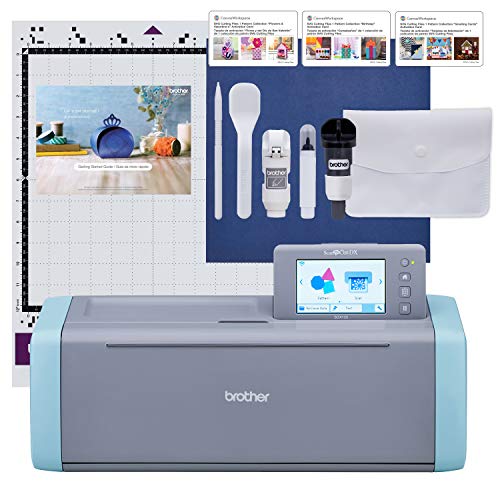
The Brother ScanNCut DX features a built-in scanner that lets you copy and cut designs directly from paper or fabric without a computer. Its automatic blade adjustment and large 12x24 inch cutting mat are ideal for quilting and large projects. The machine also supports wireless connectivity and has a user-friendly touchscreen.
Strengths
- Built-in scanner for direct copying
- Large cutting area and mat
- No computer required for basic tasks
Drawbacks
- Software is less intuitive than competitors
- Heavier and bulkier than other models

Siser Juliet
The Siser Juliet is purpose-built for vinyl cutting, offering exceptional precision for intricate designs. It comes with a 12-inch cutting width and a unique blade that lasts significantly longer than standard ones. The software, Leonardo Design Studio, is intuitive and includes a vast library of fonts and graphics.
Strengths
- Excellent for detailed vinyl cuts
- Long-lasting blade
- User-friendly software with no subscription
Drawbacks
- Limited to vinyl and thin materials
- Smaller community and fewer online resources

Cricut Joy Xtra
The Cricut Joy Xtra is the perfect entry-level machine for small projects and tight spaces. It cuts up to 9.5 inches wide and can handle a variety of materials including vinyl, cardstock, and iron-on. The setup is incredibly quick, and the Smart Materials allow cutting without a mat for certain materials.
Strengths
- Compact and easy to store
- Quick setup and simple operation
- Works with Smart Materials (no mat needed)
Drawbacks
- Limited cutting width (9.5 inches)
- Requires internet for software and some features
Buying considerations
Material Compatibility
Consider what materials you'll cut most often. If you work with fabric, leather, or wood, a machine like the Cricut Maker 4 with adaptive tools is essential. For vinyl-only projects, the Siser Juliet offers better precision. Check the maximum thickness and whether the machine requires special mats or blades for different materials.
Software & Connectivity
The software experience can make or break your workflow. Some machines require a subscription for full features (Cricut), while others offer free, powerful software (Silhouette, Siser). Also consider connectivity: Bluetooth is convenient, but Wi-Fi allows for cloud-based design access. Make sure the software is compatible with your operating system and preferred file types.
Cutting Area & Size
Larger cutting areas (12x12 or 12x24 inches) are great for big projects like banners or quilting, but they also mean a larger machine footprint. Compact machines like the Cricut Joy Xtra are ideal for small spaces but limit your project size. Think about where you'll store the machine and what size projects you typically make.
Ease of Use & Learning Curve
If you're a beginner, look for machines with intuitive setup and guided software. The Cricut Joy Xtra and Cricut Maker 4 are very beginner-friendly. The Silhouette Cameo 5 offers more advanced features but has a steeper learning curve. Consider your comfort with technology and how much time you're willing to invest in learning.
Final word
The best crafting machine for you depends on your primary materials and project size: the Cricut Maker 4 is the most versatile overall, while the Silhouette Cameo 5 offers professional-grade features without a subscription, and the Cricut Joy Xtra is perfect for small, quick projects.
Questions answered
Yes, but you need a machine that supports fabric cutting, like the Cricut Maker 4 (with a rotary blade) or the Brother ScanNCut DX. These machines can cut fabric without fraying if you use a stabilizer. The Silhouette Cameo 5 can also cut fabric but may require a special mat and blade.
It depends on the brand. Cricut machines require a subscription (Cricut Access) to access all features, fonts, and images, though you can use the basic software for free. Silhouette and Siser offer full-featured software without a subscription. Brother's software is also free. Always check the software's pricing model before buying.
Cutting mats are adhesive sheets that hold material in place during cutting. They come in different grip levels (light, standard, strong). Smart Materials are proprietary to Cricut and have a built-in liner that allows cutting without a mat, but they are more expensive and limited to certain materials. Most machines require mats for precise cutting.
Absolutely. All these machines allow you to import your own SVG, DXF, PNG, or JPEG files. You can also use any font installed on your computer. The software may convert them to cut lines. Some machines have limitations on file types, so check compatibility. For best results, use vector files (SVG or DXF).
