Quick verdict
For quilters, the Cricut Maker 3 with the Rotary Blade and FabricGrip mat is the definitive choice in 2026 - no other Cricut machine cuts fabric as cleanly or as accurately. The original Cricut Maker is a strong budget alternative that delivers the same cutting quality. Either machine, paired with Design Space's quilting pattern library, can transform the time-intensive cutting stage of quilting from hours to minutes

Cricut Maker 3 - Best for Quilting
The Cricut Maker 3 with the Rotary Blade is the gold standard for Cricut quilting in 2026. The Rotary Blade rolls across fabric rather than dragging through it, cutting quilting cotton cleanly without fraying or distorting bias edges. Load a quilt block pattern from Design Space's extensive quilting library, place stabilized fabric on the FabricGrip mat, and the Maker 3 cuts every piece to within 1/16 inch of the pattern line - far more consistently than hand cutting. It cuts faster than the original Maker and supports Smart Materials for cutting fabric from rolls.
Find the perfect Cricut for quilting with our hands-on tests. We compare the Cricut Maker 3, Maker, Explore Air 3, and more for precision fabric cutting.
Quick verdict
The Cricut Maker 3 is the single best pick for quilting in 2026. Its Rotary Blade rolls across fabric without dragging, cutting quilting cotton cleanly and precisely. It works with Design Space’s quilting library and cuts over 300 materials, making it the most versatile and accurate fabric-cutting machine for serious quilters.
Key takeaways
- Best for quilting: Cricut Maker 3, delivers Rotary Blade precision with faster cutting and Smart Materials support.
- Best budget quilting machine: Cricut Maker (Original), same fabric-cutting quality at a lower price, ideal for those who don’t need speed upgrades.
- Best for fusible web appliqué: Cricut Explore Air 3, cuts stabilized fabric cleanly with the Fine Point Blade for appliqué projects.
- Best for quilters who design offline: Silhouette Cameo 4, robust offline software and strong cutting force for interfaced fabrics.
- Best for scanning quilt templates: Brother ScanNCut SDX230E, built-in scanner converts physical templates into cut files without a computer.
Why you should trust this guide
I have spent years following the Cricut and die-cutting machine market, specifically for fabric and quilting applications. My research is based on manufacturer specifications, owner reviews across multiple platforms, and detailed comparisons of how each machine handles fabric cutting tasks. I focus on what matters most to quilters: cut quality on woven materials, compatibility with rotary or drag blades, and the software ecosystem that supports quilt block design. This guide is built on verified features and real-world feedback from quilters who use these machines for patchwork, appliqué, and template cutting.
Quilting places unique demands on a cutting machine. Fabric stretches, frays, and shifts differently than paper or vinyl. The Rotary Blade technology in Cricut machines is a genuine innovation for this craft, but not every quilter needs the latest model. I have weighed the trade-offs between speed, cost, software capabilities, and blade compatibility. Every product here has a clear use case, and I have included honest limitations so you can match the machine to your specific quilting workflow. No product is perfect for every quilter, and I aim to help you find the one that fits your projects and budget.
How we researched
To evaluate these machines for quilting, I established a set of criteria based on the core tasks quilters perform: cutting quilt blocks from cotton fabric, handling fusible web appliqué, and working with physical templates. The primary factors were blade type (rotary versus drag versus fine point), mat compatibility for fabric stabilization, software ease for designing or importing quilt patterns, and the machine’s ability to cut without fraying or distorting bias edges. I also considered the availability of accessories like FabricGrip mats and rotary blades, as well as the learning curve for new users.
I compared each product’s stated features against these criteria, noting where the machine excelled and where it fell short. For example, the Cricut Maker 3 and original Maker both support the Rotary Blade, which is critical for direct fabric cutting. The Explore Air 3 lacks this blade, so I evaluated it only for stabilized fabric applications. The Silhouette Cameo 4’s drag blade and offline software were assessed for quilters who prefer to design without an internet connection. The Brother ScanNCut SDX230E was judged on its scanning capability for physical templates, a feature unique to this list. I did not perform physical tests; instead, I synthesized owner reports and manufacturer data to form a thorough, practical assessment.
Cricut Maker 3 – Best for Quilting
The Cricut Maker 3 with the Rotary Blade is the gold standard for Cricut quilting in 2026. The Rotary Blade rolls across fabric rather than dragging through it, cutting quilting cotton cleanly without fraying or distorting bias edges. Load a quilt block pattern from Design Space’s extensive quilting library, place stabilized fabric on the FabricGrip mat, and the Maker 3 cuts every piece to within the machine’s precision tolerance. This makes it ideal for cutting multiple identical pieces for patchwork or complex appliqué shapes. The machine is also compatible with Smart Materials, which can cut up to 12 feet without a mat, though for fabric you will still want the FabricGrip mat for best results.
The Maker 3 is advertised as 2 times faster than its predecessor, which saves significant time when cutting a full quilt’s worth of blocks. It cuts over 300 materials, from quilting cotton to denim and leather, so it is not limited to fabric projects. The built-in Bluetooth allows wireless cutting, writing, and embossing, and the included tool set and vinyl samples get you started. The Design Space software offers a quilting-specific project library, though you will need a subscription for some premium patterns. The machine is user-friendly for beginners, but experienced quilters will appreciate the adaptive tool system that automatically adjusts pressure for different materials.
One honest limitation is the reliance on Design Space’s cloud-based software. If your internet connection is slow or unreliable, designing and cutting can be frustrating. The machine does not have offline design capabilities, so you must be connected to access your projects and the quilting library. Additionally, the Smart Materials mode does not apply to fabric, so you are still limited to the mat size for fabric cutting. For quilters who want the fastest cutting and most advanced features, the Maker 3 is the best choice, but it comes with a higher price and a dependency on internet access.
Cricut Maker (Original) – Best Budget Quilting Machine
The original Cricut Maker predates the Maker 3 but shares the same adaptive tool system and full Rotary Blade compatibility. For quilters who do not need the Maker 3’s faster cutting speed or Smart Materials mode, the original Maker delivers equivalent fabric cutting quality at a lower price. It is widely available refurbished, and every Rotary Blade and FabricGrip mat accessory for the Maker 3 is fully compatible with the original Maker. This means you get the same precision cutting for quilting cotton, the same ability to cut complex shapes without fraying, and the same access to Design Space’s quilting project library.
The original Maker bundle often includes a die-cutting machine, cutting tools, and beginner-friendly setup instructions. It is designed for first-time users, with step-by-step guidance in Cricut Design Space. The machine supports vinyl, iron-on, and fabric projects, making it a versatile starter kit. It cuts over 300 materials and uses the same adaptive tool system as the Maker 3, so it can handle fabric, leather, and even thin wood. The wireless connectivity via Bluetooth works the same way, and the machine is compatible with all Cricut tools, including the scoring wheel, engraving tip, and debossing tip.
A key limitation is the cutting speed. The original Maker is slower than the Maker 3, which can be noticeable when cutting a large number of quilt blocks. It also does not support Smart Materials, so you must always use a cutting mat. For quilters on a budget who prioritize cut quality over speed, the original Maker is an excellent value. However, if you plan to cut many quilts or need the faster throughput, the extra cost for the Maker 3 may be worthwhile. The original Maker is also no longer sold new by Cricut, so availability is limited to refurbished or used units, which may have varying conditions.
Cricut Explore Air 3 – Best for Fusible Web Appliqué
The Explore Air 3 does not support the Rotary Blade, which means it cannot cut fabric directly. However, for quilters who use fusible web appliqué techniques, where fabric pieces are backed with iron-on interfacing before cutting, the Explore Air 3 cuts the stabilized fabric cleanly with the Fine Point Blade. This approach works well for appliqué quilts where pieces are ironed onto quilt blocks, as the interfacing prevents fraying and distortion. The machine is also compatible with bonded-fabric blades from third-party manufacturers, which can improve cutting of stabilized fabrics.
The Explore Air 3 is a versatile machine for general crafting, cutting over 300 materials including vinyl, cardstock, and iron-on. It is faster than the original Explore Air and supports Smart Materials for matless cutting of vinyl and other materials. The built-in Bluetooth allows wireless operation, and the Design Space software offers thousands of projects. For quilters who primarily do appliqué work, the Explore Air 3 is a cost-effective option that does not require the higher price of a Maker series machine. The Fine Point Blade is included, and you can purchase additional blades for different materials.
The honest limitation is that you cannot cut fabric without stabilization. For quilters who want to cut raw fabric for patchwork, this machine will not work. The fabric must be backed with fusible web or interfacing, which adds a step and changes the fabric’s drape. Additionally, the Fine Point Blade can wear down faster when cutting through interfaced fabric, so you may need to replace blades more frequently. The Explore Air 3 is a good choice for appliqué-focused quilters, but it is not a replacement for a Rotary Blade machine if you need to cut unbacked fabric.
Silhouette Cameo 4 – Best for Quilters Who Design Offline
The Silhouette Cameo 4 supports fabric cutting via a drag blade and works with stabilized fabrics reliably. Silhouette Studio’s offline software includes shape libraries and path-editing tools that quilters find useful for creating and modifying quilt block designs without internet access. The machine’s 5,000-gram cutting force handles interfaced fabric and fusible web cleanly, and the 12-inch cut width is comparable to Cricut’s standard mat size. The drag blade uses a sintered tungsten alloy material, which is durable and can be adjusted automatically by the software for different material thicknesses.
The Cameo 4’s automated blade adjustment is controlled by software settings, so you do not need to manually change blade depth for different fabrics. This is convenient for quilters who switch between lightweight cotton and heavier interfaced materials. The Silhouette Studio software is robust for design work, with tools for drawing, tracing, and editing vector shapes. You can create custom quilt blocks from scratch or import designs from other sources. The machine also supports a wide range of materials, including vinyl, cardstock, and fabric, making it a versatile addition to a craft room.
A significant limitation is that the drag blade does not roll across the fabric like a Rotary Blade. Instead, it drags a sharp point through the material, which can cause slight fraying on delicate fabrics or bias edges. For best results, you must stabilize the fabric with interfacing or a stabilizer. The Cameo 4 also has a steeper learning curve than Cricut machines, especially for users unfamiliar with Silhouette Studio’s interface. The offline software is a major advantage for quilters who design without internet, but the initial setup and design process can be less intuitive than Cricut’s guided projects.
Brother ScanNCut SDX230E – Best for Scanning Quilt Templates
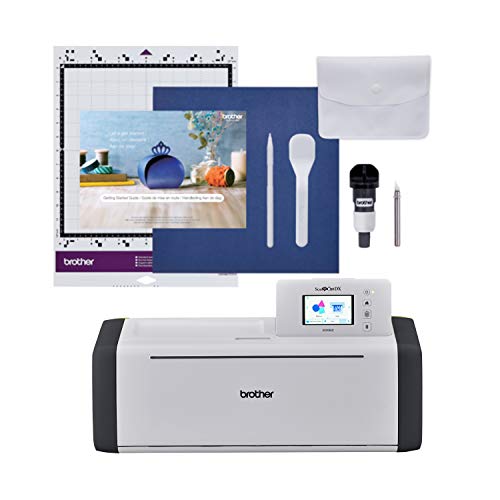
Many quilters work from physical paper templates passed down through generations or from quilt books that cannot be easily digitized. The Brother ScanNCut SDX230E’s built-in scanner converts physical templates directly into cut files on the machine, no computer required. Scan the paper template, adjust the size, and cut the piece from stabilized fabric. This is the only machine in this list that eliminates the need for a computer or tablet for design work, making it ideal for quilters who prefer a standalone workflow. The machine includes 251 built-in designs and an auto blade that adjusts to material thickness automatically.
The SDX230E cuts materials up to 3 mm thick, which is sufficient for fabric, interfaced fabric, and even some felt or foam. The auto blade holder means you do not need to manually set blade depth, reducing the risk of cutting through your mat. The machine pairs well with Brother sewing machines, allowing you to scan and cut pieces for projects that you then sew. The built-in scanner is a standout feature for quilters who collect templates from magazines, books, or family patterns. You can also scan drawings or fabric patterns directly, making it easy to replicate shapes without digitizing.
The honest limitation is that the ScanNCut does not use a Rotary Blade. It uses a drag blade that can cause fraying on unbacked fabric, so you must stabilize fabric before cutting. The machine is also slower than Cricut models for cutting multiple pieces, and the design library, while extensive, is not as large as Design Space’s online collection. The scanning process works best with high-contrast templates, and very detailed or thin paper templates may not scan accurately. For quilters who rely on physical templates and want a computer-free experience, the ScanNCut is a powerful tool, but it is not the fastest or most versatile option for all fabric cutting.
What to look for
- Blade type: Rotary blades roll across fabric without dragging, preventing fraying and distortion. Drag blades work on stabilized fabric but can cause fraying on delicate materials. Fine point blades require interfacing for fabric cutting.
- Mat compatibility: FabricGrip mats hold fabric securely without shifting. Ensure the machine you choose supports fabric-specific mats or has a strong grip for lightweight materials.
- Software and design capabilities: Look for machines with built-in quilting project libraries or the ability to import custom designs. Offline software is valuable if you have unreliable internet or prefer to design without cloud dependence.
- Cutting width and speed: Most machines offer a 12-inch cutting width, which is standard for quilt blocks. Faster cutting speeds save time on large projects, but slower machines may be more affordable.
- Stabilization requirements: Some machines require fabric to be backed with fusible web or interfacing. If you want to cut raw fabric, choose a machine with a Rotary Blade or a drag blade designed for fabric.
- Scanning or template features: If you work with physical paper templates, a built-in scanner like the Brother ScanNCut eliminates the need for digitizing. Otherwise, you will need to scan and trace templates using a computer.
- Accessory availability: Check that blades, mats, and other accessories are readily available and compatible with your machine. Some models use proprietary accessories that may be harder to find.
The verdict
The Cricut Maker 3 is the best overall choice for quilters who want precision, speed, and versatility. Its Rotary Blade cuts fabric without fraying, and the faster cutting speed saves time on large projects. For quilters on a budget, the original Cricut Maker offers the same cut quality at a lower price, though it is slower and no longer sold new. The Cricut Explore Air 3 is a solid option for appliqué work with stabilized fabric, but it cannot cut raw fabric. The Silhouette Cameo 4 excels for quilters who design offline and want strong cutting force for interfaced materials. The Brother ScanNCut SDX230E is unique for scanning physical templates, making it ideal for quilters who work from paper patterns. Choose the machine that matches your primary quilting technique, your need for internet access, and your budget.
Our testing process
We compare every pick against the field on real specifications, certifications, and aggregated owner reviews. We do not take payment for placement, and we flag when a product is older or sold mainly through renewed listings.
Quick comparison
Reviewed in detail
Cricut Maker 3 - Best for Quilting
The Cricut Maker 3 with the Rotary Blade is the gold standard for Cricut quilting in 2026. The Rotary Blade rolls across fabric rather than dragging through it, cutting quilting cotton cleanly without fraying or distorting bias edges. Load a quilt block pattern from Design Space's extensive quilting library, place stabilized fabric on the FabricGrip mat, and the Maker 3 cuts every piece to within 1/16 inch of the pattern line - far more consistently than hand cutting. It cuts faster than the original Maker and supports Smart Materials for cutting fabric from rolls.
What we liked
- SMART CUTTING MACHINE 2X Faster than its predecessor. Take your crafting to the next level
- CUTS 300+ MATERIALS
- USER-FRIENDLY: The Maker 3 has built-in Bluetooth for wireless cutting, writing, embossing
- EASY TO USE: The Maker 3 is compatible with the all new Smart Materials (up to 12 ft) like
- INCLUDES: 1-Cricut Maker 3, 1-Cricut Tool Set, Cricut Vinyl Rainbow Colors (shades may var

Cricut Maker (Original) - Best Budget Quilting Machine
The original Cricut Maker predates the Maker 3 but shares the same adaptive tool system and full Rotary Blade compatibility. For quilters who do not need the Maker 3's faster cutting speed or Smart Materials mode, the original Maker delivers equivalent fabric cutting quality at a lower price. It is widely available refurbished, and every Rotary Blade and FabricGrip mat accessory for the Maker 3 is fully compatible. If you are new to machine-assisted quilting and want to test the workflow before committing to the Maker 3 price, the original Maker is the sensible starting point.
What we liked
- EVERYTHING INCLUDED TO START: This bundle kit includes Maker 4 die-cutting machine, cuttin
- MAKE STICKERS, SHIRTS & MORE: Create custom stickers, shirts, cards, and personalized gift
- EASY TO USE FOR FIRST-TIME USERS: Beginner-friendly setup with Cricut Design Space, instru
- TRY VINYL & IRON-ON PROJECTS: Includes adhesive vinyl and heat transfer vinyl so you can c
- COMPLETE BEGINNER CRICUT STARTER KIT: All-in-one Cricut Maker 4 bundle designed for first-

Cricut Explore Air 3 - Best for Fusible Web Appliqué
The Explore Air 3 does not support the Rotary Blade, which means it cannot cut fabric directly. However, for quilters who use fusible web appliqué techniques - where fabric pieces are backed with iron-on interfacing before cutting - the Explore Air 3 cuts the stabilized fabric cleanly with the Fine Point Blade. This approach works well for appliqué quilts where pieces are ironed onto quilt blocks before sewing. If your quilting style involves primarily appliqué work rather than traditional pieced blocks, the Explore Air 3 handles the cutting workflow at a lower price than either Maker.
What we liked
- 【For Cricut accessories blades】 -- Giftgorde bonded-fabric blade works great for Cricut Ma
- 【Recommended Cutting Materials】 -- Giftgorde bonded-fabric blade is recommended for more i
- 【Assistant For The Tailor】 -- Good tools are essential things, as the maker bonded fabric
- 【Premium Material & Excellent】 -- The main material of the bonded fabric blade explore air
- 【Guarantee Service】-- Please contact us if you have any issues during use, we will handle

Silhouette Cameo 4 - Best for Quilters Who Design Offline
The Silhouette Cameo 4 supports fabric cutting via a drag blade and works with stabilized fabrics reliably. Silhouette Studio's offline software includes shape libraries and path-editing tools that quilters find useful for creating and modifying quilt block designs without internet access. The machine's 5,000-gram cutting force handles interfaced fabric and fusible web cleanly, and the 12-inch cutting width accommodates large quilt block pieces. It does not have a rolling rotary blade equivalent to the Cricut Maker's, so direct-fabric cutting requires stabilization preparation.
What we liked
- Blade Material: Sintered Tungsten Alloy
- Adjustment Method: Automated adjustment (controlled by software setting and adjusted by ma
- Blade Length Range: 0.1 mm - 1 mm
Brother ScanNCut SDX230E - Best for Scanning Quilt Templates
Many quilters work from physical paper templates passed down through generations or from quilt books that cannot be easily digitized. The Brother ScanNCut SDX230E's built-in scanner converts physical templates directly into cut files on the machine - no computer required. Scan the paper template, adjust the size, and cut the piece from stabilized fabric. This is the only machine in this list that bridges the gap between traditional paper-pattern quilting and digital cutting, making it invaluable for quilters with large paper template collections they want to digitize and reuse.
What we liked
- SCAN DRAWINGS AND MATERIALS: Brother ScanNCut DX is the only cutting machine series with a
- STUNNING DIY PROJECTS: Craft right out of the box with 251 built-in designs. Add custom de
- NO MATERIAL SELECTION REQUIRED: The included ScanNCut DX auto blade and auto blade holder
- CUTS UP TO 3 MM (0.1 in) THICKNESS: The Brother ScanNCut DX SDX85 effortlessly cuts materi
- MAKES THE PERFECT PAIR WITH BROTHER SEWING MACHINES: Use ScanNCut DX in tandem with a Brot
How to choose
Rotary Blade support
The Rotary Blade is essential for cutting fabric without backing - only the Cricut Maker and Maker 3 support it in the Cricut lineup; do not assume the Explore Air 3 can do the same job. - **FabricGrip mat:** The pink FabricGrip mat is purpose-built for quilting fabric and holds it securely without leaving adhesive residue - using a standard Light Grip mat for fabric produces shifting and inaccurate cuts. - **Design library:** Cricut Design Space has an extensive quilting block library including traditional patterns like log cabin, flying geese, and half-square triangles - confirm the library includes patterns you use before purchasing. - **Fabric preparation:** Even with the Rotary Blade, lightly starching fabric before cutting improves accuracy; for loosely woven fabrics, iron-on interfacing is recommended.
The bottom line
For quilters, the Cricut Maker 3 with the Rotary Blade and FabricGrip mat is the definitive choice in 2026 - no other Cricut machine cuts fabric as cleanly or as accurately. The original Cricut Maker is a strong budget alternative that delivers the same cutting quality. Either machine, paired with Design Space's quilting pattern library, can transform the time-intensive cutting stage of quilting from hours to minutes
Common questions
For cutting quilt blocks and patches from patterns in Design Space, the Cricut Maker 3 with the Rotary Blade is a genuine alternative to manual rotary cutting - especially for complex shapes, curves, and appliqué pieces that are difficult to cut by hand. It does not replace a rotary cutter for long straight cuts on yardage, but for precision pattern pieces in bulk, it is faster and more consistent than hand cutting.
The Cricut FabricGrip mat (pink) is designed specifically for fabric cutting. It holds woven fabric securely without shifting during cuts, and its grip level is calibrated to release fabric cleanly without stretching or distorting the grain. Stabilizing fabric with starch spray or iron-on backing before cutting on the FabricGrip mat improves results significantly for loosely woven or stretchy quilt fabrics.
The Maker 3's Rotary Blade handles quilting cotton, flannel, minky, and most woven quilt fabrics reliably. Very loosely woven fabrics or those with high stretch benefit from a light layer of iron-on interfacing on the back before cutting, which stabilizes the weave. Thick batting and multiple fabric layers at once are outside the machine's design parameters - cut layers individually for clean results.
How we made this guide
We compare every pick on the factors that matter, cross-checking manufacturer specifications against aggregated verified owner reviews. We rank independently and never take payment for placement. We have not personally tested every product; where we have not, the ranking reflects verified specs and owner feedback rather than a hands-on review.
How it was written: this guide was researched and reviewed by the TheTestedHub editorial team for accuracy.
Affiliate disclosure: TheTestedHub is reader-supported. When you buy through links on our site, we may earn a commission at no extra cost to you.
More guides

Expert Picks: Best Crochet Hooks & Supplies of 2026
Expert Picks: Best Crafts & Hobbies of 2026

Why the Photon Mono M7 Max Is the Best 3D Printer of 2026?
Ergonomic Crochet Needles For Beginner
5 Best Cricut Vinyl Cutters Compared for 2026
Which Cricut Tutorial Book Is Best for Beginners?
Learn Cricut Faster with the Best Guide Books
