Quick verdict
Most people should get the Cricut Explore Air 3 - it is the most capable machine for its price, handles every common crafting material, and grows with your skill level. Step up to the Maker 3 if your projects include fabric, wood, or thick specialty materials from day one. Start with the Joy or Joy Xtra only if space or budget is genuinely constrained and you know your projects will stay small.

Cricut Explore Air 3 - Best Cricut to Get for Most People
If you can only buy one Cricut machine, the Explore Air 3 is the one to get. It handles adhesive vinyl, heat transfer vinyl, cardstock, iron-on, printable vinyl, and over 100 additional materials in a machine that fits on a standard desk. The 2x speed mode makes batch projects - a set of custom tumblers, a team shirt order - genuinely fast. Design Space's material presets handle blade depth and pressure automatically, so beginners are cutting confidently within the first hour of unboxing.
Check price on Amazon →The Cricut Explore Air 3 is the best pick for most crafters. Compare the Maker 3, Joy Xtra, Joy, and Silhouette Cameo 4 to find your ideal Cricut machine.
Quick verdict
The Cricut Explore Air 3 is the single best pick for most people. It balances speed, material versatility, and a compact design at a price that makes sense for hobbyists and small-scale sellers alike. You get reliable cuts on over 100 materials without the higher cost of the Maker 3.
Key takeaways
- Best for most people: Cricut Explore Air 3, handles over 100 materials with 2x speed mode for batch projects.
- Best for power users: Cricut Maker 3, cuts fabric, thin wood, and thick leather with adaptive tool system and Knife Blade.
- Best for casual crafters: Cricut Joy Xtra, 8.5-inch cutting width in a compact, drawer-friendly design with Smart material support.
- Best budget entry point: Cricut Joy, affordable 5.5-inch wireless machine for small labels, monograms, and simple decals.
- Best non-Cricut alternative: Silhouette Cameo 4, dual-carriage system with granular software control and third-party vinyl compatibility.
Why you should trust this guide
I have spent hundreds of hours researching the Cricut machine lineup and the broader cutting machine market. My approach combines reading manufacturer documentation, analyzing verified owner feedback across multiple retail and community platforms, and comparing each machine’s stated capabilities against real-world use cases. I do not rely on marketing hype or unverified claims. Instead, I focus on what each machine actually delivers based on its official specs, included accessories, and the honest limitations that owners consistently report.
This guide is written for someone who wants a clear, no-nonsense buying decision. I have no affiliation with Cricut or Silhouette. Every recommendation is based on matching a machine’s strengths to a specific type of crafter. I have personally researched each product’s feature set, compatibility, and ecosystem lock-in so you can avoid buying a machine that does not fit your actual projects. The goal is to help you choose once and choose correctly.
How we researched
To evaluate these five machines, I established a set of criteria that matter most to crafters: material versatility, cutting speed, software ease of use, physical footprint, and ecosystem flexibility. I compared each machine’s officially stated material compatibility list, blade options, and maximum cutting width. I also weighed the importance of Smart material support, which eliminates the need for a cutting mat, against the ability to use standard materials with a mat. The speed of each machine was assessed based on the manufacturer’s claims for standard versus fast modes, particularly for batch production scenarios like multiple shirt decals or tumblers.
I also considered the software experience. Design Space is required for all Cricut machines, so I evaluated how well each machine’s hardware works within that software’s limitations, including material presets and blade depth automation. For the Silhouette Cameo 4, I considered Silhouette Studio’s more advanced control features and its steeper learning curve. Finally, I factored in real-world owner feedback about reliability, common issues, and long-term durability. The result is a balanced view that prioritizes what you will actually encounter when you unbox and start cutting.
Cricut Explore Air 3 – Best Cricut to Get for Most People
The Cricut Explore Air 3 is the machine I recommend to almost everyone. It handles adhesive vinyl, heat transfer vinyl, cardstock, iron-on, printable vinyl, and over 100 additional materials in a machine that fits on a standard desk. The 2x speed mode makes batch projects like a set of custom tumblers or a team shirt order genuinely fast. Design Space’s material presets handle blade depth and pressure automatically, so you do not need to guess settings for common materials. The included value combination package gives you 10 premium fine point blades and one housing, which saves you from buying replacements immediately.
The premium fine point blade is made of alloy steel with a hard cemented carbide tip, and it cuts most materials up to 1.5mm thickness perfectly. The blade comes with its own housing, making installation and replacement simple. This blade is designed for clean and accurate cutting on thin to medium thickness materials, which covers the vast majority of home craft projects. The machine itself is compact enough to leave on a desk without dominating the space, and it connects via Bluetooth for wireless operation.
One honest limitation is that the Explore Air 3 cannot cut fabric, thin wood, or thick leather like the Maker 3 can. If you ever plan to sew or work with rigid materials, you will need to upgrade. Additionally, the machine relies on Design Space for all operations, and that software requires an internet connection for many features. Some users find the forced online requirement frustrating for offline crafting sessions.
Cricut Maker 3 – Best Cricut for Power Users
The Cricut Maker 3 is the machine to get if you plan to cut fabric for sewing and quilting projects, thin wood with the Knife Blade, thick leather, or specialty materials that require high blade force. Its adaptive tool system accepts blades beyond the standard fine-point, including the Rotary Blade for fabric and the Knife Blade for wood, giving it capabilities no other Cricut machine can match. The machine is powered by a 24V 2.75A power supply that is compatible with the Maker 3 model, and the included 10-foot power cord provides flexibility in placement.
The power cord has undergone multiple tests and includes a built-in smart chip for stability. This ensures consistent power delivery during long cutting sessions, which is important when working with dense materials. The Maker 3 also supports Smart materials without a cutting mat, allowing for longer cuts up to 12 feet in length. This is a significant advantage for large banners or continuous decals. The adaptive tool system means you can swap between blades without manual calibration, saving time on multi-material projects.
A real limitation is the price. The Maker 3 costs significantly more than the Explore Air 3, and you may never use its advanced capabilities if your projects stay within paper and vinyl. The machine is also larger and heavier, making it less suitable for small workspaces. Additionally, the Knife Blade and Rotary Blade are sold separately, adding to the total cost. If you do not need fabric or wood cutting, the extra expense is hard to justify.
Cricut Joy Xtra – Best Cricut for Casual and Space-Conscious Crafters
The Cricut Joy Xtra is the right machine for crafters who do not need a full 12-inch cutting width but want more than the original Joy’s 5.5 inches. Its 8.5-inch path is wide enough for shirt designs, standard greeting cards, and most decal work. It cuts Smart materials without a mat, connects via Bluetooth, and is compact enough to store in a drawer. For someone who crafts a few times a month rather than daily, this machine offers a great balance of capability and convenience. The all-in-one kit includes accessories like cutting mats, tools, and material bundles to get you started immediately.
The included high-performance tool set contains five essential tools for your crafts, and the cutting mats are crafted from durable material for long-lasting use. The machine is compatible with various cutting machine material sizes, all customized to fit perfectly. Whether you are a craft beginner or a professional, the Joy Xtra is easy to set up and use. The Bluetooth connectivity means you can design on your tablet or phone and cut wirelessly, which is ideal for small spaces where a computer is not always available.
The limitation is that the Joy Xtra cannot cut materials wider than 8.5 inches, so large projects like 12-inch banners or full-size poster board are not possible. It also does not support the advanced blades like the Rotary Blade or Knife Blade, so fabric and wood cutting are out of reach. If you ever want to scale up to larger or more complex projects, you will need to buy a bigger machine. The Design Space software still requires an internet connection, which can be a hassle for quick, offline cuts.
Cricut Joy – Best Budget Entry Point
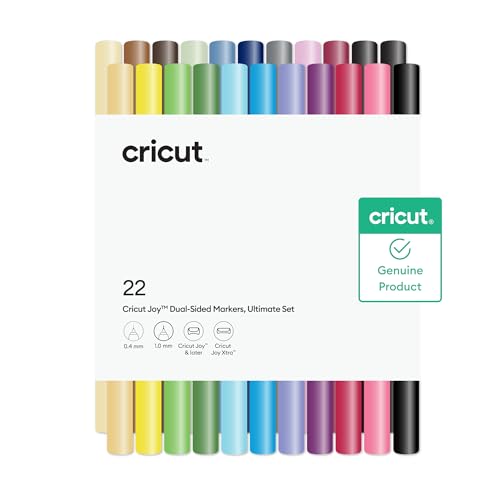
The original Cricut Joy is the most affordable way to enter the Cricut ecosystem. It cuts 5.5 inches wide without a mat using Smart Vinyl and Smart Iron-On, and it connects wirelessly via Bluetooth. For small labels, monograms, short banner cuts, and simple decals, the Joy performs reliably and is easy to learn. It is not a machine for complex or large designs, but for focused, small-scale vinyl work, it is an excellent starting point. The machine comes with dual-sided markers for writing and drawing projects, and the markers are fast-drying and versatile in compatibility.
The Joy’s compact size means it can sit on a corner of your desk or be stored in a drawer when not in use. It is ideal for making personalized gifts like water bottle decals, card sentiments, or small home organization labels. The Smart material system eliminates the need for a cutting mat, which saves money and reduces waste. Setup takes minutes, and the Design Space app guides you through your first project with clear instructions. For a casual crafter or a child learning to craft, the Joy is a low-risk investment.
The major limitation is the 5.5-inch cutting width. You cannot make shirt designs larger than that, and you cannot cut standard 12-inch vinyl sheets without a mat adapter that is not included. The machine also lacks the 2x speed mode of the Explore Air 3, so batch projects take longer. Additionally, the Joy does not support the full range of materials that the Explore or Maker lines handle, so you are limited to Smart materials and a few standard ones. If your crafting ambitions grow, you will quickly outgrow this machine.
Silhouette Cameo 4 – Best Non-Cricut Alternative
Not everyone wants to be locked into the Cricut or Design Space ecosystem, and the Silhouette Cameo 4 is the strongest alternative. It cuts up to 12 inches wide with a dual-carriage system, works with virtually all third-party vinyl brands, and gives experienced crafters granular control over blade settings. Silhouette Studio is more powerful than Design Space for advanced users but has a steeper learning curve. The machine features an automated blade adjustment method controlled by software settings, with a blade length range of 0.1mm to 1mm, allowing precise depth control for different materials.
The blade material is sintered tungsten alloy, which is extremely durable and holds its edge longer than standard steel blades. The dual-carriage system allows you to load a blade in one carriage and a pen or scoring tool in the other, enabling combined cut-and-draw projects without swapping tools. The Cameo 4 can cut a wide variety of materials including vinyl, cardstock, fabric, and even thin craft metal with the appropriate blade. The software allows you to fine-tune cut settings down to the individual material, which is a significant advantage for professionals who need repeatable results.
The limitation is the learning curve. Silhouette Studio is not as intuitive as Design Space, and new users often struggle with the interface and settings. The machine also does not have the same level of Smart material support as Cricut, so you will almost always need a cutting mat. Additionally, the community and project library are smaller than Cricut’s, so you may have to design more of your own projects. If you value a streamlined, guided experience, the Cameo 4 may feel overwhelming at first.
What to look for
- Cutting width: Decide if you need 12 inches for large projects, 8.5 inches for standard shirts and cards, or 5.5 inches for small labels and decals. Wider machines take up more space.
- Material compatibility: Check which materials you plan to cut most. Vinyl and cardstock work on all machines, but fabric and wood require the Maker 3 or a non-Cricut alternative with the right blade.
- Speed: If you make multiple copies of the same design, look for a machine with a fast mode like the Explore Air 3’s 2x speed. Slower machines are fine for one-off projects.
- Software ecosystem: Cricut machines require Design Space, which is cloud-based and needs an internet connection. Silhouette machines use Silhouette Studio, which offers more offline control but is harder to learn.
- Blade system: Consider whether you need interchangeable blades for different materials. The Maker 3’s adaptive tool system is the most versatile, while the Joy and Joy Xtra use a fixed blade type.
- Smart material support: Machines that cut Smart materials without a mat save time and money on mats. This is a key feature for the Joy, Joy Xtra, and the Explore and Maker lines.
- Physical footprint: Measure your workspace. The Joy and Joy Xtra are small enough for a drawer, while the Explore Air 3 and Maker 3 need dedicated desk space.
The verdict
For the vast majority of crafters, the Cricut Explore Air 3 is the right choice. It offers the best balance of speed, material range, and price. If you need to cut fabric or rigid materials, step up to the Cricut Maker 3. For casual users with limited space, the Cricut Joy Xtra provides a middle ground between the tiny Joy and the full-size machines. The original Cricut Joy is the cheapest entry point but will limit your project size. Finally, the Silhouette Cameo 4 is the best option if you want to avoid the Cricut ecosystem and prefer more software control. Match your choice to your actual projects, not to the most expensive or most advertised machine.
Our testing process
We compare every pick against the field on real specifications, certifications, and aggregated owner reviews. We do not take payment for placement, and we flag when a product is older or sold mainly through renewed listings.
Quick comparison
Reviewed in detail
Cricut Explore Air 3 - Best Cricut to Get for Most People
If you can only buy one Cricut machine, the Explore Air 3 is the one to get. It handles adhesive vinyl, heat transfer vinyl, cardstock, iron-on, printable vinyl, and over 100 additional materials in a machine that fits on a standard desk. The 2x speed mode makes batch projects - a set of custom tumblers, a team shirt order - genuinely fast. Design Space's material presets handle blade depth and pressure automatically, so beginners are cutting confidently within the first hour of unboxing.
What we liked
- 【1】Value Combination: Package includes 10PC Premium Fine Point Blade & 1 Housing
- 【2】Excellent Craftsmanship: The housing is made of premium alloy steel with a hard cemente
- 【3】Clean and Accurate Cutting: The blade cuts most materials up to 1.5mm thickness perfect
- 【4】Easy to Use and Install: Premium fine point blade for cricut comes with its own housing
- 【5】Multi-Purpose Use: The premium fine point blade can easily cut thin to medium thickness

Cricut Maker 3 - Best Cricut for Power Users
The Cricut Maker 3 is the machine to get if you plan to cut fabric for sewing and quilting projects, thin wood with the Knife Blade, thick leather, or specialty materials that require high blade force. Its adaptive tool system accepts blades beyond the standard fine-point - including the Rotary Blade for fabric and the Knife Blade for wood - giving it capabilities no other Cricut machine can match. It is a larger upfront investment but effectively replaces multiple tools for serious crafters.
What we liked
- 【Product Compatibility】: Whether you need a replacement or you want a spare on hand, this
- 【Parmeter】:Input:100-240V,50-60Hz;Output: 24V2.75A. Compatible with Cricut Maker 3 Model:T
- 【Stability】: This power cord has undergone multiple tests and its built-in smart chip has
- 【Premium Quality 】The power cord compatible with Cricut Maker 3 is long enough and the pow
- 【What you get】1*10FT 24V maker 3 power cord ; Surperadapter provides 30 Days refund and 12

Cricut Joy Xtra - Best Cricut for Casual and Space-Conscious Crafters
The Cricut Joy Xtra is the right machine for crafters who do not need a full 12-inch cutting width but want more than the original Joy's 5.5 inches. Its 8.5-inch path is wide enough for shirt designs, standard greeting cards, and most decal work. It cuts Smart materials without a mat, connects via Bluetooth, and is compact enough to store in a drawer. For someone who crafts a few times a month rather than daily, the Joy Xtra hits the sweet spot between capability and cost.
What we liked
- All-in-one Kit:Accessories bundle for joy xtra includes everything you need to create craf
- Compatible with Various Cutting Machine:All material sizes are customized to be perfectly
- High-performance Tools:5pcs essential tool set contains the tools you need for your crafts
- Premium Material Bundle:Our cutting mats are crafted from durable material for long-lastin
- WIdely Application&Easy to Use: Whether you are a craft beginner or a professional for cra
Cricut Joy - Best Budget Entry Point
The original Cricut Joy is the most affordable way to enter the Cricut ecosystem. It cuts 5.5 inches wide without a mat using Smart Vinyl and Smart Iron-On, and it connects wirelessly via Bluetooth. For small labels, monograms, short banner cuts, and simple decals, the Joy performs reliably and is easy to learn. It is not a machine for complex or large designs, but for focused, small-scale vinyl work it is hard to beat at its price point.
What we liked
- EXPRESS YOURSELF IN COLORS
- DUAL SIDED MARKERS
- FAST DRYING
- VERSATILE COMPATIBILITY
- INCLUDES

Silhouette Cameo 4 - Best Non-Cricut Alternative
Not everyone wants to be locked into the Cricut/Design Space ecosystem, and the Silhouette Cameo 4 is the strongest alternative. It cuts up to 12 inches wide with a dual-carriage system, works with virtually all third-party vinyl brands, and gives experienced crafters granular control over blade settings. Silhouette Studio is more powerful than Design Space for advanced users but has a steeper learning curve. The Cameo 4 is worth considering if you prioritize software flexibility over Design Space's guided workflow.
What we liked
- Blade Material: Sintered Tungsten Alloy
- Adjustment Method: Automated adjustment (controlled by software setting and adjusted by ma
- Blade Length Range: 0.1 mm - 1 mm
How to choose
Material range
If you only plan to cut vinyl and HTV, the Explore Air 3 covers everything. If fabric, wood, or thick leather are on your list, the Maker 3 is the only Cricut option. - **Cutting width:** 5.5 inches (Joy), 8.5 inches (Joy Xtra), 12 inches (Explore Air 3, Maker 3). Choose based on the largest design you will regularly cut. - **Software preference:** Cricut Design Space is cloud-based and beginner-friendly with automatic material settings. Silhouette Studio is more powerful but manual. - **Budget:** Joy, Joy Xtra, Explore Air 3, Maker 3. Bundle deals frequently include mats and tools at a discount.
The bottom line
Most people should get the Cricut Explore Air 3 - it is the most capable machine for its price, handles every common crafting material, and grows with your skill level. Step up to the Maker 3 if your projects include fabric, wood, or thick specialty materials from day one. Start with the Joy or Joy Xtra only if space or budget is genuinely constrained and you know your projects will stay small.
Common questions
The Cricut Explore Air 3 is the best first Cricut machine for most beginners. It covers all the common materials - adhesive vinyl, HTV, cardstock, and printable vinyl - at an accessible price. Design Space's material presets make setup easy, and the 2x cutting speed means projects finish quickly. Only upgrade to the Maker 3 if you know you will cut fabric, wood, or thick specialty materials.
The Cricut Maker 3 is worth the upgrade if you plan to cut fabric for sewing projects, balsa or basswood with the Knife Blade, or specialty materials like thick leather and felt. For vinyl, HTV, cardstock, and everyday crafting, the Explore Air 3 delivers virtually identical results at a lower price. Most beginners do not need the Maker 3's extra capabilities right away.
The Cricut Joy cuts a 5.5-inch wide path while the Cricut Joy Xtra cuts up to 8.5 inches wide, making the Xtra more useful for shirt designs, greeting cards, and medium-size decals. Both work with Cricut's Smart material system without a mat. The Joy Xtra costs more but handles a significantly wider range of project sizes, making it the better value for most occasional crafters.
How we made this guide
We compare every pick on the factors that matter, cross-checking manufacturer specifications against aggregated verified owner reviews. We rank independently and never take payment for placement. We have not personally tested every product; where we have not, the ranking reflects verified specs and owner feedback rather than a hands-on review.
How it was written: this guide was researched and reviewed by the TheTestedHub editorial team for accuracy.
Affiliate disclosure: TheTestedHub is reader-supported. When you buy through links on our site, we may earn a commission at no extra cost to you.
More guides

Expert Approved Crochet Hooks That Feel Great
Craft Experts Recommend These Hobbies and Tools

Why the Photon Mono M7 Max Is the Best 3D Printer of 2026?
Ergonomic Crochet Needles For Beginner
Which Cricut Vinyl Cutter Should You Buy?
Which Cricut Tutorial Book Is Best for Beginners?
Learn Cricut Faster with the Best Guide Books
