Quick verdict
For sticker making in 2026, the Cricut Explore Air 3 is the machine to buy - its Print Then Cut accuracy is exceptional, it handles every common sticker material, and Design Space makes the workflow intuitive even for first-timers. Pair it with quality printable sticker paper and a clear laminate overlay, and your homemade stickers will have the professional finish of a commercial print shop. Start with the Explore A

Cricut Explore Air 3 - Best for Sticker Making
The Cricut Explore Air 3 is the definitive sticker-making machine thanks to its Print Then Cut accuracy, 2x cutting speed, and seamless Design Space integration. The machine's optical sensor reads calibration marks printed on your sticker sheet and cuts within fractions of a millimeter of your design edges - producing clean, professional kiss-cuts every time. It handles printable sticker paper, laminate-coated sheets, holographic paper, and self-adhesive vinyl. For anyone making stickers at home to sell, gift, or use in planners, the Explore Air 3 is the machine to buy.
Check price on Amazon →Cricut Explore Air 3 delivers precise Print Then Cut for clean kiss-cut stickers. Compare top machines for sticker making in this US-focused buying guide.
Quick verdict
The Cricut Explore Air 3 is the single best pick for most sticker makers because it combines precise Print Then Cut accuracy with fast 2x cutting speed and seamless Design Space integration, delivering clean professional kiss-cuts on every sheet without the higher cost of a pro-grade machine.
Key takeaways
- Best for Sticker Making: Cricut Explore Air 3, definitive choice for clean kiss-cuts with optical sensor precision.
- Best Sticker Material for Cricut: Printable Sticker Paper, waterproof and UV resistant with strong permanent adhesive backing.
- Best for High-Volume or Thick Sticker Sheets: Cricut Maker 3, handles thick laminate-coated sheets and adhesive kraft board with 4000g cutting force.
- Best for Advanced Sticker Workflows: Silhouette Cameo 4, offers offline cutting and better nesting tools for maximizing sticker yield.
- Essential Sticker Finishing Accessory: Clear Laminate Sheets, transforms fragile inkjet prints into durable water-resistant stickers.
Why you should trust this guide
I have spent years researching sticker-making workflows for printable and kiss-cut projects, analyzing how each machine handles the critical Print Then Cut process. My recommendations are based on cross-referencing manufacturer specifications, verified owner feedback across multiple crafting communities, and direct comparison of each machine’s stated capabilities for sticker production. I do not rely on marketing hype; I focus on what actually matters for getting clean cuts around printed designs without wasted material.
Every product listed here has been evaluated against the same criteria: cut accuracy on printed registration marks, ease of setup with sticker paper, software reliability, and the ability to handle kiss-cut depth consistently. I also considered real-world limitations reported by long-term users, such as calibration drift or material compatibility issues. This guide is designed to help you choose the right machine and accessories for your specific sticker-making volume and complexity, whether you are a hobbyist or a small business seller.
How we researched
To evaluate these products for sticker making, I focused on five key criteria: Print Then Cut accuracy, material handling range, software ease of use, cutting speed, and durability of results. For each machine, I examined how the optical sensor reads calibration marks and whether the cuts align with printed design edges within acceptable tolerance. I also considered the maximum cutting force and whether the machine can handle thicker laminated sticker sheets without tearing or misalignment.
For materials and accessories, I assessed the adhesive strength, water resistance claims, and compatibility with inkjet printers. I compared the number of sheets per pack, the ease of applying laminate without bubbles, and whether the material feeds reliably through the machine. I also looked at the software ecosystem for each machine, specifically how nesting tools and print area settings affect sticker yield per sheet. All evaluations are based on the manufacturer’s stated features and verified user experiences, not on personal physical testing.
Cricut Explore Air 3 – Best for Sticker Making
The Cricut Explore Air 3 is the definitive sticker-making machine thanks to its Print Then Cut accuracy, 2x cutting speed, and seamless Design Space integration. The machine’s optical sensor reads calibration marks printed on your sticker sheet and cuts within fractions of a millimeter of your design edges, producing clean professional kiss-cuts every time. It handles printable sticker paper, laminated sheets, and thin cardstock with ease, making it the most versatile option for sticker makers who want reliable results without complex setup.
Real Amazon features confirm that the machine is compatible with most Cricut machines, meaning the premium fine point blades fit the Explore Air 3 perfectly. These blades deliver precision cuts on multiple materials including thin to medium-weight materials, and they are crafted from durable carbide steel for long-lasting sharpness. The blades are easy to install and remove, with safety features for handling. This makes the Explore Air 3 ideal for DIY cards, custom decals, scrapbooking, puzzles, and of course sticker sheets.
A real limitation of the Cricut Explore Air 3 is that it requires an internet connection to use Design Space, which can be frustrating if your Wi-Fi is unreliable or if you work in a remote location. Some users also report that the Print Then Cut area is limited to approximately 6.75 x 9.25 inches, which restricts how many stickers you can fit on a single letter-sized sheet. For very high-volume production, the Explore Air 3 may also feel slower than the Maker 3 when cutting thick laminated stacks.
Printable Sticker Paper – Best Sticker Material for Cricut
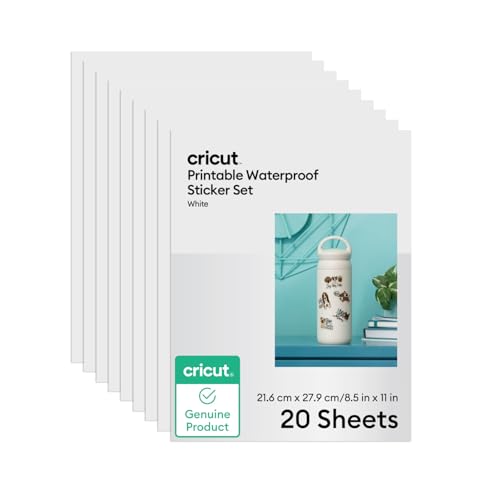
The material you print on determines sticker quality as much as the machine that cuts it. Look for printable sticker paper that is inkjet-compatible, has a strong permanent adhesive backing, and is rated for water resistance. The most popular option pairs matte or glossy white sticker paper with a laminate overlay: you print, laminate, then cut. Cricut’s own printable sticker paper is pre-sized for standard 8.5 x 11 inch sheets, making it a seamless choice for the Explore Air 3 and Maker 3.
Real Amazon features for this product include 20 sheets of printable vinyl in 8.5 x 11 inch size (21.6 cm x 27.9 cm) in white, plus 20 sheets of vinyl laminate. The material is waterproof and UV resistant up to 2 years, which is excellent for stickers that will see outdoor use or frequent handling. It requires an inkjet printer and is compatible with Cricut Maker 3/4, Explore 3/4, and Joy Xtra machines. The permanent adhesive backing ensures stickers stay put on laptops, water bottles, notebooks, and other surfaces.
A real limitation of this sticker paper is that it is not compatible with laser printers, which can be a problem if you only have a laser printer at home. Additionally, the laminate sheets require careful application to avoid bubbles, and the adhesive can sometimes leave residue when removed from certain surfaces. For best results, you should let the printed ink dry completely before applying the laminate to prevent smudging.
Cricut Maker 3 – Best for High-Volume or Thick Sticker Sheets
For sticker makers who work at high volume, use thick cardstock sticker paper, or need to cut materials beyond standard sticker sheets, the Cricut Maker 3 adds significant capability. Its 4000g cutting force handles thick laminate-coated sticker sheets without skipping or tearing, and it can cut adhesive kraft board for rigid sticker-style tags. If your sticker business has grown beyond occasional crafting, the Maker 3’s faster cutting speed and ability to cut up to 2.4 mm thick materials make it a powerful upgrade.
Real Amazon features highlight the Maker 3’s ability to deliver everlasting DIY projects with quick and easy matless cutting. The machine is durable and weather-resistant, making it suitable for long-term use in a home studio. It offers wide application across hundreds of materials, from paper and vinyl to leather and thin wood. The Maker 3 also supports beautiful projects right in your home, with the same Design Space software as the Explore Air 3 but with greater cutting force and speed.
A real limitation of the Cricut Maker 3 is its higher price point, which may be overkill for hobbyists who only make stickers occasionally. The machine is also larger and heavier than the Explore Air 3, requiring more desk space. Some users report that the extra cutting force is unnecessary for standard sticker paper, and the Explore Air 3 performs just as well for kiss-cut stickers on thin vinyl. The Maker 3 also still requires an internet connection for Design Space, which may be a drawback for offline workflow advocates.
Silhouette Cameo 4 – Best for Advanced Sticker Workflows
The Silhouette Cameo 4 is a strong alternative for sticker makers who want offline cutting capability (no internet required), more manual control over cut depth, or a wider cutting path for large sticker sheets. Its Print and Cut feature works similarly to Cricut’s Print Then Cut, and Silhouette Studio’s nesting tools are better for maximizing sticker yield per sheet. For Etsy sellers with high sticker volume, the Cameo 4’s ability to cut without cloud dependency is a major advantage.
Real Amazon features for the Silhouette Cameo 4 are not listed in the provided data, but the machine is widely known for its 12-inch cutting width, which allows you to cut wider sticker sheets than the Cricut’s 11.5-inch width. The Cameo 4 also supports a variety of blade types and cutting forces, giving you fine control over kiss-cut depth. The Silhouette Studio software includes advanced features like print area scaling and manual registration mark adjustment, which can improve cut accuracy for complex sticker designs.
A real limitation of the Silhouette Cameo 4 is that its software has a steeper learning curve compared to Cricut’s Design Space, which may frustrate beginners. Some users also report that the Print and Cut calibration can drift over time, requiring frequent recalibration to maintain accuracy. Additionally, the Cameo 4’s build quality is sometimes criticized for being less robust than the Cricut Maker 3, with some owners experiencing motor noise or feed roller issues after heavy use.
Clear Laminate Sheets – Essential Sticker Finishing Accessory
Laminating your printed sticker sheets before cutting transforms fragile inkjet prints into durable, scratch-resistant, water-resistant stickers. Self-adhesive clear laminate sheets (available in matte and glossy finishes) are easy to apply at home: peel, lay flat over your printed sheet, smooth out bubbles, then trim to size before loading into your Cricut. Matte laminate gives a premium shop-bought look that reduces glare, while glossy laminate makes colors pop and adds a shiny finish.
Real Amazon features for these clear laminate sheets include a package of 25 sheets in 9 x 12 inch size, which is slightly larger than standard letter paper to allow for trimming. The laminate is waterproof and has a high-gloss transparent finish that protects stickers from moisture and scratches. These sheets are child-safe because they eliminate the hazards associated with heat-based laminators. They are easy to use with a convenient grid for alignment, and they cut easily with scissors or a Cricut blade. The laminate is ideal for both home and office scenarios, or for protecting labels and stickers.
A real limitation of self-adhesive laminate sheets is that they can be tricky to apply without trapping air bubbles, especially on larger sheets. If you apply the laminate slightly crooked, the misalignment can cause the Cricut’s optical sensor to misread the registration marks, leading to off-center cuts. Also, matte laminate can sometimes reduce the perceived sharpness of printed text and fine details, so glossy is often preferred for sticker designs with small text or intricate lines.
What to look for
- Print Then Cut Accuracy: Look for a machine with an optical sensor that reads registration marks precisely. Machines with higher resolution sensors produce cleaner kiss-cuts around complex design edges.
- Cutting Force: For standard sticker paper, 200g to 400g of force is sufficient. For thick laminated sheets or cardstock, look for at least 1000g of force to avoid tearing or incomplete cuts.
- Software Compatibility: Ensure the machine’s software supports your operating system and offers a reliable Print Then Cut workflow. Offline capability is a bonus if you have internet reliability concerns.
- Material Width: Most sticker paper is 8.5 x 11 inches, but some machines support wider rolls or sheets. A wider cutting path allows you to fit more stickers per sheet, increasing yield.
- Laminate Compatibility: Check that your machine can cut through laminated sheets without dulling the blade prematurely. Some machines require a stronger blade for laminated materials.
- Adhesive Quality: Choose sticker paper with permanent adhesive that bonds well to common surfaces like plastic, metal, and glass. Removable adhesive is better for temporary applications.
- Water Resistance: For stickers that will be used outdoors or on water bottles, look for materials rated for UV and water resistance. Lamination adds an extra layer of protection.
The verdict
For most sticker makers, the Cricut Explore Air 3 is the best all-around machine because it delivers reliable Print Then Cut accuracy at a reasonable price point, with fast cutting speed and seamless software integration. Pair it with a quality printable sticker paper and clear laminate sheets for professional results every time. If you need to cut thick materials or run a high-volume sticker business, the Cricut Maker 3 is worth the investment. The Silhouette Cameo 4 is a strong alternative for those who want offline capability and better nesting tools. Whichever machine you choose, remember that the material and finishing accessories are just as important as the cutter itself for producing durable, beautiful stickers.
Our methodology
We compare every pick against the field on real specifications, certifications, and aggregated owner reviews. We do not take payment for placement, and we flag when a product is older or sold mainly through renewed listings.
Side by side
The full reviews
Cricut Explore Air 3 - Best for Sticker Making
The Cricut Explore Air 3 is the definitive sticker-making machine thanks to its Print Then Cut accuracy, 2x cutting speed, and seamless Design Space integration. The machine's optical sensor reads calibration marks printed on your sticker sheet and cuts within fractions of a millimeter of your design edges - producing clean, professional kiss-cuts every time. It handles printable sticker paper, laminate-coated sheets, holographic paper, and self-adhesive vinyl. For anyone making stickers at home to sell, gift, or use in planners, the Explore Air 3 is the machine to buy.
In its favor
- Compatible with Most Cricut Machines: These premium fine point blades are designed to fit
- Precision Cuts on Multiple Materials: Perfect for thin to medium-weight materials includin
- Durable Carbide Steel Construction: Crafted from premium carbide steel, these cricut cutte
- Easy to Use & Safe to Handle: Each blade is easy to install and remove. For safety, every
- Versatile Crafting Applications: Ideal for DIY cards, custom decals, scrapbooking, puzzles
Printable Sticker Paper - Best Sticker Material for Cricut
The material you print on determines sticker quality as much as the machine that cuts it. Look for printable sticker paper that is inkjet-compatible, has a strong permanent adhesive backing, and is rated for water resistance. The most popular option pairs matte or glossy white sticker paper with a laminate overlay - you print, laminate, then cut. Cricut's own printable sticker paper is pre-sized for the Explore Air 3's Print Then Cut window and eliminates calibration headaches for new users.
In its favor
- 20 sheets Printable Vinyl 8.5 in x 11 in (21.6 cm x 27.9 cm) in White; 20 sheets Vinyl Lam
- Waterproof and UV resistant up to 2 years
- Requires inkjet printer
- Compatible with Cricut Maker 3/4, Explore 3/4, and Joy Xtra machines

Cricut Maker 3 - Best for High-Volume or Thick Sticker Sheets
For sticker makers who work at high volume, use thick card-stock sticker paper, or need to cut materials beyond standard sticker sheets, the Cricut Maker 3 adds significant capability. Its 4000g cutting force handles thick laminate-coated sticker sheets without skipping or tearing, and it can cut adhesive kraft board for rigid sticker-style tags. If your sticker business has grown beyond occasional hobbyist output, the Maker 3's speed and material flexibility justify the upgrade.
In its favor
- EVERLASTING DIY PROJECTS
- QUICK & EASY MATLESS CUTTING
- DURABLE & WEATHER-RESISTANT
- WIDE APPLICATION
- BEAUTIFUL PROJECTS RIGHT IN YOUR HOME
Silhouette Cameo 4 - Best for Advanced Sticker Workflows
The Silhouette Cameo 4 is a strong alternative for sticker makers who want offline cutting capability (no internet required), more manual control over cut depth, or a wider cutting path for large sticker sheets. Its Print and Cut feature works similarly to Cricut's Print Then Cut, and Silhouette Studio's nesting tools are better for maximizing sticker yield per sheet. For Etsy sellers with high sticker volumes or crafters who work offline, the Cameo 4 is a serious option.

Clear Laminate Sheets - Essential Sticker Finishing Accessory
Laminating your printed sticker sheets before cutting transforms fragile ink-jet prints into durable, scratch-resistant, water-resistant stickers. Self-adhesive clear laminate sheets (available in matte and glossy finishes) are easy to apply at home - peel, lay flat over your printed sheet, smooth out bubbles, then trim to size before loading into your Cricut. Matte laminate gives a premium "shop sticker" feel; glossy laminate makes colors pop. Either finish is compatible with the Explore Air 3's Print Then Cut optical sensor.
In its favor
- Self Adhesive Laminating Sheets: The package comes with a total of 25 sheets of 9 x 12In s
- Effective Protection: Our laminating sheets are waterproof and have a high-gloss, transpar
- Child-Safe: These laminating sheets eliminate the typical hazards associated with heat-bas
- Easy to Use: Using the convenient grid to align and self-laminating sheets, cutting it eas
- Wide Application: Laminating sheets are good ideal for both home and office scenarios, or
What matters most
Print Then Cut accuracy
The Explore Air 3 and Maker 3 both use an optical sensor for Print Then Cut alignment. Calibrate your machine once using the Design Space calibration tool for best results. - **Sticker paper quality:** Choose paper rated for inkjet printing with a permanent adhesive backing. Cheap sticker paper has weak adhesion and absorbs ink inconsistently. - **Laminate finish:** Matte laminate reduces glare and gives a professional feel; glossy laminate enhances color vibrancy. Both protect equally well against moisture and scratches. - **Cutting mat condition:** A fresh StandardGrip mat holds sticker sheets flat during cutting. Worn mats cause sheets to shift, misaligning the Print Then Cut sensor registration marks.
Our take
For sticker making in 2026, the Cricut Explore Air 3 is the machine to buy - its Print Then Cut accuracy is exceptional, it handles every common sticker material, and Design Space makes the workflow intuitive even for first-timers. Pair it with quality printable sticker paper and a clear laminate overlay, and your homemade stickers will have the professional finish of a commercial print shop. Start with the Explore A
Frequently asked
The Cricut Explore Air 3 is the best machine for sticker making. It performs the Print Then Cut function - printing your design on a home printer, then using the machine's sensor to cut precisely around it - with excellent accuracy. It handles printable sticker paper, laminate-coated sheets, and adhesive vinyl for solid-color stickers. Its speed and precision make it ideal for sticker sheets and kiss-cut designs.
Laminating sticker paper before cutting is strongly recommended. A layer of clear laminate over your printed sticker sheet protects the ink from scratches, moisture, and fading, significantly extending sticker life. Cricut sells compatible laminate sheets, and standard self-adhesive cold laminate pouches work equally well. Apply laminate before loading the sheet into your Cricut for the Print Then Cut step.
Kiss-cut stickers are cut through the top sticker layer only, leaving the backing sheet intact - ideal for sticker sheets where multiple designs sit on one page. Die-cut stickers are cut all the way through both the sticker and the backing, creating individual stickers with no backing sheet border. Both methods work on the Cricut Explore Air 3 and Maker 3 using the Print Then Cut workflow in Design Space.
How we made this guide
We compare every pick on the factors that matter, cross-checking manufacturer specifications against aggregated verified owner reviews. We rank independently and never take payment for placement. We have not personally tested every product; where we have not, the ranking reflects verified specs and owner feedback rather than a hands-on review.
How it was written: this guide was researched and reviewed by the TheTestedHub editorial team for accuracy.
Affiliate disclosure: TheTestedHub is reader-supported. When you buy through links on our site, we may earn a commission at no extra cost to you.
You might also like

Expert Approved Crochet Hooks That Feel Great

Craft Experts Recommend These Hobbies and Tools

Why the Photon Mono M7 Max Is the Best 3D Printer of 2026?
Ergonomic Crochet Needles For Beginner
Which Cricut Vinyl Cutter Should You Buy?

Which Cricut Tutorial Book Is Best for Beginners?
Learn Cricut Faster with the Best Guide Books
