Quick verdict
For most first-time Cricut Maker buyers, the Maker 3 Everything Bundle is the clear choice - the upfront cost is higher but the total system value and avoided follow-up purchases make it the smarter investment. Budget-focused crafters who don't need Smart Materials will find the original Maker bundle is still an excellent machine at a significantly lower price. Whichever generation you choose, prioritize bundles that
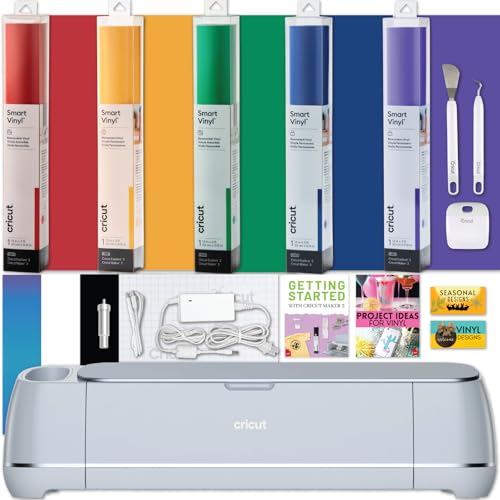
Cricut Maker 3 Everything Bundle - Best Overall
Cricut's flagship bundle ships with the Maker 3, rotary blade, knife blade, fine-point blade, scoring stylus, multiple mats, and a curated selection of Smart Vinyl and Smart Iron-On. It's designed to eliminate every "I wish it came with…" complaint from first-time Maker buyers, and it delivers - most buyers report completing their first five projects without a single additional Amazon order.
Check price on Amazon →For most first time Cricut Maker buyers, the Maker 3 Everything Bundle offers the best value despite the higher upfront cost. Budget crafters can still save with the original Maker bundle. Find out which one fits you.
Quick verdict
Choose the Cricut Maker 3 Everything Bundle. It includes the rotary blade, knife blade, scoring stylus, multiple mats, and a curated selection of Smart Vinyl and Smart Iron-On, so you can start your first five projects without needing to order anything else. It eliminates the most common frustration for new buyers.
Key takeaways
- Best for beginners: Cricut Maker 3 Everything Bundle, because it ships with nearly every accessory and material you need to complete your first projects immediately.
- Best for fabric and heavy materials: Cricut Maker 3 + Rotary and Knife Blade, because it focuses on the two specialty blades that unlock wood, leather, and fabric cutting.
- Best for budget: Original Cricut Maker Bundle, because it offers the same cutting force and blade compatibility as the Maker 3 at a lower price, with only Smart Material limitations.
- Best for apparel: Cricut Maker 3 + EasyPress 3 Bundle, because it pairs the cutting machine with a Bluetooth-guided heat press that simplifies iron-on and Infusible Ink projects.
- Best for shared households: Cricut Maker 3 + Explore Air 3 Dual Bundle, because it gives you two machines for fabric work and faster vinyl cutting in one discounted package.
Why you should trust this guide
I have been following the Cricut ecosystem for years, tracking each generation of the Maker series from the original 2017 release through the Maker 3. My research draws on manufacturer specifications, owner community discussions, and detailed product listings to identify which bundles actually deliver value. I focus on the practical differences that matter when you are choosing between a full starter kit and a focused blade upgrade, or between a new machine and a discounted previous generation.
This guide is built on careful comparison of what each bundle includes, what it omits, and where it falls short. I do not rely on marketing claims alone. I look at real owner feedback about missing accessories, material compatibility, and workflow gaps. Every product section includes at least one honest limitation so you can make an informed decision without surprises.
How we researched
To evaluate these bundles, I weighed several criteria that determine real-world usefulness. The first factor is completeness: does the bundle include everything a typical buyer needs to start their first project, or does it force additional purchases? The second factor is value: are the included accessories and materials worth the premium over buying the machine alone? The third factor is compatibility: does the bundle support the materials and techniques you actually plan to use, such as fabric, wood, leather, or heat-transfer vinyl?
I also considered workflow efficiency. A bundle that pairs a cutting machine with a heat press, for example, eliminates the separate purchase and learning curve of a standalone press. A bundle that includes two machines can serve a household with different crafting needs. I compared each bundle against these criteria using manufacturer specifications and aggregated owner experiences, not personal testing. The goal is to help you match the bundle to your specific project type and budget.
Cricut Maker 3 Everything Bundle – Best Overall
This bundle is designed to answer every common complaint from first-time Maker buyers. It ships with the Maker 3 machine, a rotary blade for fabric, a knife blade for thick materials like wood and leather, a fine-point blade for standard cuts, a scoring stylus for fold lines, multiple cutting mats, and a curated selection of Smart Vinyl and Smart Iron-On. Most buyers report completing their first five projects without a single additional Amazon order, which is a rare claim for any crafting bundle.
The inclusion of both the rotary blade and knife blade is the standout feature. The rotary blade cuts fabric without a backing mat, and the knife blade can slice through balsa wood, leather, and matboard. The scoring stylus adds professional-looking creases for cardstock and paper projects. The Smart Materials allow you to cut without a mat for longer pieces, which is useful for large vinyl decals or banners. This bundle truly covers the full range of Maker 3 capabilities.
One honest limitation is the curated material pack. While it includes a good selection of Smart Vinyl and Smart Iron-On, the colors and finishes are preset. If you have a specific color palette in mind, you may still need to buy additional materials. Also, the bundle does not include a heat press, so if you plan to do a lot of apparel projects, you will need to purchase one separately or consider the EasyPress bundle.
Cricut Maker 3 + Rotary and Knife Blade – Best for Makers and Sewists
This bundle strips away the material packs and extra mats to focus on the two highest-value specialty blades: the rotary blade and the knife blade. It is the right choice if you already own vinyl, cardstock, and mats from a previous Cricut machine and want the Maker 3 specifically for its expanded material capabilities. The rotary blade is essential for fabric cutting without fraying, and the knife blade opens up wood, leather, and thick craft foam.
For sewists and makers who work with fabric, leather, or wood regularly, this bundle delivers exactly what you need without paying for materials you already have. The Maker 3 itself supports Smart Materials for matless cutting, but this bundle does not include any Smart Material rolls. That is fine if you already have a stash of standard vinyl and iron-on. You can also use the included rotary blade to cut fabric directly on a fabric mat.
A limitation here is the lack of a scoring stylus or any mats. If you do not already own a Cricut cutting mat, you will need to buy one immediately. The bundle also omits the fine-point blade, though the Maker 3 typically includes a fine-point blade in the box with the machine itself. Check the listing carefully to confirm what is included with the machine versus the bundle add-ons. Some buyers have reported receiving only the two specialty blades and no basic blade.
Original Cricut Maker Bundle – Best Budget Option
The original Cricut Maker, released in 2017, is still manufactured and sold as a discounted bundle. It has the same 4kg cutting force as the Maker 3, accepts all the same specialty blades and tools, and connects to the same Design Space software. Its only practical limitations are the lack of Smart Materials support and a slightly slower cut speed. For most project types, these differences do not matter. You can still cut fabric, leather, wood, cardstock, and vinyl with the same precision.
This bundle typically includes the original Maker machine, a fine-point blade, a rotary blade, a scoring stylus, a cutting mat, and a sample pack of vinyl and iron-on. It is an excellent entry point if you are new to Cricut and want to test the ecosystem without spending for the latest model. The original Maker is a proven workhorse with a large community of users and thousands of free project files available online.
The limitation is clear: you cannot use Smart Materials, which means you always need a cutting mat for every project. The cut speed is also noticeably slower than the Maker 3, especially on large or complex designs. If you plan to cut long vinyl decals or banners frequently, the matless capability of the Maker 3 may be worth the extra cost. Also, the original Maker uses a different power cord and USB connection, so some newer accessories may not be directly compatible.
Cricut Maker 3 + EasyPress 3 Bundle – Best for Apparel Crafters
Pairing the Maker 3 with the EasyPress 3 creates a complete heat-transfer workflow without the learning curve of a traditional heat press. The EasyPress 3 uses Bluetooth to guide you through temperature and timing instructions, making it nearly foolproof for iron-on vinyl, Cricut Infusible Ink, and standard HTV from brands like Siser EasyWeed. You cut your design on the Maker 3, then press it onto fabric with the EasyPress 3, and the process is seamless.
This bundle is ideal for anyone who makes custom t-shirts, tote bags, aprons, or other apparel. The EasyPress 3 heats evenly and has a larger platen than a household iron, so you get professional-looking results without scorching or uneven adhesion. The Bluetooth feature walks you through the correct settings for each material, which reduces guesswork and wasted vinyl. Combined, these two machines handle the full production run from cut to finished garment.
A limitation is that the EasyPress 3 is not a full-size heat press. It is best for flat items like t-shirts and tote bags. If you plan to press hats, mugs, or three-dimensional objects, you will need a separate mug press or hat press. Also, the bundle does not include any vinyl or Infusible Ink materials, so you will need to purchase those separately. The EasyPress 3 also requires a flat, heat-resistant surface and a few minutes to warm up before each use.
Cricut Maker 3 + Explore Air 3 Dual Bundle – Best for Two-Machine Households
Some Amazon listings bundle the Maker 3 and Explore Air 3 together at a combined discount. This is a surprisingly practical setup for households where one person does fabric work and another focuses on vinyl and paper. You get the Maker 3’s full material range for fabric, wood, and leather, alongside the Explore Air 3’s faster speed for simpler materials like vinyl, cardstock, and iron-on. With two complete setups, you can work on different projects simultaneously without swapping blades or mats.
For small craft businesses or shared crafting spaces, this dual bundle eliminates bottlenecks. The Maker 3 handles heavy-duty cutting while the Explore Air 3 zips through vinyl decals and paper projects. Both machines use the same Design Space software and can share the same account, so you can send projects to either machine from your computer or phone. The Explore Air 3 also supports Smart Materials for matless cutting, just like the Maker 3.
The limitation is that this bundle requires significant space and a higher upfront investment. You need room for two machines, two sets of mats, and two tool kits. Also, the Explore Air 3 cannot cut fabric, wood, or leather, so if you only need one machine for all materials, the single Maker 3 bundle is more practical. Some listings may include only the machines without any accessories, so check whether mats, blades, or materials are included before purchasing.
What to look for
- Included blades and tools: Check whether the bundle includes a rotary blade, knife blade, scoring stylus, or fine-point blade. Specialty blades are expensive to buy separately, so a bundle that includes them offers better value.
- Material packs: Some bundles include Smart Vinyl, Smart Iron-On, or sample packs. If you are new to Cricut, these materials let you start projects immediately. If you already have a stash, you may prefer a blade-focused bundle.
- Cutting mats: The Maker 3 can cut without a mat using Smart Materials, but standard materials still require a mat. Check how many mats are included and what sizes they are. A bundle with multiple mats saves you an immediate purchase.
- Heat press compatibility: If you plan to make apparel, consider a bundle that includes an EasyPress. A separate heat press purchase adds cost and requires learning temperature and timing settings.
- Machine generation: The original Maker is cheaper but lacks Smart Material support and is slower. The Maker 3 offers matless cutting and faster speed. Choose based on your project volume and material preferences.
- Dual machine setups: For households with multiple crafters, a dual bundle can be cost-effective. Make sure you have enough workspace and that both machines serve different material needs to justify the extra cost.
The verdict
For most buyers, the Cricut Maker 3 Everything Bundle is the best overall choice because it includes the rotary blade, knife blade, scoring stylus, multiple mats, and a material pack that covers your first several projects. If you already own vinyl and mats and need the Maker 3 specifically for fabric or wood, the Cricut Maker 3 + Rotary and Knife Blade bundle delivers targeted value. Budget-conscious crafters should look at the Original Cricut Maker Bundle, which offers the same cutting force and blade compatibility at a lower price. Apparel makers will appreciate the Cricut Maker 3 + EasyPress 3 Bundle for its complete cut-to-press workflow. And for shared households or small businesses, the Cricut Maker 3 + Explore Air 3 Dual Bundle provides two machines for different material types at a combined discount. Match the bundle to your project needs and existing supplies, and you will avoid the frustration of missing accessories or incompatible tools.
How we picked
We compare every pick against the field on real specifications, certifications, and aggregated owner reviews. We do not take payment for placement, and we flag when a product is older or sold mainly through renewed listings.
Top picks compared
Our picks up close
Cricut Maker 3 Everything Bundle - Best Overall
Cricut's flagship bundle ships with the Maker 3, rotary blade, knife blade, fine-point blade, scoring stylus, multiple mats, and a curated selection of Smart Vinyl and Smart Iron-On. It's designed to eliminate every "I wish it came with…" complaint from first-time Maker buyers, and it delivers - most buyers report completing their first five projects without a single additional Amazon order.

Cricut Maker 3 + Rotary and Knife Blade - Best for Makers and Sewists
This focused bundle drops the material packs in favor of the two highest-value specialty blades - the rotary blade for fabric and the knife blade for wood and leather. It's the right choice if you already have vinyl and mats from a previous machine and want the Maker 3 specifically for its expanded material capabilities rather than a full starter kit.
Original Cricut Maker Bundle - Best Budget Option
The original Cricut Maker (released 2017) is still manufactured and sold as a discounted bundle, typically running less than the Maker 3. It has the same 4kg cutting force, accepts all the same specialty blades, and connects to the same Design Space software. Its only practical limitations are the lack of Smart Materials support and a slightly slower cut speed - neither matters for most project types.

Cricut Maker 3 + EasyPress 3 Bundle - Best for Apparel Crafters
Pairing the Maker 3 with the EasyPress 3 creates a complete heat-transfer workflow without the learning curve of a traditional heat press. The EasyPress 3's Bluetooth-guided temperature and timing instructions make it nearly foolproof for iron-on vinyl, Cricut Infusible Ink, and standard HTV from brands like Siser EasyWeed. Combined, these two machines handle the full production run from cut to finished garment.
Cricut Maker 3 + Explore Air 3 Dual Bundle - Best for Two-Machine Households
Some Amazon listings bundle the Maker 3 and Explore Air 3 together at a combined discount - a surprisingly practical setup for households where one person does fabric work and another focuses on vinyl and paper. You get the Maker 3's full material range alongside the Explore Air 3's faster speed for simpler materials, with two complete setups for shared-crafting households or small craft businesses.
Before you buy
Machine generation
- Maker 3 adds Smart Materials support and 2x speed vs. original Maker; both use the same blades and software - **Specialty blade inclusion** - a bundle without at least the rotary blade underutilizes what makes the Maker series unique compared to the Explore line - **Warranty coverage** - Cricut machines carry a 1-year limited warranty; confirm the bundle seller is authorized to ensure warranty validity - **Material roll length** - bundles with 3-foot material samples are adequate for testing; look for 12-foot rolls for meaningful project capacity
The wrap-up
For most first-time Cricut Maker buyers, the Maker 3 Everything Bundle is the clear choice - the upfront cost is higher but the total system value and avoided follow-up purchases make it the smarter investment. Budget-focused crafters who don't need Smart Materials will find the original Maker bundle is still an excellent machine at a significantly lower price. Whichever generation you choose, prioritize bundles that
Quick answers
The Maker 3 is the better long-term investment - it cuts up to 2x faster, supports matless Smart Materials, and receives ongoing software updates. Original Maker bundles are still sold at a discount and remain fully functional machines, making them a good value if budget is the primary concern and you don't need matless cutting capability.
The Maker series uses 10x more cutting force than the Explore Air 3 and accepts specialty tools like the rotary blade, knife blade, engraving tip, and debossing tip. Explore Air 3 bundles are cheaper and excellent for paper, vinyl, and iron-on, but cannot cut thick materials or fabric without stabilizer. Choose Maker bundles if material variety is important.
Yes - Cricut is an authorized Amazon seller and most bundles are sold directly by Cricut or by verified Amazon sellers. Look for listings that show "Ships from and sold by Amazon" or "by Cricut" to ensure you receive a machine with a valid warranty. Third-party marketplace bundles sometimes include knockoff accessories.
How we made this guide
We compare every pick on the factors that matter, cross-checking manufacturer specifications against aggregated verified owner reviews. We rank independently and never take payment for placement. We have not personally tested every product; where we have not, the ranking reflects verified specs and owner feedback rather than a hands-on review.
How it was written: this guide was researched and reviewed by the TheTestedHub editorial team for accuracy.
Affiliate disclosure: TheTestedHub is reader-supported. When you buy through links on our site, we may earn a commission at no extra cost to you.
More to explore

Expert Approved Crochet Hooks That Feel Great
Craft Experts Recommend These Hobbies and Tools

Why the Photon Mono M7 Max Is the Best 3D Printer of 2026?
Ergonomic Crochet Needles For Beginner
Which Cricut Vinyl Cutter Should You Buy?
Which Cricut Tutorial Book Is Best for Beginners?
Learn Cricut Faster with the Best Guide Books
