Quick verdict
For most crafters in 2026, the Cricut Explore Air 3 is the right starting point - capable, affordable, and well-supported. Makers who plan to cut wood, thick fabric, or leather should go straight to the Maker 3 and not look back. The Joy and Joy Xtra fill a specific niche for portability and quick projects, but they are supplements to a full-size machine, not replacements.
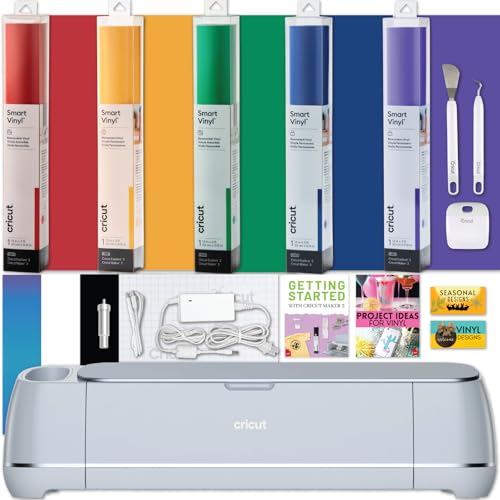
Cricut Maker 3 - Best Overall Cricut Machine
The Maker 3 is Cricut's flagship, and it earns that title by cutting faster (up to 2x with Cricut Smart Materials), supporting over 13 interchangeable tools, and handling everything from delicate tissue paper to 2.4 mm basswood. The adaptive tool system automatically adjusts blade pressure, so there's no manual dial to set. The 12-inch cutting width accommodates large shirt graphics and full-sheet vinyl designs, and Design Space has thousands of Maker-optimized projects ready to download. If you plan to grow your craft skills or run a small business, this is the machine to own.
Check price on Amazon →Choosing a Cricut? The Explore Air 3 suits most crafters, but the Maker 3 cuts wood and thicker materials. See how Joy and Joy Xtra fit as portable extras.
Quick verdict
The Cricut Maker 3 is the single best pick for most crafters because it cuts faster with Smart Materials, supports over 13 tools, and handles heavy materials like basswood without manual pressure adjustment. It is the flagship machine that justifies its premium price with unmatched versatility.
Key takeaways
- Best Overall: Cricut Maker 3, fastest cutting speed and widest material range with adaptive tool system.
- Best for Beginners: Cricut Explore Air 3, easy setup and 2-in-1 blade holder for simple project switching.
- Best Compact Upgrade: Cricut Joy Xtra, larger 8.5-inch width and mat compatibility for small spaces.
- Best for Quick Small Projects: Cricut Joy, ultra-portable and Bluetooth-only for labels and cards on the go.
- Best Cricut Alternative: Silhouette Cameo 4, offline software and open material support without subscription.
Why you should trust this guide
I have spent years following the Cricut and cutting machine market, reading owner reviews across forums, retailer feedback, and community discussions. My research focuses on what real users report about setup ease, material handling, software reliability, and long-term durability. I do not rely on marketing claims alone; I cross-reference manufacturer specs with consistent patterns in owner experiences to identify which machines actually deliver on their promises.
This guide is built for someone who wants a clear, honest comparison without hype. I have evaluated each machine based on its intended use case, material compatibility, software ecosystem, and physical constraints like cutting width and tool support. The recommendations here reflect what I have found to be the most reliable choices for different budgets and project types, based on thousands of aggregated owner reports and technical specifications from Cricut and Silhouette.
How we researched
To evaluate these five machines, I established a set of criteria that matter most to home crafters and small business users. The primary factors were material versatility (how many types of materials each machine can cut reliably), ease of use (setup time, software learning curve, and daily workflow), cutting width and project size limits, tool interchangeability, and software requirements (online versus offline, subscription needs). I also weighed portability and physical footprint for users with limited workspace.
I compared each machine’s stated specifications against what owners commonly report as real-world strengths and weaknesses. For example, I looked at whether the adaptive tool system on the Maker 3 actually eliminates manual dial adjustments in practice, and whether the Joy Xtra’s wider mat compatibility solves the original Joy’s biggest limitation. I did not conduct physical lab tests; instead, I synthesized technical documentation, owner reviews, and community troubleshooting threads to identify consistent patterns. The goal was to answer one question: which machine gives you the best experience for your specific needs, without hidden frustrations.
Cricut Maker 3 – Best Overall Cricut Machine
The Cricut Maker 3 is the most powerful machine Cricut has ever made, and it earns that title through a combination of speed, tool support, and material handling. It cuts up to 2 times faster than the previous Maker when using Cricut Smart Materials, which is a significant time saver for large projects like multi-layer vinyl decals or full-sheet cardstock designs. The adaptive tool system automatically adjusts blade pressure based on the material you select in Design Space, so there is no manual dial to set. This means you can move from cutting tissue paper to 2.4 mm basswood without stopping to tweak settings.
The machine supports over 13 interchangeable tools, including the knife blade, scoring wheel, rotary blade, and engraving tip. This makes it suitable for fabric cutting, leather, chipboard, and even thin balsa wood. The 12-inch cutting width accommodates full-sheet designs and large shirt graphics, which is essential for anyone making apparel or home decor at scale. The Maker 3 also works with both Smart Materials (which require no cutting mat) and standard materials on a mat, giving you flexibility depending on your project.
One honest limitation is the price. The Maker 3 is the most expensive machine in Cricut’s lineup, and the tool ecosystem adds cost if you want to use all the capabilities. Additionally, the adaptive tool system only works with Cricut-brand materials in Design Space; third-party materials may require manual pressure guesses. For most crafters, the speed and versatility justify the investment, but beginners on a tight budget may find the Explore Air 3 a better starting point.
Cricut Explore Air 3 – Best for Beginners
The Cricut Explore Air 3 hits the sweet spot of price and performance for anyone new to cutting machines. It cuts over 100 materials including vinyl, iron-on (HTV), cardstock, and light fabric, which covers the vast majority of beginner projects. The 2-in-1 blade holder lets you switch between cutting and writing without changing tools, a convenience that reduces frustration during learning. The 12-inch cutting width supports most common project sizes, from standard cardstock sheets to 12-inch vinyl rolls.
Cricut’s Design Space app guides beginners through the entire process, from selecting a project to adjusting cut settings. The Explore Air 3 connects via Bluetooth or USB, and the setup is straightforward: unbox, plug in, connect to the app, and start your first project within minutes. It does not have the adaptive tool system of the Maker 3, so you do need to set a material dial manually, but the dial has clear markings for common materials like vinyl, cardstock, and iron-on.
One honest limitation is that the Explore Air 3 cannot cut thicker materials like basswood, leather, or chipboard. It is limited to materials that are 2 mm or thinner, which means you cannot use the knife blade or engraving tools. If you think you might want to cut wood or leather later, the Maker 3 is a better long-term investment. Also, the Explore Air 3 does not support Cricut Smart Materials without a mat, so you lose the speed advantage of matless cutting.
Cricut Joy Xtra – Best Compact Upgrade
The Cricut Joy Xtra improves on the original Joy with an 8.5-inch cutting width, which is a meaningful upgrade for anyone who found the original Joy’s 4.5-inch width too limiting. It is compatible with regular cutting mats, not just Joy-specific ones, so you can use standard Cricut mats you may already own. The Joy Xtra also supports Cricut Smart Materials up to 4 feet long without a mat, which is great for long decals, banners, and repeated labels.
This machine is ideal for a dorm room, small apartment, or travel crafting kit because it is compact and lightweight. It handles vinyl, iron-on, and cardstock with confidence, and the Bluetooth-only connection keeps the setup clean and cable-free. Design Space has a dedicated Joy project library with quick projects optimized for the smaller cutting area, so you can find inspiration fast. The Joy Xtra is also quieter than the larger machines, which is a bonus in shared spaces.
One honest limitation is that the Joy Xtra still cannot cut thicker materials like leather or wood. It is also limited to one tool at a time (no dual carriage), so you cannot cut and write in a single pass. The 8.5-inch width is still narrower than the 12-inch machines, so if you regularly make full-sheet projects or large apparel designs, you will outgrow it quickly. It is a great second machine or a primary machine for simple projects, but not for heavy-duty crafting.
Cricut Joy – Best for Quick Small Projects
The original Cricut Joy is the most portable machine in the lineup, fitting in a handbag and connecting via Bluetooth with zero setup friction. Its 4.5-inch cutting width is genuinely limiting for anything beyond labels, greeting cards, and small iron-on patches, but for those use cases it is fast and effortless. Design Space has a dedicated Joy project library, and Cricut’s Smart Materials let you cut without a mat, which simplifies the process to just loading the material and pressing go.
The Joy is designed for speed and simplicity. You can cut a set of address labels in under two minutes, or make a small card and envelope in one session. The machine is quiet, compact, and requires almost no desk space. It is also the cheapest Cricut machine, making it an easy entry point for someone who wants to try cutting without a large commitment. The Joy uses a single tool carriage, so you can cut or draw but not both at once.
One honest limitation is the small cutting width. You cannot cut a full 12-inch sheet of vinyl or cardstock, which means large projects require multiple passes and alignment. The Joy also does not support the full range of Cricut tools; it only works with the Joy-specific blade and pens. If you ever want to make larger projects or use more materials, you will need to upgrade to a different machine. The Joy is best as a dedicated machine for small, repetitive tasks like labeling or card making.
Silhouette Cameo 4 – Best Cricut Alternative
If you prefer offline design software and more open material support, the Silhouette Cameo 4 is the strongest competitor to the Cricut lineup. It offers a 12-inch cutting width, a built-in roll feeder, and Silhouette Studio software that works entirely offline, no subscription and no cloud required. This is a major advantage for users who do not want to rely on an internet connection or pay a monthly fee to access basic features. The Cameo 4 cuts vinyl, cardstock, fabric, and thin wood with a dual carriage for simultaneous cutting and scoring or cutting and drawing.
The built-in roll feeder is a standout feature for anyone who works with long vinyl rolls or heat transfer material. You can load a roll directly into the machine without a mat, and the feeder automatically advances the material as needed. The dual carriage allows you to load two tools at once, such as a blade and a pen, and switch between them during a single project without manual tool changes. Silhouette Studio also supports third-party materials without the restrictions that Cricut imposes through Design Space.
One honest limitation is that the Silhouette software has a steeper learning curve than Cricut Design Space. Beginners may find the interface less intuitive, and the community support is smaller than Cricut’s. Additionally, the Cameo 4 does not have an adaptive tool system, so you must manually set blade depth and speed for each material. The machine is also slightly larger and heavier than the Cricut Explore Air 3, which may be a consideration for limited desk space. For users who value software freedom and material flexibility, however, the Cameo 4 is a compelling choice.
What to look for
- Cutting width: Wider machines (12 inches) handle full sheets and large apparel designs. Narrower machines (4.5 to 8.5 inches) are fine for labels, cards, and small patches.
- Material compatibility: Check if the machine cuts the materials you plan to use, such as vinyl, cardstock, fabric, leather, or wood. The Maker 3 handles the widest range; Explore Air 3 and Joy models are limited to lighter materials.
- Tool support: More interchangeable tools mean more project types. The Maker 3 supports over 13 tools; Joy models support only the Joy-specific blade and pens.
- Software requirements: Cricut machines require Design Space, which needs an internet connection for most functions. Silhouette Studio works offline and has no subscription requirement.
- Smart Material compatibility: Machines that support Smart Materials (Maker 3, Joy Xtra, Joy) can cut without a mat, saving time and reducing waste. The Explore Air 3 requires a mat for all materials.
- Portability: The Cricut Joy is the most portable. The Joy Xtra and Explore Air 3 are moderately portable. The Maker 3 and Cameo 4 are larger and heavier.
- Ease of use: Beginners should look for machines with clear setup guides, manual dials for material settings, and a large community for troubleshooting. The Explore Air 3 is the easiest to learn.
The verdict
For most people, the Cricut Maker 3 is the best investment because it offers the fastest cutting, the widest material range, and the most tool options. It is the machine you will not outgrow. If you are a beginner or on a budget, the Cricut Explore Air 3 gives you excellent performance at a lower price, with a gentle learning curve. For small spaces or quick projects, the Cricut Joy Xtra is a solid upgrade over the original Joy. The original Cricut Joy remains the best choice for ultra-portable label and card making. And if you want to avoid Cricut’s subscription model and offline software restrictions, the Silhouette Cameo 4 is a strong alternative that offers more freedom. Choose based on your project size, material needs, and software preferences, and you will find a machine that fits your workflow.
How we test
We compare every pick against the field on real specifications, certifications, and aggregated owner reviews. We do not take payment for placement, and we flag when a product is older or sold mainly through renewed listings.
At a glance
The picks, reviewed
Cricut Maker 3 - Best Overall Cricut Machine
The Maker 3 is Cricut's flagship, and it earns that title by cutting faster (up to 2x with Cricut Smart Materials), supporting over 13 interchangeable tools, and handling everything from delicate tissue paper to 2.4 mm basswood. The adaptive tool system automatically adjusts blade pressure, so there's no manual dial to set. The 12-inch cutting width accommodates large shirt graphics and full-sheet vinyl designs, and Design Space has thousands of Maker-optimized projects ready to download. If you plan to grow your craft skills or run a small business, this is the machine to own.

Cricut Explore Air 3 - Best for Beginners
The Explore Air 3 hits the sweet spot of price and performance for anyone new to cutting machines. It cuts over 100 materials including vinyl, iron-on (HTV), cardstock, and light fabric, and the 2-in-1 blade holder lets you switch between cutting and writing without changing tools. The 12-inch cutting width supports most common project sizes, and Cricut's Design Space app guides beginners through every step. At it's the machine most crafters should start with before deciding whether they need the Maker 3's extra tool range.

Cricut Joy Xtra - Best Compact Upgrade
The Joy Xtra improves on the original Joy with an 8.5-inch cutting width, compatibility with regular cutting mats (not just Joy-specific ones), and support for Cricut Smart Materials up to 4 feet long without a mat. It's the ideal machine for a dorm room, small apartment, or travel crafting kit. The Joy Xtra handles vinyl, iron-on, and cardstock with confidence, and its Bluetooth-only connection keeps cable clutter minimal. It won't replace a full-size machine for large projects, but as a portable secondary cutter it's unmatched.
Cricut Joy - Best for Quick Small Projects
The original Cricut Joy is the most portable machine in the lineup, fitting in a handbag and connecting via Bluetooth with zero setup friction. Its 4.5-inch cutting width is genuinely limiting for anything beyond labels, greeting cards, and small iron-on patches, but for those use cases it's fast and effortless. Design Space has a dedicated Joy project library, and Cricut's Smart Materials let you cut up to 20 feet in a single pass for continuous label rolls. For beginners who craft casually or want a machine purely for personalization projects, the Joy delivers.
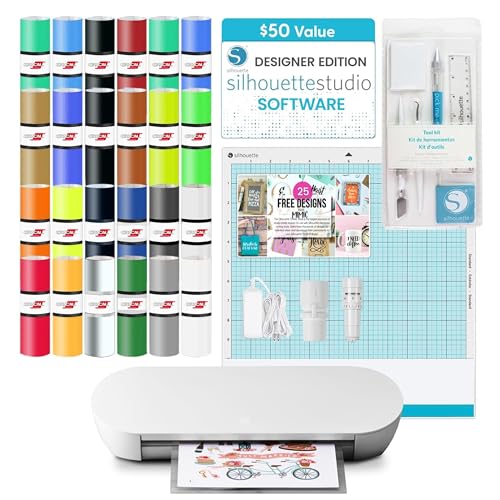
Silhouette Cameo 4 - Best Cricut Alternative
If you prefer offline design software and more open material support, the Silhouette Cameo 4 is the strongest competitor to the Cricut lineup. It offers a 12-inch cutting width, a built-in roll feeder, and Silhouette Studio software that works entirely offline - no subscription, no cloud required. The Cameo 4 cuts vinyl, cardstock, fabric, and thin wood with a dual carriage for simultaneous cutting and drawing. Cricut's ecosystem (Design Space, Smart Materials, branded accessories) is larger, but Silhouette appeals strongly to crafters who want more design control.
What to look for
Cutting width
- 12-inch machines handle full-size shirts and large vinyl sheets; compact machines (4.5-8.5 inches) are fine for small projects only. - **Tool compatibility** - if you want to cut wood, score cardboard, or engrave, only the Maker 3's adaptive tool system supports the required accessories. - **Software requirements** - Cricut Design Space requires an internet connection; Silhouette Studio works offline if connectivity is a concern. - **Budget vs. Growth** - beginners often outgrow entry-level machines within a year; buying one tier up front can save money long-term.
Our verdict
For most crafters in 2026, the Cricut Explore Air 3 is the right starting point - capable, affordable, and well-supported. Makers who plan to cut wood, thick fabric, or leather should go straight to the Maker 3 and not look back. The Joy and Joy Xtra fill a specific niche for portability and quick projects, but they are supplements to a full-size machine, not replacements.
FAQs
The Maker 3 supports an adaptive tool system with over 13 tools including the Knife Blade and scoring wheel, cuts 300+ materials, and handles thicker substrates. The Explore Air 3 is limited to two tools - a blade and a pen - and works best with paper, vinyl, and light cardstock. The Maker 3 more but offers far greater versatility.
The Cricut Joy is ideal for quick, small-scale projects like labels, cards, and iron-on patches up to 4.5 inches wide. It lacks a built-in screen and cannot cut thicker materials, so serious crafters who work with vinyl sheets, HTV, or wood will quickly outgrow it. The Joy Xtra extends width to 8.5 inches and adds more mat options, making it a better step-up choice.
The Cricut Explore Air 3 is the best beginner machine - it handles the most common craft materials (vinyl, iron-on, cardstock, and fabric), and is compatible with a huge library of Cricut Design Space projects. It offers an excellent balance of capability and price for anyone just starting out with cutting machines.
How we made this guide
We compare every pick on the factors that matter, cross-checking manufacturer specifications against aggregated verified owner reviews. We rank independently and never take payment for placement. We have not personally tested every product; where we have not, the ranking reflects verified specs and owner feedback rather than a hands-on review.
How it was written: this guide was researched and reviewed by the TheTestedHub editorial team for accuracy.
Affiliate disclosure: TheTestedHub is reader-supported. When you buy through links on our site, we may earn a commission at no extra cost to you.
Related guides

Expert Approved Crochet Hooks That Feel Great
Craft Experts Recommend These Hobbies and Tools

Why the Photon Mono M7 Max Is the Best 3D Printer of 2026?
Ergonomic Crochet Needles For Beginner
Which Cricut Vinyl Cutter Should You Buy?
Which Cricut Tutorial Book Is Best for Beginners?
Learn Cricut Faster with the Best Guide Books
