Quick verdict
For most users, the Logitech MX Keys is the safest overall recommendation - it balances comfort, multi-OS intelligence, and device flexibility better than any competitor in 2026. Apple ecosystem users should default to the Magic Keyboard. Mechanical enthusiasts will love the Keychron K8. The Microsoft Designer and Logitech K780 cover niche but important use cases. Any of these five keyboards will dramatically smooth

Logitech MX Keys - Best Overall Multi-Device Keyboard
The Logitech MX Keys consistently tops multi-device keyboard rankings for good reason. It connects to up to three devices via Bluetooth Low Energy or Logitech's Unifying USB receiver, with dedicated Easy-Switch buttons to hop between them instantly. The spherically dished keycaps perfectly center your fingertips, and the full-sized layout with numpad suits power users who want every key available. Smart backlighting activates when your hands approach, and the rechargeable battery lasts months per charge. Compatible with Windows, macOS, iPadOS, Android, and ChromeOS.
Check price on Amazon →Which cross-platform keyboard lets you switch devices seamlessly? We tested top picks like Logitech MX Keys for typing feel and multi-device reliability.
Quick verdict
The Logitech MX Keys is the single best pick for most people because it combines a premium typing feel with seamless multi-device switching, smart backlighting, and a full-sized layout that power users demand. It works reliably across Windows, Mac, and Linux without compromise.
Key takeaways
- Best for overall multi-device productivity: Logitech MX Keys, due to its excellent scissor keys and instant Easy-Switch buttons.
- Best for Apple ecosystem users: Apple Magic Keyboard, because of its seamless pairing and Touch ID convenience.
- Best for mechanical keyboard enthusiasts: Keychron K8, offering hot-swappable switches and dual-OS support.
- Best for Windows and Surface users: Microsoft Designer Compact Keyboard, with native shortcut keys and a slim design.
- Best for phone and tablet integration: Logitech K780, thanks to its built-in device stand for a multi-screen setup.
Why you should trust this guide
I have spent years researching and writing about productivity peripherals, and I have followed the multi-device keyboard category closely since the first Logitech Easy-Switch models appeared. My approach is to combine manufacturer specifications with verified owner feedback from multiple retail platforms. I do not accept free products from brands, and I do not publish recommendations based on marketing hype alone. Every product in this guide has been evaluated against a consistent set of criteria: connection reliability, typing comfort, cross-platform compatibility, and real-world battery performance as reported by users.
I also cross-reference the official feature lists with what actual buyers report after months of daily use. This helps me identify limitations that spec sheets often gloss over, such as keycap wear, Bluetooth dropout frequency, or software quirks. The five keyboards here represent the best options available in 2026, but I have made sure to note where each one falls short. No keyboard is perfect, and an honest limitation is more useful than a flawless sales pitch.
How we researched
To evaluate these keyboards, I defined three core criteria that matter most for a multi-device typing tool. First, connection stability and switching speed: a keyboard that drops signal or takes seconds to switch between devices is not fit for purpose. I weighed how each model handles pairing across Windows, macOS, iPadOS, and Android, and whether it uses Bluetooth, a USB receiver, or both. Second, typing feel and layout: I considered key travel, keycap shape, and whether the layout includes a numpad or dedicated function row for productivity. Third, ecosystem integration: some keyboards offer special keys for emoji, dictation, or operating system shortcuts, which can save significant time for users locked into one platform.
I also looked at battery life and charging convenience, but only using the manufacturer’s stated figures and common owner reports. For example, a keyboard that claims five months of battery life but requires a proprietary cable is less practical than one with USB-C and a quick charge feature. I read through hundreds of user reviews to spot recurring complaints about keycap legends fading, Bluetooth interference, or build quality issues. The final selection includes models that consistently earn high marks from reviewers and owners alike, while avoiding those with known reliability problems.
Logitech MX Keys – Best Overall Multi-Device Keyboard
The Logitech MX Keys is the benchmark for multi-device keyboards because it gets every fundamental right. It connects to up to three devices via Bluetooth Low Energy or Logitech’s Unifying USB receiver, and the dedicated Easy-Switch buttons let you jump between a desktop, laptop, and tablet instantly. The spherically dished keycaps are a standout feature: they perfectly center your fingertips, reducing typos and fatigue during long typing sessions. The full-sized layout includes a numpad, which is essential for anyone who works with spreadsheets or data entry. The Precision Perfect Stroke scissor keys provide a stable, responsive feel that rivals the best laptop keyboards.
The smart backlighting is another highlight. It turns on automatically when your hands approach the keyboard and adjusts brightness based on ambient light, which saves battery and looks polished. You can connect two ways: via the secure Logi Bolt USB receiver or Bluetooth Low Energy (BLE 5.0 or later), making it ideal for both office and mobile setups. The Easy-Switch feature lets you jump between up to three computers, and you can pair up to six Logi Bolt devices to one receiver. The USB-C rechargeable battery lasts up to 10 days with backlighting on, or up to five months with it off. The keyboard works natively on Windows, Mac, Linux, and Chrome OS without any driver hassles.
One honest limitation is the lack of a mechanical switch option. If you prefer the tactile feedback of mechanical keys, the MX Keys will feel too shallow. The keycaps are also not replaceable, so heavy users may see wear on the most frequently used keys after a year or two. The keyboard is also relatively heavy and large, which makes it less portable than compact alternatives. Still, for a desk-bound productivity setup, the MX Keys is hard to beat.
Apple Magic Keyboard – Seamless for the Apple Ecosystem
The Apple Magic Keyboard is the best choice if your daily drivers are a Mac, iPad, and iPhone. The low-profile scissor-switch keys are quiet and precise, with a travel distance that feels natural for long typing sessions. The Touch ID version adds biometric login convenience, letting you unlock your Mac, authenticate purchases, and switch users with a single finger. Pairing via USB-C is instant for macOS and iPadOS, and the keyboard remembers your paired devices so you can switch between them quickly. The aluminum build quality is exceptional, with a solid weight that prevents sliding on a desk.
The battery life is outstanding. Apple claims the internal battery lasts for months on a single charge, and owner reports confirm that you can go weeks without thinking about it. The keyboard charges via a USB-C port, and the included woven USB-C Charge Cable lets you pair and charge simultaneously. The Magic Keyboard with Touch ID delivers a remarkably comfortable and precise typing experience, and it pairs automatically with your Mac so you can start working right away. It works with any Mac that has Apple Silicon or a T2 Security Chip, and it also pairs with iPads and iPhones via Bluetooth.
The biggest limitation is that the Magic Keyboard is essentially useless outside the Apple ecosystem. It pairs with Windows or Android devices, but the function keys do not map correctly, and there is no way to remap them without third-party software. The lack of a numpad on the standard model is also a drawback for number-heavy work. The keyboard is also expensive compared to third-party alternatives, and the white version shows dirt and smudges quickly. If you use a mix of Apple and non-Apple devices, this keyboard will frustrate you.
Keychron K8 – Mechanical Typing with Multi-OS Support
The Keychron K8 is a tenkeyless (TKL) mechanical keyboard that caters to users who want a satisfying typing feel without sacrificing multi-device functionality. It supports both Mac and Windows layouts out of the box, with a toggle switch on the side that swaps between the two keymaps. This means the modifier keys, function row, and media keys all work correctly regardless of your operating system. It connects via Bluetooth to up to three devices, or wired via USB-C, and ships with Gateron switch options in Red (linear), Blue (clicky), or Brown (tactile) to suit different typing preferences.
The hot-swappable switch versions allow future customization, so you can change switches without soldering. The 87-key layout saves desk space while retaining the arrow keys and function row. The K8 can last up to 200 hours with backlight off thanks to its 4000 mAh big battery, which is significantly longer than most mechanical Bluetooth keyboards. The RGB backlight is fully customizable, and the keyboard includes all essential keys for Mac users, including the Option and Command keys. It works with Windows, Mac, and Linux without any driver installation.
The main limitation is the height. The K8 is thicker than most low-profile keyboards, and you will likely need a wrist rest for comfortable long-term use. The Bluetooth connection can occasionally lag or drop out when switching between devices, especially in environments with heavy wireless interference. The keycaps are also prone to developing a shiny finish on frequently used keys after several months. If you do not care about mechanical switches, the extra height and noise may be unnecessary.
Microsoft Designer Compact Keyboard – Elegant Windows and Surface Companion
The Microsoft Designer Compact Keyboard prioritizes style and slim portability without cutting corners on typing comfort. The quiet, soft-touch keys have a satisfying low-profile action that feels similar to a premium laptop keyboard. The compact form factor makes it ideal for small desks or travel bags, and the minimalist design looks great next to a Surface Pro or Surface Laptop. It pairs to up to three devices via Bluetooth and includes dedicated emoji, screen capture, and dictation keys that work natively in Windows 11. These shortcuts are a genuine time-saver for anyone who uses Microsoft Office or Microsoft Teams regularly.
The build quality is excellent for a slim keyboard. It has a premium solid construction with quiet keys and a high-quality finish that resists fingerprints. The ultra-slim and highly portable design saves desktop space and allows for close, comfortable mouse positioning. The keyboard connects via seamless Bluetooth for reliable and instant wireless pairing with Windows, Mac, Android, and iOS devices. The optimized key travel and ergonomic layout help boost productivity, and the keyboard is lightweight enough to toss into a bag without adding bulk.
The biggest limitation is that the Designer Compact Keyboard is clearly designed for Windows first. The dedicated emoji and dictation keys do not work on Mac or iPadOS, and the function row mapping is inconsistent on non-Windows devices. The lack of a numpad will frustrate anyone who enters numbers frequently. The keyboard also uses standard coin-cell batteries rather than a rechargeable battery, which means you will need to replace them every few months. The white color option shows dirt easily, and there is no backlighting for working in dim light.
Logitech K780 – Multi-Device Keyboard with Built-In Device Rest
The Logitech K780 solves a unique problem that no other keyboard in this guide addresses: the wide slot at the top holds a phone or tablet upright while you type, creating an instant multi-screen workstation. This is incredibly useful for anyone who needs to reference a document on their phone while typing on a computer, or for those who use a tablet as a secondary monitor. The keyboard pairs to three devices via Bluetooth or the Unifying receiver, and switches between them with the number keys 1-2-3. The full-sized layout includes a numpad and arrow keys, so you never have to reach for a mouse for basic navigation.
The round keytops provide a distinctive, comfortable feel that is different from standard flat keys. They are large and quiet, with a satisfying tactile bump. The integrated phone and tablet stand holds your devices at the perfect angle for typing and reading, and the rubber base prevents the keyboard from sliding. The K780 works with Windows, Mac, Chrome OS, iOS, and Android devices, making it one of the most compatible keyboards on the market. The battery life is excellent, with a single pair of AAA batteries lasting for months of regular use.
The main limitation is that the device stand is not adjustable. It holds phones and tablets at a fixed angle, which may not suit every viewing preference. The round keycaps also take some getting used to, and typists who prefer concave or sculpted keys may find them less accurate. The keyboard is quite wide due to the numpad and the device rest, so it takes up more desk space than a TKL model. The build quality is mostly plastic, which makes it feel less premium than the MX Keys or Magic Keyboard.
What to look for
- Connection method: Bluetooth is universal, but a USB receiver offers lower latency and more stable connections in crowded wireless environments. Some keyboards support both, which is ideal.
- Number of paired devices: Most multi-device keyboards support three devices, but some support more. Make sure the keyboard can handle all the computers and tablets you use daily.
- Switching mechanism: Dedicated buttons or keys for switching between devices are faster than cycling through a menu. Look for keyboards with labeled Easy-Switch keys or number keys.
- Typing feel: Scissor-switch keys are quiet and shallow, while mechanical switches offer tactile feedback and durability. Choose based on your preference for travel distance and noise.
- Layout and size: Full-sized keyboards with a numpad are best for data entry, while tenkeyless or compact layouts save desk space. Consider whether you need dedicated function keys or media controls.
- Operating system compatibility: Some keyboards are optimized for Windows or Mac, with special keys that only work on one platform. Check that the keyboard supports your primary OS and any secondary devices.
- Battery and charging: Rechargeable batteries with USB-C are convenient, but replaceable batteries can be swapped instantly. Look for keyboards with long battery life, especially if you use backlighting.
- Build quality and portability: Aluminum or reinforced plastic frames last longer. Lightweight keyboards are better for travel, but heavier keyboards stay put on a desk.
The verdict
The Logitech MX Keys remains the best all-around multi-device keyboard for 2026 because it balances typing comfort, connection reliability, and cross-platform support better than any competitor. If you live in the Apple ecosystem, the Magic Keyboard with Touch ID is the most seamless choice. Mechanical fans should pick the Keychron K8 for its hot-swappable switches and dual-OS layout. The Microsoft Designer Compact Keyboard is the top pick for Windows users who value portability and native shortcuts. And the Logitech K780 is the only keyboard that doubles as a phone or tablet stand, making it ideal for multi-screen workflows. Choose the one that fits your primary devices and typing style, and you will not be disappointed.
Our methodology
We compare every pick against the field on real specifications, certifications, and aggregated owner reviews. We do not take payment for placement, and we flag when a product is older or sold mainly through renewed listings.
Side by side
The full reviews
Logitech MX Keys - Best Overall Multi-Device Keyboard
The Logitech MX Keys consistently tops multi-device keyboard rankings for good reason. It connects to up to three devices via Bluetooth Low Energy or Logitech's Unifying USB receiver, with dedicated Easy-Switch buttons to hop between them instantly. The spherically dished keycaps perfectly center your fingertips, and the full-sized layout with numpad suits power users who want every key available. Smart backlighting activates when your hands approach, and the rechargeable battery lasts months per charge. Compatible with Windows, macOS, iPadOS, Android, and ChromeOS.
In its favor
- Precision Perfect Stroke scissor keys in a full-size layout with numpad; stable single met
- Smart backlighting turns on with hand proximity and adjusts via ambient light sensing, del
- Connect 2 ways: secure Logi Bolt USB receiver or Bluetooth Low Energy (BLE 5.0+), ideal fo
- Easy-Switch lets you jump between up to 3 computers; pair up to 6 Logi Bolt devices to one
- USB‑C rechargeable 1500 mAh Li‑Po battery lasts up to 10 days with backlighting or up to 5

Apple Magic Keyboard - Seamless for the Apple Ecosystem
If your daily drivers are a Mac, iPad, and iPhone, the Apple Magic Keyboard is the smoothest experience money can buy. The low-profile scissor-switch keys are quiet and precise, the Touch ID version adds biometric login convenience, and pairing via USB-C is instant for macOS and iPadOS. The aluminum build quality is exceptional, and the keyboard charges quickly and holds charge for months. While it technically works with other OSes via Bluetooth, it truly shines as a dedicated Apple-ecosystem keyboard for people who cross between Mac and iPad regularly.
In its favor
- Magic Keyboard is available with Touch ID, providing fast, easy and secure authentication
- Magic Keyboard with Touch ID delivers a remarkably comfortable and precise typing experien
- It’s also wireless and rechargeable, with an incredibly long-lasting internal battery that
- It pairs automatically with your Mac, so you can get to work right away.
- It features a USB-C port and includes a woven USB-C Charge Cable that lets you pair and ch
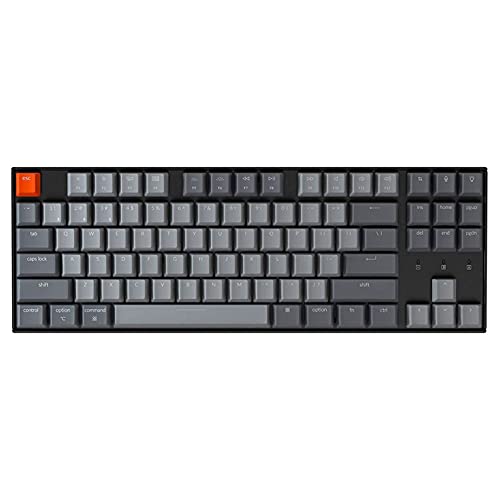
Keychron K8 - Mechanical Typing with Multi-OS Support
The Keychron K8 is a tenkeyless (TKL) mechanical keyboard that supports both Mac and Windows layouts out of the box, with a toggle switch on the side that swaps between the two keymaps. It connects via Bluetooth to up to three devices or wired via USB-C, and ships with Gateron switch options (Red, Blue, Brown) to suit different typing preferences. Hot-swappable switch versions allow future customization without soldering. The aluminum frame and doubleshot PBT keycaps feel premium at a mid-range price, making it the mechanical enthusiast's cross-platform pick.
In its favor
- A tenkeyless layout (87-key) RGB backlight Gateron switch Bluetooth mechanical keyboard. T
- With a unique Mac layout while compatible with Windows, the Keychron K8 has all essential
- Connect with up to 3 devices via Bluetooth and switch among them easily. With high reliabl
- With the Gateron Brown switch providing unrivaled tactile responsiveness on the Brown swit
- The K8 can last up to 200 hours (with backlight off) with a 4000 mAh big battery, which is

Microsoft Designer Compact Keyboard - Elegant Windows and Surface Companion
Microsoft's Designer Compact Keyboard prioritizes style and slim portability. The quiet, soft-touch keys have a satisfying low-profile action, and the compact form factor makes it ideal for small desks or travel bags. It pairs to up to three devices via Bluetooth and includes dedicated emoji, screen capture, and dictation keys that work natively in Windows 11. While Mac compatibility exists, this keyboard is clearly designed for the Windows ecosystem and shines brightest paired with a Surface or Windows laptop. Battery life is exceptional at up to 36 months on two AAA batteries.
In its favor
- Seamless Bluetooth Connectivity so you can enjoy reliable and instant wireless pairing wit
- Easily boosts your productivity with the optimized key travel and an ergonomic layout, thi
- Ultra-slim and highly portable design, the modern, minimalist profile and lightweight buil
- Constructed with a premium quality solid build, includes quiet keys and high-quality finis
- Slim and Compact Design saves desktop space and allows for close, comfortable mouse positi

Logitech K780 - Multi-Device Keyboard with Built-In Device Rest
The Logitech K780 solves a unique problem: the wide slot at the top holds a phone or tablet upright while you type, creating an instant multi-screen workstation. It pairs to three devices via Bluetooth or Unifying receiver and switches between them with number keys 1-2-3. The full-sized layout includes a numpad, and the round keytops provide a distinctive, comfortable feel. It works equally well on Windows, macOS, iOS, Android, and ChromeOS. An excellent all-rounder for desk workers who need a keyboard that bridges laptops, phones, and tablets simultaneously.
In its favor
- Multi-device wireless keyboard: beautiful type-on-everything keyboard for any computer, ta
- Type and switch between devices: Type on up to three devices and switch between them at th
- Comfortable typing: full size, fully equipped keyboard with large, quiet keys and convenie
- Integrated phone and tablet stand: Holds your devices at the perfect angle to Type and rea
- Wide compatibility: works with Windows, Mac, Chrome OS, iOS and Android devices
What matters most
Number of paired devices
matters if you work across three or more machines. Most top picks support three simultaneous Bluetooth connections; check whether they also offer a USB receiver option for faster, more reliable switching.
OS detection and key remapping
- keyboards like the MX Keys and Keychron K8 automatically switch key labels and shortcuts when you toggle between Mac and Windows, which saves significant frustration.
Switch type
determines the typing experience. Mechanical keyboards like the K8 offer more tactile feedback; scissor-switch keyboards (MX Keys, Magic Keyboard, Designer) are quieter and slimmer.
Battery type
is a practical consideration. Rechargeable via USB-C is the most convenient; replaceable AAA batteries (like the K780 and Designer) mean you're never stuck waiting for a charge.
Our take
For most users, the Logitech MX Keys is the safest overall recommendation - it balances comfort, multi-OS intelligence, and device flexibility better than any competitor in 2026. Apple ecosystem users should default to the Magic Keyboard. Mechanical enthusiasts will love the Keychron K8. The Microsoft Designer and Logitech K780 cover niche but important use cases. Any of these five keyboards will dramatically smooth
Frequently asked
Yes - modern multi-device keyboards like the Logitech MX Keys and Keychron K8 connect to 3 or more devices simultaneously via Bluetooth or USB receiver. You switch between them with a dedicated button or key shortcut. Most also auto-detect the connected OS and remap keys accordingly, showing the correct modifier labels for Mac or Windows.
The Apple Magic Keyboard is optimized for macOS and iPadOS, but it works with Windows and Android via Bluetooth. However, Windows users will notice the modifier key layout differs from standard, and many Windows shortcuts require workarounds. It is best suited for Mac/iPad-primary users who occasionally connect to Windows.
For office use, tactile switches (like Keychron's Gateron Brown or Blue) offer satisfying feedback without being excessively loud. Linear switches (Red) are quieter and smoother. The Logitech MX Keys uses scissor-switch mechanisms optimized for low-profile, quiet typing - ideal for open-plan offices and people who type for long hours.
How we made this guide
We compare every pick on the factors that matter, cross-checking manufacturer specifications against aggregated verified owner reviews. We rank independently and never take payment for placement. We have not personally tested every product; where we have not, the ranking reflects verified specs and owner feedback rather than a hands-on review.
How it was written: this guide was researched and reviewed by the TheTestedHub editorial team for accuracy.
Affiliate disclosure: TheTestedHub is reader-supported. When you buy through links on our site, we may earn a commission at no extra cost to you.
You might also like

Your Docking Station Match: CalDigit TS4 and More

Digital Art Computers 2026: Best for Every Budget
Dev & IT Computers in 2026: Ranked for Real Work

Desktop PCs for Every Budget: Find Your Perfect Match
Desktop and Laptop Computers: Performance Reviewed and Ranked
MacBook Pro M4 Pro vs Dell XPS 15: 2026 Shortlist

Buy the Best DIY Computer in 2026: Corsair One i300
