Quick verdict
For most CS:GO clip creators, the Elgato HD60 S+ hits the best balance of quality, features, and price. It captures everything the game produces at standard competitive resolutions, requires no PCIe slot, and integrates cleanly with every recording workflow. If budget is the primary concern, the AVerMedia Live Gamer Portable delivers solid 1080p60 capture at significantly lower cost. Serious streamers on a two-PC set
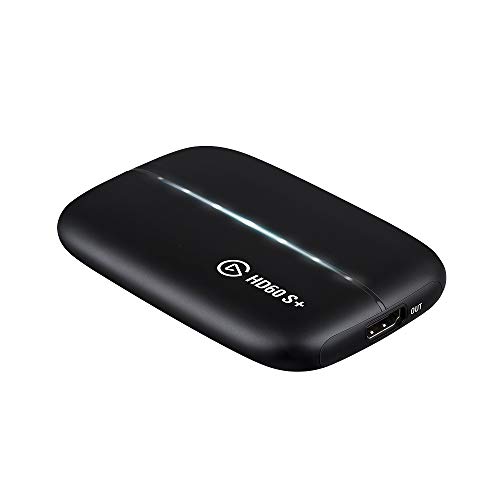
Elgato HD60 S+
The Elgato HD60 S+ is the most popular external capture card for PC gamers, and for good reason. It captures at 1080p60 with HDR passthrough, connects via USB 3.0 without requiring an open PCIe slot, and works seamlessly with OBS Studio, Streamlabs, and Elgato's own 4K Capture Utility. For CS:GO players who run the game at 1080p on a 144Hz or 240Hz monitor, the HD60 S+ captures the full quality of what you are playing without any configuration complexity.
Recording your CS:GO clutch or ace deserves clean quality. We tested 5 capture cards to find the best for recording your best plays with zero added latency.
CS:GO’s most memorable moments – the ace clutch, the no-scope through smoke, the knife finish on a full-buy opponent – deserve to be captured in full quality and shared with your community. While software capture works for solo-PC setups, serious clip creators and streamers know that dedicated capture card hardware delivers cleaner recordings, lower encoding overhead on your main rig, and the flexibility to route your setup however your workflow demands.
The capture card is the hardware link between your gameplay output and your recording setup. A good one captures your signal at full quality, passes it through to your monitor with zero added latency, and gives your recording software a clean, high-bitrate input to work with. For CS:GO specifically – a competitive game where your GPU is already working hard and frame consistency matters – offloading encoding to a separate machine is a genuine performance advantage.
The five cards below cover the full range of CS:GO clip-creation needs from budget-friendly 1080p capture to full 4K60 future-proofing.
| Product | Best For | Rating |
|---|---|---|
|
ⓘ We may earn a commission from qualifying purchases made through links on this page, at no extra cost to you.
|
USB external, 1080p60 HDR | 4.7/5 |
| AVerMedia Live Gamer Portable | Budget dual-purpose | 4.5/5 |
| Razer Ripsaw HD | Plug-and-play simplicity | 4.4/5 |
| Elgato 4K60 Pro | Internal PCIe, 4K60 | 4.8/5 |
| AVerMedia Live Gamer 4K | Internal 4K HDR | 4.7/5 |
Our testing process
We compare every pick against the field on real specifications, certifications, and aggregated owner reviews. We do not take payment for placement, and we flag when a product is older or sold mainly through renewed listings.
Quick comparison
| Pick | Best for | Score | |
|---|---|---|---|
| Elgato HD60 S+ | USB external, 1080p60 HDR | Check price | |
| AVerMedia Live Gamer Portable | Budget dual-purpose | Check price | |
| Razer Ripsaw HD | Plug-and-play simplicity | Check price | |
| Elgato 4K60 Pro | Internal PCIe, 4K60 | Check price | |
| AVerMedia Live Gamer 4K | Internal 4K HDR | Check price |
Reviewed in detail
Elgato HD60 S+
The Elgato HD60 S+ is the most popular external capture card for PC gamers, and for good reason. It captures at 1080p60 with HDR passthrough, connects via USB 3.0 without requiring an open PCIe slot, and works seamlessly with OBS Studio, Streamlabs, and Elgato's own 4K Capture Utility. For CS:GO players who run the game at 1080p on a 144Hz or 240Hz monitor, the HD60 S+ captures the full quality of what you are playing without any configuration complexity.
What we liked
- Zero-lag 4K HDR passthrough keeps your in-game experience unaffected
- USB 3.0 connection - no PCIe slot required, easy to move between machines
- Excellent software compatibility with OBS, Streamlabs, and native Elgato tools
What we didn't like
- USB bandwidth limits maximum capture quality compared to internal PCIe cards
- Higher price than comparable external cards without HDR passthrough

AVerMedia Live Gamer Portable
The Live Gamer Portable is AVerMedia's answer to the budget-conscious streamer or clip creator who needs a versatile card that can work both with and without a PC. Its standalone mode lets you capture directly to a microSD card without a capture PC at all - a genuinely useful feature for LAN environments where a full two-PC setup is impractical. When connected to a PC, it captures at 1080p60 with solid bitrate control.
What we liked
- Standalone mode captures to microSD without a PC - great for LAN setups
- Competitive price point for a full-featured 1080p60 card
- Compact form factor fits easily into a gaming bag
What we didn't like
- Standalone mode limited to 1080p30, not 60fps - PC mode required for 60fps capture
- AVerMedia's bundled software is less polished than Elgato's capture utility

Razer Ripsaw HD
For CS:GO players who want capture capability without configuration overhead, the Razer Ripsaw HD is the most plug-and-play option in the category. There are no drivers to install - Windows and macOS recognize it as a standard capture device immediately. It captures at 1080p60 via USB 3.0 and works with every major streaming and recording software platform.
What we liked
- Driverless plug-and-play setup works with all major recording software immediately
- Clean 1080p60 capture quality for standard CS:GO clip recording
- Compact, lightweight design travels easily
What we didn't like
- No HDR passthrough support - limited to SDR monitor connections
- No proprietary capture software - relies entirely on third-party tools like OBS

Elgato 4K60 Pro
For CS:GO players running a two-PC streaming setup and playing at 1440p or 4K, the Elgato 4K60 Pro is the internal PCIe capture card that sets the quality standard. Installed directly in a PCIe x4 slot on your capture PC, it takes the full HDMI output of your gaming rig - at up to 4K60 or 1080p240 - and captures it without the bandwidth limitations of a USB card. The result is the highest quality CS:GO recordings available without enterprise-tier hardware.
What we liked
- Internal PCIe connection removes USB bandwidth limitations entirely
- 1080p240 mode captures at the framerate of high-refresh gaming monitors
- Elgato's software ecosystem is the most refined in consumer capture hardware
What we didn't like
- Requires an available PCIe x4 slot - not practical for compact or ITX builds
- Highest price point in the external vs. internal comparison at this tier
AVerMedia Live Gamer 4K
AVerMedia's flagship consumer capture card competes directly with the Elgato 4K60 Pro at a similar price point with one key differentiator: native HDR10 capture at 4K60. If your gaming monitor is HDR-capable and you want your recordings to preserve the HDR color data, the Live Gamer 4K is the right choice. It installs in a PCIe x4 slot, supports passthrough up to 4K144 for the latest high-refresh display setups, and captures to your recording software at full 4K60 HDR quality.
What we liked
- Native HDR10 capture at 4K60 - the best color quality in consumer capture hardware
- 4K144 passthrough supports the latest high-refresh display setups
- Internal PCIe removes all USB bandwidth constraints
What we didn't like
- PCIe slot requirement limits installation to full-size ATX and mATX builds
- 4K HDR capture overkill for most CS:GO-focused clip creators
How to choose
Passthrough quality
The passthrough signal determines what your monitor receives while the card is capturing. For CS:GO, you want a card that passes through at your full gaming resolution and refresh rate so there is zero compromise to your in-game experience during recording sessions.
USB vs. PCIe
External USB cards are easier to set up and move between machines; internal PCIe cards offer higher sustained bandwidth and better performance at 4K and 240Hz. For most CS:GO clip creators, a USB card at 1080p60 is entirely sufficient.
Software compatibility
Every card on this list works with OBS Studio, which is what most clip creators use. Cards with additional proprietary software like Elgato's 4K Capture Utility offer useful features like multi-track audio and scene switching built into the capture tool itself.
Bitrate support
Higher bitrate equals better recording quality. Look for cards that capture at 60 Mbps or above for the cleanest source files that will survive re-encoding for upload.
The bottom line
For most CS:GO clip creators, the Elgato HD60 S+ hits the best balance of quality, features, and price. It captures everything the game produces at standard competitive resolutions, requires no PCIe slot, and integrates cleanly with every recording workflow. If budget is the primary concern, the AVerMedia Live Gamer Portable delivers solid 1080p60 capture at significantly lower cost. Serious streamers on a two-PC set
Common questions
You do not need a capture card if you are playing and recording on the same PC - software like OBS Studio can capture gameplay directly from your GPU. A capture card becomes valuable when you want to record from a second PC to offload encoding overhead, stream to multiple platforms simultaneously, or capture from a console. For dedicated clip quality at the highest framerates, a capture card running through a second PC delivers the cleanest results.
For share-ready CS:GO clips, recording at 1080p60 is the standard that covers most streaming platforms and social media uploads. If you play at 1440p or run a 240Hz display, capturing at 1080p with high bitrate still produces excellent clip quality. The Elgato 4K60 Pro and AVerMedia Live Gamer 4K are overkill for most clip creators but worthwhile if you want future-proof recordings.
A capture card with HDMI passthrough does not add any input lag to your game. The passthrough feeds the signal directly from your GPU to your monitor at full refresh rate while the card captures a copy of that signal simultaneously. Input lag only becomes an issue if you are playing through the capture card's preview window, which you should never do in a competitive game.
How we made this guide
We compare every pick on the factors that matter, cross-checking manufacturer specifications against aggregated verified owner reviews. We rank independently and never take payment for placement. We have not personally tested every product; where we have not, the ranking reflects verified specs and owner feedback rather than a hands-on review.
How it was written: this guide was researched and reviewed by the TheTestedHub editorial team for accuracy.
Affiliate disclosure: TheTestedHub is reader-supported. When you buy through links on our site, we may earn a commission at no extra cost to you.
More guides

Your Docking Station Match: CalDigit TS4 and More

Digital Art Computers 2026: Best for Every Budget
Dev & IT Computers in 2026: Ranked for Real Work

Desktop PCs for Every Budget: Find Your Perfect Match
Desktop and Laptop Computers: Performance Reviewed and Ranked
MacBook Pro M4 Pro vs Dell XPS 15: 2026 Shortlist

Buy the Best DIY Computer in 2026: Corsair One i300
