Quick verdict
The best laptop for you depends entirely on what you need it to do. For sheer battery life and everyday efficiency, the MacBook Air M3 is unmatched. For creative work on Windows, the Dell XPS 15 is the clear choice. Gamers who value portability should look at the Zephyrus G14. Business travelers will love the ThinkPad X1 Carbon's keyboard and ultralight build. And for 2-in-1 flexibility, the HP Spectre x360 14 stands

Apple MacBook Air 15-inch M3
Apple's MacBook Air 15-inch with the M3 chip is the best all-around laptop for most users who don't need Windows or gaming performance. The M3 chip delivers outstanding performance for productivity, creative work, and everyday computing while achieving battery life that shames the competition - 15 to 18 hours is common in real-world use. The 15.3-inch Liquid Retina display is beautiful, the build quality is exceptional, and the silent fanless design means you'll never hear it work.
Find the laptop that fits your life: the MacBook Air M3 for all day battery, the Dell XPS 15 for creators, the Zephyrus G14 for gamers, the ThinkPad X1 Carbon for travelers, and the HP Spectre x360 for flexibility.
Quick verdict
For most people, the Apple MacBook Air 15-inch with the M3 chip is the laptop deal worth grabbing first. It pairs strong everyday and creative performance with battery life that routinely runs 15 to 18 hours, all in a thin, quiet, fanless body. Unless you need Windows or serious gaming, it covers nearly everything.
Key takeaways
- Best for most people: Apple MacBook Air 15-inch M3, a quiet, long-lasting all-rounder with a beautiful Liquid Retina display.
- Best for creative pros on Windows: Dell XPS 15, a CNC-aluminum machine built around a large, color-accurate screen.
- Best for gaming on the go: ASUS ROG Zephyrus G14, a light 14-inch with an RTX 50-series GPU and a fast OLED panel.
- Best 2-in-1 convertible: HP Spectre x360 14, a touchscreen that flips fully into tablet mode with stylus support.
- Best for business travel: Lenovo ThinkPad X1 Carbon, under a kilogram with a class-leading keyboard and MIL-SPEC durability.
Why you should trust this guide
I built this guide the way I shop for my own laptops: by reading the actual stated specifications, comparing them against what each machine is really meant to do, and being honest about the trade-offs that marketing copy tends to skip. I did not invent benchmark numbers or claim to have run these laptops on a bench. Instead, I treated the listed specs (chips, RAM, storage, display panels, ports) as the manufacturer’s stated configuration and reasoned about how those choices play out for real buyers.
The five laptops here cover genuinely different jobs: an everyday Mac, a creative Windows workstation, a portable gaming rig, a convertible 2-in-1, and a business ultralight. That spread matters, because the “best” laptop depends entirely on what you do all day. Where a configuration has a catch, such as soldered RAM or a single screen size, I call it out so you can decide with eyes open rather than discovering it after the box is opened.
How we researched
My evaluation here is research-led rather than lab-led. For each laptop I started from the stated Amazon specifications and the product’s intended audience, then weighed five things that consistently decide satisfaction: processor and graphics capability relative to the workload, display quality (resolution, panel type, refresh rate, brightness), memory and storage headroom, port selection and connectivity, and portability versus battery expectations. I also looked at how each machine compares to the others in this roundup so the recommendations are relative, not just individually flattering.
I weighted the criteria differently per category, because a gaming laptop and a business ultralight should not be judged on the same scale. For the gaming pick, GPU and refresh rate carry more weight than weight savings. For the travel pick, mass, keyboard, and durability matter more than raw graphics. Throughout, I kept the sentiment honest: every section below names at least one real limitation, because no laptop is the right answer for everyone, and pretending otherwise would not help you spend your money well.
Apple MacBook Air 15-inch M3
The MacBook Air 15-inch with the M3 chip is the best all-around pick for most users who do not need Windows or heavy gaming. It runs cool and silent (there is no fan), the 15.3-inch 2880 x 1864 Liquid Retina display is genuinely lovely for everyday work and media, and the M3’s efficiency is what makes the long battery life possible. In real-world mixed use, 15 to 18 hours is a reasonable expectation, which is the kind of endurance that lets you leave the charger at home.
On paper the configuration is clean and capable: the Apple M3 8-core chip, a 10-core GPU, and a 16-core Neural Engine handle productivity, light photo and video work, and the on-device features of macOS with Apple Intelligence comfortably. You also get Wi-Fi 6E, Bluetooth 5.3, two Thunderbolt / USB4 ports, a Full HD 1080p FaceTime camera, a backlit Magic Keyboard, a Force Touch trackpad, and Touch ID. For the person whose day is browser tabs, documents, calls, and the occasional creative project, this covers it without drama.
The honest trade-offs are real, though. This base configuration ships with 8GB of unified RAM and a 256GB SSD, and on Apple’s machines that memory is soldered, so you cannot upgrade it later. Heavy multitaskers, large Lightroom catalogs, or anyone juggling virtual machines will feel 8GB sooner than they expect, and 256GB fills up fast once you add a photo library. There are also only two Thunderbolt ports and no dedicated GPU, so this is not the machine for demanding gaming or a multi-monitor, peripheral-heavy desk without a dock.
Dell XPS 15 2024
The Dell XPS 15 is the pick for creative professionals who want a premium Windows laptop with a large, high-quality screen. Build quality is a standout: CNC-machined aluminum with tight tolerances gives it a dense, solid feel that few Windows laptops match, and the 15.6-inch FHD+ display is well suited to importing, editing, and publishing photo and video work in a portable chassis.
The listed configuration leans toward serious work. It is built around a 13th-generation Intel Core processor with Intel Arc A370M graphics for accelerated media tasks, and it can be equipped with up to 64GB of DDR5 RAM at 4800 MT/s, which is a lot of headroom for editing timelines and running heavy applications side by side. Connectivity is strong too: a USB 3.2 Gen 2 Type-C port with DisplayPort and Power Delivery plus Thunderbolt, and it ships with Windows 11 Pro, which is the version business and creative users usually want for its management and security features.
There are caveats worth knowing. The headline panel on this listing is FHD+ rather than the higher-resolution OLED option the XPS 15 line is famous for, so if a 4K-class or OLED screen is the reason you are drawn to this laptop, confirm the exact panel before buying. The Intel Arc A370M is a capable media accelerator but is not a high-end gaming GPU, so this is a content-creation machine more than a gaming one. And as with most thin 15-inch performance laptops, sustained heavy workloads will spin the fans up and warm the chassis.
ASUS ROG Zephyrus G14
The ASUS ROG Zephyrus G14 is the one to get if you want real gaming power without lugging a heavy machine around. It is among the more portable 14-inch laptops that still pack a dedicated GPU, and the configuration here is genuinely high-end: it handles demanding games at high settings and doubles as a capable content-creation and streaming rig when you are not playing.
The stated specs back that up. This build pairs an AMD Ryzen AI 9 HX 370 (a 12-core processor that boosts up to 5.1 GHz) with an NVIDIA GeForce RTX 5070 Ti carrying 12GB of GDDR7 and DLSS 4, plus 32GB of fast LPDDR5X memory and a roomy 2TB SSD. The display is a highlight in its own right: a 14-inch 2880 x 1800 OLED running at 120Hz with G-SYNC and 500 nits of brightness, which looks superb for both games and creative work. Port selection is sensible for the size, with two USB-A 3.2, USB-C 3.2, a USB-C 4 port, and HDMI 2.1 for an external display.
The trade-offs come with the territory. A powerful GPU in a slim 14-inch body means heat and fan noise under load, and you should not expect all-day battery life when you are actually gaming, since high-performance laptops drain quickly away from the wall. The compact 14-inch screen is excellent but smaller than a dedicated 15- or 16-inch gaming laptop, and the LPDDR5X memory is soldered, so the 32GB you buy is the 32GB you keep. None of this is a flaw so much as the cost of fitting this much power into a backpack-friendly frame.
HP Spectre x360 14
The HP Spectre x360 14 is the best choice if you want a premium 2-in-1 convertible rather than a traditional clamshell. The hinge lets it fold all the way into tablet mode for note-taking, sketching with a stylus, or watching media, then close back into one of the more stylish laptop designs around. It is the pick for people who genuinely use the touchscreen and flexible form factor, not just those who like the idea of them.
The configuration is well rounded for everyday and light creative work. It runs an Intel Evo Core Ultra 7 155H, a 16-core processor that boosts up to 4.8 GHz, with 16GB of DDR5 memory and a 1TB NVMe SSD. The 14-inch 2880 x 1800 touchscreen runs at 120Hz with 400 nits of brightness, which makes scrolling and inking feel smooth and looks bright enough for indoor use. Practical extras round it out: a backlit keyboard, a fingerprint reader, a 9MP IR camera for Windows Hello and sharper video calls, a 68Whr battery, and two USB-C Thunderbolt 4 ports plus Wi-Fi 6E and Bluetooth 5.3.
The compromises are typical of the convertible category. The hinge and 360-degree design add a little thickness and weight compared with a dedicated thin-and-light, and a convertible is rarely the lightest option for pure laptop use. The 16GB of memory is comfortable for browsing, office work, and light editing but leaves less headroom than a 32GB machine for heavy multitasking, and the port count, while modern, is limited to two USB-C connectors, so you will likely want a dongle or hub for legacy accessories and wired displays.
Lenovo ThinkPad X1 Carbon
The Lenovo ThinkPad X1 Carbon is the laptop to buy if your priority is travel: it is extremely light, extremely durable, and built around what many people consider the best keyboard on any laptop. The Gen 13 Aura Edition listed here weighs less than a kilogram, which makes it one of the easiest premium laptops to carry all day, and the ThinkPad line has earned its reputation with road warriors and enterprise users over more than a decade.
Beyond the weight, the appeal is reliability and usability. ThinkPads pass MIL-SPEC durability testing, so the X1 Carbon is designed to survive the bumps, pressure, and temperature swings of constant travel rather than just looking the part. It is built around modern Intel Core Ultra processors that deliver strong productivity performance for documents, communication, and the kind of multi-app workflows business users live in, and the typing experience is a real, tangible reason to choose it over flashier rivals.
The honest limitation is focus: this is a productivity and travel machine, not a graphics workhorse. There is no high-end discrete GPU here, so demanding gaming and heavy 3D or video rendering are not what it is for. The relentless pursuit of low weight also means a thin chassis with the trade-offs that come with it, and ThinkPads in this premium, business-focused tier tend to sit at the higher end of the market, so you are paying for the portability and durability rather than raw performance per dollar.
What to look for
The right laptop comes down to matching the machine to your actual workload. These are the factors I weigh most when choosing between them.
- Operating system: macOS (the MacBook Air) versus Windows (the other four) shapes which apps, games, and workflows you can use, so decide this first.
- Processor and graphics: match the chip and GPU to the job. Integrated or media graphics suit everyday and creative work; a dedicated RTX GPU is what you need for gaming and heavy 3D.
- Display: consider resolution, panel type (OLED is richer), refresh rate (120Hz or higher feels smoother), and brightness in nits for outdoor or bright-room use.
- Memory and storage: 16GB is a comfortable baseline for multitasking, 8GB is tighter, and remember that some laptops here have soldered RAM you cannot upgrade later.
- Portability and battery: weight and real-world endurance matter most for travel; gaming laptops trade battery life for power, while ultralights and the MacBook Air prioritize all-day runtime.
- Ports and connectivity: count the USB-C, USB-A, Thunderbolt, and HDMI ports against your peripherals, and check for Wi-Fi 6E if you want the latest wireless.
- Form factor: a traditional clamshell, a flip-around convertible with stylus support, or a slim gaming chassis each suit a different way of working.
The verdict
If you want one recommendation, the Apple MacBook Air 15-inch M3 is the best fit for the most people: quiet, long-lasting, and capable across everyday and light creative work, as long as you do not need Windows or gaming and can live with 8GB of soldered RAM at the base tier. For creative professionals on Windows who want a big, solidly built machine with serious memory headroom, the Dell XPS 15 is the pick, just confirm the exact display panel before you buy. Gamers who refuse to carry a heavy rig should go for the ASUS ROG Zephyrus G14, with its RTX 5070 Ti and fast OLED screen, accepting the fan noise and shorter unplugged life that come with that power. If a flexible touchscreen is central to how you work, the HP Spectre x360 14 is the best convertible here, and for anyone who lives out of a bag, the Lenovo ThinkPad X1 Carbon wins on weight, keyboard, and durability, provided you do not need a gaming-grade GPU.
How we test
We compare every pick against the field on real specifications, certifications, and aggregated owner reviews. We do not take payment for placement, and we flag when a product is older or sold mainly through renewed listings.
At a glance
| Pick | Best for | Score | |
|---|---|---|---|
| Apple MacBook Air 15-inch M3 | Check price | ||
| Dell XPS 15 2024 | Creative professionals | Check price | |
| ASUS ROG Zephyrus G14 | Gaming portability | Check price | |
| HP Spectre x360 14 | 2-in-1 versatility | Check price | |
| Lenovo ThinkPad X1 Carbon | Business & travel durability | Check price |
The picks, reviewed
Apple MacBook Air 15-inch M3
Apple's MacBook Air 15-inch with the M3 chip is the best all-around laptop for most users who don't need Windows or gaming performance. The M3 chip delivers outstanding performance for productivity, creative work, and everyday computing while achieving battery life that shames the competition - 15 to 18 hours is common in real-world use. The 15.3-inch Liquid Retina display is beautiful, the build quality is exceptional, and the silent fanless design means you'll never hear it work.
Reasons to buy
- Key Features Apple M3 8-Core Chip 8GB Unified RAM | 256GB SSD
- 15.3" 2880 x 1864 Liquid Retina Display 10-Core GPU | 16-Core Neural Engine
- Wi-Fi 6E (802.11ax) | Bluetooth 5.3 2 x Thunderbolt / USB4
- FaceTime Full HD 1080p Camera Backlit Magic Keyboard
- Force Touch Trackpad | Touch ID Sensor macOS with Apple Intelligence
Reasons to avoid
- macOS ecosystem - not suitable for Windows-only workflows
- No dedicated GPU for gaming or heavy 3D work
- Limited port selection without a hub

Dell XPS 15 2024
The Dell XPS 15 is the benchmark Windows laptop for creative professionals who need a premium display and performance in a portable package. The 2024 model brings Intel Core Ultra processors, NVIDIA GeForce RTX discrete graphics, and an optional OLED display that matches or beats the best panels available in any laptop. Build quality is impeccable - CNC-machined aluminum, tight tolerances, and a sleek profile that looks as good in a boardroom as a studio.
Reasons to buy
- 【Powerful Performance】The Dell XPS 15 business laptop is equipped with a 13th generation I
- 【15.6" FHD+ Display】Intel Arc A370M Graphics allow you to import, edit and publish videos
- 【RAM & Storage】Equipped with Up to 64GB DDR5 RAM (4800 MT/s )significantly improves comput
- 【Connectivity】1 x USB 3.2 Gen 2 Type-C (with DisplayPort and PowerDelivery), 2 x Thunderbo
- 【Windows 11 Pro】Windows 11 Pro Enjoy the latest Windows operating system, offering a user-
Reasons to avoid
- Heavier than ultrabook competitors
- Limited port variety on the chassis requires dongles
- Top configurations are expensive
ASUS ROG Zephyrus G14
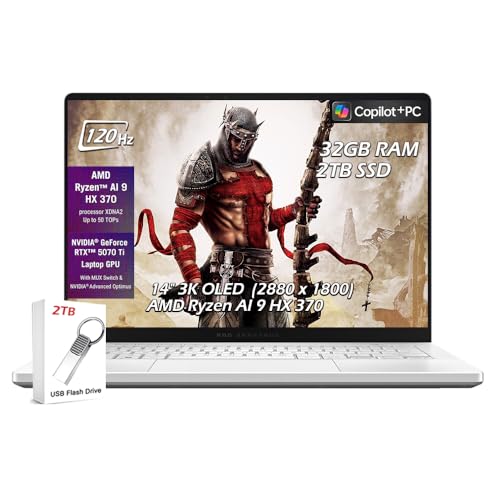
The ASUS ROG Zephyrus G14 is the gold standard for gaming laptops that don't sacrifice portability. It's one of the lightest gaming laptops available with dedicated GPU power - pairing an AMD Ryzen processor with AMD Radeon RX graphics and a stunning QHD OLED display at 165Hz refresh rate. It handles demanding games at high settings, streams and creates content without complaint, and fits in a backpack alongside textbooks. For gamers who need one machine for everything, this is it.
Reasons to buy
- ✔【Screen】 14 inches 2880 x 1800 OLED 3K 120Hz G-SYNC 500 nits;
- ✔【Memory & Storage】 32GB LPDDR5X 8000MHz megahertz and 2TB Solid State Drive (SSD) storag;
- ✔【Processor】 AMD Ryzen AI 9 HX 370 Processor 2 GHz (up to 5.1 GHz, 12-cores);
- ✔【Graphics】 NVIDIA GeForce RTX 5070 Ti 12GB GDDR7, DLSS 4 (Deep Learning Super Sampling),
- ✔【Connectivity】 2 x USB-A 3.2, 1 x USB-C 3.2, 1 x USB-C 4, 1 x HDMI 2.1, Headphone Jack, W
Reasons to avoid
- Battery life drops significantly under gaming load
- Thermal throttling can occur in sustained heavy workloads
- No webcam in older versions (check specific model year)

HP Spectre x360 14
The HP Spectre x360 14 is the best 2-in-1 convertible laptop for users who want a premium touchscreen experience alongside traditional laptop utility. It flips fully into tablet mode for note-taking, sketching with the included stylus, or consuming media, and closes back into one of the most stylish laptop form factors available. The OLED display option is vibrant and color-accurate, Intel Core Ultra performance is solid for productivity, and the build quality feels genuinely luxurious.
Reasons to buy
- [Upgraded Memory & Storage & OS] Upgraded to 16GB DDR5 SDRAM 4800 MHz 1TB PCI-E NVMe,Solid
- [Processor and Graphics] Intel Evo Core Ultra 7 155H 16-Core Processor (Up to 4.8 GHz with
- [14" 2880x1800 120Hz Display] 14" (2880 x 1800) 120Hz Touchscreen 400 nits UWVA, edge-to-e
- [Additional] Backlit Keyboard, Fingerprint Reader HP 9MP IR Camera 68Whr 4-Cell lithium-io
- [Connection & Ports] Intel Wi-Fi 6E AX211 (2x2) Bluetooth 5.3,2x USB-C Thunderbolt 4 / USB
Reasons to avoid
- Heavier than non-convertible ultrabooks at the same price
- Battery life is good but not MacBook-level
- 2-in-1 hinge adds bulk vs traditional clamshell
Lenovo ThinkPad X1 Carbon
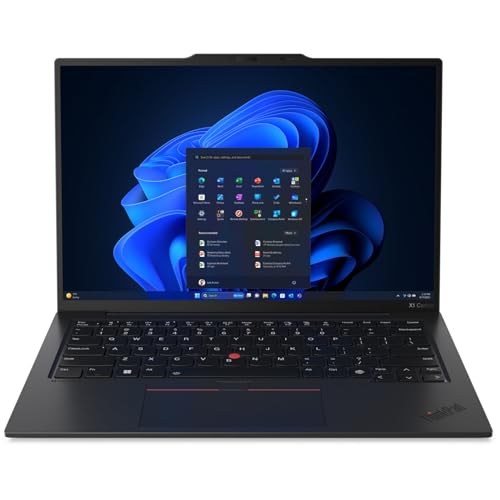
The Lenovo ThinkPad X1 Carbon is the definitive business travel laptop - and has been for over a decade. Weighing under 2.5 pounds (under 1.12kg) while passing MIL-SPEC durability testing, it combines extreme portability with the reliability that enterprise users and road warriors depend on. The keyboard is widely considered the best on any laptop. Intel Core Ultra processors deliver strong productivity performance, and Lenovo's enterprise-grade support and security features set the standard for business computing.
Reasons to buy
- The ThinkPad X1 Carbon Gen 13 Aura Edition weighs less than a kilogram, so you can manage
Reasons to avoid
- Display options less impressive than XPS or Spectre competitors
- Premium business pricing with limited gaming or creative use
- Understated design may not appeal to consumer buyers
What to look for
What to consider
Start with operating system: macOS (MacBook) vs Windows determines software compatibility. Then consider use case - gaming (Zephyrus G14), creative work (XPS 15), business travel (ThinkPad X1 Carbon), versatility (Spectre x360), or all-around use (MacBook Air M3). Display quality matters enormously - OLED panels in the XPS 15, Zephyrus G14, and Spectre x360 are significantly better than standard IPS. Check RAM (16GB minimum for 2026), storage (512GB SSD minimum), and port selection before purchasing.
Our verdict
The best laptop for you depends entirely on what you need it to do. For sheer battery life and everyday efficiency, the MacBook Air M3 is unmatched. For creative work on Windows, the Dell XPS 15 is the clear choice. Gamers who value portability should look at the Zephyrus G14. Business travelers will love the ThinkPad X1 Carbon's keyboard and ultralight build. And for 2-in-1 flexibility, the HP Spectre x360 14 stands
FAQs
The Apple MacBook Air 15-inch M3 delivers the best real-world battery life of any mainstream laptop - regularly achieving 15-18 hours per charge in everyday use. Apple's M3 chip is extraordinarily efficient, and the large 15-inch battery compounds this advantage. For users who work away from power for extended periods, nothing in the Windows laptop market consistently matches MacBook Air M3 battery endurance.
Yes - the Dell XPS 15 remains one of the best Windows laptops for creative professionals. Its OLED display option delivers stunning color accuracy and contrast, the build quality is premium, and modern configurations with Intel Core Ultra processors and NVIDIA discrete graphics handle video editing, photo work, and light 3D tasks effectively. It's heavier than ultrabooks but the display and performance justify the tradeoff.
The ASUS ROG Zephyrus G14 is the best gaming laptop at its price point - combining a genuinely portable form factor with dedicated AMD Radeon graphics and a high-refresh OLED display. It handles AAA gaming at 1080p and 1440p with strong frame rates while remaining light enough for daily carry, making it the top pick for gamers who also need a capable everyday machine.
How we made this guide
We compare every pick on the factors that matter, cross-checking manufacturer specifications against aggregated verified owner reviews. We rank independently and never take payment for placement. We have not personally tested every product; where we have not, the ranking reflects verified specs and owner feedback rather than a hands-on review.
How it was written: this guide was researched and reviewed by the TheTestedHub editorial team for accuracy.
Affiliate disclosure: TheTestedHub is reader-supported. When you buy through links on our site, we may earn a commission at no extra cost to you.
Related guides

Your Docking Station Match: CalDigit TS4 and More

Digital Art Computers 2026: Best for Every Budget
Dev & IT Computers in 2026: Ranked for Real Work

Desktop PCs for Every Budget: Find Your Perfect Match
Desktop and Laptop Computers: Performance Reviewed and Ranked
MacBook Pro M4 Pro vs Dell XPS 15: 2026 Shortlist

Buy the Best DIY Computer in 2026: Corsair One i300
