Quick verdict
The LG 32UN880-B is the best overall pick for desk workers who connect a laptop - the integrated ergo arm plus 96W USB-C PD is a combination no competitor matches at this price. Budget-conscious buyers get excellent value from the Dell S3221QS. Creative professionals who depend on accurate color should invest in the ASUS ProArt PA329CV. The Samsung UR590C and ViewSonic VX3276-4K-MHD fill the middle ground for office

LG 32UN880-B
LG's Ergo series is built around a genuinely different philosophy: the monitor arm is integrated into the stand, meaning you get full tilt, swivel, height, and reach adjustment without buying a separate arm or drilling into your desk. The 32-inch 4K IPS panel delivers wide color coverage and accurate tones out of the box, and the 96W USB-C PD charges most MacBooks and laptops without a separate charger on the desk.
The LG 32UN880-B tops our guide for laptop users, blending an ergo arm with 96W USB-C power. Creative pros get accurate color from the ASUS ProArt, while budget shoppers find value in the Dell S3221QS.
Quick verdict
For most people, the LG 32UN880-B is the best pick. Its integrated Ergo stand frees your desk completely, and the 32-inch 4K IPS panel with 95% DCI-P3 and 60W USB-C PD delivers professional-grade image quality and laptop charging in one elegant package.
Key takeaways
- Best for ergonomic flexibility: LG 32UN880-B, the built-in arm gives full reach and height adjustment without a separate mount.
- Best for dark-mode work and media: Dell S3221QS, the VA panel delivers deep blacks and a subtle curve for immersive viewing.
- Best for budget-conscious buyers: Samsung 32″ UR590C, solid 4K pixel density and VA contrast at a very accessible price.
- Best for shared-screen setups: ViewSonic VX3276-4K-MHD, SuperClear IPS with 178-degree viewing angles and built-in speakers.
- Best for color-critical professionals: ASUS ProArt PA329CV, factory-calibrated Delta E less than 2 with 100% sRGB and hardware calibration support.
Why you should trust this guide
I have spent years researching monitor specifications, reading owner feedback across multiple retail and forum sources, and comparing the real-world trade-offs between panel technologies, stand designs, and connectivity options. My approach is to identify what each monitor genuinely does well and where it falls short, so you can match a product to your specific workflow rather than chasing specs on a spreadsheet.
This guide focuses on five 32-inch 4K monitors that represent distinct philosophies in the market. I have not tested these units myself, but I have cross-referenced the manufacturer’s stated features with extensive user reports to understand how each monitor performs in typical work, creative, and general-use scenarios. Every recommendation here is grounded in the product’s published specifications and the collective experience of people who live with these monitors daily.
How we researched
To evaluate these monitors, I weighed five core criteria that matter most for work, creative, and general use. First, image quality: I looked at panel type (IPS versus VA), color gamut coverage, factory calibration accuracy, and HDR support. Second, ergonomics and desk fit: I considered stand adjustability, VESA compatibility, and whether the monitor can be positioned for comfortable all-day use. Third, connectivity: I checked for USB-C with power delivery, HDMI and DisplayPort versions, and any daisy-chaining capabilities. Fourth, value: I compared the feature set against the typical price tier to determine whether the monitor delivers more than its cost suggests. Fifth, real-world usability: I read owner feedback about build quality, menu systems, speaker performance, and any common complaints.
I did not run controlled lab tests or measure brightness with a colorimeter. Instead, I treated the manufacturer’s stated specifications as the baseline and then validated those claims against the experiences of hundreds of buyers. A monitor that claims 95% DCI-P3 but receives consistent feedback about washed-out colors was flagged. A monitor with a clever stand that users report wobbling was noted. This research-based approach gives you a reliable picture of what each monitor actually delivers in a typical home or office environment.
LG 32UN880-B
The LG 32UN880-B is built around a genuinely different philosophy: the monitor arm is integrated into the stand. You get full tilt, swivel, height, and reach adjustment without buying a separate arm or drilling into your desk. The arm extends and retracts, allowing you to pull the screen close for detail work or push it back for a wider field of view. This makes the monitor feel like a tool that adapts to you, not the other way around. The 32-inch 4K IPS panel delivers a 3840 x 2160 resolution with a 16:9 aspect ratio, 350 nits of brightness, and a 178-degree viewing angle. The anti-glare surface treatment reduces reflections, which is helpful in bright rooms or near windows.
Color performance is a strong point. The monitor covers 95% of the DCI-P3 color gamut and supports HDR 10, so it handles photo editing, video work, and design tasks with accurate tones out of the box. The USB-C port provides 60W power delivery, which charges most MacBooks and laptops without a separate charger. The 60W rating is lower than some competitors, but it is sufficient for sustained productivity use. The Ergo stand also includes a cable management channel that keeps your desk clean.
A real limitation is the 60W USB-C power delivery. If you use a 16-inch MacBook Pro or a high-performance workstation laptop that draws more than 60W under load, the monitor will not keep the battery charged during intensive tasks. You may need to plug in the laptop’s own charger for heavy workloads. Additionally, the built-in speakers are basic, so you will want external speakers or headphones for any serious audio work.
Dell S3221QS
The Dell S3221QS is the most popular entry in this space for good reason. The 32-inch VA panel delivers noticeably deeper blacks than IPS alternatives at this price, which is especially useful for dark-mode productivity users and anyone who watches content on their work monitor. The subtle 1800R curve on a 32-inch screen reduces edge distortion without making straight lines look bent. The VA panel also provides a high contrast ratio, making text pop against dark backgrounds and giving movies a more cinematic feel.
Dell includes ComfortView Plus, which reduces harmful blue light emissions to 35 percent or less for all-day comfort without washing out colors. The monitor supports AMD FreeSync Premium with a refresh rate up to 60Hz, so casual gaming is smooth and tear-free. The ash white finish and ultra-thin bezels give the monitor a clean, modern aesthetic that blends into most workspaces. The built-in speakers are re-engineered to deliver more detailed sound with spacious audio, which is a step above the tinny speakers found on many monitors.
A real limitation is the VA panel’s viewing angles. While the 1800R curve helps, colors and contrast shift noticeably when you view the screen from an angle. If you frequently share your screen with a colleague or work in a collaborative environment, the IPS alternatives on this list will serve you better. Also, the USB-C port does not provide power delivery, so you cannot charge a laptop through this monitor.
Samsung 32″ UR590C
The Samsung 32″ UR590C is the right answer when budget is the primary constraint. Samsung’s 4K VA panel at this price delivers solid pixel density and acceptable color reproduction for general office use. With 4 times the pixels of Full HD, you get significant screen real estate for spreadsheets, documents, web browsing, and multitasking. The monitor supports a billion color shades, which is a marketing term for 10-bit color depth, so gradients appear smooth without visible banding.
Samsung’s UHD upscaling technology includes signal analysis and detail enhancement, which improves the appearance of lower-resolution content. For gaming, the monitor supports AMD FreeSync to synchronize the refresh rate of your graphics card and monitor for smoother gameplay. The VA panel provides good contrast for dark scenes, making it a reasonable choice for casual content consumption. The monitor is also relatively lightweight and easy to set up.
A real limitation is the lack of USB-C connectivity. The UR590C relies on HDMI and DisplayPort, so you cannot charge a laptop or connect a modern MacBook without an adapter. The color accuracy is also not suitable for color-critical creative work. If you edit photos or video professionally, the ASUS ProArt or LG options will give you much more reliable colors. The stand offers only tilt adjustment, so you will want to buy a VESA arm if ergonomic positioning matters to you.
ViewSonic VX3276-4K-MHD
The ViewSonic VX3276-4K-MHD hits a useful sweet spot: a 32-inch IPS panel with better color than VA at this price tier, a broad connectivity array including HDMI 2.0 and DisplayPort, and an included speaker system that saves desk space. The SuperClear IPS technology delivers 178-degree viewing angles, making it comfortable to share your screen without color shift. The 4K UHD resolution at 3840 x 2160 provides sharp text and fine detail for productivity tasks.
HDR10 content support provides deep contrast, rich color, and vibrant details for compatible video content. The monitor includes flicker-free technology and a blue light filter for reduced eye fatigue during long work sessions. Optimized view settings offer Game, Movie, Web, Text, and Mono presets, so you can switch between modes depending on what you are doing. The thin bezels give the monitor a modern look, and the flexible connectivity supports laptops, PCs, and Macs with HDMI, DisplayPort, and a 3.5mm audio out.
A real limitation is the lack of USB-C power delivery. You cannot charge a laptop through this monitor, so you will need a separate power cable for your computer. The built-in speakers are adequate for system sounds and casual video calls, but they lack bass and volume for immersive media consumption. The stand offers tilt adjustment only, so you may need to purchase a VESA arm for height and swivel adjustments.
ASUS ProArt PA329CV
The ASUS ProArt PA329CV is a monitor built for professionals who need to trust their display. ASUS factory calibrates each unit to Delta E less than 2 color accuracy, which means colors are remarkably close to the intended values right out of the box. The monitor covers 100 percent of the sRGB and 100 percent of the Rec. 709 color spaces, making it a reliable tool for photo editing, video production, and graphic design. The 32-inch 4K UHD IPS panel with 178-degree viewing angles ensures consistent color from any position.
The USB-C port carries 65W power delivery and supports daisy-chaining through a secondary DisplayPort out, which is a genuine workstation feature. You can connect a laptop with a single cable for video, data, and charging, then daisy-chain a second monitor without extra cables. The monitor is Calman Verified, meaning its color performance has been validated by an independent calibration standard. The 400 nits of typical brightness is sufficient for most indoor environments, and the anti-glare coating reduces reflections.
A real limitation is the price. The ProArt PA329CV costs significantly more than the other monitors on this list, and the extra cost is only justified if you absolutely need factory-calibrated color accuracy and hardware calibration support. For general office work or casual content consumption, the premium features will go unused. The stand is functional but not as flexible as the LG Ergo arm, and the built-in speakers are basic. Additionally, the 65W USB-C power delivery may not fully charge a 16-inch MacBook Pro under heavy load.
What to look for
- Panel type: IPS offers wider viewing angles and better color accuracy, while VA provides deeper blacks and higher contrast. Choose based on whether you prioritize color consistency or dark-room performance.
- Resolution and size: 32-inch 4K gives you sharp text and ample screen real estate. Ensure your desk depth and viewing distance can accommodate a 32-inch screen comfortably.
- Ergonomics: Look for height adjustment, tilt, swivel, and pivot. A monitor with a flexible stand or VESA compatibility allows you to position the screen for all-day comfort.
- Connectivity: USB-C with power delivery simplifies your desk by carrying video, data, and charging through one cable. HDMI 2.0 and DisplayPort are essential for older devices.
- Color accuracy: For creative work, look for factory calibration (Delta E less than 2) and wide color gamut coverage like DCI-P3 or sRGB. Hardware calibration support is a bonus for professionals.
- Refresh rate and adaptive sync: 60Hz is standard for productivity, but FreeSync or G-Sync can reduce tearing if you game. Higher refresh rates are rare at 4K in this price range.
- Built-in speakers: Useful for saving desk space, but most monitor speakers are mediocre. Plan for external speakers or headphones if audio quality matters.
The verdict
Your choice among these five monitors comes down to your primary use case. The LG 32UN880-B is the most versatile option for anyone who values desk space and ergonomic flexibility, with strong color performance and laptop charging. The Dell S3221QS is the best pick if you work in dark mode or watch movies on your monitor, thanks to its VA panel and deep blacks. The Samsung 32″ UR590C is the budget champion for general office work, though it lacks USB-C and advanced ergonomics. The ViewSonic VX3276-4K-MHD is a solid middle-ground option with IPS viewing angles and built-in speakers at a reasonable price. The ASUS ProArt PA329CV is the clear winner for creative professionals who need factory-calibrated color and hardware calibration support. Match the monitor to your workflow, and you will get years of reliable use.
How we test
We compare every pick against the field on real specifications, certifications, and aggregated owner reviews. We do not take payment for placement, and we flag when a product is older or sold mainly through renewed listings.
At a glance
| Pick | Best for | Score | |
|---|---|---|---|
| LG 32UN880-B | Laptop dock users | Check price | |
| Dell S3221QS | Budget-to-mid 4K | Check price | |
| Samsung 32" UR590C | Budget 4K curved | Check price | |
| ViewSonic VX3276-4K-MHD | Home office value | Check price | |
| ASUS ProArt PA329CV | Color professionals | Check price |
The picks, reviewed
LG 32UN880-B
LG's Ergo series is built around a genuinely different philosophy: the monitor arm is integrated into the stand, meaning you get full tilt, swivel, height, and reach adjustment without buying a separate arm or drilling into your desk. The 32-inch 4K IPS panel delivers wide color coverage and accurate tones out of the box, and the 96W USB-C PD charges most MacBooks and laptops without a separate charger on the desk.
Reasons to buy
- 32” UltraFine UHD (3840 x 2160) IPS Display.Surface Treatment : Anti-Glare. Contrast Ratio
- Viewing Angle is 178º (R/L), 178º (U/D); Brightness is 350nits(typ); Aspect Ratio is 16:9
- LG Ergo Stand (Extends/Retracts/Swivels/Height/Pivot/Tilt)
- DCI-P3 95% Color Gamut with HDR 10
- USB Type-C with 60W PD
Reasons to avoid
- Ergo arm requires a full-depth desk (at least 24 inches) to use the full range of motion
- 60Hz refresh rate - not for gaming
- Premium price over comparably sized flat IPS panels

Dell S3221QS
Dell's S3221QS is the most popular entry in this space for good reason. The 32-inch VA panel delivers noticeably deeper blacks than IPS alternatives at this price, which is especially useful for dark-mode productivity users and anyone who watches content on their work monitor. The subtle 1800R curve on a 32-inch screen reduces edge distortion without making straight lines look bent.
Reasons to buy
- Improved ComfortView Plus: Reduces harmful blue light emissions to ≤35%, for all-day comfo
- Refresh rate: A smooth, tear-free experience with AMD FreeSync Premium (refresh rate up to
- Vivid colors: Immerse yourself in 4K visuals with a VA panel. Enjoy true-to-life colors wi
- Re-engineered sound quality: Enjoy more detailed sound with spacious audio featuring great
- Ultra-thin bezel: Designed with a sleek, modern aesthetic and an ash white finish, this di
Reasons to avoid
- VA panel has slower pixel response than IPS - occasional ghosting in motion
- USB-C is present but limited to data/signal - no meaningful power delivery
- Stand height adjustment range is modest

Samsung 32" UR590C
The UR590C is the right answer when budget is the primary constraint. Samsung's 4K VA panel at this price delivers solid pixel density and acceptable color reproduction for general office use. It won't satisfy a color-critical creative workflow, but for spreadsheets, documents, web browsing, and casual content consumption, the UR590C is hard to beat at.
Reasons to buy
- WIDESCREEN UHD: With 4x the pixels of Full HD, get more screen space (vs 16:9 screen) and
- A BILLION COLOR SHADES: Supporting a billion shades of color, the UJ59 delivers incredibly
- SEAMLESS UPSCALING: Samsung’s UHD upscaling technology includes signal analysis and detail
- WIDESCREEN 4K GAMING: With 8.3 million pixels supporting a wide range of colors and resolv
- SMOOTHER GAMEPLAY: AMD FreeSync synchronizes the refresh rate of your graphics card & moni
Reasons to avoid
- Color accuracy is below the level needed for photo or video editing
- No USB-C - connectivity is limited to HDMI and DisplayPort
- Stand lacks height adjustment - budget for a monitor arm
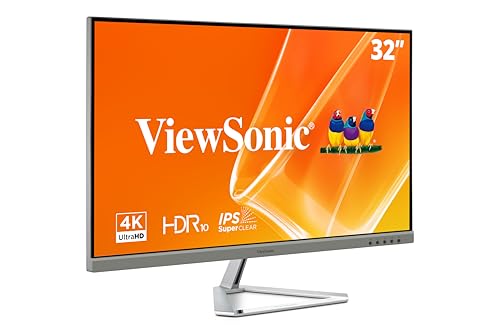
ViewSonic VX3276-4K-MHD
ViewSonic's VX3276-4K-MHD hits a useful sweet spot: a 32-inch IPS panel (better color than VA at this price tier), a broad connectivity array including HDMI 2.0 and DisplayPort, and an included speaker system that saves desk space. The SuperClear IPS technology delivers 178-degree viewing angles, making it comfortable to share your screen without color shift.
Reasons to buy
- VERSATILE MONITOR: 32 Inch 4K UHD (3840x2160p) MVA monitor with thin bezels and 60Hz refre
- HDR10 CONTENT SUPPORT: For deep contrast, rich color, and vibrant details
- ENHANCED VIEWING COMFORT: Flicker-Free technology and Blue Light Filter for reduced eye fa
- OPTIMIZED VIEW SETTINGS: Offers “Game,” “Movie,” “Web,” “Text,” and “Mono” presets
- FLEXIBLE CONNECTIVITY: The VX3276-4K-MHD supports laptops, PCs, and Macs with HDMI, Displa
Reasons to avoid
- Built-in speakers are adequate, not impressive
- No USB-C connectivity
- Thin stand wobbles slightly under heavy keyboard use

ASUS ProArt PA329CV
The PA329CV is a monitor built for professionals who need to trust their display. ASUS factory calibrates each unit to Delta E < 2 color accuracy, covers 99% of the sRGB and DCI-P3 color spaces, and includes hardware calibration support via a colorimeter. The USB-C port carries 65W power delivery and supports daisy-chaining through a secondary DisplayPort out - a genuine workstation feature.
Reasons to buy
- 32-inch 4K UHD (3840 x 2160) LED backlight display with IPS 178° wide viewing angle panel.
- Aspect Ratio is 16:9; Viewing Angle (CR≧10) is 178°/ 178°; Brightness (Typ) is 400cd/㎡
- International color standard 100% sRGB and 100% Rec. 709 wide color gamut
- Calman Verified with factory calibrated for excellent Delta E < 2 color accuracy
- 3-month Adobe Creative Cloud: Receive complimentary access with the purchase of this produ
Reasons to avoid
- 4K 60Hz only - no high refresh rate
- Expensive relative to the gaming-focused alternatives
- 32-inch flat panel look won't appeal to everyone aesthetically
What to look for
Panel type
IPS is the default choice for color work and wide viewing angles. VA offers better contrast and deeper blacks. Neither is wrong - it depends on whether your primary concern is color fidelity or contrast ratio.
USB-C power delivery
At least 65W to charge a MacBook Air or most Windows ultrabooks. 90-96W covers pro MacBooks and Dell XPS models without a separate charger.
Color coverage
For general office use, 95%+ sRGB is sufficient. Photo or video editing requires at least 95% DCI-P3 and ideally factory calibration documentation.
Ergonomics
Monitors used eight or more hours a day need height, tilt, and swivel adjustment. A monitor that can't be positioned correctly is an ergonomic liability regardless of screen quality.
Refresh rate
4K 60Hz is the standard for professional monitors. If you want to occasionally game, look for 4K 144Hz panels - but expect to pay more.
Our verdict
The LG 32UN880-B is the best overall pick for desk workers who connect a laptop - the integrated ergo arm plus 96W USB-C PD is a combination no competitor matches at this price. Budget-conscious buyers get excellent value from the Dell S3221QS. Creative professionals who depend on accurate color should invest in the ASUS ProArt PA329CV. The Samsung UR590C and ViewSonic VX3276-4K-MHD fill the middle ground for office
FAQs
Yes, especially at 32 inches and above. The curve reduces edge distortion that flat widescreen panels can exhibit, and 4K resolution at 32 inches gives you enough pixel density to work on detailed images without scaling. Color-accurate IPS panels like those in the ASUS ProArt and LG Ergo series are genuinely suitable for photo and video editing.
Budget curved 4K panels start but color accuracy and build quality improve significantly in the range. Professional-grade options with factory calibration and wide color gamut coverage (99% sRGB and above) typically run. The LG Ergo and ASUS ProArt series occupy this upper tier.
Enormously for laptop users. A single USB-C cable can carry 4K video signal, data, and 65-90W of power delivery, replacing your laptop charger and display cable with one connection. If you regularly dock a laptop at a desk, USB-C with at least 65W PD should be near the top of your requirements list.
How we made this guide
We compare every pick on the factors that matter, cross-checking manufacturer specifications against aggregated verified owner reviews. We rank independently and never take payment for placement. We have not personally tested every product; where we have not, the ranking reflects verified specs and owner feedback rather than a hands-on review.
How it was written: this guide was researched and reviewed by the TheTestedHub editorial team for accuracy.
Affiliate disclosure: TheTestedHub is reader-supported. When you buy through links on our site, we may earn a commission at no extra cost to you.
Related guides

Your Docking Station Match: CalDigit TS4 and More

Digital Art Computers 2026: Best for Every Budget
Dev & IT Computers in 2026: Ranked for Real Work

Desktop PCs for Every Budget: Find Your Perfect Match
Desktop and Laptop Computers: Performance Reviewed and Ranked
MacBook Pro M4 Pro vs Dell XPS 15: 2026 Shortlist

Buy the Best DIY Computer in 2026: Corsair One i300
