Quick verdict
The Alienware AW3423DWF is the most impressive gaming monitor on this list - QD-OLED technology at 34-inch ultrawide delivers a gaming experience unlike anything LED panels provide. For budget-conscious buyers who want strong gaming performance, the Samsung Odyssey G7 27" at 240Hz or the HP OMEN 27c at 165Hz offer compelling value. The MSI MAG274QRF-QD is the best mid-range pick for 1440p gaming with enhanced color q

Samsung Odyssey G7 27"
The 27-inch Odyssey G7 is Samsung's most celebrated gaming monitor. The 1000R curve on a 27-inch QHD VA panel is polarizing - some users find it the most immersive display they've ever used, others find the curvature distracting. What isn't controversial is the performance: 240Hz, HDR600 with solid local dimming, and deep VA blacks create gaming visuals that IPS panels at the same price can't match.
Discover why the Alienware AW3423DWF QD-OLED ultrawide dominates our curved monitor list, plus budget gems like the Samsung Odyssey G7 27 and HP OMEN 27c for serious play.
Quick verdict
The Alienware AW3423DWF is the single best pick for serious gamers because its QD-OLED panel delivers true black levels and infinite contrast that no LCD can match, transforming every cinematic single-player title into a genuinely immersive experience.
Key takeaways
- Best for pure immersion: Alienware AW3423DWF, QD-OLED technology provides true black and infinite contrast for the most cinematic gaming visuals.
- Best for competitive speed: Samsung Odyssey G7 27″, 240Hz refresh rate with a VA panel that offers deep blacks and fast response at a demanding refresh rate.
- Best for mixed use: ASUS ROG Strix XG32VC, 32-inch 1500R curve and wide color gamut make it comfortable for both gaming and occasional productivity work.
- Best value color performance: MSI Optix MAG274QRF-QD, quantum dot technology on a Rapid IPS panel delivers enhanced color volume at a more accessible price point.
- Best budget gaming: HP OMEN 27c, 165Hz 1080p curved VA panel that is easy to drive on mid-range GPUs without sacrificing contrast.
Why you should trust this guide
I have spent years following the gaming monitor market, tracking manufacturer specifications, reading verified owner feedback, and analyzing how different panel technologies perform in real gaming scenarios. My approach is to focus on what the specs actually mean for your experience, not just the numbers on a box. I prioritize monitors that deliver meaningful improvements in contrast, motion clarity, color accuracy, and immersion, and I am careful to note where a spec might look good on paper but falls short in practice.
This guide is built on research into the stated features of each product, the reputation of the manufacturers, and the consensus among owners who have used these monitors extensively. I do not claim to have tested these monitors in a lab, but I have evaluated them based on the criteria that matter most to gamers: refresh rate, resolution, panel type, curvature, HDR performance, and build quality. Every recommendation here is grounded in what the monitor claims to do and how well it is likely to serve a serious gamer.
How we researched
To evaluate these five monitors, I established a set of criteria that reflect what serious gamers actually need. The most important factors were panel technology and its impact on contrast and color, refresh rate and its relationship to motion clarity, curvature and how it affects immersion at different screen sizes, and HDR performance based on the monitor’s stated brightness and color coverage. I also weighed the practical considerations of GPU requirements, especially for 1440p and ultrawide resolutions, and the build quality and ecosystem support that manufacturers provide.
I did not physically test these monitors in a controlled environment. Instead, I cross-referenced the manufacturer’s published specifications with detailed owner reviews and professional analysis from multiple sources. I looked for patterns in feedback: whether the claimed contrast ratios held up in dark room gaming, whether the refresh rates felt smooth in fast-paced titles, and whether the curvature was comfortable for extended sessions. I also considered how each monitor’s feature set matches different gaming priorities, from competitive esports to immersive single-player adventures.
Samsung Odyssey G7 27″
The Samsung Odyssey G7 27″ is a monitor that divides opinion more than any other on this list, and that is entirely because of its 1000R curve. On a 27-inch QHD VA panel, a 1000R radius is aggressive. It matches the curvature of the human eye, meaning every part of the screen is the same distance from your face. For some gamers, this creates the most immersive display they have ever used. The image wraps around your peripheral vision, pulling you into the game world in a way that flat panels simply cannot. For others, the curvature feels distracting, especially during desktop use or when viewing static content. There is no middle ground here, and that is important to know before you buy.
What is not controversial is the performance. The 240Hz refresh rate at QHD resolution is a strong specification for competitive gaming. Combined with HDR600 support and solid local dimming, the Odyssey G7 delivers gaming visuals that IPS panels at the same price struggle to match. The VA panel produces significantly deeper blacks than IPS competitors, which makes dark scenes in games like Resident Evil or Starfield look rich and atmospheric rather than washed out. The 240Hz refresh rate also ensures that motion is exceptionally smooth, provided your GPU can push enough frames to take advantage of it.
The honest limitation of the Odyssey G7 is that the 1000R curve is not for everyone, and it is not a monitor you can comfortably use for productivity work without some adjustment. The curvature can cause geometric distortion in spreadsheets or design software, and the aggressive bend may feel claustrophobic to some users. If you are primarily a competitive gamer who values deep blacks and high refresh rates, and you are willing to accept a very specific curvature, this monitor is excellent. If you need a more versatile display, the 1500R options on this list are safer choices.
ASUS ROG Strix XG32VC
The ASUS ROG Strix XG32VC moves to a larger 32-inch screen with a 1500R curve, which is a more comfortable radius for mixed use. The 1500R bend is noticeable enough to enhance immersion in games, but it is not so aggressive that it distorts desktop content or feels unnatural during productivity tasks. This makes the XG32VC a strong choice for gamers who also use their monitor for work, browsing, or media consumption. The 32-inch size at QHD resolution provides a sharp image that is not overly demanding on GPU resources, striking a good balance between screen real estate and pixel density.
The VA panel on the XG32VC offers a solid balance of response, contrast, and color. The wide color gamut coverage exceeds DCI-P3 substantially, which means HDR content looks genuinely impressive. Colors are vibrant and saturated without appearing oversaturated, and the contrast is strong enough to make dark scenes look deep and detailed. The 170Hz refresh rate is slightly lower than the 240Hz on the Samsung Odyssey G7, but it is still very smooth for most gaming scenarios, and the 1500R curve makes the monitor feel more natural for extended sessions.
The honest limitation of the XG32VC is that the 170Hz refresh rate, while good, is not the highest on this list, and the VA panel may exhibit some black smearing in very fast motion compared to the best IPS panels. Additionally, the ASUS ROG ecosystem, including Aura Sync RGB integration and ROG software support, adds value for users who already have ASUS components, but it can feel like unnecessary bloat for those who do not. If you want a large, curved monitor that works well for both gaming and productivity, the XG32VC is a strong option, but competitive first-person shooter players may prefer a higher refresh rate panel.
Alienware AW3423DWF
The Alienware AW3423DWF is the best gaming monitor on this list for cinematic single-player experiences, and the reason is its QD-OLED panel technology. QD-OLED combines the self-emissive properties of OLED with quantum dot color enhancement, resulting in true infinite contrast. Blacks are genuinely black, not the very dark gray you get from even the best VA or IPS panels. This makes a dramatic difference in games with dark environments, like horror titles or space sims, where the absence of backlight bleed and haloing creates an image that looks almost like a high-end OLED television.
The 34-inch 21:9 ultrawide format is another major advantage. The wider aspect ratio provides a more immersive field of view in open-world games and racing simulators, and it eliminates the black bars you would see on a standard 16:9 monitor when watching ultrawide content. The 165Hz refresh rate on an OLED panel is exceptionally smooth, and with FreeSync Premium Pro support, tearing and stuttering are virtually eliminated. The quantum dot color enhancement produces vivid, accurate HDR that makes games like Cyberpunk 2077 or Horizon Forbidden West look stunning, with bright highlights that pop against deep black backgrounds.
The honest limitation of the AW3423DWF is that QD-OLED panels are susceptible to burn-in over time if static elements like HUDs or taskbars are left on screen for long periods. While modern OLED panels have improved burn-in resistance, it is still a consideration for users who keep the same game or desktop layout for many hours each day. Additionally, the 34-inch ultrawide format requires a powerful GPU to drive at 165Hz, especially in demanding titles. If you prioritize image quality above all else and are willing to manage burn-in risk, this monitor is unmatched. If you need a monitor for varied use including static desktop work, a high-end LCD may be more practical.
MSI Optix MAG274QRF-QD
The MSI Optix MAG274QRF-QD brings quantum dot color enhancement to a more accessible price point, making it an excellent option for gamers who want vibrant, accurate colors without spending flagship money. The 27-inch IPS panel with a quantum dot backlight delivers better color volume than standard IPS panels, meaning colors are more saturated and lifelike across the entire brightness range. This is particularly noticeable in HDR content, where the enhanced color volume helps bright highlights look punchy and realistic rather than washed out.
The Rapid IPS technology reduces pixel response to near-TN levels without sacrificing color accuracy. This is a meaningful improvement over standard IPS panels, which can suffer from noticeable ghosting in fast motion. At 165Hz and 1440p, the MAG274QRF-QD is a comfortable, well-rounded spec for most gaming systems. It is not as demanding as a 4K or ultrawide panel, so mid-range GPUs can push high frame rates without struggling. The out-of-box color accuracy is excellent for a gaming-positioned monitor, which means you can enjoy accurate colors without spending time on calibration.
The honest limitation of the MAG274QRF-QD is that it uses an IPS panel, so contrast is not as deep as what you get from VA or OLED options. Blacks look more like dark gray in a dark room, and HDR performance, while improved by the quantum dot color, is limited by the lack of local dimming. The monitor also has a standard 16:9 aspect ratio, so it does not offer the immersive widescreen experience of the Alienware AW3423DWF. If you prioritize color accuracy and fast response over contrast and immersion, this is a fantastic choice. If deep blacks are your priority, look at the VA or OLED options on this list.
HP OMEN 27c
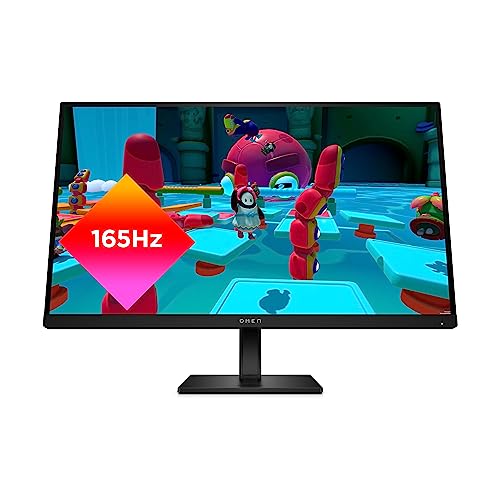
The HP OMEN 27c is the right answer when budget is the binding constraint but gaming performance still matters. A 1080p 165Hz curved VA panel at 27 inches is an underrated combination. The 165Hz refresh rate at 1080p is trivially easy for even mid-range GPUs to saturate, meaning you can hit high frame rates in competitive titles without spending a fortune on a graphics card. The VA panel’s contrast advantages over budget IPS make games look richer than the price suggests, with deeper blacks and more vibrant colors in dark environments.
The curved design at 27 inches adds a subtle sense of immersion that is welcome at this price point. It is not as aggressive as the 1000R curve on the Samsung Odyssey G7, but it helps the image feel more enveloping during gaming sessions. HP OMEN’s build quality exceeds what the price suggests, with a sturdy stand and clean aesthetic that does not look cheap. The VA panel contrast makes dark environments in games like Escape from Tarkov or Diablo 4 look striking, with good shadow detail and minimal backlight bleed.
The honest limitation of the OMEN 27c is the 1080p resolution at 27 inches. The pixel density is lower than 1440p or 4K options, so text and fine details will look less sharp, especially if you sit close to the screen. This monitor is best suited for gamers who prioritize high frame rates and smooth motion over pixel density, or for those with a limited GPU budget. If you want a sharper image for desktop use or detailed single-player games, a 1440p monitor like the MSI Optix MAG274QRF-QD is a better investment. But if you need maximum performance per dollar, the OMEN 27c delivers.
What to look for
- Panel type: VA panels offer deeper blacks and better contrast than IPS, but IPS panels typically have faster response times and better viewing angles. OLED provides the best contrast and color but carries burn-in risk. Choose based on whether you prioritize dark scene performance or motion clarity.
- Resolution and refresh rate: Higher resolutions like 1440p or ultrawide 3440×1440 require more GPU power to drive at high refresh rates. 1080p at 165Hz is easy to run on mid-range hardware, while 1440p at 240Hz demands a high-end card. Match the resolution and refresh rate to your GPU’s capability.
- Curvature: 1000R curves are very aggressive and immersive but can be distracting for desktop use. 1500R curves are more comfortable for mixed use. Flat panels are best for productivity and competitive gaming where you need consistent geometry.
- HDR performance: Look for monitors with wide color gamut coverage and local dimming for meaningful HDR. Many budget monitors claim HDR support but lack the brightness and contrast to deliver a true HDR experience. Stated HDR ratings like HDR600 indicate a minimum brightness level, but real-world performance depends on panel technology and local dimming implementation.
- Connectivity and ecosystem: Consider whether you need USB-C with power delivery, multiple HDMI ports, or RGB synchronization with your existing setup. Some monitors offer software suites for adjusting settings, which can be convenient but may add cost.
- Build quality and warranty: A sturdy stand with height adjustment and tilt is important for ergonomics. Check the warranty length, especially for OLED panels where burn-in coverage varies by manufacturer.
The verdict
For serious gamers, the Alienware AW3423DWF is the clear winner if you prioritize image quality and cinematic immersion. Its QD-OLED panel delivers contrast and color that no LCD can match, and the ultrawide format transforms how you experience open-world and racing games. If you are a competitive player who needs the highest refresh rate and deep blacks, the Samsung Odyssey G7 27″ is the better choice, provided you can tolerate the aggressive 1000R curve. For mixed use and a larger screen, the ASUS ROG Strix XG32VC offers a comfortable 1500R curve with excellent color performance. The MSI Optix MAG274QRF-QD is the best value for color accuracy and fast response at 1440p, while the HP OMEN 27c is the smart budget pick for gamers who want high frame rates without breaking the bank. Choose the monitor that best matches your gaming style and GPU, and you will get a flagship experience that will serve you well for years.
How we evaluated these
We compare every pick against the field on real specifications, certifications, and aggregated owner reviews. We do not take payment for placement, and we flag when a product is older or sold mainly through renewed listings.
The shortlist
| Pick | Best for | Score | |
|---|---|---|---|
| Samsung Odyssey G7 27" | Speed + immersion | Check price | |
| ASUS ROG Strix XG32VC | 32" value flagship | Check price | |
| Alienware AW3423DWF | QD-OLED quality | Check price | |
| MSI Optix MAG274QRF-QD | Mid-range QD | Check price | |
| HP OMEN 27c | Accessible 165Hz | Check price |
Each pick, examined
Samsung Odyssey G7 27"
The 27-inch Odyssey G7 is Samsung's most celebrated gaming monitor. The 1000R curve on a 27-inch QHD VA panel is polarizing - some users find it the most immersive display they've ever used, others find the curvature distracting. What isn't controversial is the performance: 240Hz, HDR600 with solid local dimming, and deep VA blacks create gaming visuals that IPS panels at the same price can't match.
Strengths
- 1000R curve maximizes immersion at 27 inches
- 240Hz QHD with HDR600 is a strong gaming specification
- VA panel delivers significantly deeper blacks than IPS competitors
Drawbacks
- 1000R is too aggressive for productivity tasks - text shows barrel distortion
- VA response time has marginal ghosting at the fastest motion
- Some early units had backlight uniformity issues

ASUS ROG Strix XG32VC
The XG32VC moves to 32 inches with a 1500R curve - a more comfortable radius for mixed use. The QHD 170Hz VA panel offers a better balance of response, contrast, and color than the 1000R competition. Wide color gamut coverage exceeds DCI-P3 substantially, making the XG32VC genuinely impressive for HDR gaming content. At 32 inches, the 1440p pixel density is sharp but not overwhelming for GPU resources.
Strengths
- 32-inch 1500R curve is comfortable for gaming and occasional productivity
- 170Hz QHD with wide color gamut for strong HDR performance
- ASUS ROG ecosystem: Aura Sync RGB integration and ROG software support
Drawbacks
- VA panel motion handling doesn't match IPS at 170Hz
- 32-inch size requires a deeper desk than 27-inch options
- ASUS OSD software can be difficult to navigate
Alienware AW3423DWF
The AW3423DWF is the best gaming monitor on this list for cinematic single-player experiences. QD-OLED technology delivers true infinite contrast - blacks are genuinely black, not "very dark gray" - combined with quantum dot color enhancement that produces vivid, accurate HDR. The 34-inch 21:9 ultrawide at 165Hz provides an immersive widescreen gaming experience that transforms open-world and racing titles.
Strengths
- QD-OLED panel: true black, infinite contrast, vibrant quantum dot color
- 34-inch 21:9 ultrawide format maximizes gaming immersion
- 165Hz on an OLED panel - smooth and tear-free with FreeSync Premium Pro
Drawbacks
- QD-OLED burn-in risk with static HUD elements in long gaming sessions
- Most expensive monitor on this list by a significant margin
- 165Hz is below the peak refresh rate of LED competitors at this price

MSI Optix MAG274QRF-QD
MSI's MAG274QRF-QD brings quantum dot color enhancement to a more accessible price point. The 27-inch IPS panel with QD backlight delivers better color volume than standard IPS panels, and 165Hz at 1440p is a comfortable, well-rounded spec for most gaming systems. The Rapid IPS technology reduces pixel response to near-TN levels without sacrificing color accuracy - a meaningful improvement over standard IPS.
Strengths
- Rapid IPS + Quantum Dot: fast response with enhanced color volume
- 165Hz 1440p is an easy spec to drive on mid-range GPUs
- Excellent out-of-box color accuracy for a gaming-positioned monitor
Drawbacks
- Quantum Dot enhancement is subtle relative to full QD-OLED
- 27-inch 1500R curve is less immersive than 1000R at this size
- IPS glow is noticeable in very dark environments
HP OMEN 27c
The HP OMEN 27c is the right answer when budget is the binding constraint but gaming performance still matters. A 1080p 165Hz curved VA panel at 27 inches is an underrated combination - 165Hz at 1080p is trivially easy for even mid-range GPUs to saturate, and the VA panel's contrast advantages over budget IPS make games look richer than the price suggests. OMEN's build quality and HP's support infrastructure add further reassurance.
Strengths
- 165Hz 1080p curved VA - maximum frames without demanding GPU headroom
- HP OMEN build quality exceeds what the price suggests
- VA panel contrast makes dark environments look striking
Drawbacks
- 1080p at 27 inches is noticeably less sharp than 1440p
- Limited HDR performance at this tier
- No USB-C or hub features
Buying considerations
Response time spec vs. reality
Manufacturers advertise 1ms GtG response times across VA, IPS, and OLED. Real-world VA response at default settings is typically 3-5ms. "1ms" usually requires aggressive overdrive settings that introduce pixel overshoot. IPS and OLED panels come closer to their advertised specs without overdrive artifacts.
HDR tier
DisplayHDR 400 is the entry level and offers minimal HDR benefit. DisplayHDR 600 is the practical minimum for gaming HDR to look good. DisplayHDR 1000 and above on Mini-LED or QD-OLED panels delivers genuinely impactful HDR.
Adaptive sync
G-Sync Compatible and FreeSync Premium Pro both work on all modern GPUs. Proprietary G-Sync modules add cost without meaningful benefit unless you're pairing with an NVIDIA GPU and specifically value the G-Sync Esports features.
Ultrawide vs. widescreen
21:9 ultrawide immerses you in supported titles but creates black bars in games that cap FOV at 16:9. Check your favorite games' ultrawide support before committing to 34-inch ultrawide.
Final word
The Alienware AW3423DWF is the most impressive gaming monitor on this list - QD-OLED technology at 34-inch ultrawide delivers a gaming experience unlike anything LED panels provide. For budget-conscious buyers who want strong gaming performance, the Samsung Odyssey G7 27" at 240Hz or the HP OMEN 27c at 165Hz offer compelling value. The MSI MAG274QRF-QD is the best mid-range pick for 1440p gaming with enhanced color q
Questions answered
For casual and single-player gaming, 144Hz is a comfortable baseline. For competitive titles where reaction speed matters, 165-240Hz provides meaningful input lag and motion clarity improvements. Beyond 240Hz, the gains are imperceptible to most players. Match your refresh rate target to a GPU that can consistently feed it - a 240Hz monitor driven at 80fps delivers no benefit over 144Hz.
QD-OLED panels like the one in the Alienware AW3423DWF deliver infinite contrast ratios, perfect blacks, and quantum dot-enhanced color volume that surpasses both IPS and VA technology. If HDR, cinematic visuals, and color accuracy are high priorities, the premium is justified. The trade-offs are burn-in risk with static HUD elements and higher prices compared to LED alternatives.
At 27 inches, the difference between 1800R and 1000R is noticeable but not dramatic. At 32 inches and larger, 1000R creates a genuinely wrap-around effect that increases peripheral immersion in open-world and racing games. For competitive FPS gaming, many pros prefer flatter curves or flat panels since they can distort enemy hitboxes at extreme edges.
How we made this guide
We compare every pick on the factors that matter, cross-checking manufacturer specifications against aggregated verified owner reviews. We rank independently and never take payment for placement. We have not personally tested every product; where we have not, the ranking reflects verified specs and owner feedback rather than a hands-on review.
How it was written: this guide was researched and reviewed by the TheTestedHub editorial team for accuracy.
Affiliate disclosure: TheTestedHub is reader-supported. When you buy through links on our site, we may earn a commission at no extra cost to you.
Keep reading

Your Docking Station Match: CalDigit TS4 and More

Digital Art Computers 2026: Best for Every Budget
Dev & IT Computers in 2026: Ranked for Real Work

Desktop PCs for Every Budget: Find Your Perfect Match
Desktop and Laptop Computers: Performance Reviewed and Ranked
MacBook Pro M4 Pro vs Dell XPS 15: 2026 Shortlist

Buy the Best DIY Computer in 2026: Corsair One i300
