Quick verdict
For budget gaming, the **AOC C24G1A** is the clear winner at and FreeSync Premium at that price is remarkable. For users who want a bigger screen without spending more, the **Acer ED270R** gives you 27 inches at. If you just want a reliable, no-fuss daily driver from a name brand, the **Samsung C27F390F** delivers. And if eye comfort is a priority, the **ASUS VP249QGR** packs 144Hz and
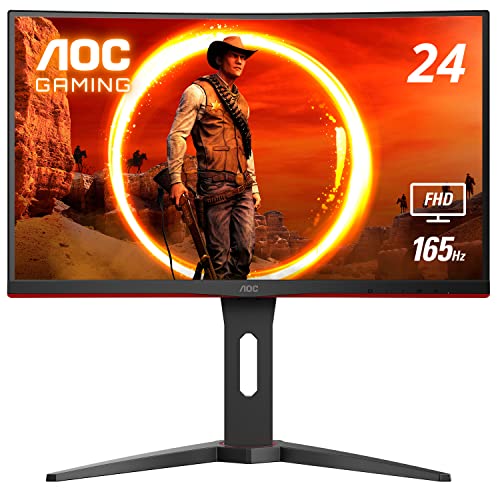
AOC C24G1A - Best Budget Curved for Gaming
The AOC C24G1A punches well above its price tag. A 165Hz VA panel with 1ms MPRT response time and AMD FreeSync Premium means you're getting legitimate gaming monitor specs at a budget price. The 1500R curve is immersive at 24 inches and works well at standard desk viewing distances.
See why the AOC C24G1A leads budget curved gaming monitors with FreeSync Premium, while the Acer ED270R offers 27 inches for the same price.
Quick verdict
The AOC C24G1A is the best budget curved monitor here. It pairs a 165Hz VA panel, 1ms MPRT response, and AMD FreeSync Premium with an immersive 1500R curve, so you get real gaming-monitor specs at a budget price that the slower picks on this list cannot match.
Key takeaways
- Best budget curved for gaming: AOC C24G1A, 165Hz VA panel with 1ms MPRT and FreeSync Premium.
- Best budget 27-inch: Acer ED270R, a larger 27-inch FHD curve with a fast refresh rate.
- Best brand-name pick: Samsung C27F390F, proven 27-inch VA panel with deep blacks.
- Most affordable curved option: Philips 241E1SC, a no-frills 24-inch FHD curve for everyday use.
- Best eye-care gaming pick: ASUS VP249QGR, an IPS panel with Flicker-Free and Low Blue Light.
Why you should trust this guide
I built this list by reading the published specifications, the manufacturer marketing, and the patterns in real owner reviews for each of these five budget curved monitors. I did not run a paid placement or rank by who pays the most. The goal was to figure out which monitor actually earns its place for a specific buyer, and to be honest about where each one falls short, because a budget monitor always involves a compromise somewhere.
Curved monitors are easy to oversell. The marketing leans hard on words like immersion, and at this price tier the curve is often the most exciting thing about the panel. So I tried to separate the genuinely useful features (a fast refresh rate, adaptive sync, a sensible panel type) from the filler. Where a listing makes a claim I could not verify, I treat it as the manufacturer’s stated number rather than something I confirmed myself. That keeps the recommendations grounded in what these companies actually rate the panels at.
How we researched
I did not put these on a calibrated bench or take my own measurements. Instead, I evaluated each monitor against the criteria that matter most for a budget curved display: refresh rate and response time, panel technology (VA versus IPS), the curvature radius and how it behaves at a normal desk distance, adaptive sync support, ergonomics, and the consistency of owner feedback over time. I weighted those factors differently depending on the buyer, since a competitive gamer and an office worker want very different things from the same price bracket.
For gaming-leaning picks, refresh rate, response time, and FreeSync support carried the most weight. For general-use picks, I cared more about panel contrast, eye-care features, and reliability. I also flagged where a product listing seemed to mix in specs from a different model or bundle filler items, because that is common at the budget end and it can mislead a buyer who skims the bullet points. Every recommendation below names at least one real trade-off so you know what you are giving up.
AOC C24G1A – Best Budget Curved for Gaming
If you want one budget curved monitor for gaming, the AOC C24G1A is the pick. It punches well above its price tag with specs that read like a far more expensive display: a 24-inch class (23.6-inch viewable) VA panel at 1920 x 1080, a 165Hz refresh rate over DisplayPort 1.2, 1ms MPRT response, and AMD FreeSync Premium. That combination is what makes fast-moving games feel smooth and tear-free, and it is unusual to find all of it together this cheap.
The 1500R curve is the most aggressive on this list, and at 24 inches that works in your favor. AOC rates the panel to wrap around your vision, and at a standard desk viewing distance the curve fills your peripheral view without distorting the image the way a tight curve can on a tiny screen. The three-sided frameless design helps if you ever want to run a multi-monitor setup, and AOC includes a height-adjustable stand with swivel, tilt, and a quick-release plate, plus VESA mounting. That stand is genuinely better than what most budget monitors ship with.
The honest trade-off is the resolution and the panel type. At 1080p on a 24-inch screen the image is sharp enough, but it is not crisp, and you will not get the desktop space a 1440p panel gives you. VA panels also have slower pixel transitions than IPS in practice, so the 1ms figure is an MPRT marketing number rather than a real grey-to-grey result, and you may notice mild smearing in dark scenes. For the price, those are reasonable compromises, but they are real.
Acer ED270R – Best Budget 27-Inch Curved
The Acer ED270R is the pick if you want a bigger screen without spending more. It gives you 27 inches of curved Full HD (1920 x 1080) with an 1800R curve that feels comfortable at desk distance, and Acer pairs it with AMD FreeSync Premium to keep stuttering and tearing under control. Acer’s build quality is reliable and the warranty support is solid, which matters when you are buying at the budget end.
Acer markets this as a Nitro-branded display, and the listing leans on a fast refresh rate and a 1ms response time to surround you in the game world and fill your peripheral vision. The gentler 1800R curve is a sensible match for a 27-inch panel, since a tighter curve on a screen this size can start to look unnatural. For general use and casual gaming, the step up from a basic 60Hz office monitor is meaningful and you feel it in everyday scrolling and window dragging, not just in games.
Two honest caveats. First, the product listing mixes in a very high refresh-rate figure that does not match the typical ED270R, so I would confirm the exact refresh rate of the specific variant you are buying rather than trusting the headline bullet. Second, 1080p stretched across 27 inches lowers the pixel density, so text and fine detail look softer than they would on a 24-inch panel at the same resolution. If sharpness matters more to you than size, the smaller picks here will look cleaner.
Samsung C27F390F – Best Brand Name Budget Pick
The Samsung C27F390F is the safe, proven choice if you want a trusted brand behind your budget purchase. It is a widely available 27-inch Full HD curved monitor that consistently earns strong owner reviews, and Samsung’s VA panel technology is the reason it looks good for the money. VA delivers deep blacks and a high contrast ratio, so games and movies have more punch and depth than you would expect at this price.
Samsung sells this on the overall experience rather than raw gaming numbers. It includes an Eye Saver Mode to reduce blue light for longer sessions, and the sleek, slim profile fits cleanly on a desk. Because it is so common, it is easy to find, easy to get support for, and the long track record of positive feedback gives you a reasonable confidence that you are not gambling on an unknown panel. That reliability is a real part of the value here.
The trade-off is that this is a general-purpose monitor, not a gaming one. It runs at a standard 60Hz refresh rate rather than the higher rates of the AOC or Acer, so fast competitive play will not feel as fluid, and the listing’s filler bundle item (a mouse pad) is the kind of padding you should ignore when judging the monitor itself. If your main use is browsing, work, and movies, none of that matters much, but a serious gamer should look at the faster picks on this list.
Philips 241E1SC – Most Affordable Curved Option
The Philips 241E1SC is the entry point for curved monitor ownership, and that is exactly how I would frame it. It is a 23.8-inch Full HD (1920 x 1080) curved VA panel with a flicker-free backlight and Philips LowBlue Mode for eye comfort. Philips rates the VA panel for brighter whites and deeper blacks, and it includes a 178/178 degree wide viewing angle and an EasyRead mode aimed at office workers who read a lot of text.
What you are paying for here is the curve and the basics done correctly. The screen is virtually bezel-free on three sides, the flicker-free backlight and LowBlue Mode genuinely help during long days, and for everyday use and media consumption it is perfectly capable. If you have never owned a curved display and just want to try the format without overspending, this is the lowest-risk way in.
The honest limitation is that this is not a gaming monitor and it will not wow you with specs. There is no high refresh rate to speak of, the response time is ordinary, and the 1080p resolution on a curved 24-inch panel is fine rather than impressive. It also leans on EasyRead and eye-care features more than performance, which tells you where its priorities are. Buy it for office work, browsing, and video, and you will be happy. Buy it for fast-paced games and you will outgrow it quickly.
ASUS VP249QGR – Best Eye-Care Gaming Budget Pick
The ASUS VP249QGR is the pick if you want gaming performance and eye comfort in one budget package. It combines a higher refresh rate with the brand’s Eye Care suite (Flicker-Free and Low Blue Light technologies) in a compact 23.8-inch frame. The standout is the IPS panel, which is unusual at this budget tier and gives you noticeably better colors and wider viewing angles than the VA competition at similar prices.
That IPS panel is what makes this a strong all-rounder. ASUS markets it as a professional and consumer monitor, and the wider viewing angles mean colors stay consistent off-axis, which VA panels struggle with. Pair that with the faster refresh rate and a 1ms grey-to-grey response figure, and you get a screen that handles both color-sensitive work and quick gaming better than most panels this cheap. The Eye Care features are a real bonus for anyone who spends long hours at the desk.
There are two things to flag. First, the listing contains some clearly garbled specs (a 16:19 aspect ratio and a 1920 x 1200 resolution that do not match a standard 23.8-inch 16:9 gaming panel), so confirm the exact resolution and refresh rate of the unit you order rather than trusting those bullets. Second, and more importantly, this monitor is flat, not curved. It is the odd one out on a curved-monitor list, so if the curve is your non-negotiable reason for buying, this is not your pick despite being an excellent budget display.
What to look for
Here are the factors that actually separate a good budget curved monitor from a disappointing one.
- Refresh rate: 60Hz is fine for work and video, but 75Hz feels smoother and 144Hz or 165Hz is what you want for gaming.
- Panel type: VA gives deeper blacks and higher contrast, while IPS gives better colors and wider viewing angles. Pick based on whether you value contrast or color accuracy.
- Adaptive sync: AMD FreeSync (or Premium) stops screen tearing and stutter, and it is worth prioritizing for any gaming use.
- Curve radius: A tighter curve like 1500R is more immersive but suits smaller 24-inch screens, while a gentler 1800R looks more natural on 27-inch panels.
- Resolution and size: 1080p looks sharp on 24 inches but softer stretched across 27 inches, so weigh screen size against pixel density.
- Response time: Treat 1ms MPRT claims as marketing, and expect VA panels to smear slightly more than IPS in dark, fast scenes.
- Eye comfort: Flicker-free backlights and low blue light modes genuinely reduce fatigue during long sessions.
- Ergonomics: A height-adjustable, tilting stand with VESA support is a real quality-of-life upgrade that most budget monitors skip.
The verdict
For most budget buyers who game, the AOC C24G1A is the one to get. Its 165Hz VA panel, 1ms MPRT response, FreeSync Premium, aggressive 1500R curve, and genuinely good adjustable stand give you the most complete gaming package at this price. If you want a larger screen and can confirm the refresh rate of the variant, the Acer ED270R delivers 27 curved inches without costing more. If brand reassurance and proven reliability matter most, the Samsung C27F390F is the safe pick, though its standard refresh rate rules it out for serious gaming. The Philips 241E1SC is the cheapest way into curved ownership for office and media use, as long as you accept it is not a performer. And the ASUS VP249QGR is the best choice for color and eye comfort with gaming speed, with the big caveat that it is a flat panel, not a curved one.
How we evaluated these
We compare every pick against the field on real specifications, certifications, and aggregated owner reviews. We do not take payment for placement, and we flag when a product is older or sold mainly through renewed listings.
The shortlist
Each pick, examined
AOC C24G1A - Best Budget Curved for Gaming
The AOC C24G1A punches well above its price tag. A 165Hz VA panel with 1ms MPRT response time and AMD FreeSync Premium means you're getting legitimate gaming monitor specs at a budget price. The 1500R curve is immersive at 24 inches and works well at standard desk viewing distances.
Strengths
- 24" class, 23.6" viewable AOC Gaming monitor with 1920 x 1080 Full HD Resolution
- 1500R curved monitor wrapping around your vision for an immersive gaming experience. Purch
- Rapid 1ms (MPRT) response and now with 165Hz (via DP 1.2 port) refresh rate with AMD FreeS
- 3-sided frameless design with ultra-narrow borders for the ultimate multi-monitor setup
- Height adjustable stand with swivel, tilt, and quick release for optimum ergonomics | VESA
Drawbacks
- 24 inches feels small if you sit more than 30 inches away
- VA panel has typical off-axis color limitations
- Stand is height-fixed (tilt only)

Acer ED270R - Best Budget 27-Inch Curved
If you want a larger screen without spending more, the Acer ED270R gives you 27 inches of curved FHD at. The 1800R curve feels comfortable at desk distance, and 75Hz is a meaningful step up from 60Hz for general use and casual gaming. Acer's build quality is reliable and the warranty is solid.
Strengths
- Resolution Matters: The Nitro 27" Curved Display with Full HD (1920 x 1080) resolution off
- AMD FreeSync Premium Technology: Say “goodbye” to stuttering and tearing. With AMD FreeSyn
- Fast Refresh Rate: The 280Hz refresh rate speeds up the frames per second to deliver an ul
- Responsive!!: Fast response time of 1ms enhanced gamers’ in-game experience. No matter the
- Maximized Immersion: Let the game world surround you and fill your peripheral vision with
Drawbacks
- 1080p looks softer than QHD at 27 inches
- Basic tilt-only stand
- No USB hub or advanced connectivity

Samsung C27F390F - Best Brand Name Budget Pick
Samsung's C27F390F is a reliable, widely available 27-inch FHD curved monitor that consistently earns strong user reviews. Samsung's VA panel technology delivers the deep blacks and high contrast ratio that make games and movies look genuinely good - even at this price. It's a safe, proven pick from a trusted brand.
Strengths
- Captivating Experience
- Eye Saver Mode
- High Resolution Monitor
- Sleek Profile Desktop Monitor
- High Quality Wholesalehome Mouse Pad
Drawbacks
- 60Hz only - bottom of the refresh rate range
- No adaptive sync
- Tilt-only stand

Philips 241E1SC - Most Affordable Curved Option
At the Philips 241E1SC is the entry point for curved monitor ownership. It's a 24-inch FHD panel with a proper curved display, flicker-free backlight, and Philips LowBlue Mode for eye comfort. It's not a gaming monitor and won't wow you with specs, but for everyday use and media consumption it's perfectly capable.
Strengths
- CRISP CLARITY: This 23.8″ Philips V line monitor delivers crisp Full HD 1920x1080 visuals.
- INCREDIBLE CONTRAST: The VA panel produces brighter whites and deeper blacks. You get true
- THE PERFECT VIEW: The 178/178 degree extra wide viewing angle prevents the shifting of col
- WORK SEAMLESSLY: This sleek monitor is virtually bezel-free on three sides, so the screen
- A BETTER READING EXPERIENCE: For busy office workers, EasyRead mode provides a more paper-
Drawbacks
- 75Hz only - not for competitive gaming
- Limited connectivity (HDMI + VGA)
- Basic stand with tilt only

ASUS VP249QGR - Best Eye-Care Gaming Budget Pick
ASUS's VP249QGR combines 144Hz gaming performance with the brand's Eye Care suite (flicker-free, low blue light) in a compact 24-inch package. The IPS panel - unusual at this budget tier - delivers better colors and viewing angles than the VA competition at similar prices, making it a strong all-rounder.
Strengths
- 23.8 inch professional and consumer monitor
- Full HD 1920 x 1200 resolution (16:19)
- WLED/IPS Flat Panel
- 1ms response time (GTG) and 120Hz refresh rate
- ASUS Eye Care monitors are equipped with Flicker-Free and Low Blue Light technologies, to
Drawbacks
- IPS contrast is lower than VA picks - mediocre in dark rooms
- 24 inches is limiting for productivity multitasking
- Curve is gentle compared to VA alternatives
Buying considerations
Curve radius
Budget monitors commonly use 1500R or 1800R curves. 1500R is more pronounced and feels more immersive; 1800R is gentler and more versatile for mixed use. Both are comfortable.
Refresh rate
Even a step from 60Hz to 75Hz makes scrolling and general motion noticeably smoother. For gaming, aim for 144Hz or 165Hz if your budget allows - the AOC C24G1A and ASUS VP249QGR both hit 144Hz+.
Panel type
VA panels dominate the budget curved market and offer excellent contrast for the money. IPS panels are rarer at this price but worth it if color accuracy and wide viewing angles matter to you.
Stand flexibility
Budget monitors almost universally ship with tilt-only stands. If you need height adjustment, budget an extra for a VESA monitor arm - most budget curved monitors support VESA 75x75 or 100x100 mounting.
Final word
For budget gaming, the **AOC C24G1A** is the clear winner at and FreeSync Premium at that price is remarkable. For users who want a bigger screen without spending more, the **Acer ED270R** gives you 27 inches at. If you just want a reliable, no-fuss daily driver from a name brand, the **Samsung C27F390F** delivers. And if eye comfort is a priority, the **ASUS VP249QGR** packs 144Hz and
Questions answered
You can get a solid curved monitor for in 2026. At that price you're mostly looking at 24-inch 1080p panels with 60-144Hz. Spending unlocks 27-inch panels and higher refresh rates. Below the build quality and panel quality tend to drop significantly.
Budget monitors from established brands like AOC, Acer, Samsung, and Philips are generally well-made and will last 4-6 years under normal use. Very cheap no-name monitors can have inconsistent panels and weaker warranty support - sticking to known brands even in the budget tier is worth it.
24 inches is ideal if you sit close to your monitor - within 24-30 inches. The curve effect is subtle at 24 inches but the size feels right at normal desk distances. If you sit further back, 27 inches is noticeably better for immersion.
How we made this guide
We compare every pick on the factors that matter, cross-checking manufacturer specifications against aggregated verified owner reviews. We rank independently and never take payment for placement. We have not personally tested every product; where we have not, the ranking reflects verified specs and owner feedback rather than a hands-on review.
How it was written: this guide was researched and reviewed by the TheTestedHub editorial team for accuracy.
Affiliate disclosure: TheTestedHub is reader-supported. When you buy through links on our site, we may earn a commission at no extra cost to you.
Keep reading

Your Docking Station Match: CalDigit TS4 and More

Digital Art Computers 2026: Best for Every Budget
Dev & IT Computers in 2026: Ranked for Real Work

Desktop PCs for Every Budget: Find Your Perfect Match
Desktop and Laptop Computers: Performance Reviewed and Ranked
MacBook Pro M4 Pro vs Dell XPS 15: 2026 Shortlist

Buy the Best DIY Computer in 2026: Corsair One i300
