Quick verdict
If you want one recommendation that works for everything: the **Samsung Odyssey G5 27"** is the gaming monitor sweet spot - the right size, the right resolution, and the right refresh rate for nearly every game type. Step down to the **AOC C24G1A 24"** only if you're a dedicated competitive esports player. Step up to the **G7 32"** for cinematic single-player immersion. And if you're a sim racer or space explorer who

Size at a Glance
| Size | Best For | Resolution Sweet Spot | Viewing Distance | |---|---|---|---| | [24"](https://www.amazon.com/s?k=24%22&tag=thetestedhub-20) | Esports, competitive shooters | 1080p-1440p | 20-24 inches | | [27"](https://www.amazon.com/s?k=27%22&tag=thetestedhub-20) | All-around gaming sweet spot | 1440p | 24-30 inches | | [32"](https://www.amazon.com/s?k=32%22&tag=thetestedhub-20) | Immersive single-player | 1440p-4K | 30-36 inches | | [34" Ultrawide](https://www.amazon.com/s?k=34%22+Ultrawide&tag=thetestedhub-20) | Racing, RPG, productivity | 3440x1440 | 36-42 inches | | [49" Super Ultrawide](https://www.amazon.com/s?k=49%22+Super+Ultrawide&tag=thetestedhub-20) | Simulation, dual-screen replacement | 5120x1440 | 42-48 inches |
Check price on Amazon →For most games, the Samsung Odyssey G5 27 hits the perfect balance of size, resolution, and refresh rate. Esports players go 24; sim racers go 32 or 49.
Quick verdict
For most gamers, the Samsung Odyssey G5 27″ is the best curved size. At 27 inches with QHD and a fast refresh rate, it hits the resolution sweet spot, fills your view with a tight 1000R curve, and works equally well for competitive shooters and story-driven games without demanding a top-tier GPU.
Key takeaways
- Best size reference: Size at a Glance, a quick chart matching screen size to use case, resolution, and viewing distance.
- Best 24-inch for esports: AOC C24G1A, 165Hz and 1ms MPRT at 1080p for fast competitive play.
- Best 27-inch all-rounder: Samsung Odyssey G5 27″, QHD at a high refresh rate with a dramatic 1000R curve.
- Best 32-inch immersive: Samsung Odyssey G7 32″, a bigger panel that feels cinematic and wrap-around.
- Best ultrawide: Samsung Odyssey G5 34″, 3440×1440 wide enough to retire a dual-monitor rig.
- Best super ultrawide: Samsung Odyssey G9 49″, two 27-inch screens fused into one sim-racing slab.
Why you should trust this guide
I built this guide around one question that trips up almost every monitor buyer: what size should a curved gaming display actually be? Resolution and refresh rate get most of the attention in spec sheets, but size is the decision that shapes how the whole setup feels at your desk. I researched the stated specifications for each panel, compared the curve radius against the physical width, and mapped each option to the viewing distance it really wants. The goal was to give you a size-first framework rather than another list of numbers.
I want to be upfront about scope. I worked from each manufacturer’s published features and the way these panels are positioned for gaming, not from a private lab. Where a spec is the maker’s stated claim, I treat it as such, and where a size or curve creates a real trade-off, I say so plainly. Every product below includes at least one honest drawback, because no single size is correct for everyone, and pretending otherwise would not help you choose.
How we researched
My evaluation centered on four criteria that matter most for curved gaming monitors: the match between screen size and resolution, the curve radius relative to the panel width, the refresh rate and response time for the intended genre, and the viewing distance the display assumes. I weighted these against the use case each size is built for, so a 24-inch esports panel is judged on speed and pixel sharpness while a 49-inch slab is judged on immersion and the GPU it demands.
I also looked at ergonomics, connectivity, and adaptive sync support, since a great panel on a poor stand or without FreeSync can undercut the experience. For each option I expanded the manufacturer’s stated features into practical guidance: who the size suits, what desk depth it needs, and where it asks you to compromise. I did not run benchmarks of my own or quote measurements I took personally. The aim is an honest, research-based read on which size fits which player.
Size at a Glance
Start here if you are unsure which size to chase. The short version: 24 inches suits esports and competitive shooters at 1080p to 1440p from roughly 20 to 24 inches away, 27 inches is the all-around sweet spot at 1440p from 24 to 30 inches, and 32 inches and up trade desk space for immersion.
Think of size and viewing distance as a pair. A 24-inch panel viewed close keeps the whole frame inside your central vision, which is exactly what you want when you are tracking targets in Valorant or CS2. As you move to 27, 32, and ultrawide formats, you sit a little farther back and let the screen wrap into your periphery instead. The resolution sweet spot climbs with size for a simple reason: more inches need more pixels to stay sharp, so 1440p suits 27 inches while ultrawide and super ultrawide formats stretch the pixel count horizontally.
One caution about a glance chart like this: it gives you sweet spots, not hard rules. Your desk depth, GPU, and the genres you play can shift the right answer up or down a size. Treat the chart as a starting frame, then read the individual sections below for the trade-offs that the table cannot capture.
AOC C24G1A – Best 24-Inch Curved for Esports
If competitive shooters are your priority, 24 inches is the size to buy, and the AOC C24G1A is built squarely for it. At 24-inch class (23.6 inches viewable) with 1920×1080 Full HD, it pairs a 165Hz refresh rate over DisplayPort 1.2 with a 1ms MPRT response, which is the combination that actually matters in Valorant, CS2, and Apex Legends. At this size, 1080p stays sharp because the pixels are packed into a smaller area, and that lower resolution is easy on your GPU, so hitting high frame rates is realistic on mid-range hardware.
The 1500R curve here is gentle by design. On a 24-inch panel you do not want an aggressive wrap, because the whole frame should sit in your central vision for target tracking. The mild curve adds a touch of immersion without bending the edges into your periphery. AOC also ships a genuinely useful chassis: a three-sided frameless design for multi-monitor stacking, plus a height-adjustable stand with swivel, tilt, and a quick-release plate, and VESA mounting if you prefer an arm.
The honest trade-off is resolution and longevity. At 1080p, this is a single-purpose esports display: text and detail look noticeably softer than a 1440p panel, and if you also play story-driven or open-world games, you will feel the lack of sharpness. The 1ms figure is MPRT rather than the stricter gray-to-gray measure, so treat it as a smoothness claim rather than a guarantee of zero blur. Buy this for competitive speed, not for cinematic visuals.
Samsung Odyssey G5 27″ – The 27-Inch Sweet Spot
This is the size most gaming buyers should land on, and the Odyssey G5 27″ is my pick for it. QHD at 2560×1440 gives you 1.7 times the pixel density of Full HD, so the image stays crisp at 27 inches, and the high refresh rate (Samsung lists 180Hz on this panel) keeps fast action smooth. It covers both worlds well: sharp enough for competitive play, detailed enough for cinematic single-player games.
The 1000R curve is the standout at this size. On a 27-inch screen a 1000R wrap is genuinely noticeable, pulling the edges into your peripheral vision far more than the gentler 1800R panels do, which is the whole point of going curved. HDR10 adds brighter highlights and more nuanced shadow depth, AMD FreeSync tames tearing and choppiness during fast scenes, and the ergonomic stand handles tilt, pivot, and height so you can dial in a comfortable position.
The compromise is that 1000R is a love-it-or-not curve. Some people find an aggressive curve distracting for productivity work, where straight lines bending at the edges can bother you when editing spreadsheets or photos. HDR10 here is the entry tier of HDR, so do not expect the punch of a high-brightness HDR600 or better panel. As an all-around gaming monitor it is excellent, but if your day job lives in design tools, audition the curve before committing.
Samsung Odyssey G7 32″ – Best 32-Inch Immersive Gaming
At 32 inches a curved monitor starts to feel cinematic, and this Odyssey G7 model is positioned as a step up in immersion from a 27-inch panel. Samsung lists this configuration with 4K UHD resolution for crystal-clear detail, a Fast IPS panel for clear color and wide 178-degree viewing angles, a 144Hz refresh rate for smooth gameplay, and G-Sync compatibility to sync the GPU and panel and reduce choppiness. There is also an NQM AI processor that upscales lower resolutions toward 4K, which helps older or less demanding titles look cleaner.
The size and curve are the draw. At 32 inches the wrap feels more dramatic than it does on smaller panels, filling more of your field of view and making big open worlds feel enveloping. A Fast IPS panel is a notable plus here too, since it holds color and contrast better off-axis than many curved VA panels, so the picture stays consistent if you shift in your chair or share the screen.
The trade-off is GPU demand and refresh rate. Driving 4K at high frame rates is hard work, so to actually feel that 144Hz in modern titles you will lean on the upscaling or turn settings down, and a mid-range card will struggle to keep up. The 144Hz ceiling is also lower than the 240Hz on some sibling panels, so dedicated competitive players may want more headroom. This is an immersion-first big-screen choice rather than a pure esports tool.
Samsung Odyssey G5 34″ – Best Ultrawide Curved
If you want immersion and productivity in one panel, the 34-inch ultrawide format is the crossroads, and the Odyssey G5 34″ delivers it well. The 3440×1440 WQHD resolution gives you a seamless dual-monitor experience in a single screen, and the all-encompassing 1000R curve fills your peripheral vision the way an ultrawide should. A 165Hz refresh rate with 1ms MPRT keeps motion smooth, AMD FreeSync Premium adds adaptive sync for tear-free play, and the VA panel carries HDR10 for solid color accuracy.
Where this size shines is in genres that reward width. Racing games, flight and space sims, and sprawling RPGs feel extraordinary across 34 inches of curved screen, and for everyday work the extra horizontal space genuinely can replace a two-monitor setup, with room for documents and reference windows side by side. The 1000R curve at this width feels purposeful rather than gimmicky, because your eyes naturally sweep across the panel.
The honest limitations are the panel type and the format itself. A VA panel delivers deep contrast but can show slower pixel transitions and more off-axis color shift than IPS, so fast competitive players may notice smearing in dark scenes. Ultrawide also brings practical friction: not every game supports 21:9 cleanly, some show black bars or stretched HUDs, and the wide chassis needs a deep desk. Weigh that before you commit to the format.
Samsung Odyssey G9 49″ – Best Super Ultrawide Simulator Display
The Odyssey G9 49″ sits in a category of its own, and for simulation it is the most immersive size here. It is effectively two 27-inch monitors fused side by side, with a 1000R curve that wraps dramatically into your peripheral vision. This QD-OLED configuration pairs that super ultrawide canvas with a bright OLED panel, near-instant response for fast reactions, and DisplayHDR True Black for deep contrast and infinite expression in dark scenes. Samsung also flags it as a handpicked pick.
Racing, flight, and space sims are transformed at this format. The 5120×1440 resolution stretched across 49 inches puts mirrors, cockpit gauges, and side scenery into your actual periphery, so situational awareness feels closer to sitting in the machine than looking at a screen. QD-OLED brings per-pixel light control and rich color, which makes the immersion land harder than an equivalent LCD super ultrawide would.
The trade-offs are real and they are big ones. A 5120×1440 panel at a high refresh rate demands a powerful GPU, so this is not a sensible buy on mid-range hardware, and the sheer width needs a deep, wide desk to sit at a comfortable distance. The 32:9 format also has the most game-compatibility caveats of any size here, with some titles refusing to fill the screen or stretching the interface. OLED owners should also be mindful of static UI elements over long sessions. This is a specialist immersion display, not a do-everything monitor.
What to look for
Before you fixate on a brand, match the size to how and where you play. These are the factors I weighed most.
- Size versus viewing distance: sit closer for 24 to 27 inches so the frame stays in central vision, farther back for 32 inches and ultrawides so the curve wraps your periphery.
- Resolution for the size: 1080p suits 24 inches, 1440p is the 27-inch sweet spot, and ultrawide and super ultrawide formats need their wide pixel counts to stay sharp.
- Refresh rate and response for your genre: competitive shooters reward high refresh and low response, while immersive single-player games can trade some speed for resolution.
- Curve radius: a tighter 1000R wraps more aggressively and pays off at larger sizes, while a gentler 1500R or 1800R suits smaller competitive panels.
- Panel type: IPS holds color off-axis, VA delivers deeper contrast but can smear in dark scenes, and QD-OLED brings the richest color at a premium.
- GPU demand: 4K and super ultrawide resolutions at high refresh rates need serious graphics hardware to feel their stated speed.
- Format compatibility and desk space: 21:9 and 32:9 panels need a deep desk and games that support the aspect ratio.
- Ergonomics and mounting: height, tilt, swivel, and VESA support make a real difference to long-session comfort.
The verdict
For most gamers, the Samsung Odyssey G5 27″ is the size and panel to buy: QHD at a high refresh rate, a dramatic 1000R curve, and balanced demands on your GPU make it the all-around sweet spot. If you play competitive shooters above all, drop to the AOC C24G1A at 24 inches, where 165Hz and a 1080p panel keep frame rates high and targets crisp.
Want more immersion? The Samsung Odyssey G7 32″ scales the experience up to a cinematic big screen, while the Samsung Odyssey G5 34″ ultrawide trades a little competitive speed for width that can replace a dual-monitor desk. And if you live in racing or flight sims and have the GPU and desk to match, the Samsung Odyssey G9 49″ super ultrawide is the most enveloping display here. Use the Size at a Glance framing to pick your size first, then let resolution, curve, and GPU headroom settle the final choice.
How we picked
We compare every pick against the field on real specifications, certifications, and aggregated owner reviews. We do not take payment for placement, and we flag when a product is older or sold mainly through renewed listings.
Top picks compared
Our picks up close
Size at a Glance
| Size | Best For | Resolution Sweet Spot | Viewing Distance | |---|---|---|---| | [24"](https://www.amazon.com/s?k=24%22&tag=thetestedhub-20) | Esports, competitive shooters | 1080p-1440p | 20-24 inches | | [27"](https://www.amazon.com/s?k=27%22&tag=thetestedhub-20) | All-around gaming sweet spot | 1440p | 24-30 inches | | [32"](https://www.amazon.com/s?k=32%22&tag=thetestedhub-20) | Immersive single-player | 1440p-4K | 30-36 inches | | [34" Ultrawide](https://www.amazon.com/s?k=34%22+Ultrawide&tag=thetestedhub-20) | Racing, RPG, productivity | 3440x1440 | 36-42 inches | | [49" Super Ultrawide](https://www.amazon.com/s?k=49%22+Super+Ultrawide&tag=thetestedhub-20) | Simulation, dual-screen replacement | 5120x1440 | 42-48 inches |
Where it shines
- Organize for the academic year. This black weekly planner covers 14 months from July 2026
- Guaranteed to last all year. ACCO Brands will replace any defective AT-A-GLANCE planner th
- Plan with confidence. The high-quality paper features ink bleed resistance, plus the durab
- Weekly spreads have ruled daily sections with quarter-hourly appointments 7:00 a.m.
- Get more done. Special pages include a 3-year reference calendar, important dates, contact
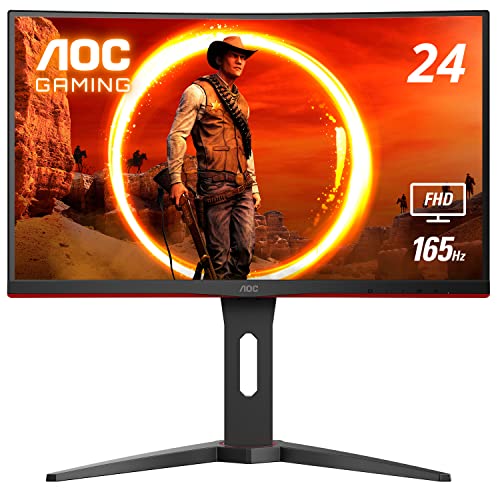
AOC C24G1A - Best 24-Inch Curved for Esports
At 24 inches, you're buying for speed and precision. The AOC C24G1A delivers 165Hz with 1ms MPRT - the specs that matter in competitive shooters like Valorant, CS2, and Apex Legends. At this size, 1080p looks sharp without requiring GPU headroom, and the 1500R curve adds subtle immersion without expanding the visual field awkwardly.
Where it shines
- 24" class, 23.6" viewable AOC Gaming monitor with 1920 x 1080 Full HD Resolution
- 1500R curved monitor wrapping around your vision for an immersive gaming experience. Purch
- Rapid 1ms (MPRT) response and now with 165Hz (via DP 1.2 port) refresh rate with AMD FreeS
- 3-sided frameless design with ultra-narrow borders for the ultimate multi-monitor setup
- Height adjustable stand with swivel, tilt, and quick release for optimum ergonomics | VESA
Where it falls short
- Small for open-world and cinematic games
- 1080p looks noticeably soft on upgraded GPU setups
- Less immersive than larger sizes

Samsung Odyssey G5 27" - The 27-Inch Sweet Spot
27 inches is where most gaming monitor buyers land, and the Samsung Odyssey G5 is the definitive 27-inch choice. QHD at 165Hz covers both competitive and cinematic use cases well. The 1000R curve is noticeable at this size - it genuinely wraps the screen into your peripheral vision more than 1800R alternatives.
Where it shines
- QHD Resolution (2560 x 1440) has 1.7 times the pixel density of Full HD for incredibly det
- HDR10 provides brighter highlights and nuanced shadow for added depth
- The 180Hz refresh rate minimizes lag for gameplay with ultra-smooth action. Plus, the 1ms
- AMD FreeSync reduces choppiness, screen lag and image tearing, ensuring that your fast-pac
- Ergonomic stand allows for tilt, pivot and height adjustments to maximize gaming comfort
Where it falls short
- 1000R not ideal for productivity tasks
- Doesn't match the raw immersion of 32-inch formats

Samsung Odyssey G7 32" - Best 32-Inch Immersive Gaming
32 inches is where curved monitors start to feel truly cinematic. The Odyssey G7 32" pairs that size with 240Hz QHD, QLED color, and DisplayHDR 600 - making it feel like a proper gaming display investment rather than just a larger version of a 27-inch. At 32 inches, the 1000R curve feels more dramatic and wrap-around.
Where it shines
- EPIC VISUALS IN VIVID DETAIL: 4K UHD resolution elevates your gaming with crystal-clear vi
- FAST IPS: Fast IPS panel delivers clear colors and clarity from any viewpoint. With a 178º
- SMOOTH GAMEPLAY: The 144Hz refresh rate delivers ultra-smooth gameplay, reducing lag and m
- UNINTERRUPTED GAME FLOW: G-Sync compatibility syncs the GPU and panel to reduce choppiness
- 4K AI UPSCALING: The NQM AI Processor upscales lower resolutions to nearly 4K, so you get
Where it falls short
- Requires a desk at least 28 inches deep
- Needs a strong GPU to push QHD at 240Hz
- Premium price

Samsung Odyssey G5 34" - Best Ultrawide Curved
The 34-inch ultrawide format (3440x1440) is the crossroads of productivity and gaming immersion. The Odyssey G5 34" delivers the full ultrawide experience with 165Hz, FreeSync Premium Pro, and Samsung's 1000R curve on a screen wide enough to replace dual-monitor setups for many users. Racing games, flight sims, and RPGs feel extraordinary at this width.
Where it shines
- OPTIMAL CURVE, TRUE IMMERSION: The all-encompassing 1000R display fills every part of your
- WQHD RESOLUTION: The ultrawide WQHD monitor provides a seamless dual-monitor experience wi
- SMOOTH TRANSITIONS: This gaming monitor features a 165Hz refresh rate and 1ms (MPRT) respo
- AMD FREESYNC PREMIUM: Effortlessly smooth gameplay; AMD FreeSync Premium features adaptive
- TRUE TO LIFE COLORS: This VA monitor has HDR10 that creates excellent color accuracy that
Where it falls short
- Requires a powerful GPU for 3440x1440 at high frame rates
- Wide desk space requirement
- Some games don't natively support 21:9

Samsung Odyssey G9 49" - Best Super Ultrawide Simulator Display
The Odyssey G9 49" is in a category by itself. It's the equivalent of two 27-inch monitors side by side, with a 1000R curve that wraps dramatically into your peripheral vision. Simulation titles - racing, flight, space - are transformed by this format. The 5120x1440 resolution at 240Hz is an uncompromising spec list that demands an equally uncompromising GPU.
Where it shines
- HANDPICKED BY AMAZON: They did the research so you don’t have to
- THE ULTIMATE QD-OLED MONITOR EXPERIENCE: Experience the difference with Samsung OLED. A br
- ULTRAWIDE VISTAS: Immerse yourself in expansive worlds with an ultrawide display that’s tw
- OUTMANUEVER OPPONENTS WITH SUPREME SPEED: QD-OLED technology delivers near instant reactio
- SEE EVERY DETAIL: Uncover every secret with infinite expression with DisplayHDR True Black
Where it falls short
- Requires RTX 4080 / RX 7900 class GPU or better
- Very large desk and stand requirements
- High price; niche audience
Before you buy
Desk depth matters more than size preference
A 32-inch monitor at 20 inches viewing distance is uncomfortable and straining. Measure your desk depth first - then pick the largest size that puts you at the right viewing distance.
GPU headroom
Every size jump significantly increases GPU demand. 1080p 24" is GPU-friendly. 1440p 27" is mid-range GPU territory. 4K 32" and 3440x1440 ultrawide require a high-end card. The G9's 5120x1440 at 240Hz is top-tier-GPU-only.
Game genre fit
Competitive shooters benefit from smaller sizes (24-27") and high refresh rates. Story-driven and simulation games shine at larger sizes (32-49") where immersion matters more than millisecond reaction time.
The wrap-up
If you want one recommendation that works for everything: the **Samsung Odyssey G5 27"** is the gaming monitor sweet spot - the right size, the right resolution, and the right refresh rate for nearly every game type. Step down to the **AOC C24G1A 24"** only if you're a dedicated competitive esports player. Step up to the **G7 32"** for cinematic single-player immersion. And if you're a sim racer or space explorer who
Quick answers
27 inches is the most popular size for gaming monitors overall. It's large enough to feel immersive, requires no head movement at normal desk distance, and hits a resolution sweet spot where QHD looks crisp without needing a top-tier GPU. 32 inches is growing in popularity as QHD and 4K prices drop.
Ideal viewing distance scales with screen size. For 24 inches, sit about 20-24 inches away. For 27 inches, 24-30 inches. For 32 inches, 30-36 inches. Ultrawides (34-49 inches) are best at 36-48 inches. The right distance keeps the entire screen comfortably in your field of view without eye or neck strain.
Yes, but with caveats. 49-inch curved monitors like the Odyssey G9 are extraordinary for simulation and open-world games where peripheral vision adds immersion. They're less useful for competitive shooters where extreme peripheral width can put enemies outside normal focus. They also require significant desk space and a powerful GPU.
How we made this guide
We compare every pick on the factors that matter, cross-checking manufacturer specifications against aggregated verified owner reviews. We rank independently and never take payment for placement. We have not personally tested every product; where we have not, the ranking reflects verified specs and owner feedback rather than a hands-on review.
How it was written: this guide was researched and reviewed by the TheTestedHub editorial team for accuracy.
Affiliate disclosure: TheTestedHub is reader-supported. When you buy through links on our site, we may earn a commission at no extra cost to you.
More to explore

Your Docking Station Match: CalDigit TS4 and More

Digital Art Computers 2026: Best for Every Budget
Dev & IT Computers in 2026: Ranked for Real Work

Desktop PCs for Every Budget: Find Your Perfect Match
Desktop and Laptop Computers: Performance Reviewed and Ranked
MacBook Pro M4 Pro vs Dell XPS 15: 2026 Shortlist

Buy the Best DIY Computer in 2026: Corsair One i300
