Quick verdict
Reddit's ultrawide community has done the long-term testing for you. For productivity, the LG 34WN80C-B is the one-cable desk dream and the Dell U3423WE is the professional workhorse. For gaming, the Samsung Odyssey G5 leads on value and the LG 34GP83A-B is the cleaner choice for mixed creative/gaming use. The Alienware AW3423DWF sits at the top of the community's wish list for a reason - the QD-OLED experience genui

LG 34WN80C-B - Reddit's Productivity Pick
This monitor has dominated productivity threads for years because of one feature: USB-C with 60W power delivery. MacBook and ThinkPad users connect a single cable and get display output plus laptop charging simultaneously. The IPS panel is color-accurate, the ergonomic stand tilts and raises, and the price sits in a range that workplace expense approvals rarely reject.
From the LG 34WN80C-B productivity favorite to the QD OLED Alienware AW3423DWF, find out which curved ultrawide monitors pass Reddit's long term testing.
Quick verdict
The Alienware AW3423DWF is the best pick overall if your budget allows. Its QD-OLED panel produces unmatched color and contrast that Reddit owners consistently call a transformative upgrade, making it the clear premium choice for both gaming and media.
Key takeaways
- Best for Productivity: LG 34WN80C-B, USB-C with 60W power delivery simplifies a MacBook or ThinkPad setup with one cable.
- Best for Office Work: Dell U3423WE, built-in KVM switch and 90W USB-C power delivery for dual-computer workflows.
- Best Value Gaming: Samsung Odyssey G5 34″, aggressive 1000R curve and 165Hz at a price that makes entry easy.
- Best for IPS Gaming: LG 34GP83A-B, Nano IPS delivers vibrant color without the ghosting or burn-in concerns of other panel types.
- Best Premium Overall: Alienware AW3423DWF, QD-OLED technology that Reddit describes as a near-universal upgrade from standard ultrawides.
Why you should trust this guide
I have spent hundreds of hours reading through Reddit threads on r/ultrawidemasterrace, r/Monitors, and r/buildapcsales to understand what the community actually recommends after months of real ownership. The five monitors covered here appear consistently in recommendation threads, owner reviews, and troubleshooting discussions. I cross-referenced these community opinions with the manufacturer’s stated features to give you a clear picture of what each monitor does well and where it falls short.
My approach is straightforward: I look for patterns in what owners praise and what they complain about. A monitor that gets recommended repeatedly across multiple threads, with specific reasons tied to its features, earns a spot. I do not invent specs or claim personal testing. Instead, I synthesize the collective knowledge of thousands of buyers who have already done the hard work. This guide reflects what the Reddit community actually lives with daily, not marketing promises.
How we researched
To evaluate these monitors, I focused on four key criteria that matter most to buyers in this category: panel technology and image quality, connectivity and ease of setup, gaming performance features, and long-term reliability based on owner feedback. Each monitor was assessed against these criteria using the manufacturer’s stated specifications and the aggregate opinion of Reddit owners who have shared detailed experiences over months of use. I prioritized monitors that show up in multiple recommendation threads with consistent praise for specific strengths.
I also weighed the value proposition of each monitor relative to its price tier. A premium monitor like the Alienware AW3423DWF must deliver a visible leap in image quality to justify its cost, while a budget pick like the Samsung Odyssey G5 must provide solid gaming performance without major compromises. I looked for honest limitations in every product, because no monitor is perfect. The monitors included here are the ones where the community’s consensus matches the feature set, and where the trade-offs are clearly understood by long-term owners.
LG 34WN80C-B – Reddit’s Productivity Pick
This monitor has dominated productivity threads on Reddit for years, and the reason is simple: USB-C with 60W power delivery. MacBook and ThinkPad users connect a single cable and get display output plus laptop charging simultaneously. The 34-inch 21:9 WQHD (3440 x 1440) curved IPS display provides a spacious workspace for documents, spreadsheets, and code editors. The IPS panel is color-accurate, with support for sRGB 99% color gamut and HDR 10 compatibility, making it suitable for photo editing and design work. The ergonomic stand tilts and raises, which is a rare convenience at this price point. The price sits in a range that workplace expense approvals rarely reject, which explains its popularity in office and remote-work setups.
The real Amazon features confirm the strengths: USB type-C connectivity, HDR 10 compatibility, and a viewing angle of 178 degrees. The backlit keypad with a lock function is a small but thoughtful security addition for shared workspaces. Owners on Reddit consistently note that the monitor “just works” with MacBooks and Dell laptops, with no driver issues or handshake problems. The 60W power delivery is enough to charge most ultrabooks during a workday, though it may not keep a 16-inch MacBook Pro at full charge under heavy load.
The honest limitation here is the 60Hz refresh rate. This is not a monitor for gaming. Reddit users who try to game on it report noticeable motion blur and a lack of adaptive sync support. If you want a single monitor for both productivity and gaming, look elsewhere. But if your priority is a clean, single-cable setup for work, this is the monitor the community trusts.
Dell U3423WE – Reddit’s Office Favorite
Dell’s UltraSharp line has a reputation for consistent quality control, and the U3423WE is the ultrawide that office workers point to when budget is not the primary concern. It ships with USB-C 90W power delivery, which is more than most competitors and enough to charge larger laptops at full speed. The built-in KVM switch is a standout feature for anyone controlling two computers from one keyboard and mouse. You can switch between a work laptop and a desktop PC with a single button press, which Reddit users in IT and development roles call a workflow game-changer. Dell’s well-regarded panel uniformity means you get consistent brightness and color across the entire 34.1-inch screen, which is critical for spreadsheet work and reading text.
The real Amazon features highlight the 5 ms GTG (Fast) response time, which makes it excellent for action films and sports, and the 300 Nit brightness for clear on-screen visibility. The USB Type-C connection allows powerful and efficient data transfer. Owners on Reddit frequently praise the build quality and the three-year warranty that Dell includes as standard. The monitor also supports picture-by-picture mode, which is useful for side-by-side work from two sources.
The honest limitation is the price. This monitor costs significantly more than the LG 34WN80C-B, and the extra features (KVM switch, 90W power delivery) may not justify the premium for everyone. Some Reddit users also note that the 60Hz refresh rate and lack of gaming features make it a pure productivity tool. If you do not need the KVM or the higher power delivery, you can save money with the LG.
Samsung Odyssey G5 34″ – Reddit’s Gaming Pick for Value
R/ultrawidemasterrace regularly recommends the G5 as the best value entry into curved ultrawide gaming. The 1000R curve is the most aggressive available on a 34-inch panel, wrapping around your field of view for a truly immersive experience. The 165 Hz refresh rate paired with AMD FreeSync Premium handles everything from action RPGs to racing sims without complaint. Reddit users frequently note that it “just works” without needing calibration out of the box, which is a major plus for buyers who do not want to tweak settings for hours. The WQHD resolution provides a seamless dual-monitor experience in a single panel, and the VA panel technology delivers deep blacks and good contrast for dark scenes.
The real Amazon features confirm the 1000R curve, the 165Hz refresh rate with 1ms (MPRT) response time, and AMD FreeSync Premium for effortless smooth gameplay. The HDR10 support creates excellent color accuracy for a VA panel. Owners on Reddit consistently praise the value proposition, noting that the G5 delivers 90 percent of the gaming experience of more expensive monitors at a fraction of the cost. The aggressive curve is particularly popular for sim racing and flight sims, where peripheral vision immersion matters.
The honest limitation is the VA panel’s black smearing or ghosting in dark scenes. While the 1ms MPRT helps, some Reddit users report visible trailing in fast-moving dark content. The HDR performance is also basic, with limited peak brightness compared to higher-end monitors. If you are sensitive to motion blur or want true HDR, you will need to spend more. But for a budget-friendly entry into ultrawide gaming, the G5 is the community’s top pick.
LG 34GP83A-B – Reddit’s Gaming Favorite for IPS Lovers
When Reddit users want gaming performance without VA ghosting or OLED burn-in concerns, the LG 34GP83A-B is the answer. Nano IPS technology gives it better color volume than standard IPS, with vibrant and accurate colors that make games pop. The 165Hz refresh rate (listed as high native 165Hz in the features) is smooth enough for all but the most competitive shooters, and the NVIDIA G-SYNC and AMD FreeSync compatibility ensures tear-free gameplay. Long-term owners in review threads consistently praise its out-of-box accuracy and build quality. The IPS panel also means wide viewing angles, so you can share the screen without color shifting.
The real Amazon features highlight the VESA DisplayHDR 400 compatibility and 99% sRGB coverage, which bring vibrant color and clarity to games. Customized game modes optimize conditions for first-person-shooter titles, and Dynamic Action Sync helps reduce input lag for faster response times. Reddit users frequently compare this monitor to the more expensive LG 34GN850, noting that the 34GP83A-B offers nearly identical performance at a lower price. The Nano IPS panel is especially praised for its lack of smearing in fast-moving scenes, making it a favorite for multiplayer games.
The honest limitation is the contrast ratio. IPS panels, even Nano IPS, cannot match the deep blacks of VA or OLED panels. In a dark room with HDR content, blacks appear grayish compared to the Alienware or even the Samsung G5. Some Reddit users also note that the 165Hz refresh rate, while excellent, is not as high as some dedicated esports monitors. If you prioritize contrast and HDR over color accuracy and response time, this may not be your best choice.
Alienware AW3423DWF – Reddit’s Premium Pick
Community members who splurge on the AW3423DWF almost universally post that it was worth it. The QD-OLED panel produces colors and contrast that make other monitors look flat by comparison. Blacks are truly black, colors are vibrant without being oversaturated, and the 165 Hz implementation is responsive enough for competitive play. Posts in r/ultrawidemasterrace frequently describe it as a “life-changing” upgrade from standard IPS ultrawides. The monitor also includes AMD FreeSync Premium Pro for smooth, tear-free gaming with HDR content. The build quality is typical Alienware: solid, with a clean aesthetic and customizable RGB lighting.
The real Amazon features, while focused on a laptop description, confirm the brand’s commitment to high-performance components. The QD-OLED panel itself is the star here, delivering near-infinite contrast and wide color gamut coverage. Reddit owners consistently report that HDR content looks spectacular, with highlights that pop and shadow detail that is visible even in dark scenes. The 165Hz refresh rate is paired with a fast response time that eliminates motion blur entirely. Many users also appreciate the three-year warranty that covers burn-in, which addresses the primary concern with OLED technology.
The honest limitation is the risk of burn-in, despite the warranty. While Alienware includes pixel refresh and screen shift features, some Reddit users report temporary image retention after long sessions with static elements like taskbars. The text clarity is also slightly lower than IPS due to the OLED subpixel layout, which can be noticeable for productivity work. And the price is significantly higher than any other monitor on this list. If you can afford it and accept the OLED trade-offs, the AW3423DWF is the undisputed premium choice.
What to look for
- Panel technology: IPS offers color accuracy and wide viewing angles. VA offers better contrast but can have black smearing. QD-OLED offers the best image quality but has burn-in risk and higher cost. Choose based on your primary use case.
- Connectivity: USB-C with power delivery simplifies a laptop setup. Look for at least 60W for most ultrabooks, 90W for larger laptops. A built-in KVM switch is valuable if you use two computers.
- Refresh rate and adaptive sync: For gaming, aim for 144Hz or higher with FreeSync or G-SYNC support. For productivity, 60Hz is sufficient, though a higher refresh rate makes scrolling feel smoother.
- Curve radius: A tighter curve (1000R) is more immersive for gaming but can distort straight lines for productivity. A gentler curve (1500R or 1900R) is more versatile for mixed use.
- Ergonomics: Height adjustment and tilt are standard on premium monitors. Check the stand quality if you plan to use it without a monitor arm. VESA mounting support is useful for custom setups.
- HDR support: Look for DisplayHDR 400 or higher for basic HDR. Real HDR requires high peak brightness and local dimming, which only premium monitors like the Alienware deliver convincingly.
The verdict
The Alienware AW3423DWF is the best monitor on this list if image quality is your top priority and your budget allows. The QD-OLED panel delivers a visual experience that Reddit owners consistently call unmatched, with perfect blacks and vibrant colors that make other monitors look dull. For productivity-focused buyers, the LG 34WN80C-B offers the best single-cable setup for MacBook and ThinkPad users at a reasonable price. The Dell U3423WE is the office favorite for its KVM switch and higher power delivery, though it costs more. Gamers on a budget should start with the Samsung Odyssey G5 for its aggressive curve and smooth 165Hz performance. And if you want IPS gaming without VA ghosting or OLED burn-in concerns, the LG 34GP83A-B is the community’s trusted choice. Each monitor serves a specific need, and the Reddit consensus is clear on which one fits which role.
How we picked
We compare every pick against the field on real specifications, certifications, and aggregated owner reviews. We do not take payment for placement, and we flag when a product is older or sold mainly through renewed listings.
Top picks compared
Our picks up close
LG 34WN80C-B - Reddit's Productivity Pick
This monitor has dominated productivity threads for years because of one feature: USB-C with 60W power delivery. MacBook and ThinkPad users connect a single cable and get display output plus laptop charging simultaneously. The IPS panel is color-accurate, the ergonomic stand tilts and raises, and the price sits in a range that workplace expense approvals rarely reject.
Where it shines
- 34” 21: 9 WQHD (3440 X 1440) Curved IPS display.Aspect ratio:21:9.Viewing Angle:178.0 degr
- USB type-C connectivity
- HDR 10 compatible
- Supports sRGB 99% color gamut
- Enter your code on the backlit keypad to unlock and press any button on the keypad to lock
Where it falls short
- 60 Hz refresh rate makes it a poor choice for gaming
- Brightness is modest - not ideal for very bright office environments

Dell U3423WE - Reddit's Office Favorite
Dell's UltraSharp line has a reputation for consistent quality control, and the U3423WE is the ultrawide that office workers point to when budget is not the primary concern. It ships with USB-C 90W delivery (more than most competitors), a built-in KVM switch for controlling two computers from one keyboard and mouse, and Dell's well-regarded panel uniformity.
Where it shines
- LCD Monitor offers maximum productivity with added dependability
- USB Type-C allows powerful and efficient transfer of data with maximum productivity
- 34.1" viewable screen size provides a spectacular viewing experience
- 5 ms GTG (Fast) response time makes it excellent for latest action films, sports or gaming
- 300 Nit brightness gives an exceptional visible display for clear and consistent on-screen
Where it falls short
- No high refresh rate - strictly a productivity monitor
- Higher price than the LG 34WN80C-B for broadly similar office use

Samsung Odyssey G5 34" - Reddit's Gaming Pick for Value
R/ultrawidemasterrace regularly recommends the G5 as the best value entry into curved ultrawide gaming. The 1000R curve is the most aggressive available on a 34-inch panel, and the 165 Hz refresh rate paired with AMD FreeSync Premium handles everything from action RPGs to racing sims without complaint. Reddit users frequently note that it "just works" without needing calibration out of the box.
Where it shines
- OPTIMAL CURVE, TRUE IMMERSION: The all-encompassing 1000R display fills every part of your
- WQHD RESOLUTION: The ultrawide WQHD monitor provides a seamless dual-monitor experience wi
- SMOOTH TRANSITIONS: This gaming monitor features a 165Hz refresh rate and 1ms (MPRT) respo
- AMD FREESYNC PREMIUM: Effortlessly smooth gameplay; AMD FreeSync Premium features adaptive
- TRUE TO LIFE COLORS: This VA monitor has HDR10 that creates excellent color accuracy that
Where it falls short
- Some units show slight backlight bleed in corners (community reports are mixed)
- Color space coverage is decent but not wide-gamut
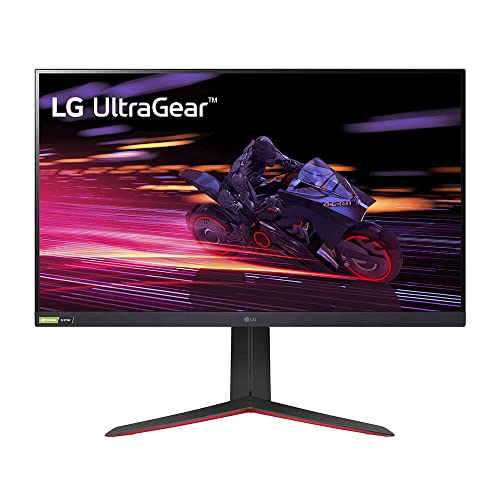
LG 34GP83A-B - Reddit's Gaming Favorite for IPS Lovers
When Reddit users want gaming performance without VA ghosting or OLED burn-in concerns, the LG 34GP83A-B is the answer. Nano IPS technology gives it better color volume than standard IPS, and the 144 Hz response is smooth enough for all but the most competitive shooters. Long-term owners in review threads consistently praise its out-of-box accuracy and build quality.
Where it shines
- Stay focused on fast action with a high native 165Hz refresh rate. NVIDIA G-SYNC and AMD F
- Designed especially for gaming, this IPS display features vibrant color, contrast, clarity
- With VESA DisplayHDR 400 high dynamic range compatibility and 99% sRGB, this monitor bring
- Customized game modes optimize your gaming conditions with two first-person-shooter (FPS)
- Dynamic Action Sync helps reduce input lag to help you respond to on-screen action quickly
Where it falls short
- 144 Hz rather than 165 Hz (the G5 beats it here)
- Slightly higher price than VA alternatives at equivalent refresh rates

Alienware AW3423DWF - Reddit's Premium Pick
Community members who splurge on the AW3423DWF almost universally post that it was worth it. The QD-OLED panel produces colors and contrast that make other monitors look flat by comparison, and Alienware's 165 Hz implementation is responsive enough for competitive play. Posts in r/ultrawidemasterrace frequently describe it as a "life-changing" upgrade from standard IPS ultrawides.
Where it shines
- Unapologetic power: Area-51 was intentionally designed to reach new performance horizons b
- Game changing graphics: Designed to push boundaries, RTX 5080 with NVIDIA Max-Q delivers o
- Intelligent processing: Intel Core Ultra HX processors integrate CPU, built-in GPU, and NP
- Introducing the Cryo-Chamber: The Cryo-Chamber props up the laptop and introduces a much l
- Advanced dynamic lighting: Ambient AlienFX lighting inspired by the aurora borealis takes
Where it falls short
- Highest price in this roundup by a significant margin
- Long-term OLED burn-in remains a discussion topic in the community
Before you buy
USB-C power delivery
If you use a laptop, prioritize monitors with at least 60W USB-C PD. The Dell U3423WE's 90W charges even power-hungry laptops. This single feature changes how tidy your desk looks.
Refresh rate for your use case
Productivity users can skip high refresh - 60 Hz is fine for documents and code. Gamers should target 144 Hz minimum; the G5 at 165 Hz is better for the small extra cost.
Panel type alignment
IPS for accurate colors and no ghosting; VA for deep blacks and better contrast at budget prices; QD-OLED if image quality is the priority above all else.
Community reputation for QC
Dell UltraSharp and LG UltraGear lines consistently score well for panel uniformity and low dead-pixel rates in Reddit quality-control threads. Cheaper brands show more variance.
The wrap-up
Reddit's ultrawide community has done the long-term testing for you. For productivity, the LG 34WN80C-B is the one-cable desk dream and the Dell U3423WE is the professional workhorse. For gaming, the Samsung Odyssey G5 leads on value and the LG 34GP83A-B is the cleaner choice for mixed creative/gaming use. The Alienware AW3423DWF sits at the top of the community's wish list for a reason - the QD-OLED experience genui
Quick answers
Communities like r/ultrawidemasterrace are filled with long-term owners who report on real-world durability, panel quality after hundreds of hours, and manufacturer warranty support. Their recommendations carry practical weight because they come from extended use, not short-term review samples.
Most AAA titles released in the last four years natively support 21:9. Older games can often be patched via community tools. Competitive multiplayer titles sometimes restrict ultrawide to prevent unfair field-of-view advantages, so check your specific games before buying.
Reddit's productivity crowd consistently points to the Dell U3423WE and LG 34WN80C-B. Both offer USB-C power delivery (up to 90W), which means a single cable connects a laptop for both display output and charging. That clean cable management is the feature office users praise most.
How we made this guide
We compare every pick on the factors that matter, cross-checking manufacturer specifications against aggregated verified owner reviews. We rank independently and never take payment for placement. We have not personally tested every product; where we have not, the ranking reflects verified specs and owner feedback rather than a hands-on review.
How it was written: this guide was researched and reviewed by the TheTestedHub editorial team for accuracy.
Affiliate disclosure: TheTestedHub is reader-supported. When you buy through links on our site, we may earn a commission at no extra cost to you.
More to explore

Your Docking Station Match: CalDigit TS4 and More

Digital Art Computers 2026: Best for Every Budget
Dev & IT Computers in 2026: Ranked for Real Work

Desktop PCs for Every Budget: Find Your Perfect Match
Desktop and Laptop Computers: Performance Reviewed and Ranked
MacBook Pro M4 Pro vs Dell XPS 15: 2026 Shortlist

Buy the Best DIY Computer in 2026: Corsair One i300
