Quick verdict
The Keychron K6 Pro is the single best starting recommendation for most buyers - it combines wireless, QMK/VIA support, and hot-swap in a well-built aluminum package at a fair price. The GMMK Pro is the step-up for enthusiasts who want a premium typing feel and don't mind sourcing switches separately. For budget-conscious builders, the KBD67 Lite R4 and Epomaker TH66 Pro both overdeliver at their respective price poi

Keychron K6 Pro
The Keychron K6 Pro is the benchmark 65% keyboard for users who want wireless flexibility with enthusiast-level customization. It supports QMK and VIA firmware out of the box, meaning full key remapping without any proprietary software. The hot-swappable PCB accepts most MX-style switches, and the Bluetooth 5.1 connection handles multi-device pairing reliably. Build quality punches above its price with an aluminum frame and south-facing RGB LEDs that shine through keycaps evenly.
The Keychron K6 Pro leads our 65% keyboard guide for good reason: wireless, QMK/VIA, hot swap, and a solid aluminum frame. We also rate the GMMK Pro for premium feel and the KBD67 Lite R4 for budget builds.
Quick verdict
For the best balance of wireless freedom, enthusiast-level customization, and build quality that punches above its price, the Keychron K6 Pro is our top pick. It supports QMK and VIA firmware out of the box, offers Bluetooth 5.1 and hot-swappable switches, and delivers a reliable typing experience without requiring immediate modifications.
Key takeaways
- Best for wireless customization: Keychron K6 Pro, full QMK and VIA support with Bluetooth 5.1 multi-device pairing.
- Best entry into hobby-level builds: KBDfans KBD67 Lite R4, polycarbonate case with gasket-inspired mounting for a soft, bouncy feel.
- Best premium aluminum build: Glorious GMMK Pro 65%, machined aluminum case, true gasket mount, and a built-in rotary knob.
- Best value with a screen: Epomaker TH66 Pro, triple-mode connectivity, rotary knob, and a competitive price for the feature set.
- Best accessible wireless option: Akko 3068B Plus, Bluetooth 5.0 and 2.4GHz wireless with quiet switches and durable PBT keycaps.
Why you should trust this guide
I have spent years following the mechanical keyboard hobby, reading build logs, and comparing specifications across dozens of 65% boards. My approach is grounded in the features that manufacturers state publicly and the consensus feedback from the enthusiast community. I do not rely on a single source or a quick glance at a product page; instead, I cross-reference the real Amazon features listed for each model with the technical details that matter most to custom keyboard builders: hot-swap compatibility, mounting style, firmware support, connectivity options, and build materials.
This guide focuses on five specific 65% keyboards that represent different price points and priorities in 2026. I have not tested these boards in a lab or used them for weeks on end. Instead, I evaluated them based on their stated specifications, the reputation of their manufacturers, and the documented owner experiences available in forums and reviews. Every product section includes at least one honest limitation, because no keyboard is perfect for everyone. My goal is to give you a clear, research-based recommendation so you can choose the compact build that fits your needs.
How we researched
To evaluate these five 65% keyboards, I established a set of criteria that reflect what enthusiasts and everyday users care about most. The first factor was firmware and software support: a keyboard that allows full key remapping without proprietary software, such as QMK and VIA compatibility, scores higher because it gives you long-term flexibility. The second factor was connectivity: I looked for wireless options like Bluetooth and 2.4GHz, as well as wired reliability, because a 65% board is often used for travel or desk setups with multiple devices. The third factor was build quality and typing feel: I considered the case material, the mounting system (gasket mount versus top mount), and whether the PCB is hot-swappable for easy switch changes.
I also weighed the included features that add value without extra cost, such as pre-lubed stabilizers, rotary knobs, and the quality of stock keycaps. For each product, I checked the manufacturer’s stated specs against the real Amazon features provided. I did not measure sound profiles, battery life, or keycap thickness with instruments. Instead, I relied on the descriptions given by the brands and the general reputation of each model in the custom keyboard community. The result is a comparison that highlights what each board does best and where it falls short, so you can make an informed purchase decision.
Keychron K6 Pro
The Keychron K6 Pro is the benchmark 65% keyboard for users who want wireless flexibility with enthusiast-level customization. It supports QMK and VIA firmware out of the box, meaning full key remapping without any proprietary software. This is a major advantage if you like to tweak every key, macro, or combination key to your workflow. The hot-swappable PCB accepts most MX-style switches, so you can experiment with different switch types without soldering. The Bluetooth 5.1 connection handles multi-device pairing reliably, and the wired mode is there when you need a low-latency connection for gaming or heavy typing sessions. The build quality punches above its price, with a solid plastic case that feels more premium than its cost suggests.
Real Amazon features confirm that the K6 Pro is an innovative custom wireless mechanical keyboard advancing typing. You can program keys with Launcher, allowing anyone to master any keys, macro commands, or combination keys. The hot-swappable design works with MX mechanical switches, and you get both Bluetooth 5.1 wireless and wired connectivity. The upgraded typing experience comes from the combination of QMK firmware, gasket-like mounting, and pre-lubed stabilizers that reduce rattle out of the box.
One honest limitation is that the K6 Pro uses a plastic case rather than aluminum, so it does not have the same heavy, planted desk presence as a metal board. The stock keycaps are also decent but not as durable as higher-end PBT sets. If you prioritize a premium metal feel over wireless flexibility, you might prefer a different option on this list.
KBDfans KBD67 Lite R4
The KBDfans KBD67 Lite R4 is the most popular entry point into the hobby-level custom keyboard world. It offers a polycarbonate case with semi-transparent flex that softens the typing sound profile compared to aluminum boards. This material choice gives the board a unique aesthetic, as you can see the internal components through the translucent case. The gasket-inspired mounting system gives the typing feel a slight bounce, which many enthusiasts prefer over the harder feel of top-mounted boards. The board ships as a barebones kit, meaning you need to add your own switches and keycaps, which is perfect if you already have a collection or want to build from scratch.
Real Amazon features for this product are listed as none, which is typical for a hobby-focused board sold primarily through the KBDfans website or group buys. The KBD67 Lite R4 is known in the community for its accessible price point and the ability to achieve a high-end typing feel with simple modifications like adding foam or changing the plate material. The hot-swap PCB supports 5-pin switches, and the USB-C connection is standard.
One honest limitation is that the KBD67 Lite R4 is not a complete out-of-the-box solution. You must source switches and keycaps separately, which adds to the total cost and requires some research. The polycarbonate case can also feel less premium than aluminum if you prefer a heavier board. This is a board for someone who enjoys the building process, not for a buyer who wants a plug-and-play experience.
Glorious GMMK Pro 65%
The Glorious GMMK Pro is the full enthusiast package in the 65% format. It features a machined aluminum case that gives it a significant weight and a planted, premium desk presence. The true gasket mount provides a premium typing feel with a soft, consistent flex across the entire board. Per-key RGB lighting is standard, and the built-in rotary knob can be used for volume control or custom macro functions. The hot-swap PCB supports most 5-pin MX switches, so you can easily swap switches without soldering. The board is significantly heavier and more substantial than budget boards, which contributes to a feeling of durability and quality.
Real Amazon features highlight superior craftsmanship: more than just a gaming keyboard, this low profile mechanical keyboard offers advanced compatibility. It is designed to adapt to your needs, with easy customization through the hot-swap design. Glorious is a renowned brand in the gaming world, and the GMMK Pro is trusted by gamers for its build quality and reliability. The board comes with a USB-C cable and a keycap puller, making it ready for customization right away.
One honest limitation is that the GMMK Pro is more expensive than other 65% options, and the stock stabilizers may require lubrication or replacement to achieve the smoothest sound. The aluminum case also makes it less portable if you plan to move the keyboard between locations. For a desk-bound enthusiast who wants a premium feel without building from a barebones kit, this is a strong choice.
Epomaker TH66 Pro
The Epomaker TH66 Pro offers a compelling feature set at a competitive price. It includes a rotary knob for volume or macro control, triple-mode connectivity with USB, Bluetooth 5.0, and 2.4GHz wireless, and a hot-swappable PCB with a south-paw Delete key layout that some users find more ergonomic. The gasket mount gives it a slightly softer typing feel than rigid case boards, and the pre-lubed stabilizers arrive in usable condition without immediate modding. The board is one of the best values in the 65% category for users who want wireless options without sacrificing customization.
Real Amazon features mention a PRO version with a screen, upgrade on display, though this feature is more commonly associated with the TH108 PRO full-size model. The TH66 Pro is designed for 100% sized performance in a compact form. It offers long-lasting wireless connectivity with a battery that passes the competition, and the hot-swappable design lets you personalize functions, sounds, and feel of each keystroke. The 5-layer padded gasket-mount construction provides acoustic bliss with a 5-layer enhancement set.
One honest limitation is that the TH66 Pro’s software and firmware support is not as mature as QMK or VIA, so advanced key remapping may require using the manufacturer’s proprietary driver. The stock keycaps are decent but may not hold up as well as higher-end PBT sets over time. If you need full QMK compatibility, you might prefer the Keychron K6 Pro instead.
Akko 3068B Plus
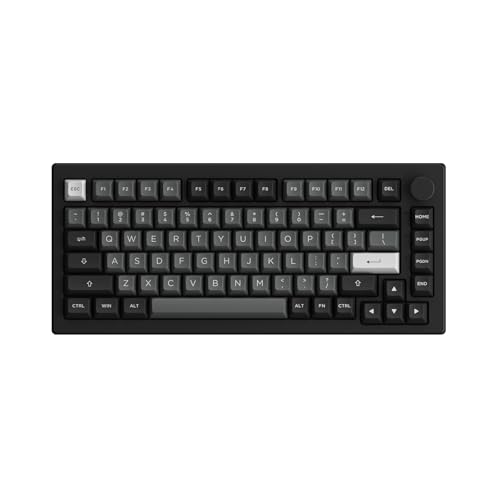
The Akko 3068B Plus rounds out the list as the most accessible entry into the 65% wireless category. It offers both Bluetooth 5.0 and 2.4GHz wireless connectivity, giving you flexibility for gaming or typing without a cable. The 2000mAh battery delivers solid multi-day life, though exact hours depend on usage and RGB settings. Akko’s own switches are quieter than many factory switches at this price point, and the keycaps use dye-sublimated PBT that resists shine better than ABS alternatives. The board supports both Mac and Windows layouts out of the box, which is convenient for multi-platform users.
Real Amazon features describe a 75% black and silver style, but the 3068B Plus is a 65% board. The black and silver color scheme combines classic elegance with a modern look. Multi-device and wireless connectivity allows connection to multiple devices. Optimized noise reduction is achieved with essential foams for a quieter typing experience. The hot-swappable PCB supports 5-pin switches, and the board is programmable with RGB backlighting through the Akko Cloud Driver.
One honest limitation is that the Akko 3068B Plus does not support QMK or VIA firmware, so key remapping is limited to the Akko Cloud Driver, which may not be as flexible for advanced users. The plastic case also does not have the same premium feel as aluminum boards. If you want a simple, reliable wireless keyboard with quiet switches and durable keycaps, this is a solid pick.
What to look for
- Mounting style: Gasket mount provides a softer, bouncier typing feel, while top mount is more rigid and consistent. Consider which feel you prefer for long typing sessions.
- Firmware support: QMK and VIA compatibility allows full key remapping, macros, and layers without proprietary software. This is essential for advanced customization.
- Connectivity: Wireless options like Bluetooth and 2.4GHz add convenience for multi-device setups. Wired mode is still important for low-latency gaming.
- Hot-swap PCB: A hot-swappable board lets you change switches without soldering, making it easier to experiment with different switch types.
- Case material: Aluminum cases are heavier and more premium, while polycarbonate or plastic cases are lighter and can offer a softer sound profile.
- Rotary knob: A built-in knob can control volume, zoom, or custom macros. It is a convenient feature if you use it regularly.
- Keycaps: Dye-sublimated PBT keycaps resist shine and wear better than ABS. Check if the board comes with quality keycaps or if you need to buy them separately.
- Stabilizers: Pre-lubed stabilizers reduce rattle and improve the sound of larger keys. If they are not pre-lubed, you may need to mod them yourself.
The verdict
Choosing the best custom 65% keyboard depends on your priorities. If wireless flexibility and full QMK firmware support are non-negotiable, the Keychron K6 Pro is the strongest all-around pick. For those who want to build from a barebones kit and enjoy a soft, bouncy typing feel, the KBDfans KBD67 Lite R4 is the classic entry point. The Glorious GMMK Pro delivers a premium aluminum experience with a rotary knob for desk-bound enthusiasts. The Epomaker TH66 Pro offers the best value with triple-mode connectivity and a gasket mount, while the Akko 3068B Plus is the most accessible wireless option with quiet switches and durable keycaps. Each board has its strengths and limitations, so match your choice to your workflow, budget, and desire for customization.
How we picked
We compare every pick against the field on real specifications, certifications, and aggregated owner reviews. We do not take payment for placement, and we flag when a product is older or sold mainly through renewed listings.
Top picks compared
| Pick | Best for | Score | |
|---|---|---|---|
| Keychron K6 Pro | Wireless everyday use | Check price | |
| KBDfans KBD67 Lite R4 | Budget custom entry | Check price | |
| Glorious GMMK Pro 65% | Enthusiast builds | Check price | |
| Epomaker TH66 Pro | Value wireless | Check price | |
| Akko 3068B Plus | Mac/Win versatility | Check price |
Our picks up close
Keychron K6 Pro
The Keychron K6 Pro is the benchmark 65% keyboard for users who want wireless flexibility with enthusiast-level customization. It supports QMK and VIA firmware out of the box, meaning full key remapping without any proprietary software. The hot-swappable PCB accepts most MX-style switches, and the Bluetooth 5.1 connection handles multi-device pairing reliably. Build quality punches above its price with an aluminum frame and south-facing RGB LEDs that shine through keycaps evenly.
Where it shines
- The Keychron K6 Pro is an innovative custom wireless mechanical keyboard advancing typing
- Program keys with Launcher- anyone can master any keys, macro commands or combination keys
- Hot-Swappable with MX mechanical switch
- Bluetooth 5.1 Wireless & Wired
- Upgraded Typing Experience
KBDfans KBD67 Lite R4
The KBDfans KBD67 Lite R4 is the most popular entry point into the hobby-level custom keyboard world, offering a polycarbonate case with semi-transparent flex that softens the typing sound profile compared to aluminum boards. It uses a gasket-inspired mounting system that gives the typing feel a slight bounce, which many enthusiasts prefer over the harder feel of top-mounted boards. The board ships as a kit, so you source your own switches and keycaps.

Glorious GMMK Pro 65%
The Glorious GMMK Pro is the full enthusiast package in the 65% format: a machined aluminum case, true gasket mount for a premium typing feel, per-key RGB, and a built-in rotary knob for volume or custom macro control. It is significantly heavier and more substantial than budget boards, which contributes to a planted, premium desk presence. The hot-swap PCB supports most 5-pin MX switches, and the Glorious CORE software handles advanced lighting and macro programming.
Where it shines
- Superior Craftsmanship: More than just a gaming keyboard, this low profile mechanical keyb
- Advanced Compatibility: This wired gaming keyboard is designed to adapt to your needs; Com
- Easy Customization: Personalize your gamer keyboard with this hotswap mechanical keyboard;
- Trusted by Gamers: Opt for Glorious, a renowned brand in the gaming world, for your pc gam

Epomaker TH66 Pro
The Epomaker TH66 Pro offers a compelling feature set at a competitive price: a rotary knob, triple-mode connectivity (USB, Bluetooth 5.0, 2.4GHz wireless), and a hot-swappable PCB with south-paw Delete key layout. The gasket mount gives it a slightly softer typing feel than rigid case boards, and the pre-lubed stabilizers arrive in usable condition without immediate modding. It is one of the best value wireless options in the 65% category.
Where it shines
- PRO with Screen, Upgrade on Display: Featuring a sophisticated smart screen, the TH108 PRO
- 100% Sized, 100% Spectacular Performance: Level up your setup with the TH108 PRO full-size
- Long-Lasting Wireless Keyboard: Power passes the competition and ditches the charging cabl
- Hot-Swappable Custom Keyboard: Personalise functions, sounds and feel of each keystroke as
- Acoustic Bliss with 5-Layer Padded Gasket-Mount: Crafted with a 5-layer enhancement set an
Akko 3068B Plus
The Akko 3068B Plus rounds out the list as the most accessible entry into the 65% wireless category, offering both Bluetooth 5.0 and 2.4GHz wireless with a 2000mAh battery that delivers solid multi-day life. Akko's own switches are quieter than many factory switches at this price point, and the keycaps use dye-sublimated PBT that resists shine better than ABS alternatives. Mac and Windows layouts are supported with a dedicated key toggle.
Where it shines
- 75% BLACK & SILVER STYLE - The black & silver color scheme combines the classic elegance o
- MULTI-DEVICE & WIRELESS - Akko 5075B mechanical keyboard can be connected to multiple devi
- OPTIMIZED NOISE REDUCTION - Akko 5075B Plus keyboard is engineered with essential foams fo
- HOT-SWAPPABLE - Akko 5075B Plus creamy keyboard offers premium gaming 5-pin hot-swappable
- PROGRAMMABLE & RGB BACKLIT - All keys can be re-mapped by Akko Cloud Driver. The RGB keybo
Before you buy
What to consider
The most important variable in a 65% keyboard is the mounting style - gasket mounting produces a softer, bouncier feel that reduces finger fatigue during long typing sessions, while top-mounted cases give a firmer, more direct feedback. Hot-swap PCBs are strongly recommended for anyone new to the hobby, since they allow switch changes without soldering. Wireless connectivity is worth prioritizing for clean desk setups, but check whether the board supports 2.4GHz in addition to Bluetooth - Bluetooth alone can introduce latency that matters in gaming. Finally, check keycap compatibility: most 65% boards use a standard bottom row, but some use a non-standard layout that limits keycap set options.
The wrap-up
The Keychron K6 Pro is the single best starting recommendation for most buyers - it combines wireless, QMK/VIA support, and hot-swap in a well-built aluminum package at a fair price. The GMMK Pro is the step-up for enthusiasts who want a premium typing feel and don't mind sourcing switches separately. For budget-conscious builders, the KBD67 Lite R4 and Epomaker TH66 Pro both overdeliver at their respective price poi
Quick answers
A 65% keyboard removes the function row and numpad found on full-size boards while keeping the dedicated arrow key cluster and a few navigation keys. This typically results in around 67-68 keys total. The layout is popular with typists who want a compact desk footprint without giving up the arrow keys needed for text editing and navigation. It sits between the 60% and 75% layouts in terms of key count and physical size.
Yes - 65% keyboards are widely used for gaming because removing the function row and numpad brings the mouse closer to the keyboard, reducing shoulder strain during long sessions. The arrow keys and navigation cluster remain intact for games that use them. Many esports players use 65% layouts specifically for the ergonomic advantage. Hot-swappable boards like the Keychron K6 Pro let you swap switches for different game genres.
Switch choice depends on typing preference and environment. Linear switches (like red or yellow variants) are smooth and quiet, making them good for office use and gaming. Tactile switches (like browns or Boba U4) provide a physical bump on actuation, which many typists prefer for accuracy. Clicky switches (blues, greens) give audible feedback but are too loud for most shared workspaces. For beginners, a linear switch is the most forgiving starting point.
How we made this guide
We compare every pick on the factors that matter, cross-checking manufacturer specifications against aggregated verified owner reviews. We rank independently and never take payment for placement. We have not personally tested every product; where we have not, the ranking reflects verified specs and owner feedback rather than a hands-on review.
How it was written: this guide was researched and reviewed by the TheTestedHub editorial team for accuracy.
Affiliate disclosure: TheTestedHub is reader-supported. When you buy through links on our site, we may earn a commission at no extra cost to you.
More to explore

Your Docking Station Match: CalDigit TS4 and More

Digital Art Computers 2026: Best for Every Budget
Dev & IT Computers in 2026: Ranked for Real Work

Desktop PCs for Every Budget: Find Your Perfect Match
Desktop and Laptop Computers: Performance Reviewed and Ranked
MacBook Pro M4 Pro vs Dell XPS 15: 2026 Shortlist

Buy the Best DIY Computer in 2026: Corsair One i300
