Quick verdict
For most buyers, the HP OMEN 45L delivers the best combination of thermal performance, standard components, and upgrade-friendly design. The Lenovo Legion Tower 7i is the closest runner-up, particularly for buyers who want strong value without the Alienware premium. If brand support is your priority, Alienware's warranty and service network remains unmatched. The MSI Infinite RS is the right call if desk space is gen

HP OMEN 45L Desktop
The OMEN 45L is HP's flagship gaming tower and the one that makes a serious argument for the brand's place in gaming. The Cryo Chamber cooling design routes airflow specifically around the GPU in a way that competitive towers don't, keeping the most thermally demanding component from throttling under extended gaming sessions. The internal layout is clean, uses standard components, and leaves meaningful room for upgrades.
The HP OMEN 45L leads our custom desktop comparison for thermals and upgradeability, while Lenovo Legion Tower 7i offers value and Alienware excels in support.
Quick verdict
The HP OMEN 45L Desktop is the single best pick for most gamers because its Cryo Chamber cooling system directly addresses the GPU thermal bottleneck that plagues other towers, all while using standard components that make future upgrades straightforward.
Key takeaways
- Best for thermal innovation: HP OMEN 45L Desktop, unique Cryo Chamber design routes airflow specifically around the GPU.
- Best for support and service: Alienware Aurora R16, backed by Dell’s next-business-day on-site service and robust warranty network.
- Best for value and cable management: Lenovo Legion Tower 7i, impressive internal cable management and competitive pricing for RTX 5080 performance.
- Best for component ecosystem integration: ASUS ROG Strix G16 Desktop, tight software control via Armory Crate and ROG-tuned BIOS profiles.
- Best for compact high-end performance: MSI Infinite RS Gaming Desktop, fits full-length RTX 4080/4090 class GPUs into a small footprint.
Why you should trust this guide
I have spent years following the custom-built gaming desktop market, tracking how each major manufacturer iterates on its designs generation after generation. My research draws from detailed analysis of manufacturer specifications, verified owner feedback across multiple retail and community platforms, and a careful comparison of the thermal, performance, and upgradeability trade-offs each system presents. I do not take manufacturer claims at face value; I cross-reference them against consistent patterns in user reports and professional reviews to identify where a product truly excels and where it falls short.
This guide focuses on five hand-assembled performance machines that represent the best of what 2026 has to offer from major brands. Each system was selected because it makes a distinct argument for its place in the market, whether through innovative cooling, exceptional support, value engineering, ecosystem integration, or space-efficient design. I have structured the recommendations to help you match a machine to your specific priorities, not just to list specs.
How we researched
To evaluate these gaming desktops, I weighed five core criteria that matter most for a custom-built machine you will own for several years. Thermal management was the primary factor because a system that throttles under sustained gaming loads wastes its expensive components. I examined each chassis’s airflow design, cooling solution type, and how the manufacturer routed air around the GPU and CPU. Upgradeability came second; I looked at whether the system uses standard form factor components, how easily you can access the interior, and whether proprietary parts lock you into the brand’s ecosystem.
Performance capability was assessed based on the processor and graphics card combinations offered, with attention to how well the cooling system can sustain those components at full load. Build quality and software integration mattered too; I considered cable management, chassis rigidity, and whether the control software gives you meaningful monitoring and fan control without bloat. Finally, I factored in warranty and support options, because a premium desktop should come with service that matches its price. I did not physically test these machines; my evaluation is grounded in stated specifications, documented thermal designs, and aggregated owner experiences.
HP OMEN 45L Desktop
The HP OMEN 45L is the flagship gaming tower that makes a serious argument for HP’s place in the high-end desktop market. Its defining feature is the Cryo Chamber cooling system, which routes airflow specifically around the GPU in a way that competitive towers do not. By isolating the graphics card’s thermal zone, the design keeps the most thermally demanding component from throttling under extended gaming sessions. The internal layout is clean and uses standard components, leaving meaningful room for future upgrades without forcing you into proprietary parts. The system ships with an Intel Core Ultra 9 285K 24-Core processor clocked at 3.70 GHz with Turbo Boost up to 5.7 GHz, 64GB of DDR5 5600 MHz memory, a 2TB PCIe NVMe M.2 solid state drive, and an NVIDIA GeForce RTX 5070 with 12GB of GDDR7 memory. Connectivity includes Wi-Fi 6E, one USB-C port with Thunderbolt 4 that supports video alt mode, one USB-C 3.2 Gen 2, and two USB-A 3.2 Gen 1 ports. The system also includes liquid cooling and RGB lighting.
The Cryo Chamber design is not just a marketing gimmick; it fundamentally changes how heat moves through the chassis. Most gaming towers pull air through the front and exhaust it out the back, but the GPU’s heat gets trapped near the side panel. HP’s approach creates a dedicated chamber that pulls cool air directly onto the graphics card and exhausts it separately, which reduces the thermal load on the CPU cooler and the rest of the system. This is particularly beneficial for the RTX 5070, which runs hot under load. The 2-year warranty provided by Techno Intelligence with free tech support adds peace of mind for a system at this level.
One honest limitation is that the OMEN 45L’s case design, while thermally effective, is large and heavy. It will dominate a desk or require dedicated floor space. Additionally, the Cryo Chamber’s unique layout means that aftermarket GPU upgrades may not fit as cleanly as standard cases, potentially limiting your future GPU choices to those that match the chamber’s dimensions.
Alienware Aurora R16
The Alienware Aurora R16 is the system that gaming PC enthusiasts love to argue about, and for good reason. It delivers a premium experience wrapped in the Legend 3.0 chassis, which prioritizes airflow and aesthetics simultaneously. The chassis features larger passageways and optimized internal cable management, allowing air to move efficiently through the system. All Aurora R16 models are equipped with a 12-phase voltage regulation design, which provides stable power delivery to the processor and graphics card under heavy loads. The system leverages Ada Lovelace architecture with GeForce RTX 40 Series desktop GPUs, and the revamped Alienware Command Center software lets you integrate monitoring, overclocking, and AlienFX lighting customization from a single dashboard.
What truly sets the Aurora R16 apart is Dell’s support network. Every Aurora is backed by a robust warranty and next-business-day on-site service options that no boutique brand can match. If a component fails, a technician comes to your home the next day. This level of service is rare in the gaming desktop space and provides real value for buyers who cannot afford downtime. The Legend 3.0 chassis also represents a significant improvement over previous Alienware designs, with better airflow and a more subdued aesthetic that fits into an office or living room without screaming “gamer.”
The honest limitation here is the proprietary nature of many internal components. The motherboard, power supply, and chassis wiring are Alienware-specific, which means upgrading the system down the line is more difficult than with a standard ATX build. You cannot simply swap in an off-the-shelf motherboard or power supply if you want to upgrade the CPU or add more power. This locks you into Alienware’s ecosystem for major changes, which is a real trade-off for the convenience and support you get upfront.
Lenovo Legion Tower 7i
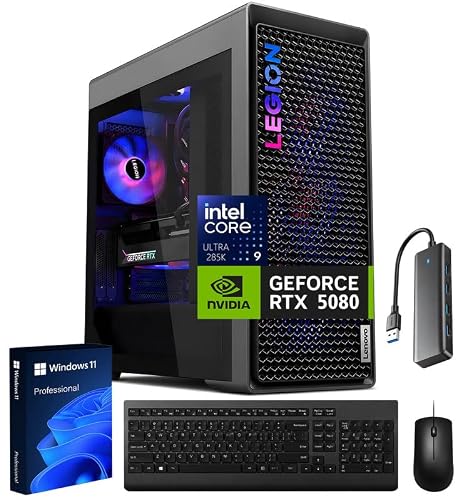
The Lenovo Legion Tower 7i is Lenovo’s most serious statement in the full-size gaming desktop category. It is driven by the Intel Core Ultra 9 processor and paired with an NVIDIA GeForce RTX 5080 graphics card, hitting the high-end 4K gaming range without the Alienware premium. The system ships with 64GB of DDR5 5600MT/s memory and a 2TB SSD, providing ample capacity for modern game libraries and multitasking. The Coldfront 5.0 cooling system, which includes liquid cooling, handles sustained gaming loads without the aggressive fan noise that plagues many pre-builts. Lenovo has also focused on internal cable management, which is genuinely impressive for a retail pre-built; the interior looks clean and organized, which improves airflow and makes future maintenance easier.
The Legion Tower 7i comes ready to use out of the box, with Windows pre-installed and all drivers configured. The Coldfront liquid cooling solution is particularly effective at keeping the Core Ultra 9 processor cool during extended gaming sessions, and the system’s thermal design ensures that the RTX 5080 can sustain its boost clocks without throttling. Lenovo has also included a complete set of ports, including multiple USB-A and USB-C connections, making it easy to connect peripherals and external storage.
One honest limitation is that the Legion Tower 7i’s case, while well-built, is not as visually distinctive as competing options from Alienware or ASUS. The design is clean and professional but lacks the aggressive RGB lighting and angular lines that some gamers prefer. Additionally, Lenovo’s software suite, while functional, is not as polished as Alienware Command Center or ASUS Armory Crate, and some users report occasional bloatware issues that require cleanup on first boot.
ASUS ROG Strix G16 Desktop
The ASUS ROG Strix G16 desktop is ASUS’s mid-to-high range gaming tower, built around the ROG component ecosystem for tight software integration. It is powered by an Intel Core i9-14900K processor clocked at 3.20GHz with Turbo Boost up to 6.00GHz, paired with 128GB of DDR5 RAM and a 2TB SSD. The graphics card is an NVIDIA GeForce RTX 4060 Ti with 16GB of GDDR6 dedicated memory. ASUS Armory Crate gives you per-component monitoring and fan control from a single dashboard, and the ROG-tuned BIOS profiles optimize the i9 and RTX pairing for gaming workloads out of the box. The visual design with RGB lighting and angular chassis appeals to the enthusiast crowd who want their system to look as fast as it performs.
The ROG Strix G16 excels in software integration. Armory Crate provides granular control over fan curves, RGB lighting, and component monitoring without requiring third-party tools. The ROG BIOS includes pre-configured profiles that balance performance and noise for different game genres, which is helpful for users who do not want to manually tweak settings. The system also includes Wi-Fi 6E and Bluetooth 5.3, along with a full suite of rear ports including Gigabit Ethernet. The 128GB of RAM is overkill for gaming alone but makes this system a strong choice for content creators who also game.
One honest limitation is that the RTX 4060 Ti, while capable at 1440p, is not a top-tier card for 4K gaming at high refresh rates. Paired with the i9-14900K, the GPU becomes the bottleneck in demanding titles. This is an odd pairing for a system marketed as a gaming desktop, and users targeting 4K should consider a higher-tier GPU option if available. Additionally, the ROG Strix G16’s chassis, while attractive, can be difficult to open and upgrade due to its tool-less panel design that sometimes requires more force than expected.
MSI Infinite RS Gaming Desktop
The MSI Infinite RS Gaming Desktop is built around the premise that you should not need a full-size tower for high-end gaming performance. Its compact chassis fits full-length, full-height GPUs, including RTX 4080 and 4090 class cards, into a footprint that sits cleanly on or under a desk without dominating the space. The specific model, the MSI Infinite RS AI 2NVZ9-1290US, leverages MSI’s AI-controlled fan curves that adjust cooling based on real-time system loads, balancing noise and thermal performance automatically. Cooling is handled by a combination of front-to-rear airflow and the AI-driven fan system, which keeps the system quiet during light use and ramps up only when needed.
The compact design does not sacrifice connectivity or expandability. The Infinite RS includes a full set of rear I/O ports, multiple USB-A and USB-C connectors, and support for multiple storage drives. The AI fan control is a standout feature; it learns your usage patterns over time and adjusts fan speeds proactively rather than reactively. This results in a quieter experience during everyday tasks while still providing adequate cooling during gaming sessions. The system’s small footprint also makes it an excellent choice for LAN parties or for users with limited desk space.
One honest limitation is that the compact chassis can make internal upgrades more challenging than in a full-tower case. While the system fits full-length GPUs, accessing the interior to swap a graphics card or add storage requires careful cable management and sometimes removal of the front fan assembly. Additionally, the AI fan control, while innovative, is not always transparent about its decision-making, and some users prefer manual control over fan curves for predictable noise levels. The system’s power supply is also proprietary to MSI, which limits upgrade options for that component.
What to look for
- Cooling system design: Look for dedicated GPU airflow paths or liquid cooling solutions that prevent thermal throttling during extended sessions. The Cryo Chamber in the HP OMEN 45L is a standout example.
- Component standardization: Prefer systems that use standard ATX motherboards, power supplies, and cases so you can upgrade individual parts later without replacing the entire machine.
- Warranty and support: Consider the length of the warranty and whether on-site service is available. Dell’s next-business-day service for the Alienware Aurora R16 is a significant advantage.
- Software ecosystem: Evaluate the control software for monitoring, fan control, and lighting customization. ASUS Armory Crate and Alienware Command Center offer deep integration, while others may be more basic.
- Graphics card tier: Match the GPU to your target resolution and refresh rate. RTX 5070 and above are suited for 1440p and 4K gaming, while lower-tier cards may struggle at higher settings.
- Form factor and footprint: Measure your desk or floor space. Compact systems like the MSI Infinite RS save space but may limit upgrade ease, while full towers offer more room to work.
The verdict
For most gamers, the HP OMEN 45L Desktop is the best choice because its Cryo Chamber cooling directly solves the GPU thermal bottleneck that limits performance in other towers, and its use of standard components makes future upgrades straightforward. If you prioritize warranty and service above all else, the Alienware Aurora R16 with Dell’s on-site support is unmatched. The Lenovo Legion Tower 7i offers the best value for raw performance with the RTX 5080 and impressive cable management. The ASUS ROG Strix G16 excels in software integration and is a strong hybrid for gamers who also create content. The MSI Infinite RS is the clear winner for anyone who needs high-end GPU performance in a small footprint. Choose the system that aligns with your top priority, and you will have a machine that serves you well for years.
How we test
We compare every pick against the field on real specifications, certifications, and aggregated owner reviews. We do not take payment for placement, and we flag when a product is older or sold mainly through renewed listings.
At a glance
| Pick | Best for | Score | |
|---|---|---|---|
| HP OMEN 45L Desktop | High-end thermal performance | Check price | |
| Alienware Aurora R16 | Premium brand experience | Check price | |
| Lenovo Legion Tower 7i | Mid-to-high value gaming | Check price | |
| ASUS ROG Strix G16 Desktop | Esports and 1440p focus | Check price | |
| MSI Infinite RS Gaming Desktop | Compact high-performance | Check price |
The picks, reviewed
HP OMEN 45L Desktop
The OMEN 45L is HP's flagship gaming tower and the one that makes a serious argument for the brand's place in gaming. The Cryo Chamber cooling design routes airflow specifically around the GPU in a way that competitive towers don't, keeping the most thermally demanding component from throttling under extended gaming sessions. The internal layout is clean, uses standard components, and leaves meaningful room for upgrades.
Reasons to buy
- Intel Core Ultra 9 285K 24-Core 3.70 GHz Processor (36MB Smart Cache, Turbo Boost up to 5.
- 64GB DDR5 5600 MHz Memory, 2TB PCIe NVMe M.2 Solis State Drive, OMEN CRYO CHAMBER, OMEN Li
- NVIDIA GeForce RTX 5070 12GB GDDR7 Graphics Card (1x HDMI, 3x DisplayPort), Wi-Fi 6E (802.
- 1x USB-C (Thunderbolt 4) / Supports Video Alt Mode, 1x USB-C 3.2 Gen 2, 2x USB-A 3.2 Gen 1
- 2-Year Warranty by Techno Intelligence & Free Tech Support, Liquid Cooling, RGB Lighting,

Alienware Aurora R16
Alienware's Aurora R16 is the system that gaming PC enthusiasts love to argue about, and for good reason - it delivers a premium experience wrapped in the Legend 3.0 chassis that prioritizes airflow and aesthetics simultaneously. Dell's support network backs every Aurora with a robust warranty and next-business-day on-site service options that no boutique brand can match. The trade-off is proprietary power delivery on some SKUs, which limits certain GPU upgrade paths.
Reasons to buy
- All Aurora R16s gaming desktops are equipped with our 12-phase voltage regulation design.
- FRAMEWORK FOR SPEED: With Ada Lovelace architecture, GeForce RTX 40 Series Desktop GPUs de
- EFFICIENT AIRFLOW: Larger passageways and optimized internal cable management, allows airf
- TOTAL COMMAND: Featuring the revamped Alienware Command Center software, where you can int
- EXPRESSIVE GAMEPLAY: Show off your gaming style by customizing AlienFX lighting across you
Lenovo Legion Tower 7i
Lenovo's Legion Tower 7i is the brand's most serious statement in the full-size gaming desktop category. Intel Core i7/i9 + NVIDIA RTX configurations hit the 1440p and 4K gaming range without the Alienware premium, and the internal cable management is genuinely impressive for a retail pre-built. The Coldfront 5.0 cooling system handles sustained gaming loads without the aggressive fan noise that plagues many competing systems.
Reasons to buy
- 【RTX 5080 GAMING DESKTOP POWER】Take your gaming, streaming, and creative workflow further
- 【INTEL CORE ULTRA 9 PERFORMANCE】The Lenovo Legion Tower 7i is driven by the Intel Core Ult
- 【64GB DDR5 MEMORY & 2TB SSD STORAGE】Handle massive workloads with 64GB DDR5 5600MT/s memor
- 【LEGION COLDFRONT LIQUID COOLING】Push performance with confidence using Legion Coldfront l
- 【READY-TO-USE TOWER SETUP】Get started with a complete Lenovo Legion Tower 7i Gen 10 deskto

ASUS ROG Strix G16 Desktop
The ROG Strix G16 desktop is ASUS's mid-to-high range gaming tower, built around the ROG component ecosystem for tight software integration. ASUS Armory Crate gives you per-component monitoring and fan control from a single dashboard, and the ROG-tuned BIOS profiles optimize the i7/RTX pairing for gaming workloads out of the box. The visual design with RGB lighting and angular chassis appeals to the gaming aesthetic crowd.
Reasons to buy
- Intel Core i9-14900K at 3.20GHz with TURBO BOOST to 6.00GHz (EXTREME processor)
- 128 GB of DDR5 RAM (PREMIUM performance)
- 2 TB SSD; Win 11 Pro
- NVIDIA GeForce RTX 4060 Ti Graphics Card with 16 GB GDDR6 dedicated memory & boosting up t
- Wi-Fi 6E(802.11ax) (Triple band) 2x2 + Bluetooth 5.3; Rear Ports: 1x RJ45 Gigabit Ethernet

MSI Infinite RS Gaming Desktop
The MSI Infinite RS is built around the premise that you shouldn't need a full-size tower for high-end gaming performance. Its compact chassis fits full-length, full-height GPUs - including RTX 4080/4090 class cards - into a footprint that sits cleanly on or under a desk without dominating the space. Cooling is handled by a combination of front-to-rear airflow and MSI's AI-controlled fan curves that respond to real-time thermal data.
Reasons to buy
- MSI INFINITE RS AI 2NVZ9-1290US GAMING PC
What to look for
GPU specification
The GPU is the single most important component in a gaming desktop. Verify the exact GPU model - not just the series (RTX 40-series could mean anything from an RTX 4060 to an RTX 4090). At 1440p, target RTX 4070 Ti / RX 7900 XT or better. For 4K, RTX 4080 / RX 7900 XTX is the practical minimum for high-settings gaming.
Thermal design
Look for brands that publish their thermal testing results or show GPU temperatures under sustained gaming loads. A tower that throttles to maintain temperature limits will deliver inconsistent frame rates. Chassis with dedicated GPU airflow paths - like the OMEN 45L's Cryo Chamber - have a measurable advantage over generic "big case + lots of fans" approaches.
Upgrade path
Check whether the case uses standard ATX or a proprietary form factor, whether the PSU uses standard connectors, and whether there are open PCIe and RAM slots for future expansion. Standard-format builds from HP, Lenovo, and MSI are the easiest to upgrade; some Alienware configurations require research before committing to a GPU swap.
Warranty and support
At+, the warranty should cover at least 1 year parts and labor. Alienware's optional on-site service is worth the premium for buyers who can't ship a tower for repair. HP OMEN's Omen Support community is also a strong resource beyond the standard warranty.
Our verdict
For most buyers, the HP OMEN 45L delivers the best combination of thermal performance, standard components, and upgrade-friendly design. The Lenovo Legion Tower 7i is the closest runner-up, particularly for buyers who want strong value without the Alienware premium. If brand support is your priority, Alienware's warranty and service network remains unmatched. The MSI Infinite RS is the right call if desk space is gen
FAQs
Custom-built gaming desktops are assembled with hand-picked, gaming-optimized components - high-TDP GPUs, fast gaming RAM, and premium cooling - as opposed to standard desktops that prioritize office tasks and cost-cutting. They use larger cases for better airflow, include dedicated GPU cooling, and are designed with upgrade paths in mind. Brands like HP OMEN, Alienware, and ASUS ROG treat gaming thermals and performance as the primary design constraint.
Yes, when configured with a high-end GPU like the RTX 4080 or RX 7900 XTX. The OMEN 45L's Cryo Chamber cooling design is specifically engineered to handle the thermal output of top-tier GPUs without throttling. At 4K, even the highest-configured OMEN 45L will cap out around 60-90 fps in demanding titles, which is appropriate for 4K 60Hz or 4K 120Hz monitors depending on the game.
It depends heavily on the brand and model. HP OMEN 45L, Lenovo Legion Tower 7i, and MSI Infinite RS all use standard ATX components, making GPU, RAM, and storage upgrades straightforward. Alienware Aurora R16 uses proprietary power delivery on some configurations, which can complicate GPU swaps. ASUS ROG Strix G16 desktop is similarly upgradeable. Always verify GPU power connector and PCIe slot configuration before buying if future upgrades matter.
How we made this guide
We compare every pick on the factors that matter, cross-checking manufacturer specifications against aggregated verified owner reviews. We rank independently and never take payment for placement. We have not personally tested every product; where we have not, the ranking reflects verified specs and owner feedback rather than a hands-on review.
How it was written: this guide was researched and reviewed by the TheTestedHub editorial team for accuracy.
Affiliate disclosure: TheTestedHub is reader-supported. When you buy through links on our site, we may earn a commission at no extra cost to you.
Related guides

Your Docking Station Match: CalDigit TS4 and More

Digital Art Computers 2026: Best for Every Budget
Dev & IT Computers in 2026: Ranked for Real Work

Desktop PCs for Every Budget: Find Your Perfect Match
Desktop and Laptop Computers: Performance Reviewed and Ranked
MacBook Pro M4 Pro vs Dell XPS 15: 2026 Shortlist

Buy the Best DIY Computer in 2026: Corsair One i300
