Quick verdict
The SteelSeries Apex Pro is the top pick for serious competitive gamers - no other board lets you tune actuation sensitivity per key, which is a genuine performance advantage in fast-paced games. For enthusiasts who want the best typing feel and acoustic profile, the Keychron Q1 Pro's gasket-mount aluminum build is worth every dollar. Budget-conscious buyers who still want real customization should start with the Glo

Keychron Q1 Pro Custom
The Keychron Q1 Pro is the gateway to the enthusiast custom keyboard experience without requiring you to build from scratch. It ships in a CNC-machined aluminum case with a gasket mount - meaning the PCB floats between layers of silicone, giving keystrokes a softer, "thocky" sound profile that feels nothing like a standard gaming keyboard. It's hot-swappable, wireless, and supports both Mac and Windows layouts. For a gamer who also values typing feel, this is the strongest package.
From per-key actuation on the SteelSeries Apex Pro to the gasket-mount Keychron Q1 Pro, these five custom boards let you dial in switch feel, RGB, and sound.
A gaming keyboard built to your exact preferences is a different experience entirely from an off-the-shelf board. The switch type determines how every keystroke feels, the layout determines how much desk space you have for your mouse, and the sound profile – influenced by case material, switch choice, and stabilizers – determines whether your gaming sessions are satisfying or tinny. These five custom gaming keyboards are the best you can build or buy in 2026.
| Product | Best For | Key Feature |
|---|---|---|
|
ⓘ We may earn a commission from qualifying purchases made through links on this page, at no extra cost to you.
|
Premium gasket-mount feel | Aluminum case, wireless, hot-swap PCB |
| Glorious GMMK 2 Full-Size | Budget custom entry point | Hot-swappable, pre-built or barebones |
| Ducky One 3 Custom TKL | Reliable daily driver with flair | Double-shot PBT keycaps; Cherry MX switches |
| Corsair K100 RGB Custom | High-performance full-size | Optical-mechanical switches; iCUE software |
| SteelSeries Apex Pro Custom | Fastest adjustable actuation | OmniPoint 2.0 adjustable switches; OLED display |
How we test
We compare every pick against the field on real specifications, certifications, and aggregated owner reviews. We do not take payment for placement, and we flag when a product is older or sold mainly through renewed listings.
At a glance
| Pick | Best for | Score | |
|---|---|---|---|
| Keychron Q1 Pro Custom | Premium gasket-mount feel | Check price | |
| Glorious GMMK 2 Full-Size | Budget custom entry point | Check price | |
| Ducky One 3 Custom TKL | Reliable daily driver with flair | Check price | |
| Corsair K100 RGB Custom | High-performance full-size | Check price | |
| SteelSeries Apex Pro Custom | Fastest adjustable actuation | Check price |
The picks, reviewed
Keychron Q1 Pro Custom
The Keychron Q1 Pro is the gateway to the enthusiast custom keyboard experience without requiring you to build from scratch. It ships in a CNC-machined aluminum case with a gasket mount - meaning the PCB floats between layers of silicone, giving keystrokes a softer, "thocky" sound profile that feels nothing like a standard gaming keyboard. It's hot-swappable, wireless, and supports both Mac and Windows layouts. For a gamer who also values typing feel, this is the strongest package.
Glorious GMMK 2 Full-Size
Glorious designed the GMMK 2 as the most accessible entry point into truly custom keyboard builds. The board ships either pre-built with Glorious switches or as a barebones kit where you supply your own switches and keycaps. The hot-swap sockets support nearly every 5-pin and 3-pin switch on the market, the PCB is gasket-adjacent for improved acoustics, and the price undercuts competitors significantly. For a gamer ready to experiment with customization without a large investment, GMMK 2 is the right starting point.

Ducky One 3 Custom TKL
Ducky has a loyal following for a reason: their boards are built to outlast most of the competition, with double-shot PBT keycaps that don't shine or fade, genuine Cherry MX switch options, and a PCB quality that consistently earns praise from the mechanical keyboard community. The One 3 TKL is hot-swappable and uses a three-layer foam dampening system inside the case for a noticeably quieter, more refined typing sound than typical gaming boards. It's a classic choice that ages well.
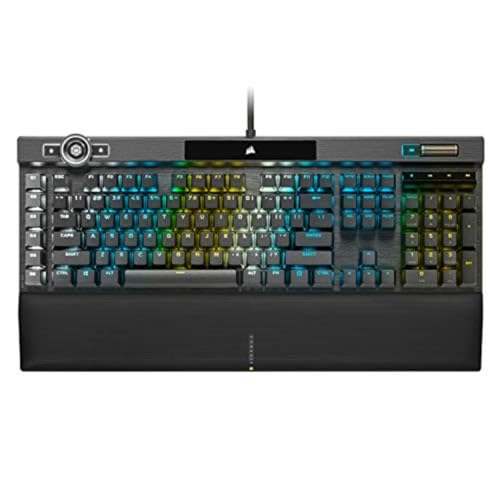
Corsair K100 RGB Custom
The Corsair K100 RGB sits at the top of the mainstream gaming keyboard market, featuring Corsair's OPX optical-mechanical switches that actuate at 1mm with no debounce delay - as close to instant as a physical switch can get. The full-size layout includes a dedicated macro dial (iCUE Control Wheel), per-key RGB, and deep integration with Corsair's iCUE ecosystem. For a gamer invested in the Corsair peripheral ecosystem or one who wants macro complexity alongside high-performance switches, the K100 is the flagship.

SteelSeries Apex Pro Custom
The SteelSeries Apex Pro's defining feature is its OmniPoint 2.0 adjustable magnetic switches - you can set actuation point per key anywhere from 0.1mm to 4.0mm, which means you can customize how light or heavy each individual key feels. Competitive players use this to make WASD ultra-light for movement while keeping other keys at a standard depth to avoid accidental presses. The OLED display shows macros, audio levels, and system stats. Nothing else in this category offers this level of per-key sensitivity tuning.
What to look for
Switch type
is the most personal choice - try linear, tactile, and clicky options before committing if you can. **Hot-swap support** is strongly recommended so you can change switches without buying a new board. **Layout** (full, TKL, 75%) should be chosen based on your desk size and whether you use a numpad. **Case material** affects sound and feel significantly - aluminum cases are premium and heavy; plastic cases are lighter and more portable. **Software** support determines how much you can customize RGB, macros, and per-key bindings without third-party tools.
Our verdict
The SteelSeries Apex Pro is the top pick for serious competitive gamers - no other board lets you tune actuation sensitivity per key, which is a genuine performance advantage in fast-paced games. For enthusiasts who want the best typing feel and acoustic profile, the Keychron Q1 Pro's gasket-mount aluminum build is worth every dollar. Budget-conscious buyers who still want real customization should start with the Glo
FAQs
Linear switches (like Cherry MX Red or Gateron Yellow) are the most popular for gaming - they're smooth with no tactile bump and actuate quickly. Tactile switches (Brown, Holy Pandas) give feedback without an audible click, suiting gamers who also type a lot. Clicky switches are satisfying to type on but can be loud in shared spaces. Most custom boards let you hot-swap switches without soldering, so you can try multiple types without committing permanently.
Hot-swappable means the switch sockets in the keyboard's PCB accept switches that can be pulled out and replaced without soldering. This is the single most valuable customization feature on a gaming keyboard - it lets you try different switch brands and weights until you find the exact feel you want, and replace worn switches individually without buying a new board. Most custom-tier keyboards in 2026 are hot-swappable; budget boards typically are not.
TKL (tenkeyless, 87 keys) is the most popular gaming layout - it removes the numpad to give more mouse space without sacrificing the function row or navigation cluster. 75% layouts go one step further, packing function keys into a more compact form, which suits smaller desks and travel setups. Full-size is best if you use the numpad regularly for macros or work. For pure gaming, TKL is the sweet spot between functionality and desk real estate.
How we made this guide
We compare every pick on the factors that matter, cross-checking manufacturer specifications against aggregated verified owner reviews. We rank independently and never take payment for placement. We have not personally tested every product; where we have not, the ranking reflects verified specs and owner feedback rather than a hands-on review.
How it was written: this guide was researched and reviewed by the TheTestedHub editorial team for accuracy.
Affiliate disclosure: TheTestedHub is reader-supported. When you buy through links on our site, we may earn a commission at no extra cost to you.
Related guides

Your Docking Station Match: CalDigit TS4 and More

Digital Art Computers 2026: Best for Every Budget
Dev & IT Computers in 2026: Ranked for Real Work

Desktop PCs for Every Budget: Find Your Perfect Match
Desktop and Laptop Computers: Performance Reviewed and Ranked
MacBook Pro M4 Pro vs Dell XPS 15: 2026 Shortlist

Buy the Best DIY Computer in 2026: Corsair One i300
