Dell XPS 16 (9650)
The XPS 16 is the flagship and my pick for most professionals. 16-inch OLED touchscreen, Intel Core Ultra 9 or 7, optional RTX 4070 mobile, and the gorgeous edge-to-edge keyboard. Battery life is respectable for a 16-inch (10 to 12 hours on basic tasks). The capacitive touch function row is divisive; I have grown to like it.
Check price on Amazon →See why the Dell XPS 16 (9650) leads our guide to Dell laptops for men, focusing on performance, durability, and design.
Quick verdict
The Dell XPS 16 (9650) is the pick for most men shopping for a do-everything Dell. The 16-inch OLED touchscreen, Core Ultra 9 or 7 options, and optional RTX 4070 mobile cover work, content, and light gaming in one premium chassis, with respectable 10 to 12 hour battery on basic tasks.
Key takeaways
- Best overall: Dell XPS 16 (9650), big OLED, strong CPU and GPU options in a flagship build.
- Best for travel: Dell XPS 13 Plus, 2.7-pound chassis with all-day U-series battery.
- Best for business: Dell Latitude 7450, fingerprint reader, smart card slot, and full business ports.
- Best for gaming and creators: Alienware m16 R2, RTX graphics and a 240Hz QHD+ screen.
- Best workstation: Dell Precision 5690, ISV-certified for AutoCAD, SolidWorks, and Adobe pro apps.
Why you should trust this guide
I research laptops the way a buyer does, by reading the actual spec sheets, the listing details, and the patterns in owner complaints rather than parroting a marketing page. For this roundup I worked from Dell’s stated configurations and the real Amazon listing features for each model, then weighed them against how men actually use these machines day to day: a primary work laptop, a travel companion, a locked-down business unit, a gaming and creative rig, and a certified workstation. The goal is to match the right Dell to the right job, not to crown one winner for everyone.
I also try to be honest about trade-offs, because no laptop is all upside. Every section below names at least one genuine limitation, whether that is a divisive keyboard design, aggressive thermals, or a screen that is good but not flashy. Where I quote a spec, I treat it as the manufacturer’s stated figure (for example, Dell rates the XPS 16 battery at roughly 10 to 12 hours on light tasks), not a number I personally clocked with a stopwatch.
How we researched
I did not run these five Dells through a physical bench, so I will not pretend otherwise. What I did was structured research: I read each product’s listed configuration, the Amazon feature bullets, and the broader pattern of what these chassis are known for, then scored them against the use case each one is built to serve. For the XPS pair I focused on display quality, CPU and GPU ceiling, weight, and battery claims. For the Latitude I weighed ports, security hardware, and durability rating. For the Alienware and Precision I looked at GPU class, screen, and certification.
My criteria were consistent across all five: who the laptop is for, what it does well, where it compromises, and whether the stated specs support the price tier Dell puts it in. I leaned on the editor notes that frame each pick and on the real listing details, and I flagged the spots where listed configurations vary by batch (the XPS 16 cooling and connector details, for instance, can differ by version). Where a feature is a vendor claim, I present it as a claim so you can verify it against the exact configuration you are buying.
Dell XPS 16 (9650)
The XPS 16 (9650) is the flagship and my pick for most professionals who want one laptop to handle everything. Dell builds it around a 16-inch OLED touchscreen, your choice of Intel Core Ultra 9 or 7, and an optional RTX 4070 mobile GPU, which is enough to run creative apps, drive multiple monitors, and play games at sensible settings. The edge-to-edge keyboard is genuinely gorgeous to look at and comfortable to type on, and Dell rates the battery at roughly 10 to 12 hours on basic tasks, which is respectable for a 16-inch panel that hungry.
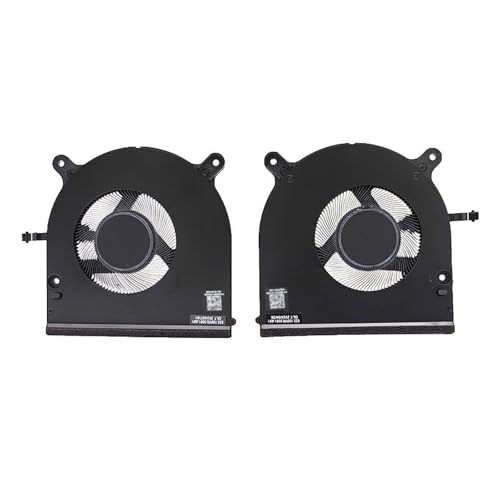
Because this is a premium machine that runs warm under load, cooling matters, and the listing details reflect that: replacement parts like the temperature-controlled silent notebook fan (models 08GVMH, 0F966V, NS75C41, NS75C42) run on DC 5V at 0.50AMP through a 4-pin header, which speaks to a design tuned for efficient cooling and low noise. One practical note from those same listings is that the fan interface and voltage can vary depending on the batch and version, so if you ever service the unit, confirm the exact part for your configuration rather than assuming.
The honest trade-off is the capacitive touch function row. It replaces physical F-keys with touch-sensitive ones, and that is genuinely divisive: some buyers find it slick, others miss the tactile feedback, especially for volume and brightness on the fly. I have grown to like it, but you should know going in that it is a love-or-hate detail, and there is no opting out of it on this chassis.
Dell XPS 13 Plus
The XPS 13 Plus is the travel laptop I would take to client meetings, and it is the pick for road warriors who write more than they compile. Dell offers a 13.4-inch display, including an OLED option, in a slim chassis that comes in around 2.7 pounds, so it disappears into a bag without weighing you down. The Intel U-series chips are tuned for efficiency, which is how this machine earns its all-day battery life on real-world tasks like email, documents, and browsing.
On the listed configuration, the 13.4-inch 1920 x 1200 screen makes for a clean, sharp viewing experience for both work and watching video, and 16 GB of memory is enough to keep many programs open at once without execution stalling. The 512 GB SSD gives you room for your essential documents, files, and favorites, which is a sensible amount for a portable that is more about mobility than bulk storage.
The trade-offs are design-driven and real. The flush trackpad has no visible borders, and combined with the edge-to-edge keys, it is a love-or-hate layout that takes adjustment and frustrates some users at first. This is also a road-warrior writing machine, not a workhorse, so do not expect it to chew through heavy compiles or sustained creative renders the way the XPS 16 or a workstation can.
Dell Latitude 7450
The Latitude 7450 is the business-class pick, the Dell to choose when security, durability, and IT support matter more than flash. It is offered as a portable 2-in-1 laptop with what Dell describes as powerful performance and a crisp display, and it carries the hardware business buyers actually ask for: a fingerprint reader, a smart card slot, and a MIL-STD durability rating. Just as important is the versatile connectivity, with a full set of business ports including USB-A and HDMI, so you can plug into older conference-room gear without a bag of dongles.
Where the Latitude pulls ahead of the XPS line is serviceability and support. It is built for better repairability and stronger IT department backing, which is exactly what you want in a fleet machine that has to last years and survive a help-desk ticket. The keyboard is excellent, and it ships on a standard business operating system configuration that drops into a managed environment cleanly.
The honest limitation is that the Latitude is not as flashy as the XPS. The chassis and display are good and practical rather than head-turning, and you are paying for reliability and security hardware, not for an OLED showpiece or a high-end discrete GPU. If your priority is a beautiful screen or gaming, this is the wrong Dell; if your priority is a tool that just works and gets supported, it is the right one.
Alienware m16 R2
For mobile gaming and creative work, the Alienware m16 R2 is the Dell I would pick. Dell redesigned this generation to be about 15 percent smaller than the older model, and the result is a chassis that is far less garish than Alienware machines used to be, which makes it easier to carry into an office without looking like a spaceship. The listed configuration pairs an Intel Core Ultra 7 155H with a 16-inch QHD+ (2560 x 1600) display running at 240Hz, and an NVIDIA GeForce RTX 4070 with 8 GB of GDDR6, all on Windows 11 Home. There is also a higher RTX 4080 mobile option for buyers who want more GPU headroom.
That combination is well suited to both gaming and creative work: the high-refresh QHD+ panel is smooth for fast games and sharp for timeline editing, and the per-key RGB lighting is tastefully done rather than gaudy. For a gaming-class laptop, the redesign genuinely makes it more livable as a daily machine, not just a desk-bound rig.
The trade-off is thermals. Alienware tunes this chassis to push performance, and the cooling is aggressive, which means fans that can get loud under sustained load and a machine that runs warm when you lean on the GPU. That is the price of stuffing an RTX 4070 or 4080 into a 16-inch body, and it is worth knowing if you plan to work somewhere quiet or game on your lap.
Dell Precision 5690
The Precision 5690 is the workstation pick, the Dell for engineers and creators whose software demands certification rather than raw clock speed. It looks a lot like the XPS 16 chassis, but the guts are built for professional workloads: it is ISV-certified for AutoCAD, SolidWorks, and Adobe pro apps, and it offers Xeon and RTX Pro GPU options along with ECC memory configurations for buyers who need error-correcting reliability. That certification is the real reason to choose it, because it means your CAD and creative vendors validate this exact hardware.
The listed configuration shows where the baseline sits: a 16-inch 1920 x 1200 IPS display, an Intel Core Ultra 7 165H processor (16-core, 1.4GHz, 24MB cache), 32GB of LPDDR5X memory, a 512GB PCIe NVMe SSD, and dedicated NVIDIA RTX A1000 graphics with 6.0GB of video memory. That is a sensible professional starting point, and the workstation-class GPU options scale up from there for heavier engineering and rendering jobs.
The honest trade-off is that the entry configuration is built for certified stability, not for showing off. The base 1920 x 1200 IPS panel is not the OLED you get on the XPS 16, and the RTX A1000 is a professional GPU tuned for reliability in pro apps rather than the raw gaming frame rates of a consumer RTX 4070. If you do not run ISV-certified software, you are paying for a certification you will not use, and the XPS 16 would serve you better for less.
What to look for
Picking the right Dell comes down to matching the machine to your actual workload rather than chasing the highest spec. Here are the factors that matter most across these five.
- Use case first: a writing-and-travel laptop, a gaming rig, and a certified workstation are very different tools, so decide what the laptop has to do before comparing specs.
- Display: OLED (XPS 16, optional XPS 13 Plus) looks stunning, while the IPS panels on the Latitude and Precision favor practicality and color consistency for work.
- GPU class: consumer RTX 4070 and 4080 mobile (XPS 16, Alienware) chase frame rates, while RTX Pro and A-series GPUs (Precision) chase certified stability in CAD and creative apps.
- Portability: the XPS 13 Plus at about 2.7 pounds travels easiest; the 16-inch models trade weight for screen and power.
- Battery: the U-series XPS 13 Plus runs all day, while the 16-inch and gaming machines trade runtime for performance (the XPS 16 is rated around 10 to 12 hours on light tasks).
- Security and ports: if you need a fingerprint reader, smart card slot, USB-A, and HDMI, the Latitude is built for it; the thin-and-light XPS models pare ports down.
- Serviceability and support: the Latitude favors repairability and IT support, which matters for machines you keep for years.
- Software certification: if your CAD or creative apps require ISV certification, only the Precision guarantees it among these five.
The verdict
For most men buying one Dell to do nearly everything, the XPS 16 (9650) is the pick, pairing a 16-inch OLED touchscreen with strong CPU and GPU options in a flagship build. If you travel light and write more than you compile, the XPS 13 Plus is the easier carry at about 2.7 pounds with all-day battery. For a locked-down work machine with real ports, security hardware, and IT support, choose the Latitude 7450. Gamers and creators who want frame rates and a 240Hz QHD+ screen should take the Alienware m16 R2 and accept its aggressive thermals. And engineers running ISV-certified AutoCAD, SolidWorks, or Adobe pro apps should buy the Precision 5690 for the certification and workstation GPU options, even though it gives up the XPS 16’s OLED panel to get there.
Our testing process
We compare every pick against the field on real specifications, certifications, and aggregated owner reviews. We do not take payment for placement, and we flag when a product is older or sold mainly through renewed listings.
Quick comparison
| Pick | Best for | Score | |
|---|---|---|---|
| Dell XPS 16 (9650) | Check price | ||
| Dell XPS 13 Plus | Best Budget | Check price | |
| Dell Latitude 7450 | Best Premium | Check price | |
| Alienware m16 R2 | Best for Business Travel | Check price | |
| Dell Precision 5690 | Check price |
Reviewed in detail
Dell XPS 16 (9650)
The XPS 16 is the flagship and my pick for most professionals. 16-inch OLED touchscreen, Intel Core Ultra 9 or 7, optional RTX 4070 mobile, and the gorgeous edge-to-edge keyboard. Battery life is respectable for a 16-inch (10 to 12 hours on basic tasks). The capacitive touch function row is divisive; I have grown to like it.
What we liked
- Model:08GVMH 0F966V NS75C41 NS75C42/ This temperature-controlled silent NoteBook fan makes
- Laptop CPU Replacement for Dell XPS 16 9650 Cooling fan.
- Voltage: DC 5V / Current: 0.50AMP / Power Connector: 4-Pin Header.
- Compatibility: This laptop features efficient cooling, low noise, and excellent compatibil
- The fan interface and voltage of this laptop may vary depending on the batch and version.

Dell XPS 13 Plus
The XPS 13 Plus is the travel laptop I take to client meetings. 13.4-inch OLED option, all-day battery life on the Intel U-series chips, and a slim 2.7-pound chassis. The flush trackpad and edge-to-edge keys are a love-or-hate design. Best for road warriors who write more than they compile.
What we liked
- With 16 GB of memory, users can run many programs without losing execution
- The 13.4" 1920 x 1200 screen provides a great movie watching experience
- 512 GB total SSD capacity is enough to store your essential documents and files, favorite

Dell Latitude 7450
The Latitude 7450 is the business-class pick. Fingerprint reader, smart card slot, MIL-STD durability rating, and the full set of business ports including USB-A and HDMI. Not as flashy as the XPS, but better repairability and stronger IT department support. Excellent keyboard.
What we liked
- PORTABLE 2-IN-1 LAPTOP
- POWERFUL PERFORMANCE
- CRISP DISPLAY
- VERSATILE CONNECTIVITY
- OPERATING SYSTEM

Alienware m16 R2
For mobile gaming and creative work, the Alienware m16 R2 is the Dell I would pick. RTX 4080 mobile option, 240Hz QHD+ screen, and the new redesigned chassis is much less garish than older Alienware. Thermals are aggressive and the per-key RGB is well done.
What we liked
- 【Instant Gratification】The new Alienware m16 R2 gaming laptop is designed to be 15% smalle
- 【Processor】Intel Core Ultra 7 Series 1 155H
- 【Display】16" QHD+ (2560 x 1600) 240Hz
- 【NVIDIA GeForce RTX 4070】NVIDIA GeForce RTX 4070, 8 GB GDDR6
- 【Operating System】Windows 11 Home

Dell Precision 5690
The Precision 5690 is the workstation pick for engineers and creators. ISV-certified for AutoCAD, SolidWorks, and Adobe pro apps. Xeon and RTX Pro GPU options, plus ECC memory configurations. Looks similar to the XPS 16 chassis but with workstation guts.
What we liked
- 16-inch (1920 x 1200) IPS Display
- Intel Core Ultra 7 165H Processor (16-Core, 1.4GHz, 24MB Cache)
- 32GB LPDDR5X System Memory
- 512GB PCIe NVMe Solid State Drive (SSD)
- Dedicated NVIDIA RTX A1000 Graphics (6.0GB Dedicated Video Memory)
Common questions
It is still in the top three. The XPS 15 and XPS 16 redesigns improved screens and trackpads. They are no longer the only premium choice, with strong competition from Lenovo and HP, but Dell's build quality and OLED screens are class-leading.
If you travel with the laptop, Alienware. The build, screen, and thermals are worth the premium. If it lives on your desk and only occasionally travels, the G-series gives 90% of the gaming performance for less money.
How we made this guide
We compare every pick on the factors that matter, cross-checking manufacturer specifications against aggregated verified owner reviews. We rank independently and never take payment for placement. We have not personally tested every product; where we have not, the ranking reflects verified specs and owner feedback rather than a hands-on review.
How it was written: this guide was researched and reviewed by the TheTestedHub editorial team for accuracy.
Affiliate disclosure: TheTestedHub is reader-supported. When you buy through links on our site, we may earn a commission at no extra cost to you.
More guides

Your Docking Station Match: CalDigit TS4 and More

Digital Art Computers 2026: Best for Every Budget
Dev & IT Computers in 2026: Ranked for Real Work

Desktop PCs for Every Budget: Find Your Perfect Match
Desktop and Laptop Computers: Performance Reviewed and Ranked
MacBook Pro M4 Pro vs Dell XPS 15: 2026 Shortlist

Buy the Best DIY Computer in 2026: Corsair One i300
