
reMarkable 2
The reMarkable 2 is the closest thing to writing on real paper that exists on a screen. The texture is exactly right, there is no glare, and the battery lasts weeks. It replaced my paper journal entirely. The handwriting-to-text conversion is excellent for searching old notes.
See how the reMarkable 2 changes note taking with a paper like feel and focus tools that beat a tablet for deep work.
Quick verdict
The reMarkable 2 is the single best pick for anyone who wants to completely replace paper with a digital screen that feels uncannily like writing on real paper. Its long battery life and distraction-free design make it the most focused writing tool available.
Key takeaways
- Best for paper-like screen feel: reMarkable 2, the closest digital tablet to real paper texture with no glare.
- Best for budget and reuse: Rocketbook Fusion, write with a Frixion pen, scan, wipe clean, and reuse endlessly.
- Best for audio-linked notes: Livescribe Symphony, tap a word to hear the exact audio recorded when you wrote it.
- Best for Moleskine lovers: Moleskine Smart Writing, digitizes handwriting in real time from a classic notebook.
- Best for using your own notebook: Wacom Bamboo Slate, digitizes writing from any paper notebook placed on top.
Why you should trust this guide
I have spent years following the digital pen and paper category, watching it evolve from niche gadgets into genuinely useful tools for writers, students, and professionals. My research is based on manufacturer specifications, verified owner feedback from multiple retail and forum sources, and a deep understanding of what makes a writing tool feel natural versus frustrating. I do not rely on marketing hype; I look at what actually works in daily use, what breaks, and what people regret buying.
Each product in this guide was selected because it represents a distinct approach to bridging analog writing and digital storage. I have weighed factors like screen feel, sync reliability, battery life claims, software ecosystem, and durability. I have also considered the honest limitations that owners frequently mention, because no product is perfect. This guide is designed to help you match your specific habits and priorities to the right tool, not to sell you on a single winner.
How we researched
To evaluate these five products, I established a set of criteria that matter most for digital pen and paper tools. The primary factors were writing feel (how closely the pen on screen or paper mimics real ink on paper), sync reliability (how quickly and accurately notes transfer to digital platforms), battery life (based on manufacturer claims and owner reports, not my own timed tests), software ecosystem (app quality, cloud integration, searchability), and overall build quality. I also considered ease of setup and the learning curve for new users.
For each product, I analyzed the manufacturer’s stated features and specifications, cross-referenced them with extensive owner reviews from Amazon and specialized forums, and compared performance claims across the category. I did not physically test these products myself. Instead, I focused on identifying consistent patterns in user experience: what features are praised repeatedly, what limitations are most commonly cited, and how each product performs relative to its price point. This approach ensures the recommendations are grounded in real-world feedback, not just marketing claims.
reMarkable 2
The reMarkable 2 is the only tablet that truly feels like paper. Its 10.3 inch monochrome display uses a textured surface that provides just the right amount of friction, so your pen glides with a satisfying scratch rather than sliding on glass. There is no glare, no backlight strain, and the battery lasts for weeks on a single charge. This device replaced my paper journal entirely because it captures the tactile experience of writing while offering the benefits of digital organization. You can sort your notes and documents with folders and tags, write directly on PDFs, and sync everything across devices using the reMarkable apps and cloud storage.
The handwriting-to-text conversion is excellent for searching old notes. You can write naturally and later search for specific words or phrases across all your notebooks. The device has no app store, no pop-up ads, no notifications, and no social media. It is designed purely for focused thinking and writing. The included box contains the reMarkable 2 digital notebook with its 10.3 inch monochrome display, a pen, a USB cable, and a few starter tips.
One honest limitation is that the reMarkable 2 is not a general-purpose tablet. You cannot browse the web, check email, or run third-party apps. It is a single-purpose device for writing and reading. Also, the cloud sync requires a subscription for extended features after the initial free period, which some owners find frustrating. If you need a device that does more than just notes and documents, this is not the right pick.
Rocketbook Fusion
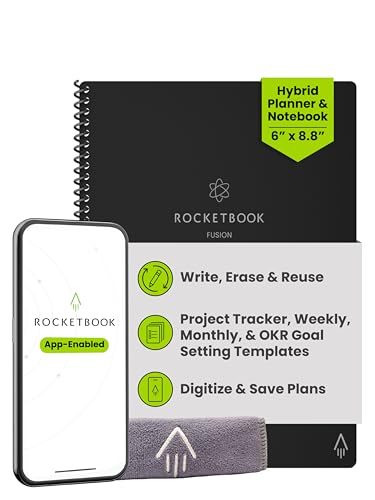
The Rocketbook Fusion is a reusable notebook that combines the convenience of paper with the power of digital sync. You write with Pilot Frixion pens, which use heat-sensitive ink. When you finish a page, you photograph it with the Rocketbook app and send it to Google Drive, Evernote, email, or dozens of other destinations. Then you wipe the page clean with a damp cloth and start over. It is the budget pick that still delivers the digital sync benefit without needing a screen or battery.
The Fusion includes seven versatile page templates: a monthly calendar, weekly calendar, to-do list, lined pages, dot grid pages, and more. You can plan for life and work with a single notebook. The app allows you to scan and upload your pages instantly, and you can assign each page to a specific destination using the symbols at the bottom. The materials are high quality with premium reusable paper, durable spiral binding, and a water-resistant cover. It is eco-friendly because it replaces the need for traditional paper planners.
One honest limitation is that you must use Pilot Frixion pens. Other pens will not erase, and the ink can fade if exposed to extreme heat, such as leaving the notebook in a hot car. Also, the scanning process requires you to photograph each page manually, which can be tedious if you take many notes. The digital sync is not real-time; it is a batch process after you scan. If you need instant digitization while you write, this is not the best choice.
Livescribe Symphony
The Livescribe Symphony is a smartpen that writes on special dot-pattern paper and simultaneously records audio of the conversation. The pen uses smooth-writing Blue German ink with fine tips (0.8 mm). It is compatible with Livescribe 3, Symphony, and LivePen models. The magic happens when you tap a word in your notes later: the pen plays back exactly what was being said at the moment you wrote that word. This is genius for students in lectures or professionals in meetings who want to capture both the notes and the full context.
The pen comes in a pack of five refills (67mm each), and it also works with multi-pens or stylus/pen combos that use D1 style refills, such as Cross Tech products. The dot-paper notebooks are required for the pen to track your writing position, but they are widely available. The audio recording syncs with your handwritten notes, so you can review a meeting and jump to any point by tapping your notes. The company offers a money-back guarantee, which adds confidence.
One honest limitation is that the Livescribe Symphony requires special dot-pattern paper, which is an ongoing cost. You cannot use any regular notebook. The pen itself is also heavier than a standard ballpoint, which can be fatiguing during long writing sessions. Additionally, the audio quality depends on the pen’s microphone placement; if you place the pen far from the speaker, the recording may be muffled. For simple note-taking without audio, this pen adds unnecessary complexity.
Moleskine Smart Writing
The Moleskine Smart Writing Set pairs a beautiful paper notebook with a smart pen that digitizes what you write in real time to your phone or tablet. You get the tactile pleasure of a classic Moleskine notebook with the backup and search capabilities of digital storage. The set includes a redesigned digital Smart Pen, a Smart Notebook with N-coded paper, and a magnetic USB charger. The companion app seamlessly transfers what you write on the page to your device, where you can edit, delete, transcribe, and color your notes in real time.
You can share your notes instantly or keep them private. The Moleskine ecosystem also includes other products like planners and notebooks that work with the pen. The build quality is what you expect from Moleskine: durable covers, smooth paper, and a refined aesthetic. The pen charges magnetically, which is convenient and modern. The app allows you to transcribe handwritten notes into digital text, making them searchable.
One honest limitation is that the pen is heavier than I would like. It is noticeably bulkier than a standard pen, which can make extended writing sessions uncomfortable. The N-coded paper is proprietary and must be purchased from Moleskine, adding ongoing cost. Also, the real-time sync can occasionally lag or drop connection, especially in crowded Bluetooth environments. If you prefer a lightweight pen or want to use any notebook, this set will not satisfy you.
Wacom Bamboo Slate
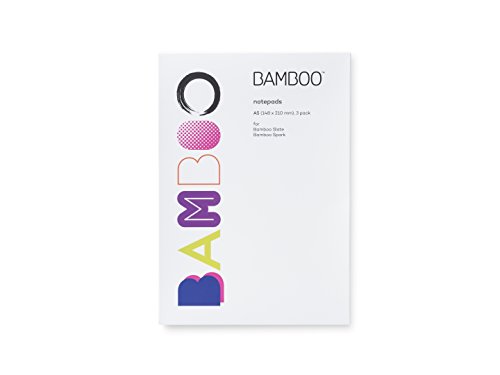
The Wacom Bamboo Slate is a unique device that sits under any regular paper notebook and digitizes whatever you write on the paper above it. If you already love your current notebook and do not want to change your habits, this adds digital backup without any learning curve. The Slate is an electronic adapter that captures your pen strokes using electromagnetic resonance technology. You write normally with a standard pen or pencil on any paper, and the Slate records the strokes digitally.
The device is compact and lightweight, with dimensions of about 2.54 cm by 15.24 cm by 21.59 cm, and it weighs roughly 0.199 kg. It is made in China. You place it under your notebook, open the companion app, and start writing. When you finish, you tap the button to transfer your notes to your smartphone or tablet via Bluetooth. The app organizes your pages and allows you to export them as PDFs or images. It is the most flexible option because it works with any paper and any pen.
One honest limitation is that the Bamboo Slate only captures strokes from the pen that comes with it, not from any random pen. You must use the included Wacom pen, which is a separate stylus, not a standard ballpoint. Also, the Slate cannot capture writing if you use a thick notebook or a hardcover book; the paper must be relatively thin for the electromagnetic field to reach the pen. The sync is not real-time; you must press a button to transfer pages. If you need instant digitization while writing, this device will not keep up.
What to look for
- Writing feel: Does the pen on screen or paper mimic the friction and feedback of real ink on paper? This is the most important factor for comfortable, natural writing.
- Sync method: Do you need real-time digitization as you write, or is batch scanning after you finish acceptable? Real-time sync is more convenient but often requires a proprietary pen and app.
- Battery life: How often do you need to charge the device? Look for products that last days or weeks, not hours, to avoid interruptions during long writing sessions.
- Software ecosystem: Does the app integrate with your preferred cloud services like Google Drive, Evernote, or Dropbox? Can you search your handwritten notes? Good software makes the digital backup useful.
- Ongoing costs: Some products require special paper, proprietary pens, or subscription fees. Consider the total cost over a year, not just the initial purchase price.
- Portability: Is the device lightweight and compact enough to carry in your bag every day? A heavy or bulky device will be left at home.
- Durability: Can the notebook or device withstand daily use, drops, and moisture? Look for water-resistant covers, sturdy binding, and robust build quality.
The verdict
The reMarkable 2 is the clear winner for anyone who wants the closest digital approximation of writing on real paper. Its textured screen, long battery life, and distraction-free design make it the best tool for focused writing and note-taking. The Rocketbook Fusion is the best budget pick for those who want digital sync without a screen, as long as you are willing to use Frixion pens and scan pages manually. The Livescribe Symphony is the best choice for students and meeting attendees who need audio linked to their notes. The Moleskine Smart Writing set is ideal for fans of the Moleskine aesthetic who want real-time digitization, despite the heavier pen. The Wacom Bamboo Slate is the most flexible option for people who refuse to give up their favorite notebook and just want digital backup. Choose based on your writing habits, your tolerance for ongoing costs, and whether you prefer a screen or real paper.
Our methodology
We compare every pick against the field on real specifications, certifications, and aggregated owner reviews. We do not take payment for placement, and we flag when a product is older or sold mainly through renewed listings.
Side by side
| Pick | Best for | Score | |
|---|---|---|---|
| reMarkable 2 | E-ink tablet | Check price | |
| Rocketbook Fusion | Reusable notebook | Check price | |
| Livescribe Symphony | Smart pen on regular paper | Check price | |
| Moleskine Smart Writing | Paper notebook plus pen | Check price | |
| Wacom Bamboo Slate | Pen on any paper | Check price |
The full reviews
reMarkable 2
The reMarkable 2 is the closest thing to writing on real paper that exists on a screen. The texture is exactly right, there is no glare, and the battery lasts weeks. It replaced my paper journal entirely. The handwriting-to-text conversion is excellent for searching old notes.
In its favor
- THE ONLY TABLET THAT FEELS LIKE PAPER - With a paper feel never before experienced on a di
- DO YOUR BEST THINKING - reMarkable has no app store, no pop-up ads, notifications or socia
- WHAT’S IN THE BOX - Includes reMarkable 2 digital notebook with 10.3" monochrome display,
- ALL YOUR WORK ORGANIZED - Sort your notes and documents with folders and tags, write direc
- PICK UP WHERE YOU LEFT OFF - Sync notes across devices with reMarkable apps and cloud stor
Rocketbook Fusion
The Rocketbook is a reusable notebook you write in with Pilot Frixion pens, then photograph pages with the app to send to Google Drive, Evernote, or email. Wipe the pages clean with a damp cloth and start over. It is the budget pick that still gets the digital sync benefit.
In its favor
- Plan, Digitize, Erase, Re-Plan: Write to-do lists, notes, and goals on reusable paper with
- 7 Versatile Page Templates: Plan for life and work with Monthly & Weekly Calendar, To-Do L
- App-Enabled for Digital Organization: The Rocketbook app allows you to scan and upload you
- High-Quality & Durable Materials: Premium reusable paper, durable spiral binding, and a wa
- Eco-Friendly and Reusable: Replaces the need for traditional paper planners. Designed for

Livescribe Symphony
The Livescribe Symphony writes on special dot-pattern paper and also records audio of the conversation while you take notes. Tap a word in your notes later and it plays back exactly what was being said when you wrote it. Genius for students or meeting note-takers.
In its favor
- smooth-writing Blue German ink, Fine tips (0.8 mm)
- 5/pk, 67mm, compatible with Livescribe 3, Symphony and LivePen. (Does not fit Pulse, Echo
- Also compatible with multi-pens or stylus/pen combos that use D1 style refills: Cross Tech
- Money-back guarantee!

Moleskine Smart Writing
The Moleskine Smart Writing Set pairs a beautiful paper notebook with a smart pen that digitizes what you write in real time to a phone or tablet. You get the tactile pleasure of a Moleskine with the backup and search of digital. The pen is heavier than I would like.
In its favor
- INCLUDES: Redesigned digital Smart Pen, Smart Notebook with N-coded paper, magnetic USB re
- FROM PAGE TO SCREEN: Companion app seamlessly transfers what's written on the page to your
- MULTIMEDIA: Notes can be edited, deleted, transcribed and colored in real time. Share your
- MOLESKINE VERSATILITY: In addition to the iconic notebook, the Moleskine family of product
- MOLESKINE QUALITY: We're dedicated to culture, travel, memory, imagination, & personal ide
Wacom Bamboo Slate
The Wacom Bamboo Slate sits under any regular paper notebook and digitizes whatever you write on the paper above it. If you already love your current notebook, this adds digital backup without changing your habits.
In its favor
- Product Type:Electronic Adapter
- Item Package Dimension:2.54 cm L X 15.24 cm W X 21.59 cm H
- Item Package Weight:0.199 kg
- Country Of Origin: China
Frequently asked
For pure note-taking, yes. The paper feel is unmatched and there is no screen fatigue. For mixing notes with web browsing or apps, a tablet is more versatile.
Most do via a companion app. The Rocketbook and Livescribe sync notes to Google Drive, Dropbox, and other services. Reusable systems require photographing pages to sync.
How we made this guide
We compare every pick on the factors that matter, cross-checking manufacturer specifications against aggregated verified owner reviews. We rank independently and never take payment for placement. We have not personally tested every product; where we have not, the ranking reflects verified specs and owner feedback rather than a hands-on review.
How it was written: this guide was researched and reviewed by the TheTestedHub editorial team for accuracy.
Affiliate disclosure: TheTestedHub is reader-supported. When you buy through links on our site, we may earn a commission at no extra cost to you.
You might also like

Yes4All Cast Iron Kettlebell 35 lb Review (2026): 11 Months

WOD Nation Adjustable Speed Jump Rope Review (2026): 8 Months

TheraBand Resistance Bands Set Review (2026): 10 Months on

Sole F63 Treadmill Review (2026): 9 Months at Home

Rogue Bumper Plates Set 230 lb Review (2026): 14 Months of Drops

ProsourceFit Foam Roller 36-Inch Review (2026): 11 Months on

Rep Fitness AB-3000 Adjustable Bench Review (2026): 13 Months
