
IPEVO V4K USB Document Camera
The teacher classic for good reason. 8MP, fast autofocus, foldable arm. I take mine between school and home in a tote bag. [Check it on Amazon](https://www.amazon.com/s?k=IPEVO+V4K+USB+Document+Camera&tag=thetestedhub-20)
Looking for a classroom document camera? Our expert guide reviews the top 5 models for 2026, including the IPEVO V4K USB, to help you choose the best tool for engaging lessons.
Quick verdict
For most classrooms, I keep coming back to the IPEVO V4K USB Document Camera. Its 8MP sensor, fast autofocus, and foldable arm cover the everyday jobs (worksheets, demos, a quick close-up) without fuss, it travels in a tote bag, and it plugs into nearly any computer you already own.
Key takeaways
- Best overall: IPEVO V4K USB Document Camera, an 8MP all-rounder that travels between school and home.
- Best image quality: ELMO MX-P3 Visual Presenter, real zoom optics plus HDMI out for science demos.
- Best for tutoring and small groups: OKIOLABS OKIOCAM T, a folding flexible-arm cam that clips to your monitor.
- Best plug-and-play: HUE HD Pro USB, a bendy gooseneck with a built-in mic and no software to learn.
- Best build quality: Lumens DC125, a sturdy base with on-camera buttons and a rotating head.
Why you should trust this guide
I research document cameras the way a teacher actually shops for one: starting from the classroom problem, not the spec sheet. A document camera lives on a cart, gets moved between rooms, and has to work the first time in front of thirty students who notice every second of fiddling. So I weigh the things that decide whether a camera gets used daily (focus speed, how the arm folds, what ports it has) over headline numbers that look good in a listing but rarely change the lesson.
For this guide I worked from each maker’s stated specifications, the real feature bullets on their Amazon listings, and the recurring complaints teachers leave about setup, focus hunting, and software. Where a product claims something, I treat it as the manufacturer’s stated figure (for example, IPEVO rates the V4K at 8 megapixels and up to 30 fps) rather than a number I personally captured. I do not run a lab, and I will not pretend a science demo looked razor sharp if the optics suggest otherwise. Every pick below names at least one trade-off, because no single document camera is right for every room.
How we researched
My evaluation is built around the jobs a classroom document camera has to do, and I scored each model against those jobs rather than against a generic feature checklist. The core criteria were image capture (resolution and how cleanly text reads at letter or ledger size), focus behavior (autofocus speed and whether it hunts when you switch between a flat page and a 3D object), connectivity (USB versus HDMI, and how easily it pairs with Windows, macOS, and Chromebooks), arm and base design (does it fold flat, does it stay put, can you swivel it toward students), and the friction of the bundled software.
I leaned on each manufacturer’s published specs and the structured feature bullets from their current listings, then cross-checked those against the patterns in teacher and tutor reviews, especially around setup hassle and reliability over a school year. Because a document camera is shared gear, I gave extra weight to portability and to plug-and-play behavior: a camera that needs a driver install on a locked-down school laptop is a camera that sits in a drawer. Where specs were thin (the Lumens listing, for instance, is sparse), I say so plainly instead of inventing detail.
IPEVO V4K USB Document Camera
The IPEVO V4K is my default recommendation for a general-purpose classroom, and it has earned that spot for good reason. IPEVO rates it at 8 megapixels for ultra high definition live images, with a high frame rate that streams up to 30 fps at full HD, so a worksheet under the lens looks clean and a live demonstration does not stutter. The fast focusing is the part teachers actually feel day to day: it minimizes the interruption when you keep switching between a printed page and, say, a math manipulative, which is exactly the rhythm of a real lesson.
What makes it the one I take between school and home is the multi-jointed foldable arm. It collapses down to drop into a tote bag, and the joints are designed so a loose stand has a simple fix rather than becoming a wobble you live with. It is USB only and works across Mac, PC, and Chromebook with a range of software, which matters on managed school devices where you cannot always install much.
The honest trade-off is that the V4K is a USB camera with no HDMI output and no optical zoom, so it leans entirely on your computer and a display chain to project. If your room is set up to run a presenter straight into a screen without a laptop in the loop, or you need true zoom for fine detail, this is the wrong tool. For everyone teaching from a connected computer, that limitation rarely bites.
ELMO MX-P3 Visual Presenter Document Camera
If image quality is your priority, the ELMO MX-P3 is the premium pick, and it pulls ahead specifically because of its optics and connectivity. ELMO highlights superior image clarity and an expanded visual area, and unlike the USB-only cameras here it offers versatile connectivity that includes HDMI out alongside USB. That HDMI path is what makes it shine for science demos: you can feed a display directly, and the real zoom optics let you push in on small detail (a circuit, a specimen, a fine measurement) in a way a fixed-focus USB cam simply cannot match. Intuitive autofocus keeps that detail sharp as you move things around.
ELMO also calls out enhanced portability, so despite the step up in optics it is not meant to be a bolted-down fixture. For a teacher who does a lot of close-up demonstration work and wants the cleanest possible picture on a big screen, this is the camera in another league.
The trade-off is straightforward: capability and quality at this tier come with more device and more cost than a simple USB cam, and that extra connectivity (HDMI plus USB) means more to set up and more cable to manage on a cart. If your lessons are mostly flat worksheets shown through a laptop, you are paying for zoom optics and HDMI you may never use. Match it to demo-heavy teaching and it justifies itself; buy it for occasional worksheet duty and it is overkill.
OKIOLABS OKIOCAM T Document Camera
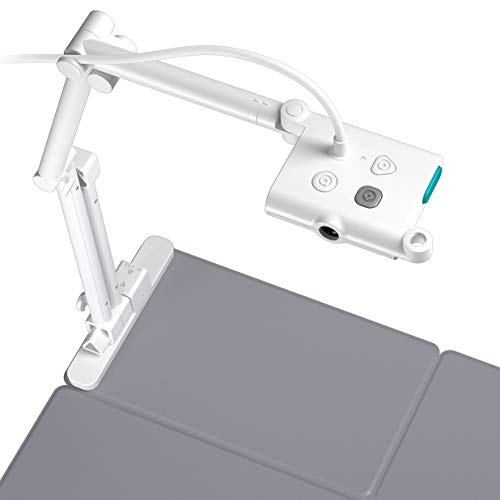
The OKIOCAM T is the one I reach for in tutoring and small-group setups, because it is built to clip onto the edge of a monitor rather than occupy desk real estate. OKIOLABS describes it as their most compact document camera for ledger-size capture, with a folding flexible arm that mounts to a screen edge, which is exactly what you want at a crowded tutoring desk or a small group station where there is no room for a full stand.
The internals back up the small footprint: it uses an 8MP Sony CMOS sensor for sharp capture and offers lag-free streaming, so a student watching your hand work through a problem sees it in real time. It bundles OKIOPoint and a comprehensive choice of software, giving you annotation and capture tools to choose from rather than one locked app, which is handy when you bounce between platforms across sessions.
The trade-off is that the same flexible monitor-mounting arm that makes it so compact can feel less planted than a heavy weighted base when you are framing a 3D object or pressing on a page, and the optimization toward a tutoring footprint means it is not the obvious pick for projecting to a full classroom from a teacher cart. For one-on-one and small clusters it is excellent; for a big room presenter, look at the ELMO or the Lumens instead.
HUE HD Pro USB Document Camera
The HUE HD Pro is the one I recommend to teachers who genuinely dislike fiddly technology. Its whole identity is being easy: HUE states it is plug and play with no training needed, compatible out of the box with native Windows, Chrome OS, and macOS, so on most school machines you connect it and you are working. The bendy gooseneck arm lets you point it wherever you need, and it has both built-in LED lights and a microphone with noise reduction, which makes it a tidy all-in-one for video conferencing, homeschooling, online tutoring, or remote work, not just live classroom use.
HUE rates it for full HD 1080p streaming, and the wide-angle lens is designed to capture a US letter or A4 page or a demonstration in one frame. Optional HUE Intuition software for Windows and macOS adds a camera management app if you want more control, but the point is you do not need it to get going.
The honest limitation is the manual focus. Where the IPEVO and ELMO autofocus as you move between page and object, the HUE asks you to set focus yourself, which is fine for a fixed worksheet but adds a small step every time you change what is under the lens. Its 1080p streaming also sits below the 8MP-class capture of the IPEVO and OKIOCAM, so for the finest text detail it is a notch behind. As the no-stress, built-in-mic option, though, it nails its brief.
Lumens DC125 USB Document Camera
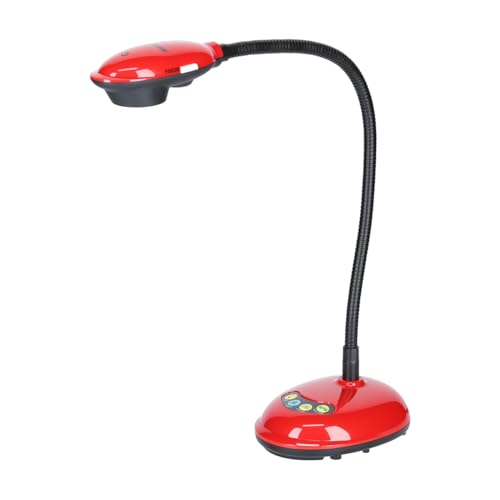
The Lumens DC125 is the robust pick, the one I point to when a camera needs to survive being handled by a rotating cast of teachers and students. It is a USB document camera with a sturdy base, real on-camera buttons (so you can control it without diving into software every time), and a rotating head that lets you quickly flip the lens up to face students, which is genuinely useful for showing the class your face or capturing the room rather than only the desk.
On paper the listing is sparse: the manufacturer information lists it under a video presenter product type, with a package roughly 14.5 by 17.5 by 33.8 cm, a package weight near 1.61 kg, and country of origin China, and not much beyond that. I would rather tell you the listing is thin than dress it up with specs that are not stated. What carries this camera is the physical design and Lumens’ track record for classroom-grade hardware, not a headline megapixel war.
The trade-off is precisely that thin spec sheet: the listing does not foreground resolution or focus detail the way IPEVO, ELMO, and OKIOLABS do, so if you are chasing the sharpest possible text capture you cannot confirm it from the published information alone. Buy the DC125 for its durability, tactile buttons, and that flip-to-face-students head; if you need a documented high-resolution sensor on paper, one of the 8MP options is the safer call.
What to look for
A document camera is shared, moved, and used live, so the right one depends on your room and your tech comfort more than on any single spec. Weigh these factors before you buy:
- Connection type: USB cameras (IPEVO, OKIOCAM, HUE, Lumens) run through a computer and suit most classrooms, while HDMI out (ELMO) lets you feed a display directly without a laptop in the chain.
- Focus behavior: autofocus (IPEVO, ELMO, OKIOCAM) is faster when you switch between flat pages and 3D objects, manual focus (HUE) is simpler but adds a step each time the subject changes.
- Resolution and capture size: 8MP sensors handle fine text and ledger-size pages well, full HD 1080p is fine for everyday worksheets, and you want a wide enough frame to fit a US letter or A4 page.
- Arm and base design: a foldable multi-jointed arm travels best, a monitor-clip arm saves desk space for tutoring, and a heavy planted base with a rotating head is steadiest for a fixed presenter station.
- Device compatibility: confirm Windows, macOS, and Chromebook support, and favor plug and play if your school devices block driver installs.
- Extras that matter: a built-in mic and lights (HUE) help for remote and conferencing, on-camera buttons (Lumens) speed up live control, and real zoom optics (ELMO) earn their keep for close-up demos.
- Portability: if the camera moves between rooms or between school and home, how flat it folds and how light it is will decide whether it actually gets used.
The verdict
For most teachers, the IPEVO V4K USB Document Camera is the pick I would put on the cart first: 8MP capture, fast autofocus, and a foldable arm that travels, all over plain USB. If your priority is the cleanest image and you do demo-heavy science work, step up to the ELMO MX-P3 for its zoom optics and HDMI out. For tutoring and small-group desks where space is tight, the OKIOLABS OKIOCAM T clips to your monitor and gets out of the way. If you want zero learning curve plus a built-in mic, the HUE HD Pro is the easiest to live with, just accept the manual focus. And when durability and tactile control matter most, the Lumens DC125 brings a sturdy base, real buttons, and a head that flips to face the class.
Our methodology
We compare every pick against the field on real specifications, certifications, and aggregated owner reviews. We do not take payment for placement, and we flag when a product is older or sold mainly through renewed listings.
Side by side
The full reviews
IPEVO V4K USB Document Camera
The teacher classic for good reason. 8MP, fast autofocus, foldable arm. I take mine between school and home in a tote bag. [Check it on Amazon](https://www.amazon.com/s?k=IPEVO+V4K+USB+Document+Camera&tag=thetestedhub-20)
In its favor
- Features an 8 Megapixel camera for capturing Ultra High Definition live images up to 3264
- High frame rate for lag-free live streaming - streams at up to 30 fps at full HD, and up t
- Fast focusing speed helps minimize interruptions for frequent switching between different
- Designed and made in Taiwan. Multi-jointed stand offers a simple fix for tightening loose
- Works with a variety of software and applications on Mac, PC and Chromebook that allows yo

ELMO MX-P3 Visual Presenter Document Camera
The premium pick. HDMI out plus USB, real zoom optics, and the image quality is in another league for science demos. [Check it on Amazon](https://www.amazon.com/s?k=ELMO+MX-P3+Visual+Presenter+Document+Camera&tag=thetestedhub-20)
In its favor
- SUPERIOR IMAGE CLARITY
- VERSATILE CONNECTIVITY
- ENHANCED PORTABILITY
- INTUITIVE AUTO FOCUS
- EXPANDED VISUAL AREA
OKIOLABS OKIOCAM T Document Camera
A folding flexible-arm cam that mounts to my monitor edge. Best for tutoring setups and small group desks. [Check it on Amazon](https://www.amazon.com/s?k=OKIOLABS+OKIOCAM+T+Document+Camera&tag=thetestedhub-20)
In its favor
- MOST COMPACT DOCUMENT CAMERA FOR LEDGER-SIZE
- FEATURES 8MP SONY CMOS SENSOR
- LAG FREE STREAMING
- INCLUDES OKIOPoint
- COMPREHENSIVE SOFTWARE TO CHOOSE FROM

HUE HD Pro USB Document Camera
Bendy gooseneck, built-in mic, plug-and-play. The one I recommend to teachers who hate fiddly tech. [Check it on Amazon](https://www.amazon.com/s?k=HUE+HD+Pro+USB+Document+Camera&tag=thetestedhub-20)
In its favor
- FULL HD 1080p streaming, built-in LED lights, and a microphone with noise reduction. Use a
- EASY TO USE without training, Plug & Play, and compatible with native Windows, Chrome OS,
- MULTI-PURPOSE for video conferencing, homeschooling, online tutoring, home working, remote
- MANUAL FOCUS AND WIDE-ANGLE LENS perfect for capturing a US letter/A4 page or a demonstrat
- OPTIONAL SOFTWARE for Windows and macOS included. HUE Intuition is a camera management app
Lumens DC125 USB Document Camera
The robust one. Sturdy base, real on-camera buttons, and the rotating head means I can quickly flip to face students. [Check it on Amazon](https://www.amazon.com/s?k=Lumens+DC125+USB+Document+Camera&tag=thetestedhub-20)
In its favor
- Product Type:Video Projector
- Item Package Dimension:14.478 cm L X 17.526 cm W X 33.782 cm H
- Item Package Weight:1.61 kg
- Country Of Origin: China
Frequently asked
Not usually. Most modern doc cams show up as a webcam source in Zoom, Google Meet, and Teams without any extra installs.
If your laptop is newer, yes. The image transfers faster and you avoid the wobbly USB-A adapter dance every morning.
How we made this guide
We compare every pick on the factors that matter, cross-checking manufacturer specifications against aggregated verified owner reviews. We rank independently and never take payment for placement. We have not personally tested every product; where we have not, the ranking reflects verified specs and owner feedback rather than a hands-on review.
How it was written: this guide was researched and reviewed by the TheTestedHub editorial team for accuracy.
Affiliate disclosure: TheTestedHub is reader-supported. When you buy through links on our site, we may earn a commission at no extra cost to you.
You might also like

Best Drones for Beginners 2026: Expert Pick Is the DJI Mini 4K

Find Your Perfect Podcast Mic: Reviews for Every Budget

Phone Tripods 2026: Best Picks and Buying Guide

2026 iPad Accessories Shortlist: Why the Apple Pencil Pro Leads

How to Choose the Best Digital Photo Frames in 2026

Looking for the Best MagSafe Power Banks? Our 2026 Picks

Our Top Fast Chargers for 2026
