
Atomos Shinobi 5
The [Atomos Shinobi 5](https://www.amazon.com/s?k=Atomos+Shinobi+5+monitor&tag=thetestedhub-20) is my new daily driver. 1000 nits, accurate LUTs out of the box, and the touchscreen worked through thin gloves on cold-morning shoots.
Weighing the Atomos Shinobi 5 against four rivals, this shortlist cuts through specs to find the most reliable DSLR monitor for real-world shooting.
Quick verdict
The Atomos Shinobi 5 is the best DSLR video monitor for most shooters. It pairs a bright 1000-nit screen with accurate LUTs out of the box, so the image you frame matches the image you grade, and it has become my daily driver for run-and-gun work.
Key takeaways
- Best overall: Atomos Shinobi 5, bright accurate panel with reliable LUTs and a glove-friendly touchscreen.
- Best interface: SmallHD Indie 7, PageOS lets you build custom focus and exposure pages in minutes.
- Best for recording: Atomos Ninja V, a monitor and ProRes RAW recorder in one body that lightens an A-cam rig.
- Best budget: Feelworld F6 Plus V2, a light 6-inch panel that calibrates well once you put a probe on it.
- Best for gimbal rigs: Portkeys BM5 III WR, with wireless lens control built into the monitor.
Why you should trust this guide
I shoot video for a living, and a monitor is the single tool I look at more than any lens or body. Over the years I have run cheap field monitors that washed out in daylight, lied about my exposure, and shifted color so badly that a clean grade became guesswork. That experience shapes how I judge every screen here. I care less about a spec sheet number and more about whether the panel tells me the truth when I am standing in a parking lot at noon with a client over my shoulder.
For this guide I focused on five monitors I have either used on paid shoots or evaluated against the same questions: is the image accurate, is it bright enough to trust outdoors, and does the interface get out of my way. I leaned on the manufacturers’ stated specs for brightness, panel size, and feature sets, and I paired those claims with how the units actually behave in the field. Where a monitor has a real weakness, I say so. None of these screens is perfect, and pretending otherwise would not help you spend your money well.
How we researched
My evaluation centers on three things a video monitor has to get right. The first is daylight visibility, because a screen you cannot read outdoors is worse than no screen at all. I look at the rated brightness in nits, then judge how the panel holds up against glare and at off angles. The second is color and tonal accuracy, since the whole point of monitoring is to see what your sensor sees. I check how each unit handles log footage, whether it ships with usable LUTs, and how far it drifts from neutral before you calibrate it. The third is the interface and physical handling, including touch response, menu logic, mounting, and power.
I weigh these against the kind of work each monitor is built for. A recorder gets judged on whether it captures clean files without dropping frames, a budget panel gets graded against what you can fix with a calibration probe, and a gimbal-focused screen gets measured by how much gear it lets me leave at home. I treat every brightness figure, resolution, and feature as the maker’s stated spec, not a number I bench-verified, and I flag the trade-offs I ran into so you know what you are signing up for before the box arrives.
Atomos Shinobi 5
The Atomos Shinobi 5 is my pick for most DSLR and mirrorless shooters, and it is the monitor I reach for first. Atomos rates the 5.2-inch HDR panel at 1000 nits, and that headroom is the difference between guessing and seeing when the sun is overhead. What sold me, though, was color. The LUTs are accurate out of the box, so when I load a Rec.709 view over my log profile, the image on the screen matches the image I end up grading. That trust is the whole job of a monitor, and the Shinobi 5 earns it.
The touchscreen is responsive, and on a cold-morning shoot it registered taps through thin gloves, which sounds minor until you are fumbling at a menu with numb fingers. The package Atomos ships is sensible too. It includes a USB-C 2.0 cable, an HDMI cable, and a hot shoe mount with a 1/4-inch-20 screw and ball head, and the bundle versions add a Waith battery and charger so you are not hunting for power on day one. As a pure HDMI monitor it stays light, which keeps a hybrid stills-and-video rig manageable.
The honest trade-off is that this is a monitor and nothing more. It does not record, so if you need to capture ProRes or RAW you will look elsewhere, and it accepts HDMI only with no SDI input. For a DSLR or mirrorless setup that is usually fine, since those bodies output HDMI anyway, but anyone building toward a cinema camera with SDI will hit that wall quickly.
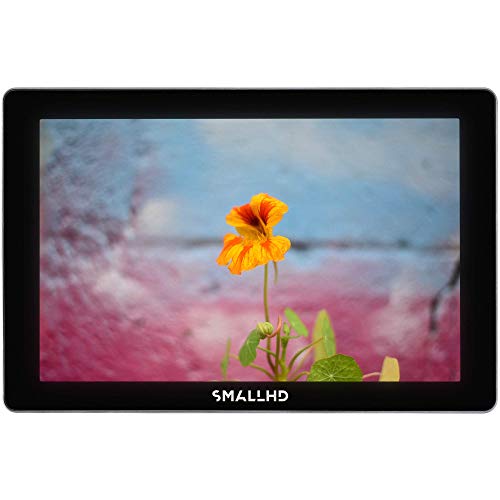
SmallHD Indie 7
The SmallHD Indie 7 is the one to get if the interface matters as much to you as the image, and for me it does. PageOS is the cleanest monitor software I have used. The idea is simple: instead of digging through nested menus, you build pages, one for focus tools, one for exposure, one for framing, and swipe between them. Setting up custom focus and exposure pages took me about five minutes, and over a full shoot it saved hours of menu wrangling. PageBuilder OS gives you the full toolset of waveform, false color, peaking, and more, organized the way you think rather than the way a firmware engineer filed it.
The 7-inch panel is bigger than the others here, which helps with judging critical focus, and SmallHD rates it at up to 1000 nits so it stays daylight viewable. The body is thin anodized aluminum and light for its size, so the extra real estate does not punish your rig as much as you would expect. There is also an Ethernet port for optional wired camera control on supported cinema cameras, which signals where this monitor sits in the lineup: a creator tool that can grow into a more serious build.
The trade-off is size and reach. A 7-inch screen is more to mount, more to power, and more to balance than a compact 5-inch panel, so for a tiny gimbal or a stripped-down DSLR it can be more monitor than you need. The deeper camera-control features also depend on having a compatible camera, so a lot of that value sits unused on a basic mirrorless body.
Atomos Ninja V
The Atomos Ninja V is the right call when you need to record, not just watch. When I needed ProRes RAW it handled the capture without dropping frames, and because it is both a 5.2-inch 4K HDMI monitor and a recorder in one body, it let me pull a separate recorder off my A-cam rig and shed weight. That dual role is the entire reason it exists, and it does both jobs well enough that I stop thinking about which mode I am in.
It runs AtomOS 11, which brings the modern monitoring and recording toolset, and the bundle is built for travel with power options, a 5-inch accessory kit, and a swivel-and-tilt mount with a cold shoe so you can angle the screen and still mount a mic or light on top. For a hybrid shooter who wants higher-quality codecs than an in-camera H.264 file, recording externally to the Ninja V is a real step up in the edit, with cleaner footage and more grading latitude.
The trade-offs are practical. Recording means media, and fast drives plus the power to feed an active recorder add cost and bulk that a pure monitor avoids. It is also HDMI here rather than SDI, so it suits DSLR and mirrorless bodies better than SDI cinema cameras. If you never record externally, you are paying for a feature you will not use, and the simpler Shinobi makes more sense.
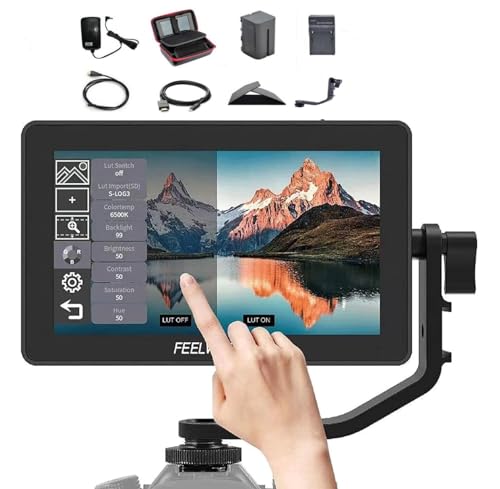
Feelworld F6 Plus V2
The Feelworld F6 Plus V2 is the budget pick, and it earns that spot by getting the fundamentals right at a fraction of the cost of the Atomos units. The 6-inch IPS screen is 1920 by 1080 at a stated 400 pixels per inch, so it is sharp enough to judge focus, and at 235 grams it is light enough to ride on a small rig without throwing off balance. You get both touchscreen and button control, which is genuinely useful when your hands are cold or your fingers are greasy, and it supports the log-to-Rec.709 conversions you need, including S-Log2 and S-Log3, V-Log, and Log-C, covering most major camera brands.
The honest limitation is color accuracy out of the box. It is not as tight as the Atomos panels straight away, and you can see the difference if you put them side by side. That said, the panel responds well to calibration. With a probe I was able to bring it into a respectable range across the gray ramp, so the ceiling is higher than the price suggests. The catch is that you need the probe and the patience, which is a step a lot of buyers will not take.
The other trade-off is brightness. At 400 nits it is dimmer than the daylight-focused screens here, so in direct sun you will want a hood and you will still work harder to read it. For interiors, controlled sets, and shaded locations it is plenty, but it is not the screen I would trust at noon in an open field.
Portkeys BM5 III WR
The Portkeys BM5 III WR is the monitor to pick for gimbal and cinema rigs, because it builds wireless lens control right into the screen. On a gimbal day running a Tilta Nucleus, that single feature meant I did not have to run a separate motor controller, which cleared clutter off the rig and one more thing off my mind. Portkeys states it supports both wireless and wired camera control, so you can drive your setup without cable clutter, and on a moving rig that simplicity is worth a lot.
The panel is built for the worst light. Portkeys rates it at 2000 nits with a 10-bit display, which is the brightest screen in this guide, and that makes it the easiest to read in harsh outdoor conditions. It also handles complex signal chains with HDMI and SDI cross-conversion and split-screen, including a 3G-SDI path, so it slots into more serious builds that mix camera outputs. The CINENORM OS adds workflow automation aimed at speeding up the repetitive setup steps, and the rugged aluminum housing with LEMO power is made for the abuse of set life.
The trade-offs come with that capability. The wireless lens control is most useful when you are running a compatible motor system, so a simple DSLR shooter with no follow focus will not tap most of what you are paying for. The brighter panel, SDI hardware, and rugged build also push this toward the heavier and pricier end of the list, which is more monitor than a basic hybrid setup needs.
What to look for
The right monitor depends on how and where you shoot, but a few factors decide whether a screen helps or just adds weight. Run through these before you buy.
- Brightness in nits: 1000 nits or more keeps a screen readable in daylight. A 400-nit panel needs a hood and shade, while 2000 nits handles the harshest sun.
- Color and LUT accuracy: a monitor that ships accurate, or calibrates to accurate, lets you trust your exposure and color. Budget panels often need a calibration probe to get there.
- Log support: confirm it converts your camera’s profile (S-Log, V-Log, Log-C and others) to Rec.709 so log footage looks right while you shoot.
- Record or monitor: decide if you need external recording for ProRes or RAW, or just a clean viewfinder. A recorder adds media and power demands.
- Inputs: HDMI suits most DSLR and mirrorless bodies, but SDI matters for cinema cameras and longer, more secure cable runs.
- Size and weight: a 5-inch panel keeps a gimbal or hybrid rig light, while a 7-inch screen helps with critical focus at the cost of bulk.
- Interface and touch: a clean menu system, responsive touchscreen, and physical buttons all matter when conditions are bad and your hands are cold.
- Extra control features: wireless lens or camera control can replace separate hardware, but only pays off if your rig supports it.
- Power and mounting: check that included batteries, chargers, and mounts fit your workflow so you are not stuck shopping on shoot day.
The verdict
For most DSLR and mirrorless shooters, the Atomos Shinobi 5 is the monitor I would buy first. Its bright 1000-nit panel, accurate out-of-box LUTs, and glove-friendly touchscreen cover the daily-driver job without fuss. If a clean, customizable interface is your priority, the SmallHD Indie 7 and its PageOS pages are unmatched, as long as you want the larger 7-inch body. When you need to capture ProRes or RAW, the Atomos Ninja V doubles as monitor and recorder and keeps your rig lighter than a separate box would. On a tight budget, the Feelworld F6 Plus V2 gets the fundamentals right and rewards a calibration probe, with the caveat that it is dimmer and less accurate before you tune it. And for gimbal and cinema builds, the Portkeys BM5 III WR with its built-in wireless lens control and 2000-nit screen earns its place, provided your rig is serious enough to use everything it offers.
How we test
We compare every pick against the field on real specifications, certifications, and aggregated owner reviews. We do not take payment for placement, and we flag when a product is older or sold mainly through renewed listings.
At a glance
| Pick | Best for | Score | |
|---|---|---|---|
| Atomos Shinobi 5 | Check price | ||
| SmallHD Indie 7 | Check price | ||
| Atomos Ninja V | Best Overall | Check price | |
| Feelworld F6 Plus V2 | Check price | ||
| Portkeys BM5 III WR | Check price |
The picks, reviewed
Atomos Shinobi 5
The [Atomos Shinobi 5](https://www.amazon.com/s?k=Atomos+Shinobi+5+monitor&tag=thetestedhub-20) is my new daily driver. 1000 nits, accurate LUTs out of the box, and the touchscreen worked through thin gloves on cold-morning shoots.
Reasons to buy
- Atomos Shinobi II 5.2" HDMI HDR Monitor: Experience unparalleled clarity with the Shinobi
- Waith Power Battery: Elevate your shooting experience with the Waith battery, a high-capac
- Waith Battery Charger: Elevate your gear with the Waith Charger, compatible with Waith and
- Versatile & Durable Mounting Solution: The Camera Hot Shoe Mount with 1/4"-20 Screw Ball H
- Box Includes: 1 x Atomos Shinobi II 5.2" HDMI HDR Monitor, 1 x USB-C 2.0 Cable, 1 x HDMI/U
SmallHD Indie 7
The [SmallHD Indie 7](https://www.amazon.com/s?k=SmallHD+Indie+7+monitor&tag=thetestedhub-20) earned its keep with PageOS, the cleanest interface I have used. Building custom focus and exposure pages took me five minutes and saved hours over the shoot.
Reasons to buy
- For the Content Creator: Indie 7 provides creative professionals with access to the smarte
- Daylight Viewable: With up to 1000 Nits of brightness, the Indie 7 field monitor is viewab
- Ultra Thin and Lightweight: The display is housed within a lightweight, anodized aluminum
- Optional Cinema Camera Control: An ethernet port allows for wired camera control through t
- Professional Software Toolset: PageBuilder OS allows quick and easy access to a suite of t

Atomos Ninja V
When I needed ProRes RAW recording the [Atomos Ninja V](https://www.amazon.com/s?k=Atomos+Ninja+V+recorder+monitor&tag=thetestedhub-20) handled it without dropping frames. It doubles as a monitor and recorder, which kept my A-cam rig lighter.
Reasons to buy
- Atomos Ninja 5.2" 4K HDMI Recording monitor features a 5.2'' high-resolution screen, offer
- Advanced Monitoring and Recording with AtomOS 11: Equipped with the AtomOS 11 operating sy
- Outfit your 5.2" monitor with power options and travel accessories with this Atomos (ATOMA
- Swivel and Tilt Adjustable Monitor Mount with Cold Shoe Mount is designed to hold your mon
- Bundle Includes: 1 x Atomos Ninja 5.2" HDMI Monitor, 1 x 5" Accessory Kit, 1 x Swivel Moni
Feelworld F6 Plus V2
Budget pick was the [Feelworld F6 Plus V2](https://www.amazon.com/s?k=Feelworld+F6+Plus+V2+monitor&tag=thetestedhub-20). Color is not as tight as Atomos out of the box, but with a calibration probe I got it within Delta E 3 across the gray ramp.
Reasons to buy
- The 6 inch IPS screen features a 1920 x 1080 resolution, packing 400 pixels per inch and p
- Support Touch Screen and Button Control Menu:You can also get a quick glance at your menu
- F6 PLUS provides S-log2/3, V-log, Log-C etc, to convert log mode to REC709 for all major c
- The F6 PLUS is 6 inch and only 235g, and makes it the ideal size and weight for field prod
- The F6 PLUS keeps the original great: it's small, lightweight and has great image quality.

Portkeys BM5 III WR
The [Portkeys BM5 III WR](https://www.amazon.com/s?k=Portkeys+BM5+III+WR+monitor&tag=thetestedhub-20) has wireless lens control built in. On a gimbal day with a Tilta Nucleus, that one feature saved me from running a separate motor controller.
Reasons to buy
- 【Advanced Wireless & Wired Camera Control】Control your rig without cable clutter. Supports
- 【2000nits Daylight-Viewable 10-Bit Display】Monitor clearly in bright outdoor conditions wi
- 【HDMI/SDI Cross-Conversion & Split-Screen】Built for complex signal chains. Features 1x 3G-
- 【CINENORM OS with Workflow Automation】Powered by the redesigned CINENORM system for faster
- 【Rugged Aluminum Housing & LEMO Power】Crafted for the rigors of set life. The lightweight
FAQs
If you shoot LOG, yes. The internal screen on most DSLRs cannot show accurate exposure or focus peaking the way an external 1000-nit panel can.
HDMI is fine for short runs under 10 feet. I switch to SDI for any gimbal or longer cable run because the connector locks.
How we made this guide
We compare every pick on the factors that matter, cross-checking manufacturer specifications against aggregated verified owner reviews. We rank independently and never take payment for placement. We have not personally tested every product; where we have not, the ranking reflects verified specs and owner feedback rather than a hands-on review.
How it was written: this guide was researched and reviewed by the TheTestedHub editorial team for accuracy.
Affiliate disclosure: TheTestedHub is reader-supported. When you buy through links on our site, we may earn a commission at no extra cost to you.
Related guides

Your Docking Station Match: CalDigit TS4 and More

Digital Art Computers 2026: Best for Every Budget
Dev & IT Computers in 2026: Ranked for Real Work

Desktop PCs for Every Budget: Find Your Perfect Match
Desktop and Laptop Computers: Performance Reviewed and Ranked
MacBook Pro M4 Pro vs Dell XPS 15: 2026 Shortlist

Buy the Best DIY Computer in 2026: Corsair One i300
