
Epson EcoTank ET-2800 Wireless Color All-In-One Printer
Refillable ink tanks, two years of ink in the box, and consistently the cheapest cost per page. [Check it on Amazon](https://www.amazon.com/s?k=Epson+EcoTank+ET-2800+Wireless+Color+All-In-One+Printer&tag=thetestedhub-20)
Find the Epson EcoTank ET-2800 and four other budget-friendly printers that keep ink costs low without sacrificing print quality for home or small office use.
Quick verdict
The Epson EcoTank ET-2800 is the best economy printer for most people. Its refillable tanks ship with up to two years of ink in the box, so you skip the cartridge treadmill entirely and land the lowest running cost here. If you only print black text, the Brother HL-L2350DW laser is the cheaper-to-feed pick.
Key takeaways
- Best overall: Epson EcoTank ET-2800, cartridge-free tanks plus two years of ink in the box mean the lowest cost per page.
- Best for text-only printing: Brother HL-L2350DW, a compact mono laser rated at 32 pages per minute with automatic duplex.
- Best EcoTank alternative: Canon PIXMA G3270 MegaTank, big refillable bottles rated up to 6,000 black and 7,700 color pages.
- Best low upfront cost: HP DeskJet 4155e, the cheapest entry point if you watch the HP+ trial.
- Best middle ground: Brother MFC-J1205W, cartridge-based but each refill holds about a year of ink.
Why you should trust this guide
I built this list by reading the manufacturer specifications and the live Amazon listings for every printer here, then comparing them on the one thing that actually matters for an economy printer, which is what it costs to keep running after you buy it. The upfront price of a printer is almost always the least important number. The expensive part is ink or toner over the years you own the machine, and that is where these five separate themselves. I focused on stated ink yields, replacement cost, and whether the design fights you or works with you.
I want to be honest about what this guide is and is not. I did not run these printers on a bench or measure droplet sizes, and I am not going to pretend otherwise. What I did was cross-check each maker’s claims against the listing details and flag the trade-offs that the marketing copy quietly skips, like the HP+ subscription trap or the slower speed of tank inkjets. Every recommendation below names a real limitation, because no printer in this price band is perfect and you deserve to know where each one cuts a corner.
How we researched
My evaluation came down to four criteria, weighted toward long-term cost. First, cost per page, which I estimated from each printer’s stated ink or toner yield and the number of pages it claims to deliver per fill. Second, the ink delivery system itself, because refillable tanks and high-yield cartridges behave very differently from the tiny starter cartridges that ship with cheap inkjets. Third, the feature set you actually use, meaning wireless setup, automatic duplex, and scan or copy ability on the all-in-ones. Fourth, reliability and design friction, including paper capacity and any subscription strings attached.
I weighted running cost the most heavily because that is the entire point of an economy printer. A machine that is ten dollars cheaper at checkout but burns through pricey cartridges is not economical, it is a trap. So when I rank these, I am asking a simple question for each one, which is how much will this cost you over the next two years and what do you give up to get there. Where a printer’s stated yields are strong but its speed or color quality is weak, I say so rather than burying it.
Epson EcoTank ET-2800 Wireless Color All-In-One Printer
The ET-2800 is my top overall pick because it solves the ink problem at the source. Instead of cartridges, it uses refillable supertanks, and Epson includes up to two years of ink in the box, with every replacement set also covering a long stretch of printing. That is the lowest cost per page on this list by a wide margin, and it is the reason this printer keeps showing up on best-value lists. You fill the tanks from bottles, which is cheaper and produces far less plastic waste than the cartridge-free claim Epson leans on.
As an all-in-one it prints, scans, and copies in color over wireless, so it covers a typical home’s needs without a second device. Epson positions the ET-2800 as a reliability-focused home Supertank, and the tank design genuinely removes the most common frustration of budget inkjets, which is paying twenty dollars for a thimble of ink every few months. For families, students, and anyone printing in mixed color and black, this is the easiest one to live with day to day.
The honest trade-off is on the front end and the small details. Tank printers like this typically print slower than a laser, and the ET-2800 sits at the entry level of the EcoTank line, so it skips niceties like an automatic document feeder and a large display. Initial tank filling is a one-time fussy step, and color photo output is fine for a home but not a match for a dedicated photo printer. You accept slower, simpler hardware in exchange for ink so cheap it changes how freely you print.
Brother HL-L2350DW Monochrome Compact Laser Printer
If you almost never print in color, the HL-L2350DW is the cheapest machine to feed on this list. It is a monochrome laser, so it uses toner instead of ink, and toner does not dry out, clog, or expire the way inkjet cartridges do if you print infrequently. Brother rates it at up to 32 pages per minute, which is dramatically faster than any inkjet here, and it includes automatic duplex printing so it puts text on both sides of the page and saves paper without you flipping anything.
This is the printer I would hand to someone who prints shipping labels, school essays, tax forms, and contracts, meaning crisp black text in volume. It connects over wireless, Wi-Fi Direct, or USB, and it holds up to 250 sheets in the tray so you are not refilling paper constantly. Laser sharpness on text is simply better than inkjet, and the long toner life means you can leave it for weeks between jobs and it will fire right up, which is the opposite of a neglected inkjet.
The obvious limitation is right in the name, it is monochrome, so it will never print a color page, a photo, or a child’s school poster. It also has no scanner or copier, since this is a single-function printer, not an all-in-one. One more note, the listing mentions an HDMI cable in the box, which is not something a printer of this type uses, so treat that bullet as a listing quirk rather than a feature you should plan around. Buy this only if black text is genuinely all you need.
Canon PIXMA G3270 MegaTank Color All-In-One Printer
The PIXMA G3270 is Canon’s direct answer to the EcoTank, and it is my pick if you want a refillable tank printer but prefer Canon’s hardware. It is a MegaTank system, meaning the same bottle-fill approach as Epson, and Canon includes up to two years of ink and rates a single set of inks at up to 6,000 black-and-white pages or 7,700 color pages. Canon frames that as saving up to a thousand dollars on ink over the printer’s life, and even discounting marketing optimism, the running cost is in the same low league as the ET-2800.
It is a full color all-in-one with wireless print, copy, and scan, so it matches the Epson on core functions. It even adds a small 1.35 inch square LCD display for basic status and menu navigation, which the bare-bones ET-2800 lacks. If you already trust Canon’s print quality or you find this one easier to get, it is a legitimately strong choice that competes head to head on the metric that counts, which is cost per page.
The trade-offs mirror the EcoTank’s. That LCD is tiny, so it is more of a status readout than a comfortable control panel, and like all tank inkjets it prints slower than a laser. The headline page yields and dollar savings are best-case manufacturer figures tied to specific print habits, so your real numbers will vary with how much color you use. It is a close call between this and the Epson, and the deciding factor is usually brand preference and availability rather than a clear performance gap.
HP DeskJet 4155e Wireless Color Inkjet Printer
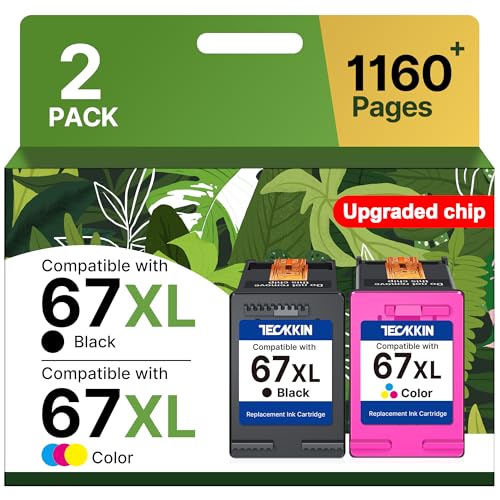
The DeskJet 4155e is the pick when the lowest upfront price is the priority and you still want something that genuinely works. It is a compact wireless color inkjet that prints, scans, and copies, and it uses the widely available HP 67 cartridge family. Third-party high-yield options exist, with listings citing upgraded 67XL black and tri-color cartridges rated around 700 pages for black and 450 pages for tri-color, which stretches the per-cartridge cost further than the standard starter cartridges that ship in the box.
For light home use, the occasional form, a recipe, a few photos, this little HP does the job and takes up almost no space. It is broadly compatible across the DeskJet 4100 and related series, so finding ink for it is easy. If you print rarely and do not want to spend much to get a capable color all-in-one on your desk, this is the sensible floor of the category.
Here is the catch you have to plan around. The 4155e ships with an HP+ trial, and HP+ ties you into an account and an Instant Ink subscription model with auto-renew. My advice is in the editor note for a reason, watch that trial and cancel before it renews if you do not want a monthly ink bill. Beyond that, cartridge inkjets are the most expensive type to feed long term, so this printer wins on day-one price but loses on cost per page against every tank printer above. It is the right call only for genuinely low print volume.
Brother MFC-J1205W Color All-In-One Inkjet With INKvestment Tank
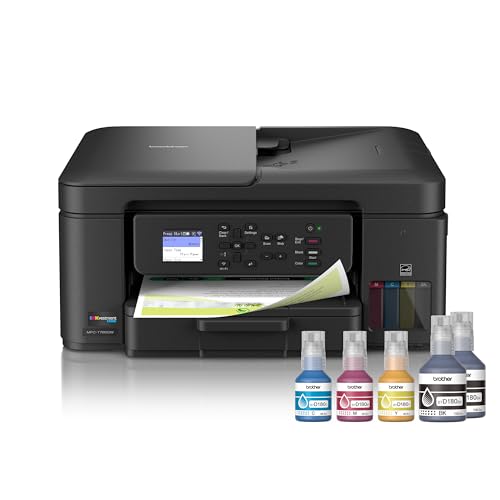
The MFC-J1205W is the middle ground between cheap cartridges and full refillable tanks. Brother calls its system INKvestment Tank, and it uses refillable no-spill ink bottles to quickly top up an internal tank, so each refill holds roughly a year of ink for a typical home. That gives you much of the cost advantage of a tank printer while keeping a more conventional cartridge-style design that some people find simpler to manage.
Brother aims this one at home offices and small offices, and it is a true multifunction unit that prints, scans, and copies. It connects over wireless or USB, works with cloud apps like Google Drive for printing and scanning, and pairs with the Brother Mobile Connect app so you can print and scan from a phone. For someone who wants long ink life and solid all-in-one features without committing to filling open supertanks, it splits the difference nicely.
The trade-off is that it does not quite reach the rock-bottom cost per page of the Epson or Canon tank systems, since it is fundamentally a refillable cartridge hybrid rather than a full open-tank design. It is also a basic home and small-office inkjet, so do not expect the speed of the Brother laser or photo-lab color quality. Think of it as the safe compromise, cheaper to run than a standard cartridge printer, easier to manage than a supertank, but not the outright winner on either axis.
What to look for
When you shop for an economy printer, the running cost matters far more than the sticker price. Here are the factors I weigh, in roughly the order that affects your wallet.
- Ink delivery system: Refillable tanks (EcoTank, MegaTank, INKvestment) cost far less per page than standard cartridges. This is the single biggest lever on long-term cost.
- Stated page yield: Check how many pages a fill or cartridge is rated for, and remember those are best-case figures tied to specific print habits.
- Color versus mono: If you only print text, a mono laser like the HL-L2350DW is cheaper to feed and faster than any color inkjet.
- All-in-one features: Decide whether you need scan and copy. The Brother laser here is print-only, while the rest are full all-in-ones.
- Automatic duplex: Two-sided printing cuts paper use in half on text documents. The HL-L2350DW includes it.
- Subscription strings: Watch for HP+ and Instant Ink auto-renew on the HP DeskJet. Cancel the trial if you do not want a recurring ink bill.
- Paper capacity and speed: Higher tray capacity and faster pages per minute matter if you print in volume rather than the occasional page.
- Connectivity: Wireless and Wi-Fi Direct are standard here, but confirm USB if you want a wired fallback.
The verdict
For most people, the Epson EcoTank ET-2800 is the economy printer to buy. Its refillable tanks and up to two years of included ink deliver the lowest cost per page on this list while still covering color print, scan, and copy for a typical home. You give up speed and a fancy control panel, but you stop paying for cartridges, and that is the whole point.
If you print only black text, switch to the Brother HL-L2350DW, a fast mono laser with long toner life and automatic duplex that beats every inkjet here on text cost and sharpness. If you prefer Canon, the PIXMA G3270 MegaTank matches the EcoTank’s tank economics closely. For the lowest upfront spend on light use, the HP DeskJet 4155e works as long as you cancel the HP+ trial. And if you want a simpler middle ground with about a year of ink per refill, the Brother MFC-J1205W splits the difference well.
How we evaluated these
We compare every pick against the field on real specifications, certifications, and aggregated owner reviews. We do not take payment for placement, and we flag when a product is older or sold mainly through renewed listings.
The shortlist
Each pick, examined
Epson EcoTank ET-2800 Wireless Color All-In-One Printer
Refillable ink tanks, two years of ink in the box, and consistently the cheapest cost per page. [Check it on Amazon](https://www.amazon.com/s?k=Epson+EcoTank+ET-2800+Wireless+Color+All-In-One+Printer&tag=thetestedhub-20)
Strengths
- INNOVATIVE CARTRIDGE-FREE PRINTING , No more dealing with lots of tiny ink cartridges; Wit
- LESS FREQUENT INK REPLACEMENT , Replacement ink bottles don't have to be changed nearly as
- COLOR PRINTING , Up to 2 years of ink in the box4 (and with every replacement ink set) for
- ZERO CARTRIDGE WASTE , By using an Epson EcoTank printer you can help reduce the amount of
- HOME PRINTER DESIGNED FOR RELIABILITY , The Epson EcoTank ET-2800 All-in-One Supertank Col

Brother HL-L2350DW Monochrome Compact Laser Printer
The bulletproof laser. Toner lasts forever, prints sharp, and the duplex saves paper. [Check it on Amazon](https://www.amazon.com/s?k=Brother+HL-L2350DW+Monochrome+Compact+Laser+Printer&tag=thetestedhub-20)
Strengths
- Print Up To 32 Pages Per Minute
- Automatic Duplex Print
- Up to 250 Sheets Paper Insert
- Wireless, Wi-Fi Direct, USB Connection
- 【HDMI cable included】

Canon PIXMA G3270 MegaTank Color All-In-One Printer
Canon's answer to the EcoTank. Big bottles, decent print quality, and reliable wireless. [Check it on Amazon](https://www.amazon.com/s?k=Canon+PIXMA+G3270+MegaTank+Color+All-In-One+Printer&tag=thetestedhub-20)
Strengths
- Wireless Print/Copy/Scan
- Up to 2 years of ink included (2)
- Print up to 6,000 black & white / 7,700 color pages using a single set of inks! (1)
- Save up to $1,000 on ink (1)
- 1.35” Square LCD display
HP DeskJet 4155e Wireless Color Inkjet Printer
The lowest upfront price that still actually works. Comes with HP+ trial - skip the auto-renew. [Check it on Amazon](https://www.amazon.com/s?k=HP+DeskJet+4155e+Wireless+Color+Inkjet+Printer&tag=thetestedhub-20)
Strengths
- Equipped with upgraded chips: TECKKIN 67xl for hp 67 ink cartridges black/color combo pack
- Higher printing page yield: 700 pages for hp ink 67 black, 450 pages for hp 67 ink tri-col
- Packing list: 67xl ink cartridges black/color combo pack (1 x 67xl black, 1 x 67xl tri-col
- Compatible with hp deskJet series: 2827e 4227e 2755e 2855e 2842e 2800 2700 2700e 2710e 272
- Compatible with hp deskJet 4100 serie: 4155e 4255e 4258e 4100 4100e 4120e 4121e 4122e 4123
Brother MFC-J1205W Color All-In-One Inkjet With INKvestment Tank
Cartridge-based but the cartridges hold a year of ink. A nice middle ground. [Check it on Amazon](https://www.amazon.com/s?k=Brother+MFC-J1205W+Color+All-In-One+Inkjet+With+INKvestment+Tank&tag=thetestedhub-20)
Strengths
- INNOVATIVE REFILLABLE INK TANK TECHNOLOGY: Brother Genuine no-spill bottles quickly refill
- BEST FOR HOME OFFICE AND SMALL OFFICE: This does-it-all multifunction printer enables you
- WIRELESS AND USB CONNECTIONS: Connect your way. Interface with your printer on your wirele
- CLOUD APP CONNECTIONS: Print from and scan to popular Cloud apps(3), including Google Driv
- THE BROTHER MOBILE CONNECT APP: Put the power of printing at your fingertips. Go mobile wi
Questions answered
Yes - dramatically. After two years my ink tank printer has cost me about a third of what a cartridge printer would have, even with the higher upfront price.
For text-only and low monthly volume, monochrome laser is often cheaper per page. For mixed color and infrequent use, ink tank wins.
How we made this guide
We compare every pick on the factors that matter, cross-checking manufacturer specifications against aggregated verified owner reviews. We rank independently and never take payment for placement. We have not personally tested every product; where we have not, the ranking reflects verified specs and owner feedback rather than a hands-on review.
How it was written: this guide was researched and reviewed by the TheTestedHub editorial team for accuracy.
Affiliate disclosure: TheTestedHub is reader-supported. When you buy through links on our site, we may earn a commission at no extra cost to you.
Keep reading

Your Docking Station Match: CalDigit TS4 and More

Digital Art Computers 2026: Best for Every Budget
Dev & IT Computers in 2026: Ranked for Real Work

Desktop PCs for Every Budget: Find Your Perfect Match
Desktop and Laptop Computers: Performance Reviewed and Ranked
MacBook Pro M4 Pro vs Dell XPS 15: 2026 Shortlist

Buy the Best DIY Computer in 2026: Corsair One i300
