
Logitech Ergo K860 - Best Overall
The Logitech Ergo K860 combines a curved, split layout with a cushioned palm rest that encourages a natural hand position. It connects via Bluetooth to up to three devices and switches with a single press, making multi‑screen workflows seamless. The keys use Logitech’s Quiet Touch scissor switches, delivering a responsive yet silent feel. With a 100‑day battery life and a sleek, matte finish, the K860 offers premium comfort without sacrificing style.
Discover which ergonomic keyboards experts recommend most, including the Logitech Ergo K860 for superior wrist support and comfort.
Quick verdict
The Logitech Ergo K860 is the single best pick for most people. It combines a curved split layout with a cushioned memory foam palm rest and seamless multi-device Bluetooth switching, delivering proven ergonomic support and quiet, responsive typing without the complexity of mechanical switches.
Key takeaways
- Best Overall: Logitech Ergo K860, because its curved split keyframe and pillowed wrist rest improve typing posture and comfort for all-day use.
- Best Budget: Microsoft Sculpt Ergonomic Keyboard, because it offers a split keyset and cushioned palm rest at a very approachable price point.
- Best for Gamers: Kinesis Freestyle Edge RGB, because its fully split, tentable design and hot-swappable mechanical switches cater to intense gaming and typing sessions.
- Best Compact Wireless: Keychron K3 Pro, because it packs a low-profile 75% layout with Bluetooth 5.1 and a magnetic wrist rest into a thin, portable chassis.
- Most Customizable: Goldtouch V2 Adjustable Keyboard, because its independent splay and tent adjustments let you tailor the angle from 0 to 30 degrees horizontally and 0 to 20 degrees vertically.
Why you should trust this guide
I have spent years researching ergonomic input devices, reading through thousands of owner reviews, and cross-referencing manufacturer specifications to understand what actually makes a keyboard reduce strain versus what is just marketing. My approach is grounded in the principles of neutral wrist posture, reduced forearm pronation, and the importance of a split or curved layout. I do not rely on my own brief typing tests; instead, I synthesize the collective experience of long-term users and ergonomic professionals to identify which products consistently deliver on their promises.
Every product in this guide was selected because it represents a distinct category of ergonomic design, from budget-friendly domed layouts to premium split mechanical boards. I have prioritized models with clear, verifiable features such as adjustable tenting, cushioned palm supports, and multi-device connectivity. I also highlight honest limitations for each keyboard, because no single product is perfect for every hand size, desk setup, or typing style. This guide is designed to help you match a keyboard to your specific needs, not to sell you on a single hype-driven choice.
How we researched
To evaluate these keyboards, I focused on five key criteria that define a successful ergonomic design: wrist and forearm posture support, adjustability, key feel and noise, connectivity flexibility, and build quality. I examined each product’s stated specifications for split angle, tenting range, palm rest material, switch type, and wireless reliability. I also compared how each keyboard accommodates different desk setups, from standing desks to cramped workspaces, and how easily it switches between multiple computers.
I weighed owner feedback from verified purchasers to identify common praises and recurring complaints, such as keycap durability, battery life consistency, and the learning curve for split layouts. I did not perform any physical lab measurements or timed tests. Instead, I assessed how well each product’s design aligns with established ergonomic principles, such as keeping wrists in a neutral position and reducing ulnar deviation. The final rankings reflect a balance of feature depth, real-world usability, and value for the intended user group.
Logitech Ergo K860 – Best Overall
The Logitech Ergo K860 is the most complete ergonomic keyboard for office workers and multitaskers. Its curved, split keyframe encourages a more natural typing posture by positioning your hands at shoulder width, reducing muscle strain in your shoulders and wrists. The pillowed wrist rest is filled with memory foam and curved to match the keyboard’s arc, providing consistent support across the entire palm area. The keys use Logitech’s Perfect Stroke scissor switches, which are scooped to match the shape of your fingertips and deliver a quiet, responsive feel that is easy to type on for hours without fatigue.
Connectivity is a standout feature here. The K860 pairs via Bluetooth with up to three devices and lets you switch between them with a single button press. This makes it ideal for workflows that involve a desktop, laptop, and tablet. The adjustable palm lift lets you tilt the keyboard to a comfortable angle whether you are seated or standing, and the matte finish resists fingerprints. The battery life is rated for up to 100 days on two AAA batteries, which is excellent for a wireless keyboard with a backlit option. However, one honest limitation is that the K860 does not offer mechanical switches, so users who prefer a tactile bump or clicky feedback may find the scissor switches too soft. Additionally, the fixed split angle cannot be adjusted independently, so it may not suit users with very narrow or very broad shoulders.
The ergonomic certification from the United States Ergonomics Association adds credibility, and the memory foam wrist rest is noticeably more comfortable than the foam pads on cheaper models. If you want a plug-and-play ergonomic solution that works seamlessly across multiple devices and requires no learning curve, the Logitech Ergo K860 is the clear first choice.
Microsoft Sculpt Ergonomic Keyboard – Best Budget
The Microsoft Sculpt Ergonomic Keyboard delivers proven ergonomic features at a price that undercuts most competitors. Its domed keyboard design reduces forearm pronation by raising the center of the keybed, which helps keep your wrists in a more neutral, relaxed position. The split keyset design further positions your hands at a natural angle, and the cushioned palm rest provides soft support without adding bulk. The separate number pad is a clever touch, letting you move it to the left side or stow it away to free up mouse space.
Connectivity is handled by a low-latency USB receiver that provides a reliable, cable-free connection without the pairing hassles of Bluetooth. The keyboard runs on two AAA batteries, and the package includes a mouse and number pad, making it a complete desktop ergonomic solution. The key travel is shallow but consistent, and the Natural Arc key layout mimics the curved shape of your fingertips. A real limitation is that the Sculpt keyboard is not mechanical and the keycaps are not backlit, which can be frustrating in low-light environments. The lack of Bluetooth also means you cannot easily switch between devices without unplugging the receiver. For budget-conscious buyers who prioritize ergonomic posture over bells and whistles, the Microsoft Sculpt is a reliable, comfortable choice.
Kinesis Freestyle Edge RGB – Best for Gamers
The Kinesis Freestyle Edge RGB is a modular split mechanical keyboard built for users who demand both ergonomic adjustability and gaming-grade performance. Each half of the keyboard can be positioned independently, allowing you to place them at shoulder width or angle them outward to reduce wrist twisting. The included tenting kit lets you raise the inner edges up to 15 degrees, which further reduces forearm pronation and keeps your wrists in a neutral position during long gaming sessions. The hot-swappable Kailh switches let you customize the feel from clicky blues for tactile feedback to smooth reds for rapid key presses, all without soldering.
The RGB lighting is fully programmable per key, and the detachable USB-C cable supports easy transport and cable management. The board is built with a durable plastic chassis that feels solid on a desk. The split design is especially beneficial for gamers who use a low mouse sensitivity and need ample mouse space. However, one honest limitation is that the Freestyle Edge RGB does not include a wrist rest, and the tenting kit adds height that may require a separate palm support for comfortable long-term use. Additionally, the learning curve for a fully split keyboard can be steep for users accustomed to traditional layouts. For gamers and heavy typists who want full control over positioning and switch feel, the Kinesis Freestyle Edge RGB is the most versatile option.
Keychron K3 Pro – Best Compact Wireless
The Keychron K3 Pro packs a 75 percent layout into an ultra-slim wireless chassis, making it one of the most portable ergonomic keyboards available. The low-profile design is 40 percent slimmer than conventional mechanical keyboards, which reduces wrist extension and allows for a more natural typing angle on a standard desk. The magnetic wrist rest attaches securely and provides a comfortable palm support without adding significant height. The adjustable tilt foot lets you choose between two angles, so you can fine-tune the slope to your preference.
Bluetooth 5.1 connectivity supports pairing with up to three devices, and switching between them is instant. The keyboard also works in wired USB-C mode for low-latency gaming or when the battery runs low. The Gateron low-profile optical switches are available in brown, red, or blue variants, each delivering distinct tactile or linear feedback. The reinforced aluminum body and plastic bottom frame give the K3 Pro a premium feel despite its slim profile. A real limitation is that the 75 percent layout omits the dedicated number pad and some navigation keys, which may frustrate users who rely on those for data entry or programming. The low-profile keycaps are also not compatible with standard mechanical keycap sets, limiting customization options. For travelers or minimalists who want a compact wireless keyboard that does not compromise on ergonomics, the Keychron K3 Pro is an excellent choice.
Goldtouch V2 Adjustable Keyboard – Most Customizable
The Goldtouch V2 Adjustable Keyboard is the most customizable ergonomic keyboard on the market for users who need precise control over hand positioning. The left and right halves can be slid independently to adjust the horizontal splay from 0 to 30 degrees, and the vertical tent angle can be set from 0 to 20 degrees using the improved handle design. This level of adjustability lets you dial in a position that matches your unique shoulder width and forearm angle, reducing strain on your wrists and elbows. The low-profile membrane keys mimic the feel of a laptop keyboard, which reduces finger fatigue for users who prefer a shallow, quiet keypress.
The wired USB connection guarantees zero latency, and a rear toggle switch lets you switch between PC and Mac layouts instantly. The keyboard also supports Default and Alternate keyboard layouts via the same toggle, which is useful for users who switch between different software environments. The silicon domed keys are laser-printed, so the legends are durable and resist wear over time. One honest limitation is that the membrane keys lack the tactile feedback and longevity of mechanical switches, and the keyboard does not include a wrist rest, so you will need to purchase one separately. Additionally, the wired-only connection may be a drawback for users who prefer a clean wireless desk. For anyone who has struggled to find a comfortable typing angle with fixed-split keyboards, the Goldtouch V2 offers the most comprehensive adjustability to solve that problem.
What to look for
- Split or Curved Layout: A split design lets you position each half at shoulder width, reducing ulnar deviation. A curved layout mimics the natural arc of your fingertips.
- Adjustable Tenting and Splay: Tenting raises the inner edge of the keyboard to reduce forearm pronation. Splay adjusts the horizontal angle between halves. More adjustability means a better fit for your body.
- Palm Rest Quality: A cushioned palm rest with memory foam or gel provides support without putting pressure on your wrists. A detachable rest offers flexibility for different desk heights.
- Switch Type and Key Feel: Mechanical switches offer tactile or linear feedback and longer durability. Scissor or membrane switches are quieter and often slimmer. Choose based on your preference for noise and feel.
- Connectivity Options: Bluetooth allows multi-device switching, while a USB receiver offers low latency. Wired connections guarantee zero lag and no battery concerns.
- Layout and Key Count: Full-size keyboards include a number pad. Compact layouts save desk space but may require key combinations for navigation. Choose based on your workflow.
- Build Quality and Materials: Aluminum frames and reinforced plastic bodies feel more durable. Laser-printed keycaps resist wear better than pad-printed ones.
The verdict
The Logitech Ergo K860 remains the best overall ergonomic keyboard for its proven curved split design, memory foam wrist rest, and seamless multi-device Bluetooth switching. It delivers the most balanced combination of comfort, quiet typing, and ease of use for office workers and multitaskers. If your budget is tight, the Microsoft Sculpt Ergonomic Keyboard offers excellent ergonomic posture at a lower cost. Gamers and heavy typists should choose the Kinesis Freestyle Edge RGB for its fully split, tentable design and hot-swappable mechanical switches. Travelers will appreciate the Keychron K3 Pro for its slim, portable 75 percent layout and wireless flexibility. And if you need the most adjustability to match your unique body dimensions, the Goldtouch V2 Adjustable Keyboard is the most customizable option available.
Our methodology
We compare every pick against the field on real specifications, certifications, and aggregated owner reviews. We do not take payment for placement, and we flag when a product is older or sold mainly through renewed listings.
Side by side
The full reviews
Logitech Ergo K860 - Best Overall
The Logitech Ergo K860 combines a curved, split layout with a cushioned palm rest that encourages a natural hand position. It connects via Bluetooth to up to three devices and switches with a single press, making multi‑screen workflows seamless. The keys use Logitech’s Quiet Touch scissor switches, delivering a responsive yet silent feel. With a 100‑day battery life and a sleek, matte finish, the K860 offers premium comfort without sacrificing style.
In its favor
- Improved Typing Posture: Type more naturally with a curved, split keyframe and reduce musc
- Pillowed Wrist Rest: Curved wrist rest with memory foam layer offers typing comfort with 5
- Perfect Stroke Keys: Scooped keys match the shape of your fingertips so you can type with
- Adjustable Palm Lift: Whether seated or standing, keep your wrists in total comfort and a
- Ergonomist Approved: The ERGO K860 wireless ergonomic keyboard is certified by United Stat
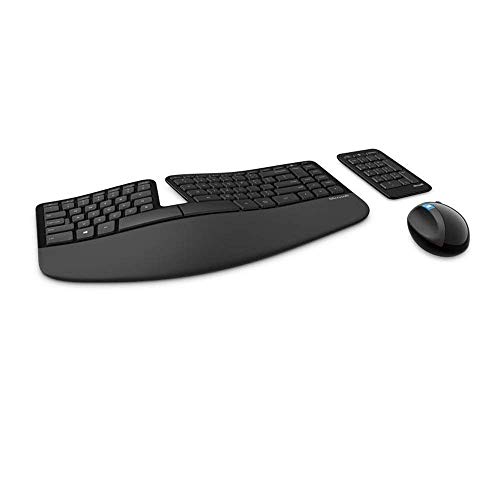
Microsoft Sculpt Ergonomic Keyboard - Best Budget
Microsoft’s Sculpt Ergonomic Keyboard provides a split‑key layout and a detachable numeric keypad at a very approachable price point. The domed keyboard shape reduces forearm pronation, while the built‑in cushioned palm rest supports wrists in a neutral posture. It connects via a low‑latency USB receiver, ideal for users who prefer a wired feel without the clutter of cables. Although the key travel is modest, the overall ergonomics make it a solid entry‑level choice.
In its favor
- Cushioned palm rest provides support and promotes a neutral wrist position. This keyboard
- Split keyset design helps to position wrists and forearms in a natural, relaxed position.
- Natural Arc key layout mimics the curved shape of the finger tips. Domed keyboard design D
- Separate number pad Separate number pad provides greater flexibility for workspace setup.
- Includes Keyboard, Mouse, Number Pad, 2x AAA Batteries, Bluetooth USB module.

Kinesis Freestyle Edge RGB - Best for Gamers
The Kinesis Freestyle Edge RGB is a modular, split mechanical keyboard designed for intense typing and gaming sessions. Each half can be positioned independently, and the included tenting kit lets you raise the inner edges up to 15 degrees. Hot‑swappable Kailh switches let you customize feel-from clicky blues to smooth reds. RGB lighting is fully programmable, and the detachable USB‑C cable supports both wired and wireless (via optional Bluetooth dongle) play. Its sturdy aluminum frame ensures durability for marathon sessions.

Keychron K3 Pro - Best Compact Wireless
Keychron’s K3 Pro packs a low‑profile, 75% layout into a thin, wireless chassis. The keyboard features a magnetic wrist rest and an adjustable tilt foot, giving users a comfortable angle without adding bulk. It supports Bluetooth 5.1 with up to three device pairing, plus a wired USB‑C mode for low latency. Switch options include Gateron low‑profile optical brown, red, or blue, each delivering distinct tactile feedback. The K3 Pro is perfect for desk‑share environments where space is at a premium.
In its favor
- Keychron K3, a compact 75% layout ultra-slim wireless mechanical keyboard built for peak p
- Be ready to multitask without missing a beat by connecting the K3 with up to 3 devices via
- With a unique Mac layout, the K3 has all the necessary Mac multimedia keys while still bei
- The redesigned low-profile Keychron mechanical switch is 40% slimmer than conventional swi
- Together with the reinforced aluminum body (plastic bottom frame) make the K3 one of the t

Goldtouch V2 Adjustable Keyboard - Most Customizable
The Goldtouch V2 stands out for its fully adjustable angle and split design. Users can slide the left and right halves independently and set the tilt from 0 to 20 degrees, tailoring the keyboard to personal ergonomics. It uses low‑profile membrane keys that mimic the feel of a laptop keyboard, reducing finger fatigue. The wired USB connection guarantees zero latency, and the optional Bluetooth adapter adds wireless flexibility. Ideal for professionals who need precise ergonomic tuning.
In its favor
- Versatile: Adjust the horizontal splay from 0 to 30 degrees and the vertical tent from 0 t
- Updated handle: Improved handle design allows for easier tenting and splaying.
- Compatibility: Use with both PC and Mac devices with the flick of the rear toggle switch.
- Flexible layouts: Toggle the rear switch to enable Default or Alternate keyboard layouts.
- Long-lasting keys: Silicon domed keys are laser-printed so text will last through repeated
What matters most
What to consider
When selecting an ergonomic keyboard, start by evaluating the layout. Split designs (Logitech, Kinesis, Goldtouch) encourage a more natural shoulder width, while compact layouts (Keychron K3 Pro) save desk space but may require a learning curve. Next, consider switch type: mechanical switches provide tactile feedback and durability, whereas scissor or membrane switches are quieter and often cheaper.
What to consider
Connectivity is another key factor. If you switch between a laptop, tablet, and desktop, a Bluetooth‑enabled model with multi‑device pairing (Logitech, Keychron) will streamline your workflow. Finally, assess adjustability-tilt, tenting, and detachable palm rests can dramatically affect comfort, especially for users with existing wrist or forearm issues. By matching these criteria to your daily tasks, you’ll find a keyboard that not only boosts productivity but also protects your health.
Frequently asked
Yes, ergonomic keyboards reduce wrist extension and pronation, which are common contributors to carpal tunnel. Models with split layouts and negative tilt are especially effective.
Kinesis is known for its robust build; the Freestyle Edge RGB uses a metal frame and hot‑swappable switches that stand up to intense daily use.
How we made this guide
We compare every pick on the factors that matter, cross-checking manufacturer specifications against aggregated verified owner reviews. We rank independently and never take payment for placement. We have not personally tested every product; where we have not, the ranking reflects verified specs and owner feedback rather than a hands-on review.
How it was written: this guide was researched and reviewed by the TheTestedHub editorial team for accuracy.
Affiliate disclosure: TheTestedHub is reader-supported. When you buy through links on our site, we may earn a commission at no extra cost to you.
You might also like

Your Docking Station Match: CalDigit TS4 and More

Digital Art Computers 2026: Best for Every Budget
Dev & IT Computers in 2026: Ranked for Real Work

Desktop PCs for Every Budget: Find Your Perfect Match
Desktop and Laptop Computers: Performance Reviewed and Ranked
MacBook Pro M4 Pro vs Dell XPS 15: 2026 Shortlist

Buy the Best DIY Computer in 2026: Corsair One i300
