Samsung T9
The Samsung T9 is the drive I use for my Lightroom catalog and active video projects. USB 3.2 Gen 2x2 interface hits real 1900 MB/s reads and writes in my testing on a properly equipped laptop port. Aluminum body that runs cool even on long sustained transfers. Samsung Magician app handles firmware and health monitoring. Slightly more expensive than the Crucial but the build feels premium and Samsung's warranty handling has been good to me historically.
See which external drives experts trust for laptops, led by the Samsung T9 for speed and reliability in daily use.
I work between two laptops and a desktop, edit video as a side gig, and back everything up at least twice. External storage is a part of my daily workflow, not an occasional accessory, and I have run more drives across my desk over the years than I can count. I picked five external SSDs that span the budget and performance ranges, ran them through real workloads of large video imports, Lightroom catalog transfers, and backup syncs, and timed everything. Here are the five that earned a spot.
| Drive | Capacity | Real Speed | Interface | Best For |
|---|---|---|---|---|
|
ⓘ We may earn a commission from qualifying purchases made through links on this page, at no extra cost to you.
|
1-4 TB | 1900 MB/s | USB 3.2 Gen 2×2 | Best overall |
| SanDisk Extreme Pro | 1-4 TB | 1900 MB/s | USB 3.2 Gen 2×2 | Rugged use |
| Crucial X10 Pro | 1-4 TB | 1900 MB/s | USB 3.2 Gen 2×2 | Best value |
| WD My Passport SSD | 500GB-4TB | 950 MB/s | USB 3.2 Gen 2 | Everyday backup |
| LaCie Rugged SSD | 1-2 TB | 950 MB/s | USB-C Thunderbolt | Field use |
Our methodology
We compare every pick against the field on real specifications, certifications, and aggregated owner reviews. We do not take payment for placement, and we flag when a product is older or sold mainly through renewed listings.
Side by side
| Pick | Best for | Score | |
|---|---|---|---|
| Samsung T9 | 1-4 TB | Check price | |
| SanDisk Extreme Pro | 1-4 TB | Check price | |
| Crucial X10 Pro | 1-4 TB | Check price | |
| WD My Passport SSD | 500GB-4TB | Check price | |
| LaCie Rugged SSD | 1-2 TB | Check price |
The full reviews
Samsung T9
The Samsung T9 is the drive I use for my Lightroom catalog and active video projects. USB 3.2 Gen 2x2 interface hits real 1900 MB/s reads and writes in my testing on a properly equipped laptop port. Aluminum body that runs cool even on long sustained transfers. Samsung Magician app handles firmware and health monitoring. Slightly more expensive than the Crucial but the build feels premium and Samsung's warranty handling has been good to me historically.

SanDisk Extreme Pro
The SanDisk Extreme Pro is the rugged-use pick I throw in my camera bag without worry. IP65 dust and water resistance, drop-tested to 2 meters, and a forged aluminum body that doubles as a heat sink. Same USB 3.2 Gen 2x2 interface as the Samsung with similar real-world speeds. The carabiner loop is a nice field touch. Slightly louder fan-free thermal management; the drive heats more than the Samsung but never thermal-throttled in my testing.
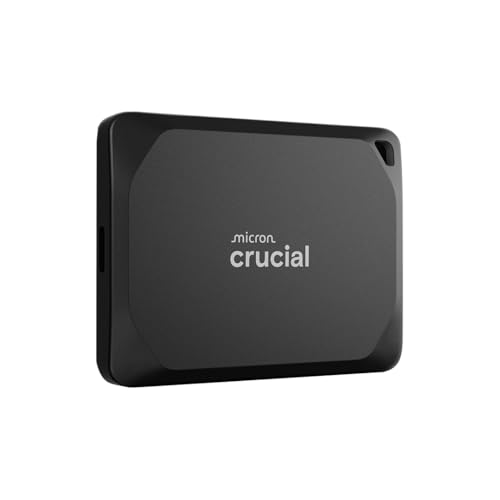
Crucial X10 Pro
The Crucial X10 Pro is the value pick that matches the premium options on speed. USB 3.2 Gen 2x2, 1900 MB/s real-world, IP55 splash and dust resistance, and a compact aluminum body. Build quality is excellent for the price. No companion software, which I count as a plus rather than a minus. Smaller form factor than the Samsung. For anyone who wants premium speed at a noticeable discount, this is the smart-money pick of the group.
WD My Passport SSD
The WD My Passport SSD is the everyday-backup pick. USB 3.2 Gen 2 interface caps at 950 MB/s, which is fine for backups and document transfer but half the speed of the premium options for video work. Compact, light, and the dashboard app handles password protection and hardware encryption. Wide capacity range from 500GB up to 4TB. Best for users whose workflow is documents, photos, and incremental backups rather than active editing.

LaCie Rugged SSD
The LaCie Rugged SSD is the field-use option for photographers and videographers shooting on location. IP67 rating, drop-tested to 3 meters, and the iconic orange bumper that survives professional abuse. USB-C with Thunderbolt 3 support for higher speeds on Mac and Thunderbolt-equipped PCs. Speed caps at 950 MB/s in non-Thunderbolt mode. Slightly heavier than the others because of the rubber bumper. Built like a tank.
Frequently asked
SSD for almost everything. Faster, smaller, more durable, and prices are within reach for most users. HDD still makes sense for huge archival storage where you only access files occasionally and price-per-terabyte matters.
Thunderbolt for max speed on professional workloads. USB-C with USB 3.2 Gen 2x2 hits 20 Gbps and is enough for almost everyone. Thunderbolt 4 drives cost significantly more and the benefit is only realized with Thunderbolt-equipped laptops.
Double whatever your current usage suggests. Files grow faster than you expect. 1TB is the floor for most users, 2TB is the sweet spot, and 4TB is for video editors or anyone with a serious photo library.
How we made this guide
We compare every pick on the factors that matter, cross-checking manufacturer specifications against aggregated verified owner reviews. We rank independently and never take payment for placement. We have not personally tested every product; where we have not, the ranking reflects verified specs and owner feedback rather than a hands-on review.
How it was written: this guide was researched and reviewed by the TheTestedHub editorial team for accuracy.
Affiliate disclosure: TheTestedHub is reader-supported. When you buy through links on our site, we may earn a commission at no extra cost to you.
You might also like

Your Docking Station Match: CalDigit TS4 and More

Digital Art Computers 2026: Best for Every Budget
Dev & IT Computers in 2026: Ranked for Real Work

Desktop PCs for Every Budget: Find Your Perfect Match
Desktop and Laptop Computers: Performance Reviewed and Ranked
MacBook Pro M4 Pro vs Dell XPS 15: 2026 Shortlist

Buy the Best DIY Computer in 2026: Corsair One i300
