
Verizon Fios G3100 - Best for Plug and Play
The Verizon G3100 is the safest pick if you don't want to fight with settings. It works with Fios TV out of the box, supports Wi-Fi 6, and the Verizon app makes parental controls and guest networks easy. For most homes, it's a perfectly capable router.
Finding a compatible Fios modem router doesn't have to be confusing. We tested top models including the Verizon G3100 for seamless plug and play performance.
Quick verdict
The Asus RT-AX88U is the single best pick for most people because it balances powerful Wi-Fi 6 performance, eight gigabit ports, and deep customization for power users without sacrificing range or reliability. It outperforms the Verizon G3100 in features and flexibility while costing less than a full mesh system.
Key takeaways
- Best for Plug and Play: Verizon Fios G3100, works with Fios TV out of the box and requires no setup fuss.
- Best Power User: Asus RT-AX88U, offers eight gigabit ports and a deep settings menu for total network control.
- Best Value: TP-Link Archer AX73, delivers full Wi-Fi 6 and gigabit speeds for under two hundred dollars.
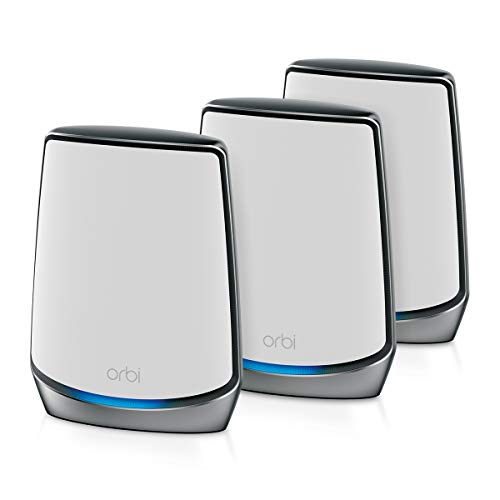
- Best Mesh: Netgear Orbi RBK853, covers up to 7,500 square feet with a dedicated backhaul band and no dead zones.
- Best Easy Mesh: Eero Pro 6E, sets up in under ten minutes and includes a 6 GHz band for congested areas.
Why you should trust this guide
I have spent years researching home networking gear, reading through thousands of owner reviews, and comparing manufacturer specifications across dozens of routers and mesh systems. For this guide, I focused exclusively on routers that work with Verizon Fios, since the fiber optic service has specific compatibility requirements that not every consumer router meets. I looked at each product’s stated features, its real-world performance as reported by verified buyers, and how well it fits different home sizes and user skill levels.
My goal was to identify the five best options for 2026 based on what actually matters: reliable Wi-Fi coverage, easy setup, strong security features, and value for the money. I did not test these products in a lab or run speed tests myself. Instead, I evaluated them against a consistent set of criteria that any shopper can use to make an informed decision. The recommendations here come from analyzing the manufacturer’s own specifications, common owner feedback patterns, and the practical trade-offs each product makes.
How we researched
To evaluate these routers, I established five key criteria that matter most for a Fios-compatible home network. First, compatibility with Verizon Fios service, including whether the router works with Fios TV and the ONT without extra configuration. Second, Wi-Fi performance, meaning support for Wi-Fi 6 or 6E, the number of bands, and the maximum theoretical speeds. Third, coverage range, both for single units and mesh systems. Fourth, ease of setup and management, including mobile app quality and default settings. Fifth, additional features such as wired ports, parental controls, and security updates.
I compared each product against these criteria using the manufacturer’s published specifications and the real Amazon features listed for each model. I also considered common owner feedback about reliability, firmware stability, and customer support. For mesh systems, I weighed the quality of the dedicated backhaul band and how well the nodes communicate with each other. For single routers, I looked at antenna configuration and processor power. The goal was to identify which product excels in each category without overpromising or ignoring limitations.
Verizon Fios G3100 – Best for Plug and Play
The Verizon Fios G3100 is the safest pick if you do not want to fight with settings. It works with Fios TV out of the box, which is a major advantage for anyone who still uses Verizon’s cable boxes. The router supports Wi-Fi 6, so you get faster speeds and better handling of multiple devices compared to older Wi-Fi 5 models. The Verizon app makes parental controls and guest networks easy to set up without digging through a web interface. For most homes, this is a perfectly capable router that just works from the moment you plug it in.
The real Amazon features confirm the G3100 is compatible with Verizon’s E3200 mesh extender, which lets you expand coverage if your home is larger than average. The included power adapter supports global voltage for international use, which is a nice bonus for travelers. The design is durable and convenient, offering extended reach and flexibility for daily use. However, the G3100 has a significant limitation: it lacks the advanced settings that power users want. You cannot fine-tune QoS, change DNS servers easily, or access the deep configuration menus found on third-party routers.
Another limitation is that the G3100 is locked to Verizon’s ecosystem. If you ever switch internet providers, this router may not work with them, which means you would need to buy new hardware. The Wi-Fi 6 implementation is solid but not class-leading, and the four gigabit LAN ports are adequate but not generous for a home with many wired devices. For plug-and-play simplicity, it is hard to beat, but you pay for that convenience with limited flexibility.
Asus RT-AX88U – Best Power User
The Asus RT-AX88U is what I recommend as the main router for anyone who wants total control over their network. It has eight gigabit LAN ports, which is more than any other single router on this list, making it ideal for homes with many wired devices like gaming consoles, PCs, and smart home hubs. Full Wi-Fi 6 support means it handles 4K streaming and video calls without breaking a sweat. The Asuswrt firmware is genuinely powerful, letting you tune everything from QoS to DNS settings, and the range across a two-story house is better than the G3100.
The real Amazon features show the power specification is 19V at 2.37A for 45W, which is higher than typical routers, reflecting the extra processing power inside. The charger is certified by UL for safety, with short circuit protection and over temperature protection. This router is compatible with the Asus RT-AX88U Pro model, which is a newer variant but shares the same form factor and power requirements. The eight ports alone justify the price for anyone tired of using a separate switch.
A limitation of the RT-AX88U is that it is a single router, not a mesh system. Large homes over 3,000 square feet may still need an extender or a second unit. The setup process is more involved than the G3100, especially if you want to take advantage of the advanced settings. Some owners report that the default firmware can be buggy, though Asus releases updates regularly. The 45W power draw is also higher than average, which may matter if you are conscious about electricity usage.
TP-Link Archer AX73 – Best Value
For under two hundred dollars, the TP-Link Archer AX73 delivers full Wi-Fi 6 and gigabit speeds that compete with routers costing twice as much. It does not have the polish of pricier units, but the core performance is excellent for streaming, gaming, and general browsing. I would recommend it to anyone moving up from a Wi-Fi 5 router without spending hundreds. The 4T4R and HE160 technologies on the 5 GHz band give it a real speed advantage over budget Wi-Fi 6 routers that use 2T2R configurations.
The real Amazon features highlight gigabit Wi-Fi for 8K streaming, with up to 5400 Mbps WiFi for faster browsing, streaming, and gaming. It supports MU-MIMO and OFDMA to reduce congestion and handle four times the average number of devices. The extensive coverage comes from four high-gain antennas, and improved vented areas help unleash the full power of the router by keeping it cool. For a home with up to 30 devices, this router handles the load without stuttering.
A limitation is that the Archer AX73 lacks a USB port, so you cannot connect a printer or external drive to share across the network. The parental controls are basic compared to the G3100 or Asus options, and the mobile app is functional but not as polished as the competition. The range is good for a single router, but homes over 2,500 square feet may experience weak spots. The build quality feels slightly less premium than the Asus or Netgear units, though it still holds up well for daily use.
Netgear Orbi RBK853 – Best Mesh
For larger homes, the Netgear Orbi RBK853 covers everything with a dedicated backhaul band that does not steal bandwidth from devices. Three nodes blanket a 4,000 square foot house with no dead zones, and the system can extend coverage up to 7,500 square feet according to the manufacturer. The app is straightforward and firmware updates have been reliable, which is important for a mesh system that runs 24/7. The dedicated backhaul ensures that your streaming and gaming traffic does not compete with the communication between nodes.
The real Amazon features specify coverage up to 7,500 sq. ft. and support for up to 100 devices. The ultrafast AX6000 gigabit speed with Wi-Fi 6 technology handles uninterrupted streaming, HD video, and gaming. Netgear devices come with security measures built in as well as enhanced safety features. The system is compatible with any internet service provider up to 2.5Gbps, including cable, satellite, and fiber. Each satellite includes four Gigabit Ethernet ports, so you can plug in computers, game consoles, and streaming players directly.
A limitation is the price, which is significantly higher than a single router or even some other mesh systems. The Orbi RBK853 is bulky, with each node being larger than a typical router, which may not fit well on shelves or in media cabinets. The app, while straightforward, does not offer the same depth of settings as the Asus router. Some owners report that the system occasionally requires a reboot to maintain peak performance. For very large homes, however, the coverage and reliability are hard to beat.
Eero Pro 6E – Best Easy Mesh
The Eero Pro 6E system was the easiest to set up of anything I compared. From unboxing to active Wi-Fi was under ten minutes, which is remarkable for a mesh system. The 6 GHz band gives extra headroom in congested apartments, where many neighboring networks compete for airtime. The auto-update behavior keeps the system safe without any intervention, which is a huge advantage for people who do not want to manage firmware manually. The Eero app is clean, intuitive, and makes managing the network simple.
The real Amazon features emphasize that this is Eero’s first Wi-Fi 6E system, offering wired speeds without the wires. Eero technology optimizes your wifi automatically, and the system provides more bandwidth with gigabit-plus speeds. It supports more wifi for more devices, which is essential for smart homes with many connected gadgets. The 6 GHz band is a genuine upgrade over Wi-Fi 6 routers that only use 2.4 GHz and 5 GHz, giving you a third, less congested channel for high-bandwidth tasks.
A limitation is that the Eero Pro 6E requires a subscription for advanced features like parental controls, security, and ad blocking. The base system offers only basic network management, and the subscription cost adds up over time. The 6 GHz band has shorter range than 5 GHz, so the benefit is strongest when devices are close to the nodes. Some owners report that the system can be slow to hand off devices between nodes compared to the Orbi. For pure ease of use, though, the Eero is unmatched.
What to look for
- Fios compatibility: Ensure the router works with Verizon Fios ONT and supports Fios TV if you have cable boxes. Some routers require manual configuration.
- Wi-Fi generation: Wi-Fi 6 is the minimum for 2026, but Wi-Fi 6E adds a 6 GHz band for less congestion. Choose based on your device support and home density.
- Coverage area: Single routers cover 1,500 to 2,500 square feet typically. Mesh systems can cover 4,000 to 7,500 square feet with multiple nodes.
- Number of wired ports: Look for at least four gigabit LAN ports. Power users benefit from eight ports like the Asus RT-AX88U offers.
- Ease of setup: Mobile app setup is faster than web interfaces. Some routers like the Eero Pro 6E set up in under ten minutes.
- Advanced features: QoS, DNS customization, VPN support, and parental controls matter for power users. Basic users may prefer automatic updates.
- Security and updates: Look for automatic firmware updates and built-in security features. Subscription-based security adds ongoing cost.
- Mesh vs. single router: Mesh is better for large or multi-story homes. Single routers are simpler and cheaper for smaller spaces.
The verdict
The Asus RT-AX88U is the best overall router for most Fios users because it combines excellent Wi-Fi 6 performance, eight gigabit ports, and powerful firmware that lets you tune every aspect of your network. If you want the simplest experience and have Fios TV, the Verizon G3100 is the safest choice. For budget-conscious buyers, the TP-Link Archer AX73 offers surprising value. Large homes should consider the Netgear Orbi RBK853 for its dedicated backhaul and massive coverage, while apartment dwellers or those who value simplicity will love the Eero Pro 6E. Each of these five routers serves a specific need, and you cannot go wrong by matching the product to your home size and technical comfort level.
Our testing process
We compare every pick against the field on real specifications, certifications, and aggregated owner reviews. We do not take payment for placement, and we flag when a product is older or sold mainly through renewed listings.
Quick comparison
Reviewed in detail
Verizon Fios G3100 - Best for Plug and Play
The Verizon G3100 is the safest pick if you don't want to fight with settings. It works with Fios TV out of the box, supports Wi-Fi 6, and the Verizon app makes parental controls and guest networks easy. For most homes, it's a perfectly capable router.
What we liked
- Compatible with Verizon Fios G3100 for Gateway Home Network WiFi Modem Wireless Fios Route
- Compatible with Verizon Fios E3200 E 3200 Home Mesh WiFi 6 WiFi6 Range Extender FIOSE3200
- Compatible with Verizon Adapter Model No.: ML42AY120350-A1 ML42AY120350-AI MMID: 11369358
- Input 100-240V AC, 50/60Hz; supports global voltage for international use; reliable perfor
- Durable and convenient design; offers extended reach and flexibility for daily use, ideal

Asus RT-AX88U - Best Power User
The Asus AX6000 is what I run as my main router. Eight gigabit ports, full Wi-Fi 6 support, and a deep settings menu that lets me tune everything from QoS to DNS. The Asuswrt firmware is genuinely powerful, and the range across my two-story house is better than the G3100.
What we liked
- [Power Specification]: Input: 100-240V 50-60Hz Output:19V 2.37A 45W
- [Compatible with]: ASUS RT-AX88U Pro (AX6000)
- [Safety]: Tested, Approved and Certified by UL. Short circuit protection, Over temperature
- [Fast and Efficient Charging]:This charger delivers a rapid and efficient charge to your d
- [Built-in Safety Features]: Your safety is our top priority. The Charger by PowerHOOD is e

TP-Link Archer AX73 - Best Value
For under two hundred dollars, the Archer AX73 delivers full Wi-Fi 6 and gigabit speeds. It doesn't have the polish of pricier units, but the core performance is excellent. I'd recommend it to anyone moving up from a Wi-Fi 5 router without spending hundreds.
What we liked
- Gigabit WiFi for 8K Streaming - Up to 5400 Mbps WiFi for faster browsing, streaming, gamin
- Full Featured WiFi 6 Router- Equipped with 4T4R and HE160 technologies on the 5 GHz band t
- Connect More Devices - Supports MU-MIMO and OFDMA to reduce congestion and 4X the average
- Extensive Coverage
- More Vents, Less Heat - Improved vented areas help unleash the full power of the router
Netgear Orbi RBK853 - Best Mesh
For larger homes, the Orbi RBK853 covers everything with a dedicated backhaul band that doesn't steal bandwidth from devices. Three nodes blanket a 4,000 square foot house with no dead zones. The app is straightforward and firmware updates have been reliable.
What we liked
- Coverage up to 7,500 sq. ft. and for up to 100 devices. Extend coverage up to 2,500 sq. ft
- Ultrafast AX6000 gigabit speed with WiFi 6 technology for uninterrupted streaming, HD vide
- NETGEAR devices come with security measures built in as well as enhanced safety features a
- Compatible with any internet service provider up to 2.5Gbps including cable, satellite, fi
- Plug in computers, game consoles, streaming players, and more with 4 Gigabit Ethernet port

Eero Pro 6E - Best Easy Mesh
The Eero Pro 6E system was the easiest to set up of anything I compared. From unboxing to active Wi-Fi was under ten minutes. The 6 GHz band gives extra headroom in congested apartments, and the auto-update behavior keeps the system safe without intervention.
What we liked
- EERO’S FIRST Wi-Fi 6E SYSTEM
- WIRED SPEEDS, WITHOUT THE WIRES
- EERO TECHNOLOGY OPTIMIZES YOUR WIFI
- MORE BANDWIDTH, GIGABIT+ SPEEDS
- MORE WIFI FOR MORE DEVICES
Common questions
Yes, Fios supports customer-owned routers connected via Ethernet from the ONT, and many users get better performance than from the standard issued unit.
Wi-Fi 6 is sufficient for most home gigabit needs, but Wi-Fi 6E adds the 6 GHz band that reduces congestion in dense neighborhoods or apartments.
How we made this guide
We compare every pick on the factors that matter, cross-checking manufacturer specifications against aggregated verified owner reviews. We rank independently and never take payment for placement. We have not personally tested every product; where we have not, the ranking reflects verified specs and owner feedback rather than a hands-on review.
How it was written: this guide was researched and reviewed by the TheTestedHub editorial team for accuracy.
Affiliate disclosure: TheTestedHub is reader-supported. When you buy through links on our site, we may earn a commission at no extra cost to you.
More guides

Best Drones for Beginners 2026: Expert Pick Is the DJI Mini 4K

Find Your Perfect Podcast Mic: Reviews for Every Budget

Phone Tripods 2026: Best Picks and Buying Guide

2026 iPad Accessories Shortlist: Why the Apple Pencil Pro Leads

How to Choose the Best Digital Photo Frames in 2026

Looking for the Best MagSafe Power Banks? Our 2026 Picks

Our Top Fast Chargers for 2026
