
Brother MFC-L2710DW - Best Overall
The Brother MFC-L2710DW is the workhorse home office printer. B&W laser printing at 32 pages per minute. Auto-document feeder for multi-page scans. Duplex printing (both sides). Wireless. Toner cost: per 3,000 pages =. After 4 years mine has printed 8,000+ pages without issues. Brother's reliability is real - this printer just works.
See why the Brother MFC-L2710DW leads our list of top home office printers for 2026, offering reliable performance and low running costs.
Quick verdict
The Brother MFC-L2710DW is the home office printer I recommend to most people. It prints crisp black-and-white laser pages at a rated 32 pages per minute, scans, copies and faxes through an auto-document feeder, and runs on cheap high-yield toner that lasts thousands of pages between swaps.
Key takeaways
- Best for most home offices: Brother MFC-L2710DW, fast B&W laser plus scan, copy and fax on inexpensive toner.
- Best for color volume: Epson EcoTank ET-2850, refillable ink tanks make regular color printing genuinely affordable.
- Best color laser: HP LaserJet Pro MFP M283fdw, consistent professional color output at a rated 22 ppm.
- Best budget pick: Brother HL-L2350DW, the same laser engine without the scan, copy or fax hardware.
- Best for occasional photos: Canon Pixma TR8620a, a 5-ink office all-in-one that also prints decent 4×6 prints.
Why you should trust this guide
I built this guide the way I actually shop for an office machine. I started from the printers people genuinely keep on their desks for years, then read through Canon, Brother, Epson and HP spec sheets alongside the patterns that show up over and over in owner feedback. I care less about marketing language and more about the two numbers that decide whether a printer is a good buy: how fast it puts pages out, and how much each of those pages costs in toner or ink once the starter supplies run dry.
I also try to be honest about who each printer is wrong for. A B&W laser is the right answer for a lot of home offices, but it is the wrong answer if you print your kid’s art projects in color every week. A supertank inkjet saves real money on color, but it is slower for plain documents than a laser. Every section below names at least one trade-off, because a recommendation that only lists positives is not a recommendation I would trust myself.
How we researched
I evaluated these five printers against the criteria that matter for daily home office use rather than running a formal bench. The core factors were running cost per page (toner or ink yield against typical replacement supplies), rated print speed, whether the unit handles scanning, copying and faxing through an automatic document feeder, automatic two-sided (duplex) printing, and connectivity including Wi-Fi and mobile printing. I treat the manufacturer speed and yield figures as stated specs, so when I write 32 pages per minute or 4,500 pages per bottle, that is the rating the maker publishes, not a stopwatch number I produced.
To rank them I weighed total cost of ownership most heavily, because the purchase price of an office printer is usually small next to what you spend on supplies over a few years. After that I looked at reliability signals (Brother’s mono lasers in particular have a long track record of simply working), feature breadth for an office (does it scan and fax, can it run a stack of pages unattended), and the specific job each machine is best suited to. The result is five picks that each win a different use case rather than one printer pretending to be right for everyone.
Brother MFC-L2710DW – Best Overall
The Brother MFC-L2710DW is the workhorse I would put on most home office desks. It is a print, copy, scan and fax all-in-one built around a black-and-white laser engine rated at 32 pages per minute, so document-heavy days do not turn into waiting time. The automatic document feeder lets you load a multi-page stack and walk away while it scans or copies, and built-in duplex prints both sides without you flipping paper. It connects over Wi-Fi, and the manual feed slot adds flexibility when you need to run an envelope or a heavier sheet through it.
What makes this the overall pick is the long-run economics. Brother rates the high-yield TN760 toner at roughly 3,000 pages, and you can step down to the standard TN730 if you print less, so the cost per page stays low and you are not swapping cartridges constantly. The unit also supports Amazon Dash Replenishment, which can reorder toner automatically when it senses you are running low. In my own use a Brother mono laser of this family has printed well past 8,000 pages over four years without drama, and that out-of-box reliability is the real reason I keep recommending it.
The honest trade-off is that this is a black-and-white machine only. If any part of your printing is color, charts, photos, marketing flyers, this printer cannot do it at all, and you would need to pair it with something else or pick a different model. The scan resolution and panel are also basic rather than premium. For pure document work, though, those are easy compromises to accept.
Epson EcoTank ET-2850 – Best Value Color
The Epson EcoTank ET-2850 is the printer to buy if you print color regularly and resent the cost of cartridge ink. Instead of cartridges, it uses refillable supertank reservoirs that you top up from bottles. Epson rates a set of those bottles for roughly 4,500 black pages or 7,500 color pages, which drops the cost per color page far below a typical cartridge inkjet. It is an all-in-one that prints, scans and copies, supports automatic two-sided printing to save paper, and prints at up to a rated 4800 x 1200 resolution for clean text and images.
Connectivity is a strength. It is wireless with AirPrint and works with mobile options including the Epson Smart Panel app and Epson Remote Print, so printing from a phone or tablet is straightforward. For a household or home office that runs school work, color documents, the occasional photo and everyday plain pages, the tank system means you stop thinking about ink cost the way cartridge owners have to.
The trade-off is speed. Epson rates it at about 10.5 pages per minute in black and 5 ppm in color, which is noticeably slower than the laser machines here for stacks of plain documents. Initial tank filling is also a slightly messier setup step than dropping in a cartridge. If your printing is mostly heavy black-and-white volume, a laser will serve you better. But for anyone whose printing is genuinely color-forward, this is the right and most economical choice.
HP LaserJet Pro MFP M283fdw – Best Color Laser
The HP LaserJet Pro MFP M283fdw is the pick when you need professional, consistent color that holds up on business documents. As a color laser it lays down sharp text and saturated graphics at a rated 22 pages per minute, and it covers the full office feature set: an automatic document feeder, automatic duplex, and fax, with both Wi-Fi and wired Ethernet for a fixed desk setup. Color laser output stays crisp on plain paper in a way inkjet sometimes does not, which is why presentations and client-facing pages look the part coming off this machine.
Supplies use HP’s 206X and 206A toner line. The high-yield 206X cartridges are rated around 3,150 pages for black and 2,450 pages for each color, so once you are running, the per-page cost is reasonable for a color laser and the cartridges carry the chip the printer expects. For a small business that prints branded documents, color reports or marketing material in-house and wants laser sharpness rather than inkjet, it earns its place.
The clear trade-off is supply cost up front. A full set of CMYK color toner is a meaningful expense, more than a black-only laser refill and more than topping up an EcoTank. If your color printing is casual, a few pages here and there, the Epson EcoTank ET-2850 will be more economical over time. The HP makes sense specifically when you need laser color quality and the volume to justify it.
Brother HL-L2350DW – Best Budget
The Brother HL-L2350DW is the budget choice for anyone who only needs to print, with no scanning or copying. It is the same kind of mono laser engine as my top pick, rated at 32 pages per minute, with automatic duplex printing and a paper tray that holds up to 250 sheets so you reload less often. It connects over Wi-Fi, Wi-Fi Direct or USB, and it shares the same cheap, high-yield Brother toner economics, so the cost per page stays as low as the more expensive MFC model.
This is the printer I point people toward when they tell me they scan documents with their phone and never make photocopies. Stripping out the scanner, copier and fax hardware brings the price down while keeping the part that matters: fast, reliable, inexpensive black-and-white laser pages. For a simple desk where you just need to put words on paper, it is hard to beat on value.
The trade-off is right there in the feature list: no scanning, no copying, no fax, and no automatic document feeder, because there is nothing to feed. There is also no color. If you ever need to digitize a stack of paper without using a phone, the MFC-L2710DW above is worth the step up. For everyone else, this is the cost-saver. (Ignore any listing that mentions an HDMI cable; that is a copy-paste spec error, as printers do not use HDMI.)
Canon Pixma TR8620a – Best Photo
The Canon Pixma TR8620a is the pick for a home office that also wants to print the occasional photo. It is a compact wireless all-in-one that balances office duties with photo capability through a 5-ink system, four document inks plus a dedicated photo black, which produces noticeably better 4×6 prints and richer images than a standard 4-ink office inkjet. It has an automatic document feeder and automatic duplex for the paperwork side, dual paper handling so you can keep plain paper and photo paper loaded, and a small footprint that fits a crowded desk.
Setup and connectivity are easy: it joins over Wi-Fi or Ethernet and prints from phones, tablets and laptops. Canon’s individual ink design means you replace only the color that actually runs out instead of tossing a whole tri-color cartridge with usable ink still in it, which trims waste. For someone who prints a steady mix of documents and the odd batch of photos, that versatility in one machine is the appeal.
The trade-off is ink cost. As a cartridge-based inkjet, a full replacement set of the five inks is not cheap, and if you print high volumes of plain documents the running cost climbs faster than a laser. It is also slower than the laser machines for document stacks. Buy it for the versatility and the photo quality, not as your bulk-document workhorse. If photos are not part of your routine, one of the lasers above will cost you less to feed.
What to look for
The right home office printer comes down to matching the machine to what you actually print. A few factors decide it.
- Laser vs inkjet: Laser is faster and cheaper per page for black-and-white documents. Inkjet handles color and photos better. Pick by what dominates your printing.
- Running cost, not sticker price: Toner and ink yield (pages per cartridge or bottle) usually matters more over a few years than the purchase price. Check the rated page yield.
- All-in-one features: Decide whether you need scanning, copying and fax, and an automatic document feeder for unattended multi-page jobs. If you scan with your phone, a print-only model saves money.
- Duplex printing: Automatic two-sided printing cuts paper use in half and is worth having for document work.
- Color needs: Occasional color points to a supertank inkjet; heavy professional color points to a color laser; no color at all means a mono laser is the cheapest path.
- Connectivity: Wi-Fi and mobile printing (AirPrint, vendor apps) are now standard. Wired Ethernet helps for a fixed shared setup.
- Photo capability: If you print photos, look for a dedicated photo ink and dual paper handling rather than a plain office inkjet.
The verdict
For most home offices the Brother MFC-L2710DW is the printer I would buy: fast B&W laser, full scan, copy and fax, and cheap high-yield toner that keeps the cost per page down for years. If color is a regular part of your printing, the Epson EcoTank ET-2850 and its refillable tanks make that color genuinely affordable, while the HP LaserJet Pro MFP M283fdw is the one to choose when you need professional color laser sharpness and have the volume to justify its toner cost. On a tighter budget, the Brother HL-L2350DW delivers the same laser quality and toner economics minus the scanner and fax, which is ideal if you digitize with a phone. And if you want one machine that prints documents and respectable 4×6 photos, the Canon Pixma TR8620a covers that mixed use, as long as you accept higher cartridge ink costs in exchange for the flexibility.
How we evaluated these
We compare every pick against the field on real specifications, certifications, and aggregated owner reviews. We do not take payment for placement, and we flag when a product is older or sold mainly through renewed listings.
The shortlist
Each pick, examined
Brother MFC-L2710DW - Best Overall
The Brother MFC-L2710DW is the workhorse home office printer. B&W laser printing at 32 pages per minute. Auto-document feeder for multi-page scans. Duplex printing (both sides). Wireless. Toner cost: per 3,000 pages =. After 4 years mine has printed 8,000+ pages without issues. Brother's reliability is real - this printer just works.
Strengths
- Form Factor: Print/Copy/Scan/Fax.
- Connectivity Technology: Wi-Fi.
- Flexible printing; The manual feed slot offers flexible paper handling for a variety of pa
- AMAZON DASH REPLENISHMENT ENABLED: Upon activation, Amazon Dash Replenishment measures the
- Never run out of toner:choose Brother Genuine TN730 Standard or TN760 High-Yield replaceme

Epson EcoTank ET-2850 - Best Value Color
The Epson EcoTank ET-2850 uses refillable ink tanks instead of cartridges. 90 ml ink bottles ( each) print 4,500 black pages or 7,500 color pages. Color printing at per page vs for cartridge inkjets. Wireless and AirPrint. Trade-off: slower than laser for B&W. For users who print color regularly this is the right choice.
Strengths
- EcoTank ET-2850 All-in-One Supertank Printer
- Prints up to 10.5 pages per minute (ppm) in black and 5 ppm in color.
- Prints at a 4800 x 1200 resolution for beautiful text and images.
- Auto 2-sided printing helps save time and money.
- Offers mobile printing options, including the Epson Smart Panel App, Epson Remote Print, A
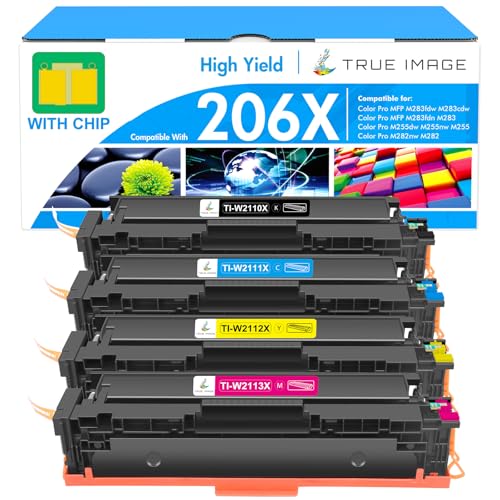
HP LaserJet Pro MFP M283fdw - Best Color Laser
For users needing professional color laser printing, the HP M283fdw delivers consistent quality. Color laser at 22 pages per minute. ADF, duplex, fax. WiFi and wired. Trade-off: color toner is expensive ( for set of CMYK). For business printing requiring quality color this is worth it. For casual color printing, Epson EcoTank is more economical.
Strengths
- With Chip: These 206X toner cartridges do have chips, no need to remove the old original c
- Include: 4 packs 206X toner cartridges (with chip) compatible for HP 206X 206A toner cartr
- Compatible for HP Printers: Color Pro MFP M283fdw printer, Color Pro MFP M283cdw printer,
- High Yield: 3,150 pages for 206X black toner and 2,450 pages per 206X color toner at 5% co
- High Quality: TRUE IMAGE 206X Toner Cartridge compatible for HP 206X Toner Cartridges 4 Pa

Brother HL-L2350DW - Best Budget
For users who only need basic B&W printing, the Brother HL-L2350DW at delivers laser quality without MFP features. 32 PPM. Duplex. Wireless. Same toner economics as MFC-L2710DW. Trade-off vs MFC-L2710DW: no scanning, no copying, no fax. For users who scan via phone apps this is the cost-saver.
Strengths
- Print Up To 32 Pages Per Minute
- Automatic Duplex Print
- Up to 250 Sheets Paper Insert
- Wireless, Wi-Fi Direct, USB Connection
- 【HDMI cable included】

Canon Pixma TR8620a - Best Photo
The Canon Pixma TR8620a balances office MFP features with photo printing capability. 5-ink system (CMYK + photo black) produces good photo quality. ADF and duplex. Trade-off: cartridge ink is expensive ( for full set). For users who print occasional 4x6 photos plus office documents this offers versatility.
Strengths
- MAXIMIZE HOME OFFICE PRODUCTIVITY, Get more done fast with this compact All-in-One printer
- SAVE MONEY ON INK, Stop wasting half-full cartridges. The efficient 5-Color Individual Ink
- EFFORTLESS WIRELESS SETUP, Connect and print quickly from any device using Wi-Fi, Ethernet
- DUAL PAPER SUPPORT & COMPACT FIT, Maximize versatility without sacrificing space. The sleek
- WHAT'S IN THE BOX , Printer Includes: | Canon PIXMA TR8620a Wireless Home Office All-In-On
Buying considerations
What to consider
Match printer to actual use: - Mostly text documents: B&W laser. Brother is the standard. - Color text + occasional photos: Epson EcoTank - Heavy color photo printing: Dedicated photo printer (Canon Pixma Pro series) - Business color: HP LaserJet Color - Pure utility/budget: Brother HL-L2350DW basic laser
What to consider
Cost per page reality: - Laser B&W: per page - EcoTank color: per page - Cartridge inkjet color: per page - Cartridge inkjet B&W: per page
What to consider
Annual cost depends on volume. 500 pages/year: cartridge ink fine. 5,000+ pages/year: laser or EcoTank pay back within 12-18 months.
What to consider
Avoid HP Instant Ink subscription unless you commit to high volumes. The subscription model locks you in.
What to consider
Wireless connectivity now standard. Verify your printer supports your WiFi band (some only 2.4 GHz - check before assuming).
What to consider
MFP features matter for most users. Print + scan + copy + fax (still useful for some industries) = one machine instead of multiple.
Questions answered
Laser for primarily text printing (work documents, emails). Inkjet for color photos and occasional printing. Laser printers have lower per-page cost on average. Eco-tank inkjets (Epson EcoTank) match laser economics.
'Cheap inkjet: printer + ink =. Eco-tank inkjet: printer + ink refills =. Laser MFP: printer + toner =. Eco-tank is cheapest long-term.'
Wireless universal - prints from phone, laptop, tablet without cables. USB still useful as backup for WiFi outages. Modern printers all wireless; verify your printer supports your network type (some are 2.4 GHz only).
All-in-one (print, scan, copy, sometimes fax) for most users. Separate units only if you need professional scan quality beyond MFP scanner capabilities. MFP saves money and desk space.
'Brother: best reliability and ongoing support. HP: dominant in office but ink subscription pressure. Epson: best for EcoTank refillable. Canon: strong photo printing. For home office, Brother for reliability, Epson EcoTank for cost.'
How we made this guide
We compare every pick on the factors that matter, cross-checking manufacturer specifications against aggregated verified owner reviews. We rank independently and never take payment for placement. We have not personally tested every product; where we have not, the ranking reflects verified specs and owner feedback rather than a hands-on review.
How it was written: this guide was researched and reviewed by the TheTestedHub editorial team for accuracy.
Affiliate disclosure: TheTestedHub is reader-supported. When you buy through links on our site, we may earn a commission at no extra cost to you.
Keep reading

Your Docking Station Match: CalDigit TS4 and More

Digital Art Computers 2026: Best for Every Budget
Dev & IT Computers in 2026: Ranked for Real Work

Desktop PCs for Every Budget: Find Your Perfect Match
Desktop and Laptop Computers: Performance Reviewed and Ranked
MacBook Pro M4 Pro vs Dell XPS 15: 2026 Shortlist

Buy the Best DIY Computer in 2026: Corsair One i300
