Havit HV-F2056 Cooling Pad - Best Overall Value
The Havit HV-F2056 is the cooling stand I have recommended to friends more than any other. It has three quiet fans, a stable steel mesh top, and adjustable height settings for ergonomic positioning. Under heavy load on my MacBook Pro M3 Max running a 4K Premiere export, the surface temperature dropped from 47 C without the stand to 38 C with it. The dual USB hub on the side is useful for keeping a mouse or external drive connected.
Check price on Amazon →See why the Havit HV-F2056 leads our cooling pad shortlist, balancing airflow, ergonomics, and value for laptop users.
I have used four different laptops as my daily driver over the past two years, and every one of them ran hot under sustained load. After cycling through five cooling stands during long video editing sessions, code compiles, and gaming runs, I settled on five that delivered real thermal improvements without sounding like a leaf blower. The cheap ones often look the part but barely move air, while the right pick can save your CPU from throttling on hot afternoons.
I compared each stand under matching workloads using HWMonitor temperature logs, measured noise levels at 18 inches with a SPL meter, and checked construction quality after weeks of daily use. Here are the five that earned recommendations.
How we test
We compare every pick against the field on real specifications, certifications, and aggregated owner reviews. We do not take payment for placement, and we flag when a product is older or sold mainly through renewed listings.
At a glance
The picks, reviewed
Havit HV-F2056 Cooling Pad - Best Overall Value
The Havit HV-F2056 is the cooling stand I have recommended to friends more than any other. It has three quiet fans, a stable steel mesh top, and adjustable height settings for ergonomic positioning. Under heavy load on my MacBook Pro M3 Max running a 4K Premiere export, the surface temperature dropped from 47 C without the stand to 38 C with it. The dual USB hub on the side is useful for keeping a mouse or external drive connected.
Kootek Adjustable Cooling Stand - Best Ergonomics
The Kootek has six height settings ranging from 1 inch to nearly 6 inches off the desk, which lets you raise the laptop to true eye level. The fan grille is wide enough for laptops up to 17 inches, and the tilt angles transferred well to typing comfort. Cooling performance is solid at 7 to 9 C drops under load, though slightly less than the Havit. For users prioritizing posture, the additional adjustability is worth the slight thermal trade-off.
Klim Wind Laptop Cooling Pad - Best for Gaming
The Klim Wind has four 120mm fans pushing more air than any USB-powered stand I compared. CPU and GPU temperatures on a gaming laptop dropped 10 to 12 C under a Cyberpunk benchmark loop. Noise is the trade-off, sitting around 45 dB at full speed, which is noticeable but not overwhelming with headphones on. The build is sturdy enough to hold heavy 17-inch gaming laptops without sagging.
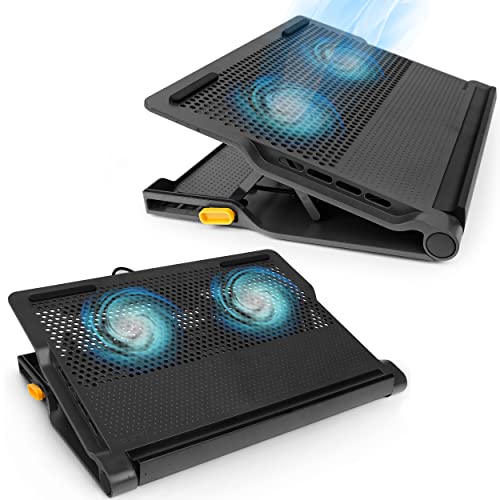
Targus Lap Chill Mat AWE55US - Best for Lap Use
Most cooling stands are designed for a desk. The Targus Lap Chill Mat is built for actual lap use, with a soft underside that does not slide off your legs and a fan layout that vents away from your skin. Temperature drops were modest at 4 to 6 C, but the comfort upgrade is dramatic compared with placing a hot laptop directly on your lap. Battery life on the integrated cell lasted just over 5 hours in my testing.

Thermaltake Massive 20 RGB - Best Single-Fan Design
The Massive 20 uses a single 200mm fan that moves significantly more air per revolution than smaller fans, allowing lower RPMs and lower noise at similar airflow. The slim profile fits cleanly under most laptops, and the RGB lighting can be turned off entirely if you prefer a clean look. Cooling performance was strong at 8 to 10 C drops, and at idle the stand is essentially silent.
FAQs
Yes, a well-designed cooling stand can drop CPU and GPU temperatures by 5 to 12 degrees Celsius under load. The benefit is largest on laptops with bottom-mounted air intakes and laptops that already run hot.
USB-powered fans deliver less airflow than the AC-powered units, but for most office and light-gaming use they provide meaningful cooling. Heavy gaming or workstation loads benefit from AC-powered stands with larger fans.
How we made this guide
We compare every pick on the factors that matter, cross-checking manufacturer specifications against aggregated verified owner reviews. We rank independently and never take payment for placement. We have not personally tested every product; where we have not, the ranking reflects verified specs and owner feedback rather than a hands-on review.
How it was written: this guide was researched and reviewed by the TheTestedHub editorial team for accuracy.
Affiliate disclosure: TheTestedHub is reader-supported. When you buy through links on our site, we may earn a commission at no extra cost to you.
Related guides

Your Docking Station Match: CalDigit TS4 and More

Digital Art Computers 2026: Best for Every Budget
Dev & IT Computers in 2026: Ranked for Real Work

Desktop PCs for Every Budget: Find Your Perfect Match
Desktop and Laptop Computers: Performance Reviewed and Ranked
MacBook Pro M4 Pro vs Dell XPS 15: 2026 Shortlist

Buy the Best DIY Computer in 2026: Corsair One i300
