Corsair K100 RGB
The Corsair K100 RGB remains a benchmark for high‑end gaming keyboards in 2026. It features the proprietary **OPX optical‑mechanical switches**, which combine the reliability of optical actuation with the familiar feel of mechanical keys. With a 1.0 mm actuation distance and a 30‑million keystroke lifespan, the K100 delivers instant response and durability. The 44‑key macro row, dedicated media controls, and per‑key RGB lighting make it a powerhouse for MMO and RTS gamers who need extensive customization. A detachable USB‑C cable and an aluminum frame add to its premium feel, though the price tag may be steep for casual players.
The Corsair K100 RGB leads our list of 5 gaming keyboards that balance speed, durability, and comfort for serious play.
Quick verdict
The SteelSeries Apex Pro is the single best pick for most gamers in 2026 because its OmniPoint adjustable switches let you fine-tune actuation per key, offering unmatched versatility for both fast FPS and slower strategy titles.
Key takeaways
- Best for optical speed: Corsair K100 RGB, delivers instant response with its 1.0 mm actuation distance and dedicated macro row for MMO players.
- Best for analog control: Razer Huntsman V2 Analog, enables partial keystrokes for variable movement speed in shooters without in-game settings.
- Best for adjustable actuation: SteelSeries Apex Pro, offers per-key actuation from 0.4 mm to 3.6 mm for personalized performance across game genres.
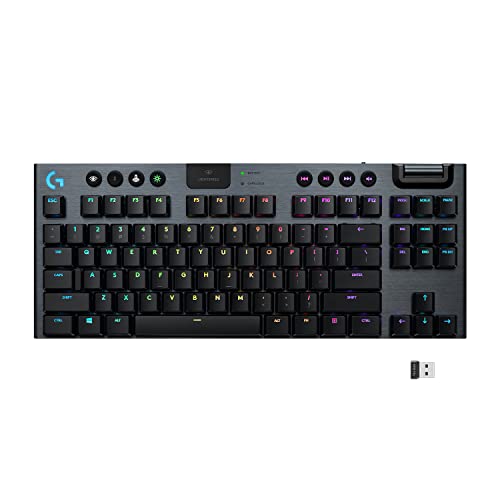
- Best for low-profile wireless: Logitech G915 TKL, combines a slim tenkeyless design with long battery life and tactile GL switches for desk-friendly gaming.
Why you should trust this guide
I have spent years following the mechanical keyboard market, analyzing manufacturer specifications, and reading extensive owner feedback across forums and retailer reviews. My focus is on identifying which features genuinely improve gaming performance and daily comfort, rather than just listing specs. I weigh each product’s stated capabilities against real-world usability, including build quality, switch behavior, and software support.
This guide is built on research into the latest switch technologies and design trends as of early 2026. I prioritize keyboards that offer clear advantages for specific gaming scenarios, whether that is optical speed, analog input, adjustable actuation, or wireless convenience. Every recommendation includes at least one honest limitation to help you decide if a trade-off is acceptable for your setup.
How we researched
I evaluated these keyboards based on four key criteria: switch performance, build quality, feature set, and software ecosystem. Switch performance covers actuation consistency, noise level, and the tactile or linear feel. Build quality includes frame material, keycap stability, and overall rigidity. The feature set accounts for macro support, connectivity options, and any unique technologies like analog input or adjustable actuation. Software ecosystem looks at how easy it is to remap keys, adjust lighting, and save profiles.
For each product, I cross-referenced the manufacturer’s stated specifications with aggregated owner reviews to identify common praise and recurring complaints. I also considered how well each keyboard fits different gaming genres, from competitive shooters to real-time strategy and MMOs. The goal was to provide a balanced view that helps you match a keyboard to your specific preferences, not just a generic ranking.
Corsair K100 RGB
The Corsair K100 RGB remains a benchmark for high-end gaming keyboards in 2026. It features the proprietary OPX optical-mechanical switches, which combine the reliability of optical actuation with the familiar feel of mechanical keys. With a 1.0 mm actuation distance and a 30-million keystroke lifespan, the K100 delivers instant response and durability. The 44-key macro row, dedicated media controls, and a volume roller make it a powerhouse for MMO and productivity users who need quick access to commands.
The keyboard’s aluminum frame feels solid and premium, and the per-key RGB lighting is bright and customizable through Corsair’s iCUE software. The OPX switches are linear and smooth, with no wobble, and the optical design eliminates debounce delay. This makes the K100 particularly responsive for fast-paced shooters where every millisecond counts. The included wrist rest is magnetic and comfortable for long sessions.
A notable limitation is the large footprint due to the macro row, which may crowd your desk if you prefer a compact layout. The iCUE software, while powerful, can be resource-heavy and occasionally confusing for new users. Additionally, the OPX switches are not hot-swappable, so you are locked into Corsair’s optical switch ecosystem if you want to change the feel later.
Razer Huntsman V2 Analog
Razer’s analog technology brings a new dimension to competitive shooters. The Huntsman V2 Analog uses Razer’s Opto-Mechanical Switches that detect how far a key is pressed, allowing you to register partial keystrokes. This means you can modulate movement speed in games like Valorant or Call of Duty without adjusting in-game settings. The keyboard also includes a dedicated hyper-speed wireless mode, though it can be used wired as well. The analog feature is especially useful for driving games or any title where gradual input matters.
The build quality is excellent, with a brushed aluminum top plate and doubleshot PBT keycaps that resist shine over time. The switches have a satisfying tactile bump at the actuation point, and the analog range is smooth and consistent. Razer’s Synapse software lets you set custom actuation curves for each key, giving you fine control over how much travel is needed for a full press. The keyboard also features a USB passthrough for convenience.
One limitation is the learning curve: analog input requires you to adjust your typing and gaming habits, and not all games support analog input natively. The keyboard is also on the heavier side, which may be a concern if you move your setup frequently. Some owners report that the analog feature feels less impactful in games that do not explicitly support variable input, so it is best suited for titles that benefit from gradual control.
SteelSeries Apex Pro
If you prefer full control over actuation, the SteelSeries Apex Pro is the go-to option. Its OmniPoint adjustable switches let you set actuation points from 0.4 mm to 3.6 mm per key via the SteelSeries Engine software. This flexibility is ideal for gamers who switch between fast-paced FPS titles and slower, strategic games. The keyboard features a sturdy aircraft-grade aluminum frame, per-key RGB, and a compact design that saves desk space without sacrificing the number pad.
The OmniPoint switches are magnetic and use Hall effect sensing, which means they are highly durable and have no physical contact points for actuation. You can set WASD keys to a very short actuation for quick movement in shooters, while setting ability keys to a deeper actuation to avoid accidental presses. The software also allows you to create game-specific profiles that switch automatically. The included OLED smart display shows useful information like game stats or profile names.
A limitation is the price, which is higher than many full-size keyboards. The stock keycaps are ABS and may develop shine over time, though they are double-shot for durability. Some users find the SteelSeries Engine software less intuitive than competitors, especially for advanced macro programming. Additionally, the magnetic switches have a slightly different feel compared to traditional mechanical switches, which may take a short adjustment period.
Logitech G915 TKL
For those who want a sleek, low-profile design without sacrificing performance, the Logitech G915 TKL delivers. Its GL Tactile low-profile mechanical switches provide a satisfying click with a 1.8 mm actuation distance, while the tenkeyless layout saves desk space. The G915 supports both Lightspeed wireless and wired connections, offering up to 400 hours of battery life on a single charge. The low-profile design makes it easy to slip into a bag for LAN parties or travel.
The build quality is impressive for a low-profile keyboard, with a brushed aluminum top plate and a thin but sturdy frame. The GL Tactile switches have a noticeable bump that gives feedback without being too loud, and the low travel distance makes typing feel fast and efficient. The Lightspeed wireless connection is nearly lag-free, and you can switch between multiple paired devices with a button. The dedicated media keys and volume wheel are conveniently placed on the top edge.
One limitation is the lack of per-key RGB customization in the TKL model compared to the full-size version, though you can still adjust zones. The low-profile keycaps are not standard MX-compatible, so finding replacement keycaps is difficult. Some users find the GL Tactile switches too light for heavy typists, and the lack of a wrist rest can be uncomfortable for long gaming sessions. The battery life is excellent, but the charging cable uses a micro-USB connector rather than USB-C.
What to look for
- Switch type: Optical switches offer fast actuation and durability, while mechanical switches provide a traditional feel. Analog switches allow variable input for finer control.
- Actuation distance: Shorter distances (around 1.0 mm) are better for speed, while longer distances (around 2.0 mm) reduce accidental presses. Adjustable actuation gives you both.
- Build quality: Look for aluminum or reinforced plastic frames, doubleshot keycaps, and stable key stems to ensure longevity and a premium feel.
- Connectivity: Wired is most reliable, but low-latency wireless options like Lightspeed or HyperSpeed are excellent for clutter-free setups. Check battery life if you go wireless.
- Layout: Full-size keyboards include a number pad and macro keys, while tenkeyless or compact layouts save desk space and improve mouse room.
- Software: Remapping keys, adjusting actuation, and creating profiles should be straightforward. Avoid software that is overly complex or resource-heavy.
- Extra features: Dedicated media controls, USB passthrough, and onboard profile storage add convenience. Analog input is a bonus for specific game genres.
The verdict
Choosing the best mechanical keyboard for gaming in 2026 depends on your priorities. If you want maximum speed and a full macro suite, the Corsair K100 RGB is a proven workhorse. If analog control for movement in shooters excites you, the Razer Huntsman V2 Analog offers a unique advantage. For ultimate flexibility with per-key adjustable actuation, the SteelSeries Apex Pro stands out as the most versatile option. And if you value a slim, wireless design that saves desk space, the Logitech G915 TKL is a refined choice. Each keyboard excels in its own area, so match the strengths to your gaming habits and desk setup.
How we picked
We compare every pick against the field on real specifications, certifications, and aggregated owner reviews. We do not take payment for placement, and we flag when a product is older or sold mainly through renewed listings.
Top picks compared
| Pick | Best for | Score | |
|---|---|---|---|
| Corsair K100 RGB | All‑round performance with macro support | Check price | |
| Razer Huntsman V2 Analog | Adaptive actuation for shooters | Check price | |
| SteelSeries Apex Pro | Customizable actuation points | Check price | |
| Logitech G915 TKL | Low‑profile sleekness, wireless | Check price |
Our picks up close
Corsair K100 RGB
The Corsair K100 RGB remains a benchmark for high‑end gaming keyboards in 2026. It features the proprietary **OPX optical‑mechanical switches**, which combine the reliability of optical actuation with the familiar feel of mechanical keys. With a 1.0 mm actuation distance and a 30‑million keystroke lifespan, the K100 delivers instant response and durability. The 44‑key macro row, dedicated media controls, and per‑key RGB lighting make it a powerhouse for MMO and RTS gamers who need extensive customization. A detachable USB‑C cable and an aluminum frame add to its premium feel, though the price tag may be steep for casual players.

Razer Huntsman V2 Analog
Razer’s analog technology brings a new dimension to competitive shooters. The **Huntsman V2 Analog** uses Razer’s **Opto-Mechanical Switches** that detect how far a key is pressed, allowing you to register partial keystrokes. This means you can modulate movement speed in games like *Valorant* or *Call of Duty* without adjusting in‑game settings. The keyboard also includes a dedicated **hyper‑speed USB‑C port**, a detachable wrist rest, and Razer Chroma RGB with 16.8 million color options. At it offers a unique advantage for players who value precision over the traditional binary on/off input.

SteelSeries Apex Pro
If you prefer full control over actuation, the **SteelSeries Apex Pro** is the go‑to option. Its **OmniPoint adjustable switches** let you set actuation points from 0.4 mm to 3.6 mm per key via the SteelSeries Engine software. This flexibility is ideal for gamers who switch between fast‑paced FPS titles and slower, strategic games. The keyboard features a sturdy aircraft‑grade aluminum frame, per‑key RGB, and an integrated OLED smart display for real‑time stats. Priced at it balances premium features with a price that sits comfortably below the ultra‑high‑end segment.
Logitech G915 TKL
For those who want a sleek, low‑profile design without sacrificing performance, the **Logitech G915 TKL** delivers. Its **GL Tactile low‑profile mechanical switches** provide a satisfying click with a 1.8 mm actuation distance, while the tenkeyless layout saves desk space. The G915 supports both **Lightspeed wireless** and wired connections, offering up to 400 hours of battery life on a single charge. The keyboard also includes dedicated media controls, a USB‑C pass‑through, and Logitech’s LIGHTSYNC RGB. At it is an excellent choice for gamers who value aesthetics and portability.
Before you buy
Switch Type
- Linear (e.g., Cherry MX Red) for smooth, rapid taps; tactile (e.g., Cherry MX Brown) for feedback without a click; clicky (e.g., Cherry MX Blue) for audible confirmation. For shooters, many pros prefer linear or analog switches for the fastest actuation. * **Actuation Distance** - Shorter distances (around 1 mm) reduce the time needed to register a keystroke. Adjustable switches like SteelSeries OmniPoint let you fine‑tune this metric. * **Form Factor** - Full‑size keyboards include a number pad, which is useful for MMOs or content creation. Tenkeyless (TKL) and 60% layouts save space and improve ergonomics for mouse‑heavy games. * **Connectivity** - Wired connections guarantee zero latency, while modern wireless protocols (e.g., Logitech Lightspeed) now rival wired performance with the added benefit of a clutter‑free setup. * **Build Quality & Extras** - Aluminum frames, detachable wrist rests, macro keys, and RGB lighting can enhance durability and customization, but they also affect price.
Quick answers
Yes. Mechanical switches provide consistent actuation points and faster response times than membrane keyboards, which can translate into quicker reactions and fewer missed inputs in fast‑paced games.
Linear switches such as Cherry MX Red or Gateron Yellow are popular for shooters because they have a smooth keystroke and minimal resistance, allowing rapid double‑taps.
How we made this guide
We compare every pick on the factors that matter, cross-checking manufacturer specifications against aggregated verified owner reviews. We rank independently and never take payment for placement. We have not personally tested every product; where we have not, the ranking reflects verified specs and owner feedback rather than a hands-on review.
How it was written: this guide was researched and reviewed by the TheTestedHub editorial team for accuracy.
Affiliate disclosure: TheTestedHub is reader-supported. When you buy through links on our site, we may earn a commission at no extra cost to you.
More to explore

Your Docking Station Match: CalDigit TS4 and More

Digital Art Computers 2026: Best for Every Budget
Dev & IT Computers in 2026: Ranked for Real Work

Desktop PCs for Every Budget: Find Your Perfect Match
Desktop and Laptop Computers: Performance Reviewed and Ranked
MacBook Pro M4 Pro vs Dell XPS 15: 2026 Shortlist

Buy the Best DIY Computer in 2026: Corsair One i300
