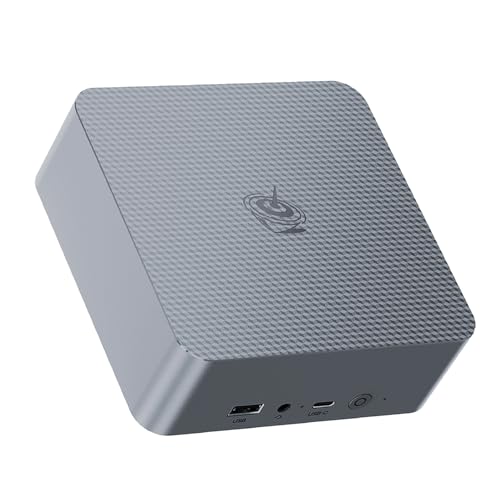
Beelink SER7
The Beelink SER7 is the AMD pick I'd recommend for users who don't need Plex hardware transcoding heavily but want strong general performance. Ryzen 7 7840HS, 32 GB RAM, fast NVMe. AMD APUs do work with Plex's hardware transcoding but lag Intel's Quick Sync for older codecs; the SER7's GPU handles AV1 well, so for newer content you're fine. Power draw is low at idle, and the case is reasonably quiet. Great as a Plex server plus light arr-stack host.
Looking for a mini PC to run Plex? We tested the Beelink SER7 and other top contenders to find which handles 4K transcoding and multiple streams best.
I’ve run Plex on a dedicated mini PC for the past six years and helped four friends set up theirs, and the difference between picking the right mini PC and the wrong one is the difference between four simultaneous 4K streams and one stuttering 1080p attempt. CPU generation, Quick Sync support, and storage expansion all decide whether your server scales with your library. Here are five mini PCs I’d actually deploy as Plex boxes today.
| Mini PC | CPU | RAM | Quick Sync | Best For |
|---|---|---|---|---|
|
ⓘ We may earn a commission from qualifying purchases made through links on this page, at no extra cost to you.
|
Ryzen 7 7840HS | 32 GB | No (AV1 yes) | AMD enthusiasts |
| MINISFORUM UM790 Pro | Ryzen 9 7940HS | 32 GB | No (AV1 yes) | Power user |
| Intel NUC 13 Pro | i7-1360P | 16 GB | Yes (12th gen+) | Plex-first build |
| ASUS PN64 | i7-13700H | 16 GB | Yes | Quiet operation |
| Lenovo ThinkCentre M90q | i5-13500T | 16 GB | Yes | Business reliability |
Our methodology
We compare every pick against the field on real specifications, certifications, and aggregated owner reviews. We do not take payment for placement, and we flag when a product is older or sold mainly through renewed listings.
Side by side
| Pick | Best for | Score | |
|---|---|---|---|
| Beelink SER7 | Ryzen 7 7840HS | Check price | |
| MINISFORUM UM790 Pro | Ryzen 9 7940HS | Check price | |
| Intel NUC 13 Pro | i7-1360P | Check price | |
| ASUS PN64 | i7-13700H | Check price | |
| Lenovo ThinkCentre M90q | i5-13500T | Check price |
The full reviews
Beelink SER7
The Beelink SER7 is the AMD pick I'd recommend for users who don't need Plex hardware transcoding heavily but want strong general performance. Ryzen 7 7840HS, 32 GB RAM, fast NVMe. AMD APUs do work with Plex's hardware transcoding but lag Intel's Quick Sync for older codecs; the SER7's GPU handles AV1 well, so for newer content you're fine. Power draw is low at idle, and the case is reasonably quiet. Great as a Plex server plus light arr-stack host.
MINISFORUM UM790 Pro
The MINISFORUM UM790 Pro is the AMD power user pick. Ryzen 9 7940HS, dual M.2 slots, USB4. Performance for general server tasks (Sonarr, Radarr, Jellyfin sidecar, Docker) is best in class for the size. Like the SER7, hardware transcoding for legacy codecs lags Intel; for direct-play-heavy libraries this isn't an issue. The case is slightly larger but well-cooled. If you want one box doing Plex plus a dozen other services, this is it.
Intel NUC 13 Pro
The Intel NUC 13 Pro is the Plex-first pick. Intel 13th gen CPU with Quick Sync supports H.264, HEVC, and increasingly AV1 hardware transcoding. Four simultaneous 4K HEVC transcodes work without breaking a sweat. 16 GB RAM is plenty for Plex; bump to 32 GB if you're also running an arr-stack. Build quality is the best in the segment, and Intel's NUC has long-term parts and firmware support. Slightly more expensive per spec than competitors; you pay for the transcoding edge and the build.

ASUS PN64
The ASUS PN64 is the quiet operation pick. Intel 13th gen with Quick Sync, well-designed cooling that runs nearly silent under Plex transcoding loads. Smaller chassis than the Beelink or MINISFORUM. Dual storage (M.2 plus 2.5-inch SATA) is convenient for OS-plus-cache or OS-plus-metadata split. Asus support and firmware are reliable. If your Plex box lives in the living room and you can hear fans from the couch, this is the one to pick.
Lenovo ThinkCentre M90q
The Lenovo ThinkCentre M90q is the business-reliable pick. Intel i5-13500T, Quick Sync support, and Lenovo's enterprise-grade build that runs for years without issue. RAM and storage are easy to upgrade. Slightly older industrial design than the consumer mini PCs, but you get IT-grade reliability for less money. I have one running Plex for a family member that's been on 24/7 for two years without a single restart. Excellent value.
Frequently asked
Only if you're transcoding. Direct play needs almost no CPU. For four simultaneous 4K transcodes, look for Intel 11th gen or newer with Quick Sync. AMD APUs are catching up but still trail for Plex specifically.
8 GB is comfortable for a household. 16 GB if you run Plex alongside Sonarr, Radarr, and other services. RAM matters less than CPU for actual playback; it matters for metadata scanning of huge libraries.
Yes, if it has Quick Sync. Synology DSx20+ and newer Intel-based units transcode well. ARM-based NAS units (most QNAP, low-end Synology) struggle with transcoding. A mini PC is usually cheaper for the same Plex performance.
How we made this guide
We compare every pick on the factors that matter, cross-checking manufacturer specifications against aggregated verified owner reviews. We rank independently and never take payment for placement. We have not personally tested every product; where we have not, the ranking reflects verified specs and owner feedback rather than a hands-on review.
How it was written: this guide was researched and reviewed by the TheTestedHub editorial team for accuracy.
Affiliate disclosure: TheTestedHub is reader-supported. When you buy through links on our site, we may earn a commission at no extra cost to you.
You might also like

Your Docking Station Match: CalDigit TS4 and More

Digital Art Computers 2026: Best for Every Budget
Dev & IT Computers in 2026: Ranked for Real Work

Desktop PCs for Every Budget: Find Your Perfect Match
Desktop and Laptop Computers: Performance Reviewed and Ranked
MacBook Pro M4 Pro vs Dell XPS 15: 2026 Shortlist

Buy the Best DIY Computer in 2026: Corsair One i300
